
I have spent years watching the same story play out: a small team sets up an email address in Gmail, things run smoothly for a few months, and then almost overnight, the cracks appear. Emails go missing. Two teammates reply to the same customer. Nobody knows what is still open.
The Gmail vs help desk question is not about which tool is “better” in some abstract sense. It is about whether your current setup is quietly costing you customers, time, and trust. Over the years, I have noticed that most businesses do not realize they have outgrown Gmail until the damage is already done.
In fact, when we studied how teams migrate to a structured help desk like ProProfs Help Desk, the most common thing they said was: “We wish we had done this sooner.”
In this blog, I’ll walk you through exactly when Gmail works, when it stops working, and how you can upgrade from Gmail to a help desk system in easy steps.
What Is the Difference Between Gmail and a Help Desk?
Here is the shortest version: Gmail organizes email. A help desk ticketing system organizes work. This distinction becomes critical as your support volume grows and collaboration across teams increases. Without a structured system, important requests can slip through the cracks, leading to delays, confusion, and inconsistent customer experiences.
Why Do Most Teams Start With Gmail for Customer Support?
Almost every support team starts in Gmail. Not because it is the best tool, but because it is already there. According to a report by Statista in 2024, there are over 1.8 billion Gmail users worldwide.
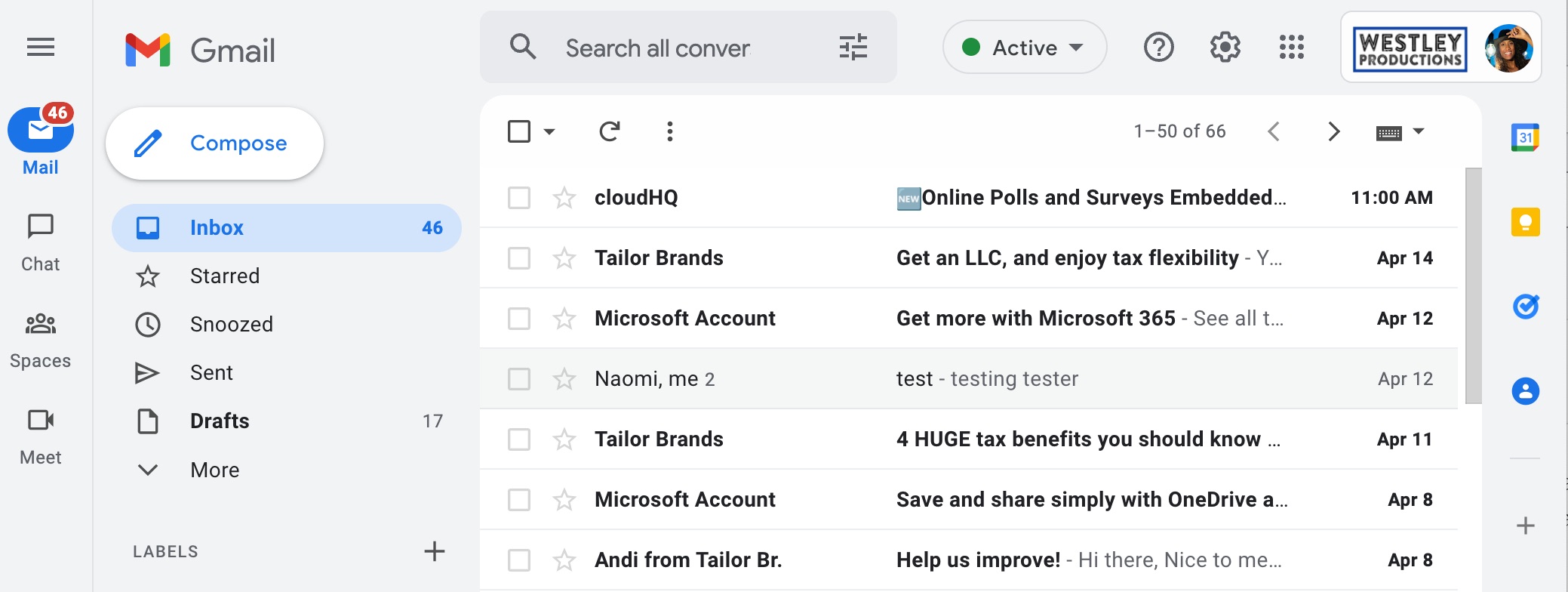
Here is why it feels like the right choice at first:
- No setup required. You already have Gmail. You create a support@yourcompany.com address, and you are live.
- No training needed. Everyone on your team already knows how to use email.
- It feels personal. Replies look like real emails, not robotic ticket responses.
- It is free. You cannot argue with free when you are an early-stage team.
- DIY structure feels possible. Labels, filters, canned responses — Gmail gives you just enough tools to feel like you have a system.
And for a short while, it works. But as soon as more than one person shares the inbox, things start to fall apart quietly, which is why shared inbox best practices matter much earlier than most teams think.
5 Signs Your Team Has Outgrown Gmail for Support
Gmail does not break loudly. It breaks slowly, through missed emails, confused ownership, and rising customer frustration that you cannot even measure because there is no dashboard. These are the five most common breaking points:
Problem 1: Emails Get Missed or Replied to Twice
This is the number one pain point.
In a shared Gmail inbox, two people can open the same email at the same time, which is exactly where team email management becomes a real operational issue. One replies. The other does not know. So either the customer gets two replies, or nobody replies because both people assumed the other one handled it.
This is not a team failure. It is a tool failure. Gmail has no built-in ownership layer. No one is officially “assigned” to an email. That gap is exactly what a help desk ticketing system closes with ticket assignment
What it looks like in practice:
- A customer emails twice because they heard nothing back
- Two agents send conflicting answers to the same person
- An urgent request sits in the inbox for two days because everyone thought it was “someone else’s”
Problem 2: Manual Work Eats Up Your Team’s Time
Once your team is sending the same replies every day, routing the same types of emails by hand, and manually following up on unanswered threads, you are doing help desk work, just without the tools.
A help desk handles all of this automatically through AI and automation:
- New billing email? Automated ticket routing sends it to the billing team.
- Got a lengthy complaint? AI help desk summarizes the issue and offers response suggestions.
- Ticket open for 5 days? Escalates to a manager.
Here is a short video showing how AI help desk software helps you automate support:
Problem 3: No One Actually Owns a Request
Ownership is the difference between “we saw it” and “it is handled.”
Gmail has workarounds, like adding a label that says “Owner: Sarah” or a filter that routes certain emails to certain people. But these are habits, not systems. When Sarah is on vacation, the label means nothing.
A help desk enforces ownership automatically. When a ticket is assigned to an agent, that agent is accountable, and everyone else on the team can see it.
Problem 4: You Cannot Measure Your Own Support Performance
In my discussion with teams, many could not answer ‘how many support emails did we get last week?’, which becomes a serious problem once you start tracking help desk metrics.
That sounds like a minor inconvenience. It is not. Without that number, you cannot:
- Know if your team is understaffed
- Spot a spike in complaints about a specific product issue
- Show leadership that support is improving (or deteriorating)
- Justify hiring a new agent
Problem 5: A Shared Gmail Inbox Is a Security Risk
Shared Gmail inboxes often mean shared passwords, or dozens of people with delegated access that nobody audits. Emails get forwarded to personal inboxes for “convenience.” Customer data moves in ways no one is tracking.
If your business handles any sensitive information, such as health records, financial details, or legal documents, a shared Gmail inbox is a compliance risk. A help desk creates an auditable trail: who accessed what, who replied, when, and from which device.
Gmail vs Help Desk: Side-by-Side Comparison
A lot of teams wonder if Gmail is really that different from a help desk. The honest answer is: yes, quite a lot. Gmail was built to send and receive email. A help desk was built to manage, assign, track, and measure support work. Below is a breakdown of what that difference actually looks like in your day-to-day operations.
| What Matters Most | Gmail Inbox | Help Desk Software |
|---|---|---|
| Ticket ownership | No one is officially assigned. Your team decides informally who handles what, and that breaks down fast when volume grows. | Every request is assigned to one agent. Ownership is clear, visible, and tracked automatically. |
| Status visibility | You use labels like "Pending" or "Done" but anyone can ignore or forget to update them. There is no enforced workflow. | Every ticket has a real status: open, pending, or resolved. The whole team sees it in one place without asking around. |
| Reporting and KPIs | You have no dashboard. To know how many emails came in last week, you count manually or export a spreadsheet. | A live dashboard shows response times, ticket volumes, backlog, and agent workload in real time. No counting, no guessing. |
| Auto-assignment | You manually decide who gets each email, or everyone just picks up whatever they see first. This leads to gaps and overlaps. | Tickets are assigned automatically using rules like round robin, least busy agent, or email type. No manual sorting needed. |
| SLA management | You have no way to set a response time target or get alerted when something is taking too long. Urgent emails can sit unnoticed. | You set SLA rules like "respond within 4 hours." The system alerts your team before a deadline is missed. |
| Customer portal | Customers have no way to check the status of their request. They have to email again to follow up, which adds to your workload. | Customers can log in to a self-service portal, see their ticket status, and find answers in a knowledge base without contacting you. |
| Canned responses | Gmail has basic templates but they are static and stored individually. Sharing them across the team is clunky. | A shared template library with dynamic fields like customer name and ticket number. Everyone uses the same best-practice replies. |
| Audit trail | There is no record of who opened an email, who replied, or when. If something goes wrong, you have no way to trace it. | Every action on a ticket is logged: who replied, when, what changed, and any internal notes. Full accountability. |
| Cost | Free | Typically $7 to $30 per agent per month for small and mid-size teams. Most teams recover that cost in the first week through time saved. |
FREE. All Features. FOREVER!
Try our Forever FREE account with all premium features!
When Should You Switch From Gmail to a Help Desk?
Gmail is a great starting point. But there comes a moment when it stops being a tool and starts being the problem.
The simplest way to know you are there: your team is doing help desk work but using an email inbox to do it. That gap is what costs you time, customers, and control.
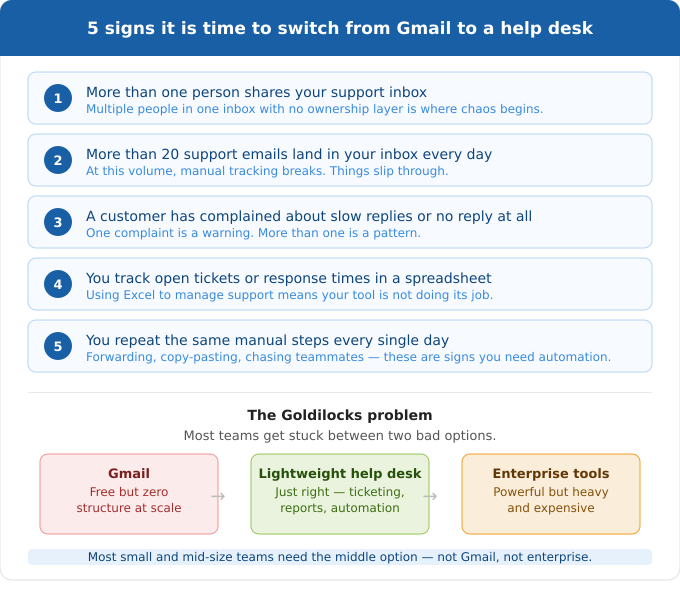
Switch when any one of these is true:
Who Actually Uses a Help Desk? (It Is Not Just Customer Support)
According to a study by FlairsTech in 2025, help desk software usage jumped from 11% in 2020 to 53% in 2024, meaning most growing businesses have already made this shift. And it is not just customer support teams making the move. Based on real-world adoption patterns, help desks are used across many team types:
- Customer Support Teams: SaaS, ecommerce, marketplace, subscription businesses
- IT Helpdesks: Employee requests, access issues, hardware, software
- HR and People Ops: Benefits questions, onboarding, policy requests, payroll queries
- Operations and fulfillment: Shipping issues, vendor coordination, internal logistics
If your team is routing requests through email in any of these functions, a help desk will improve it.
How to Switch From Gmail to a Help Desk Without Losing Emails or Customers
Here is the most important thing to know before you start: your customers do not need to do anything differently. They keep emailing the same support address. What changes is everything that happens on your end after that email arrives.
To make this walkthrough concrete, we are using ProProfs Help Desk as the example tool.
Step 1: Create Your Help Desk Account and Add Your Team
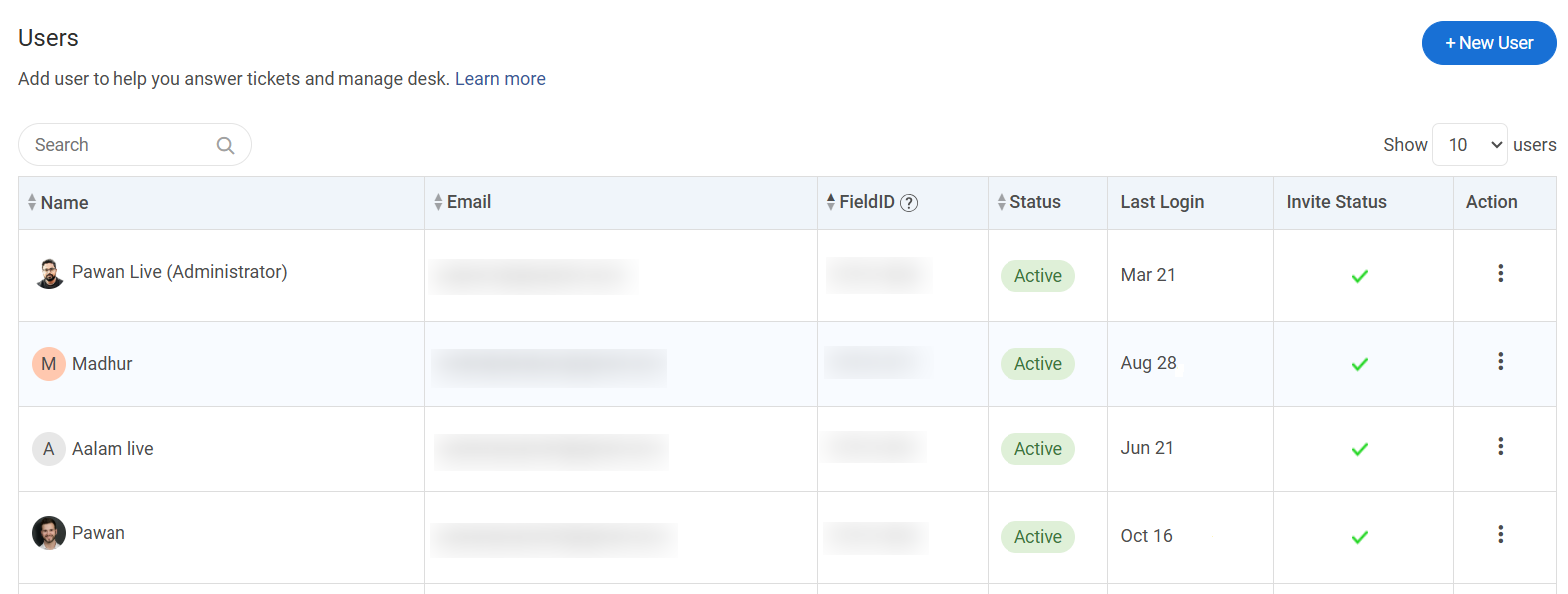
Start by signing up and setting up your workspace. Once you are in, the first thing to do is add your team members and assign their roles.
In ProProfs Help Desk, you go to Settings > Users and invite agents by email. Each agent gets a role: Admin, Supervisor, or Agent. This is the foundation of your ownership layer. Every ticket that comes in will need someone to own it, so getting your team set up first saves confusion later.
Step 2: Connect Your Support Email Address
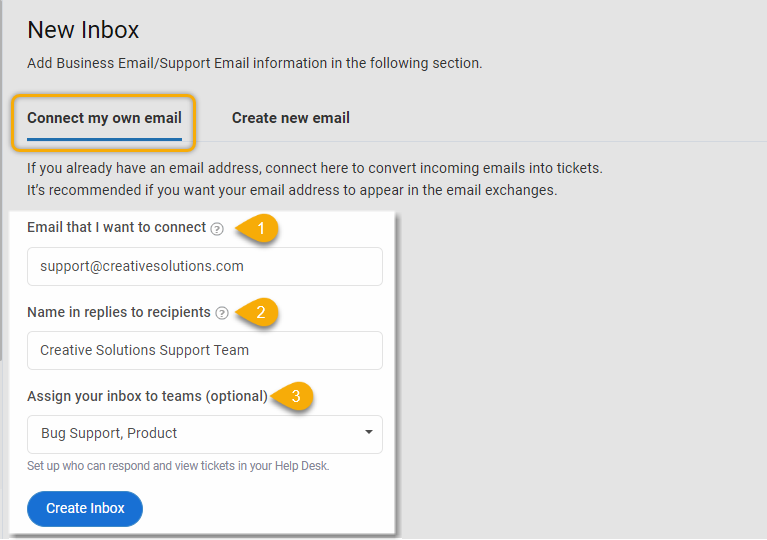
This is the step that replaces your shared Gmail inbox. Instead of your team logging into Gmail, all incoming emails to your support address will now flow directly into the help desk as tickets through an email-to-help-desk setup.
In ProProfs Help Desk, go to Settings > Inboxes > Add Inbox and choose Email as the channel. You will be asked to enter your support email address, for example support@yourcompany.com.
The tool will give you a forwarding address. Copy it, then go to your Gmail settings:
- Open Gmail and click the gear icon, then go to See All Settings
- Click the Forwarding and POP/IMAP tab
- Click Add a forwarding address and paste the address ProProfs gave you
- Gmail will send a verification code to that address. Go back to ProProfs, find the confirmation email in your inbox, and click the verification link
- Back in Gmail, set the rule to Forward a copy of incoming mail to that address
From this point, every email that lands in your support inbox automatically becomes a ticket inside ProProfs. Your customers still email the same address. Nothing changes on their end.
Step 3: Set Up Your Ticket Assignment Rules
Now that emails are coming in as tickets, you need to decide how they get assigned. Without assignment rules, tickets sit unowned, which is the exact same problem you had in Gmail.
In ProProfs Help Desk, go to Settings > Automation > Assignment Rules. You can set rules like:
- All emails with the subject line containing “billing” go to the billing team
- All emails from a specific domain get assigned to a specific agent
- If no rule matches, tickets go into a shared queue for manual pickup
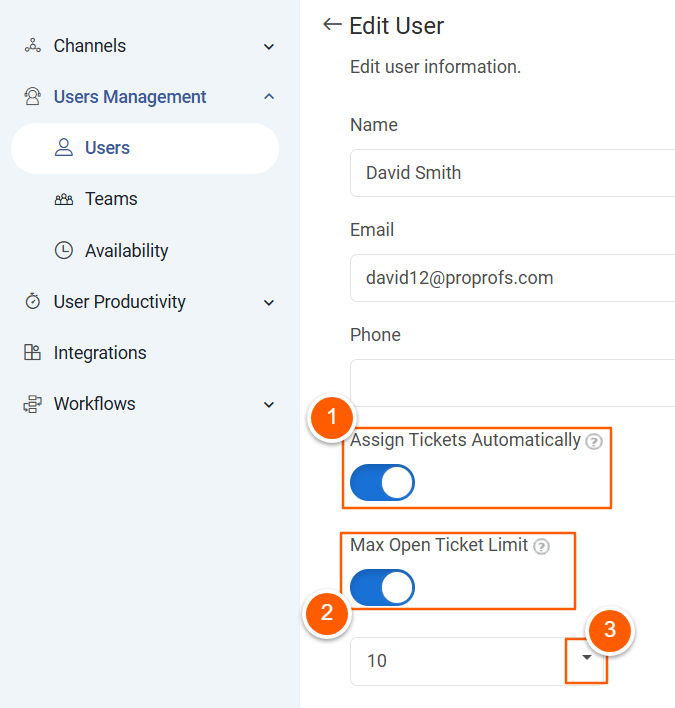
You can also enable Round Robin assignment, which distributes incoming tickets evenly across your team automatically, so no one agent gets overloaded.
Step 4: Write Your Canned Responses for Common Questions
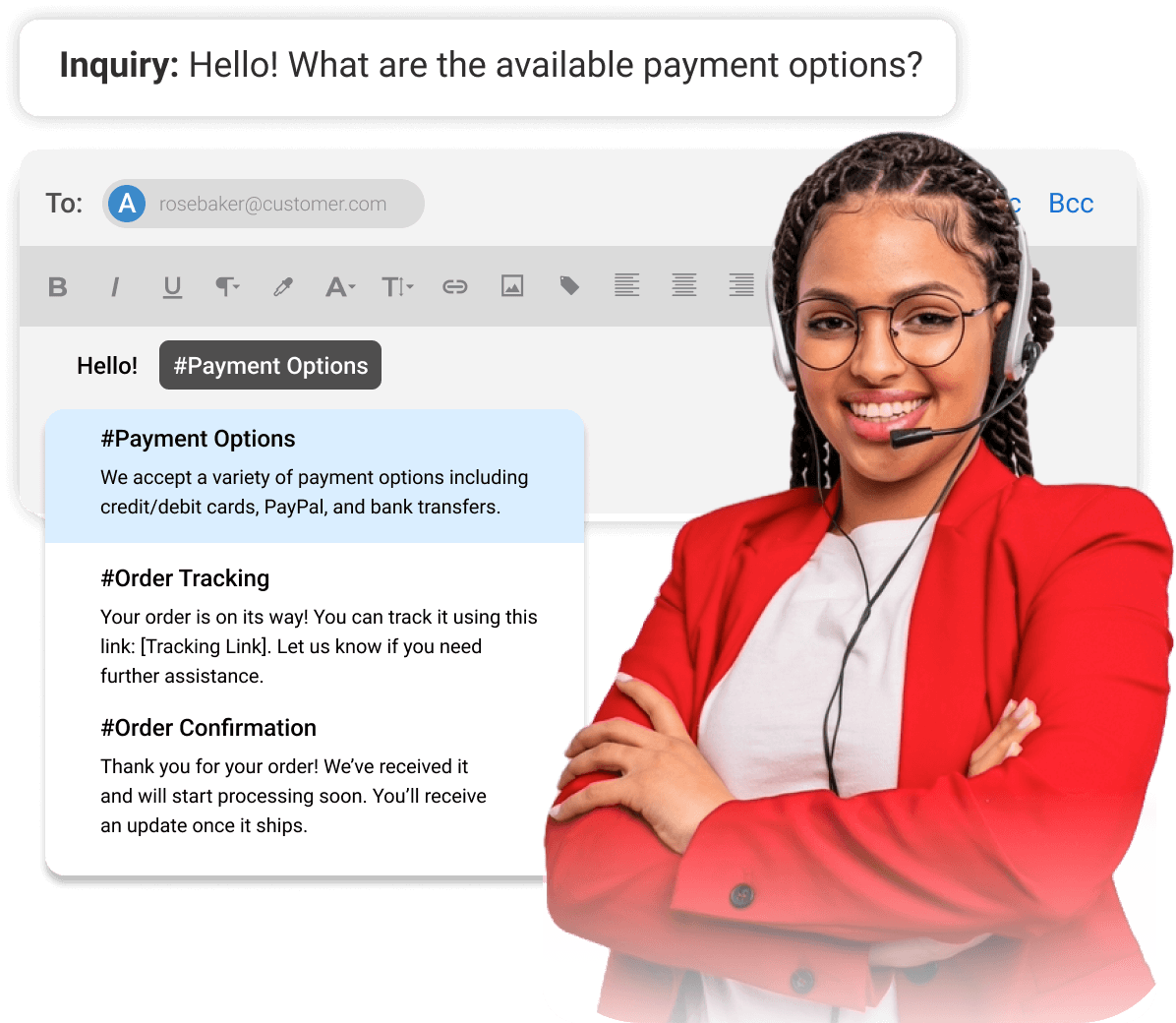
Before you go live, spend 20 minutes writing saved replies for the questions your team answers every day, especially if you already know the canned responses your team repeats most often. This is one of the fastest ways to cut reply time after switching.
In ProProfs Help Desk, go to Settings > Canned Responses > Add New. Give each response a short name so agents can find it quickly, for example, “Refund Policy” or “Reset Password Steps.”
When an agent is replying to a ticket, they type “#” or click the canned response icon and the template inserts instantly. Dynamic fields like the customer’s name and ticket number fill in automatically.
Step 5: Set Up Your Auto-Reply So Every Customer Gets an Instant Acknowledgment
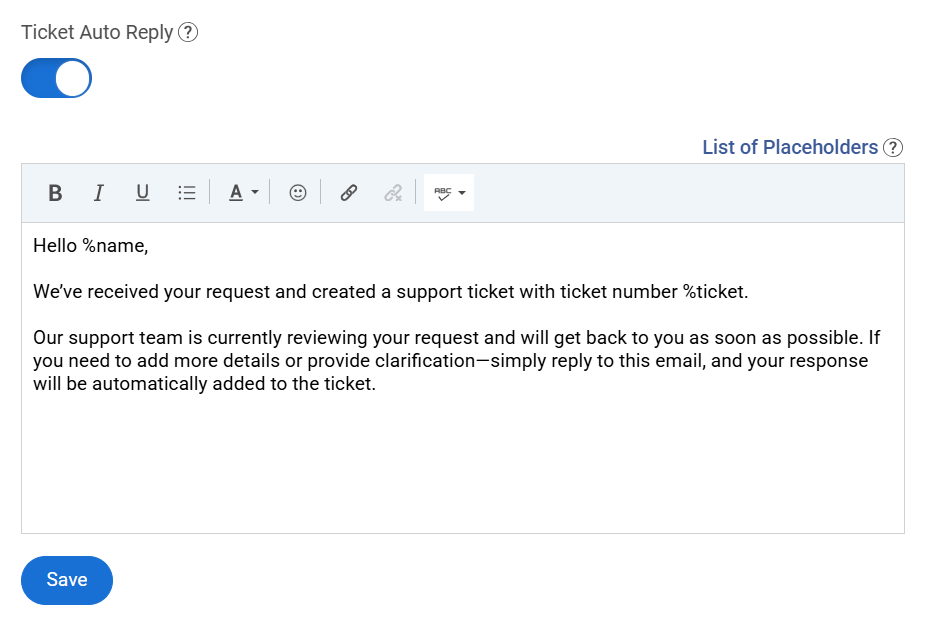
This is the one visible change your customers will notice, and it is a positive one. Instead of silence after they email you, they immediately get confirmation that their request has been received along with a ticket number they can reference.
In ProProfs Help Desk, go to Settings > Email Notifications > New Ticket Confirmation. Write a short, friendly message. Keep it simple, just like any solid customer service email template:
Step 6: Run a Test Before Going Live
Before you tell your team to start working from the help desk, send a test email to your support address and make sure:
- It appears in the ProProfs inbox as a ticket
- The auto-reply reaches your inbox
- The ticket gets assigned according to your rules
- You can reply from inside ProProfs and the reply lands in the original sender’s inbox correctly
If all five of these work, you are ready. The whole setup above typically takes between one and three hours for a team of under ten people.
If you are more of a visual learner or want to see the full setup flow in action before you start, the video below walks through every step above in real time:
Gmail vs Help Desk: Which One Is Right for You?
Not every team needs to switch right away, and not every team needs an enterprise platform. The right answer depends on where you are today, how fast you are growing, and what your support process actually needs to do. Use the guide below to find your fit.
| Your Situation | What You Need | Why |
|---|---|---|
| Solo founder or one-person team handling fewer than 10 emails a day | Gmail is fine for now | You are the only owner, so there is no coordination problem. Gmail works well when one person manages everything. |
| 1 to 3 team members handling 10 to 30 emails a day | A help desk free plan works best | You need basic ownership and visibility. A forever-free plan will cover all your basic needs. |
| 5 or more team members, or more than 30 emails a day regardless of team size | Dedicated help desk — move now | At this volume and team size, manual coordination breaks down fast. You need ticket assignment, statuses, and a dashboard to stay on top of things. |
| Any team that cannot answer "how many support emails did we get this week?" | Help desk — Gmail cannot give you this | Reporting is not a nice-to-have once you have a team. Without it you cannot staff correctly, spot problems early, or show progress to leadership. |
| Any team handling sensitive information such as health data, financial records, or legal documents | Help desk — shared Gmail is a compliance risk | Shared passwords, untracked access, and emails forwarded to personal inboxes are common in Gmail setups. A help desk gives you an auditable trail and proper access controls. |
| Any team that repeats the same manual work every day such as routing emails, sending follow-ups, or chasing teammates | Help desk — automation will save you hours every week | If you are doing the same five manual steps every morning, a help desk can handle all of them automatically through assignment rules, auto-replies, and escalation triggers. |
Stop Losing Customers to a Tool That Was Never Built for Support
Gmail did not fail you. It just was not designed for what you are asking it to do. Managing a team’s support workload through a shared inbox is like trying to run a kitchen using only a microwave. It works until it does not, and by the time you notice, the damage is already done.
The good news is that switching is not as scary or complicated as most teams assume. You keep your support email address. Your customers notice nothing. Your team gets clarity on what is open, who owns what, and how fast you are responding. That shift alone, going from “hope someone saw it” to “we know exactly where every request stands,” changes how your team works and how your customers feel about you.
If you are ready to take that step, start simple. You do not need a big platform or a long implementation. Tools like ProProfs Help Desk are built for exactly this moment, when a team has outgrown Gmail but does not want the complexity of an enterprise system. Get your inbox connected, set up a few assignment rules, and you will wonder why you waited this long.
Frequently Asked Questions

Does Gmail have a built-in ticketing system?
No. Gmail is an email service and does not natively convert emails into trackable tickets with statuses, owners, and performance dashboards.
What is a Gmail help desk?
A Gmail help desk is a support workflow that uses Gmail as the customer-facing email channel while adding a collaboration, assignment, and tracking layer behind the scenes through Google Groups or a dedicated help desk tool.
What is the easiest way to turn Gmail into a help desk?
The easiest no-cost option is Google Groups Collaborative Inbox, which supports conversation assignment. For a proper ticketing layer with reporting and automation, a lightweight help desk like ProProfs Help Desk is the next step up.
When should I stop using a shared inbox for Gmail support?
Stop when you have more than one person sharing the inbox, are missing emails, cannot measure ticket response time, or need automation. Any two of those conditions together means you have already outgrown Gmail for support.
What does a help desk give me that Gmail cannot?
Ticket ownership, status tracking, SLA management, real-time dashboards, automation rules, a customer-facing portal, canned responses with dynamic fields, and a full audit trail per request.
How do I switch from Gmail to a help desk without changing my support email?
Forward your support@yourcompany.com mailbox to your help desk's intake address. Customers keep emailing the same address. Everything routes into the help desk automatically behind the scenes.
How much does a help desk cost?
Small business help desks typically cost between $10 and $30 per agent per month on annual plans. Some tools like ProProfs Help Desk offer a free plan for growing businesses.
FREE. All Features. FOREVER!
Try our Forever FREE account with all premium features!

 We'd love your feedback!
What did you like & how can we make it even better?
 Thanks for your feedback!
 Ask Your Question
Have a question? Get expert help to make your decision easier.