I have reviewed hundreds of support ticket response examples over the years, and here is what I have found: most teams are not bad at support. They are just inconsistent. One agent sends a warm, helpful reply. Another sends two lines with no timeline. A third forgets to acknowledge the issue at all. The customer on the other end has no idea what is happening or when to expect help.
That inconsistency is not an attitude problem. It is a process problem. And the fix is simpler than you think. When your team has the right support ticket response templates ready to go, everyone from your most experienced agent to the one who joined last week responds with the same level of clarity, warmth, and professionalism.
In this guide, I am sharing 18 ready-to-use support ticket response examples across customer support, IT helpdesk, and HR teams. Each one is copy-paste ready, fully customizable, and built around what actually works. If you are setting up a ticketing system for the first time or just tired of inconsistent replies going out the door, this is the guide for you.
What Are Support Ticket Response Examples?
Support ticket response examples are pre-written, customizable replies that support agents use to respond to common customer, employee, or IT requests. Instead of typing a fresh message for every support ticket, agents pick the right template, add the specific details, and send. They are also called canned responses, ticket templates, or saved replies.
Think of them as the scripts your team already uses in their head, but written down and stored somewhere everyone can access. According to Hiver (2026), pre-built help desk templates can reduce ticket handling time by up to 70%. That is time your agents get back for solving harder problems instead of rewriting the same “we received your request” message for the hundredth time.
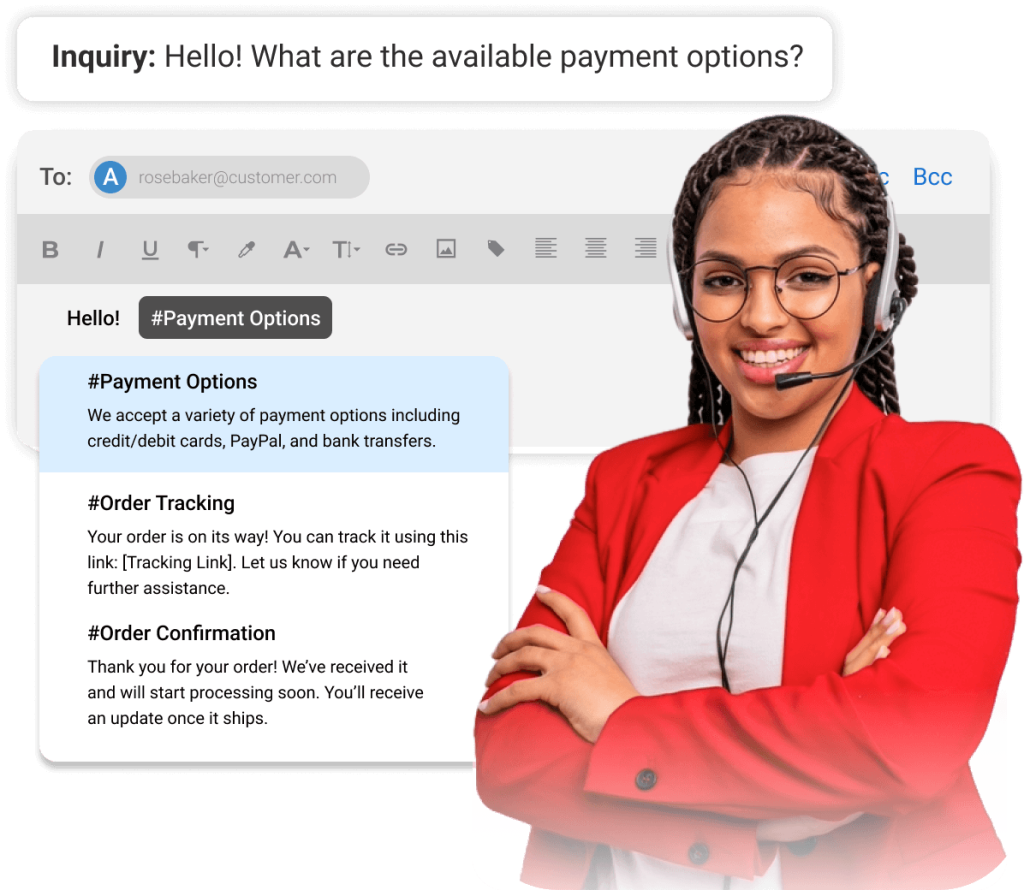
ProProfs Help Desk comes with a built-in canned response library where your team can save, search, and send the right response in seconds, directly from the ticket view. Agents can simply use the # key to add any canned response in seconds.
Why Does Your Team Need Support Ticket Response Examples?
Here is the honest truth: most help desk teams operate without any standardized response library. The result is exactly what you would expect: inconsistent quality, slower response times, and frustrated customers who feel like they are being handled differently every time they reach out.
Ticket response templates fix that. Here is what they specifically do for your team:
- Faster First Replies: Agents stop staring at a blank screen. They pick a template, customize it, and send in under a minute. This directly improves your ticket response time, which is one of the metrics customers notice most.
- Consistent Quality: Every customer gets the same professional response regardless of who picks up the ticket.
- Easier Onboarding: New agents learn the right tone and structure from day one by using what the team already uses.
- Higher Ticket Capacity: When responses take less time, agents handle more tickets per hour without burning out.
- Better SLA Compliance: Acknowledgment templates go out immediately, and follow-up templates trigger before SLA deadlines are missed.
What Makes a Good Support Ticket Response?
Before you copy any template, understand what every good ticket response must include. I have seen teams copy templates blindly and still get poor results because the template itself was missing key elements.
- Acknowledge The Issue: Let the person know you received their request and you understand what they need.
- Set A Clear Timeline: Tell them when they can expect a resolution or your next update.
- Tell Them What Happens Next: Who is working on it? What is the next step? What should they do in the meantime?
- Keep It Human: Use their name. Use plain language. Avoid jargon.
- End With An Open Door: Let them know they can follow up if needed.
18 Support Ticket Response Examples by Category
Below are 18 ready-to-use support ticket response examples organized by the three most common use cases in small to mid-size teams: customer support, IT helpdesk, and internal HR tickets. Each template comes with a short explanation of when and why to use it.
A. Customer Support Ticket Response Examples
1. Ticket Acknowledgment Response
This is the most important template your team can have. The moment a customer sends a request, they want to know it landed somewhere. An immediate acknowledgment tells them they are in good hands and sets the tone for the entire interaction. Without this, customers assume their message was lost and start sending follow-ups or calling in.
Subject: We Received Your Request [Ticket #12345]
Hi [Customer Name],
Thanks for reaching out to us. We have received your request and created Ticket #[Ticket ID] for you.
Our team is reviewing your message and will get back to you within [timeframe, e.g., 24 hours].
If you have more details to add, just reply to this email.
[Agent Name]
2. Order Status Inquiry Response
Customers asking about order status do not want a vague reply. They want a specific answer, a tracking link, and a delivery date. This template gives them exactly that. Keep it concise. If there are complications with the order, use template #3 or #5 instead.
Hi [Customer Name],
Thanks for your message. Your order [Order ID] was shipped on [date] and is currently on its way to you.
You can track it in real time here: [Tracking Link]
Expected delivery: [Date]
If anything looks off or your order does not arrive by then, let us know and we will sort it out right away.
[Agent Name]
3. Refund Request Response
A refund request is always emotionally charged. The customer is already disappointed. This template leads with empathy, immediately reassures them the request is in motion, and sets clear expectations for what happens next. Notice there is no pushback and no defensiveness. That is intentional.
Hi [Customer Name],
We are sorry to hear your experience did not meet expectations. We have received your refund request for [Product/Order].
Here is what happens next:
Our team will review your request within [X business days].
We will notify you once the refund is approved.
Refunds typically appear in your account within [X days].
In the meantime, feel free to reply here if you have any questions.
[Agent Name]
4. Account Login Issue Response
Login issues create instant urgency. The customer cannot do anything until they are back in. This template skips the pleasantries and leads straight into the fix. The self-service steps handle most cases. The fallback at the end handles the ones that need manual intervention.
Hi [Customer Name],
We understand how frustrating it is to be locked out. Here is how to reset your password quickly:
Go to [Login Page URL]
Click “Forgot Password”
Enter your registered email address
Check your inbox for a reset link (check spam too, just in case)
If that does not work or your account is still locked, reply here and we will fix it manually within [X hours].
[Agent Name]
5. Delayed Response Apology
Every support team misses a reply sometimes. What separates good teams from bad ones is how they handle it. This template does not over-apologize or make excuses. It acknowledges the gap, takes ownership, and moves immediately to what is being done. Customers are more forgiving than you think when you are direct and honest with them.
Hi [Customer Name],
I want to sincerely apologize for the delay in getting back to you. That is not the experience we want for you.
I have reviewed your request and [brief update on status/next step].
I am personally making sure this gets resolved by [specific date/time].
Thank you for your patience.
[Agent Name]
6. Billing Discrepancy Response
Billing issues are sensitive. Customers are protective of their money, and rightly so. This template takes the concern seriously without admitting fault prematurely. It commits to a review, sets a realistic timeline, and leaves the door open. If you find an error on your end after reviewing, send a follow-up using template #14.
Hi [Customer Name],
Thank you for flagging this. We take billing errors seriously and want to get this resolved for you quickly.
We have flagged your account for review. Here is what we are looking into: [Brief description of the issue].
We will have a full update for you within [X business hours]. If there was an error on our end, we will correct it immediately.
[Agent Name]
7. Ticket Resolution Confirmation
Closing a ticket correctly is just as important as opening it well. This template does three things: confirms the issue is resolved, explains what was done, and gives the customer an easy path back if the problem returns. Never close a ticket with just “done” or “resolved.” That leaves the customer with no closure.
Hi [Customer Name],
Good news. Your issue [Ticket #12345 | Brief Description] has been resolved.
Here is what we did: [Brief explanation of resolution]
If the issue comes back or you have follow-up questions, just reply here and we will reopen your ticket right away.
Thank you for your patience throughout this!
[Agent Name]
B. IT Helpdesk Ticket Response Examples
IT support teams deal with some of the highest-pressure tickets in any organization. A broken laptop or a network outage can stop someone’s entire workday. These templates are built for speed, clarity, and confidence. If you are looking to build out a proper IT ticketing system, having a response library is one of the first things to set up.
8. IT Ticket Acknowledgement Response
When an employee submits an IT ticket, the first thing they want to know is that someone is on it. This template does that immediately, provides an alternative for urgent issues, and sets a response expectation. The urgency escalation path at the bottom is important because it keeps the phone line clear for genuinely critical cases.
Hi [Employee Name],
We have received your IT support request [Ticket #IT-4567] and it is now in our queue.
A member of our IT team will be in touch within [X hours] to help you.
In the meantime, if your issue is urgent or you are completely unable to work, please call us at [IT Support Number].
[IT Support Team]
9. Password Reset Response
Password resets are one of the most common IT helpdesk tickets. This template handles them with a simple, numbered guide that even the least technical employee can follow. The fallback at the end makes sure no one is left stuck. If your team handles a high volume of these, consider automating this response using your help desk automation settings so it goes out the moment a password reset ticket is created.
Hi [Employee Name],
Here is how to reset your password right now:
Go to [Password Reset URL]
Enter your work email address
Check your inbox for a reset link
Create your new password and log in
If you are locked out completely or the reset link does not work, reply here and we will unlock your account within [X minutes].
[IT Support Team]
10. Hardware Malfunction Response
Hardware issues disrupt productivity immediately. This template acknowledges the disruption, outlines the next steps clearly, and offers a temporary workaround. The offer of a spare device at the end is a small but meaningful gesture that shows the employee their work continuity matters.
Hi [Employee Name],
We are sorry to hear your [Device/Equipment] is not working. We know how disruptive that can be.
Here is what will happen next:
A technician will reach out to you within [X hours] to run a quick diagnostic.
If it needs replacement, we will arrange a spare for you by [Date].
In the meantime, if you need a temporary device to stay productive, please let us know.
[IT Support Team]
11. Ticket Escalation Response
When a ticket moves to a senior technician or another team, communication should not stop. This template keeps the employee in the loop, explains why the escalation happened, and gives a new timeline. A sudden silence after an escalation is one of the biggest sources of employee frustration with IT support. Read more about managing this process in our guide on the ticket escalation process.
Hi [Employee Name],
We are escalating your ticket [Ticket #IT-4567] to our [Senior IT Team / Security Team] because [brief reason].
They will contact you within [X hours].
We want to make sure this gets the right attention. Thank you for your patience.
[IT Support Team]
12. Planned Maintenance Notification
Proactive communication is one of the most underused tools in IT support. When you tell people about downtime before it happens, you prevent a flood of tickets and reduce frustration. This template should go out well in advance of any planned outage. Think of it as a ticket you are closing before it is even opened.
Hi Team,
We will be performing scheduled maintenance on [System Name] on [Date] from [Start Time] to [End Time].
During this window, [System Name] will be unavailable.
Please plan accordingly and save any work before [Start Time].
If you have any questions, reply to this message or contact us at [IT Email/Number].
[IT Support Team]
C. Internal HR Ticket Response Examples
HR teams at companies of all sizes are moving away from shared email inboxes into proper HR ticketing systems. If your HR team is still managing employee requests through a shared Gmail or Outlook inbox, these templates will still help you today, but you will get dramatically more from them once they are stored in a proper ticketing tool.
13. HR Ticket Acknowledgement Response
HR requests often involve sensitive topics like payroll, benefits, or employee concerns. This acknowledgement template sets a professional, confidential tone from the first message. It also sets a clear SLA expectation, which matters especially in HR where delays can directly affect someone’s pay, leave, or employment situation.
Hi [Employee Name],
Thanks for reaching out to HR. We have received your request [Ticket #HR-789] regarding [Brief Topic].
A member of our HR team will get back to you within [X business hours].
All communications about your request will happen through this ticket, so please keep an eye on your inbox.
[HR Team]
14. Payroll Query Response
Payroll questions come with urgency and anxiety attached. Employees asking about their pay need to feel heard immediately and confident that someone is actively looking into it. This template does both. Avoid vague commitments like “we will look into this.” Commit to a specific timeframe.
Hi [Employee Name],
Thank you for flagging this payroll concern.
We are reviewing your records now and will have a full update for you within [X business hours].
If there is an error on our end, we will correct it in your next payroll cycle or issue an off-cycle payment if the amount is significant.
[HR Team]
15. Sensitive HR Issue Acknowledgement Response
This template is for complaints, grievances, or sensitive situations where confidentiality is critical. The tone here is deliberately calm and reassuring. Do not use generic language. Name the HR manager who will handle it so the employee knows exactly who is responsible. This is not a situation where you want the employee wondering who has seen their information.
Hi [Employee Name],
Thank you for bringing this to our attention. We want you to know that this is being taken seriously.
This request has been logged under Ticket #HR-[Number] and will be handled by [HR Manager Name] on a confidential basis.
We will reach out to you within [X business hours] to discuss next steps privately.
[HR Team]
D. General Ticket Response Examples (Any Team)
16. Follow-Up Status Update Response
If a ticket has been open for more than 24 hours without resolution, send a proactive update. Do not wait for the customer or employee to ask. Silence is the biggest trust-killer in support. This template keeps them informed, sets a new expectation, and shows your team is actively working on it.
Hi [Name],
I wanted to give you a quick update on your request [Ticket #12345].
Current status: [Brief update, e.g., “We are still investigating this and have escalated to our senior team.”]
We expect to have a resolution by [Date/Time].
Thank you for your patience. We will keep you updated every [X hours] until this is closed.
[Agent Name]
17. Requesting More Information from the User
Sometimes you cannot move forward without more details. This template makes it easy for the user to respond by listing exactly what you need in plain, specific terms. Avoid asking for everything at once. Ask for the minimum information needed to take the next step, and frame each question clearly so the user can answer point by point.
Hi [Name],
Thank you for reaching out. To resolve this quickly, we need a bit more information from you:
[Specific question 1, e.g., “Which browser or device are you using?”]
[Specific question 2, e.g., “When did this issue first start?”]
[Specific question 3, e.g., “Can you share a screenshot of the error?”]
Once we have these details, we will prioritize your ticket right away.
[Agent Name]
18. Closing an Inactive Ticket
Some tickets go quiet after the first message. The customer either solved it themselves, got busy, or forgot. This template closes the ticket graciously without being dismissive. It leaves the door open completely and makes it easy for them to come back. Never close an inactive ticket without sending this first.
Hi [Name],
We have not heard back from you in [X days] regarding [Ticket #12345 | Issue Description], so we are going to close this ticket for now.
If your issue is still happening, just reply to this email or open a new ticket and we will pick it up immediately.
Thank you for reaching out!
[Agent Name]
FREE. All Features. FOREVER!
Try our Forever FREE account with all premium features!
How to Use These Support Ticket Response Examples Effectively
Using templates is only half the job. I have seen teams build a library of 50 templates and still get poor results because they did not use them correctly. Here is what actually works:
- Customize Before You Send: Always add the person’s name, ticket number, and specific issue details. Generic responses feel cold and lose trust. A blank [Customer Name] field is worse than no template at all.
- Store Them In Your Help Desk Tool: Do not keep them in a Google Doc that half your team cannot find. Use your help desk software’s canned response feature so agents can access them directly from the ticket view.
- Organize By Category: Customer support, IT, HR. Make it easy for agents to find the right template fast, especially during high-volume periods.
- Review Them Every Quarter: Update templates when your product changes, your processes change, or you notice agents consistently editing the same part of a template. If everyone is rewriting the same line, the template needs updating.
- Let Agents Suggest New Ones: Your agents handle tickets every day. They know what responses work and what questions keep coming up. Build a simple process for them to submit new template ideas.
What Is the Difference Between a Trouble Ticket, a Help Desk Ticket, and a Support Ticket?
These three terms are used interchangeably across different industries, but they do have subtle differences. Here is a quick breakdown:
| Term | What It Means | Common Use Case |
|---|---|---|
| Support ticket | A record of any request for help from a customer | Customer service teams |
| Help desk ticket | A formal record of an issue tracked in a help desk system | IT teams and internal support |
| Trouble ticket | Traditionally used for technical issues or network problems | Telecom and IT operations |
In practice, they all refer to the same thing: a documented request that needs a response and resolution. If you want a deeper look at the systems behind these tickets, our guide on what is a ticket management system breaks it down further. The examples in this blog work for all three.
How Does ProProfs Help Desk Help With Support Ticket Responses?
If you are managing tickets through a shared email inbox right now, you already know the problems. Emails get missed. Two agents reply to the same customer. There is no way to track what is open, what is resolved, or how long things are taking. Switching to a dedicated support ticket system changes all of that by giving every request a unique ID, clear ownership, and a trackable timeline from open to close.. Switching from Gmail to a proper help desk changes all of that.
ProProfs Help Desk is built specifically for small to mid-size teams making that transition. It is not bloated with features you will never use. As online help desk software, it is clean, fast, and gives your team everything they need to respond consistently, track every ticket, and never miss a reply.
Here is how it directly helps with support ticket responses:
1. Canned Responses Library
ProProfs Help Desk has a built-in canned response library where you can save every template from this blog and more. Agents search by keyword directly from the reply window and insert the right response in one click. No switching tabs. No copy-pasting from a separate document.
The library is shared across your entire team, so everyone works from the same set of approved responses. When you update a template, it updates for everyone immediately.
2. AI-Powered Response Suggestions
This is where ProProfs Help Desk goes beyond a simple template library. The ProProfs AI Help Desk reads the incoming ticket and automatically suggests the most relevant canned response before the agent even starts typing. An agent handling a password reset ticket sees the password reset template surfaced instantly. A billing complaint surfaces the billing template.
This is not autocomplete. It is contextual matching that gets smarter as your team uses it. For new agents, this is especially valuable because it removes the guesswork about which response to use.
3. Omnichannel Ticket Inbox
Tickets from email, live chat, web forms, and other channels all land in one unified inbox. Your team does not have to check five different places.
They work from a single view where they can see every open ticket, its status, who it is assigned to, and how long it has been waiting. This is what makes consistent omnichannel customer support actually achievable for a small team.
4. Automatic Ticket ID and Acknowledgment
The moment a ticket is created, ProProfs Help Desk assigns it a unique ticket ID and sends an automatic acknowledgment to the customer.
Template #1 in this guide happens automatically, without any agent action required. Customers get immediate confirmation. Agents get time back.
5. Reports and SLA Tracking
ProProfs Help Desk gives your team real-time visibility into help desk metrics that actually matter: first response time, resolution time, tickets by category, agent performance, and SLA compliance. You can see which ticket types take the longest to resolve and use that data to improve your templates.
If your refund response template is consistently leading to three follow-up messages before resolution, that is a signal the template needs work. The data tells you where.
6. Collision Detection
Two agents replying to the same ticket is one of the most embarrassing things that can happen in a support operation.
ProProfs Help Desk prevents it with built-in collision detection. Agents see when someone else is already working on a ticket before they start typing, which avoids duplicate responses and confused customers.
Common Mistakes to Avoid in Support Ticket Responses
Even with good templates, teams consistently make the same mistakes. I have seen all of these happen, and I have seen the damage they do to customer trust.
1. Sending a Template Without Customizing It
Nothing tells a customer “I did not actually read your message” faster than a response with [Customer Name] still in it, or a template that references the wrong issue entirely. Templates are a starting point, not a finished product.
Every response should have the person’s name, their specific ticket number, and at least one line that references their actual issue. This takes 30 seconds and makes the response feel personal rather than automated.
2. Giving No Timeline
“We are looking into it” is not a response. It is a non-answer. Customers and employees want to know when something will be fixed. Even a rough estimate is better than nothing. “We are looking into it and will have an update for you by end of business today” is a completely different experience.
If you genuinely do not have a timeline, tell them when you will have one: “We will know more by tomorrow morning and will update you then.”
3. Jumping to the Solution Before Acknowledging the Emotion
When someone is frustrated, the last thing they want is a bullet list of troubleshooting steps as the very first sentence. Acknowledge what they are experiencing before you solve it. One sentence is enough: “I completely understand how frustrating this must be.”
That line alone changes the temperature of the entire conversation. Our guide on empathy statements for customer service has more examples you can build into your templates.
4. Closing Tickets Too Early
Closing a ticket before the issue is truly resolved is one of the top drivers of customer frustration. The customer has to reopen it, re-explain everything, and start over. Sometimes with a different agent. It wastes everyone’s time and signals that your team prioritizes closing tickets over actually helping people.
Before closing, confirm the resolution is working. Use template #7 or #18 from this guide, which are specifically designed to close tickets in a way that keeps the door open.
5. Using Jargon the Customer Does Not Understand
“We are working with the L2 team to conduct a root cause analysis on the incident” means nothing to most customers. Write the way you would explain it to a friend: “Our senior technical team is investigating what caused this and will have an answer for you soon.”
Clear language builds trust. Jargon creates distance. Always write to the person reading the response, not to demonstrate expertise.
6. Not Following Up Proactively
Silence is the biggest trust-killer in support. If a ticket is open for more than 24 hours, send an update even if nothing has changed. Template #16 in this guide exists exactly for this reason. A quick “still working on it, expect an update by [time]” message takes 60 seconds to send and prevents frustrated follow-up calls and escalations.
If you want to reduce support ticket volume over time, proactive communication is one of the most effective things you can do.
FREE. All Features. FOREVER!
Try our Forever FREE account with all premium features!
Turn These Support Ticket Response Examples Into Faster Replies and Happier Customers
Getting your support ticket responses right does not require a huge team or expensive software. It requires consistency. When every agent on your team works from the same set of well-crafted templates, your customers stop experiencing your support as “sometimes good, sometimes not.” They start experiencing it as reliably professional every single time.
Start with the 18 templates in this guide. Pick the ones that match your most common ticket types and customize them to fit your company’s voice. Store them somewhere your whole team can access, ideally inside your help desk ticketing system so agents can use them directly without extra steps. Review them every quarter as your product and processes evolve.
The goal is not to make your support feel robotic. The goal is to make your best response the default response, every time, for every customer, regardless of who picks up the ticket.
If you are looking for a tool that makes all of this easy, ProProfs Help Desk has the canned response library, the AI suggestions, and the reporting you need to build a response system that actually works. Try it free and see how quickly your team’s response quality improves.
FREE. All Features. FOREVER!
Try our Forever FREE account with all premium features!

 We'd love your feedback!
What did you like & how can we make it even better?
 Thanks for your feedback!
 Ask Your Question
Have a question? Get expert help to make your decision easier.