
I’ve spent the better part of this year moving small support teams off SupportBee and onto something that fits where they’ve grown to. Some wanted a lower bill. Some wanted live chat. A few just wanted an AI agent that could draft a reply before they even opened the ticket.
SupportBee does one thing well. It turns a shared inbox into something a small team can manage without chaos. But once a team adds live chat, needs better reporting, or just wants a lower bill at scale, the search for SupportBee alternatives starts. This guide breaks down the 10 best alternatives to SupportBee in 2026, based on pricing, features, and what each one is actually built for.
Everything here comes from digging into pricing pages, product documentation, and real user feedback, not just marketing copy. Whether you’re a solo founder answering your own emails or an IT lead managing a growing queue, there’s a SupportBee competitor on this list that fits.
What Is SupportBee Used For?
SupportBee is an email-based help desk that turns a shared team inbox (like support@ or help@) into organized tickets, with internal notes, canned replies, and a customer portal. It runs on flat per-user pricing and is built mainly for small teams under 20 agents.
Teams typically use SupportBee to stop losing customer emails in a crowded inbox, to see who’s already replied to a ticket, and to keep internal comments separate from what the customer sees. It covers email and a basic customer portal, but it doesn’t natively cover live chat, phone, or social messaging. If you’re still deciding whether a dedicated tool makes sense at all, our breakdown of what help desk software actually is and how it differs from a plain shared inbox is a good starting point.
Why Do Teams Search For SupportBee Alternatives?
Teams rarely leave a help desk tool without a real reason. Here’s what comes up most often when support and IT teams start looking at alternatives to SupportBee.
- No Live Chat Or Social Channels: SupportBee sticks to email and a customer portal, so any team that wants live chat, WhatsApp, or Instagram support has to bolt on a separate tool.
- AI Stays Basic Or Absent: SupportBee doesn’t ship a built-in AI agent that reads intent and drafts full replies, which matters more every year. A study by Gartner in 2026 shows 91% of customer service leaders are under pressure from executive teams to bring AI into their support workflow.
- Reporting Feels Thin: Several long-time users note that reporting and dashboards haven’t kept pace with newer help desks that show resolution time, workload balance, and CSAT in one view.
- Per-User Pricing Adds Up: SupportBee charges per user with no free forever tier, so a growing team’s bill scales in a straight line even if ticket volume doesn’t.
- Outgrowing The “Just Email” Model: Teams that started with a shared inbox often outgrow it the moment they need automated routing, department-based ticket splitting, or multi-brand support. If any of this sounds familiar, it’s worth reading through some common help desk problems and how teams solve them before you commit to a new tool.
Draft Replies With AI, Manage One Shared Inbox, and Automate the Busywork
Which SupportBee Alternatives Should You Consider In 2026?
I narrowed this down to 10 tools worth your time. Every one of them beats SupportBee at something specific: price, AI, channel coverage, or a feature SupportBee simply doesn’t offer.
| Tool | Best For | Starting Price | G2 Rating |
| ProProfs Help Desk | Easiest AI Help Desk for Shared Inboxes, Ticket Workflow Automation, and Scaling Support Teams | A free plan is available for growing teams. Paid plan starts at $19.99/month. | 4.7/5 |
| Freshdesk | Multi-Channel Ticketing On A Budget | Free plan available; paid from $19/agent/mo | 4.4/5 |
| Zoho Desk | Cheapest Entry Price With Bundled AI | Free plan (3 users); paid from $7/user/mo | 4.4/5 |
| Help Scout | Email-First Shared Inbox | Free plan (50 contacts); paid from $25/user/mo | 4.4/5 |
| Zendesk | Full Omnichannel Contact Center | From $19/agent/mo (Suite from $55/agent/mo) | 4.3/5 |
| Front | Team Collaboration On Email | From $19/seat/mo | 4.7/5 |
| Hiver | Gmail-Native Shared Inbox | From $19/user/mo | 4.7/5 |
| LiveAgent | Built-In Call Center Plus Ticketing | From $15/agent/mo | 4.7/5 |
| Intercom | Chat-First AI Support | From $29/seat/mo | 4.5/5 |
| HubSpot Service Hub | Teams Already Running HubSpot CRM | Free plan; paid from $15/seat/mo | 4.4/5 |
1. ProProfs Help Desk – Easiest AI Help Desk For Shared Inboxes And Growing Teams
The first time I set up ProProfs Help Desk for a small team, I was trying to solve one specific problem: getting AI-assisted replies without paying a separate add-on fee on top of the seat price. Every support address, whether it was support@, billing@, or help@, landed in one shared inbox that looked and worked like Gmail, so nobody needed training on a new interface.
What actually changed the team’s day-to-day was the AI Agent. It read each incoming message, worked out the customer’s intent and mood, and drafted a personalized reply that an agent could send as-is or tweak in a few seconds. The child ticket feature also got used more than expected, since it let a second team get looped in without breaking the original conversation thread.
Setting up automation took less time than I budgeted for. Round-robin assignment and canned responses were live within an afternoon, and the built-in reporting dashboard showed exactly where tickets were getting stuck, which helped cut resolution time without adding another agent.
Pros:
- AI Agent decodes customer intent and mood, then drafts a full reply, not just a canned template
- Shared inbox consolidates multiple support addresses into a single, familiar dashboard
- Free forever plan includes real ticketing features for single-agent teams, not a stripped demo
- Round-robin assignment and canned responses cut manual ticket sorting from day one
Cons:
- No downloadable or on-premise version
- Dark mode isn’t available yet
Pricing:
A free plan is available for growing teams. Paid plan starts at $19.99 /month.
How Does ProProfs Help Desk Compare To SupportBee?
SupportBee charges per user with no free forever plan and no built-in AI agent. ProProfs Help Desk starts free for one agent and adds an AI Agent that drafts full replies based on intent and mood, not just canned templates, inside the same $19.99 per agent plan. For a closer side-by-side, see how ProProfs Help Desk compares to Freshdesk and Zendesk.
2. Freshdesk – Best For Multi-Channel Ticketing On A Budget
I ran Freshdesk for a support team of six for close to a year, and it handled the basics of email, chat, and social ticketing without much friction. The interface felt familiar within a day, and the automation rules for assigning tickets by team saved agents from manually sorting a shared inbox every morning.
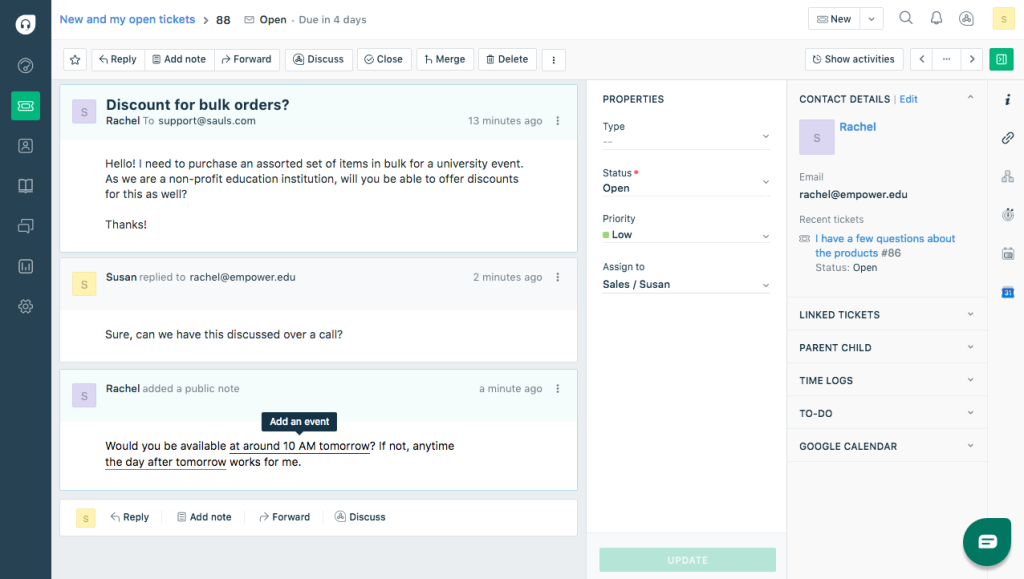
Where things got complicated was cost. Freddy AI Copilot wasn’t included in the base plan, so the moment the team wanted AI-assisted replies, it meant a separate per-agent fee on top of what was already being paid. The core ticketing plan itself was reasonably priced, but the bill looked very different once AI and broader channel support entered the picture.
Freshdesk is still a capable SupportBee alternative if your team wants a cloud-based tool with a large app marketplace and native live chat, something SupportBee doesn’t offer at all. Just budget carefully if AI is part of the plan from day one.
Pros:
- Omnichannel ticketing spans email, chat, and social in one inbox
- Large third-party app marketplace supports deep integrations
- Automation rules for team-based ticket routing are easy to set up
- Familiar interface that most agents pick up within a day
Cons:
- Freddy AI Copilot is billed as a separate per-agent add-on
- Full omnichannel support sits in a separately priced line
Pricing:
Free plan available. Paid plans start at $19 per agent per month.
How Does Freshdesk Compare To SupportBee?
Freshdesk adds live chat and social channels SupportBee doesn’t offer natively, and its free plan supports unlimited agents where SupportBee has none. The tradeoff is that Freshdesk’s AI comes as a separate line item rather than being bundled into the base price. If Freshdesk isn’t quite the fit, our Freshdesk alternatives guide covers more options.
3. Zoho Desk – Best For The Lowest Entry Price With Bundled AI
I set up Zoho Desk for a small team that was already using other Zoho products, and the two-way sync with Zoho CRM meant contact records stayed aligned without a separate connector subscription. The free plan covered three agents with real ticketing features, which made it an easy way to test the product before paying anything.
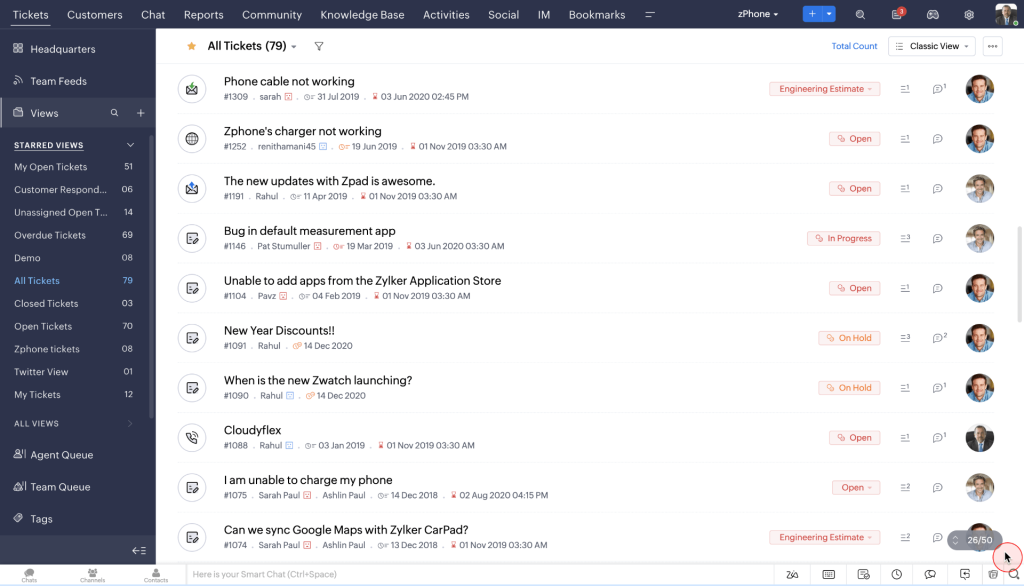
Where I ran into friction was the tier gap at the top. Zia’s more advanced generative AI features, along with live chat and multi-brand portals, sat behind the Enterprise plan, so the team ended up jumping straight to the top tier once AI became a real requirement rather than a nice-to-have.
Zoho Desk is a solid SupportBee alternative if your team wants one of the lowest per-agent entry prices in the category and doesn’t mind waiting on Enterprise for the deeper AI capabilities.
Pros:
- Genuinely free plan for 3 agents with real ticketing features
- Two-way sync with Zoho CRM keeps contact records aligned automatically
- Zia AI assistant is bundled into paid tiers rather than sold separately
- Custom workflows and blueprints support process-heavy support teams
Cons:
- Deeper AI, live chat, and multi-brand portals require the Enterprise plan
- Interface can feel cluttered next to newer, more focused help desks
Pricing:
Free plan for 3 users. Paid plans start at $7 per user per month.
How Does Zoho Desk Compare To SupportBee?
Zoho Desk’s top tier still costs less than SupportBee’s flat per-user rate, and it includes a real free plan SupportBee doesn’t offer. SupportBee stays simpler if all you need is email, but Zoho Desk delivers more channels and AI for a similar or lower price. If budget is the deciding factor between the two, our Zoho Desk vs Zendesk comparison is worth a look too.
4. Help Scout – Best For Email-First Shared Inboxes
Help Scout won me over the moment I moved a small customer success team onto it after they’d outgrown a shared Gmail inbox. Conversations, saved replies, and internal notes all worked the way agents already expected an inbox to work, so there wasn’t much of a learning curve to manage.
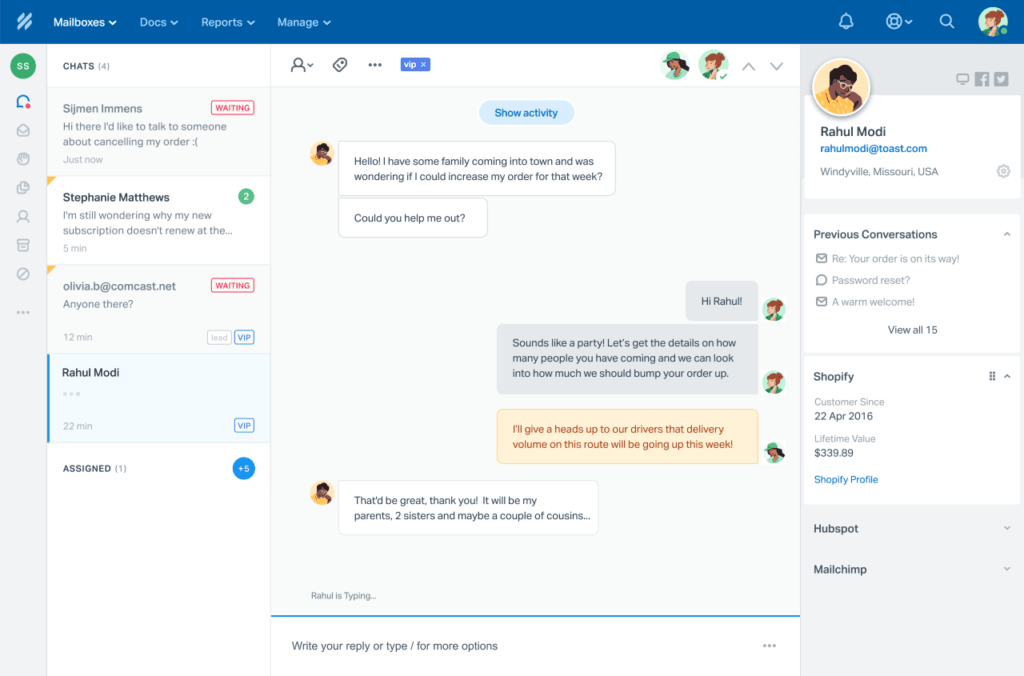
The friction showed up once the team wanted the AI layer. Help Scout’s AI Answers feature is billed per resolution on top of the seat price, and the jump from the Standard to the Plus plan for reporting depth and integrations was steeper than expected for a mid-sized team.
Help Scout is a strong SupportBee alternative if your team is primarily email-based and wants an inbox that feels human rather than like traditional ticketing software.
Pros:
- Shared inbox is styled like a personal email client, with no learning curve
- Docs knowledge base is included on Plus and Pro plans
- AI Answers can auto-resolve repetitive customer questions
- Saved replies and internal notes keep agent collaboration inside the ticket
Cons:
- AI Answers is billed per resolution, on top of the seat price
- Pro plan requires a 10-seat minimum
Pricing:
Free plan for up to 50 contacts. Paid plans start at $25 per user per month.
How Does Help Scout Compare To SupportBee?
Both tools center on email and skip the “ticket number” feel customers dislike. Help Scout’s interface reads as more modern, and its AI Answers feature, while billed separately, gives teams an option SupportBee’s basic writing assistant doesn’t match. For more on where it wins and where it doesn’t, see our Help Scout alternatives roundup.
5. Zendesk – Best For Full Omnichannel Contact Center Features
Every time a growing support team asked about scaling past SupportBee, Zendesk came up in the same breath. It earns that reputation with deep omnichannel support, skills-based routing, and a genuine contact center once you reach its Professional tier.
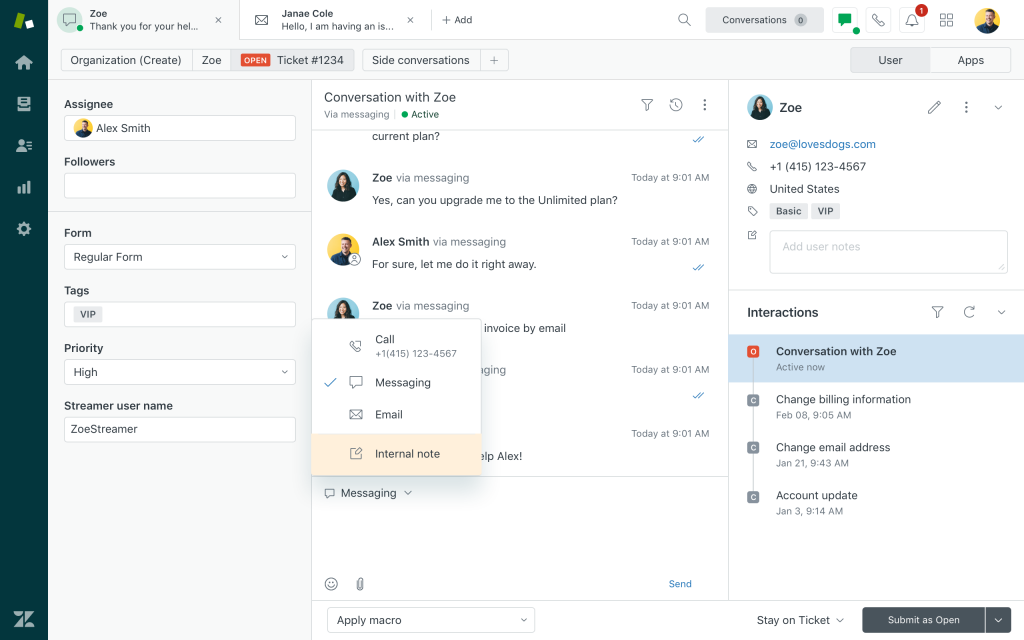
That depth comes at a cost once you price it out for a mid-sized team. Suite plans climb from $55 into $115 or more per agent per month once AI Copilot and advanced routing get added, and the jump between tiers isn’t always obvious from the pricing page alone.
Zendesk is worth the spend if your team genuinely needs a full contact center. For teams that only need email ticketing and a portal, it’s worth weighing that cost against what you’ll actually use.
Pros:
- Omnichannel support covers email, chat, voice, and social in one platform
- Skills-based routing and IVR support complex support operations
- Large marketplace of integrations and pre-built apps
- Advanced analytics and customizable dashboards
Cons:
- AI Copilot is billed as a separate add-on, on top of seat price
- Setup and onboarding take longer than smaller, simpler tools
Pricing:
Support plans start at $19 per agent per month; Suite plans start at $55 per agent per month.
How Does Zendesk Compare To SupportBee?
Zendesk goes far beyond SupportBee on channel depth and automation, but the price gap is real. Teams that only need email ticketing and a portal are paying for a lot of Zendesk they won’t use, which is exactly the gap SupportBee and lighter tools like ProProfs Help Desk are built to fill. If you want the fuller picture, our Zendesk alternatives guide breaks down how it stacks up against the rest of the category.
6. Front – Best For Team Collaboration On Email
Front found its way into my toolkit when a client-facing team needed tighter coordination on a high-volume shared inbox than a plain email client could offer. Comments, assignments, and drafts sitting right inside each email thread made handoffs between teammates much cleaner.
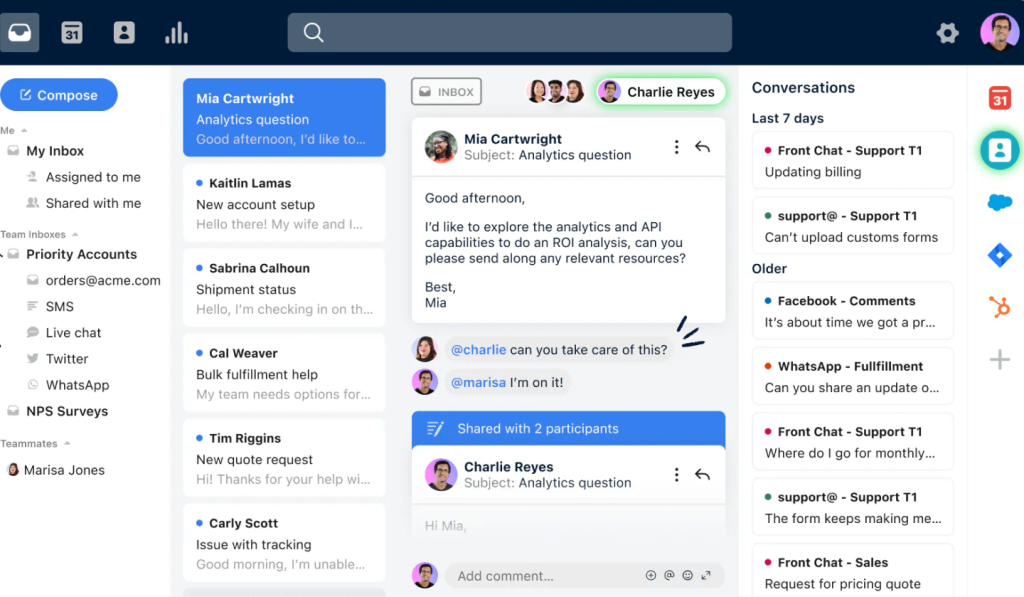
The CRM integrations were the real surprise. Connecting Front to Salesforce meant agents could see full customer context without switching tabs, which mattered a lot for a team splitting time between sales and support.
Front works best for teams that live in email and want a collaboration layer on top of it, more than it works as a pure ticketing replacement for SupportBee.
Pros:
- Shared inbox layers comments, assignments, and collaboration onto email
- Deep CRM integrations with Salesforce and HubSpot
- Collision detection means two agents never reply to the same message
- Analytics track workload balance and SLA adherence
Cons:
- Knowledge base is a paid add-on, not bundled
- AI add-ons and higher tiers increase cost quickly
Pricing:
Plans start at $19 per seat per month.
How Does Front Compare To SupportBee?
Front leans more toward internal team collaboration on email, while SupportBee stays focused on turning support requests into trackable tickets. Front costs a bit less to start but climbs quickly once you add higher tiers. See our Front alternatives breakdown if collaboration isn’t your main need.
7. Hiver – Best For Gmail-Native Shared Inboxes
Hiver became my go-to recommendation the moment a team told me they didn’t want to leave Gmail at all. It turns Gmail itself into a shared inbox, so the team works inside the tool they already know while ownership, status, and notes stay visible across the inbox.
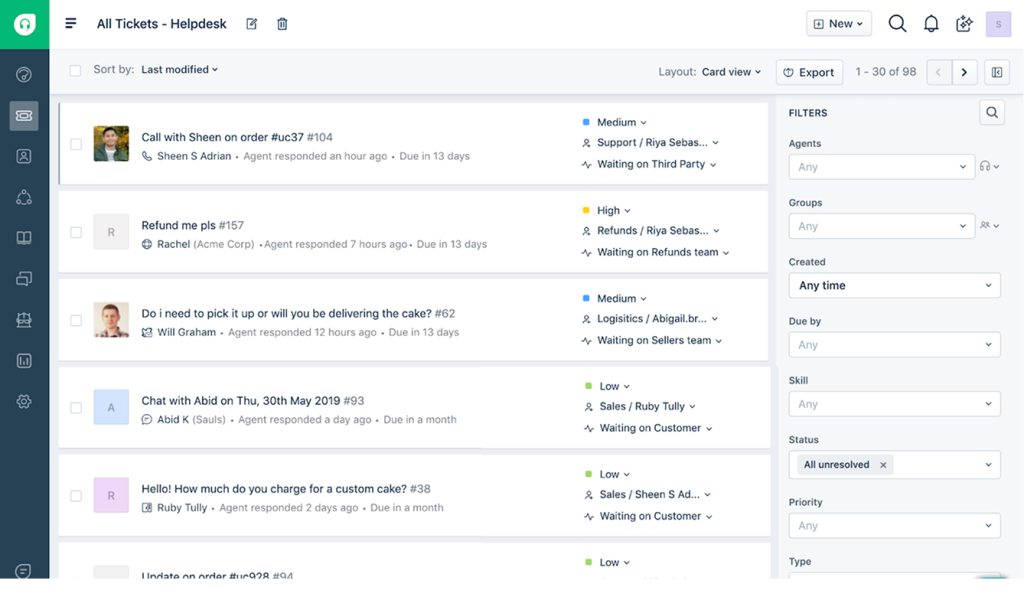
Setup was the fastest of anything on this list. There was no new tab to learn, no separate login, and reporting was live within a day of connecting the account.
Hiver is worth considering as a SupportBee alternative if your team already runs Google Workspace and wants shared inbox features without switching tools entirely.
Pros:
- Native Gmail and Google Workspace integration
- Fastest onboarding on this list, with no new interface to learn
- Shared inbox with clear ownership, status, and internal notes
- Decent reporting and analytics for the price
Cons:
- Tied to Gmail, so switching email providers means switching off Hiver too
- Less useful for teams outside the Google ecosystem
Pricing:
Plans start at $19 per user per month.
How Does Hiver Compare To SupportBee?
SupportBee runs as its own standalone inbox, while Hiver works inside Gmail itself. If your team already runs Google Workspace, Hiver removes the “new tool to learn” friction that comes with switching to SupportBee. Our Hiver alternatives guide covers what to consider if Gmail-native isn’t a strict requirement.
8. LiveAgent – Best For Built-In Call Center Plus Ticketing
LiveAgent became my recommendation the first time a client needed voice support sitting inside the help desk itself, not bolted on through a separate VoIP product. Ticketing, live chat, and a full call center all ran on the same plan.
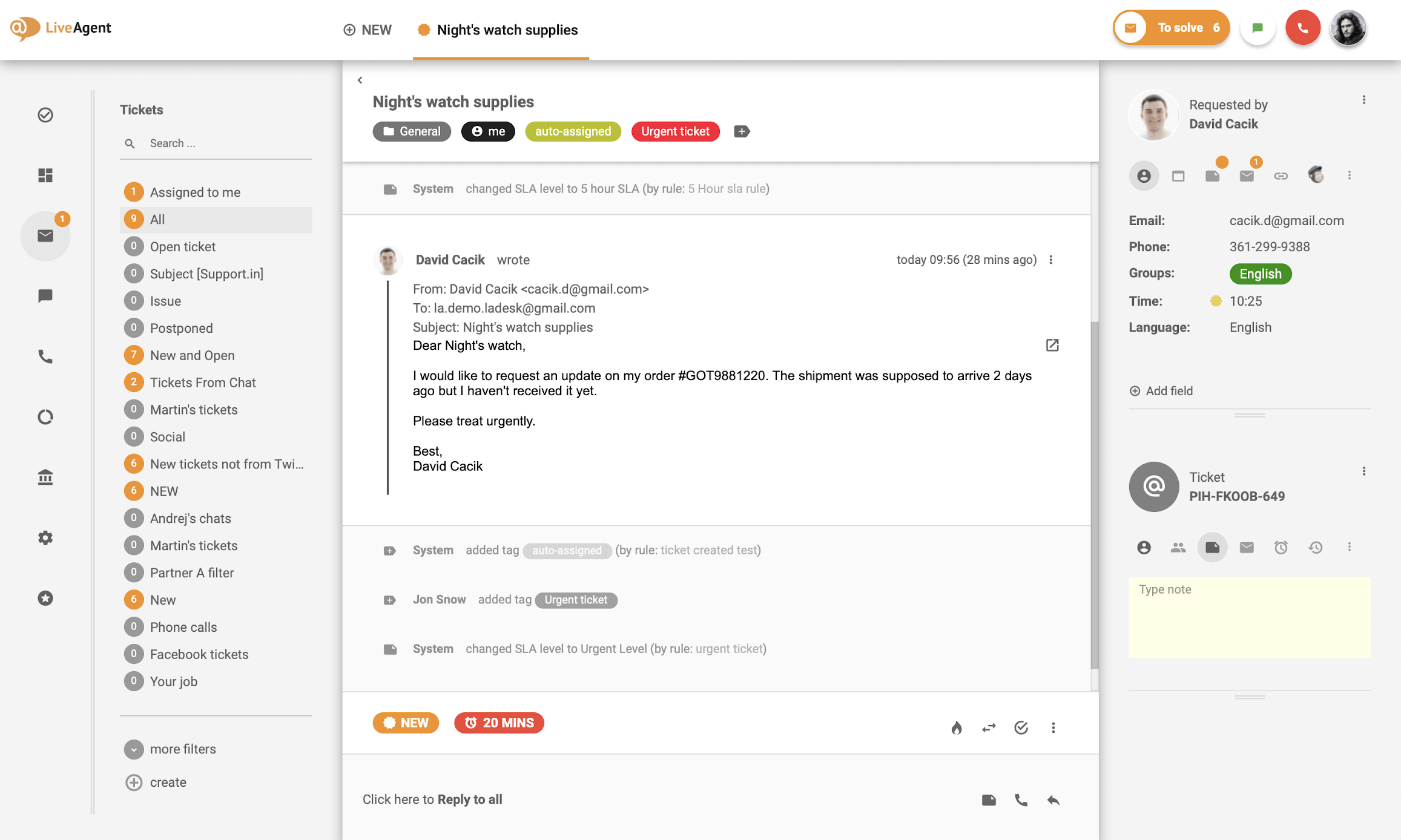
Setting up IVR and call routing took some patience, but once it was running, the universal inbox pulled email, chat, and phone into one queue without agents needing three separate tabs open.
LiveAgent is worth considering as a SupportBee alternative if voice support matters as much as email does for your team.
Pros:
- Built-in call center and IVR, not a separate purchase
- Universal inbox spans email, chat, phone, and social
- Affordable relative to other omnichannel competitors
- Gamification features add a competitive element for support teams
Cons:
- Interface feels dated next to newer help desks
- Advanced automation lags behind AI-first competitors
Pricing:
Plans start at $15 per agent per month.
How Does LiveAgent Compare To SupportBee?
SupportBee has no native phone support at all. LiveAgent includes a full call center on its mid-tier plan, so teams that need voice and email in one place get more for a similar starting price. See our LiveAgent alternatives guide if voice isn’t a priority for your team.
9. Intercom – Best For Chat-First AI Support
Intercom pioneered the chat-first support model, and its Fin AI Agent is among the strongest in the category, capable of handling queries that stump most other bots. It’s built for teams that treat in-app messaging as the primary support channel, not an add-on to email.
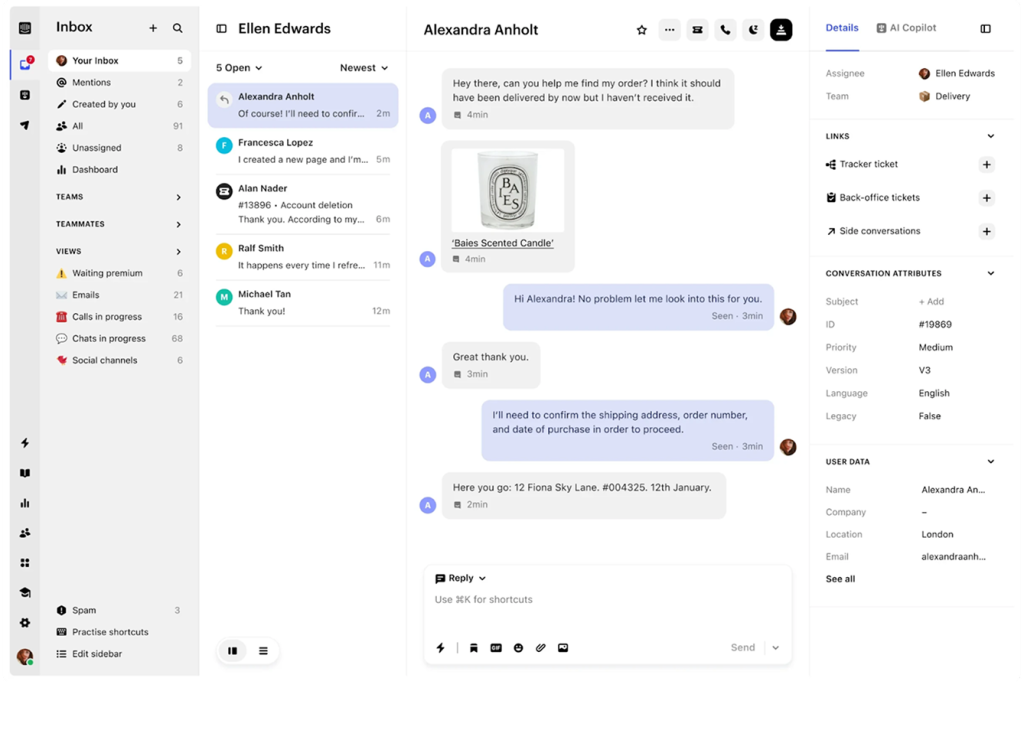
The platform leans heavily into automation-first support. Fin can resolve tickets, draft responses for human agents, and even take actions in external systems, though it isn’t cheap once resolutions start adding up.
Intercom fits teams that want a modern, product-led support experience and are willing to pay for the AI depth that comes with it.
Pros:
- Fin AI Agent handles a large share of first-line replies automatically
- Omnichannel messaging spans chat, email, and SMS
- Proactive messaging and in-app product tours built in
- AI-powered inbox (Copilot) speeds up human agent replies
Cons:
- AI resolutions are billed per conversation, on top of seat cost
- Overkill for teams with simple, low-volume support needs
Pricing:
Plans start at $29 per seat per month.
How Does Intercom Compare To SupportBee?
SupportBee is built around email; Intercom is built around chat and in-app messaging. Teams moving away from SupportBee because they want a chat-first, AI-led experience will find that in Intercom, at a meaningfully higher price point. Our Intercom alternatives guide covers lighter-weight options too.
10. HubSpot Service Hub – Best For Teams Already Running HubSpot CRM
HubSpot Service Hub makes the most sense once your sales and marketing teams are already living inside HubSpot. It connects seamlessly with Marketing Hub and Sales Hub, giving support agents a complete view of every customer without switching tools.
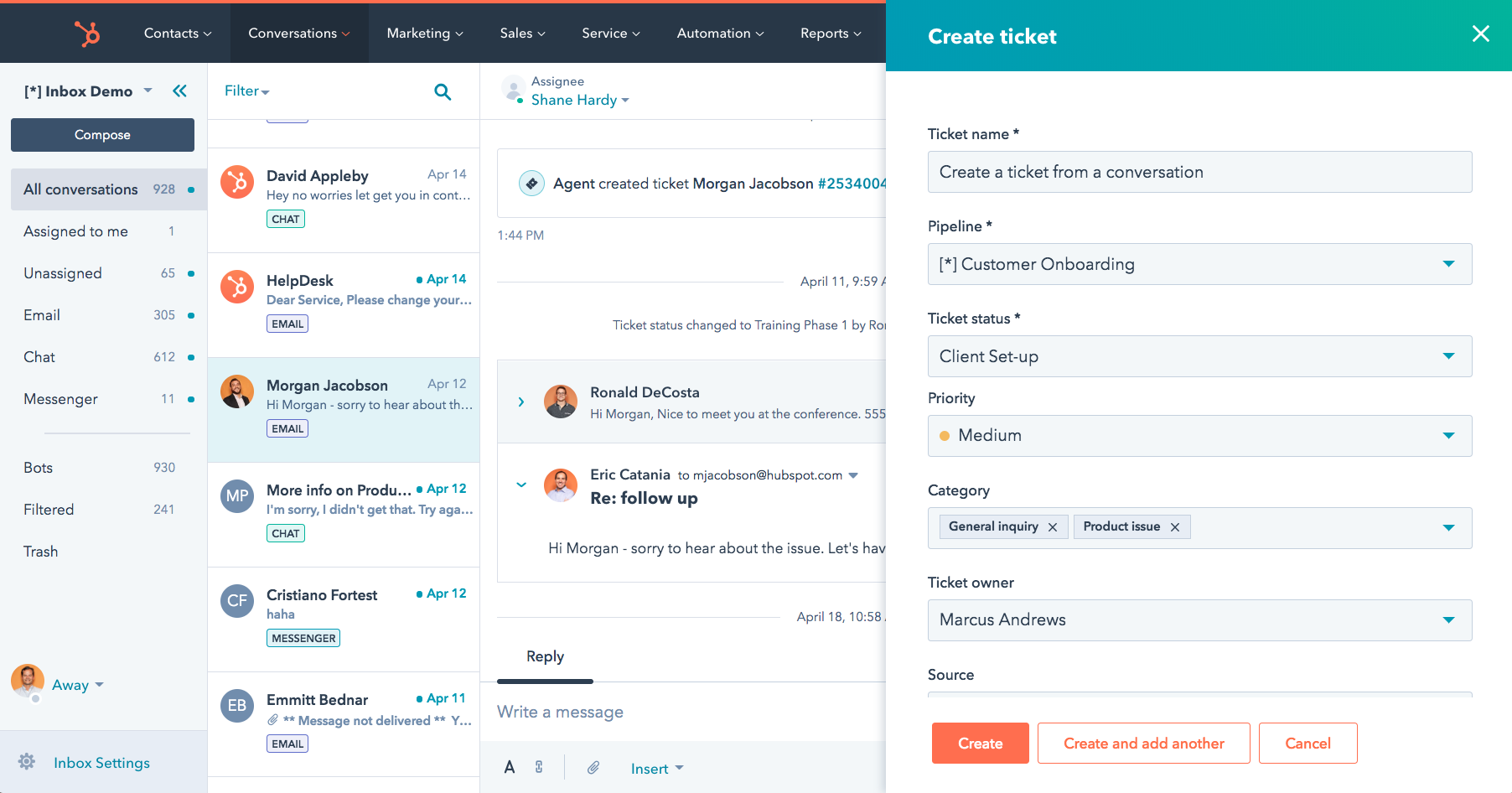
The free tier is genuinely usable for up to 2 users, and the paid tiers add features like customer feedback surveys, a knowledge base, and SLA management as the team grows.
HubSpot Service Hub is worth the switch mainly for teams that want unified customer data across sales, marketing, and support, not for teams that just want a standalone ticketing tool.
Pros:
- Unified contact timeline across sales, marketing, and service
- Deep CRM integration gives agents full customer context
- Built-in knowledge base and customer portal
- Customer feedback surveys (NPS, CSAT, CES) included
Cons:
- Standalone, without HubSpot CRM, it costs more for less than dedicated help desks
- Free tier’s upgrade jump to paid plans is steep
Pricing:
Free plan available. Paid plans start at $15 per seat per month.
How Does HubSpot Service Hub Compare To SupportBee?
SupportBee has no CRM layer at all. HubSpot Service Hub is worth the switch only if your sales and marketing teams already run on HubSpot, since that’s where the real value shows up. Our HubSpot alternatives guide is worth a look if a standalone help desk fits better.
Evaluation Criteria
Whenever I put together a comparison like this one, I run every SupportBee alternative through the same unbiased, systematic process so the ranking reflects real usability, not just which vendor has the flashiest pricing page. Here are the six factors I weighed for every tool on this list:
- User Reviews/Ratings: I read through what real users say on G2 and Capterra, since direct feedback from buyers tells me more about day-to-day friction with a shared inbox or a ticketing workflow than any spec sheet does.
- Essential Features & Functionality: I looked past the marketing page and dug into what each tool’s ticket management, automation, and AI features actually do once you’re inside the product, since the value of a help desk comes down to its core functionality.
- Ease Of Use: I paid close attention to how quickly a new agent could get productive in the shared inbox, since a clean interface saves real onboarding time for small support teams.
- Customer Support: I checked how each vendor’s own support team performed during setup, and how well they handled questions once I was actually running tickets through the product.
- Value For Money: I compared what each tool delivers against its price at real team sizes, not just the cheapest entry-level tier, since the goal is to help you know whether you’d actually get your money’s worth.
- Personal Experience / Expert Opinions: I leaned on my own hands-on time running tickets through each platform, alongside what other support and IT professionals have shared in reviews and forums.
FREE. All Features. FOREVER!
Try our Forever FREE account with all premium features!
My Top 3 Picks For The Best SupportBee Alternative
If you only read one section of this guide, read this one. These three tools cover the most common reasons teams go looking for a SupportBee alternative in the first place.
1. ProProfs Help Desk
My top pick for teams that want AI-drafted replies and a shared inbox without paying extra for the AI layer. The AI Agent reads intent and mood before an agent even opens the ticket, and the shared inbox setup took under an hour from start to finish. Start on the free plan and upgrade only once your team actually needs more seats, so you’re never paying for capacity you don’t use yet.
2. Zoho Desk
The pick for teams that want the lowest possible entry price and are willing to grow into the higher tiers for deeper AI and multi-channel features. Its free plan and bundled Zia AI make it a genuinely budget-friendly starting point, especially if you’re already using other Zoho products for sales or marketing. The tradeoff is that some of the more advanced features only unlock once you move up to Enterprise.
3. Help Scout
The pick for teams that want to stay email-first but need a more modern interface than SupportBee offers. Conversations read like normal email rather than numbered tickets, which keeps the experience calm for both agents and customers. It costs more per seat than SupportBee, but the jump in interface quality and AI Answers makes that gap easy to justify for a small, email-heavy team.
Outgrown SupportBee? Get AI Replies and a Shared Inbox in Minutes
Switch To A SupportBee Alternative That Fits How Your Team Actually Works
Switching away from SupportBee usually comes down to wanting more from your help desk: a smarter AI agent, live chat alongside email, or ticket management that doesn’t creep up in price every time your team grows. Map your current ticket volume, the channels your customers actually use, and how much AI matters to your workflow before committing to anything. Our guide to choosing the right help desk software walks through that decision in more depth if you want a second opinion.
The right SupportBee alternative is the one your team can adopt in a week, not the one with the longest feature list. A cluttered inbox and a slow reply time cost you customers long before a subscription bill does.
If AI-drafted replies, a shared inbox, and pricing that doesn’t punish you for growing sound like what your team needs, a tool like ProProfs Help Desk is worth trying free before you look at anything else on this list. Pair it with a bit of help desk automation once you’re set up, and keep an eye on your customer satisfaction metrics to confirm the switch actually worked.
Frequently Asked Questions
What is the best free alternative to Supportbee?
Zoho Desk offers a free plan for up to 3 agents with real ticketing features. ProProfs Help Desk also offers a forever-free plan for single-agent teams, and HubSpot Service Hub has a free tier for up to 2 users.
Is ProProfs help desk cheaper than Supportbee?
Yes. ProProfs Help Desk starts free for one agent and moves to $19.99 per agent per month, while SupportBee has no free forever plan and charges per user from the start.
Does Supportbee have AI features?
SupportBee does not include a built-in AI agent that reads intent and drafts full replies. It stays focused on email organization, canned responses, and a customer portal.
Can I migrate my tickets from Supportbee to another help desk?
Most help desk platforms, including ProProfs Help Desk, Freshdesk, and Zoho Desk, support ticket imports through CSV or API. Read through a help desk migration checklist and back up your SupportBee data before starting.
Which Supportbee competitor is best for small teams?
ProProfs Help Desk fits small teams well since its free plan supports a single agent with real ticketing features, not a stripped demo. For a broader comparison, our best help desk software for small businesses guide covers more options.
Does Supportbee offer live chat?
No. SupportBee is built around email and a customer portal. Teams that want live chat need a separate tool or a help desk that includes it natively, like Freshdesk or LiveAgent.
What should I look for in a Supportbee alternative?
Look for automated ticket routing, AI-assisted replies, transparent per-agent pricing, and support for the channels your customers actually use, not just email.
How much do Supportbee alternatives cost per agent?
Pricing ranges from free (Zoho Desk, ProProfs Help Desk, HubSpot Service Hub) to over $50 per agent per month for full omnichannel platforms like Zendesk Suite.
FREE. All Features. FOREVER!
Try our Forever FREE account with all premium features!

 We'd love your feedback!
What did you like & how can we make it even better?
 Thanks for your feedback!
 Ask Your Question
Have a question? Get expert help to make your decision easier.