
I go looking for HelpSpot alternatives every time a support team tells me the same thing: they’re paying $29 an agent every month, and it still feels like using email from 2015. I’ve set up HelpSpot for small teams, used it myself, and helped teams move off it more times than I can count. So I know exactly where it works and exactly where it starts to feel outdated.
Everything on this list comes from actually using these tools, not just reading their pricing pages. I’ve tried them as a one-person team and as part of a bigger team with ten agents. I paid attention to the small things too, like which tool saved me time and which one just added more work.
Here’s what you’ll get from this guide: 9 real HelpSpot alternatives, picked for what actually matters when you’re the one replying to tickets on a busy day. ProProfs Help Desk is my top pick, and I’ll explain why in a bit. But there’s something here whether you have no budget at all or a growing team of fifty agents.
What Is HelpSpot Used For?
HelpSpot is an email-based ticketing tool that organizes support requests from multiple inboxes into one queue, with internal notes, collision detection, and basic AI writing assistance. It runs on flat per-agent pricing and can be deployed as a cloud or self-hosted product, which makes it a common pick for IT teams that want data control.
Why Do Teams Search For HelpSpot Alternatives?
Most teams don’t leave a help desk tool without a reason. Here are the ones that come up most often when support and IT teams look for something else:
- Reporting feels thin. HelpSpot holds a TrustRadius score of just 2.1 out of 10 from verified reviewers, according to a study by SelectHub in 2026, with feedback pointing directly at weak reporting depth and a lack of advanced features found in newer tools.
- No live chat or social channels. HelpSpot is built around email and a customer portal. Teams that also need live chat, WhatsApp, or social ticketing have to bolt on a separate tool.
- AI stays basic. HelpSpot’s built-in AI handles auto-categorization, translation, and writing assistance, but it doesn’t decode customer intent or draft a full reply the way newer AI agents do.
- The interface hasn’t kept pace. Several long-time users note the admin screens and reporting views look and feel dated next to modern help desks.
- Per-agent pricing still adds up. At $29 per agent per month for every plan tier, a 10-agent team pays close to $3,480 a year, similar to or higher than several AI-included alternatives on this list.
A study by Gartner in 2026 found that most customer service leaders feel organizational pressure to bring AI into their support workflow, which is one reason so many teams are moving toward help desks with AI built into the core plan rather than treating it as an afterthought.
Which HelpSpot Alternatives Should You Consider In 2026?
I’ve narrowed this down to nine tools worth your time, and every one of them earned its spot by beating HelpSpot at something specific, whether that’s price, AI, or the channels it covers. Here’s how they stack up before we get into the details.
| Tool | Best For | Starting Price | G2 Rating |
| ProProfs Help Desk | Easiest AI Help Desk for Shared Inboxes, Ticket Workflow Automation, and Scaling Support Teams | A free plan is available for growing teams. Paid plan starts at $19.99/month. | 4.7/5 |
| Freshdesk | Multi-Channel Ticketing And Automation | Free plan available; paid from $19/user/month | 4.4/5 |
| Zoho Desk | Budget-Friendly Bundled AI | Free plan for 3 agents; paid from $7/user/month | 4.4/5 |
| Help Scout | Email-First Shared Inboxes | From $25/user/month | 4.4/5 |
| HappyFox | Built-In IT Asset Management | From $24/user/month (capped at 5 agents) | 4.5/5 |
| Zendesk | Full Contact Center Features | From $55 to $115+/user/month | 4.3/5 |
| Spiceworks | Free Internal IT Help Desks | Free (Core); Premium from $5/user/month | 4.3/5 |
| osTicket | Open-Source, Self-Hosted Ticketing | Free (self-hosted); Cloud from $12/user/month | 4.4/5 |
| Front | Collaborative Shared Inboxes | From $25/user/month | 4.7/5 |
1. ProProfs Help Desk – Easiest Ai Help Desk for Shared Inboxes, Ticket Workflow Automation, and Scaling Support Teams
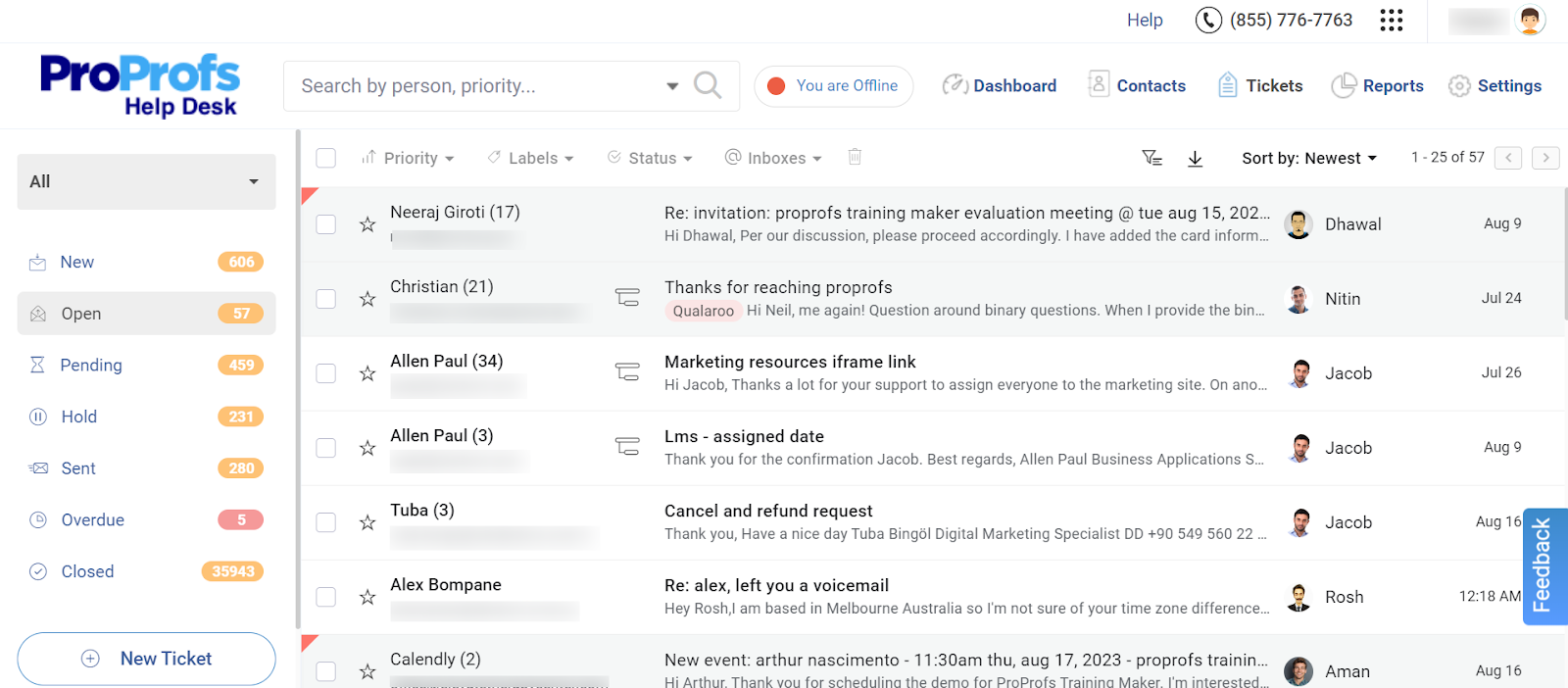
The first time I set up ProProfs Help Desk, I was mostly trying to solve one problem: getting AI-assisted replies without paying a separate add-on fee on top of my seat price. Every ticket, whether it came from support@, billing@, or help@, landed in a shared inbox that looked and worked like Gmail, so I didn’t have to train anyone on a new interface.
What actually changed my day-to-day activities was the AI Agent. It read each incoming message, decoded the customer’s intent and mood, and drafted a personalized reply I could send as-is or tweak in seconds. I also leaned on the child ticket feature more than I expected to, since it let me loop in a second team without losing the original conversation thread.
Setting up automation took less time than I budgeted for. Round-robin assignment and canned responses were live within an afternoon, and the built-in reporting dashboard showed me exactly where tickets were getting stuck, which helped me cut resolution time without adding another agent.
Pros:
- AI Agent decodes customer intent and mood before an agent opens the ticket
- Shared inbox consolidates multiple support addresses into a single dashboard
- Child ticket feature enables cross-team collaboration on a single request
- Round-robin assignment and canned responses reduce manual ticket sorting
- Free forever plan includes core ticketing features for single-agent teams
Cons:
- No downloadable or on-premise version
- Dark user interface option not available
Pricing:
A free plan is available for growing teams. Paid plan starts at $19.99 /month.
How Does ProProfs Help Desk Compare To HelpSpot?
HelpSpot charges a flat $29 per agent per month across the board, with AI limited to auto-categorization, translation, and writing help. ProProfs Help Desk starts free and moves to $19.99 per agent per month, with an AI Agent that reads intent and mood and drafts full replies rather than just assisting with wording. For a 10-agent team, that’s a real gap: roughly $3,480 a year on HelpSpot versus about $2,400 a year on ProProfs Help Desk, with more AI capability included at the lower price.
2. Freshdesk – Best For Multi-Channel Ticketing And Automation
I ran Freshdesk for a support team of six for close to a year, and it handled the basics of email, chat, and social ticketing without much friction. The interface felt familiar within a day, and the automation rules for assigning tickets by team saved my agents from manually sorting through a shared inbox every morning.
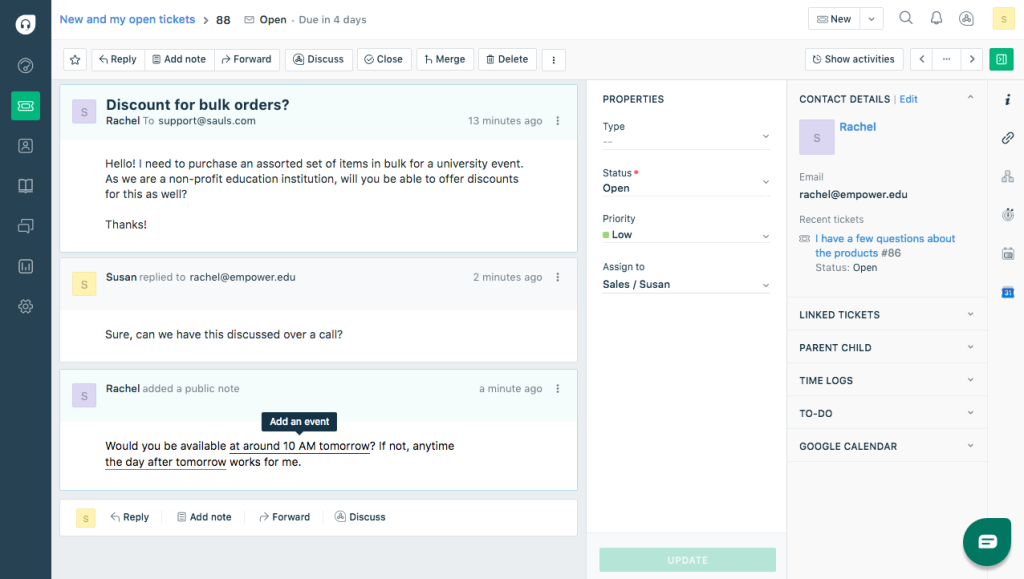
Where things got complicated was cost. Freddy AI Copilot wasn’t included in my base plan, so once I wanted AI-assisted replies, I had to add a separate per-agent fee on top of what I already paid. The core ticketing plan was reasonably priced, but by the time I added AI and looked at the Omni line for broader channel support, the bill looked very different from the number on the pricing page.
Freshdesk is still a capable HelpSpot alternative if your team wants a cloud-based tool with a large app marketplace and native live chat, something HelpSpot doesn’t offer at all. Just budget carefully if AI is part of the plan from day one.
Pros:
- Omnichannel ticketing spans email, chat, and social in one inbox
- Freddy AI Copilot adds AI-assisted replies and suggested actions
- Large third-party app marketplace supports deep integrations
- Built-in knowledge base module supports self-service deflection
Cons:
- Freddy AI Copilot is billed as a separate per-agent add-on
- Omnichannel support sits in a separately priced Omni line
Pricing:
Starts at $19/user/month.
How Does Freshdesk Compare To HelpSpot?
Freshdesk’s entry plan undercuts HelpSpot’s $29 flat rate, and it adds live chat and social channels HelpSpot doesn’t offer natively. The tradeoff is that Freshdesk’s AI comes as an extra line item, while HelpSpot at least bundles its lighter AI writing tools into every tier. If you want the fuller picture, our Freshdesk alternatives guide breaks down how it stacks up against the rest of the category.
3. Zoho Desk – Best For Budget-Friendly Bundled AI
I set up Zoho Desk for a small team that was already using other Zoho products, and the two-way sync with Zoho CRM meant we didn’t need a separate connector subscription just to keep contact records aligned. The free plan covered three agents with real ticketing features, which made it an easy way to test the product before committing to anything paid.
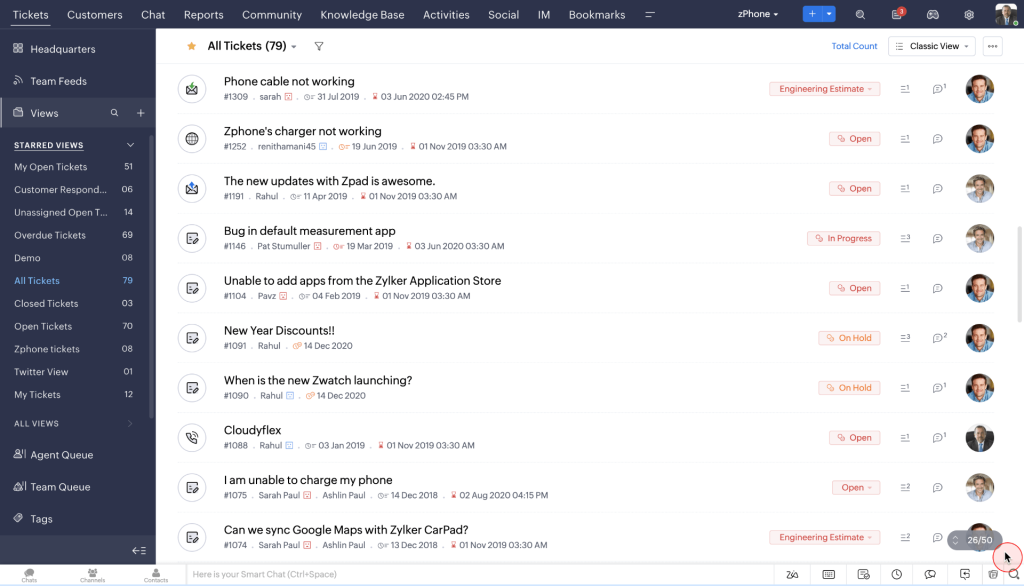
Where I ran into friction was the tier gap at the top. Zia’s more advanced generative AI features, along with live chat and multi-brand portals, sat behind the Enterprise plan, so I ended up needing to jump straight to the top tier once AI became a real requirement rather than a nice-to-have.
Zoho Desk is a solid HelpSpot alternative if your team wants one of the lowest per-agent entry prices in the category and doesn’t mind waiting on Enterprise for the deeper AI capabilities.
If you’re curious how it holds up against a bigger name, our Zoho Desk vs. Zendesk comparison covers that in more depth.
Pros:
- Two-way sync with Zoho CRM keeps contact records aligned automatically
- Zia AI is bundled into paid tiers rather than sold separately
- Multi-brand help center available on higher tiers
- Custom workflows and blueprints support process-heavy support teams
Cons:
- Deeper AI, live chat, and multi-brand portals require the Enterprise plan
- Interface can feel cluttered next to more focused help desks
Pricing:
Starts at $7/user/month.
How Does Zoho Desk Compare To HelpSpot?
Zoho Desk’s top Enterprise tier still costs less than HelpSpot’s flat $29 rate, and it includes a genuinely free plan HelpSpot doesn’t offer at all. HelpSpot wins on deployment flexibility with its self-hosted option, but Zoho Desk delivers more for less if budget is the deciding factor.
4. Help Scout – Best For Email-First Shared Inboxes
I’ll admit Help Scout won me over the moment I moved a small customer success team onto it after they’d outgrown a shared Gmail inbox. Conversations, saved replies, and internal notes all worked the way my agents already expected an inbox to work, so there wasn’t really a learning curve to manage.
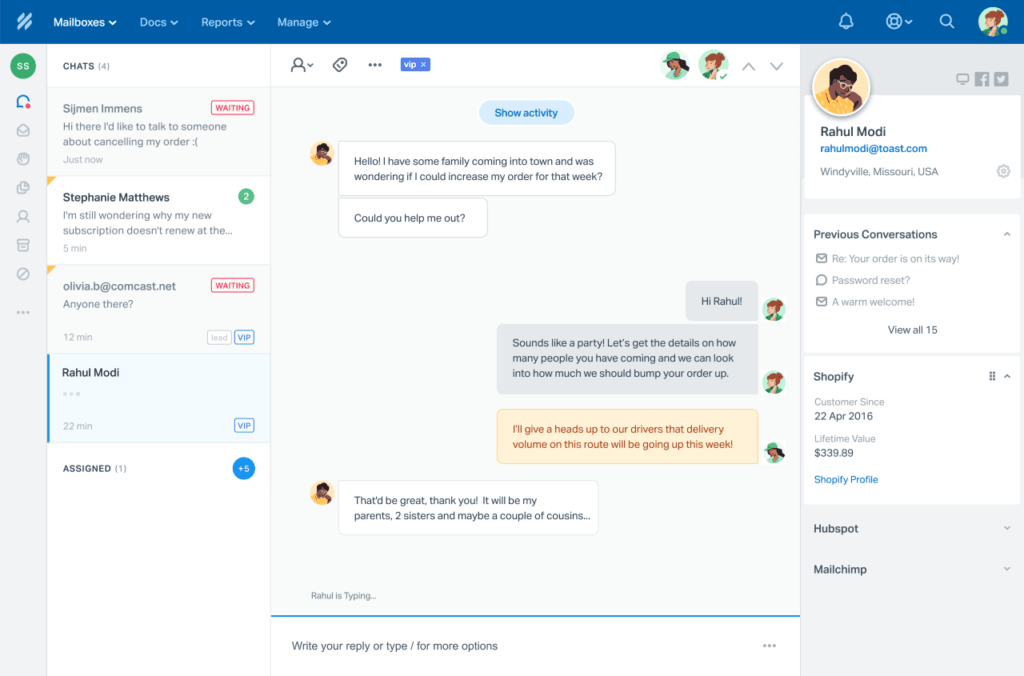
The friction showed up once I wanted the AI layer. Help Scout’s AI Answers feature is billed per resolution on top of the seat price, and the jump from the Standard to the Plus plan for reporting depth and integrations was steeper than I expected for a mid-sized team.
Help Scout is a strong HelpSpot alternative if your team is primarily email-based and wants an inbox that feels human rather than like traditional ticketing software. For a deeper side-by-side, our Help Scout alternatives roundup covers where it wins and where it doesn’t.
Pros:
- Shared inbox is styled like a personal email client, with no learning curve
- AI Answers can auto-resolve repetitive customer questions
- Docs knowledge base is included on Plus and Pro plans
- Saved replies and internal notes keep agent collaboration inside the ticket
Cons:
- AI Answers is billed per resolution, on top of the seat price
- Pro plan requires a 10-seat minimum
Pricing:
Starts at $25/user/month.
How Does Help Scout Compare To HelpSpot?
Both tools center on email, but Help Scout’s interface reads as more modern and its AI Answers feature, while billed separately, gives teams an option HelpSpot’s basic writing assistant doesn’t match. HelpSpot remains cheaper at scale if AI isn’t a priority.
5. HappyFox – Best For Built-In IT Asset Management
HappyFox became my go-to recommendation the first time a client needed asset tracking sitting inside the help desk itself, not bolted on through a separate ITSM tool. Hardware, software licenses, and warranties showed up automatically next to the relevant support ticket, which is a rare combination in this category.
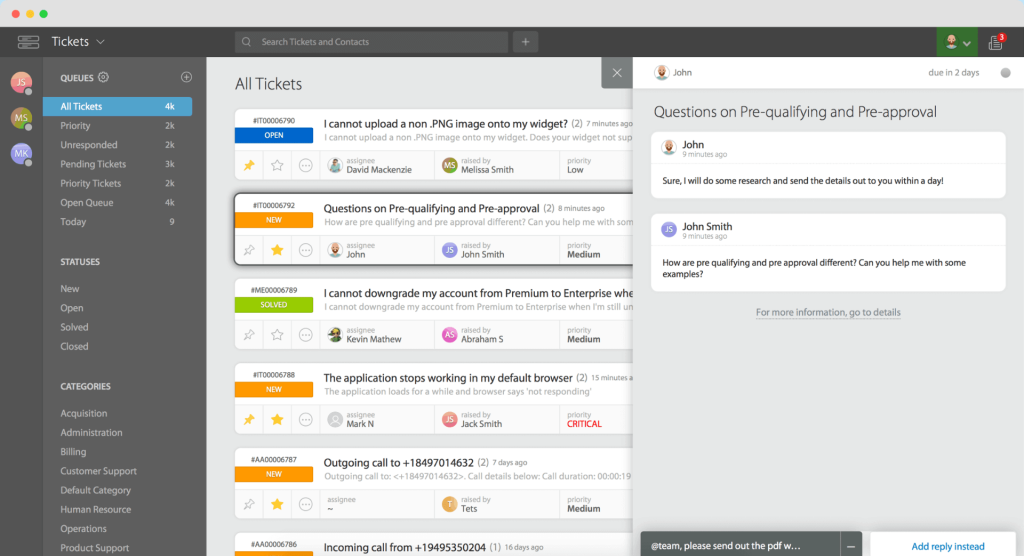
Setting up SLA policies across time zones and escalation tiers was more straightforward than I expected, and the smart automation rules with agent collision detection meant two agents never stepped on the same ticket by accident.
HappyFox is worth considering as a HelpSpot alternative if internal IT support and asset visibility matter as much as customer-facing tickets do.
Pros:
- Built-in asset management tracks hardware, software, and warranties alongside tickets
- SLA policies support multiple time zones and escalation tiers
- Smart automation rules include agent collision detection
- Scheduled reporting sends performance data to stakeholders automatically
Cons:
- Basic plan caps out at 5 agents before forcing an upgrade
- AI features are limited compared to purpose-built AI help desks
Pricing:
Starts at $24/user/month (capped at 5 agents).
How Does HappyFox Compare To HelpSpot?
HappyFox costs slightly less than HelpSpot at entry level and adds native asset management HelpSpot doesn’t have. HelpSpot’s flat pricing has no seat cap, though, while HappyFox forces a plan upgrade the moment a team passes 5 agents.
6. Zendesk – Best For Full Contact Center Features
Every time a growing IT team asked me about scaling past HelpSpot, Zendesk came up in the same breath. It earns that reputation with deep omnichannel support, skills-based routing, and a genuine contact center once you reach its Professional tier.
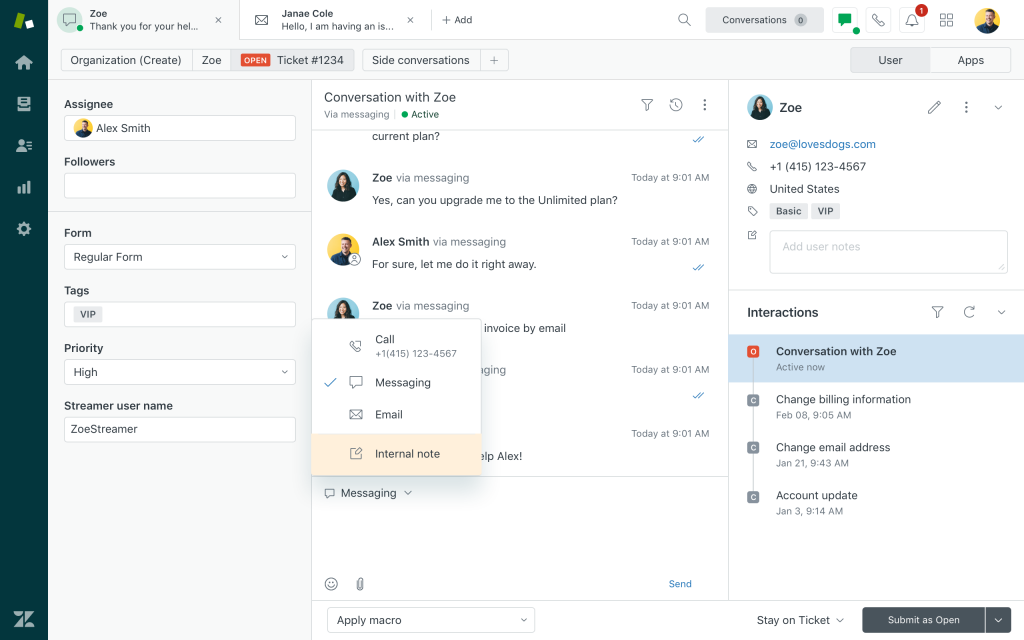
That depth came at a cost when I priced it out for a mid-sized team. Suite plans climbed from $55 into $115 or more per agent per month once AI Copilot and advanced routing were added, and the jump between tiers wasn’t always obvious from the pricing page alone.
Zendesk is worth the spend if your team genuinely needs a full contact center. For teams that only need email ticketing and a portal, it’s worth reading our Zendesk alternatives guide before committing to that price tag.
Pros:
- Omnichannel support covers email, chat, voice, and social in one platform
- Skills-based routing and IVR support complex support operations
- Large marketplace of integrations and pre-built apps
- Advanced analytics and customizable dashboards
Cons:
- AI Copilot is billed as a separate add-on, on top of seat price
- Per-agent cost climbs quickly once Suite and Enterprise features are added
Pricing:
Starts at $55/user/month.
How Does Zendesk Compare To HelpSpot?
Zendesk goes far beyond HelpSpot on channel depth and contact center features, but the price gap is significant. Teams that only need email ticketing and a portal are paying for a lot of Zendesk they won’t use, which is exactly the gap HelpSpot and lighter tools like ProProfs Help Desk are built to fill.
7. Spiceworks – Best For Free Internal IT Help Desks
Budget-strapped IT teams are the reason I keep Spiceworks bookmarked. The Core plan costs nothing and includes ticketing, asset tracking, and alerts, which made it the easiest recommendation I could give a school IT department working with zero software budget.
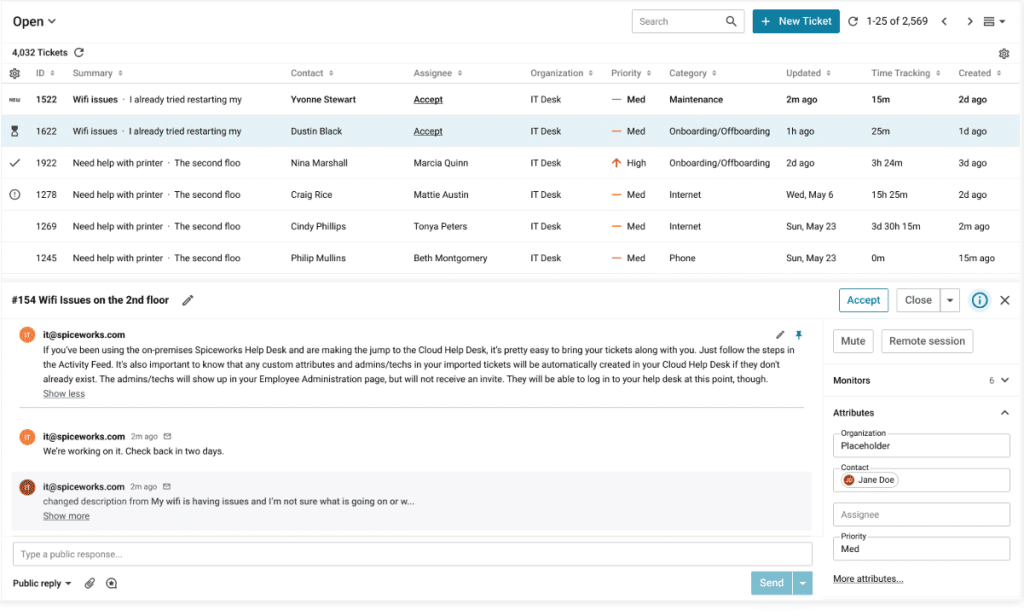
The catch became obvious fast: the free tier is ad-supported, and a few teams I set it up for found the ads distracting on a shared support screen. The Premium tier removes them and adds extra features for a small per-agent fee, which most teams upgraded to within a few months.
Spiceworks is the free HelpSpot alternative worth trying first if your team’s constraint is budget, not features.
Pros:
- Core plan is free, with ticketing, asset tracking, and alerts included
- Combines help desk and IT asset management in one tool
- Active IT community provides peer troubleshooting and shared knowledge
- Email and Active Directory integration built in
Cons:
- Lacks AI-powered replies and omnichannel support
- Reporting and customization are limited next to paid competitors
Pricing:
Starts at $0/user/month (Core plan). Premium starts at $5/user/month.
How Does Spiceworks Compare To HelpSpot?
Spiceworks is free where HelpSpot charges $29 per agent per month, but it trades away HelpSpot’s more polished ticketing UI and cloud-hosted reliability. For internal IT teams on a strict budget, Spiceworks is the more affordable starting point, and our Spiceworks alternatives guide covers what to move to once you outgrow it.
8. osTicket – Best For Open-Source, Self-Hosted Ticketing
Self-hosting osTicket taught me more about ticket routing than any paid tool ever did, mostly because I had to configure it myself. The self-hosted version is free to download, and once I had it running, custom fields, ticket filters, and SLA management covered most of what a small support team actually needs.
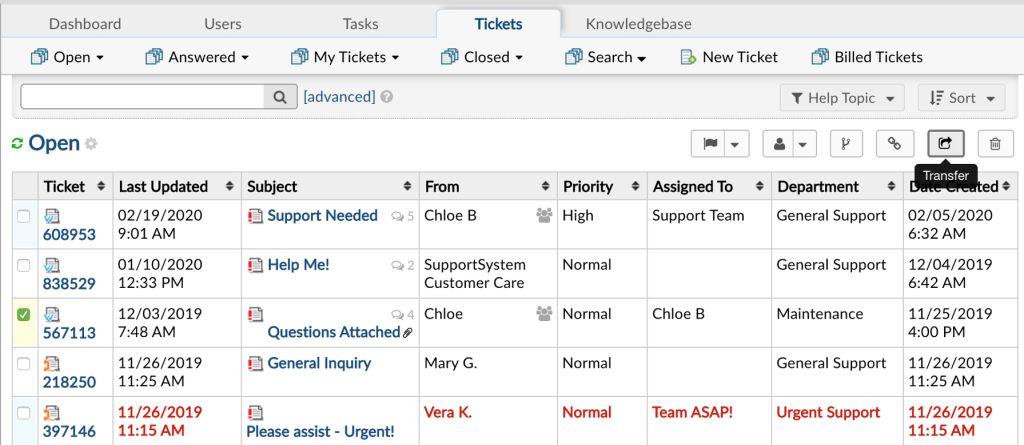
The tradeoff was time. Getting auto-assign routing and the customer portal set up correctly took a full weekend, and the interface still feels a generation behind newer tools once you’re used to it.
osTicket is the right call if self-hosting and full data control matter more to your team than a polished UI. Our osTicket alternatives guide is worth a look if you decide the self-hosting tradeoff isn’t for you after all.
Pros:
- Self-hosted version is free and open source with unlimited agents
- Cloud-hosted option adds managed uptime, backups, and support
- Custom fields, ticket filters, and SLA management support complex workflows
- Auto-assign routing sorts tickets by content automatically
Cons:
- Self-hosting requires real server management and technical skill
- No native AI features for reply drafting or intent detection
Pricing:
Starts at $0/user/month (self-hosted). Cloud-hosted plans start at $12/user/month.
How Does osTicket Compare To HelpSpot?
Both tools offer a self-hosted deployment option, which is rare in this category. osTicket’s self-hosted version is free, while HelpSpot charges the same $29 per agent whether you self-host or use its cloud version. If self-hosting is the priority and budget is tight, osTicket is the more direct trade.
9. Front – Best For Collaborative Shared Inboxes
Front found its way into my toolkit when a client-facing team needed tighter coordination on a high-volume shared inbox than a plain email client could offer. Comments, assignments, and drafts sitting right inside each email thread made handoffs between teammates much cleaner.
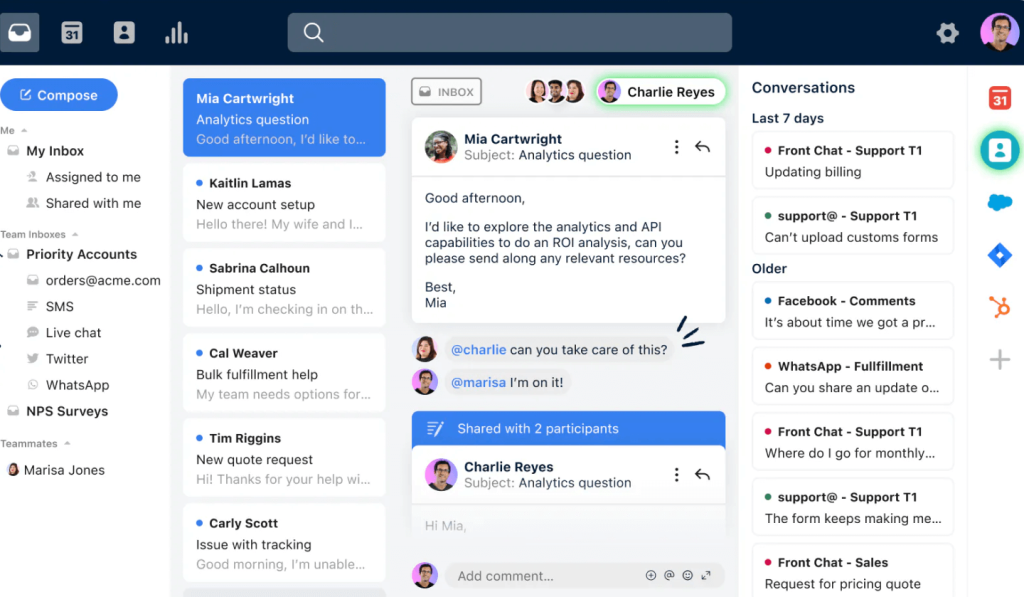
The CRM integrations were the real surprise. Connecting Front to Salesforce meant agents could see full customer context without switching tabs, which mattered a lot for a team that split time between sales and support.
Front works best for teams that live in email and want a collaboration layer on top of it, more than it works as a pure ticketing replacement for HelpSpot. See our Front alternatives breakdown if collaboration isn’t your main need.
Pros:
- Shared inbox layers comments, assignments, and collaboration onto email
- Deep CRM integrations with Salesforce and HubSpot
- Analytics track workload balance and SLA adherence
- Strong fit for client-facing teams coordinating on high email volume
Cons:
- No free plan, only a 14-day trial
- AI add-ons and higher tiers increase cost quickly
Pricing:
Starts at $25/user/month.
How Does Front Compare To HelpSpot?
Front leans more toward internal team collaboration on email, while HelpSpot stays focused on converting support requests into trackable tickets. Front costs less to start than HelpSpot but climbs past it quickly once a team adds AI add-ons or moves to the Professional tier.
Evaluation Criteria
Whenever I put together a list like this one, I run every tool through the same process so the ranking reflects real usability, not just which vendor has the flashiest pricing page. Here are the six factors I weighed for every HelpSpot alternative above:
- User Reviews / Ratings: I read through what real users say on G2, Capterra, and TrustRadius, since direct feedback from buyers tells me more about day-to-day friction than any spec sheet does.
- Essential Features & Functionality: I looked past the marketing page and dug into what each tool’s ticketing, automation, and AI features actually do in practice.
- Ease of Use: I paid close attention to how quickly a new agent could get productive, since a clean interface saves real onboarding time.
- Customer Support: I checked how each vendor’s own support team performed during setup, and how well they handled questions once I was actually using the product.
- Value for Money: I compared what each tool delivers against its price at real team sizes, not just the cheapest entry-level tier. If budget is your main constraint, our free help desk software roundup is worth a look too.
- Personal Experience / Expert Opinions: I leaned on my own hands-on time running tickets through each platform, alongside what other support and IT professionals have shared in reviews and forums.
FREE. All Features. FOREVER!
Try our Forever FREE account with all premium features!
My Top 3 Picks For The Best HelpSpot Alternative
If you only read one section of this guide, read this one. These three tools cover the most common reasons teams go looking for a HelpSpot alternative in the first place.
1. ProProfs Help Desk
ProProfs Help Desk is my top pick for teams that want AI-powered ticket resolution without paying extra for every capability. The AI Agent decodes customer intent and mood, drafts personalized replies, and the shared inbox setup took me minutes, not days. Start with the free plan and upgrade only once your team actually needs more seats.
2. Zoho Desk
Zoho Desk is the pick for teams that want the lowest possible entry price and are willing to grow into the higher tiers for deeper AI and multi-channel features. Its free plan and bundled generative AI make it a genuinely budget-friendly starting point, especially if you’re already using other Zoho products.
3. Spiceworks
Spiceworks rounds out my top three for internal IT teams with a hard $0 budget. It won’t give you AI-powered replies or omnichannel support, but for pure ticketing and asset tracking at no cost, it’s hard to beat.
Switch To A HelpSpot Alternative That Cuts Costs And Adds AI
Switching away from HelpSpot usually comes down to wanting more from your help desk, whether that’s a smarter AI agent, an extra channel like live chat, or simply ticket management that doesn’t creep up in price with every feature you add. Map your current ticket volume, the channels your customers actually use, and how much AI matters to your workflow before you commit to anything.
If AI-powered replies, a shared inbox, and pricing that doesn’t punish you for growing sound like what your team needs, ProProfs Help Desk is worth trying free before you look at anything else on this list. Pair it with help desk automation to cut manual sorting, and track resolution quality with a customer satisfaction survey once the switch is done.
Frequently Asked Questions
What is the best free alternative to HelpSpot?
Spiceworks Cloud Help Desk offers a genuinely free Core plan for internal IT teams, while osTicket is free if you're comfortable self-hosting. ProProfs Help Desk also offers a forever-free plan for single-agent teams.
Is ProProfs Help Desk cheaper than HelpSpot?
Yes. ProProfs Help Desk starts free for one agent and moves to $19.99 per agent per month, compared to HelpSpot's flat $29 per agent per month across every tier.
Does HelpSpot have AI features?
HelpSpot includes basic AI for auto-categorization, translation, and writing assistance. It doesn't include an AI agent that decodes customer intent and mood or drafts full replies.
Can I migrate my tickets from HelpSpot to another help desk?
Most help desk platforms, including ProProfs Help Desk, Freshdesk, and Zoho Desk, support ticket imports through CSV or API. Read through a help desk migration checklist and back up your HelpSpot data before starting.
Which HelpSpot competitor is best for small teams?
ProProfs Help Desk fits small teams well since its free plan supports a single agent with real features. For a broader comparison, our best help desk software for small businesses guide covers more options.
Is HelpSpot good for IT service desks?
HelpSpot works for IT service desks that only need email-based ticketing, but it lacks the built-in asset management that tools like HappyFox and Spiceworks offer natively.
Does HelpSpot offer a self-hosted version?
Yes. HelpSpot can be deployed as a cloud or self-hosted product at the same $29 per agent per month price. osTicket is the free self-hosted alternative if budget is the priority.
How much do HelpSpot alternatives cost per agent?
Pricing ranges from free for Spiceworks and self-hosted osTicket to over $100 per agent per month for Zendesk's higher tiers. ProProfs Help Desk starts at $19.99 per agent per month with AI included.
FREE. All Features. FOREVER!
Try our Forever FREE account with all premium features!

 We'd love your feedback!
What did you like & how can we make it even better?
 Thanks for your feedback!
 Ask Your Question
Have a question? Get expert help to make your decision easier.