
If you’re comparing SupportPal alternatives, you’re probably running into one of two walls: the self-hosted setup is starting to feel like a part-time job, or you want AI baked into your ticketing system instead of bolted on later. Either way, you’re in the right place. SupportPal does a good job as a flat-rate, self-hosted help desk, but it wasn’t built with AI-first ticket resolution in mind, and running your own server isn’t for everyone.
I’ve spent time testing help desk software for support teams of every size, from single-agent startups to enterprise IT departments, and this list reflects real usage, not just spec sheets. ProProfs Help Desk tops this list because it gives you AI-powered replies, a shared inbox, and automation without asking you to touch a server, but I’ve included open-source and self-hosted picks too, since not every team wants the same thing SupportPal offers minus the maintenance.
By the end of this guide, you’ll know exactly which SupportPal competitor fits your team, whether that’s a free open-source ticketing system, a self-hosted shared inbox, or an AI-first cloud help desk that gets your team up and running the same day.
Why Do You Need a SupportPal Alternative?
SupportPal works well for teams that specifically want self-hosted, flat-rate ticketing, but most teams hit a ceiling sooner than they expect. Here are the most common reasons teams start looking elsewhere:
- Server Maintenance Becomes A Part-Time Job: Self-hosted software means your team owns every update, backup, and security patch. That’s a real, ongoing cost even when the license itself is cheap. If you’d rather not manage infrastructure at all, a cloud-based help desk removes that responsibility entirely.
- No Built-In AI Ticket Resolution: SupportPal doesn’t ship with AI-powered reply generation, sentiment detection, or an AI agent, capabilities that are now standard on several competitors.
- Limited Social Channel Coverage: SupportPal’s integrations with social media platforms are thinner than what cloud-first competitors offer, which matters if your customers reach out beyond email.
- Per-Brand Pricing Can Surprise You: SupportPal charges based on the number of brands you support rather than a flat unlimited-agent fee, which can catch growing teams off guard as they scale.
- Confusing SLA Changes: Past product updates split “Due Time” into separate reply and resolution timers, which several long-time users found disruptive to existing workflows. Teams that rely heavily on service-level tracking may want to review their SLA management setup before switching tools.
A study by Gartner in 2026 predicts that 85% of customer service interactions will be handled without a human agent involved, which is one reason so many teams are prioritizing AI-native help desks over self-hosted tools that don’t have AI built in. Support teams don’t want to bolt AI onto an old ticketing system later. They want it there from day one.
What Are The Best SupportPal Alternatives In 2026?
Here’s the shortlist. Whether you want a cloud-based AI help desk, a free open-source ticketing system, or a lightweight self-hosted inbox, one of these seven SupportPal competitors should fit.
| Tool | Best For | Pricing |
| ProProfs Help Desk | Easiest AI Help Desk for Shared Inboxes, Ticket Workflow Automation, and Scaling Support Teams | A free plan is available for growing teams. Paid plan starts at $19.99 /month. |
| Freshdesk | Multi-Channel Ticketing With Freddy AI Copilot Add-Ons | Free plan available; paid plans start at $15/agent/month |
| Zendesk | Enterprise-Grade Omnichannel Support at Scale | No free plan; starts at $19/agent/month (ticketing only) |
| osTicket | Free, Self-Hosted Ticketing With Full Data Control | Free open source (self-hosted); cloud from $12/agent/month |
| Zammad | Modern Open-Source Help Desk With Rich Integrations | Free open source (self-hosted); cloud from €5/agent/month |
| HelpSpot | Simple Self-Hostable Help Desk With Flat Pricing | From $699/year for 3 agents (all features included) |
| LiveAgent | Budget-Friendly Omnichannel Support With a Built-In Call Center | Starts at $15/agent/month |
1. ProProfs Help Desk – Easiest AI Help Desk for Shared Inboxes, Ticket Workflow Automation, and Scaling Support Teams
ProProfs Help Desk is what I currently use when I need a ticketing system that doesn’t require a technical setup or a dedicated server. I log in, and every customer email lands in a shared inbox that looks and feels like Gmail, so my team doesn’t need training to get started. What I like most is the AI Response Refiner: if a drafted reply isn’t quite right, I just type out what needs to change, “add the refund timeline,” “make it shorter,” and it rewrites the reply on the spot instead of me starting over.
Setting up automation rules took me less time than I expected. I can route tickets by round robin, trigger canned responses for repeat questions, and create child tickets when a request needs input from two teams. ProProfs Chat also plugs into the same system, so live conversations that go unresolved convert straight into tickets without losing context. The reporting dashboard shows me exactly where tickets are getting stuck, which has helped me cut our average resolution time without adding headcount.
What really sold me on ProProfs Help Desk over a self-hosted tool like SupportPal is that I never think about servers, patches, or backups. It’s genuinely one of the more affordable ways to get an AI-powered help desk, and the free forever plan means a single-agent team can try the real product, not a stripped-down demo, before paying anything. I’ve also started leaning on ProProfs Knowledge Base to handle repeat questions before they ever become tickets, which has quietly cut down our incoming volume.
Pros:
- Decodes customer intent and mood before an agent even opens the ticket
- Generates personalized AI replies based on customer history and knowledge base content
- Shared inbox handles multiple addresses (support@, billing@, help@) in one dashboard
- Child ticket feature lets multiple teams collaborate without losing context
- Free forever plan available for single-agent teams with no feature-stripped catch
Cons:
- No downloadable or on-premise version
- Dark user interface option not available
How Does ProProfs Help Desk Compare to SupportPal?
ProProfs Help Desk removes the biggest reason teams start looking for a SupportPal alternative in the first place: server maintenance. There’s no infrastructure to patch, back up, or secure, since it’s fully cloud-based, and setup takes minutes instead of a self-hosted install. It also closes the AI gap outright. Where SupportPal has no AI-powered reply generation, ProProfs Help Desk’s AI Agent decodes customer intent and mood, then drafts replies automatically. Pricing is also simpler: instead of SupportPal’s per-brand licensing, ProProfs Help Desk offers a free forever plan and straightforward per-agent pricing as you scale, with ticket automation included from the start rather than bolted on later.
Pricing:
A free plan is available for growing teams. Paid plan starts at $19.99 /month.
2. Freshdesk – Multi-Channel Ticketing With Freddy AI Copilot Add-Ons
I used Freshdesk for close to a year at a previous job, and it handled the basics of email, chat, and social ticketing without much friction. The interface felt familiar within a day, and the automation rules for assigning tickets by team saved my agents from manually sorting through a shared inbox every morning.
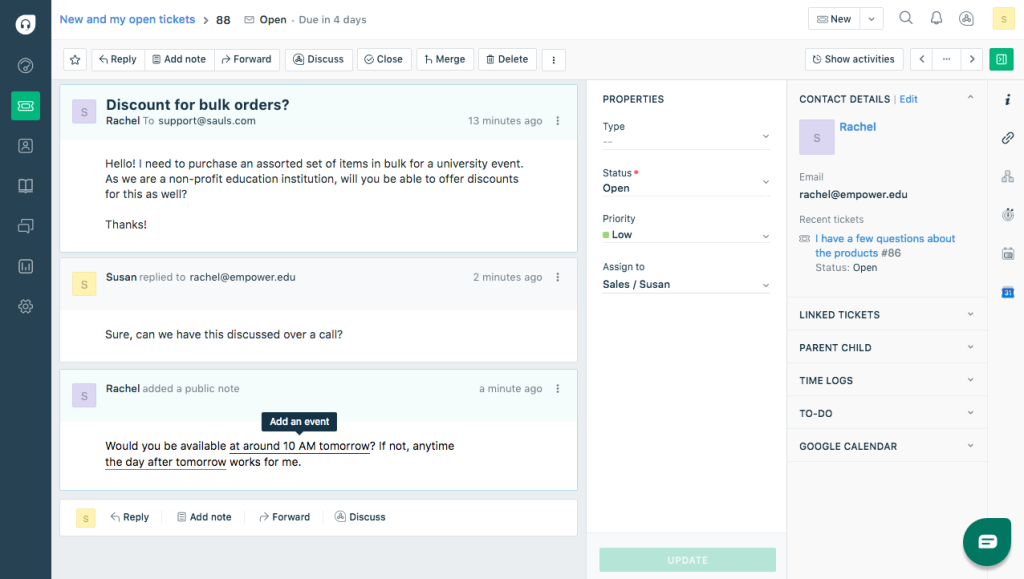
Where things got complicated was cost. Freddy AI Copilot wasn’t included in our base plan, so once we wanted AI-assisted replies, we had to add a separate per-agent fee on top of what we already paid. The core ticketing plan was reasonably priced, but by the time we added AI and a few premium integrations, the bill looked very different from the number on the pricing page.
Freshdesk is still a capable SupportPal alternative if your team wants a cloud-based tool with a large app marketplace, but budget carefully if AI is part of the plan from day one.
Pros:
- Wide marketplace of third-party integrations and connector apps
- Automation rules cover ticket assignment, SLA tracking, and canned responses
- Free plan available for very small teams testing the platform
- Knowledge base module included for self-service support
Cons:
- Freddy AI Copilot is a separate paid add-on, not included in core plans
- Feature gaps between the Growth and Pro tiers push growing teams to upgrade early
How Does Freshdesk Compare to SupportPal?
Freshdesk is cloud-based, so your team skips the server maintenance that comes with SupportPal’s self-hosted setup entirely. Where SupportPal charges per brand, Freshdesk charges per agent, which is easier to forecast as your team grows. The bigger difference is AI: SupportPal doesn’t offer AI-powered replies at all, while Freshdesk at least offers Freddy AI Copilot, though only as a separate paid add-on rather than something built into the core plan. If you’re leaving SupportPal specifically to get AI without managing infrastructure, ProProfs Help Desk includes its AI Agent in the core plan, so you’re not paying extra just to get what SupportPal was missing in the first place.
Pricing:
Starts at $15/agent/month.
3. Zendesk – Best for Omnichannel Support
Zendesk was the help desk I inherited at an enterprise support role, and it handled a genuinely high ticket volume without buckling. The Suite plan brought email, chat, and social channels into a single workspace, and the reporting depth was better than anything else I’d used up to that point.
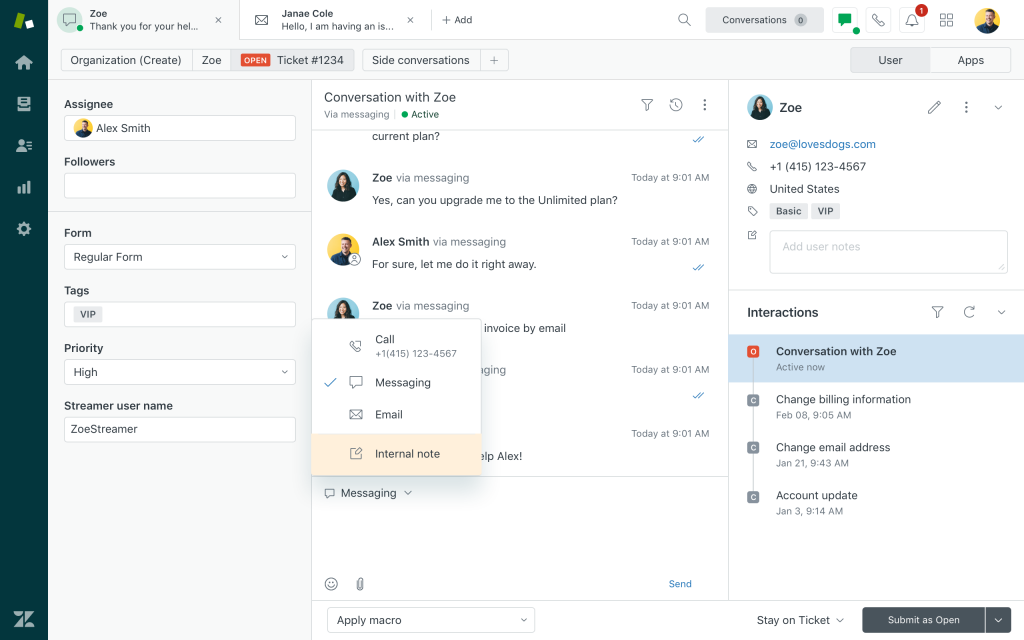
The tradeoff was cost. What started as a Suite Team plan quickly needed Copilot and Workforce Engagement add-ons to match what our support leadership wanted, and each of those came at a per-agent premium on top of the base subscription. For a large team, that adds up fast, and I found myself doing math on spreadsheets just to forecast next quarter’s software bill.
If your team needs enterprise-grade omnichannel support and has the budget for it, Zendesk remains a strong SupportPal competitor. For smaller teams, the AI-related add-on costs are worth comparing closely against ProProfs Help Desk, which bundles AI into its core plans.
Pros:
- Handles high ticket volumes reliably across email, chat, and social channels
- Deep reporting and analytics for support performance tracking
- Skills-based routing available on higher tiers for complex support queues
- Large ecosystem of apps and integrations
Cons:
- No free plan; entry-level Support Team plan covers ticketing only
- AI Copilot and Workforce Engagement are billed as separate add-ons
How Does Zendesk Compare to SupportPal?
Zendesk trades SupportPal’s flat-rate, self-hosted model for a cloud-based, per-agent subscription with far deeper omnichannel and reporting capabilities. That’s a real upgrade if your team has outgrown SupportPal’s social channel limitations, but it comes at a cost: Zendesk’s entry plan covers ticketing only, and AI Copilot and Workforce Engagement are billed as separate add-ons on top. So while you’re solving SupportPal’s server problem, you may be trading it for a different budgeting headache. ProProfs Help Desk keeps omnichannel support and AI-powered replies in one plan, which is worth comparing before you commit to Zendesk’s tier structure.
Pricing:
Starts at $19/agent/month.
4. osTicket – Best for Self-Hosted Ticketing
I set up osTicket for a nonprofit that needed a ticketing system with zero licensing cost, and it delivered exactly that. Once it was installed on our server, it handled email piping, custom ticket fields, and SLA rules without any recurring fee, which mattered a lot for an organization working with a tight budget.
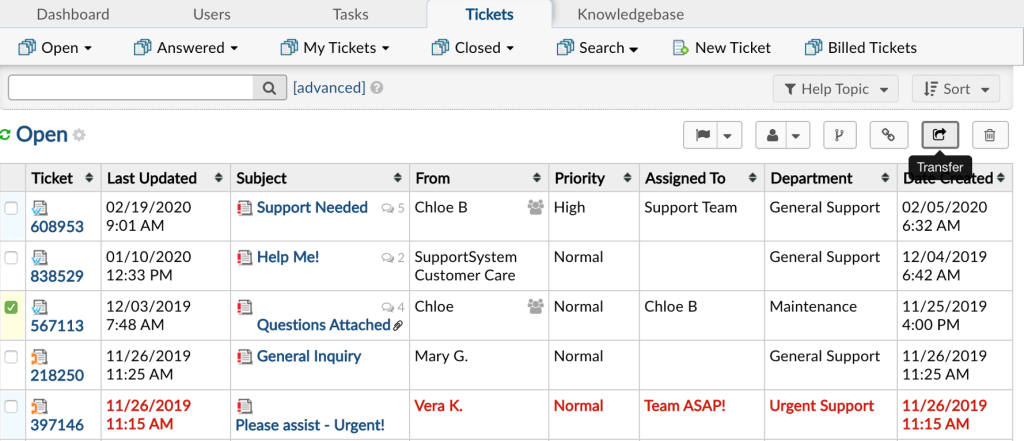
The interface felt dated compared to newer cloud tools, and getting it fully configured took more technical effort than I expected from a small team without a dedicated IT person. That said, once it was running, it was dependable, and the documentation online meant most problems we hit had already been solved by someone else in the community.
osTicket is a good SupportPal alternative if you specifically want free, self-hosted ticketing and don’t mind a more utilitarian interface in exchange for zero license cost.
Pros:
- Completely free and open source with no per-agent licensing fees
- Well-documented with a large, active user community
- Custom fields and forms support complex ticket workflows
- Battle-tested across thousands of self-hosted deployments
Cons:
- Interface feels dated compared to modern cloud-based help desks
- No built-in AI features for reply generation or ticket triage
How Does osTicket Compare to SupportPal?
osTicket and SupportPal are the closest cousins on this list. Both are self-hosted, both put server maintenance on your team, and neither ships with AI-powered ticket resolution. The real difference is cost: osTicket is fully free and open source, while SupportPal charges a flat license fee per brand. If you’re moving away from SupportPal purely to cut licensing costs and don’t mind the same infrastructure trade-off, osTicket is a reasonable lateral move. But if server upkeep was part of why you wanted to switch in the first place, neither tool solves that, and a cloud-based option like ProProfs Help Desk removes the maintenance question entirel
Pricing:
Free open source (self-hosted); managed cloud from $12/agent/month
5. Zammad – Modern Open-Source Help Desk With Rich Integrations
I moved a small IT support team from a spreadsheet-based system to Zammad and was surprised by how modern the interface felt for an open-source tool. It’s essentially what I’d describe as osTicket redesigned for 2026, with a cleaner ticket view and native support for email, chat, and social channels in one queue.
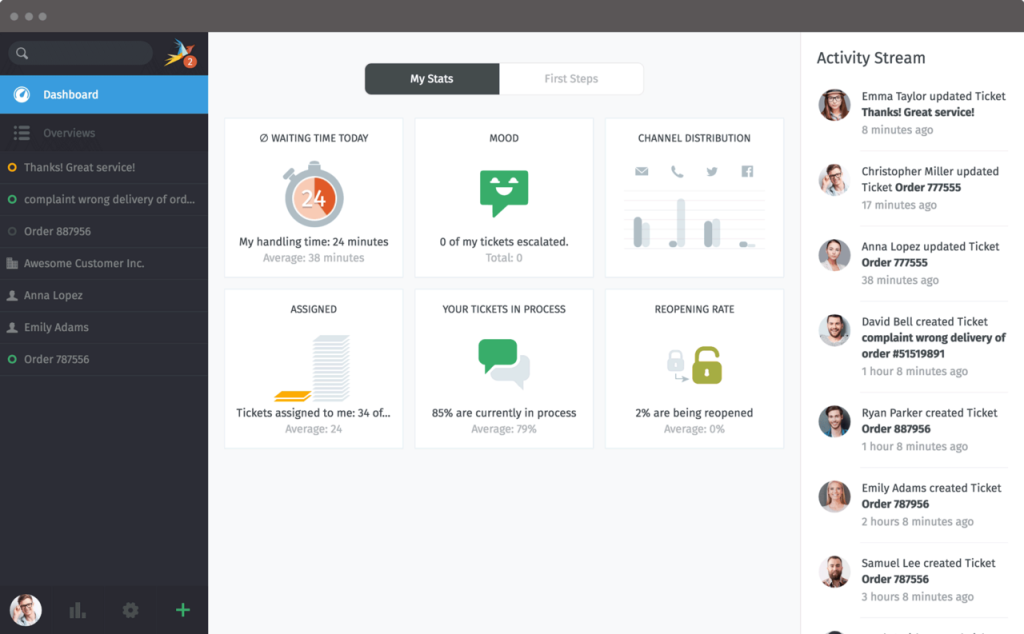
Setup required more server resources than the lightest tools on this list, and my team spent a weekend getting LDAP and SSO configured correctly. Once that was done, though, the day-to-day experience was smooth, and the built-in integrations meant we didn’t need as many third-party plugins as osTicket required.
If you want an open-source SupportPal alternative that doesn’t look like it’s stuck in 2015, Zammad is the strongest pick on this list for that specific need.
Pros:
- Modern, actively developed interface among open-source help desks
- Strong LDAP, SSO, and API support for technical teams
- Merges email, chat, and social channels into a single queue
- Free to self-host with a paid hosted plan available
Cons:
- Requires more setup time and system resources than lighter tools
- No native AI-powered reply generation
How Does Zammad Compare to SupportPal?
Zammad is also self-hosted like SupportPal, so you’re not escaping server management by switching to it, but you are getting a noticeably more modern interface and native support for merging email, chat, and social channels into one queue, something SupportPal’s social integrations don’t handle well. Neither tool includes AI-powered reply generation out of the box. If your main complaint with SupportPal is that it feels dated and your team has the technical bandwidth to manage LDAP and SSO setup, Zammad is a solid step up. If you’d rather skip server management altogether, that’s where ticket automation on ProProfs Help Desk comes in, since it’s live within minutes with no infrastructure to maintain.
Pricing:
Free open source (self-hosted); cloud plans from €5/agent/month.
6. HelpSpot – Simple Self-Hostable Help Desk With Flat Pricing
I used HelpSpot at a small agency that wanted the data control of self-hosting without managing an open-source project ourselves. Since it’s commercially backed, we had a vendor to call when something broke, which was a meaningful difference from the community-only support model of osTicket.
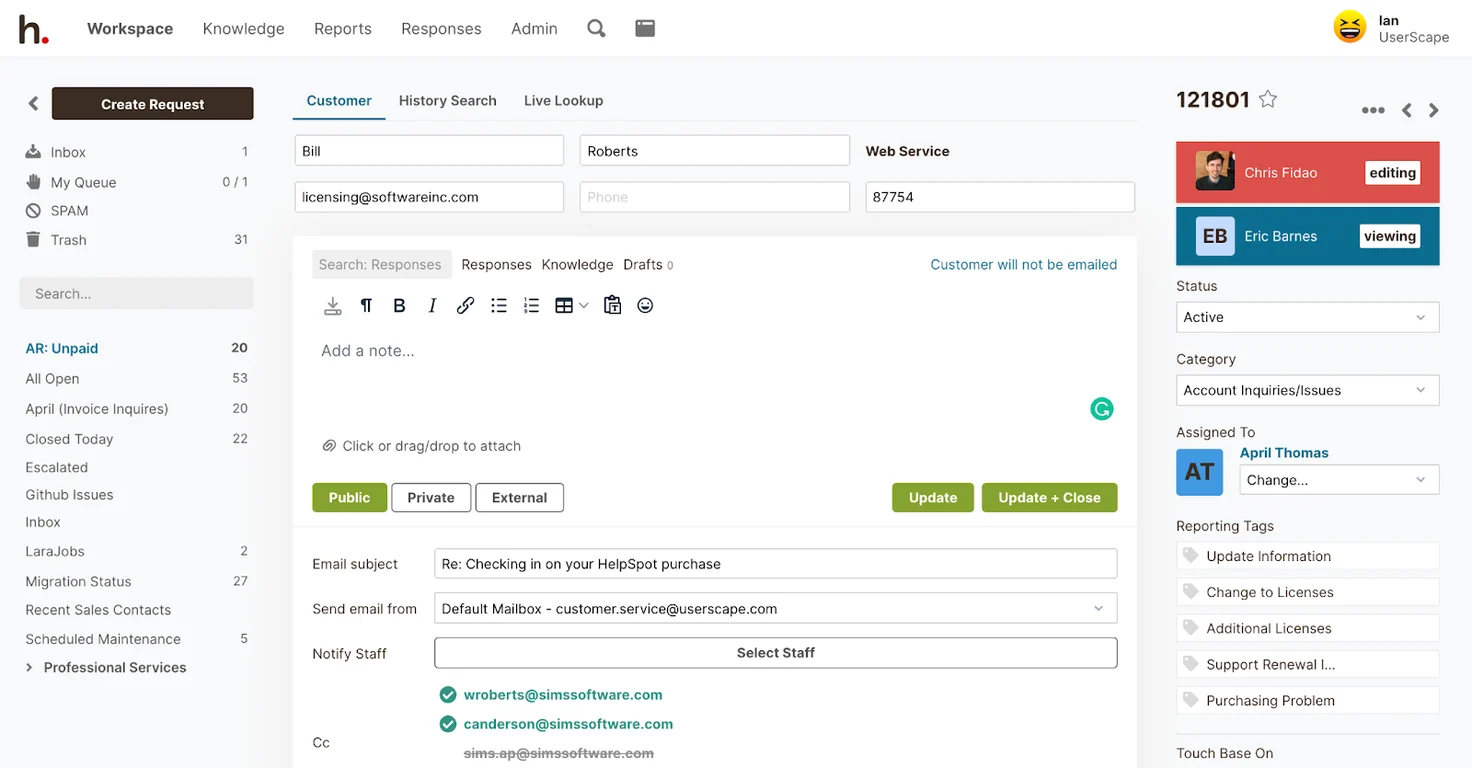
The feature set was intentionally lean. We didn’t get the same channel breadth as a cloud-first tool, but for straightforward email-based support with occasional web form tickets, it did the job without unnecessary complexity. The flat annual pricing also made budgeting simple since it didn’t scale per agent.
HelpSpot is worth considering if you want the middle ground between pure open source and a fully managed SaaS help desk, with a real support team behind the product.
Pros:
- Vendor-backed support instead of relying solely on community forums
- Can be self-hosted or run on the vendor’s cloud
- Straightforward setup without excessive configuration
- Useful automation and reporting for small support teams
Cons:
- No AI-powered ticket resolution or reply generation
- Smaller integration ecosystem than Freshdesk or Zendesk
How Does HelpSpot Compare to SupportPal?
HelpSpot and SupportPal both offer flat, predictable pricing instead of Zendesk or Freshdesk’s per-agent model, which appeals to teams that don’t want cost scaling unpredictably with headcount. The difference is support: HelpSpot is commercially backed, so you have a vendor to call when something breaks, whereas SupportPal’s self-hosted setup leans more on your own team or community resources. Neither includes AI-assisted replies. If flat pricing is the main reason you liked SupportPal but you want a vendor behind the product, HelpSpot is worth a look, though it’s still missing the AI layer that’s now standard on tools like ProProfs Help Desk.
Pricing:
Starts at $699/year.
7. LiveAgent – Budget-Friendly Omnichannel Support With a Built-In Call Center
I ran LiveAgent for an e-commerce support team that needed email, chat, and phone support without three separate subscriptions. The unified ticket view worked well, and having a built-in call center meant we didn’t need to bolt on a third-party VoIP tool just to handle phone tickets.
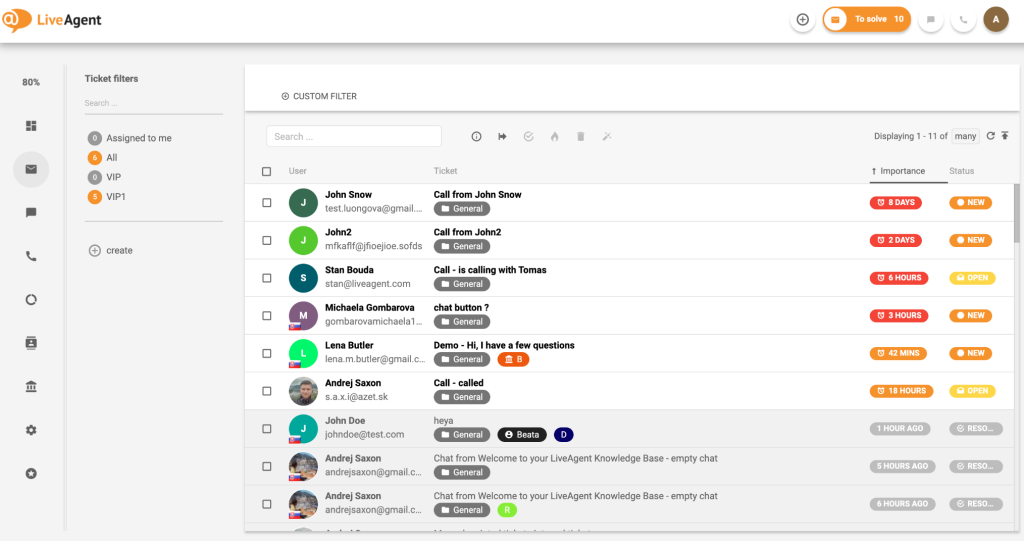
Where I ran into friction was social media channels. Adding Instagram support pushed us into a higher tier faster than I expected, since Instagram required Facebook as a prerequisite add-on. If your support mix is mostly email and chat, the entry plan is genuinely affordable, but channel-heavy teams should map out their needs before committing to the smallest plan.
LiveAgent is a solid SupportPal alternative for teams that want phone support bundled in without paying enterprise prices for it.
Pros:
- Built-in call center and IVR without a separate phone system
- Affordable entry-level plan for small support teams
- AI Answer Assistant included even on the base plan
- Unified ticket view across email, chat, and phone
Cons:
- Social media channel add-ons can push costs above the next full tier
- Mobile app has been noted as dated by several long-time users
How Does LiveAgent Compare to SupportPal?
LiveAgent moves you off SupportPal’s self-hosted, per-brand pricing model entirely, replacing it with a cloud-based, per-agent subscription that includes a built-in call center, something SupportPal doesn’t offer at all. It also includes a basic AI Answer Assistant on its base plan, which is more than SupportPal provides out of the box. The catch is that LiveAgent’s social channel add-ons, particularly Instagram, can push your bill toward its top tier faster than expected. If phone support is a must-have, LiveAgent is a strong option; if not, ProProfs Help Desk covers omnichannel support and AI-drafted replies at a more predictable cost.
Pricing:
Starts at $15/agent/month.
Evaluation Criteria
The evaluation of products or tools chosen for this article follows an unbiased, systematic approach that ensures a fair, insightful, and well-rounded review. This method employs six key factors:
- User Reviews / Ratings: Direct experiences from users, including ratings and feedback from reputable sites like G2 and Capterra, provide a ground-level perspective. This feedback is critical in understanding overall satisfaction and potential problems.
- Essential Features & Functionality: The value of a product is ascertained by its core features and overall functionality. Through an in-depth exploration of these aspects, the practical usefulness and effectiveness of the tools are carefully evaluated.
- Ease of Use: The user-friendliness of a product or service is assessed, focusing on the design, interface, and navigation. This ensures a positive experience for users of all levels of expertise.
- Customer Support: The quality of customer support is examined, taking into account its efficiency and how well it supports users in different phases, including setting up, addressing concerns, and resolving operational issues.
- Value for Money: Value for money is evaluated by comparing the quality, performance, and features. The goal is to help the reader understand whether they would be getting their money’s worth.
- Personal Experience / Experts’ Opinions: This part of the evaluation criteria draws insightful observations from the personal experience of the writer and the opinions of industry experts.
My Top 3 Picks for a SupportPal Alternative
If you only read one section of this guide, read this one. These three SupportPal alternatives cover the most common reasons teams are searching for a switch in the first place.
1. ProProfs Help Desk
ProProfs Help Desk is our top pick for teams that want AI-powered ticket resolution without touching a server. The AI Agent decodes customer intent and mood, drafts personalized replies, and the shared inbox setup takes minutes, not days. A study by Salesforce in 2026 found that agent burnout from repetitive queries is the top retention challenge for 61% of support managers, and offloading repetitive replies to an AI Agent is a direct way to address that. Start with the free forever plan and upgrade only once your team actually needs more seats.
2. Zammad
Zammad is our pick for teams that specifically want an open-source, self-hosted tool but don’t want the dated interface that comes with older options. It’s the closest thing to a modern version of what SupportPal offers, minus the commercial license fee, provided your team has the technical bandwidth to manage the server.
3. Freshdesk
Freshdesk rounds out our top three for teams that want a large app marketplace and don’t mind paying for AI as a separate add-on. It suits support operations already invested in a wide integration ecosystem and looking for a cloud-first alternative to SupportPal’s self-hosted model.
FREE. All Features. FOREVER!
Try our Forever FREE account with all premium features!
Start Resolving Tickets Faster with the Right Help Desk
Switching away from SupportPal usually comes down to one thing: you want less server maintenance and more automation, without losing the control you had before. Every type of help desk software on this list solves that differently, whether through open-source flexibility, enterprise-grade channels, or AI baked into the core product.
Before you commit, map your actual ticket volume, channel mix, and how much time your team spends on repetitive replies. That’s the fastest way to tell whether a self-hosted tool like osTicket or Zammad fits, or whether an AI-first cloud tool will save your team more time in practice.
If AI-powered replies, a shared inbox, and zero server maintenance sound like what you need, ProProfs Help Desk is worth trying free before you commit to anything else on this list. Pair it with a knowledge base for self-service deflection, and a customer satisfaction survey tool to track how your resolution quality holds up after the switch.
Frequently Asked Questions
What Is the Best Free Alternative to SupportPal?
osTicket and Zammad are both free, open-source, and self-hosted, making them the closest free equivalents to SupportPal's model. If you want a free plan without self-hosting, ProProfs Help Desk offers a forever-free tier for single-agent teams.
Is ProProfs Help Desk Cheaper Than SupportPal?
ProProfs Help Desk starts free for one agent and moves to $19.99/agent/month after that, with no server costs to factor in. SupportPal's license is flat-rate but self-hosted, so total cost depends on your own hosting and maintenance expenses.
Do SupportPal Alternatives Offer AI Ticket Resolution?
Yes, several do. ProProfs Help Desk includes an AI Agent that decodes intent and mood and drafts replies, while Freshdesk and Zendesk offer AI as separate paid add-ons. SupportPal does not currently include built-in AI ticket resolution.
Can I Migrate Tickets from SupportPal to Another Tool?
Most help desk platforms, including ProProfs Help Desk, Freshdesk, and Zendesk, support ticket data imports via CSV or API. Migration complexity depends on your ticket volume and custom fields, so back up your SupportPal data and review ahelp desk migration checklist before starting any switch.
What Is the Best Self-Hosted Alternative to SupportPal?
Zammad is the best self-hosted alternative if you want a modern interface, while osTicket suits teams that want the most established, free open-source option. Both give you the same server-level data control SupportPal offers.
Which SupportPal Competitor Is Best for Small Teams?
ProProfs Help Desk fits small teams well since its free plan supports a single agent with real features, not a stripped-down trial. LiveAgent is also a budget-friendly pick if phone support is part of your workflow.
Is Zendesk a Good Alternative to SupportPal?
Zendesk is a strong alternative for enterprise teams that need omnichannel support at scale, though it costs more than SupportPal once you add AI and workforce add-ons. Smaller teams may find better value in ProProfs Help Desk or Freshdesk.
How Much Do SupportPal Competitors Cost Per Agent?
Pricing spans free and open source (osTicket, Zammad) to $89/agent/month for enterprise tiers (Freshdesk, Zendesk). ProProfs Help Desk sits in the middle at $19.99/agent/month after its free plan, without added server costs.
FREE. All Features. FOREVER!
Try our Forever FREE account with all premium features!

 We'd love your feedback!
What did you like & how can we make it even better?
 Thanks for your feedback!
 Ask Your Question
Have a question? Get expert help to make your decision easier.