

Travel help desk software is a shared ticketing and communication tool built for trip related support work such as booking changes, cancellations, refunds, and supplier escalations. It pulls email, chat, and social requests into one queue so travel agencies, tour operators, and OTAs can respond before a deadline passes, not after.
Picture a traveler emailing at 11 p.m. because their connecting flight got cancelled and they need a hotel voucher before their layover ends. That email lands in the same inbox as a routine “can I get an invoice copy” request. A study by Netomi in 2025 found that hospitality companies and travel agencies take an average of 12.5 hours to reply to a support email, while airlines average 16.3 hours. Without a system built to sort urgency from routine, the traveler stuck at the airport waits behind the invoice request, and that’s how a five-star trip turns into a refund dispute.
Below, I’ve rounded up the 10 best travel help desk software tools out there right now, based on pricing, real user ratings, and how well each one actually handles the deadline-driven side of travel support, so you can find the fit that matches your team’s size and budget.
What Is Travel Help Desk Software?
Travel help desk software centralizes booking related support requests, whether they arrive by email, live chat, WhatsApp, or a web form, and organizes them by urgency instead of just arrival time. Unlike generic help desk software built for IT or retail, it’s built around the idea that a ticket tied to a departure in two hours matters more than one tied to a departure in two weeks.
The category sits next to, but separate from, the booking engine and back-office accounting software a travel company already runs. It doesn’t process payments or manage inventory. It manages the conversation around a booking: the follow up email, the cancellation request, the supplier escalation, and the eventual resolution.
You’ll also see this category called a travel service desk, a travel ticketing system, or simply a shared inbox for travel support. All three describe roughly the same job, though “help desk” and “ticketing system” tend to imply more structure (queues, SLAs, routing rules), while “shared inbox” implies a lighter, email-first setup.
Top 10 Travel Help Desk Software Tools
Here’s how the ten most commonly recommended tools stack up on pricing, ratings, and what each one is genuinely best at. ProProfs Help Desk leads the list, followed by the established generalists most travel teams end up comparing it against. If you’d rather see the same comparison without the travel-specific lens, our broader best help desk software roundup covers that ground too.
| Tool | Best For | Pricing | User Rating (G2) |
| ProProfs Help Desk | Easiest AI Help Desk for Shared Inboxes, Ticket Workflow Automation, and Scaling Support Teams | A free plan is available for growing teams. Paid plan starts at $19.99/month. | 4.7/5 |
| Freshdesk | Established mid-market support teams | Starts at $19/user/month | 4.4/5 |
| Zendesk | Large, multi-channel support operations | Starts at $55/user/month | 4.3/5 |
| Zoho Desk | Teams already using Zoho CRM | Starts at $7/user/month | 4.4/5 |
| HappyFox | Multi-department ticketing (support + assets) | Starts at $24/user/month | 4.5/5 |
| Help Scout | Small teams that want an email-like inbox | Starts at $25/user/month | 4.4/5 |
| LiveAgent | Budget teams that also need phone support | Starts at $15/user/month | 4.5/5 |
| Hiver | Teams that live inside Gmail or Outlook | Starts at $19/user/month | 4.6/5 |
| Front | Collaborative, comment-based team inboxes | Starts at $25/user/month | 4.2/5 |
| Intercom | AI-heavy, high-volume support operations | Starts at $29/user/month | 4.5/5 |
1. ProProfs Help Desk – Easiest AI Help Desk for Shared Inboxes, Ticket Workflow Automation, and Scaling Support Teams
I keep ProProfs Help Desk open in a browser tab through the entire shift, because every booking-related email, chat, or form submission lands in one shared inbox the moment it comes in.
When a traveler writes in about a delayed refund, I don’t have to guess who’s handling it. Round robin assignment spreads new tickets across the team automatically, and if a request needs input from billing, I split it into a child ticket instead of losing the original thread. The built-in AI Agent reads a ticket’s intent and mood and drafts a reply in seconds, so I’m editing a response instead of writing one from scratch.
For a small support team juggling three or four booking platforms, ProProfs Help Desk gives travel support teams a simple, AI assisted shared inbox without the cost or complexity of an enterprise platform. Pairing it with ProProfs Knowledge Base has also cut down repeat questions about cancellation windows and baggage policy, since travelers can find the answer themselves before a ticket is even created.
Pros:
- AI Agent drafts and suggests replies by reading a ticket’s intent and mood
- Child ticket feature loops in another department without losing the original thread
- Round robin assignment spreads new tickets evenly during peak booking season
- Built-in CSAT surveys attach directly to closed tickets for a direct read on satisfaction
Cons:
- No downloadable or on-premise version
- Dark mode isn’t available yet
Pricing:
A free plan is available for growing teams. Paid plan starts at $19.99 /month.
2. Freshdesk – Best for Established Mid-Market Teams
Freshdesk was the first tool I moved to after outgrowing a shared Gmail inbox, mostly because the free program let me test it with two agents before committing to anything.
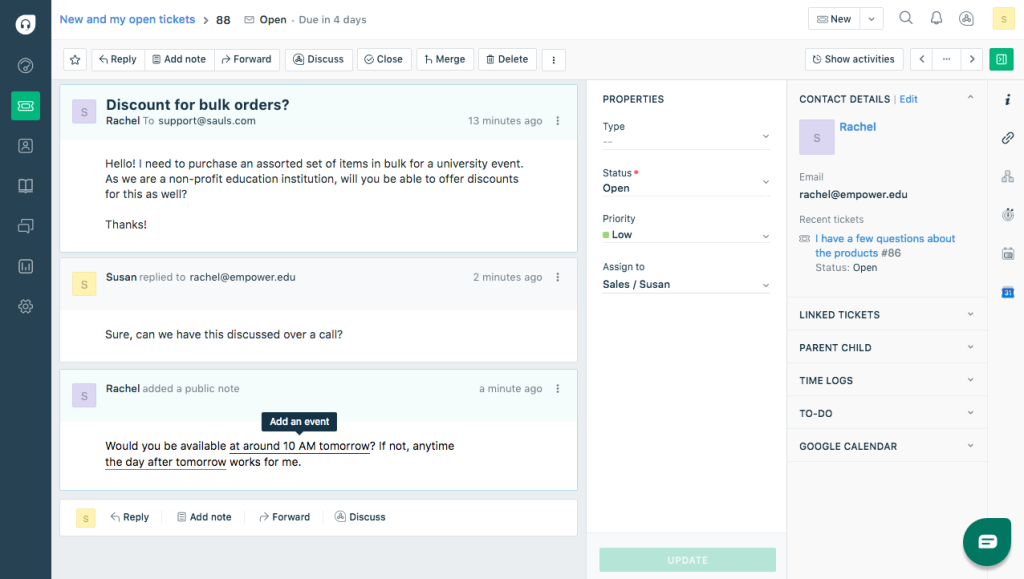
Freddy AI Copilot turned out to be genuinely useful once I turned it on. It summarized long email chains from repeat travelers, so I didn’t have to scroll through six back-and-forth messages just to understand the complaint when I picked up a ticket someone else had started.
Where Freshdesk started to feel expensive was the moment I needed live chat and social channels, since those live in the separate Freshdesk Omni product rather than the base ticketing plan I was already paying for.
Pros:
- Freddy AI Copilot summarizes long ticket threads for faster agent handoffs
- Field service module supports on-ground teams like airport reps or tour guides
- Deep marketplace with hundreds of ready-made integrations for CRMs and booking engines
- Multi-brand help center runs separate portals for different travel brands on one account
Cons:
- Freddy AI Copilot and AI Agent sessions bill separately from the base plan, so real monthly cost climbs fast
- Omnichannel features like live chat and voice sit in the pricier Freshdesk Omni line
Pricing:
Starts at $19/user/month.
3. Zendesk – Best for Large, Multi-Channel Operations
I brought in Zendesk when my support volume crossed a few thousand tickets a month and a spreadsheet-based system simply stopped working.
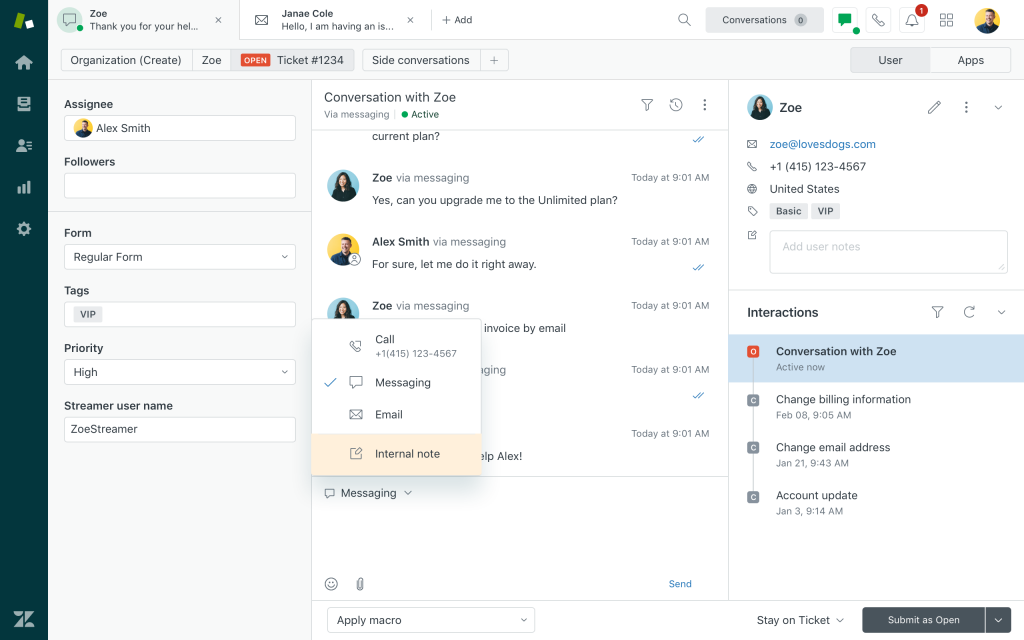
Explore, Zendesk’s reporting layer, ended up being the feature I leaned on most, since it broke down response time by business hours and by agent, which made performance reviews far less subjective.
The tradeoff was cost and setup time. Configuring triggers, views, and routing rules took me a few solid weeks, and pricing climbed quickly once I added AI and multiple channels.
Pros:
- Native voice, chat, email, and social channels sit inside one agent workspace
- Custom roles and sandbox environments support large, multi-department operations
- Wide app marketplace connects to nearly every major CRM and travel booking tool
- AI-powered triage tags and routes tickets automatically based on content and urgency
Cons:
- Entry pricing starts well above most competitors, and Enterprise pricing requires a sales quote
- Initial setup and configuration take real time and usually need a dedicated admin
Pricing:
Starts at $55/user/month.
4. Zoho Desk – Best for Teams Already on Zoho CRM
Zoho Desk made sense for me mainly because I was already running Zoho CRM, and the two synced without any real setup work.
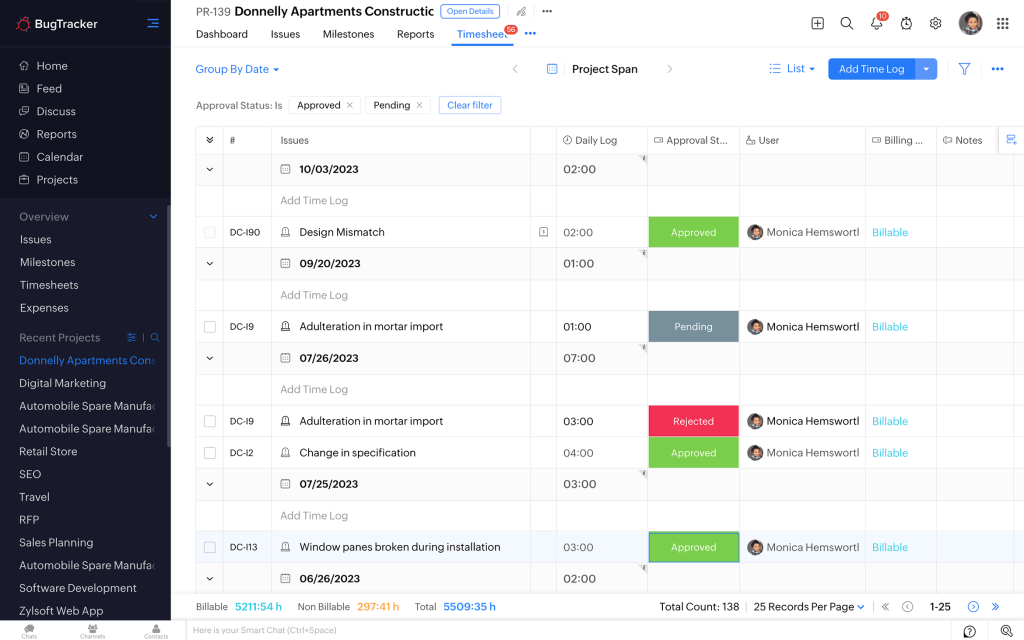
Zia, Zoho’s AI layer, drafted replies and flagged frustrated-sounding tickets automatically, and unlike a lot of competitors, that came bundled into my plan instead of showing up as a separate line item.
The one place it fell short was live chat, since that runs through a separate Zoho SalesIQ subscription rather than living natively inside Desk, which felt like an odd gap for a support tool.
Pros:
- Zia AI drafts replies and flags sentiment without a separate per-agent AI fee on most tiers
- Deep native integration with Zoho CRM, Analytics, and Projects for teams already in that ecosystem
- Blueprint workflows enforce a consistent, multi-step resolution process for complex booking disputes
- Multilingual help center supports international travelers in their own language
Cons:
- Live chat runs through the separate Zoho SalesIQ product rather than natively inside Desk
- Marketplace integrations outside the Zoho ecosystem are thinner than Zendesk or Freshdesk
Pricing:
Starts at $7/user/month.
5. HappyFox – Best for Multi-Department Ticketing
HappyFox came up in my search because a colleague at a car rental company recommended it for handling both customer tickets and internal asset requests in one place.
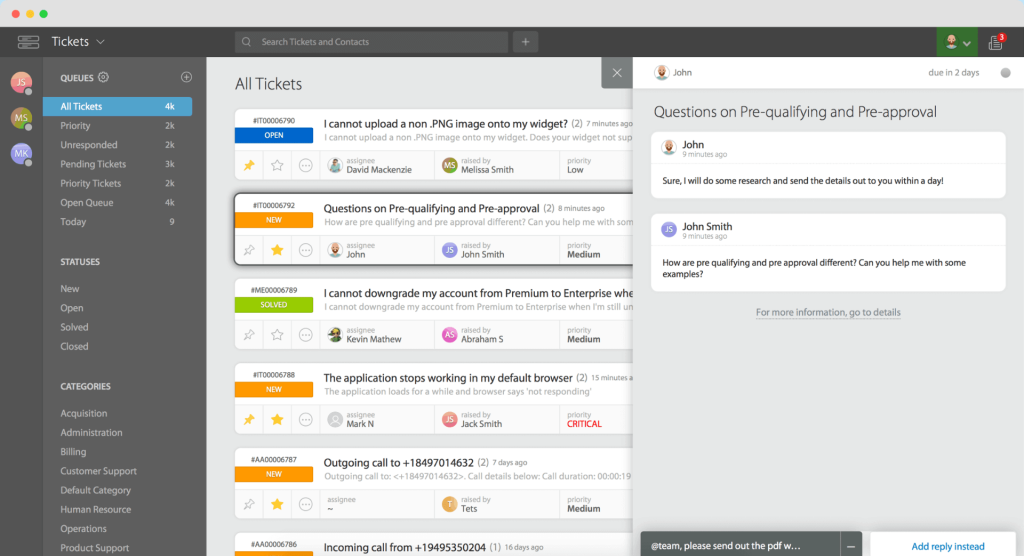
Smart Rules turned out to be the standout feature. I set up automation that flagged any ticket mentioning a departure date within 48 hours and pushed it straight to the top of the queue.
Reporting on the entry tier felt thin compared to what I eventually needed, and figuring out the pricing between the per-agent plans and the unlimited-agent tiers took more time than it should have.
Pros:
- Smart Rules automate ticket routing and repetitive replies without needing developer help
- Asset and task tracking modules suit tour operators managing equipment alongside tickets
- Built-in SLA tracking flags a ticket the moment it’s at risk of breaching a deadline
- SOC 2, GDPR, and HIPAA coverage suit larger travel and hospitality groups
Cons:
- Reporting feels basic on the entry tier and only opens up fully on higher plans
- Pricing across per-agent plans, unlimited tiers, and separate AI add-ons takes real time to compare
Pricing:
Starts at $24/user/month.
6. Help Scout – Best for Small, Email-First Teams
Help Scout won me over during the trial because it looked and felt exactly like a normal email inbox, which meant almost no training for new agents.
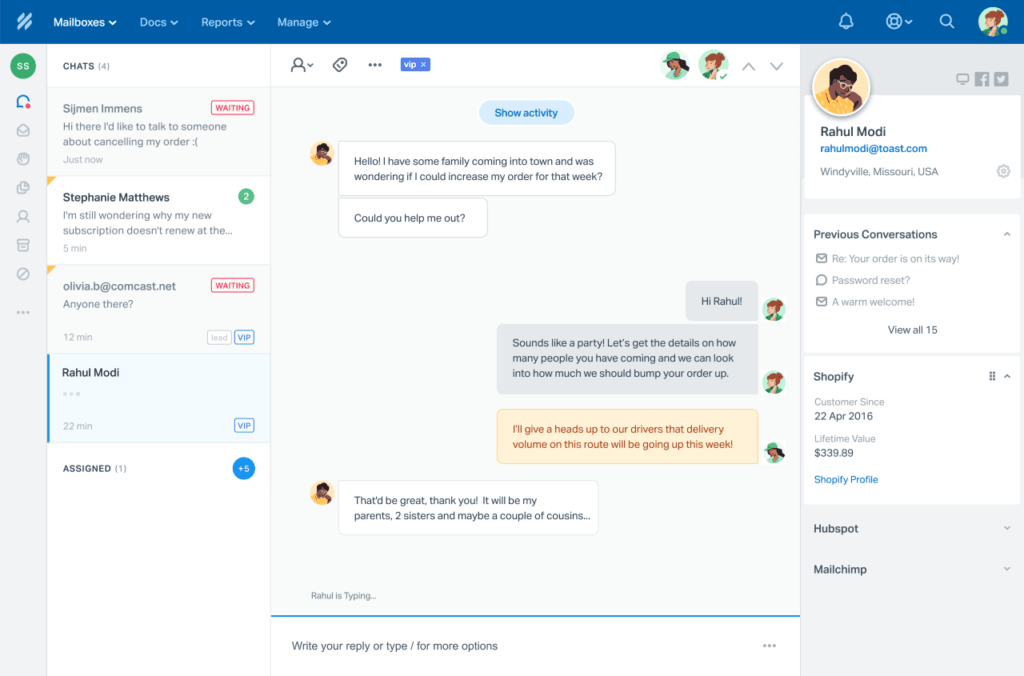
Docs, its help center feature, cut my incoming ticket volume noticeably once I published answers to the questions I got asked most, like refund windows and change fees.
The lack of native SLA management was the one gap that bothered me, since travel support really depends on catching a ticket before a deadline passes, and I ended up needing a separate app just for that.
Pros:
- Inbox reads like a normal email thread, so new agents are productive within a day
- Docs feature builds a self-service help center that can cut incoming ticket volume
- AI Drafts and AI Answers speed up both agent and customer-facing responses
- Beacon widget puts help content and live chat directly on a travel website
Cons:
- No native SLA management, so deadline-driven teams need a third-party app to fill the gap
- AI Answers bills per resolution, which can get expensive at high support volumes
Pricing:
Starts at $25/user/month.
7. LiveAgent – Best for Budget Teams That Also Need Phone Support
LiveAgent got picked mainly for the price. A five-person team on the Medium plan cost noticeably less than comparable seats on Zendesk or Freshdesk.
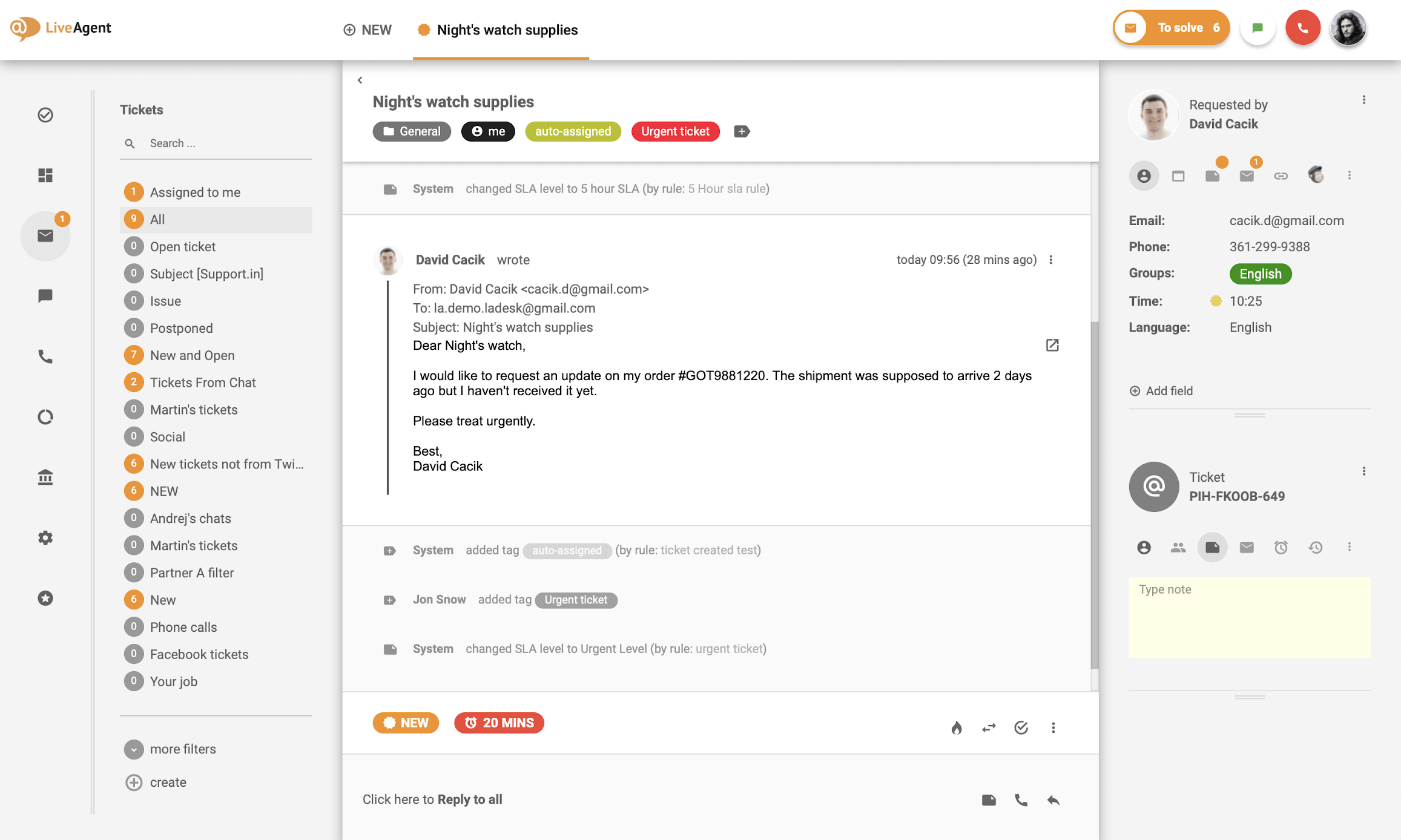
Having phone support built directly into the same plan as ticketing and chat meant we weren’t stitching together three separate tools just to cover email, calls, and live chat.
Once we wanted WhatsApp and Instagram messaging, those came as paid add-ons on top of the base plan, and the mobile app never felt as polished as the desktop version.
Pros:
- Over 200 integrations cover most CRMs, social channels, and booking platforms
- Gamification badges give agents a lightweight way to stay motivated during high-volume seasons
- Hybrid ticket stream view keeps chat, email, and social requests visible side by side
- AI Answer Assistant drafts responses so agents aren’t typing every reply from scratch
Cons:
- Social media and WhatsApp channels cost extra on top of the base plan
- Mobile app is noticeably behind the desktop experience, per user reviews
Pricing:
Starts at $15/user/month.
8. Hiver – Best for Gmail and Outlook-First Teams
Hiver made sense the day I realized my entire support team already lived inside Gmail and had no interest in learning a brand-new interface.
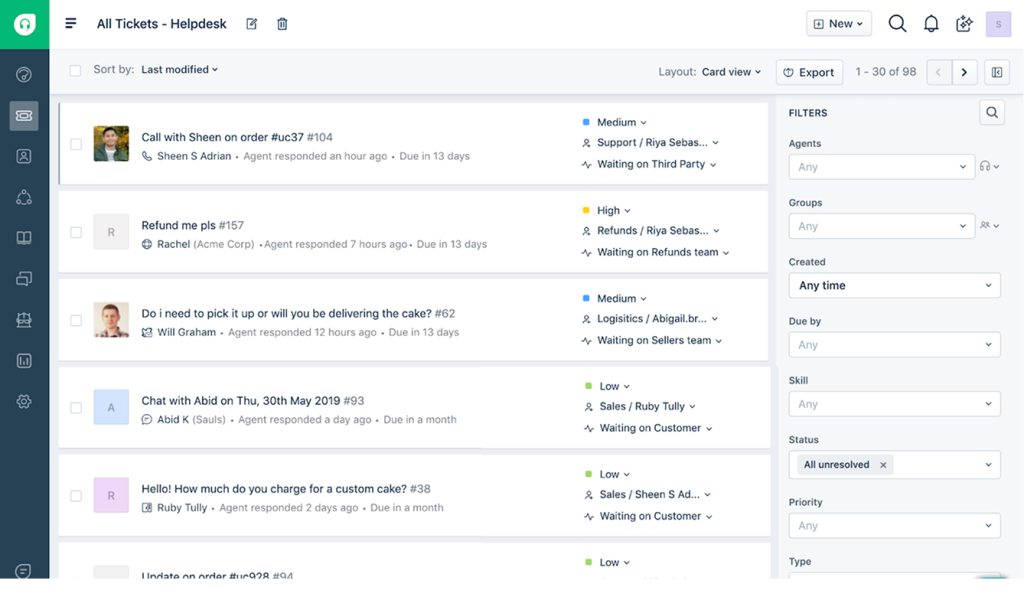
Round robin assignment inside Gmail itself meant tickets got split evenly without anyone opening a separate dashboard, and the built-in AI summarized long threads before an agent replied.
The catch was cost at scale. The moment I needed more than one shared inbox, my per-seat bill effectively doubled, which made it a harder sell once my team grew past a handful of agents.
Pros:
- Round robin and automation rules split incoming traveler emails evenly across the team
- CSAT surveys and SLA reporting come built in on paid tiers
- AI features summarize long email threads and suggest replies without extra setup
- HIPAA-compliant Elite tier suits travel medical or insurance-adjacent support teams
Cons:
- Per-seat pricing means the bill roughly doubles once a team needs more than one shared inbox
- Built for Gmail and Outlook first, so it fits less naturally outside those two ecosystems
Pricing:
Starts at $19/user/month.
9. Front – Best for Collaborative Team Inboxes
Front stood out during my trial because of how naturally multiple agents could discuss a ticket internally, using comments, before anyone sent a reply to the traveler.
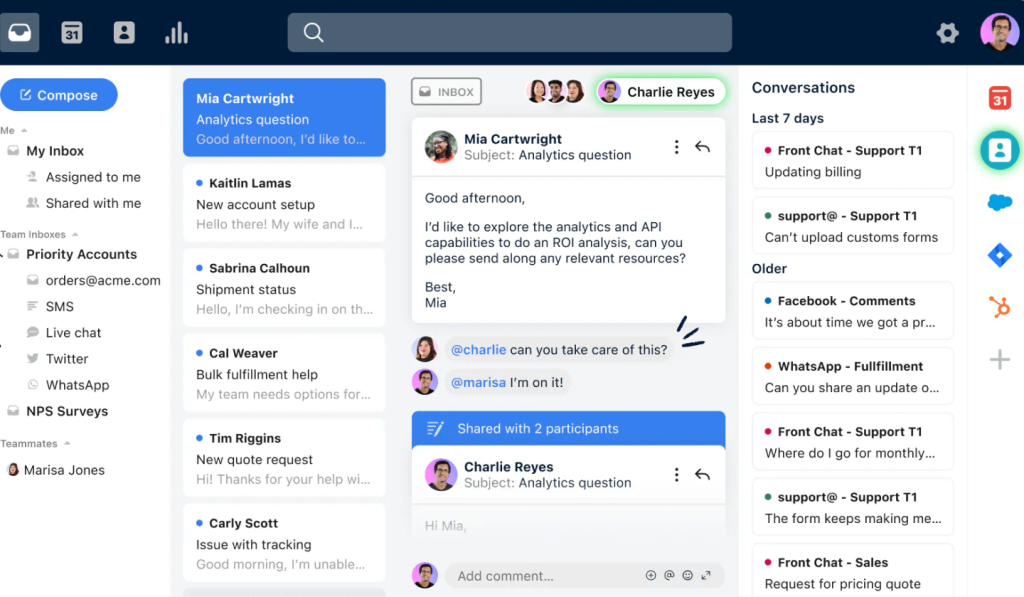
Bringing email, SMS, and WhatsApp into one shared workspace meant my team stopped missing messages that used to get lost across three different apps.
The Starter plan’s 10-seat cap meant I outgrew it within a couple of months, and AI features like Copilot and Smart QA were extra costs on the lower tiers rather than included.
Pros:
- Collaborative comments let agents discuss a ticket internally before replying to the customer
- Unified inbox brings email, SMS, WhatsApp, and social into one shared workspace
- Analytics dashboards track team and individual response times in real time
- Rules engine can auto-assign tickets the moment a keyword like “refund” appears
Cons:
- Starter plan caps out at 10 seats and a single channel type, limiting growing teams fast
- No free plan, only a time-limited trial
Pricing:
Starts at $25/user/month.
10. Intercom – Best for AI-Heavy, High-Volume Support
Intercom came onto my radar once support volume got high enough that manually answering every “where is my refund” question stopped being realistic.

Fin, the AI agent, handled a real share of repetitive questions on its own, and the Messenger widget let me push proactive alerts to travelers during flight or booking disruptions.
Cost was the recurring surprise. Seat pricing looked reasonable on its own, but Fin’s per-resolution fee meant my actual monthly bill was harder to predict than with a flat-rate tool.
Pros:
- Fin AI Agent resolves a meaningful share of routine questions before a human sees the ticket
- Messenger widget supports proactive, in-app messages for time-sensitive trip alerts
- Outbound campaigns notify travelers about disruptions across email, push, and in-app channels
- Extensive app marketplace connects to most CRMs, data warehouses, and booking systems
Cons:
- Fin AI bills per resolution on top of the seat price, making monthly costs hard to predict
- Entry tier is limited, and many teams report needing to upgrade to Advanced within months
Pricing:
Starts at $29/user/month.
Evaluation Criteria
I didn’t rank these tools by feature count or marketing copy. I used six factors, weighted toward what actually matters for a travel support team:
- User Reviews and Ratings: I pulled G2 ratings and read through recent reviews to see what real teams, not vendor pages, say about day-to-day use.
- Essential Features and Functionality: I looked past the feature checklist to whether routing, automation, and escalation actually fit a deadline-driven travel workflow, using our own must-have help desk features list as a baseline.
- Ease of Use: I weighted tools that a new agent could pick up within a day or two over ones that need a dedicated admin just to get started.
- Customer Support: I factored in how each vendor’s own support team performs, since a help desk vendor with a slow help desk is a bad sign.
- Value for Money: I compared what each tier unlocks against its price, not just the lowest advertised number.
- Personal Experience and Industry Feedback: Where I could, I leaned on real usage patterns and expert commentary rather than repeating vendor claims.
My Top 3 Picks for Travel Help Desk Software
If you only read one section of this article, make it this one. Here’s where I’d start depending on team size and budget.
1. ProProfs Help Desk
ProProfs Help Desk is my top pick for most travel businesses under 20 agents. It gives travel support teams a simple, AI assisted shared inbox without the cost or complexity of an enterprise platform, and the free single-agent plan means you can test it against your real ticket volume before spending anything.
2. Freshdesk
Freshdesk is the pick if you’re already a mid-sized team that needs field service support alongside standard ticketing, and you don’t mind the AI add-ons showing up as a separate cost.
3. HappyFox
HappyFox rounds out the top three for tour operators and rental companies that need to track physical assets (equipment, vehicles) alongside customer tickets in the same system, which overlaps a lot with what broader hospitality support teams need too.
FREE. All Features. FOREVER!
Try our Forever FREE account with all premium features!
Travel Help Desk vs Generic Help Desk Software
A generic help desk (built for IT support or general e-commerce) and a travel-specific setup can look identical on the surface: both offer ticketing, automation, and a shared inbox. The difference shows up in the details.
| What Matters | Generic Help Desk | Travel-Focused Setup |
| Ticket priority | Based on order received or a flat SLA timer | Based on trip date, deadline, or booking urgency |
| Context capture | Manual, agent has to search for booking details | Booking reference and travel dates surfaced automatically |
| Escalation | Internal, between agents or departments | Internal and external, including supplier/vendor follow-up |
| Follow-up automation | Basic reminders, often manual | Multi-step, long-interval sequences (days to weeks) |
| Channels | Email and chat, sometimes social | Same, plus WhatsApp and SMS in many travel-facing tools |
A generic tool isn’t wrong for a travel business, it’s just not optimized for the workflow. If you want the broader picture of how a help desk compares to a service desk in general, that’s worth a read too. Most travel companies find that a flexible, well-configured help desk (rather than a narrow, travel-only niche product) gets them 90% of the way there, at a fraction of the cost and setup time.
How Does Travel Help Desk Software Work?
Most travel help desk software follows the same basic flow, whether the traveler reaches out by email, form, or chat:
- Capture the request. A message from any connected channel, email, live chat, social, or a web form, becomes a ticket automatically through ticket management, tagged with the channel it came from.
- Pull in trip context. Better tools auto-detect or let an agent quickly attach a booking reference, departure date, and supplier name directly to the ticket.
- Route by urgency, not just order. Instead of a plain first-in-first-out queue, automated ticket routing checks the trip date or SLA and moves time-sensitive tickets to the top.
- Assign or escalate. The ticket goes to an available agent through round robin or “least busy” logic, or escalates to a supplier if it needs external action.
- Automate the follow-up. If the traveler or supplier doesn’t respond, the system sends a scheduled reminder instead of relying on an agent to remember.
- Resolve and report. Once closed, the ticket feeds into reporting so managers can see response times, resolution times, and where tickets get stuck.
Give Travelers Faster Support
At the end of the day, none of this is really about ticket queues or SLA timers. It’s about a traveler who’s stressed, a flight that’s been cancelled, or a refund that needs to land before a trip starts, and whether your team can respond before that stress turns into a bad review. A study by the American Customer Satisfaction Index in 2026 found that satisfaction scores across airlines, lodging, and online travel agencies all climbed for the first time in years, and better service technology was part of why.
The good news is you don’t need the most expensive tool on this list to get that right. A few automation rules, a shared inbox that actually stays organized, and a way to flag urgent tickets before they get buried will solve most of what travel support teams struggle with day to day.
If you’re weighing your options and want something simple enough to set up this week, ProProfs Help Desk is worth a look. It’s free for a single agent, so you can test round robin routing and AI-assisted replies against your own tickets before deciding whether to scale up.
Frequently Asked Questions
How is a travel help desk different from a regular help desk?
A regular help desk treats every ticket the same. A travel-focused setup prioritizes tickets by trip date or deadline, captures booking context automatically, and supports supplier or vendor escalation, not just internal handoffs.
Why do travel teams need dedicated help desk software instead of a shared inbox?
A shared inbox alone can't tell the difference between an urgent cancellation and a routine question. Dedicated software adds deadline-based routing, automated follow-ups, and supplier escalation, so time-sensitive requests never sit in line behind low-priority ones.
How does travel help desk software actually work day to day?
Every request, whether it's an email, chat, or web form, becomes a ticket automatically, gets tagged with trip details, and is routed by urgency rather than order received. For a step-by-step breakdown, see our help desk workflow guide.
Is there a free travel help desk software option?
Yes. ProProfs Help Desk offers a free plan for a single agent, and Zoho Desk has a free tier for up to three agents. Both include core ticketing features without a time limit.
Which help desk software is best for a small travel agency?
ProProfs Help Desk is the strongest fit for small teams, since it combines a genuinely free tier, AI-assisted replies, and round robin ticket assignment without the setup time larger platforms require.
Does travel help desk software support multiple languages?
Most established tools, including Zoho Desk and ProProfs Help Desk, offer multilingual help centers or interfaces. Our multilingual customer service guide covers what to check before committing to one.
Can it integrate with a booking or CRM system?
Yes, most tools on this list connect to common CRMs and booking platforms through native integrations or an API. Zoho Desk integrates most deeply with Zoho CRM, while Freshdesk and Zendesk offer the widest general marketplace.
How much does travel help desk software cost?
Pricing ranges from free (ProProfs Help Desk, Zoho Desk) to $55 or more per user per month (Zendesk). Most AI features, live chat, and phone support are billed as add-ons on top of the base ticketing plan.
Does travel help desk software use AI?
Most modern tools include some form of AI, whether that's drafting replies, summarizing long ticket threads, or flagging sentiment. ProProfs Help Desk's AI Agent reads a ticket's intent and mood before drafting a response, which is a good baseline to compare other tools against.
FREE. All Features. FOREVER!
Try our Forever FREE account with all premium features!

 We'd love your feedback!
What did you like & how can we make it even better?
 Thanks for your feedback!
 Ask Your Question
Have a question? Get expert help to make your decision easier.