
I’ve spent the last few weeks testing, comparing, and reading real user reviews of the top help desk tools built for (or adapted for) healthcare teams. A recent study by Fixify in 2026 found that healthcare support desks have the highest “productivity-blocking” ticket rate of any industry, at 35.3%, which basically means more of your staff’s day gets stuck waiting on a slow, disorganized support process than in almost any other sector. That’s the exact problem the right help desk for healthcare industry teams is supposed to fix.
Get it wrong, and it’s not just an inconvenience. A missed billing question turns into a complaint call. A slow IT ticket turns into a clinician locked out of the EHR at the worst possible moment. The stakes here are just a little higher than in most industries, which is exactly why a generic “top 10 help desk tools” list won’t cut it.
This guide breaks down the 10 best help desk solutions for healthcare providers, whether you’re a 5-person clinic or a multi-department hospital IT team, so you can pick one without spending weeks on demos.
What Is Help Desk Software for Healthcare?
Help desk software for healthcare is a centralized platform that converts patient and staff inquiries, arriving by email, phone, chat, or web form, into trackable tickets. The system routes each ticket to the right department (billing, IT, patient services, clinical support), tracks response and resolution times, and keeps a secure, auditable record of every interaction involving protected health information (PHI).
The category overlaps with what some teams call a healthcare ticketing system, a healthcare service desk, or simply “help desk for healthcare industry” tools, but the job is the same: fewer missed messages, faster responses, and a paper trail that holds up during a HIPAA audit.
10 Best Help Desk Software for Healthcare
Here’s the shortlist. I tested each tool where possible and cross-referenced pricing and ratings against G2 to keep this current.
| Tool | Best For | Pricing | G2 Rating |
| ProProfs Help Desk | Easiest AI Help Desk for Shared Inboxes, Ticket Workflow Automation, and Scaling Support Teams | A free plan is available for growing teams. Paid plan starts at $19.99/month. | 4.7/5 |
| Zendesk | Large hospitals needing enterprise-scale support | Starts at $19/agent/month | 4.3/5 |
| HappyFox | Multi-department ticket routing | Starts at $24/agent/month | 4.5/5 |
| Freshdesk | Fast setup with strong automation | Starts at $15/agent/month | 4.4/5 |
| Help Scout | Clinics wanting a simple, shared inbox | Starts at $25/user/month | 4.4/5 |
| TOPdesk | Internal IT service management | Starts at $64/agent/month | 4.3/5 |
| Zoho Desk | Budget-friendly help desk for small clinics | Starts at $7/agent/month | 4.4/5 |
| Giva | HIPAA-first healthcare and call center teams | Starts at $69/agent/month | 4.8/5 |
| Jitbit | Lightweight email-to-ticket for small IT teams | Starts at $24/month | 4.3/5 |
| OneDesk | Combined ticketing and project management | Starts at $12.99/user/month | 4.2/5 |
1. ProProfs Help Desk – Easiest AI Help Desk for Shared Inboxes, Ticket Workflow Automation, and Scaling Support Teams
ProProfs Help Desk is what I currently use to manage a mix of patient-style support requests and internal IT tickets, and the thing I keep coming back to is how little setup it needed on day one. Within an hour of signing up, I had a shared inbox live and tickets converting from email automatically.
What stands out for healthcare-style workflows specifically is the AI Help Desk layer sitting on top of the basics. Its AI Agent reads incoming tickets, understands intent and urgency, and resolves the repetitive, routine ones (password resets, appointment rescheduling requests) on its own, so an anxious patient asking about a delayed test result doesn’t sit in the same queue behind a dozen routine questions. For self-service, I connected it to ProProfs Knowledge Base so patients and staff can find answers to common billing and scheduling questions without opening a ticket at all, which has noticeably cut down our repeat-question volume.
For anything that needs a live conversation instead of a ticket, ProProfs Chat sits right alongside the help desk, so a support rep can jump from a chat to a formal ticket without losing any context. Reporting is straightforward too, and I can see response times and resolution times by department in a couple of clicks, without building a custom dashboard first.
Pros:
- Free plan available for single agents, useful for small clinics testing the waters
- AI Agent resolves routine, repetitive tickets automatically, freeing up staff for complex or sensitive patient requests
- Shared inbox consolidates multiple support email addresses into a single dashboard
- Child ticket feature lets multiple departments collaborate on one patient issue without duplicate tickets
- Native integration with ProProfs Knowledge Base reduces repeat tickets through self-service
Cons:
- No downloadable or on-premise version
- Dark mode isn’t available yet
Pricing:
A free plan is available for growing teams. Paid plan starts at $19.99 /month.
One thing worth mentioning:
Acer, which supports customers across 160+ countries and runs around 2,600 operators on ProProfs Help Desk, brought the platform in mainly to fix a reporting gap. Their internal system couldn’t break down repair, replacement, and spare-part costs in a way their team could actually use.
Custom fields solved that specific problem, letting staff log costs directly on each ticket so the numbers roll up into reports automatically. It’s a good example of a case where the win wasn’t a flashy feature, just a specific operational headache getting fixed.

2. Zendesk – Best for Enterprise-Scale Hospital Support
I rolled out Zendesk at a mid-sized clinic network a while back, mainly because leadership wanted something that could scale without hitting a ceiling. It delivered on that front. Once I had it configured with a signed BAA, it handled a genuinely high ticket volume across email, chat, and phone without slowing down.
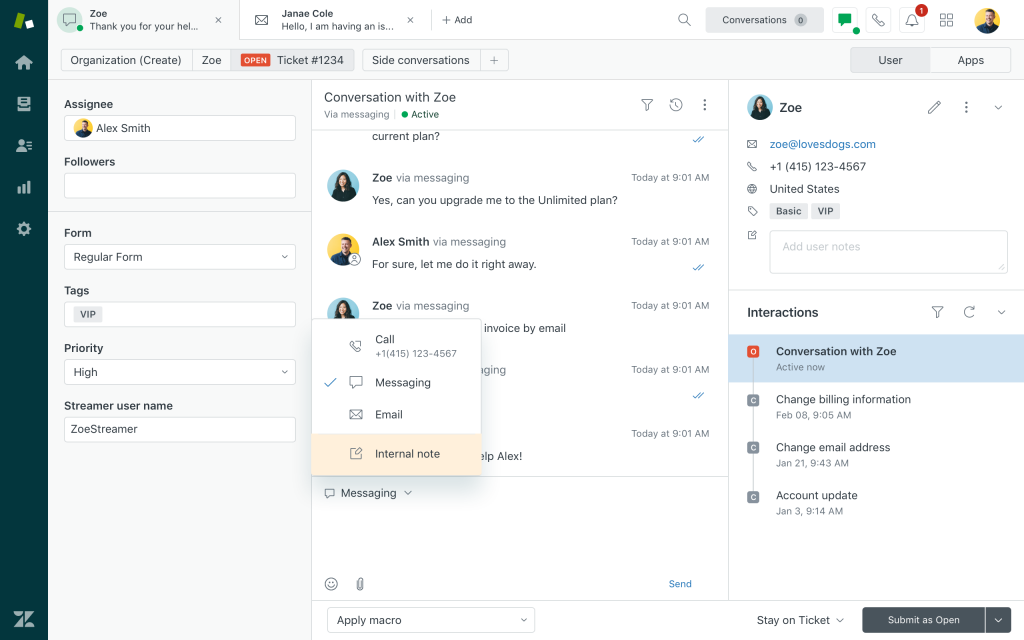
Where it got complicated was the setup itself. Getting the compliance controls right, IP restrictions, two-factor authentication, role-based permissions, took longer than I expected, and I ended up leaning on their support team more than once during onboarding. The payoff was a system that could route clinical, billing, and IT requests down completely separate workflows with their own SLAs.
I also liked the audit logging. Every access point and interaction gets tracked, which made our compliance team’s job noticeably easier during our first HIPAA audit after switching.
Pros:
- HIPAA-ready environment with signed BAA support for handling PHI
- Omnichannel support unifies email, chat, phone, and messaging in one dashboard
- Custom workflows let teams build separate routing rules for clinical, billing, and IT requests
- Detailed audit logs support compliance reporting and incident investigations
Cons:
- Suite plans with full healthcare-grade compliance features start well above entry-level pricing
- AI features and advanced automation are often locked behind higher-tier add-ons
Pricing:
Starts at $19/agent/month.
3. HappyFox – Best for Multi-Department Ticket Routing
I brought HappyFox in for a healthcare client juggling requests across IT, billing, and patient services, and the smart routing rules were the reason it stuck. Tickets got automatically assigned, prioritized, and escalated based on rules we set once, which meant far less manual triage on our end.
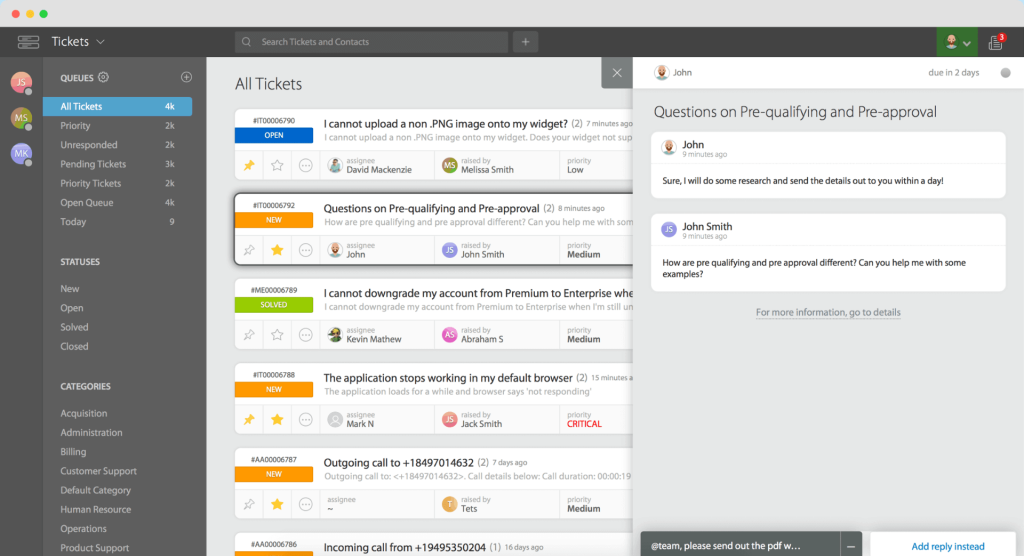
The omnichannel setup converts email, phone, chat, and web forms into a single ticket queue, so nothing slipped through a side channel. I also appreciated the granular access controls: role-based permissions and two-factor authentication kept PHI locked down to only the staff who needed it.
Where it fell a bit short was integrations. Compared to some of the bigger platforms on this list, HappyFox’s app catalog felt noticeably thinner when I went looking for a couple of niche healthcare integrations.
Pros:
- Smart automation rules handle ticket assignment, prioritization, and escalation
- Omnichannel ticketing centralizes email, phone, chat, and web forms
- Granular role-based access and two-factor authentication protect sensitive data
- Audit logs track every action for compliance purposes
Cons:
- Some advanced reporting features require higher-tier plans
- Interface customization options are more limited than competitors
Pricing:
Starts at $24/agent/month.
4. Freshdesk – Best for Fast Setup With Automation
Freshdesk was the tool I reached for when a healthtech client needed something running within a week, no long implementation project, no dedicated admin. It delivered. I had email, chat, and a basic portal live inside two days, and their automation rules picked up a lot of the routing work almost immediately.
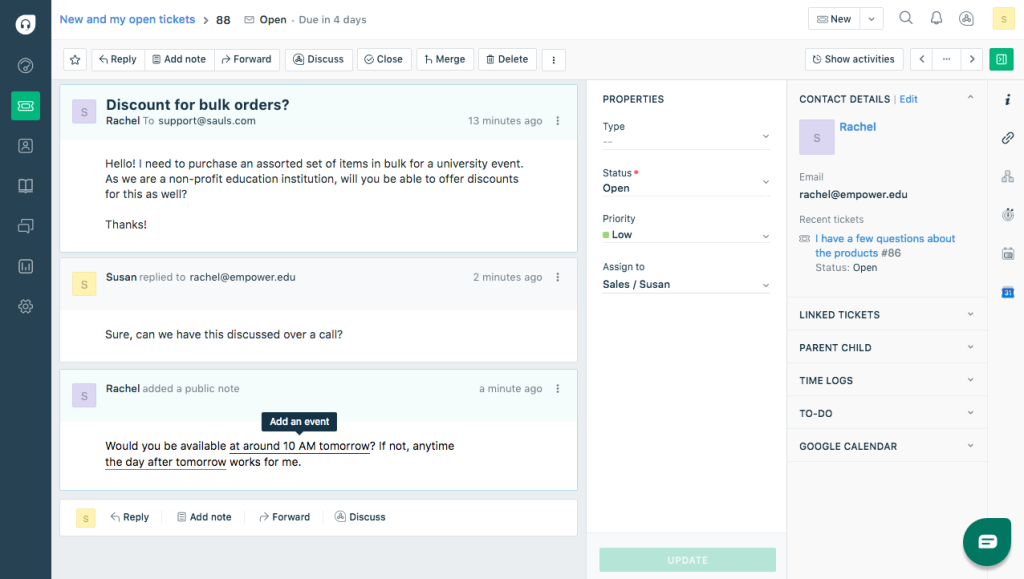
The part that mattered most for a healthcare use case was the contextual view: agents could see a patient’s past tickets, appointment history, and any linked records right alongside the current conversation, so they weren’t asking the same questions twice. Once I signed the BAA and enabled the required access logging, PHI handling felt appropriately locked down.
Encrypted custom fields were a nice touch too, letting us store sensitive data points without exposing them in every view.
Pros:
- Omnichannel ticketing consolidates email, chat, phone, and portal requests
- Contextual view links tickets to appointment and record history
- Workflow automation and prioritization speed up high ticket volumes
- Encrypted custom fields reduce exposure of sensitive data
Cons:
- Free and entry plans lack several compliance features healthcare teams need
- Advanced automation and reporting require mid-to-upper tier plans
Pricing:
Starts at $15/agent/month.
5. Help Scout – Best for Simple, Email-Style Patient Communication
I used Help Scout at a smaller practice that was drowning in email traffic across a handful of shared addresses (info@, billing@, scheduling@). It solved that specific problem well. Everything funneled into one shared inbox, and collision detection stopped two staff members from replying to the same patient at once, which had actually happened to us before switching.
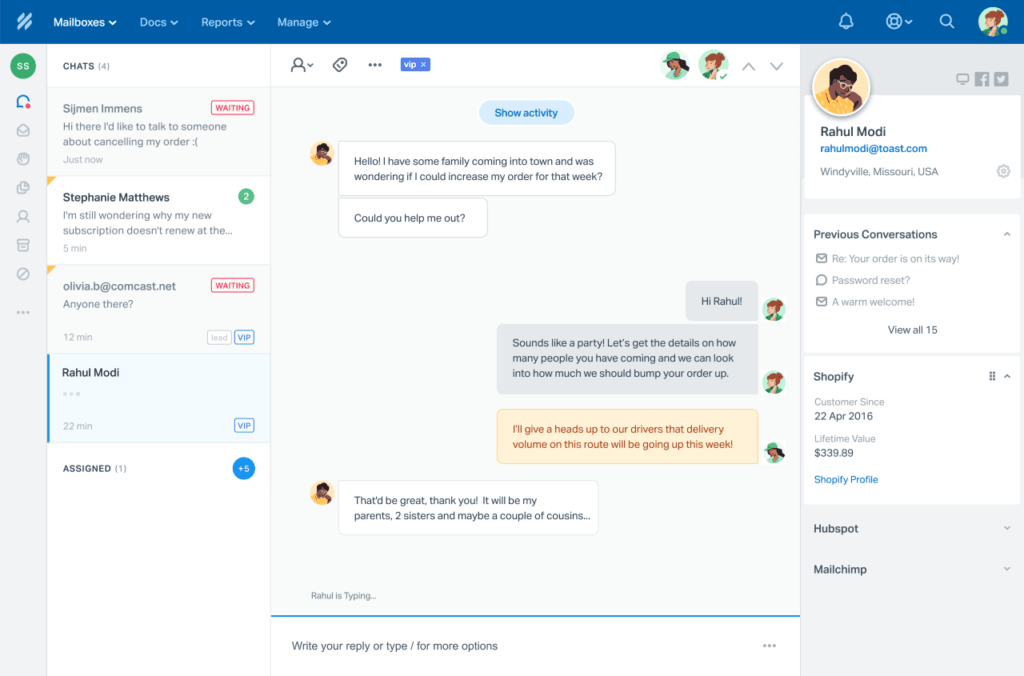
Assigning conversations to specific people or departments cut down on the “who’s handling this” confusion almost overnight. I also set up a small knowledge base so patients could find answers to routine billing questions themselves, which took a real dent out of our daily ticket count.
The tradeoff is that Help Scout’s HIPAA-compliant tier sits at a noticeably higher price point than its base plan, so budget for that if PHI is involved.
Pros:
- Shared inbox design keeps every departmental email address organized in one place
- Collision detection prevents duplicate replies to the same patient
- Conversation assignment and routing balance workload across staff
- Built-in reports track response times, satisfaction, and team performance
Cons:
- Fewer advanced automation options compared to larger ITSM-style platforms
- Not built for complex, multi-department routing at hospital scale
Pricing:
Starts at $25/user/month.
6. TOPdesk – Best for Internal IT Service Management
I set up TOPdesk for a hospital IT department that needed more than just a patient-facing help desk, they wanted IT, facilities, and admin support requests running through one system. This is closer to what most people mean by a help desk vs. service desk distinction. TOPdesk handled that multi-department structure well, with a self-service portal where staff could log equipment problems or request access without emailing anyone directly.
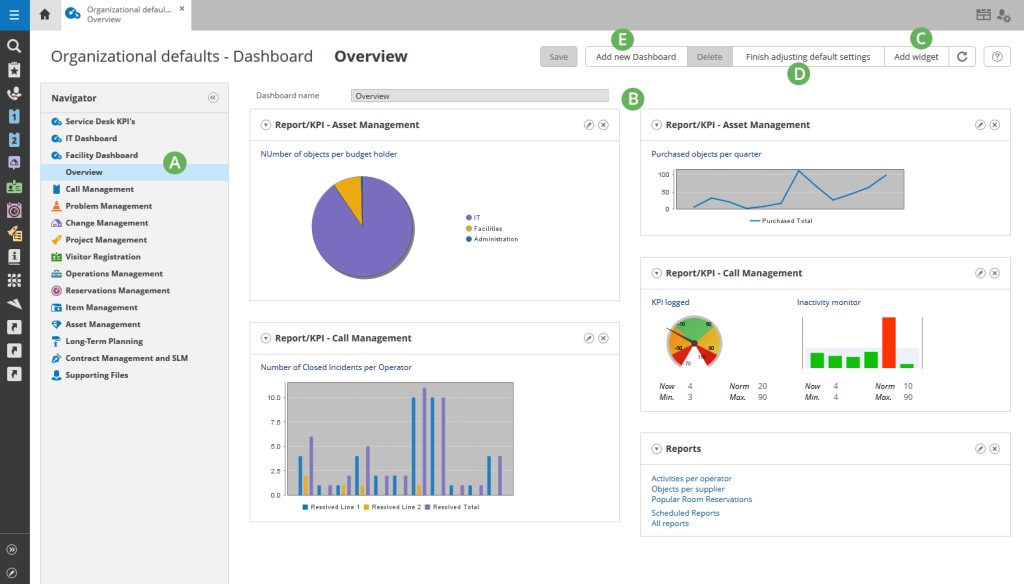
Asset tracking was the standout feature for us. Being able to monitor medical devices, laptops, and internal systems alongside incidents made troubleshooting noticeably faster, and it helped us catch a few aging devices before they failed outright.
Deployment flexibility mattered too. Because we had data residency requirements, running it on-premise instead of the cloud version kept us compliant without extra vendor negotiation.
Pros:
- Centralized incident and request management across IT, facilities, and admin
- Self-service portal reduces email and call volume for routine requests
- IT asset tracking monitors medical devices and equipment alongside tickets
- ITIL-aligned processes standardize change, problem, and SLA management
Cons:
- Pricing starts noticeably higher than most tools on this list
- Interface feels dated compared to newer cloud-native platforms
Pricing:
Starts at $64/agent/month.
7. Zoho Desk – Best for Budget-Friendly Clinics
I recommended Zoho Desk to a small clinic that needed something functional without enterprise pricing, and it fit the brief. It’s worth a look alongside other budget-friendly help desk software for small businesses if your clinic is still comparing options. The omnichannel dashboard pulled in email, chat, phone, and social requests into one place, and their AI assistant, Zia, helped classify tickets and suggest replies even on our lower-tier plan.
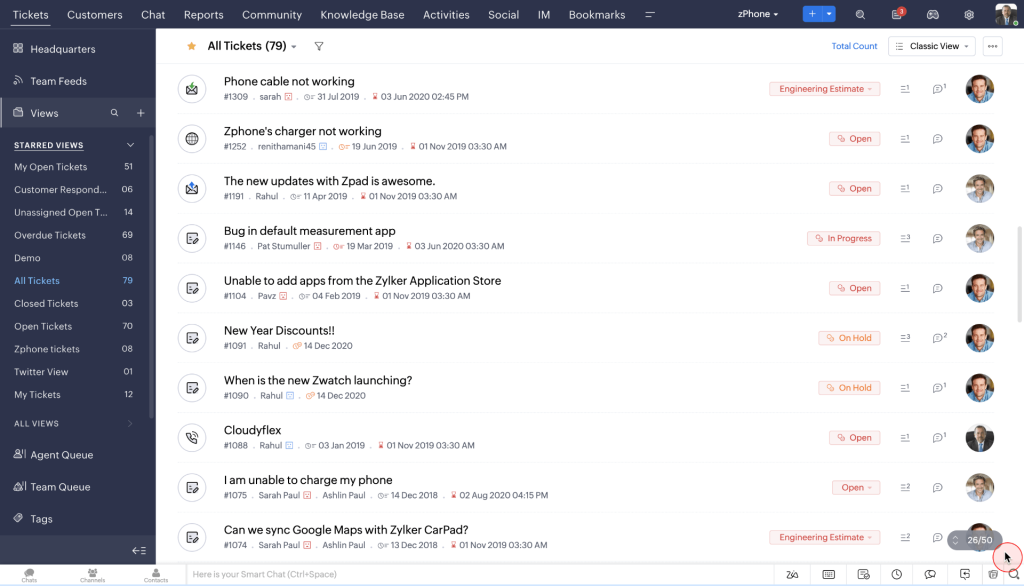
Blueprints (their workflow automation feature) let us standardize how billing disputes moved from intake to resolution, which cut down on inconsistent handling between staff. Since the clinic already used Zoho CRM for patient records, the integration between the two products saved us from re-entering data twice.
Compliance features, encryption, audit logs, and BAA support, are gated to higher plans, so this only works if your budget can stretch a bit past the entry tier once PHI is involved.
Pros:
- Omnichannel ticketing centralizes email, chat, phone, and social channels
- Zia AI assistant helps classify tickets and suggest replies
- Blueprints automation standardizes multi-step workflows
- Deep integration with Zoho CRM and other Zoho ecosystem tools
Cons:
- BAA and compliance features require upgrading past the entry-level plan
- UI can feel cluttered for teams using multiple Zoho products at once
Pricing:
Starts at $7/agent/month.
8. Giva – Best for HIPAA-First Healthcare and Call Centers
Giva was the tool I turned to for a client whose entire support model ran through phone calls, mostly patients calling in rather than emailing. Its ticket creation forms let call center reps capture exactly the information a provider or billing team needed, without back-and-forth follow-ups later.
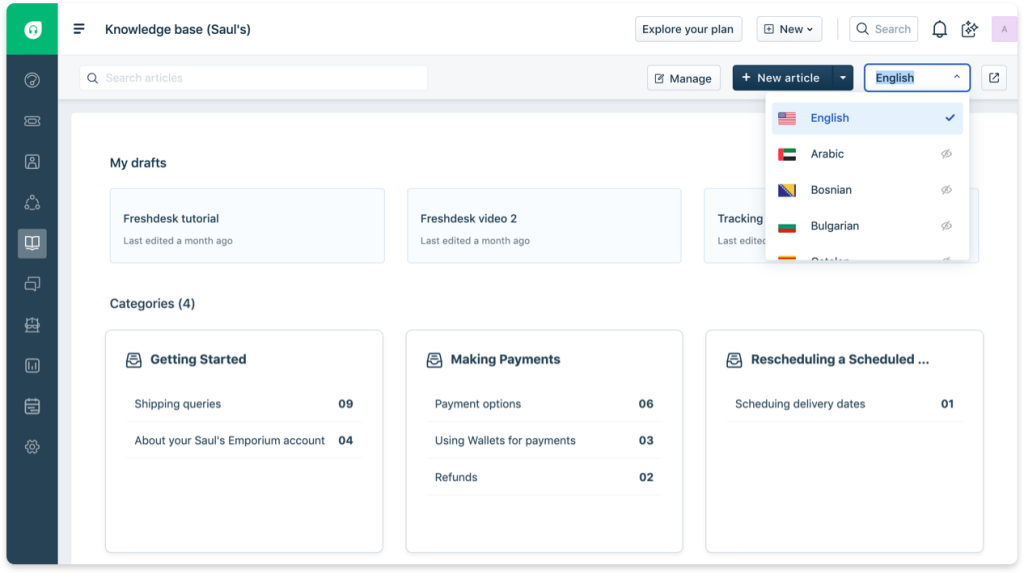
HIPAA and HITECH compliance came included in every plan tier, with a BAA provided automatically, so I didn’t have to negotiate a separate compliance addendum like I have with some other vendors. The customizable dashboards were genuinely useful too, letting managers track team performance without building custom reports from scratch.
The one gap I ran into was round-robin ticketing. It’s not natively available, so we had to bring in a separate tool to handle call distribution alongside Giva.
Pros:
- Business Associate Agreement provided automatically with all plans
- Customizable dashboards for both agents and managers
- Fast, no-code configuration for setting up new workflows
- SOC 2 Type II audited environment for security assurance
Cons:
- No native round-robin ticket assignment feature
- Smaller ESM (enterprise service management) capability compared to full ITSM platforms
Pricing:
Starts at $69/agent/month.
9. Jitbit – Best for Lightweight Email-to-Ticket Conversion
I set up Jitbit for a small IT team at a healthcare-adjacent company that just needed one thing done well: turn incoming support emails into trackable tickets without a complicated rollout. It did exactly that, and I had it running within an afternoon.
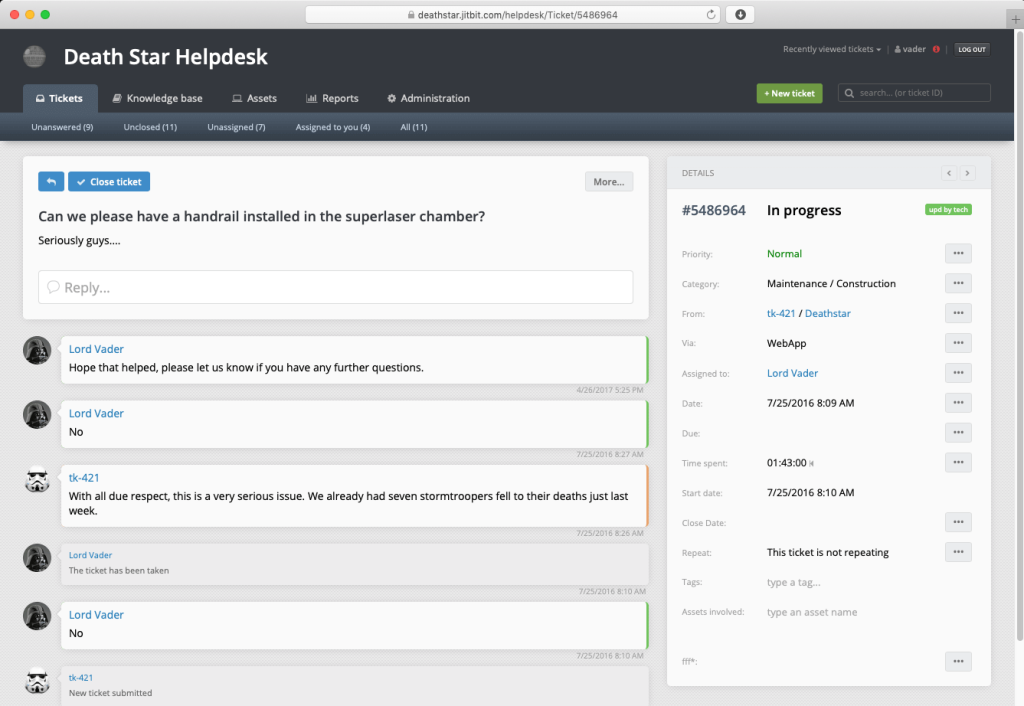
The option to self-host instead of using the cloud version mattered for this client, since they wanted full control over where PHI-adjacent data physically lived. Automation for ticket routing and SLA management worked reliably once configured, and the mobile app meant our on-call IT staff could respond to urgent tickets without being at a desk.
It’s a lean tool by design, so don’t expect the depth of automation or ESM capability you’d get from a larger ITSM platform.
Pros:
- Email-first ticketing converts incoming messages into tickets automatically
- Self-hosted or cloud deployment options for full data control
- Built-in reporting tracks ticket volume, response times, and team performance
- Mobile app supports on-the-go ticket handling for IT staff
Cons:
- Enterprise-tier HIPAA compliance costs considerably more than the base plan
- Limited native integrations with clinical or EHR systems
Pricing:
Starts at $24/month.
10. OneDesk – Best for Combined Ticketing and Project Management
I used OneDesk for a healthcare IT team where “resolving a ticket” often meant kicking off an actual project, replacing hardware, coordinating a multi-step access change, not just replying to an email. Being able to convert a ticket directly into a task with subtasks and a timeline solved a real workflow gap we had with a pure ticketing tool.
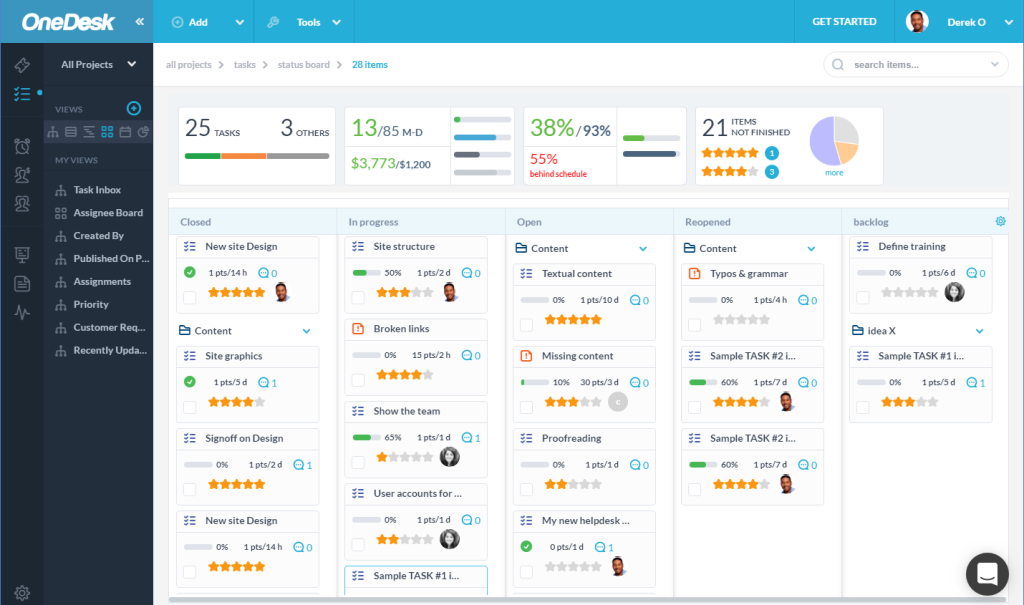
The customer portal gave patients and staff a place to submit requests and track progress themselves, which cut down on “any update on my ticket?” follow-ups. Multi-channel ticketing (email, chat, web forms) fed everything into the same workspace, so nothing needed a separate tool to manage.
Because it can be self-hosted, it also worked for a client with strict data control requirements who didn’t want everything living in the cloud.
Pros:
- Converts tickets directly into tasks or projects for complex, multi-step requests
- Customer portal gives patients and staff self-service request tracking
- Multi-channel ticketing unifies email, chat, and web form requests
- Role-based access controls limit exposure of sensitive data
Cons:
- Project management features add complexity that pure support teams may not need
- Steeper learning curve for teams only looking for simple ticketing
Pricing:
Starts at $12.99/user/month.
Evaluation Criteria
I didn’t rank these tools on gut feeling. Here’s exactly how I evaluated each one:
- User Reviews and Ratings: I cross-checked G2, Capterra, and Software Advice ratings for each tool to see how real healthcare and IT teams rate their day-to-day experience, not just marketing claims.
- Essential Features and Functionality: I looked at core ticketing, routing, automation, and reporting capabilities, and specifically how well each tool handles healthcare-specific needs like department-based routing and HIPAA controls.
- Ease of Use: I paid attention to how quickly a non-technical clinic staff member could get comfortable with each interface, since adoption fails fast if the tool feels clunky.
- Customer Support: I checked how responsive and helpful each vendor’s support team was during setup and when I ran into configuration issues, especially around compliance settings.
- Value for Money: I compared each tool’s pricing against what you actually get at that tier, since some vendors gate HIPAA and compliance features behind expensive upgrades.
- Personal Experience and Expert Opinions: Where I’ve personally used or set up a tool, I’ve shared that directly. Where I haven’t, I’ve leaned on verified user reviews and documented compliance information instead of guessing.
Keep Urgent Requests From Getting Buried in the Queue
My Top 3 Picks for the Best Help Desk Software for Healthcare
If you only read one section of this guide, read this one. Here are the three tools I’d actually recommend first, depending on what your team looks like.
1. ProProfs Help Desk
ProProfs Help Desk is my top overall pick for most healthcare teams, especially smaller clinics and multi-location practices that want AI-assisted ticket handling without an enterprise price tag or a multi-week rollout. Between the free single-agent plan, the Decode Intent & Mood feature for flagging urgent patient messages, and the tight integration with ProProfs Knowledge Base for patient self-service, it covers the core job most healthcare support teams actually need done, without forcing you to pay for ITSM complexity you won’t use.
2. Giva
Giva is the right call if HIPAA compliance is your single biggest concern and you’d rather not spend time negotiating a BAA or configuring compliance settings yourself. It’s built specifically with regulated industries in mind, and every plan tier includes the compliance groundwork already done for you, which matters most for hospital call centers and larger healthcare organizations.
3. Freshdesk
Freshdesk is the pick for teams that want to be live within days, not weeks, and need solid automation without a steep learning curve. Its contextual view of patient history alongside each ticket is genuinely useful for reducing repeat questions, and the pricing stays reasonable even as you scale up agents.
FREE. All Features. FOREVER!
Try our Forever FREE account with all premium features!
What To Look For in a Healthcare Help Desk?
Before you shortlist a help desk software for healthcare workflow, check for these eight things. They matter more than any single flashy feature you’ll see in a demo.
1. HIPAA Support and a Signed BAA
This is the one non-negotiable on the list. If any ticket could contain protected health information, the vendor needs to sign a Business Associate Agreement (BAA) before you send a single patient message through the system. Ask this upfront, not after you’ve already onboarded your team, since some vendors only offer HIPAA-ready environments on their higher-priced plans.
2. Omnichannel Ticketing
Patients and staff won’t all reach out the same way. Some email, some call, some fill out a web form. A good help desk pulls all of that into one inbox instead of forcing your team to check five different places for new requests.
3. Department-Based Routing
Healthcare support isn’t one queue, it’s several. A billing question, an IT access request, and a clinical supply issue all need to land with different people. Look for tools that let you categorize and route by team (IT, billing, clinical, facilities), not just by individual agent, so nothing sits in the wrong inbox waiting for someone to notice it.
Get Every Patient and Staff Request to the Right Team Faster
4. SLA and Escalation Rules
Response time matters more in healthcare than almost anywhere else. Make sure the tool can automatically escalate a ticket once it breaches its agreed response or resolution time, ideally backed by clear SLA management settings, so an urgent request never quietly sits at the bottom of someone’s queue.
5. Reporting and Visibility
You can’t fix what you can’t see. Look for built-in reports and tracking that break down response time, resolution time, and agent performance by department, so leadership can spot bottlenecks (like billing tickets consistently taking longer than IT ones) without pulling data manually every month.
6. EHR and Identity Integrations
The less your team has to copy and paste between systems, the fewer mistakes happen. Native or API-based connections to systems like Epic, Oracle Health, or Active Directory let agents pull up relevant patient or staff context without switching tabs, and they make onboarding and offboarding staff a lot less manual.
7. Ease of Use
A powerful tool nobody wants to open is worse than a simple one everyone actually uses. Clinical and admin staff, who are often juggling this alongside patient-facing work, won’t adopt something that needs a week of training just to send a reply.
8. Deployment Flexibility
Not every healthcare organization can run on the cloud alone. Depending on your data residency requirements, check whether the vendor offers cloud, on-premise, or both, and whether you’d lose any features by choosing one over the other.
Still building your shortlist? This help desk buying checklist walks through the same criteria in more depth if you want to dig deeper before demos.
Choose the Right Help Desk Software for Healthcare
At the end of the day, this decision isn’t really about picking the “best” tool on paper, it’s about which one gets a patient’s billing question answered before they call back, frustrated, for the third time. The right help desk turns that scramble into a routine: a ticket gets created, routed, answered, and closed, without anyone chasing it down manually.
That’s the real payoff here. Less time spent digging through inboxes and spreadsheets means more time actually helping people, whether that’s a patient waiting on an insurance answer or a nurse locked out of the EHR. Even switching from a slow, disorganized process to a basic ticketing system tends to show up fast, in shorter response times and fewer things falling through the cracks.
If you’re still weighing your options, start with whichever tool lets your team try it out without a big commitment first. ProProfs Help Desk, for instance, has a free plan that’s easy to set up in an afternoon, so you can see how it fits your workflow before deciding on anything bigger.
Frequently Asked Questions
What is help desk software for healthcare?
It's a ticketing platform that converts patient and staff support requests into trackable tickets, routes them to the right department, and keeps a secure, auditable record for compliance purposes.
Is help desk software HIPAA compliant by default?
No. HIPAA compliance depends on the vendor signing a Business Associate Agreement and the buyer configuring the required safeguards, like encryption, access controls, and audit logging.
How much does healthcare help desk software cost?
Pricing ranges from free single-agent plans to $89+/agent/month for HIPAA-compliant enterprise tiers, depending on the vendor and the compliance features included.
Can help desk software integrate with an EHR system?
Most platforms connect to EHR/EMR systems like Epic or Oracle Health through APIs, usually to pull patient context or provision access, rather than storing clinical data directly in tickets.
What's the difference between a help desk and a ticketing system?
The terms are largely interchangeable. "Help desk" usually implies a broader support platform (chat, knowledge base, reporting), while "ticketing system" refers more narrowly to the ticket tracking itself.
Which help desk software is best for small clinics?
ProProfs Help Desk and Zoho Desk are the most budget-friendly options for small clinics, both offering free or low-cost entry plans with room to add HIPAA features as you grow.
Do healthcare help desks handle patient and staff requests separately?
Yes, most platforms let you set up separate queues or departments (patient services, billing, IT) so requests get routed to the right team automatically.
How long does it take to set up a healthcare help desk?
Lightweight tools like ProProfs Help Desk, Freshdesk, or Jitbit can be running within a day or two. Larger ITSM platforms like TOPdesk or Zendesk with full compliance configuration can take a few weeks.
FREE. All Features. FOREVER!
Try our Forever FREE account with all premium features!

 We'd love your feedback!
What did you like & how can we make it even better?
 Thanks for your feedback!
 Ask Your Question
Have a question? Get expert help to make your decision easier.