

Every day, I see teams drowning in “small” requests that never feel small in reality.
“Can I get access to this tool?”
“Please reset my password.”
“I need a laptop for the new hire who joins tomorrow.”
None of these are emergencies, but together they can clog inboxes, slow down IT, and frustrate employees and customers who are just trying to get work done.
That is where mastering service request management comes in. Instead of treating every request as a one-off favor, you create a simple, reliable system that handles request tickets the same way every single time. Users know where to go. Your team knows what to do next.
In this guide, I will walk you through what service request management is, how the process works, and the best practices I have seen actually make a difference in real teams.
What Is a Service Request?
A service request is a formal request from a user asking for something they do not currently have. It usually falls into one of these buckets:
- Request for information
- Request for access
- Request for equipment or software
- Request for a standard change (like adding a user to a group)
ITIL and most ITSM tools treat service requests as predefined, low-risk, and often repetitive items such as password resets, hardware requests, or access to systems.
Simple examples of service requests:
- A new employee requests access to the company knowledge base
- A manager asks IT to provision a laptop for a new team member
- A designer requests installation of a design app on their system
- A remote employee asks for VPN access
- A customer requests a copy of a past invoice
The key idea is that a service request is planned and expected, not an emergency.
If you want practical tips on organizing, tracking, and responding to requests efficiently, you can read this guide on How to Track Customer Requests.
Types of Service Requests (With Examples)
Once you know what types of service requests you are dealing with, it becomes much easier to set the right workflow, approvals, and SLAs.
Here are some common types of service requests with simple examples.
1. Access & Permissions
These are requests where users need access to something they cannot see or use yet. For example, someone might ask for access to the CRM, HR, or finance tools, a shared drive or folder, or your internal knowledge base or wiki.
You will also see a lot of VPN access requests from remote workers. The goal here is to safely grant remote access to company network while following your security rules.
2. Hardware & Equipment
These requests are about physical devices. A new hire may need a laptop or desktop, a team member may ask for an extra monitor, keyboard, mouse, mobile device, or headset, and someone else might request a replacement for a faulty peripheral.
These are predictable, repeatable requests that fit very well into a standard hardware workflow.
3. Software & Applications
In this category, users ask for software they need to do their job. That could be a new software installation, an upgrade to a higher license, access to a specific SaaS workspace, or approval to use a browser plugin or extension.
Your workflow usually includes a quick check for security, compatibility, and license availability before you say yes.
4. Information & Advice
Sometimes people do not need new tools or access. They simply want answers. These requests sound like “How do I integrate tool A with tool B?”, “What is the process for requesting time off?”, or “How do I update my payment details?”.
You can often resolve these with a well written knowledge base article or a quick, clear reply instead of a long back and forth conversation.
5. Standard Changes
Standard changes are low risk, well understood changes that are pre-approved. They often show up as service requests. Common examples include adding a user to a security group, increasing mailbox storage, or updating access after a role change.
Because the steps are known and documented, these are perfect candidates for automation.
6. Non-IT Service Requests
The same idea works outside IT. HR might receive requests for onboarding equipment, benefits information, or policy clarifications. Facilities might handle seating changes, access cards, or meeting room setup.
Finance might get requests for reporting tool access, cost center changes, or invoice copies. Using a single request model across departments gives employees one simple way to ask for help, no matter who needs to respond.
What Is Service Request Management?
Service request management is simply the way your team handles all those “Can you help me with…?” requests in a structured, predictable, and friendly way.
Instead of treating every request as a one-off favor, you create a clear, repeatable process that everyone follows.
In practice, service request management is how your team:
- Accepts service requests through email, chat, web forms, or a portal
- Routes them to the right person or team
- Gets approvals when required
- Fulfills the request within a defined timeline
- Closes the loop with the user and learns from the data
You can think of it as the “front door” for all the services your IT or internal teams provide. New laptop, tool access, software installation, policy information, account changes. Everything comes through one organized pipeline instead of scattered messages and sticky notes.
Incident Management vs. Service Request Management
Teams often use “incident” and “request” as if they mean the same thing. In reality, they solve very different problems. If you mix them up, urgent issues get buried under routine tasks and everyone feels frustrated.
Here is a simple way to look at it.
What is incident management?
Incident management is about reacting when something breaks or stops working as it should.
- A service is down
- Performance is very slow
- A critical feature is not working for users
The goal is to restore normal service as quickly as possible and reduce the impact on the business.
Examples of incidents:
- Your website is down and customers cannot log in
- The payment gateway is failing for all transactions
- The email server is not sending or receiving messages
- A core internal app suddenly starts throwing errors
What is service request management?
Service request management is about handling planned, routine requests where users ask for something new or additional.
- Access to a system
- A new device or software
- Information or help with a standard process
The goal is to deliver these services in a consistent, predictable, and user-friendly way.
Examples of service requests:
- “Please give me access to the CRM”
- “I need a new laptop for a new hire”
- “Can you install this design tool on my system”
- “I need a copy of last month’s invoice”
| Aspect | Incident Management | Service Request Management |
|---|---|---|
| Purpose | Fix something that is broken or degraded | Provide something new or additional to the user |
| Trigger | Unplanned problem or outage | Planned request from a user |
| Typical examples | Server down, app crashes, website not loading | Access to tools, hardware requests, software installation |
| Main goal | Restore normal service as fast as possible | Fulfill the request smoothly and within agreed timelines |
| Nature of work | Investigation, diagnosis, workaround, permanent fix | Follow a predefined workflow or checklist |
| Urgency in most cases | Often high, especially if many users are affected | Usually medium or low, based on impact and business context |
| Who is affected | Many users or customers at once | One user or a specific small group |
| Communication style | Frequent updates during the outage or disruption | Status updates at key points in the request lifecycle |
| Automation potential | Partial, often needs human judgment and troubleshooting | Very high, since patterns repeat and steps can be standardized |
| Relationship to service catalog | Linked to live services and their performance | Directly linked to catalog items like “New laptop” or “Tool access” |
If you want to go deeper into the distinction, check out this detailed guide on the Difference Between Incident and Service Request.
FREE. All Features. FOREVER!
Try our Forever FREE account with all premium features!
The Service Request Management Process
The service request management process is the journey a request takes from “I need this” to “All done.” It starts the moment a user reaches out and ends only when the request is fulfilled, closed, and you have learned something from it.
Let us walk through a simple service request process flow using a ticketing system like ProProfs Help Desk as the example.
Imagine a new employee, Alex, who needs access to your internal knowledge base so they can start helping customers from day one. Here is what happens behind the scenes.
Step 1: The User Submits a Request
Alex can raise the request in whichever way feels easiest:
- Sending an email to a shared address like support@company.com or it@company.com
- Filling a simple form on your website or help center
- Using the contact option in your help center
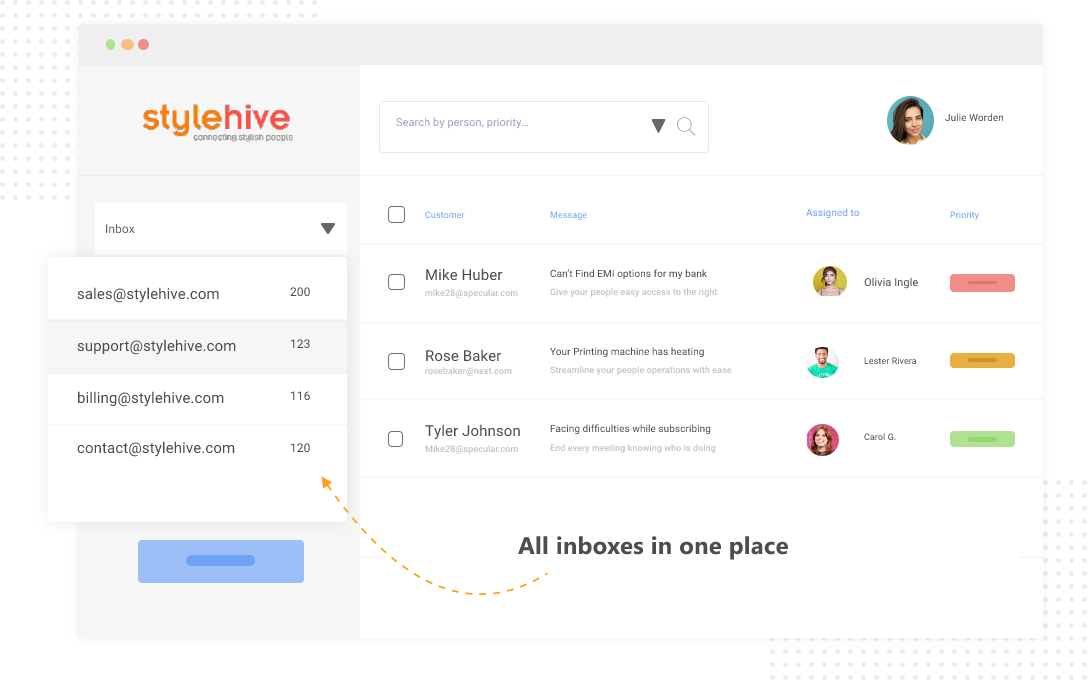
ProProfs Help Desk converts these incoming messages into trackable tickets and drops them into a shared inbox, so nothing lives in personal mailboxes anymore. Every request, including Alex’s, now has a clear home and a unique ticket ID.
Step 2: The Request Becomes an Organized Ticket
Once Alex’s request lands in the system, it is no longer “just an email.” ProProfs Help Desk creates a ticket with the full conversation, contact details, and a timestamp.
The team can now tidy things up: set a priority (for example, “High” if Alex is joining today), choose a category such as “Access request,” and add a label like “KB Access” for better organization. The interface looks and feels like email but gives your team far more structure and visibility than a normal inbox.
This is where your service request workflow really begins, because you now have clean, organized data to work with.
Step 3: Automated Ticket Routing to the Right Person
With manual routing, someone has to read every request and forward it to the right person. That does not scale.
In ProProfs Help Desk, you can set up simple automation rules so that:
- Access-related tickets go straight to the IT or internal support team
- HR or facilities requests go to their own inboxes
- High-priority tickets go to experienced agents
Based on these rules, Alex’s ticket is automatically assigned to Sara on the IT team, who handles internal access and permissions. She sees the ticket in her queue without anyone manually forwarding it.
If you want to see how this works in practice, this short video on how to automate your customer service walks through setting up automation rules step by step:
Step 4: AI Response, Approvals, and Internal Collaboration
Many service requests, especially access or hardware ones, need a manager’s approval. Instead of jumping between chat apps, emails, and spreadsheets, Sara handles everything inside the same ticket.
ProProfs AI quickly summarizes the entire request email for her and shares three response suggestions that she can use right away.
She can add a private note tagging her manager, ask for approval, and keep that internal conversation hidden from the end-user. If another team needs to help (for example, Security or HR), she can involve them as well without losing context.
All the back-and-forth lives with the ticket, so anyone who opens it later sees the full history in one place.
Step 5: Fulfilling the Request and Updating the User
Once the manager approves, Sara takes action: she creates Alex’s knowledge base account, assigns the right role, and tests the login.
She can then send a clear, friendly reply with:
- Alex’s login details or SSO link
- Short steps on how to sign in and get started
- A link to a helpful article from your knowledge base, pulled in directly from the ticket interface
Alex gets exactly what he needed, with clear guidance, instead of a vague “Your request is done.”
Step 6: Closing the Loop and Learning From the Data
After Alex confirms that everything works, Sara closes the ticket as “Resolved.” ProProfs Help Desk can automatically send a short CSAT survey asking Alex to rate the experience, and all the timings and outcomes are logged for reporting.
Over time, you can look at:
- How long access requests usually take
- Which request types pile up the most
- How satisfied users are with different kinds of requests
This is where the service request management process becomes a loop, not a straight line. Each request gives you data that helps you refine workflows, improve your knowledge base, adjust SLAs, and even automate more steps.
Service Request Management Best Practices
Simply closing every request is not enough. The goal is to make the whole journey easier for users and lighter for your team. Here are some practical service request management best practices you can put in place right away.
1. Automate Repetitive Work
If agents are manually assigning tickets, chasing approvals, and sending status updates, things will slow down very fast.
Set up simple automations so your service request process flow runs on its own wherever possible:
- New requests are auto-converted into tickets and routed to the right team
- SLAs and priorities are applied based on request type
- Notifications go out automatically when the status changes
- Standard responses (like “access granted” instructions) use templates
Automation cuts errors, speeds up resolution times, and lets agents focus on the few requests that really need human thinking.
2. Centralize Requests in a Shared Inbox
Email works for a small team with a handful of tickets. Once volumes grow, it becomes a black hole.
Move to a shared inbox or help desk where all service requests land in one place, no matter which email address or channel they come from. Your team can see:
- What is new, open, or overdue
- Who is working on what
- Which tickets are waiting for a reply or approval
This prevents duplicate replies, missed emails, and “I thought you were handling it” moments.
3. Prioritize Requests Based on Impact
When you get hundreds of requests, you cannot treat them all the same.
Define priority rules based on impact and urgency:
- High priority: A request that blocks important work (for example, access needed for a client presentation today)
- Medium priority: Useful but not urgent (for example, access to a reporting tool for future projects)
- Low priority: Nice-to-have items (for example, an extra peripheral or minor cosmetic changes)
Clear priorities help your team focus on what matters most and give users realistic expectations about response times.
4. Reduce Ticket Volume With Self-Service
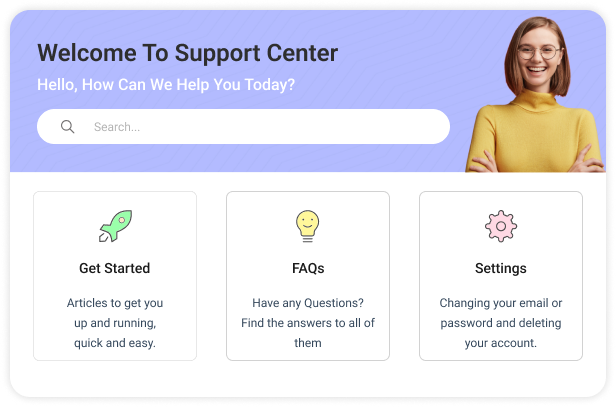
A big part of service request management is stopping unnecessary tickets before they even start.
Create strong self-service options so users can help themselves:
- A searchable knowledge base with how-to guides and FAQs
- Short articles explaining how to request access, reset passwords, or track requests
- A simple portal where users can log in, see their tickets, and submit new ones
Most people are happy to solve simple issues on their own if you give them the right content and a clear starting point.
5. Keep Your Knowledge Base Fresh
Outdated help articles can create more requests, not fewer.
Make knowledge base maintenance part of your service request management process:
- Review popular articles regularly and update them when tools or policies change
- Use simple language and screenshots where needed
- Avoid multiple conflicting versions of the same solution
- Add missing articles when agents answer the same question again and again
Your knowledge base should evolve with your products, tools, and internal processes.
6. Maintain a Clear Service Catalog
A service catalog is your menu of services. If users cannot see what is available, they will send vague, incomplete requests that are hard to process.
For each service, define:
- What it is and who it is for
- What information does the requester needs to provide
- Typical turnaround time and any costs or conditions
- Links to related knowledge base articles
When users can pick the right option from a catalog, your tickets become cleaner, approvals are faster, and workflows are easier to automate.
7. Simplify & Standardize Approvals
Approvals are often the slowest part of the service request workflow.
Look for ways to make them lighter:
- Pre-approve low-risk, low-cost requests for certain roles
- Use clear rules so managers know exactly when to approve
- Group common approvals (for example, all standard onboarding items) into a single flow
The goal is to keep control where it matters without turning every small request into a long waiting game.
8. Use Reports & Feedback to Improve
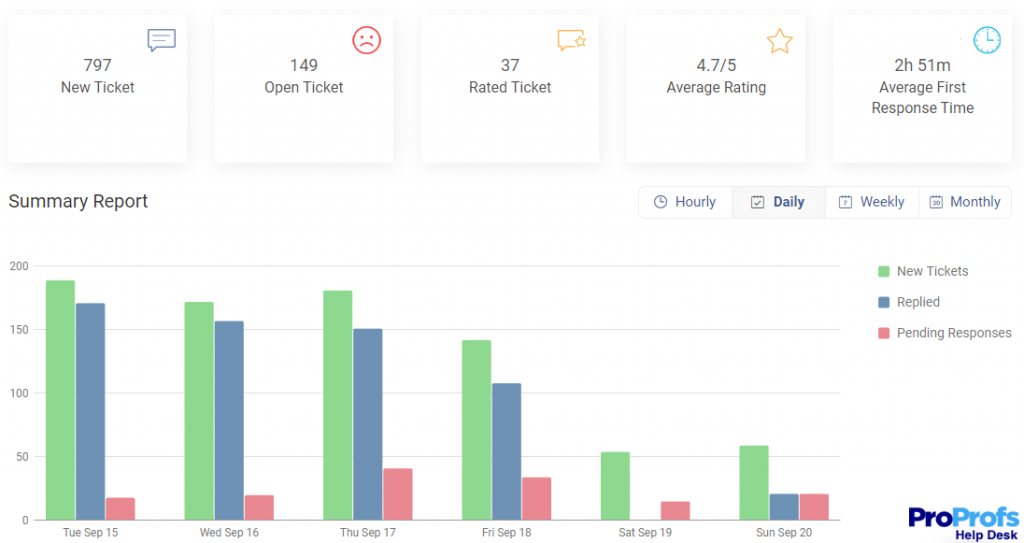
Data is what turns a busy service desk into a continuously improving one.
Track a small set of metrics that actually help you make decisions, such as:
- Number of open and new tickets by type
- Average first response time
- Average resolution time
- Customer satisfaction (CSAT) on service requests
- Percentage of requests resolved through self-service
Combine these metrics with user feedback like “What could we have done better?” and internal input from your agents. Over time, you will see patterns that tell you which workflows to simplify, which articles to update, and where to invest in more automation or staffing.
Deliver Delightful Experiences With Service Request Management
Getting service request management right is less about complex theory and more about building simple, reliable habits:
- Make it easy for users to ask for what they need
- Separate incidents from service requests so emergencies get fast attention
- Standardize and automate your service request workflow
- Encourage self-service with a strong knowledge base and portal
- Use metrics and feedback to keep improving
When your IT and service teams have the right structure and tools, they stop firefighting and start enabling people to do their best work.
If you are ready to streamline your service request management process across email, chat, web forms, and your help center, a tool like ProProfs Help Desk can help you capture, route, and resolve requests in one place while your users enjoy faster, more predictable service.
Frequently Asked Questions

What is an example of a service request?
Typical service requests include asking for access to a CRM, requesting a new laptop, installing approved software, resetting a password, or getting a copy of an invoice. These are routine, planned tasks where nothing is broken, the user just needs something new.
How does the service request management process work?
The service request management process usually covers five stages: user submits a request, it is logged and categorized, routed and approved, fulfilled by the right team, then closed with feedback captured for improvement and reporting.
Which tools help with service request management?
Service request management is usually handled through ITSM or help desk tools that offer ticketing, shared inboxes, automation, SLAs, self-service portals, and reporting. These platforms standardize workflows and make it easier to manage high volumes of routine requests.
FREE. All Features. FOREVER!
Try our Forever FREE account with all premium features!

 We'd love your feedback!
What did you like & how can we make it even better?
 Thanks for your feedback!
 Ask Your Question
Have a question? Get expert help to make your decision easier.