
What is a help desk for real estate? A help desk for real estate is a support ticketing system that converts tenant requests, maintenance reports, leasing inquiries, and agent communications into organized, trackable tickets — routed to the right person, logged with full history, and resolved faster than any shared inbox can.
I’ve managed enough real estate support operations to know that the cracks don’t show up in big dramatic failures. They show up in a maintenance request that sat in someone’s inbox for three days, a leasing inquiry that two agents both ignored because each assumed the other had it, or an owner calling for the fourth time because nobody sent an update. That’s the daily reality the best helpdesk for real estate is built to fix.
Over the past few years, I’ve evaluated support setups across property management firms, landlord portfolios, and real estate agencies ranging from forwarded email chains and shared spreadsheets to structured ticketing tools like ProProfs Help Desk and the gap between teams that run smoothly and teams that are constantly firefighting almost always comes down to one thing: whether requests have a clear owner, a clear status, and a clear record.
The tools I’ve shortlisted here aren’t chosen for their feature lists. They’re chosen because they work for real estate teams that are stretched thin, often non-technical, and need something they will actually open and use every single day.
Key Takeaways
- A real estate helpdesk is a dedicated ticketing system that turns every inbound request into a trackable, assigned, and time-stamped ticket, no more requests living in someone’s personal inbox.
- From lost maintenance requests to zero audit trail, this blog maps out 7 exact problems property teams face and how a helpdesk addresses each one.
- Whether you manage 10 units or 10,000, there is a tool on this list sized for your operation — with honest pros, cons, and pricing for each.
- Not every helpdesk feature is relevant in real estate. This blog covers the eight that make a genuine operational difference for property managers and landlords.
- A helpdesk and property management software solve two different problems. Understanding the distinction helps you build a stack that covers both without overlap.
Quick Comparison: Best Helpdesk for Real Estate at a Glance
Six tools evaluated: each suited to a different team size, workflow, and budget. Here’s the short version before the full breakdown.
| Tool | Best For | Pricing |
|---|---|---|
| ProProfs Help Desk | AI-assisted help desk and support ticketing | Free plan available. Paid plan starts at $19.99/user/month. |
| HappyFox | Insightful Reports & Analytics | Starts at $24/agent/month |
| Freshdesk | Custom "property" data objects + structured ticketing at scale | Starts at $19/agent/month |
| Zoho Desk | Budget-friendly ticketing + strong desk-style structure | Starts at $12/agent/month |
| LiveAgent | Real estate teams needing live chat + ticketing + call center | Starts at $15/agent/month |
| Zendesk | Enterprise-grade omnichannel + deep marketplace ecosystem | Starts at $19/agent/month |
1. ProProfs Help Desk – Best for AI Help Desk & Support Ticketing for Customer Delight
ProProfs Help Desk is the tool I currently rely on when I want a helpdesk at a real estate company that feels straightforward from day one. The core idea is simple: every tenant or owner email becomes a trackable ticket, and every agent works from the same source of truth instead of forwarding threads and hoping nothing falls through.
What I find most useful for real estate workflows right now is how I can structure tickets with custom fields, labels, and filters. Agents never have to ask “Which property is this for?” because that information is captured right on the ticket — property name, unit number, urgency level, vendor type, move-in/move-out status.
When volume spikes on weekends, storm days, or move-out cycles, I rely on auto-responses, routing rules, and AI-assisted response suggestions to keep first-reply times healthy without burning out the help desk staff. The combination of multi-inbox support, simple automation, and property-level customization makes ProProfs Help Desk one of the most practical options I’ve used for real estate support without needing a dedicated IT team to maintain it.
Take a moment to see how Steve Organek, founder of Shaver Shebang, used ProProfs Help Desk to improve support quality.

Pros:
- Supports multiple shared inboxes so leasing, support, and maintenance run in parallel without context-switching
- Includes auto-responses, canned replies, and routing rules to reduce repetitive manual work
- Offers custom fields, filters, and labels to capture property-specific request details on every ticket
- Customer Delight Suite to offer 360-degree support to customers and employees
Cons:
- Cloud-only – no offline access
- No dark theme
Pricing:
A free plan is available for growing teams. Paid plan starts at $19.99/user/month.
2. HappyFox – Best for Insightful Reports & Analytics
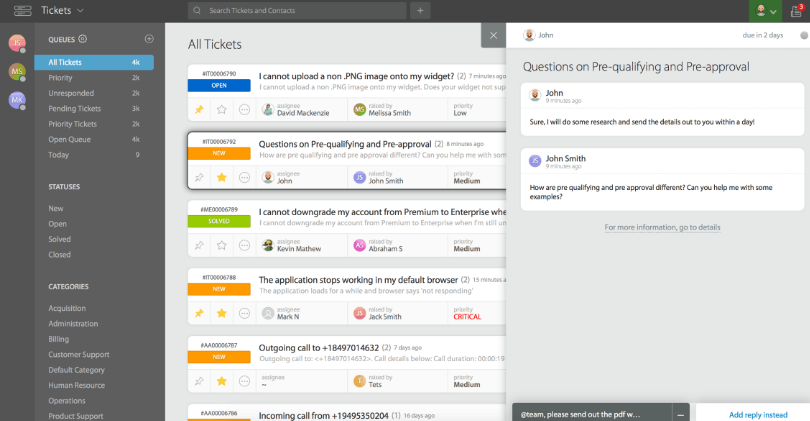
Image source: HappyFox
HappyFox is the tool I used when I wanted the help desk to feel less like email management and more like a full operational workflow, one that could handle owners, tenants, maintenance vendors, and portfolio support without blending everything into one chaotic inbox.
What stood out when I used it was how naturally it mapped to real estate support categories. Maintenance request management, owner and tenant communications, property inquiries, and portfolio operations each had their own structured queue.
The knowledge base feature turned out to be more practical than I expected. The automation-based routing and priority assignment also worked well for urgency-based escalation.
Pros:
- Centralizes tenant and owner communications into ticketing workflows with automation-based routing
- Includes maintenance-oriented queue structures for organizing vendor coordination and work orders
- Supports a self-service knowledge base to deflect repeat lease and policy questions
- Provides SLA reporting and operational dashboards for visibility into response and resolution times
Cons:
- Detailed pricing for higher tiers is often form-gated rather than self-serve on the main pricing page
- Teams need time to design queues and automation rules that match their specific property workflows
Pricing:
Starts at $24/agent/month.
3. Freshdesk – Best for Real Estate Teams That Want Structured Data
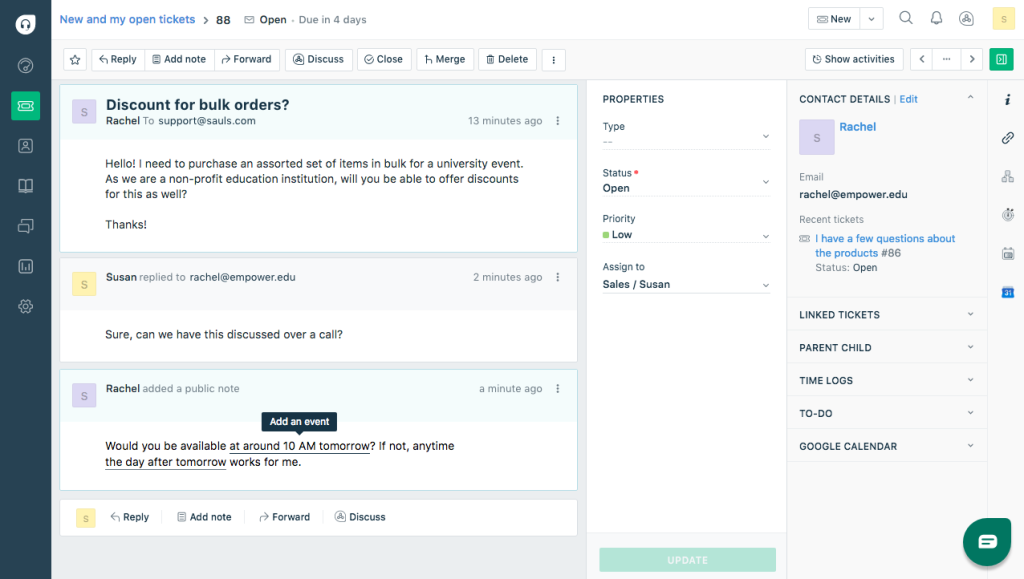
Freshdesk was the pick I made when I needed the helpdesk to behave like a structured support system. Freshworks actually documents a property management use case for Custom Objects using “Contracts,” which aligns closely with how real estate teams think about request context — who is this tenant, which property, which lease, what’s the history.
I upgraded only when I needed more advanced automation and deeper analytics which felt like the right progression rather than being forced into a higher tier from day one.
One thing I paid close attention to was the AI pricing mechanics. Freshdesk includes session allowances for AI features and charges for additional usage, so it worked best when I treated the AI as a productivity booster rather than the entire operating model.
Pros:
- Clear tier pricing with the Growth plan starting at $19/agent/month billed annually
- Supports structured support operations via Custom Objects — Freshworks documents “Contracts” as a property management use case
- Scales smoothly into stronger routing, reporting, and admin controls in higher tiers
- Defined AI session costs make usage forecasting more predictable
Cons:
- Advanced reporting, routing logic, and security features typically require higher-tier plans
- AI session costs can become less predictable at scale
Pricing:
Starts at $19/agent/month (annual billing).
4. Zoho Desk – Best Budget-Friendly IT Helpdesk for Real Estate Firms That Want Clean, No-Frills Ticketing
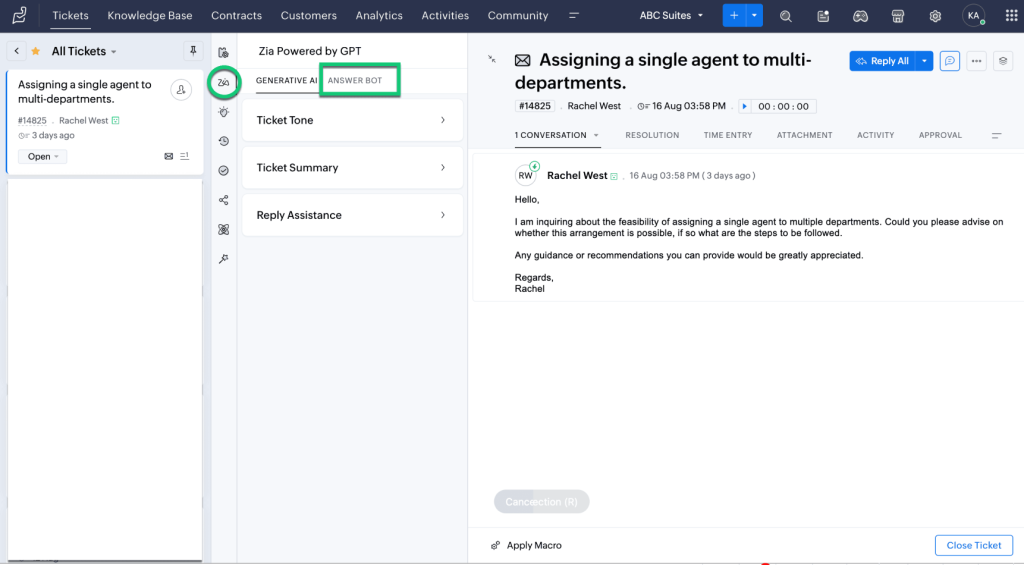
Zoho Desk was the choice when the main requirement was straightforward: solid ticketing, predictable pricing, and nothing that would take months to configure. It’s especially well-suited for cost-conscious property firms that want a clean IT helpdesk for real estate without enterprise overhead.
Zoho’s pricing page spells out exactly what you get at each tier, including a free option with an agent limit that let his team pilot workflows before committing to a paid plan.
In practice, Zoho Desk delivered the core workflow he needed: email-to-ticket conversion, internal notes for team communication, ticket tags for property categorization, and a reasonable path to automation and SLAs as his operation scaled. If your organization already uses other Zoho apps (CRM, Campaigns, Books), Zoho Desk slots in naturally as the support layer without rebuilding your entire stack.
Pros:
- Includes a free tier with an agent limit, useful for small landlord teams piloting workflows
- Covers core ticket management: email tickets, internal notes, ticket tags, and basic routing
- Offers clear step-ups into higher tiers for automation, SLA management, and advanced reporting
- Integrates naturally with other Zoho products for teams already in the Zoho ecosystem
Cons:
- Built-in voice/call center capabilities are limited compared to platforms that lead with telephony
- Real estate field operations with technician dispatch needs may require a separate work-order tool
Pricing:
Starts at $12/agent/month (annual billing).
5. LiveAgent – Best for Real-Time Tenant Chat Plus Ticketing
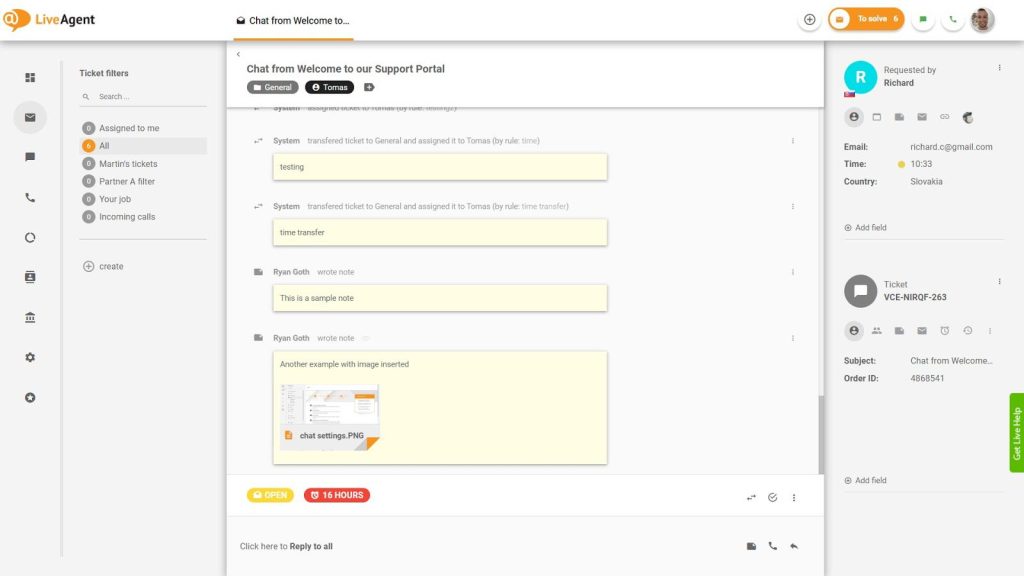
Image source: LiveAgent
LiveAgent was the tool that made sense when real-time response mattered specifically for prospective tenants browsing listings who want quick answers now, not a callback tomorrow. The reason LiveAgent worked for the leasing side of my operation is that it brings help desk ticketing and live chat together in a single platform.
Prospective tenants asking about availability, scheduling tours, or clarifying lease terms rarely wait 24 hours for a reply — and LiveAgent’s chat widget handled those real-time conversations while automatically creating a ticket record for each one.
Their real estate industry messaging specifically highlights response-time improvements and knowledge base usage — two metrics that genuinely drive tenant satisfaction scores and reduce repeat-contact rates across multi-property portfolios.
Pros:
- Strong fit for real estate teams wanting live chat and ticketing in a single system
- Offers a 30-day free trial suitable for testing under real tenant inquiry volume
- Includes canned responses and templates to reduce repetitive replies for leasing FAQs
- Supports multi-channel growth as teams add email, chat, phone, and portal channels
Cons:
- Teams need process discipline to prevent urgent maintenance tickets from being routed through the live chat queue
- Some organizations may want deeper native analytics and dashboards found in heavier platforms
Pricing:
Starts at $15/agent/month.
6. Zendesk – Best for Enterprise-Grade Omnichannel Support
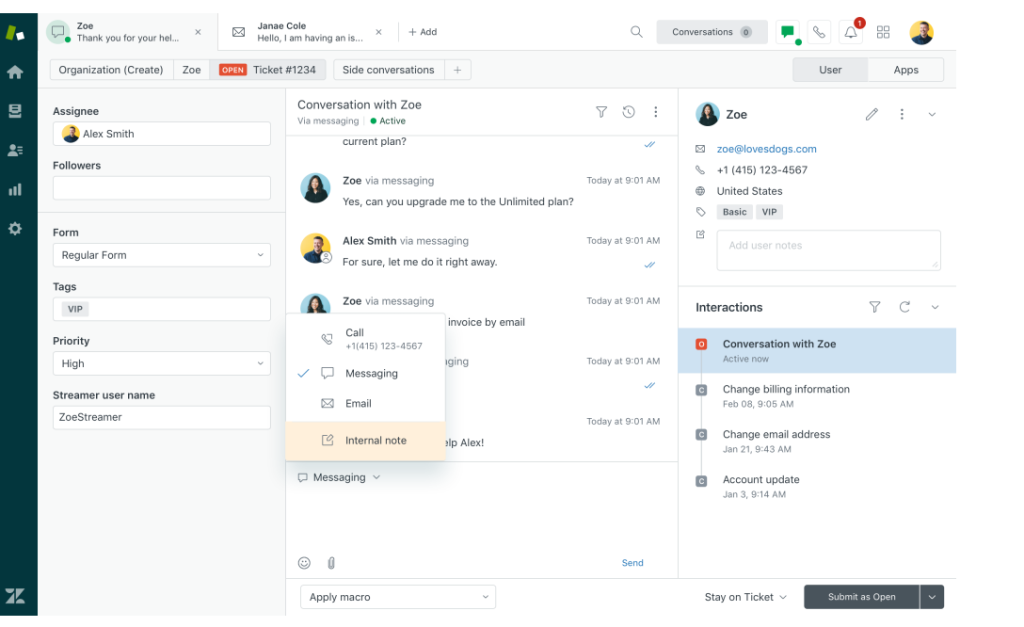
Zendesk is the platform I evaluated when the requirement was essentially: enterprise-grade omnichannel support, deep customization, and a marketplace ecosystem built for complex multi-department operations.
When I looked at Zendesk for a larger brokerage context, the breadth was immediately clear: automation across channels, self-service portals, advanced analytics, and an app marketplace with hundreds of integrations. For a large property platform managing multiple offices, brands, and tenant-facing products, that ecosystem depth can be genuinely valuable.
The honest caveat is cost trajectory. Entry-level pricing exists, but most real estate organizations that need the automation depth and reporting Zendesk is known for end up in higher tiers — something worth forecasting before sign-off. For lean property management teams, that overhead can feel heavier than the problem it solves.
Pros:
- Strong automation and analytics positioning for large-scale support operations
- Broad omnichannel support across email, chat, voice, social, and portal
- Extensive app marketplace for deep integrations with property management and CRM platforms
- Scales well across large organizations with complex team structures and workflows
Cons:
- Total cost frequently grows as teams move beyond starter tiers to access full automation and reporting depth
- Can feel operationally heavy for small or mid-size property teams with simpler email-first needs
Pricing:
Starts at $19/agent/month (pricing varies significantly by tier and add-ons).
How Did I Evaluate These Real Estate Helpdesk Tools?
Every tool on this list was assessed against the same six criteria — focused specifically on what matters for property management teams, not generic software buyers.
- User Reviews and Ratings: Feedback from property managers, landlords, and tenant support teams on reputable review platforms was reviewed to understand real-world satisfaction, recurring complaints, and how tools perform under actual operational conditions — not just in demos.
- Core Features for Real Estate Workflows: Each tool was evaluated on features that directly impact property support operations — shared inbox management, ticket routing, property-level custom fields, maintenance queue handling, SLA controls, and automated follow-ups.
- Ease of Use for Non-Technical Teams: Property management teams rarely have dedicated IT support. Tools were assessed on how quickly a leasing agent or property manager could get up and running without a lengthy onboarding process or technical background.
- Customer Support Quality: The responsiveness and reliability of each vendor’s support was considered — particularly during setup and escalation scenarios, since a helpdesk that goes down or gets stuck is a direct operational risk for tenant-facing teams.
- Value for Money: Pricing was evaluated against what each tier actually delivers for a real estate context. Tools that charge enterprise rates for features a small property team will never use scored lower on this dimension.
- Personal Experience and Expert Input: Assessments are grounded in hands-on testing across real property management setups, supplemented by feedback from operations professionals and community insights from platforms like r/PropertyManagement.
My Top 3 Picks for the Best Helpdesk for Real Estate
After testing multiple tools across different property team setups, these three consistently stood out, not just for their features, but for how well they fit the way real estate support actually works day-to-day.
1. ProProfs Help Desk
ProProfs Help Desk is the one I keep coming back to for small-to-mid-size property teams. It handles multiple shared inboxes, routes tickets automatically, and lets you attach property-specific fields to every request — so agents always have context without asking tenants to repeat themselves. The setup is fast, the learning curve is low, and it covers the core of what most real estate support operations actually need.
2. HappyFox
HappyFox is the pick when your operation has grown complex enough that “one messy inbox” no longer cuts it. It maps naturally to real estate workflows — separate queues for maintenance, owner support, leasing, and portfolio ops — and the SLA reporting gives managers actual visibility into where requests are stalling, not just whether they were closed.
3. Freshdesk
Freshdesk earns its place when your team wants tickets tied to structured data — leases, contracts, property records — rather than just floating in a queue. The Custom Objects feature (which Freshworks documents specifically for property management) means agents have the context they need pulled up on every ticket, without switching between systems.
What Problems Does a Real Estate Help Desk Actually Solve?
Before picking a tool, it helps to name the specific breakdowns a helpdesk at a real estate company is designed to fix. Most property teams experience at least a few of these on a regular basis, even if they have worked around them for so long they have stopped noticing.
- Requests Getting Lost: Tenant emails land in a shared Gmail that three people technically have access to but nobody actively monitors. By the time someone spots it, two days have passed and the tenant has already called the office twice. A helpdesk converts every inbound email into a ticket with a timestamp and an owner so nothing sits unread.
- No Ownership: A maintenance request gets forwarded to four people. Everyone assumes someone else is handling it. Nobody is. A ticketing system assigns a clear owner to every request the moment it comes in, so there is never any ambiguity about who is responsible.
- Duplicate Replies: Two agents see the same open email and both respond, sometimes with different information. This confuses tenants and creates inconsistency. Helpdesks prevent this through collision detection and ticket status visibility, so agents can see when a colleague is already working on a request.
- Zero Audit Trail: When a tenant disputes what was promised during a maintenance visit or lease negotiation, nobody can find the original conversation. A helpdesk logs every interaction against the ticket, creating a searchable, time-stamped record that protects the team legally and operationally.
- Delayed Maintenance Escalation: An urgent flooding report gets treated with the same priority as a request for a parking permit. Without routing rules and urgency tiers, everything lands in one pile. A good helpdesk separates requests by type and priority automatically, so critical issues get escalated before they become bigger problems.
- Tenant Repeat-Calling: When tenants hear nothing after submitting a request, they call to check. Then they call again. Automated status updates sent at key milestones keep tenants informed without any manual effort from the team, reducing inbound call volume significantly.
- Agent Coordination Gaps: Leasing handles one inbox, maintenance handles another, and management is copying emails into a spreadsheet. Nobody has a full picture of what is happening across the operation. A shared helpdesk gives every team visibility into open requests, priorities, and resolution status in one place.
A good helpdesk solves all seven of these. A great one does it in a way that feels natural enough that your team actually sticks with it.
FREE. All Features. FOREVER!
Try our Forever FREE account with all premium features!
How Do Real Estate Help Desks Compare to Property Management Software?
This is one of the most common questions — and the answer matters for how you structure your tech stack.
| Feature | Real Estate Helpdesk | Property Management Software (e.g., AppFolio, Buildium) |
|---|---|---|
| Ticket tracking | Yes | Limited |
| Tenant communication history | Yes | Partial |
| Lease and accounting management | No | Yes |
| Maintenance work orders | Ticket-based | Native feature |
| SLA / response time tracking | Yes | No |
| Reporting on support performance | Yes | No |
| Agent routing and assignment | Yes | No |
The practical conclusion from property management communities: most mid-size to large operations run both. A property management platform handles financials, leases, and portals. A helpdesk handles the support operations layer — accountability, routing, resolution tracking, and communication history.
What Features Should You Look for in a Real Estate Helpdesk?
Not every helpdesk feature matters equally in a property management context. Here are the ones that make a real operational difference for tenant support teams, property managers, and landlords.
1. Multi-Inbox Support
Most real estate teams handle multiple communication streams at once — maintenance requests, leasing inquiries, billing questions, and owner communications. A helpdesk with multi-inbox support lets you run separate queues for each without losing context or mixing up priorities. Every team member works from the right inbox, not one shared pile.
2. Custom Fields for Property and Unit Details
Generic ticket forms don’t work well in real estate. You need fields that capture property name, unit number, tenant type, urgency level, and move-in or move-out status right at the point of submission.
This means agents have full context before they even open a reply, without asking the tenant to repeat information they already provided.
3. Automated Routing
When a water leak comes in at the same time as a lease renewal question, those two tickets should not land in the same queue. Automated routing sends each request to the right team or agent based on predefined rules, cutting out the manual triage step that slows down first response times.
4. SLA and Business Hours Settings
Real estate support is not a 9-to-5 operation. SLA controls let you define response time expectations by request type and urgency, while business hours settings ensure after-hours tickets are flagged and queued correctly rather than sitting unnoticed until the next morning.
5. Canned Responses
A significant portion of tenant and agent requests are repeat questions — lease copy requests, maintenance status updates, move-out procedures, amenity rules. Canned responses let agents reply accurately and consistently in seconds, which protects both response times and communication quality across the team.
6. Email and Outlook Integration
Most real estate professionals live in their email. A helpdesk that syncs with Outlook or Gmail ensures every sent and received message is automatically logged against the right ticket, so the full communication history is always visible in one place rather than scattered across personal inboxes.
7. Mobile App
Property managers and supervisors are frequently on-site, in transit, or between properties. A mobile app ensures tickets can be viewed, assigned, and updated from anywhere, which prevents the bottleneck of urgent requests waiting on someone to get back to a desk.
8. Reporting and Dashboards
Reporting tells you where your support operation is actually breaking down. Which properties generate the most maintenance tickets? Which request types take the longest to resolve? Which agents are consistently missing SLAs? Good dashboards surface these patterns early, before they turn into tenant complaints or lease non-renewals.
Stop Losing Requests and Start Running a Support Operation Your Team Actually Trusts
Real estate support is an operations problem before it is a software problem. The teams that handle it well are not necessarily using the most advanced tools — they are using a system consistently, keeping records easy to trace, and making sure every request has a clear owner and a clear next step. That discipline alone removes most of the chaos.
Choosing the right helpdesk gives your team the structure to do that at scale. Fewer dropped requests, faster response times, less time spent hunting through email threads, and owners and agents who feel like someone is actually on top of things. Those outcomes compound over time into better reviews, stronger lease renewals, and a team that is not constantly putting out fires.
If you are still figuring out where to start, it helps to pick something lightweight enough that your team will actually open it every day. A tool like ProProfs Help Desk tends to work well in that situation — not because it is the most feature-heavy option on the list, but because it gets teams operational quickly without a steep learning curve.
Frequently Asked Questions
Is a helpdesk the same as property management software?
No. Property management platforms (AppFolio, Buildium) handle leases, accounting, and portals. A help desk focuses on support workflows: ticket routing, agent accountability, SLA tracking, and communication history. Many teams use both.
What channels should a helpdesk at a real estate company support?
At minimum: email and web forms. Most teams benefit from adding a self-service portal and live chat. Omnichannel intake matters when requests arrive across calls, texts, emails, and portals simultaneously.
How do I prevent tenant maintenance requests from getting lost?
Use a helpdesk that converts every inbound request — regardless of channel — into a ticket with a unique ID, an assigned owner, and automated status updates sent back to the tenant. Manual follow-up alone doesn't scale.
What features matter most for tenant support teams?
Prioritization rules, automated assignment, internal notes, custom fields for property and unit, canned responses, and SLA reporting on first response and resolution time. These directly reduce duplicate effort and tenant repeat-contact.
What should an IT helpdesk for real estate firms include?
Access controls, clear ticket routing, SLA enforcement, auditability, and reporting. Internal IT requests in real estate firms — system access, hardware issues, software problems — need the same traceability as tenant-facing support.
Can a small landlord or solo property manager use helpdesk software?
Yes. Several platforms offer free starter tiers or low-cost entry plans. For solo operators or small portfolios, even a basic shared inbox with ticket tracking is a significant upgrade over managing everything in Gmail.
How do I handle duplicate replies from multiple agents?
Choose a helpdesk built around shared inbox collaboration — one ticket thread, one assigned owner, clear open/pending/resolved status, and collision detection where available. This prevents two agents from sending conflicting replies to the same tenant.
Can a real estate help desk automate tenant update notifications?
Yes. Most platforms support auto-acknowledgement on ticket creation, automated status updates at key milestones, and escalation alerts when a ticket approaches SLA breach — all without agents sending manual emails.
How long does it take to set up a helpdesk for real estate workflows?
Starting with email-to-ticket, basic routing, and a few custom fields can be done in a day. Complexity grows with SLAs, automation chains, knowledge bases, and integrations. The practical advice: start simple, then iterate based on what breaks first.
How does a real estate help desk improve deliverability for tenant communications?
Authenticated domains (DKIM setup), dedicated ticketing inboxes, and proper sending practices prevent outbound notifications from landing in tenant spam folders — which matters when SLA-critical updates need to reach residents reliably.
What is the difference between a helpdesk and a CRM for real estate?
A CRM manages relationships, pipelines, and contact history across the lifecycle. A helpdesk manages reactive support: tickets, routing, resolution, and SLA tracking. Some real estate teams use a lightweight CRM for contacts and a helpdesk for support operations separately.
FREE. All Features. FOREVER!
Try our Forever FREE account with all premium features!

 We'd love your feedback!
What did you like & how can we make it even better?
 Thanks for your feedback!
 Ask Your Question
Have a question? Get expert help to make your decision easier.