

I’ve seen the mess when remote agents juggle emails, chats, and spreadsheets with no system in place. Tickets fall through the cracks, SLAs slip, customers chase updates, and teams burn out.
The right remote help desk software stops that spiral. It gives you one dashboard where requests are tracked, priorities are clear, and agents can resolve issues without stepping on each other. In my experience running hybrid and fully remote support, the best-performing teams always had tools built for remote operations, not just repurposed inboxes.
In this guide, I’ll walk you through 12 remote help desk tools worth your time in 2026. These tools will help you run a remote help desk team without worrying about communication barriers.
What Is Remote Help Desk Software and How Does It Work?
Remote help desk software is built for one core job: enabling support teams to resolve issues from anywhere. Unlike traditional help desk tools that assume everyone’s in one office—or worse, stuck in one inbox—these platforms are designed for distributed teams that need structure, clarity, and control across time zones.
Here’s how it works:
- Request intake: Customers or internal users submit tickets via email, forms, chat, or phone. The right tool can turn these into structured tickets automatically.
- Ticket routing: Rules assign tickets to the right team or agent based on category, urgency, or business hours.
- Remote collaboration: Agents work together with internal notes, tags, and real-time updates without stepping on each other.
- Remote access: Some tools include or integrate with screen sharing and remote desktop support to troubleshoot technical issues.
- Customer updates: Customers see replies, progress, or status changes via email or portal—without needing to chase anyone.
The best tools also include automation, SLAs, asset management, and integrations that keep support moving even as your team scales.
The 12 Best Remote Help Desk Software Tools
I’ve shortlisted these 12 tools based on real-world usage, expert reviews, and the specific needs of remote-first support teams. Whether you need email-to-ticket conversion or tight integration with your existing stack, these tools cover a range of use cases:
| Tool | Best For | Pricing |
|---|---|---|
| ProProfs Help Desk | AI help desk & support ticketing for customer delight | A free plan is available. Paid plan starts at $19.99/user/month. |
| Freshdesk | Multichannel communications | Starts at $15 per user per month |
| LiveAgent | Chat-based support | Starts at $15 per agent per month |
| SysAid | AI-powered IT service management | Custom pricing |
| SolarWinds Service Desk | Network monitoring + IT ticketing | Starts at $39 per technician per month |
| ServiceNow | Complex, multi-team IT workflows | Custom pricing |
| HappyFox | Deep-dive analytics in support operations | Starts at $21 per agent per month |
| Zendesk | Customer self-service at scale | Starts at $19 per agent per month |
| Zoho Desk | Contextual remote ticketing | Starts at $20 per user per month |
| ManageEngine ServiceDesk Plus | Asset-linked remote IT support | Custom pricing |
| LogMeIn Resolve (GoTo Resolve) | Lightweight remote desktop with built-in ticketing | Starts at $23 per month |
| InvGate Service Desk | Gamifying service desk performance | Starts at $17 per agent per month |
1. ProProfs Help Desk – Best for AI-Assisted Help Desk for Customer Delight
When I first rolled out ProProfs Help Desk to a remote team, the goal was clear: reduce scattered communication and bring structure to support. ProProfs Help Desk made that shift easy. This remote help desk software pulls in tickets from email, chat, and web forms into a single dashboard, so agents aren’t chasing updates across platforms.
The platform also stands out for its AI-powered features. It can summarize long ticket threads, suggest reply drafts, and even identify the customer’s intent when queries come in vague. I’ve found that especially useful when new agents step in or when escalations need context quickly.
For remote teams, the built-in mobile app and integrations with tools like Google Meet and GoToMeeting make it easier to resolve issues fast, sometimes while on the move. Screen sharing, session recording, and parent-child ticketing help teams stay proactive rather than reactive.
Pros:
- Unified inbox for email, chat, and form-based support
- AI summarizes threads and assists with response drafting
- Agents can record and revisit remote sessions for QA or training
- Parent-child ticketing helps manage complex, multi-team issues
- Strong security with IP restrictions, SSO, and 2FA
Cons:
- No downloadable or on-premise deployment option
- No dark mode option available
User Rating: 4.9 (Capterra)
Pricing: A free plan is available for growing teams. Paid plan starts at $19.99/user/month.
2. Freshdesk – Best for Multichannel Communications
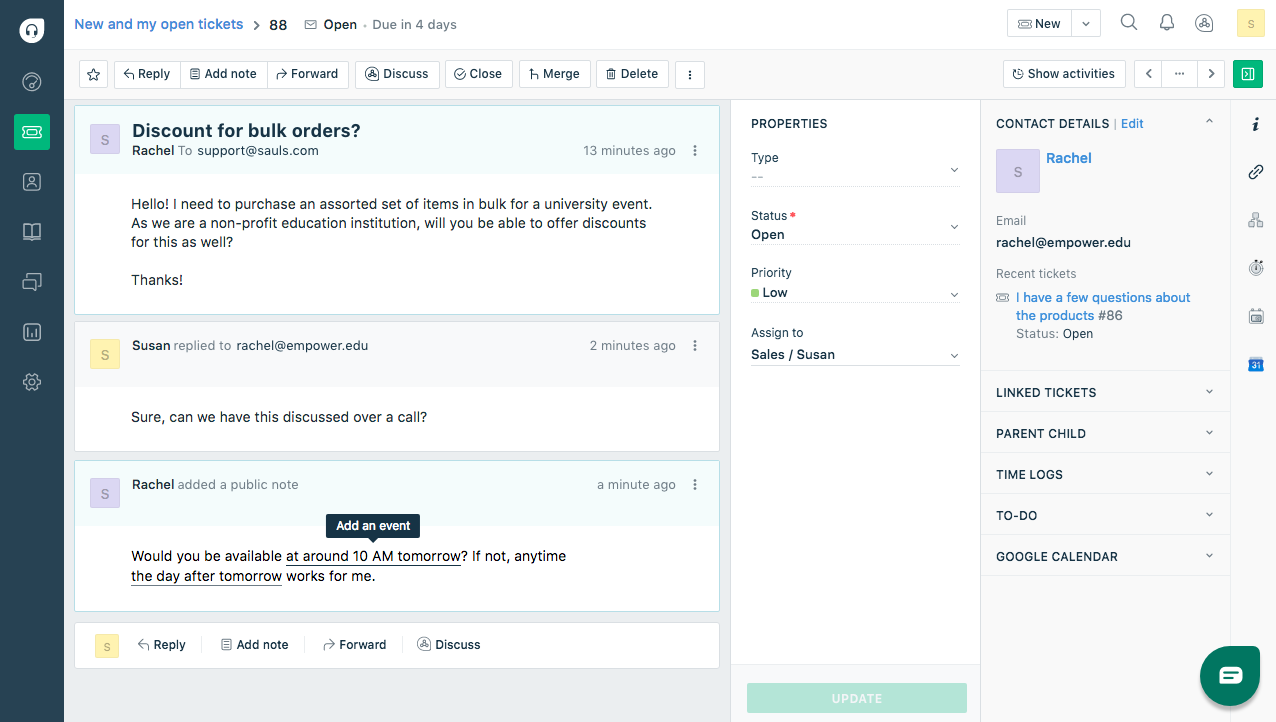
Image source: Freshdesk
I’ve recommended Freshdesk to several teams transitioning from siloed email inboxes to structured support. It’s especially useful when your customers reach out via multiple channels—email, chat, phone, or even social media—and your agents need a consistent view of the conversation.
The strength of Freshdesk is in its clean UI and strong collaboration tools. Agents can leave private notes, @mention teammates, and co-own tickets. I’ve seen teams cut first-response times significantly just by standardizing workflows with Freshdesk’s automation and canned responses.
It also integrates well with file-sharing platforms like Dropbox and OneDrive, which helps when attachments are part of the back-and-forth. Plus, the parent-child ticketing feature makes it easier to split complex issues into manageable chunks across different teams.
Pros:
- Unifies support across email, chat, phone, and more
- Strong internal collaboration with shared ownership features
- Helpful automation tools to route, escalate, and respond faster
- Pre-built integrations with common productivity platforms
- Dashboard visibility into agent workload and ticket status
Cons:
- Some essential features (e.g., advanced routing, custom reports) are gated in higher plans
- Can feel bloated if you only need core help desk features
User Rating: 4.5 (Capterra)
Pricing: Starts at $15/user/month
3. LiveAgent – Best for Chat-Based Support
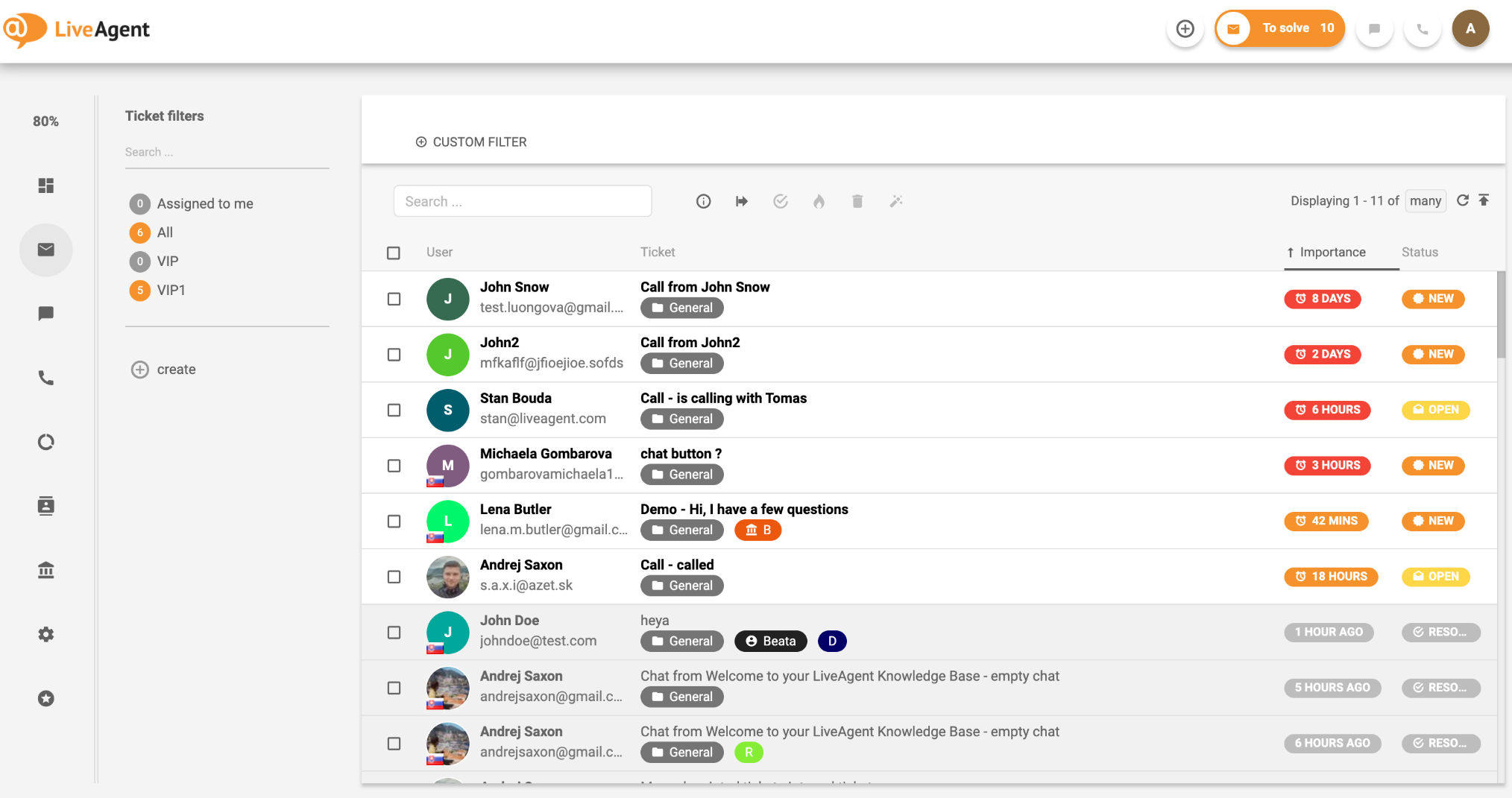
Image source: LiveAgent
LiveAgent works best when speed and clarity matter most—especially for teams relying heavily on live chat. I used it with a remote ecommerce team, where volume spiked without warning, and LiveAgent helped route queries fast while keeping agent workloads balanced.
Its real-time workload monitoring and time-tracking features give support leads better control. You can see who’s overloaded and redistribute tasks before tickets pile up. The internal chat feature also helps agents check with teammates on the fly, without toggling between tools.
Where this remote help desk software really shines is with automation. Bulk actions, pre-built templates, and tagging rules help teams move through queues without slowing down for repetitive work.
Pros:
- Real-time chat and feedback widgets in multiple languages
- Built-in time tracking tied to individual tickets
- Mass ticket actions for faster queue management
- Internal agent chat improves collaboration
- Email templates speed up repetitive responses
Cons:
- Ticket creation from phone support feels clunky
- Auto-translation for chats and tickets can be unreliable
User Rating: 4.7 (Capterra)
Pricing: Starts at $15/agent/month
4. SysAid – Best for AI-Powered IT Service Management
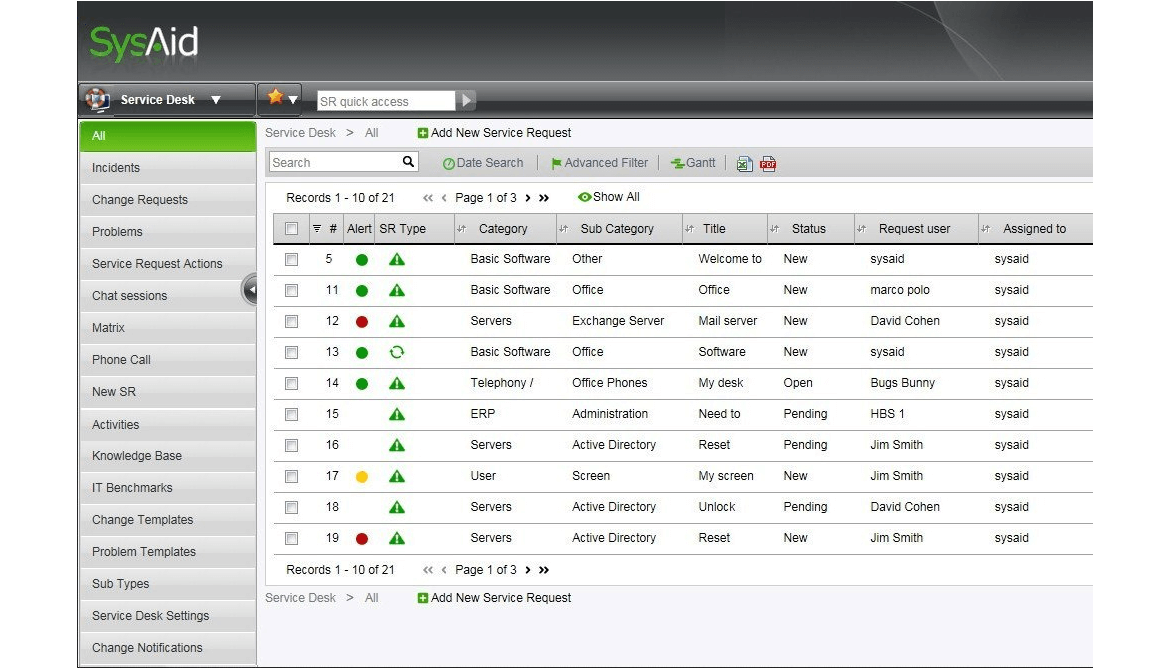
Image source: SysAid
SysAid is built for teams that need help desk software with remote control for faster issue resolution. I’ve worked with IT teams that used SysAid to remotely connect to employee machines in just a few clicks—no separate tool required. That built-in remote control drastically cuts resolution time for technical issues.
It’s also an IT service management platform at its core. The ticketing, asset management, and change management modules are tightly integrated, so you’re not just resolving incidents; you’re tracking them against systems and users.
For remote teams managing hardware or enterprise software setups, SysAid’s automation and escalation rules help reduce firefighting and keep operations predictable. The end-user portal is also customizable, so employees can check ticket status or find solutions without opening a new request.
Pros:
- Built-in remote control for instant device access
- Combines ticketing, asset, and change management in one platform
- Customizable end-user portal for self-service and status tracking
- Automation and routing reduce repetitive manual work
- Good visibility into support trends and SLA tracking
Cons:
- Interface feels dated and dense for non-technical users
- Overkill for teams not handling ITIL-based workflows
User Rating: 4.5 (Capterra)
Pricing: Custom pricing
5. SolarWinds Service Desk – Best for Network Monitoring + IT Ticketing
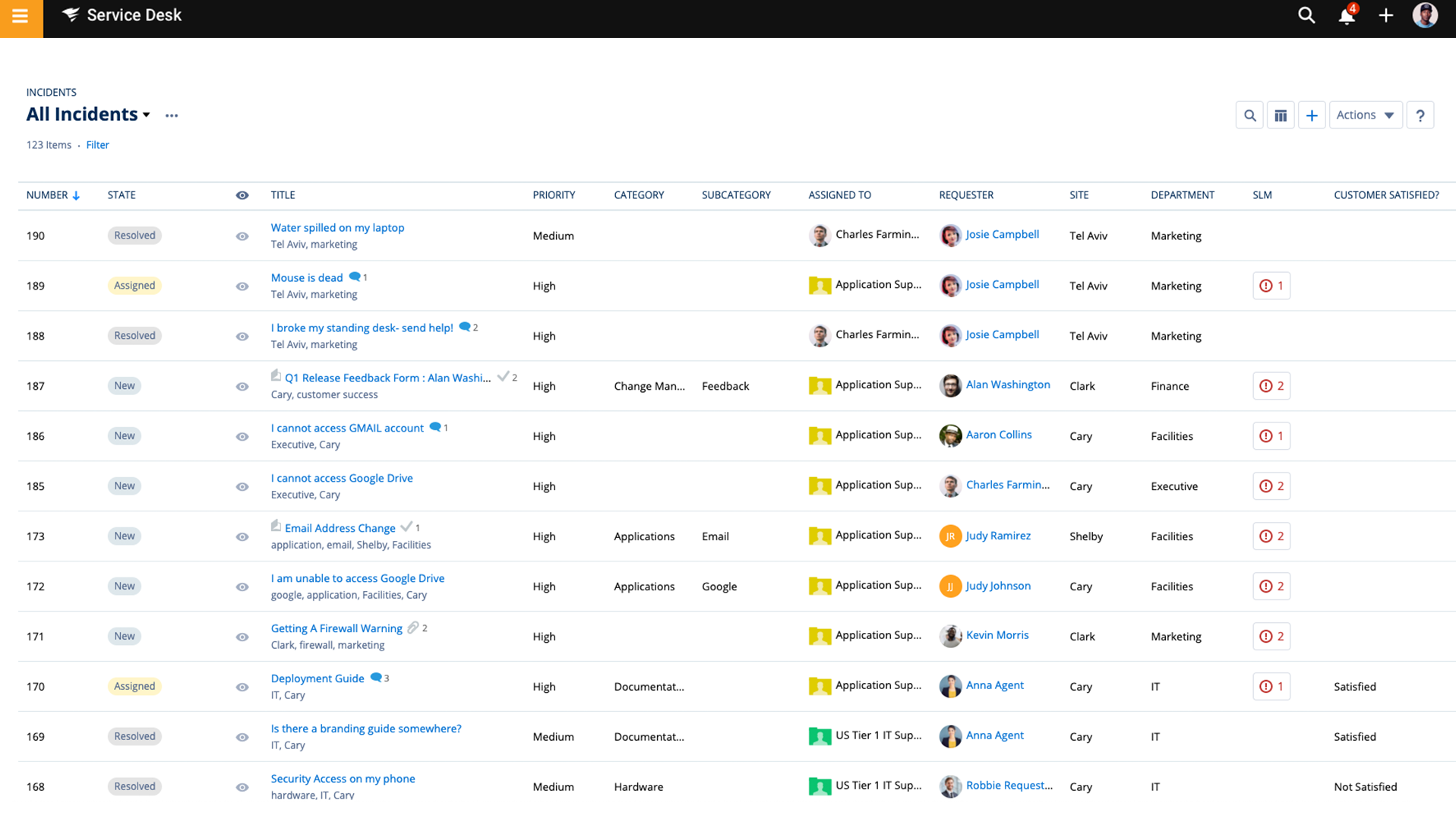
Image source: SolarWinds
SolarWinds Service Desk is ideal for IT teams that need tight control over assets, requests, and network visibility—all from one place. I’ve used it in environments where support had to resolve issues and monitor system health, and the integration with SolarWinds’ broader suite made that seamless.
The real value for remote support lies in its integration with Dameware Remote Everywhere (DRE), which positions SolarWinds Service Desk as a reliable remote access help desk software. Agents can launch remote desktop sessions from within tickets, troubleshoot issues silently in the background, and document actions without needing a separate tool. It’s fast, secure, and built with compliance in mind.
Its asset discovery and incident-tracking features also reduce back-and-forth. You can link tickets to specific devices or software, speeding up diagnostics for hybrid or fully remote teams.
Pros:
- Integrated with DRE for secure remote troubleshooting
- Asset and configuration tracking tied to support tickets
- Built-in SLA tracking and reporting for accountability
- Streamlined ticket submission through custom service catalogs
- Role-based permissions and audit trails for IT compliance
Cons:
- Interface customization is limited beyond branding basics
- Report building can feel restrictive for non-technical users
User Rating: 4.6 (Capterra)
Pricing: Starts at $39/technician/month
6. ServiceNow – Best for Complex, Multi-Team IT Workflows
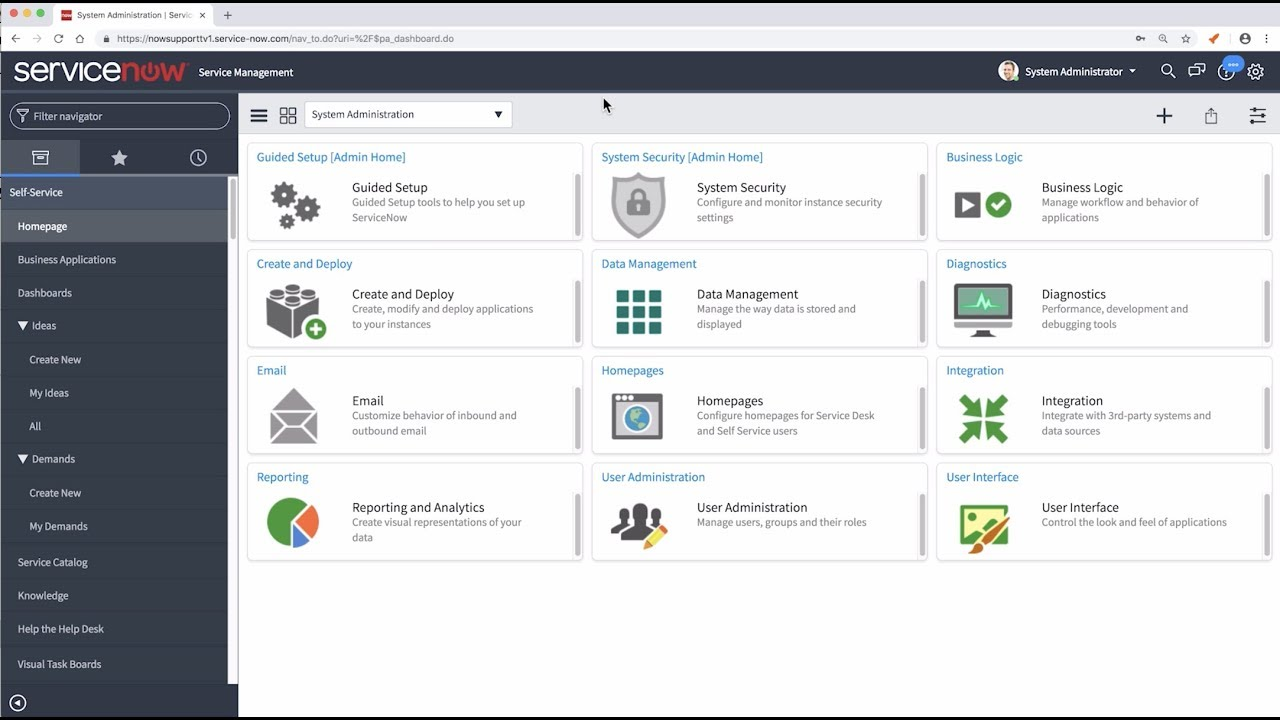
Image source: ServiceNow
ServiceNow is built for enterprise-scale IT environments where service delivery needs to be governed, traceable, and standardized across departments. While evaluating it for a regional IT rollout, what impressed me was how well it handled multi-layered workflows—especially when incidents were tied to approvals, assets, or dependent tasks.
This remote help desk software goes far beyond ticketing. Incidents, problems, and changes are interlinked, giving IT leaders full visibility into bottlenecks and root causes. For teams managing remote infrastructure, the platform offers virtual agents, automated routing, and a powerful service catalog that simplifies intake and triage.
The experience is structured, which makes it ideal for support setups with strict SLAs, regulatory oversight, or complex handoffs.
Pros:
- Built for end-to-end ITSM: incidents, changes, approvals, and assets
- Virtual agents reduce workload by handling repetitive issues
- Detailed reporting supports SLA tracking and audit trails
- Service catalog and portal simplify request intake
- Scales cleanly across departments and regions
Cons:
- Not suited for lean or fast-moving support teams
- Setup and admin require specialized expertise
User Rating: 4.5 (Capterra)
Pricing: Custom pricing
7. HappyFox – Best for Deep-Dive Analytics in Support Operations
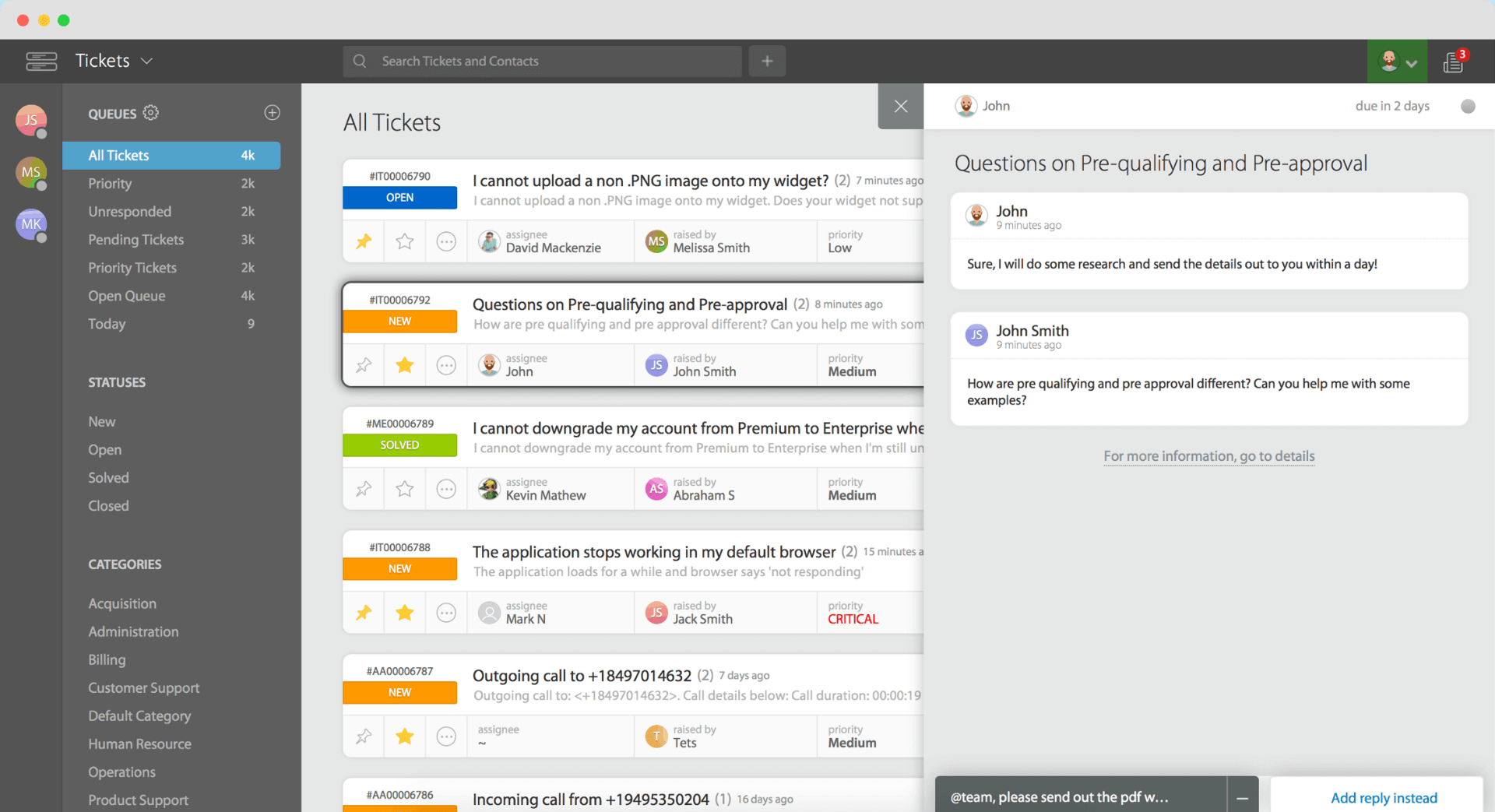
Image source: HappyFox
HappyFox brings structure and insights together—perfect for teams that want more than just queue management. What I liked most was the reporting. It doesn’t just show how many tickets were resolved, but where they got stuck, which agents handled what, and how customers rated the experience across channels.
Its workflow rules, ticket categories, and custom fields help standardize how requests are processed. For remote teams juggling multiple priorities, that consistency means fewer dropped threads and smoother escalations.
The portal is simple and secure, with canned responses and internal notes to help agents move fast without losing context.
Pros:
- Robust reporting tools with drill-down analytics
- Canned actions and templates improve response speed
- Workflow automations help enforce consistent handling
- Secure self-service portal for ticket submission and tracking
- Works well across email, chat, and social channels
Cons:
- Limited flexibility when customizing advanced workflows
- Visual customization options for the portal are fairly basic
User Rating: 4.6 (Capterra)
Pricing: Starts at $21/agent/month
8. Zendesk – Best for Customer Self-Service at Scale
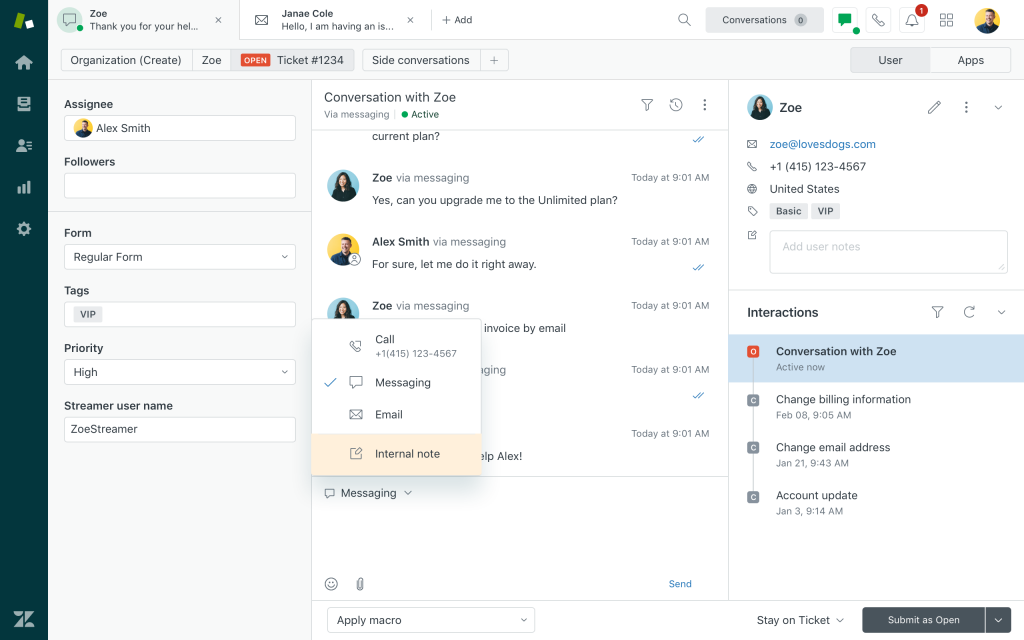
Image source: Zendesk
Zendesk is a strong fit for support teams that need to maintain consistency across high ticket volumes, multiple products, or customer tiers. Its biggest strength lies in self-service enablement. The integrated help center, ticket deflection workflows, and AI-powered bots help reduce ticket inflow before agents ever get involved.
I also liked how clearly Zendesk separates internal and customer-facing experiences. You can create distinct portals for different brands or customer segments, each with tailored SLAs and workflows. Role-based controls help large teams maintain clean ownership, while automation keeps routing and escalations predictable.
While the interface has a learning curve, this remote help desk software rewards teams that invest in setup with better long-term clarity and scale. It’s best suited for organizations where structured support delivery and self-service matter just as much as ticket resolution.
Pros:
- Multi-brand portals and role-based routing for complex teams
- Built-in help center and AI bots reduce ticket volume
- SLA management, macros, and triggers support high-volume queues
- Integrates with major CRMs and collaboration tools
- Customer history is always accessible from the ticket view
Cons:
- Limited portal design flexibility without custom development
- Can be overwhelming to manage without admin specialization
User Rating: 4.4 (Capterra)
Pricing: Starts at $19/agent/month
9. Zoho Desk – Best for Contextual Remote Ticketing
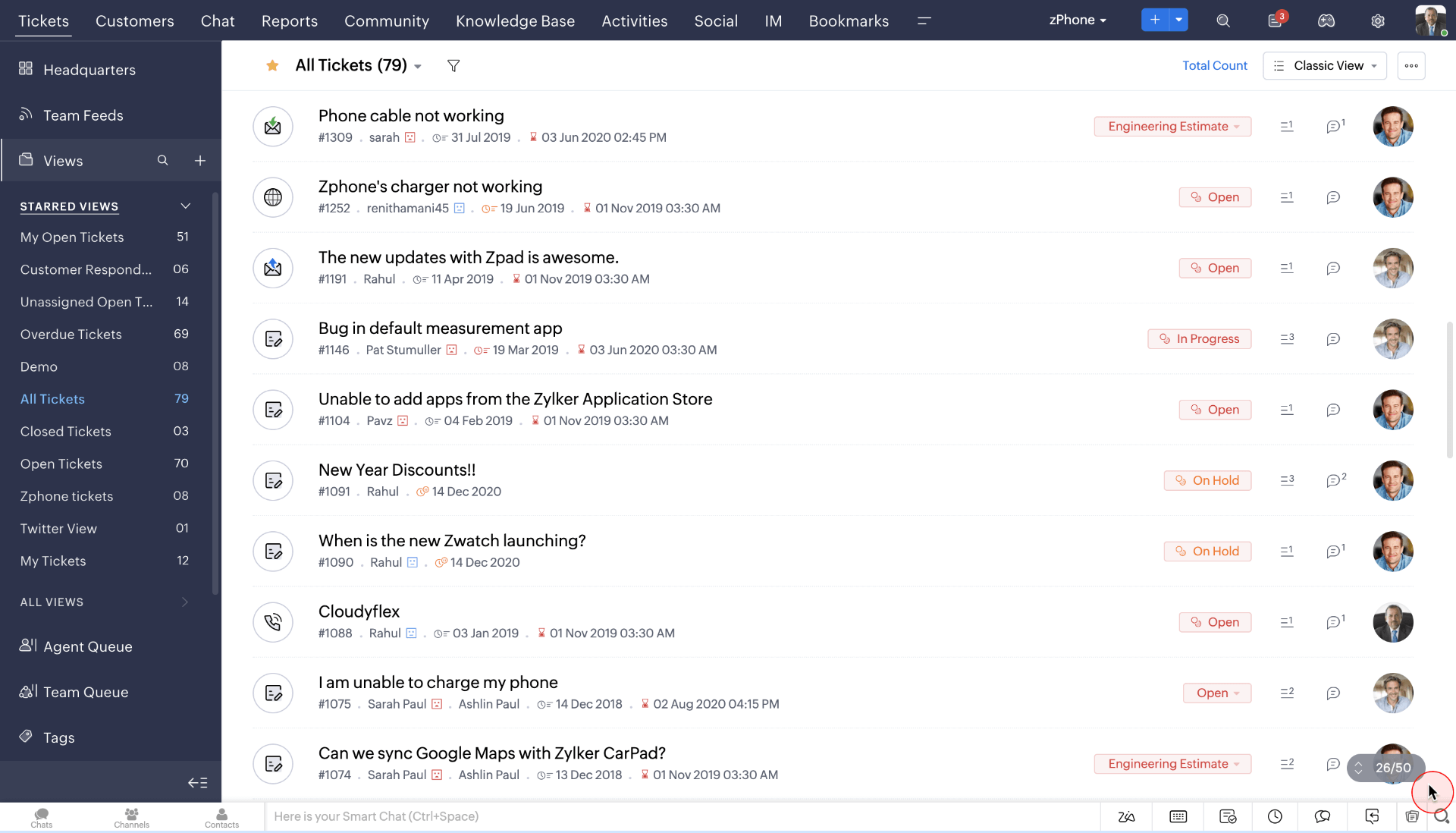
Image source: Zoho
Zoho Desk is purpose-built for support teams that need visibility into the “before and after” of every issue. Its strength lies in maintaining context—agents can view prior conversations, customer profiles, related tickets, and even product usage history, all from a single dashboard.
What impressed me was how easy it was to automate routing based on ticket properties like priority, department, or SLAs. This keeps queues organized and handoffs clean, especially for remote teams spread across time zones. The AI-powered assistant, Zia, adds another layer of efficiency by suggesting relevant knowledge base articles and tagging sentiment in conversations.
It also integrates seamlessly with Zoho’s suite of business tools, so support doesn’t feel disconnected from sales or operations.
Pros:
- Contextual views with full customer history and ticket threads
- Smooth integration with other Zoho apps for unified workflows
- SLAs, automation, and response templates reduce manual overhead
- AI assistant suggests actions and highlights intent/sentiment
- Clean, customizable self-service portal
Cons:
- Portal branding and layout options are fairly limited
- Requires time to configure rules for optimal automation
User Rating: 4.5 (Capterra)
Pricing: Starts at $20/user/month
10. ManageEngine ServiceDesk Plus – Best for Asset-Linked Remote IT Support
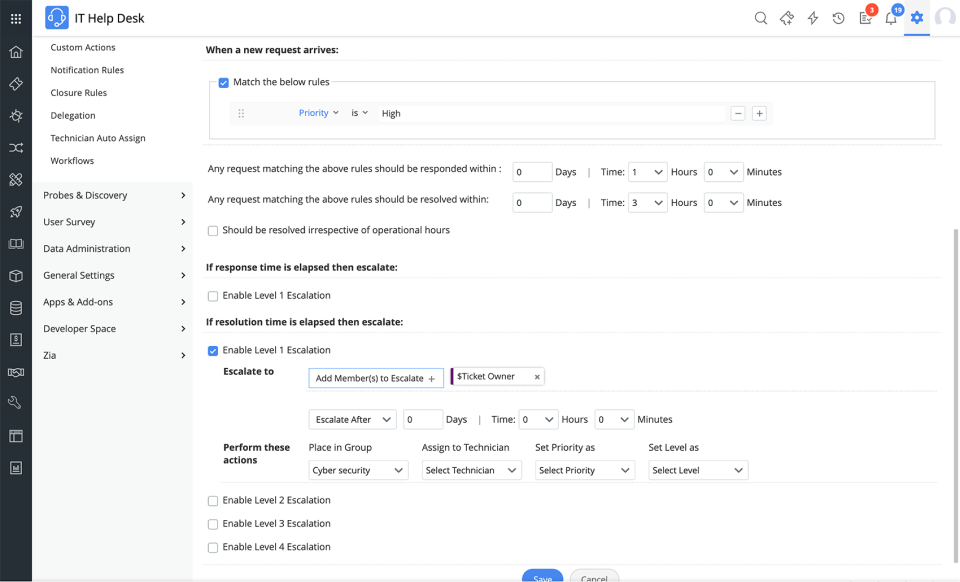
Image source: ManageEngine
ManageEngine ServiceDesk Plus is well-suited for IT teams that handle both support requests and asset oversight. It connects tickets to devices, software, and users, which helps remote teams resolve issues faster and avoid repetitive diagnostics.
The platform makes it easy to trace a request back to a specific asset, view its history, and understand whether similar issues have occurred before. That level of detail reduces guesswork, especially when agents don’t have direct access to the equipment.
This remote help desk software also includes built-in modules for incident, problem, and change management, along with automation and SLA tracking. For IT environments that rely on tight control over hardware, software, and user access, this tool brings structure and efficiency.
Pros:
- Direct link between support tickets and IT assets
- Remote troubleshooting tools built into the workflow
- Supports structured ITIL practices like change and problem management
- Custom service catalog for faster request intake
- Reporting surfaces patterns across users and devices
Cons:
- Interface can feel technical for non-IT users
- Customization and workflow setup may take time
User Rating: 4.6 (Capterra)
Pricing: Custom pricing
11. LogMeIn Resolve (Formerly GoTo Resolve) – Best for Lightweight Remote Desktop with Built-In Ticketing
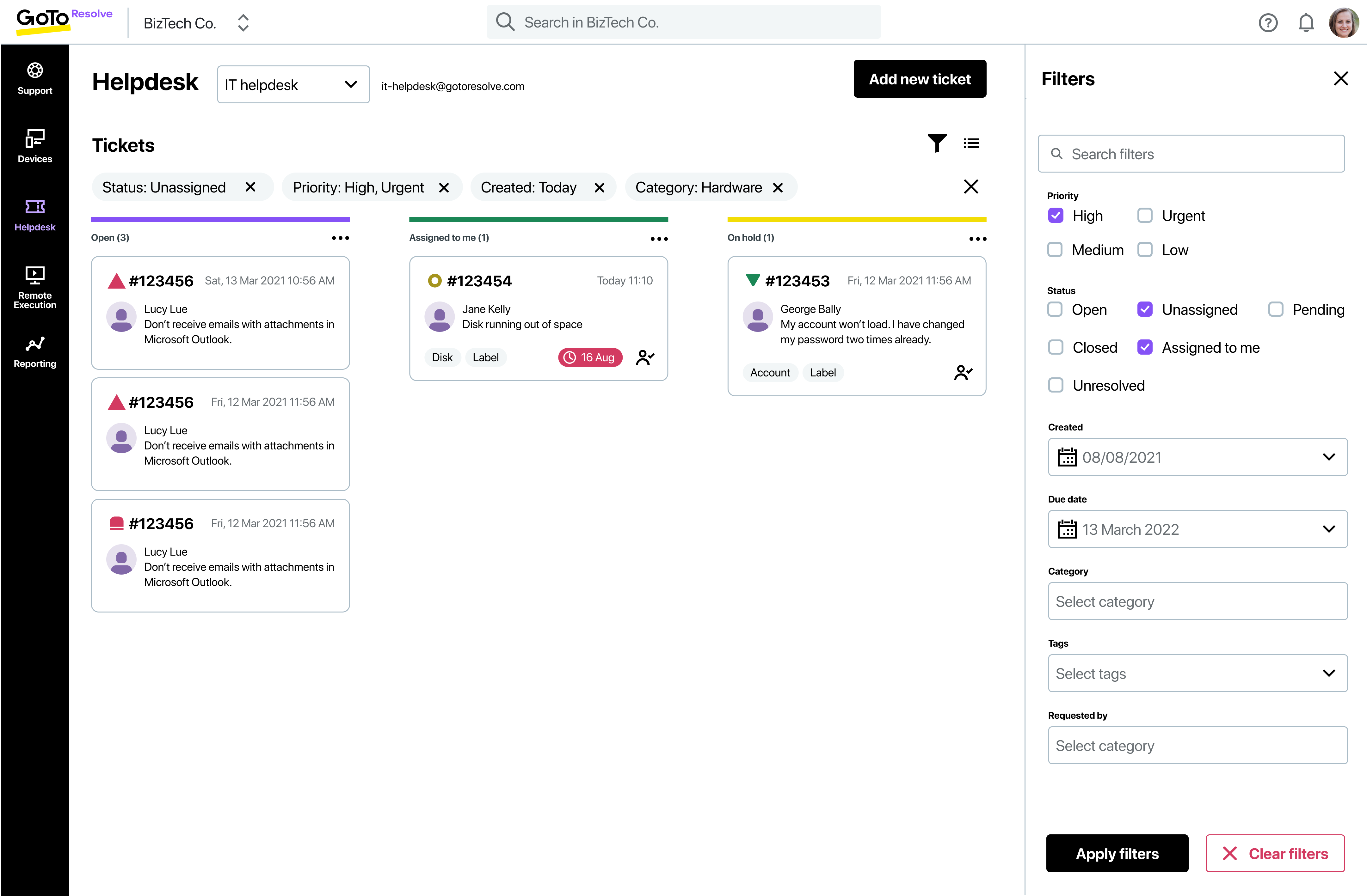
Image source: CloudBlue
LogMeIn Resolve is a solid choice for teams that need a simple, fast way to offer remote support without overcomplicating the setup. In my testing, this remote troubleshooting software delivered exactly what was needed for quick fixes and lightweight ticket management, making it especially handy for small IT teams or businesses supporting distributed staff.
My favorite aspect was the speed and simplicity of launching remote sessions. Everything runs through the browser, so users don’t have to install anything or navigate extra steps. That helped cut resolution times and kept sessions moving without friction.
The built-in help desk offers basic routing, tagging, and automation. It’s not packed with advanced features, but it delivers just enough for efficient support without unnecessary clutter.
Pros:
- Fast, browser-based remote sessions with no downloads
- Combines remote access and help desk in one platform
- Multi-factor authentication keeps sessions secure
- Clean UI with essential ticket management tools
- Free plan available for smaller teams
Cons:
- Limited depth in reporting and analytics
- Less effective for teams needing complex workflows
User Rating: 4.4 (Capterra)
Pricing: Starts at $23/month
12. InvGate Service Desk – Best for Gamifying Service Desk Performance
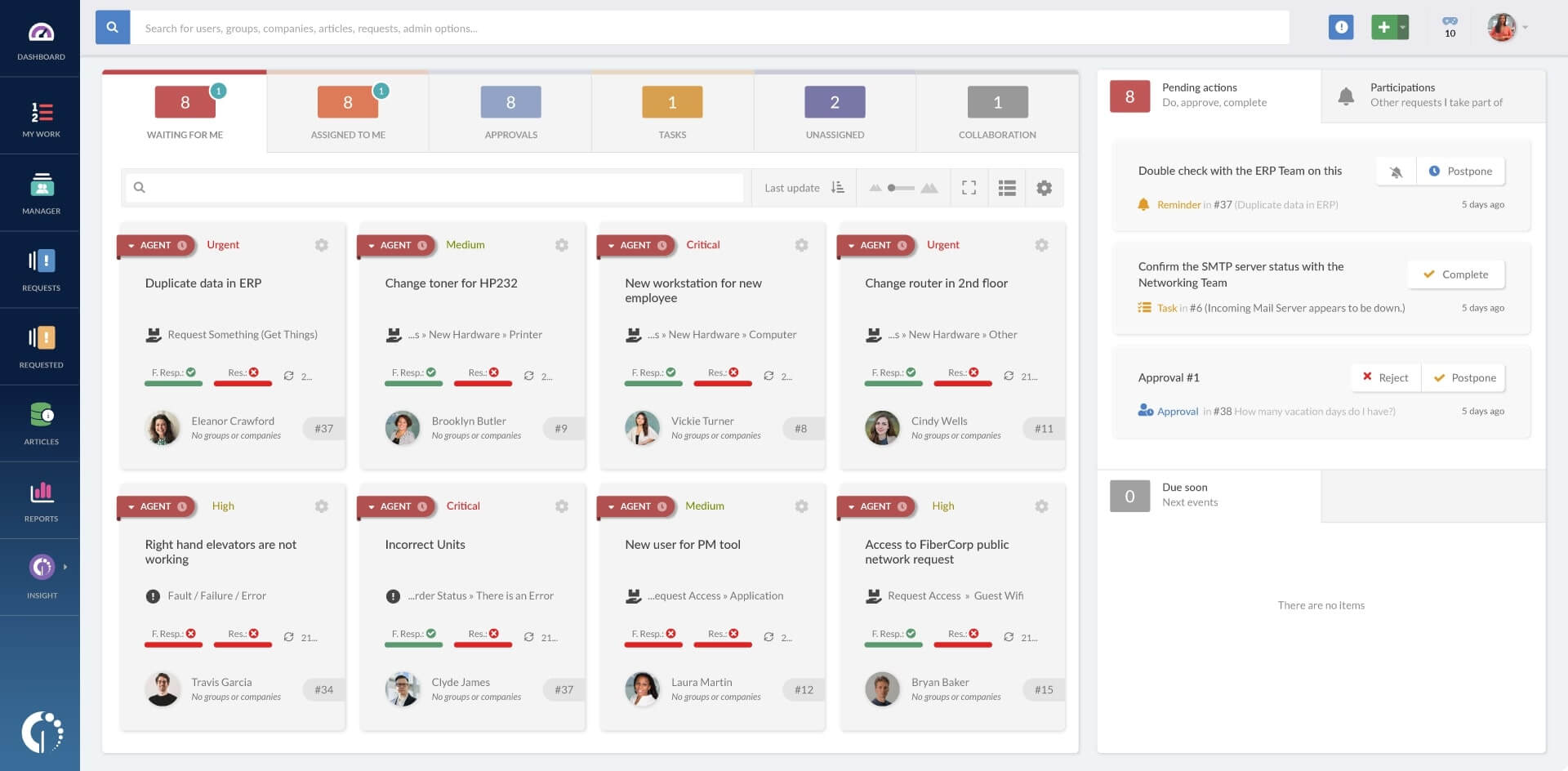
Image source: InvGate
InvGate Service Desk combines structured IT service management with a layer of gamification that made it more engaging for me as a support operator. Features like agent scorecards, badges, and leaderboards helped create friendly accountability, which is rare in traditional ITSM tools.
The platform struck a good balance between usability and control. It gave me visibility into SLAs, ticket turnaround times, and performance trends without needing to dig through complex dashboards. For remote teams, this kind of transparency helps everyone stay aligned and motivated.
Beyond gamification, this remote help desk software supports approval workflows, automation, and a customizable service catalog. The interface is clean and intuitive, which makes it easier to onboard new agents and reduce errors.
Pros:
- Built-in gamification keeps agents engaged and goal-focused
- SLA tracking and reports offer clear team-wide visibility
- Approval chains and automation support complex IT workflows
- Integrated knowledge base and service catalog
- Modern UI makes navigation simple for remote agents
Cons:
- Some processes feel form-driven instead of task-focused
- Fewer native integrations compared to larger platforms
User Rating: 4.6 (Capterra)
Pricing: Starts at $17/agent/month
How to Choose the Best Remote Help Desk Software
Whether you’re supporting customers across time zones or resolving internal IT issues from a distance, the right tool should offer structure, speed, and visibility. Here’s what I focus on during evaluation:
1. Remote Access and Troubleshooting
If your team handles technical requests, the software should offer built-in or integrated remote access. This allows agents to resolve issues directly without relying on third-party tools or step-by-step instructions over email.
2. Core Features and Functionality
Look for tools that support ticket routing, automation, SLA tracking, omnichannel intake, and reporting. These features are essential for maintaining consistency and resolving tickets quickly.
3. User Reviews and Ratings
Before shortlisting any platform, I review user feedback from trusted sources like Capterra and G2. Common pain points and standout benefits often reveal more than a feature checklist.
4. Ease of Use
A user-friendly interface reduces the learning curve. Remote agents should be able to navigate, respond, and escalate tickets without extra training, while customers should find it easy to submit and track requests.
5. Self-Service and Customer Visibility
Strong help desk platforms give users the ability to track progress, read knowledge base articles, and resolve basic issues independently. This reduces ticket volume and improves experience.
6. Customer Support Quality
A vendor’s support team should be responsive and helpful during setup, troubleshooting, and scaling. Look for live chat, email responsiveness, onboarding help, and resource libraries.
7. Reporting and Accountability
Remote support managers need real-time insights. Tools that offer dashboards, resolution time tracking, SLA compliance, and agent performance reports make it easier to stay proactive.
8. Value for Money
More features do not always mean more value. I assess whether the tool delivers reliable performance, strong support, and useful automation for its price point.
9. Security and Compliance
Remote tools should come with role-based access, data encryption, and compliance with regulations like GDPR or HIPAA. Security should be part of the foundation, not a patch-on.
My Top 3 Picks for Remote Help Desk Software
With dozens of tools available, it’s easy to get stuck comparing feature lists. If you’re short on time or need a place to start, here are the three remote help desk platforms I would personally shortlist based on performance, ease of use, and long-term value.
1. ProProfs Help Desk
ProProfs Help Desk brings together omnichannel ticketing, AI-assisted replies, and a customer-facing portal in one system. Its remote support solutions, including screen sharing and session recording, make it especially helpful for resolving complex issues from anywhere. Combined with role-based access, automation, and detailed CSAT/NPS tracking, it’s a platform that grows with your team and simplifies day-to-day support.
2. Zendesk
Zendesk works well for large or growing teams supporting multiple regions or product lines. It supports SLAs, team-specific workflows, and branded help centers, making it easier to handle high volumes of tickets without losing visibility or consistency. If your operations are distributed and complex, Zendesk brings the control you need.
3. LogMeIn Resolve
GoTo Resolve is a clean, focused option for teams that rely on remote desktop access. It allows agents to launch secure, browser-based sessions directly from support tickets and resolve issues without extra overhead. The ticketing system is streamlined but reliable, making it a smart pick for small teams with technical support needs.
FREE. All Features. FOREVER!
Try our Forever FREE account with all premium features!
Benefits of Remote Help Desk Software
Remote help desk software gives support teams structure, speed, and visibility, especially when teammates aren’t sitting side by side. When implemented well, it reduces chaos and keeps service consistent across time zones. Here’s what teams stand to gain:
- Fewer “Any Update?” Emails: Customers can view ticket progress through email updates or a secure client portal, so agents field fewer repeat questions.
- Clearer Ownership: Each request has a visible owner, status, and priority, which prevents confusion and duplication.
- Faster Resolutions: Built-in remote access and automation help teams resolve technical issues without unnecessary back-and-forth.
- Stronger Collaboration: Agents leave internal notes, tag teammates, and escalate tickets without cluttering the customer-facing thread.
- Better Reporting: Real-time dashboards surface trends like SLA breaches, response delays, and team workload patterns.
- Scalable Workflows: As ticket volume grows, automation, routing, and roles help maintain consistency without adding friction.
Watch: How Shaver Shebang Delivers Support Faster With ProProfs
Implementation Challenges (and How to Avoid Them)
Remote help desk software tools bring clarity and structure, but only if implemented with care. These are the most common roadblocks I’ve seen, along with simple, actionable fixes to avoid them.
1. Agents Stick to Old Habits
When tools feel clunky or unfamiliar, agents often default to email or chat. This leads to scattered communication, unclear ownership, and support requests falling through the cracks.
Fix: Set up email-to-ticket conversion right away. Let agents respond directly from the help desk so it feels intuitive while keeping everything organized in one place.
2. Tickets Don’t Go to the Right Person
Without proper routing rules, tickets get misassigned or dumped into general queues. This slows responses and forces managers to constantly step in and reassign.
Fix: Use clear, rule-based routing by department, topic, or priority. Always add a fallback queue to catch anything that doesn’t match a specific path.
3. No One’s in Charge
If no one owns the rollout, critical setup tasks are missed and adoption stalls. The system ends up half-configured and underused across the team.
Fix: Appoint a point person to manage setup, collect feedback, and refine workflows. This ensures issues get solved quickly and the system stays aligned with team needs.
4. Automation Adds Confusion
When automation happens behind the scenes, agents don’t trust what’s being triggered. They second-guess the system and often go back to doing things manually.
Fix: Start small with clear, visible automations like ticket tagging or assignments. Document what each rule does and update the team regularly on any changes.
5. Reports Don’t Lead to Action
Even with great dashboards, teams lose interest if help desk metrics don’t tie into real decisions. Reporting becomes background noise instead of a driver for improvement.
Fix: Review metrics in weekly meetings. Focus on patterns like unresolved tickets or SLA misses and assign clear follow-ups based on those insights.
6. Agents Feel Left Out
Rolling out a new remote help desk software without agent input can lead to resistance. If it feels like an extra burden, usage drops and frustration rises.
Fix: Let agents test early versions, offer feedback, and help design templates. Involving them boosts buy-in and uncovers helpful setup ideas.
7. Too Many Features at Once
Trying to launch every feature on day one creates overload. Teams struggle to keep up and miss the core value of the tool.
Fix: Roll out the essentials first like ticket creation and responses. Once agents are confident, add features like automation, reporting, or self-service portals gradually.
Support Customers From Anywhere, Starting Today
Remote work shouldn’t mean lost tickets, scattered conversations, or agents guessing who owns what. The right remote help desk software brings structure to that chaos by centralizing requests, simplifying handoffs, and giving your team the visibility they need to stay responsive and accountable.
I’ve seen how a thoughtful rollout can cut down “any update?” emails and improve agent focus without overcomplicating daily work. Whether you’re supporting internal teams, customers, or both, a solution built for remote environments helps support stay predictable and efficient, even across time zones.
If you’re starting out or need something easier to roll out, ProProfs Help Desk strikes a balance between simplicity and power. It covers the essentials—ticket management, AI assistance, multichannel intake—without creating unnecessary overhead. Start with what you need, scale as you go, and keep your team focused on resolution over wrangling tools.
Frequently Asked Questions

Do I need built-in remote desktop access in my help desk tool?
If your team handles IT or technical issues, built-in remote access is a major time-saver. It allows agents to troubleshoot directly, without switching tools. For non-technical support, strong email handling and automation may be enough.
Can remote help desk tools work without making users log in?
Yes. Many platforms auto-convert emails, chats, or form submissions into tickets. This means users don’t need to create accounts or log in. They can continue using the channels they’re comfortable with while still benefiting from structured support.
How do I keep agents from defaulting to email?
Make the help desk easier than email. Enable email-to-ticket conversion, in-platform replies, and shared visibility into assignments. When agents can collaborate and resolve issues faster in the tool, they’ll naturally stick with it over scattered inboxes.
What reporting features are essential for remote teams?
Remote teams need reports on SLA breaches, ticket aging, response time, and agent workload. These insights help managers redistribute work, spot delays early, and maintain accountability across time zones without micromanaging. Consistent visibility is key to smooth operations.
FREE. All Features. FOREVER!
Try our Forever FREE account with all premium features!

 We'd love your feedback!
What did you like & how can we make it even better?
 Thanks for your feedback!
 Ask Your Question
Have a question? Get expert help to make your decision easier.