
Still managing IT requests in a spreadsheet? You’re not alone, and I built this guide exactly for where you are right now.
In my experience working with IT support teams, the pattern is almost always the same. Ticket volumes are climbing, expectations are rising, and the pressure to deliver faster and cheaper service has never been higher. Without the right support desk best practices in place, even well-intentioned teams end up reactive, overwhelmed, and constantly putting out fires.
In this guide, I’ll walk you through why the IT service desk matters, what role the right help desk software plays, and 10 proven tips you can start putting into action today.
Key Takeaways:
- The biggest service desk problem is not the wrong tool. It is the lack of a structured process.
- Moving requests out of email and into a ticketing system is the single highest-impact first step for most small teams.
- Auto-routing and ticket ownership rules prevent the number one cause of slow resolution: nobody knowing who is responsible.
- SLAs are not just for enterprise teams. Even basic response and resolution targets dramatically improve accountability.
- AI and automation are accessible even for small teams. Start with canned responses and auto-assignment before going further.
- The best service desks align IT priorities with business goals, not just with ticket queues.
What Is an IT Service Desk?
The IT Service Desk is your single point of contact (SPOC) for IT help. It is the place where employees or customers report issues and make service requests — all tracked as support tickets, so nothing gets lost. Instead of messages getting lost across emails, chats, and hallway conversations, the service desk captures, tracks, and closes the loop — so users always know what is happening next.
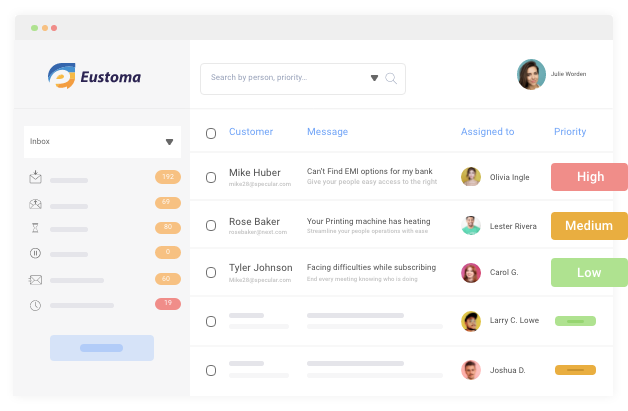
An IT service desk handles incidents as well as service requests from internal employees, external customers, business partners, and other key stakeholders. Whether a user needs to reset a password or requires technical troubleshooting for a hardware issue, the service desk is the single place for all IT needs.
Service Desk vs. Help Desk — and Why It Matters
The difference between a help desk and a service desk comes down to scope — a help desk focuses on fixing problems, while a service desk is broader, handling service requests, approvals, knowledge management, and end-to-end service delivery.
If you offer IT help desk services to internal employees or external customers, the goal is the same: make it easy to ask for help, and easy to get help fast.
Why Is the IT Service Desk Important for Your Business?
The implementation of a capable and easy-to-contact service desk can truly change the game for your business. Here are some of the key benefits:
- Create a Vast Library of Information: A service desk stores issue-resolution steps, troubleshooting guides, and technical how-tos in a knowledge database that both agents and users can access anytime. Training new employees becomes significantly easier when this knowledge is centralized.
- Anticipate Potential Problems: Due to the high volume of issues handled, the service desk gives you a live view of trends. You can see which types of problems are increasing, allocate resources accordingly, and get ahead of issues before they escalate.
- Measure and Improve the User Experience: With the right service desk solution, you can monitor interactions and gather real insights into user satisfaction, recurring challenges, and unmet needs so your team can improve continuously.
Top 10 Support Desk Best Practices for This Year
Support experience has become increasingly important to the modern service desk. Here are 10 service desk best practices you can start implementing today, ordered from “fix the basics first” to “now scale and automate.”
1. Understand What Users Actually Expect From the Service Desk
When working on support desk management, the worst thing you can do is guess what users want. You need to ask them and listen carefully.
Do they expect faster resolution times? Do they want more self-service options? Are they frustrated by how long it takes to get a first response? These answers will help you set relevant, user-focused service level agreements (SLAs) and give your team a clear picture of what “good” actually looks like.
Here is a simple way to get started:
- Run a short monthly survey after ticket resolution (1–2 questions max)
- Track which issues come up repeatedly, those are your top priorities
- Share findings with the team so everyone knows what users expect
It also helps to understand the difference between what counts as an incident vs. a service request — because users often mix them up, and your SLAs should treat them differently.
The more clarity your team has, the better they can deliver. Right from sharing a password reset link to resolving a network outage — knowing what users expect helps your team act with purpose.
2. Streamline Knowledge Management
Every organization has a goldmine of collective knowledge, but most employees still have to hunt for the right information.
Here is how to streamline it:
- Create IT-related support content and involve subject matter experts in writing and reviewing it
- Encourage dialogue and collaboration among agents; your best-documented fixes come from your most experienced people
- Build a solid review process so articles stay accurate and up to date
- Make it easy for users to find and share knowledge on their own
If you are also looking at how your ticketing process connects to knowledge sharing, ticketing system best practices covers that overlap well.
One practical shift: think of documentation as your original automation. Every time an agent writes a clear solution to a common problem, they are removing that problem from the ticket queue permanently.
3. Use the Right IT Help Desk Tools
If you are still managing IT support through a shared Gmail inbox or tracking tickets in a spreadsheet, this is the tip that will have the biggest immediate impact.
You do not need to go big right away. Start by picking a tool that gives you the basics and the basics alone done well:
Quick tool checklist before you buy:
- Email-to-ticket conversion (so no request gets lost)
- A simple agent portal with open, pending, and closed views
- Basic SLA timers and alerts
- Automation rules for routing and priority assignment
- A searchable knowledge base
- Reports your manager can understand in under 2 minutes
For teams ready to go further, an automated ticketing system can handle routing, escalations, and status updates without any manual input. But if you are a smaller team, a straightforward AI-powered IT help desk software will cover everything you need — without months of setup.
ProProfs Help Desk is a good starting point for small-to-mid-size teams. It converts emails into tickets automatically, lets you set SLAs, assign tickets to the right agents, and comes with built-in reports. There is a forever-free plan for small teams.
If you are not sure what to look for before choosing, this guide on what a ticket management system actually does is a good place to start.
4. Build an Internal Knowledge Base
Are your IT support agents spending time answering the same five questions every week? An internal knowledge base fixes that and it is one of the highest-ROI moves in IT help desk best practices.
A knowledge base acts as a central repository where users can find help articles, how-tos, troubleshooting guides, and step-by-step procedures without needing to raise a ticket. Agents get more time for complex issues. Users solve problems faster. Everyone wins.
To make your knowledge base actually useful:
- Write articles in plain, non-technical language
- Structure content around the questions users are actually asking (not the questions IT thinks they are asking)
- Keep articles short – 300 to 500 words with steps and screenshots works best
- Review and update articles every quarter
Ask yourself regularly: Is this self-service portal easy enough for a new employee on day one? If the answer is no, simplify it.
5. Set Up Ticket Routing and Auto-Assignment
This is the single most-requested capability among support teams today and for good reason. When tickets bounce between agents with no clear ownership, resolution time explodes and users feel ignored.
Automating ticket routing is one of the fastest ways to improve both speed and accountability. Here is how to set it up:
- Create routing rules based on topic (passwords, access requests, hardware, software)
- Route based on requester type (VIP users, new hires, external customers)
- Use round-robin assignment so no single agent gets overloaded
- Set up “least busy” routing for teams handling high ticket volumes
Even a simple rule — “all password reset requests go to Agent A; all access requests go to Agent B” — removes the daily confusion of “who is handling this?” and improves support desk management significantly.
6. Prioritize Issues Based on Their Severity
Not all tickets are created equal. A company-wide server outage is not the same as a request for a new USB mouse and your team needs a clear framework to tell the difference quickly.
A simple priority matrix to use:
| Priority | Impact | Urgency | Example |
|---|---|---|---|
| Critical | High | High | Server down, system-wide outage |
| High | High | Medium | Key employee cannot access core tool |
| Medium | Medium | Medium | Single user software issue |
| Low | Low | Low | Minor request, no business impact |
Most IT help desk services tools let you set triggers that automatically assign priority based on keywords, requester type, or category. This means urgent tickets cannot slip through the cracks — even during high-volume periods.
7. Set Clear SLAs & Actually Track Them
SLAs are not just a compliance checkbox. They are the clearest signal of trust you can give your users: “Here is what you can expect from us, and here is when.”
A simple SLA framework to start with:
| Ticket Priority | First Response Time | Resolution Target |
|---|---|---|
| Critical | 30 minutes | 4 hours |
| High | 2 hours | 8 hours |
| Medium | 4 hours | 24 hours |
| Low | 8 hours | 72 hours |
For a deeper look at how to manage SLAs week to week without it becoming a full-time job, this guide on SLA management covers the practical side well.
Once SLAs are set, your help desk tool should alert agents before a breach happens — not after. Measure SLA compliance weekly and make it a visible team metric.
8. Create, Share, and Update Your IT Service Catalog
For IT-focused organizations, service delivery is critical. An IT service catalog tells your end-users exactly what services are available, how they are delivered, what the process is, and what to expect before they even raise a ticket.
If you want to understand how this connects to the broader picture, service request management is a good read before you build your catalog.
A service catalog entry should include:
- Service name and category (e.g., “Software Access Request” under “IT Services”)
- Who can request it (all employees, managers only, specific departments)
- Approval required? Yes or no — and from whom
- Estimated delivery time
- Cost (if applicable)
- Point of contact
Benefits of a well-maintained service catalog:
- Fewer “what can IT help with?” questions flooding your inbox
- Cleaner ticket intake because users know exactly what to ask for
- Faster request handling because approvals and steps are pre-defined
- Reduced costs by standardizing delivery across common request types
9. Do Not Just Measure Everything — Keep KPIs User-Focused
More data does not mean better decisions. Pick a small set of help desk metrics that tell you how users actually feel and how well your team is performing — the full list can be overwhelming, so start with the six below.
Here are the ones that matter most for IT service efficiency improvement:
- User Satisfaction Score (CSAT): Send a 1-question survey after every resolved ticket. This is your most honest performance signal.
- First Response Time: How long does it take to acknowledge a request after it comes in? Users want to know they have been heard — even if the fix takes time.
- Average Resolution Time: Measures how quickly tickets are fully resolved. Track this by priority level and category to spot bottlenecks.
- SLA Compliance Rate: What percentage of tickets were resolved within your SLA targets? Aim for 90%+ consistently.
- Ticket Volume by Channel: Shows you where requests are coming from — email, phone, portal, chat. This helps you staff the right channels at the right times.
- First Contact Resolution (FCR) Rate: The percentage of tickets resolved on the first interaction without escalation. A rising FCR rate is one of the clearest signs of a healthy service desk.
If you want to go beyond basic tracking and turn your data into decisions, help desk reporting best practices covers how to structure reports your whole team can actually act on.
10. Align IT With Business Goals
Although IT is its own department, managing IT support in isolation from the rest of the business is a mistake. The service desk team should be aware of the moments that matter most to the business — a new product launch, peak sales season, a major system migration — so they can prepare in advance.
IT is powered by people. When members of different departments communicate openly about what they need from IT, the service desk shifts from being reactive to being genuinely strategic.
Practical ways to align IT with business goals:
- Schedule a 30-minute monthly sync with department heads to understand upcoming needs
- Share service desk performance reports with senior leadership — not just IT managers
- Ask each department: “What IT improvement would help you the most in the next 90 days?”
- Build your training and staffing plans around the business calendar, not just ticket volume
Common Help Desk Problems and Solutions
Here is a quick reference for the most frequent common help desk problems and solutions that teams face and the fastest way to fix each one.
| Problem | Root Cause | Solution |
|---|---|---|
| Tickets lost in shared inbox | No ticketing system in place | Move to a dedicated help desk tool with email-to-ticket conversion |
| No one knows who owns a ticket | No routing or assignment rules | Set up auto-routing rules and clear ownership policies |
| Users do not know ticket status | No automated updates | Configure status notifications at each stage |
| Agents answering same questions repeatedly | No knowledge base | Build a knowledge base with the top 10 repeat issues |
| SLA breaches go unnoticed | No SLA monitoring | Enable SLA timers and breach alerts in your help desk tool |
| Reports too complex to act on | Measuring too many metrics | Pick 3–5 key KPIs and review them weekly |
| Escalations handled inconsistently | No escalation path defined | Document and train agents on a clear multi-tier escalation process |
FREE. All Features. FOREVER!
Try our Forever FREE account with all premium features!
What Is a Help Desk Escalation Process?
Even a well-run service desk cannot resolve every issue at tier one — and having a clear ticket escalation process documented before you need it is what keeps things from falling apart under pressure.
A basic escalation path looks like this:
- Tier 1 (Front Line): Basic troubleshooting, password resets, access requests, common software issues ↓ Escalate if unresolved in SLA window
- Tier 2 (Specialists): Complex technical issues, system errors, network problems ↓ Escalate if unresolved
- Tier 3 (Engineers / Vendors): Infrastructure issues, custom development, third-party vendor escalations
Rules that make escalations work:
- The escalating agent must document what has already been tried — no blank handoffs
- The user must be notified when their ticket is escalated and given a new expected resolution time
- If the SLA will be missed, tell the user proactively — do not wait for them to chase you
Start Building a Service Desk That Actually Works for Your Team
The truth is, a great service desk does not happen overnight, but it does not have to take forever either. Every small improvement you make today, whether it is moving out of a shared inbox, setting your first SLA, or writing your first five knowledge base articles, directly translates into less chaos for your team and faster, more reliable support for your users.
The 10 best practices in this guide are not theory. They are the exact moves that teams of all sizes have used to go from “tickets falling through the cracks” to a support desk that users actually trust. You do not need a big budget or a large team to get there. You need a clear process, the right habits, and a tool that stays out of your way.
If you are ready to put these practices into action, start with a tool that handles the heavy lifting without the complexity. ProProfs Help Desk is built for teams that want to get things running quickly, with email-to-ticket conversion, SLA management, auto-routing, and reporting included even on the free plan. Sometimes the simplest starting point is also the most effective one.
Frequently Asked Questions
What is the difference between a service desk and a help desk?
A help desk focuses primarily on fixing issues and resolving incidents. A service desk is broader: it also manages service requests, approvals, knowledge, and service catalog delivery. Most modern platforms combine both into one system.
What KPIs should I track for IT service desk performance?
Focus on CSAT (user satisfaction), first response time, average resolution time, SLA compliance rate, and first contact resolution rate. These five metrics give you a complete picture of performance without drowning in data.
How do I reduce repeat tickets at my service desk?
Build a knowledge base with step-by-step articles for your top 10 most common issues. Promote the self-service portal actively. Track which ticket types recur most and create a solution article for each one, this is the fastest way to reduce volume without adding headcount.
For more strategies beyond the knowledge base, this guide on reducing support ticket volume covers automation, self-service design, and proactive communication.
What is an SLA and why does it matter for the service desk?
An SLA (Service Level Agreement) is a defined commitment for how fast your team will respond to and resolve different types of tickets. It sets clear expectations for users, drives team accountability, and is often required for regulatory compliance. Research shows that fewer than half of service desk teams have SLA targets formally defined and tracked — which means setting them gives you an immediate competitive advantage.
How can automation improve service desk performance?
Automation removes the manual decision-making from routine tasks: routing tickets to the right agent, sending status updates to users, triggering escalation alerts before SLA breaches, and suggesting knowledge base articles to users before they even submit a ticket. Each of these saves your agents real time every day and improves consistency.
What is the best way to handle escalations in a service desk?
Document a clear multi-tier escalation path. Train every agent on it. Require that escalating agents document what they have already tried. Notify the user every time their ticket moves up — and give them an updated resolution timeline.
How do I start improving my service desk if I have no formal process right now?
Start here: pick one ticketing tool, move all incoming requests into it, assign clear ownership, set three basic priority levels, and write your first five knowledge base articles. That foundation alone will make a measurable difference within the first month.
FREE. All Features. FOREVER!
Try our Forever FREE account with all premium features!

 We'd love your feedback!
What did you like & how can we make it even better?
 Thanks for your feedback!
 Ask Your Question
Have a question? Get expert help to make your decision easier.