
I didn’t set out to write another “Intercom alternatives” roundup. I sat down to solve a smaller problem: a support lead I know kept asking me why her Intercom invoice looked different every single month. That question is more common than it sounds, and it’s the real reason so many teams start typing “intercom alternatives” into Google at 11 p.m.
Most of these searches don’t start because Intercom is a bad product. They start because the bill got confusing, a chatbot gave a customer the same wrong answer twice, or a support lead got tired of explaining a usage-based invoice to finance every quarter. If any of that sounds familiar, you’re not overreacting. It’s one of the most common reasons teams start shopping around.
I manage help desk and customer support content for a living, which means I spend a lot of time inside these tools, not just reading about them. In this guide, I’m sharing what I’ve actually seen work when teams move off Intercom: what breaks during the switch, what gets easier, and which 15 tools are worth putting on your shortlist in 2026.
Why Are Teams Looking for an Intercom Alternative in 2026?
Intercom is a capable product. Reviewers on G2 and Capterra consistently praise its interface and Fin AI agent for handling straightforward queries. The reasons teams shop for alternatives usually aren’t about product quality. They’re structural.
Here’s what’s driving most of the searches I see:
- Unpredictable, layered pricing. Intercom charges per seat, then bills Fin AI separately at roughly $0.99 per resolved conversation, then adds Copilot and channel usage fees on top. Support teams and Reddit threads have documented monthly bills jumping from around $4,000 to $9,000 as automation volume increased, so the platform gets more expensive exactly when the AI is working well.
- AI that struggles with nuance. Some G2 reviewers note Fin can loop back to the same answer when it doesn’t fully understand a complex query, which frustrates customers on multi-step issues.
- Interface changes without warning. Multiple users have reported Intercom rolling out UI experiments mid-shift, disrupting live support workflows.
- Support response times. Several reviews mention slow or generic replies from Intercom’s own support team on urgent account issues, a tough pill to swallow on business-critical software.
- Ticketing depth. Intercom was built as a messenger first. Teams with high ticket volume, SLAs, and complex routing needs often find its ticketing layer thinner than dedicated help desks like Zendesk or ProProfs Help Desk.
Top 15 Intercom Alternatives for Customer Support in 2026
I evaluated each tool below on features, pricing, ease of use, and real user ratings from G2. Here’s the quick-glance comparison before the full breakdown.
| Tool | Best For | Pricing | G2 Rating |
| ProProfs Help Desk | Easiest AI Help Desk for Shared Inboxes, Ticket Workflow Automation, and Scaling Support Teams | A free plan is available for growing teams. Paid plan starts at $19.99/month. | 4.7/5 |
| ProProfs Chat | Easy Live Chat & AI Customer Service Agent for Instant, Automated Support | Free plan; paid from $19.99/user/month | 4.6/5 |
| Zendesk | Large teams & enterprise scale | Starts at $55/agent/month | 4.3/5 |
| My AskAI | Adding an AI Agent to Your Existing Helpdesk | Starts at $199/month | 4.5/5 |
| YourGPT | Omnichannel AI agents that automate support, sales, and operations workflows | 7-day free trial. Paid plan starts at $39/month (billed annually) | 4.7/5 |
| Freshdesk | Multichannel support, fast setup | Free plan; paid from $15/agent/month | 4.4/5 |
| Zoho Desk | Budget-friendly, Zoho ecosystem | Free up to 3 agents; paid from $14/agent/month | 4.4/5 |
| HubSpot Service Hub | Teams already on HubSpot CRM | Free tier; paid from $15/seat/month | 4.4/5 |
| Help Scout | Email-like shared inbox | Free up to 5 users; paid from $25/user/month | 4.4/5 |
| Gorgias | Shopify & ecommerce support | Starts at $10/month | 4.6/5 |
| Front | Collaborative shared inbox | Starts at $19/user/month | 4.4/5 |
| HelpCrunch | Live chat + email in one plan | Starts at $15/month | 4.7/5 |
| Tidio | AI chatbot for small ecommerce | Free plan; paid from $29/month | 4.6/5 |
| Drift | Conversational marketing & sales | Starts at $2,500/month | 4.4/5 |
| Respond.io | Customer conversations across WhatsApp, Instagram & TikTok for mid-market B2C | Starts at $99/month | 4.8/5 |
1. ProProfs Help Desk – Easiest AI Help Desk for Shared Inboxes, Ticket Workflow Automation, and Scaling Support Teams
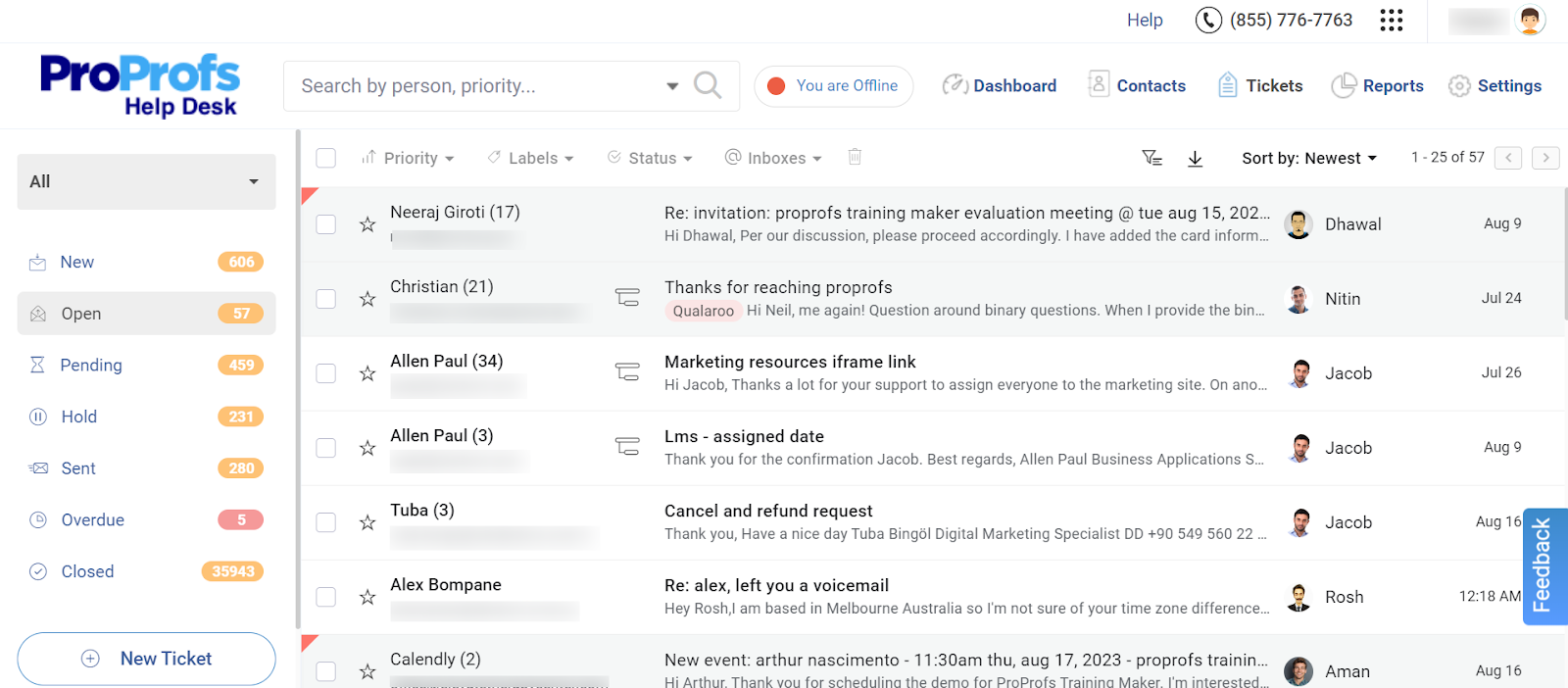
ProProfs Help Desk is the first help desk I open every morning, and it’s usually the last tab I close. It pairs AI-powered ticketing with live chat and a knowledge base in one affordable plan, which is exactly what pulls most teams away from Intercom’s layered pricing.
With ProProfs AI, I get a quick read on the intent behind a long customer message, and the tool surfaces response suggestions I can use right away instead of typing from scratch. My team brings in conversations from email, live chat, and web forms into a single omnichannel inbox, so nothing gets lost between channels or handed off without context.
What sold me on it long-term is the automation layer: tickets route to the right agent automatically, stakeholders get notified without a manual nudge, and reports run themselves on a schedule. For a team switching off Intercom’s usage-based billing, this predictability alone is worth the move.
Pros:
- Shared inbox consolidates email, chat, and web-form tickets into one view
- AI-generated response suggestions speed up first replies
- Built-in knowledge base reduces repeat tickets by letting customers self-serve
- Automated ticket routing and escalation rules cut manual triage
- Forever-free plan includes core ticketing features for a single agent
Cons:
- No downloadable or on-premise version
- Dark user interface option not available
Pricing:
A free plan is available for growing teams. Paid plan starts at $19.99 /month.
How Does ProProfs Help Desk Compare To Intercom?
Intercom charges per seat, then bills its Fin AI agent separately at roughly $0.99 per resolved conversation, so the cost keeps shifting as usage grows. ProProfs Help Desk starts free for one agent and adds an AI Agent that drafts full replies based on intent and mood, not just canned templates, inside the same $19.99 per agent plan.
2. ProProfs Chat – Easiest Live Chat & AI Customer Service Agent for Instant, Automated Support
I switched a client to ProProfs Chat when they needed a live chat tool that didn’t require a two-week onboarding call to get running. It’s an AI-powered live chat and chatbot platform, and I had it live on our site within hours using a ready-made template.
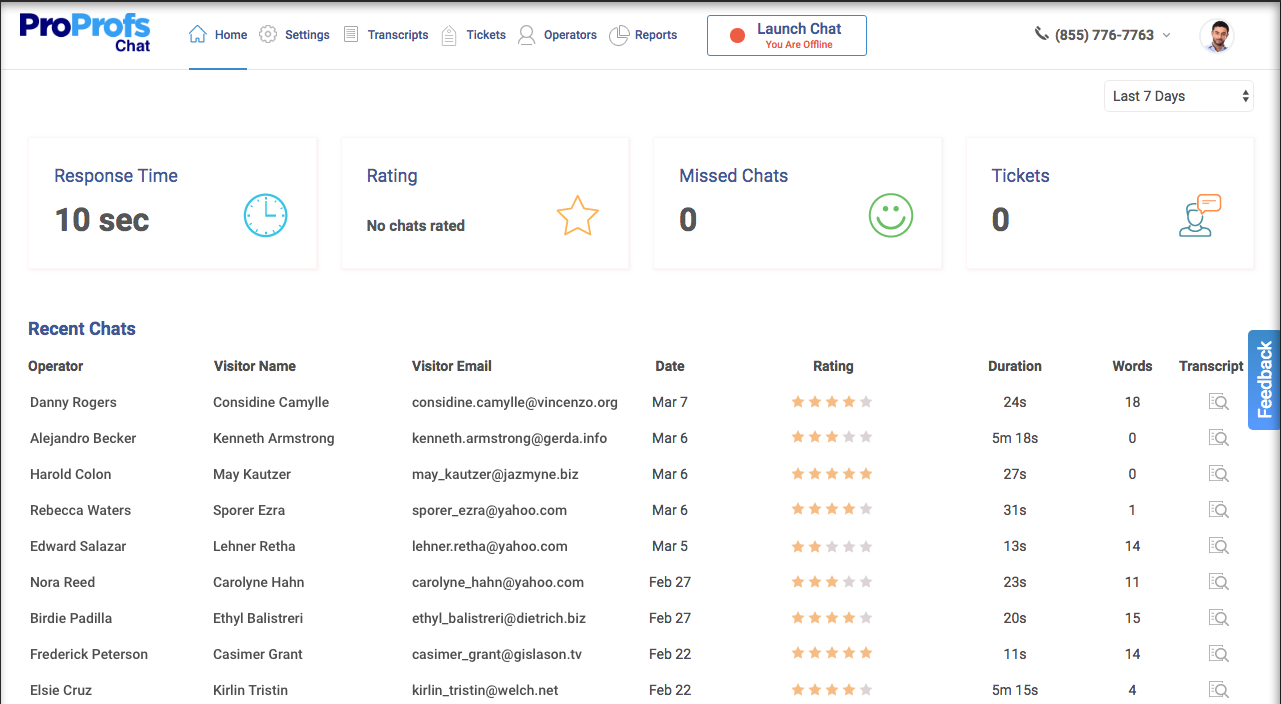
The part that stood out was how the AI trains directly on our website and help center content, so it gives contextual answers around the clock instead of generic scripted replies. When it couldn’t resolve something, the conversation auto-converted into a support ticket with the full chat history attached, so nothing got repeated or lost in the handoff.
Real-time visitor tracking and canned responses rounded out the experience, and the free plan made it an easy way to test the tool before committing budget to it.
Pros:
- AI chatbot trains on website and help center content for contextual answers
- Unresolved chats auto-convert into help desk tickets with full context
- Real-time visitor tracking for timely, proactive engagement
- Ready-made templates for support, lead generation, and appointment booking
Cons:
- Cloud-only, with no offline access
- No dark theme option
Pricing:
Starts at $19.99/user/month (a free plan is available for growing teams).
How Does ProProfs Chat Compare To Intercom?
Intercom’s messenger started as a chat tool and grew ticketing on top of it, which is part of why its billing gets layered as conversations scale. ProProfs Chat stays focused on live chat itself: the AI trains on your website and help center so it can hold a contextual conversation around the clock, and anything it can’t close converts straight into a ticket instead of adding a per-resolution charge.
3. Zendesk – Best for Enterprise-Scale Ticketing
Zendesk was the first “enterprise-grade” ticketing tool I ever rolled out for a support team, and it showed the difference immediately. It’s built for large-volume queues, and the customizable workflows made it possible to route tickets by department, priority, and SLA without duct-taping three tools together.
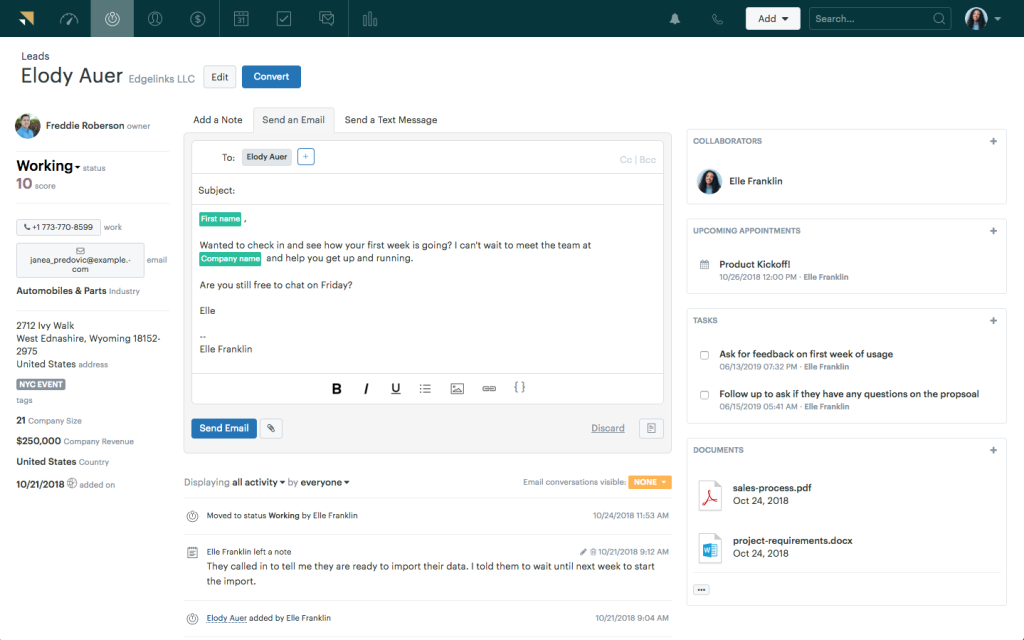
I found the omnichannel view genuinely useful: email, chat, and social messages landed in one place, and reporting gave leadership the visibility they wanted into agent performance. Where it got harder was cost: as we added AI features and reporting add-ons, the per-agent price climbed quickly.
For a startup or a five-person support team, Zendesk is probably overkill. For a 50-plus agent operation with complex routing needs, it’s still one of the most capable systems on the market.
Pros:
- Omnichannel inbox unifies email, chat, phone, and social in one view
- Customizable workflows support complex routing and SLA rules
- Detailed analytics and reporting for agent and team performance
- Large app marketplace for third-party integrations
Cons:
- Pricing rises quickly once AI and reporting add-ons are included
- Setup and admin configuration take real time to get right
Pricing:
Starts at $55/agent/month.
How Does Zendesk Compare To Intercom?
Both tools are built for scale, but they get there differently. Intercom’s ticketing layer is thinner because it grew out of a messenger, while Zendesk was built ticket-first with SLA rules and department routing from day one. The trade-off is cost: Zendesk’s per-agent price climbs fast once you add AI and reporting, so you’re swapping Intercom’s usage-based surprise for a steeper flat one.
4. My AskAI – Best for Adding an AI Agent to Your Existing Helpdesk
Every other tool on this list asks you to move your support operation somewhere new. My AskAI is the exception. It’s an AI customer service agent that plugs into the helpdesk you already run – Intercom itself, plus Zendesk, Freshdesk, HubSpot, and Gorgias.
That makes it the natural pick for teams whose problem with Intercom isn’t Intercom, it’s Fin. Fin bills roughly $0.99 per resolution, and at a few thousand tickets a month that’s a number that gets hard to defend internally. My AskAI charges per ticket from $0.10, so the bill stays predictable whether the AI resolves the conversation or hands it over.
Setup doesn’t need developers. It trains on your existing help center, website, and past tickets, and typically deflects around 75% of incoming requests, passing anything it isn’t confident about to an agent with the full conversation attached. Their customers have anywhere from a few thousand to over a hundred thousand tickets per month in Intercom.
It’s SOC 2 Type II certified, answers in 95+ languages, and can run real actions like refunds, address changes, and plan upgrades rather than only answering questions. If you’d rather keep your helpdesk and replace just the expensive AI layer sitting on top of it, this is the entry to look at.
Pros:
- Works with the helpdesk you already have (Intercom, Zendesk, Freshdesk, HubSpot, Gorgias), so there’s no migration
- Per-ticket pricing from $0.10 rather than Intercom Fin’s per-resolution model
- Trains on your help center, website, internal sources and past tickets, and goes live in minutes without developer time
- Automated actions like refunds, address changes, and upgrades, with clean handover to human agents
Cons:
- Not a standalone helpdesk – you need one of the supported platforms already in place
- No forever-free plan, though there is a 30-day free trial with no card required
Pricing:
Starts at $199/month, with per-ticket pricing from $0.10.
How Does My AskAI Compare To Intercom?
This one isn’t really an Intercom alternative so much as an Intercom fix. If your helpdesk is fine but Fin’s $0.99-per-resolution billing isn’t, My AskAI plugs directly into Intercom (or Zendesk, Freshdesk, HubSpot, Gorgias) and handles resolutions from $0.10 a ticket, so you keep your existing setup and just replace the expensive AI layer sitting on top of it.
5. YourGPT: Best for Fast Omnichannel Setup
YourGPT is a no-code AI agent platform for support, sales, and operations. It became my pick for teams that want one agent across every channel without needing developers. You train it on your website, PDFs, Notion, or Google Drive, and it can be live on the web, WhatsApp, Instagram, Telegram, Slack, email, and phone in minutes.
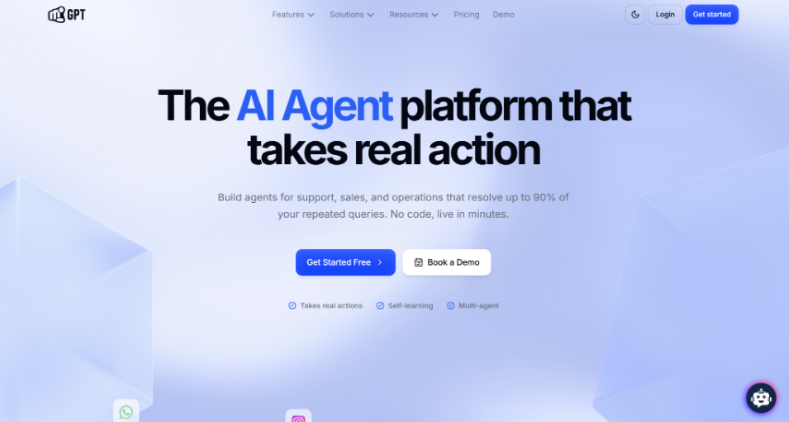
The action-oriented setup did a lot of the heavy lifting. Agents connect to tools like Shopify, Salesforce, and WordPress to process refunds, update CRM records, and book meetings, reaching up to a 90% resolution rate on repetitive queries.
Self-learning meant agents closed their own knowledge gaps from unresolved conversations, and multi-agent handoff let separate agents cover billing, refunds, and sales while passing context along. The deeper AI Studio workflow logic took more hands-on time than the basic setup.
Pros:
- No-code setup that’s quick to launch, with room to fully customize your agents
- Omnichannel deployment across web, WhatsApp, Instagram, Slack, email, Discord, and phone
- Self-learning agents that improve from unresolved conversations
- Action-oriented agents that resolve up to 90% of customer queries and run business workflows
Cons:
- Deeper workflow logic in AI Studio takes hands-on time to master
- Only a 7-day free trial, no free tier
Pricing:
Essential starts at $39/month, billed annually.
How Does YourGPT Compare To Intercom?
Intercom charges per seat, then adds $0.99 for each Fin resolution on top. YourGPT is credit-based, with no per-resolution fee, and one agent covers support, sales, and operations across more channels than a chat-first setup.
6. Freshdesk – Best for Fast Multichannel Setup
Freshdesk became my go-to recommendation the moment a client asked for multichannel support without a steep learning curve. I had email, chat, and phone tickets flowing into one inbox within a day, no dedicated implementation team required.
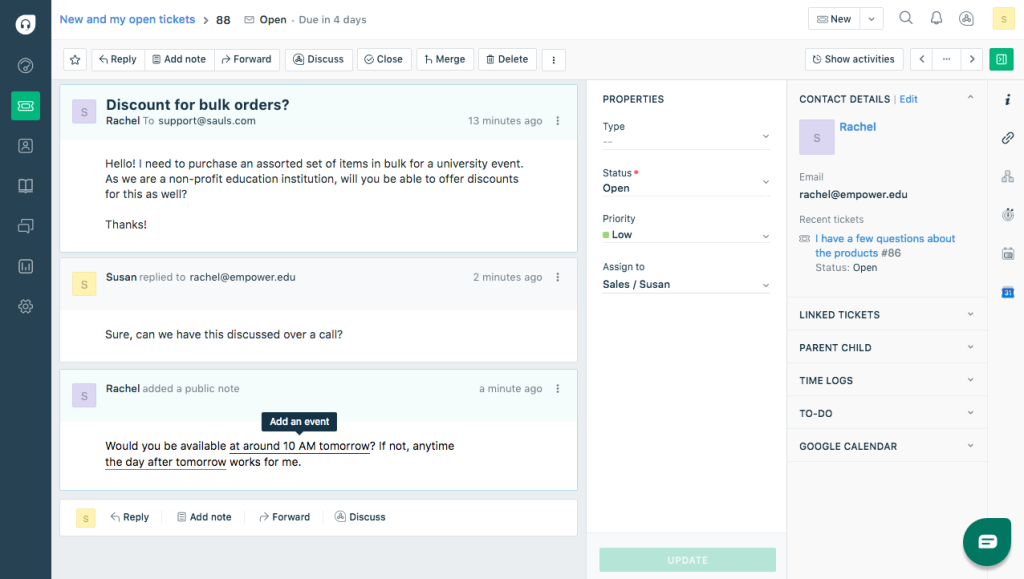
The automated ticketing system did a lot of the early heavy lifting: tickets got prioritized and assigned based on rules I set once and mostly forgot about. Freddy AI, Freshdesk’s assistant, handled canned suggestions well, though the more advanced automation and reporting sat behind higher-tier plans than I expected.
Community forums were a nice bonus for reducing repeat tickets, letting customers find answers before they ever opened a support request.
Pros:
- Multichannel ticketing across email, phone, chat, and social
- Automated ticket prioritization and assignment rules
- Community forums support self-service and reduce ticket volume
- Freddy AI assists with response suggestions and routing
Cons:
- Advanced AI and reporting features require higher-tier plans
- Interface can feel complex for brand-new users
Pricing:
Starts at $15/agent/month (a free plan is available for small teams).
How Does Freshdesk Compare To Intercom?
Intercom’s automation and reporting depth mostly live behind its higher usage tiers. Freshdesk has a similar pattern, gating Freddy AI’s more advanced automation behind higher plans, but its starting price is a fraction of what Intercom charges once Fin gets added in, and multichannel setup is faster out of the box.
7. Zoho Desk – Best Value for Zoho Ecosystem Users
I found Zoho Desk while comparing budget-friendly help desks for a client who was already running Zoho CRM. The value was hard to argue with: multichannel ticketing, a customizable knowledge base, and social media conversion into tickets, all at one of the lowest starting prices on this list.
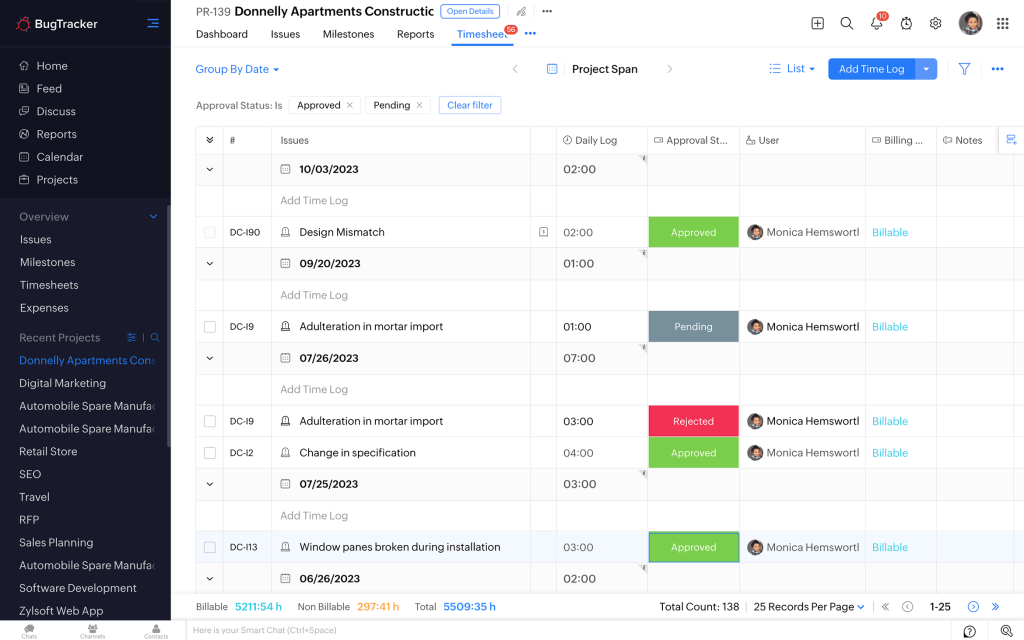
What impressed me most was how Zoho Desk automatically pulled in Twitter and Facebook complaints as tickets, so nothing sat unanswered in a public feed. Ticket prioritization and status tracking (open, overdue, unassigned) made the queue easy to scan at a glance.
The catch: live chat is locked behind the Enterprise plan, which meant we had to budget for a higher tier sooner than expected if real-time chat was a priority.
Pros:
- Multichannel support including email, chat, phone, and social
- Social media messages auto-convert into trackable tickets
- Customizable knowledge base matches brand requirements
- Ticket prioritization and status tracking built in
Cons:
- Live chat is only available on the Enterprise plan
- Reporting is less advanced than some competitors
Pricing:
Starts at $14/agent/month (free for up to 3 agents).
How Does Zoho Desk Compare To Intercom?
Intercom bundles chat and ticketing together by default. Zoho Desk splits them: you get strong ticketing and social-to-ticket conversion at a low starting price, but live chat is locked behind the Enterprise plan, so budget-conscious teams need to check whether that trade-off actually saves them money once real-time chat becomes a priority.
8. HubSpot Service Hub – Best for Teams Already on HubSpot CRM
HubSpot Service Hub made the most sense the day a client told me their sales, marketing, and support teams were tired of three separate logins and three separate customer records. Since we were already using HubSpot CRM, Service Hub gave us one unified view of every customer interaction.
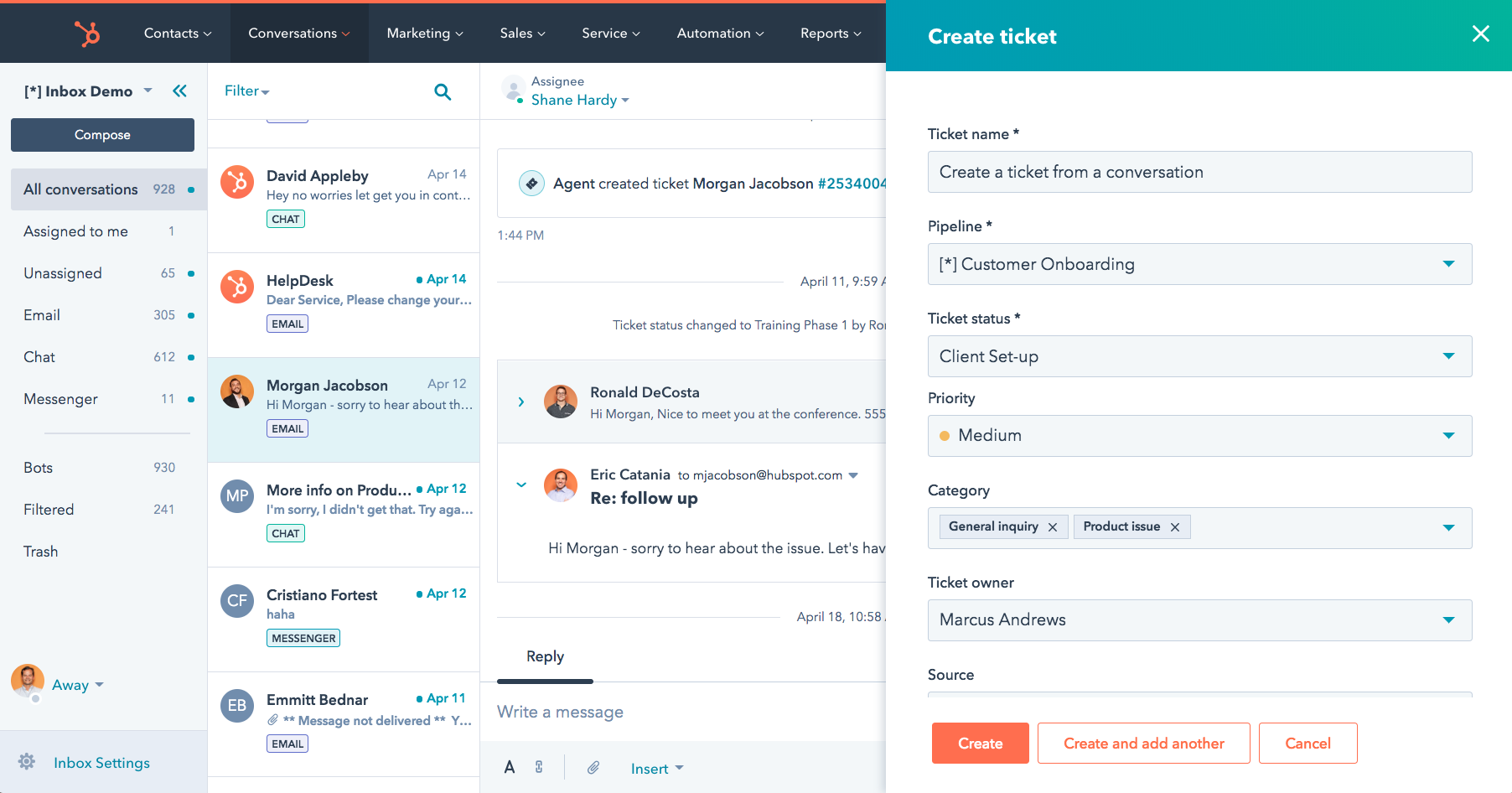
Ticket management, customer surveys, and a knowledge base all worked well together, and everything synced automatically with our existing HubSpot contacts and deals, with no manual data entry between systems. That unified record was the entire point of switching, and it delivered.
If your team isn’t already in the HubSpot ecosystem, though, the cost of Service Hub is harder to justify next to a standalone help desk. For a broader shortlist, see our full HubSpot alternatives guide.
Pros:
- Native, real-time sync with HubSpot CRM and marketing tools
- Ticketing system with customizable pipelines and views
- Customer surveys built in for feedback collection
- Knowledge base for a self-service help center
Cons:
- Costs rise quickly on Professional and Enterprise tiers
- Onboarding fees can apply on higher-tier plans
Pricing:
Starts at $15/seat/month (a free tier is available).
How Does HubSpot Service Hub Compare To Intercom?
Where Intercom’s cost grows with conversation volume, Service Hub’s cost grows with how deep you go into the HubSpot ecosystem. It’s a better fit than Intercom if your sales and marketing teams already live in HubSpot and you want one customer record instead of three; it’s a harder sell as a pure support tool on its own.
9. Help Scout – Best for Email-Like Shared Inboxes
Help Scout won me over with an inbox that looked and felt exactly like Gmail. For a team of former email-support agents, that familiarity meant almost zero training time before we were fully productive.
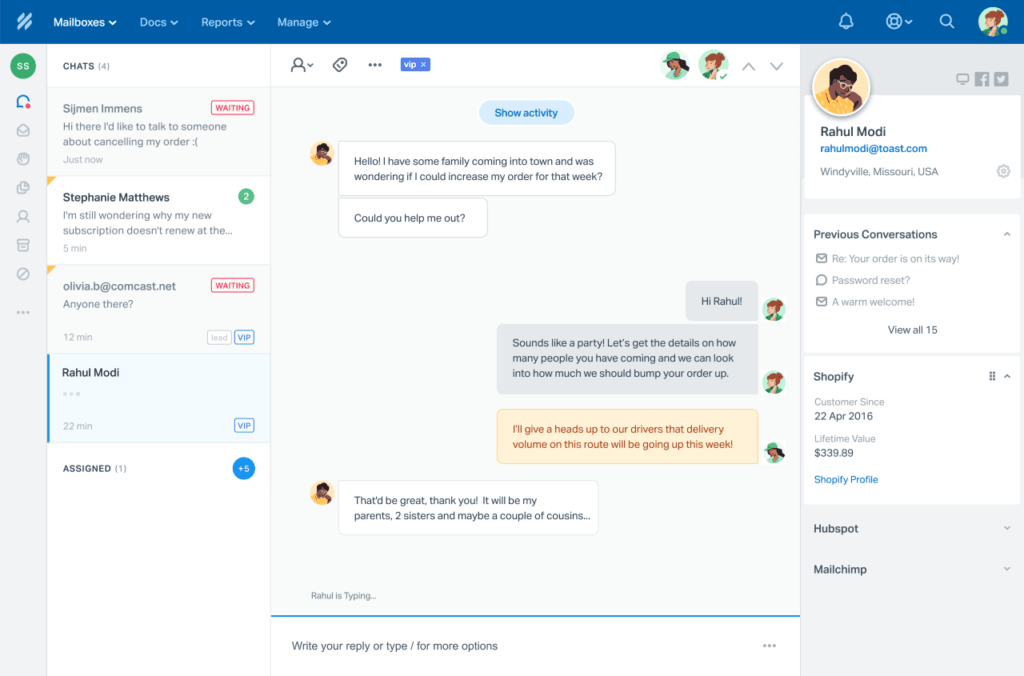
Shared inboxes, automated workflows, and a built-in knowledge base covered most of what we needed day to day. Customer profiles gave agents context before they even opened a ticket, which made replies feel more personal instead of generic.
Where it fell short was reporting. It’s noticeably lighter than what Zendesk or Freshdesk offer, and a few integrations we wanted weren’t available without extra tooling. If you’re weighing the two, Help Scout vs. Zendesk breaks down the gap in more depth.
Pros:
- Shared inbox mirrors a familiar email interface for fast adoption
- Automated workflows handle repetitive ticket routing
- Customer profiles surface context before an agent replies
- Built-in knowledge base for self-service support
Cons:
- Reporting is less comprehensive than category leaders
- Integration options are more limited than larger platforms
Pricing:
Starts at $25/user/month (free for up to 5 users).
How Does Help Scout Compare To Intercom?
Intercom’s interface leans toward a messenger widget. Help Scout goes the other way, styling its shared inbox to feel like Gmail, which makes it the faster switch for teams whose agents already think in email threads. What it gives up next to Intercom is reporting depth, which is noticeably lighter.
10. Gorgias – Best for Shopify & Ecommerce Support
Gorgias earned its spot on this list the first time I watched an agent process a Shopify refund without ever leaving the support ticket. That’s the entire pitch: order data, customer history, and support tools live in one screen.
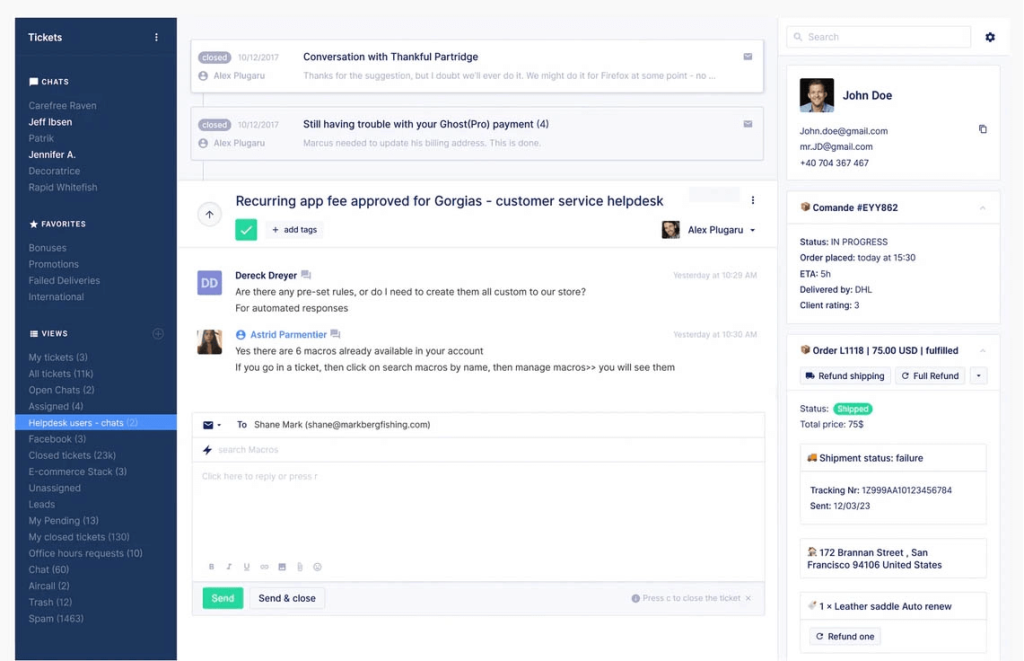
Agents could edit orders, apply refunds, and recommend products directly from a conversation, which cut down on the usual back-and-forth between the help desk and the store’s admin panel. Quick replies and ticket routing rules kept response times low even during sale-driven traffic spikes.
The pricing model took some getting used to: Gorgias bills based on ticket volume rather than seats, which rewards lean teams but needs modeling out before you commit if your volume is unpredictable.
Pros:
- Native integrations with Shopify, Magento, and BigCommerce
- Agents can edit orders and issue refunds inside a ticket
- Quick replies and ticket routing rules speed up resolution
- Live chat supports proactive, personalized product recommendations
Cons:
- Ticket-based pricing can be unpredictable for high-volume stores
- AI-handled interactions can be billed separately from standard tickets
Pricing:
Starts at $10/month.
How Does Gorgias Compare To Intercom?
Intercom’s Fin pricing is per resolution; Gorgias prices by ticket volume with unlimited seats, which rewards lean teams in a similar usage-based spirit but ties the number to something easier to forecast. It also does something Intercom doesn’t: let agents edit orders and issue refunds without leaving the ticket, which matters a lot for ecommerce stores.
11. Front – Best for Collaborative Shared Inboxes
Front solved a problem I didn’t know had a name until I lived without it: shared inbox chaos. Multiple team members were replying to the same customer thread without knowing it, and Front’s collaboration layer put a stop to that immediately.
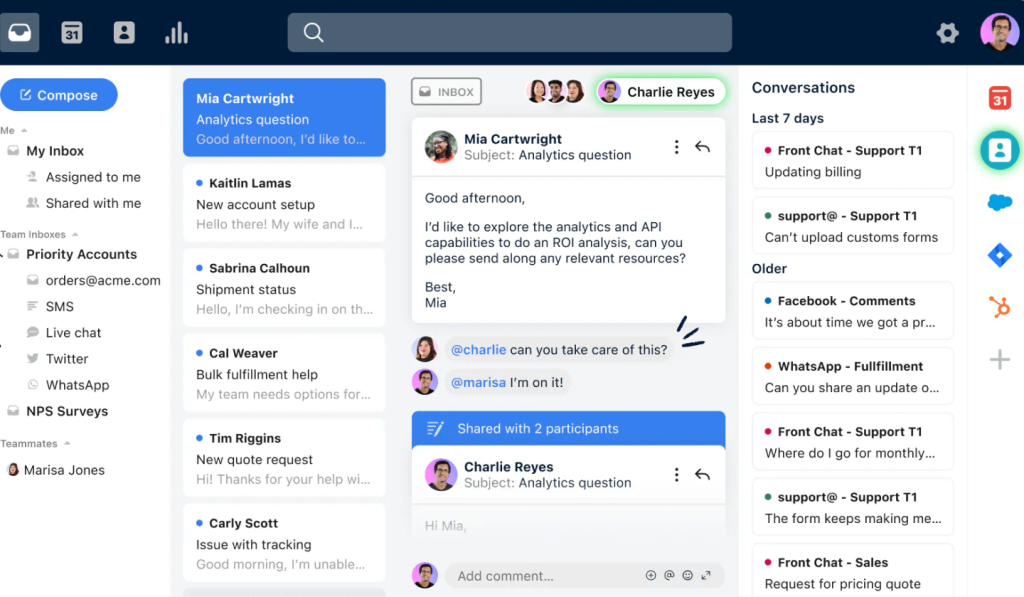
Email templates and automation cut down on repetitive replies, and analytics gave us visibility into how quickly threads actually got closed, not just opened. Chatbots handled basic lead qualification while the team focused on higher-value conversations.
Compared to a dedicated help desk, Front’s ticketing features felt lighter, and costs climbed as we added more collaborators and automation rules.
Pros:
- Shared inboxes built specifically for team-based email collaboration
- Email templates and automation reduce repetitive replies
- Analytics track thread resolution time, not just volume
- Task management ties follow-ups directly to customer threads
Cons:
- Help desk and ticketing features are lighter than dedicated platforms
- Better suited to email-first teams than high-volume ticketing queues
Pricing:
Starts at $19/user/month.
How Does Front Compare To Intercom?
Both tools started as messaging-first platforms, so neither has help-desk-grade ticketing at its core. Front’s edge over Intercom is collaboration on shared email threads; its downside is the same one Intercom has, costs climb as you add seats and automation rules.
12. HelpCrunch – Best for Live Chat + Email in One Plan
HelpCrunch surprised me with how much it packed into a $15 starting price. Live chat, email marketing, and support tools all lived in one dashboard, which meant I wasn’t stitching together three separate subscriptions to cover the basics.
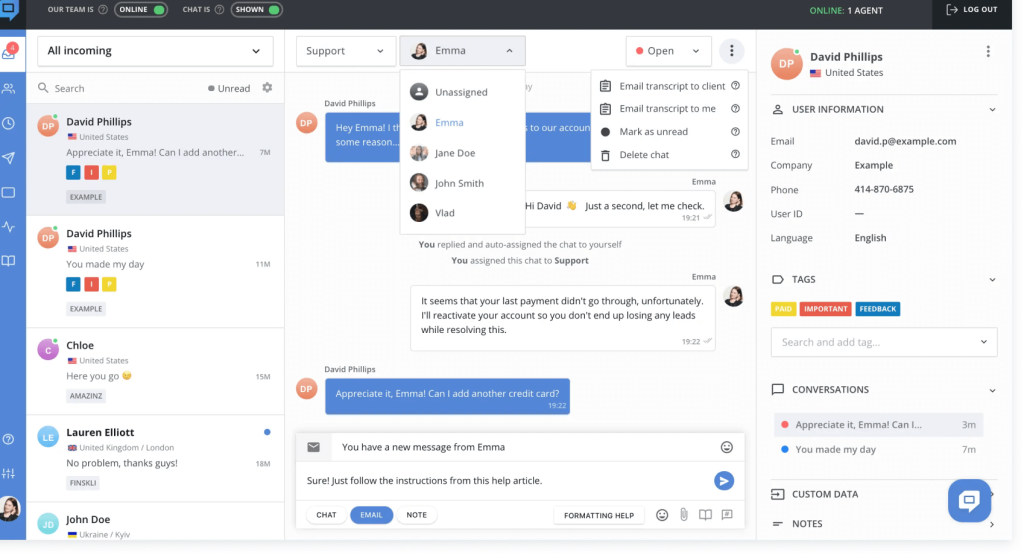
Automated messages triggered based on customer behavior, and in-app messaging let us reach users without relying on email opens. It felt built for teams that want customer engagement and support handled by the same tool, not two different ones.
Where it showed its limits was ticket volume. HelpCrunch is a strong live chat tool, but it doesn’t have the advanced ticketing depth that a high-volume support queue needs.
Pros:
- Live chat, email marketing, and support tools in a single dashboard
- Automated messages trigger based on real customer behavior
- In-app messaging reaches users without depending on email
- Popups and targeted campaigns support lead generation
Cons:
- Ticketing depth is thinner than dedicated help desk platforms
- Better suited to low-to-mid ticket volumes
Pricing:
Starts at $15/month.
How Does HelpCrunch Compare To Intercom?
Intercom charges more the more your team automates. HelpCrunch keeps live chat, email, and support in one dashboard at a fraction of Intercom’s cost, but it makes the opposite trade-off on ticketing depth, it’s built for lower-to-mid ticket volumes, not a high-volume queue.
13. Tidio – Best AI Chatbot for Small Ecommerce Teams
Tidio was the tool I turned to when a small ecommerce client wanted an AI chatbot without signing an enterprise contract. Its Lyro AI agent handled a solid share of routine questions using our existing FAQ and product pages, with no-code setup that took hours, not weeks.
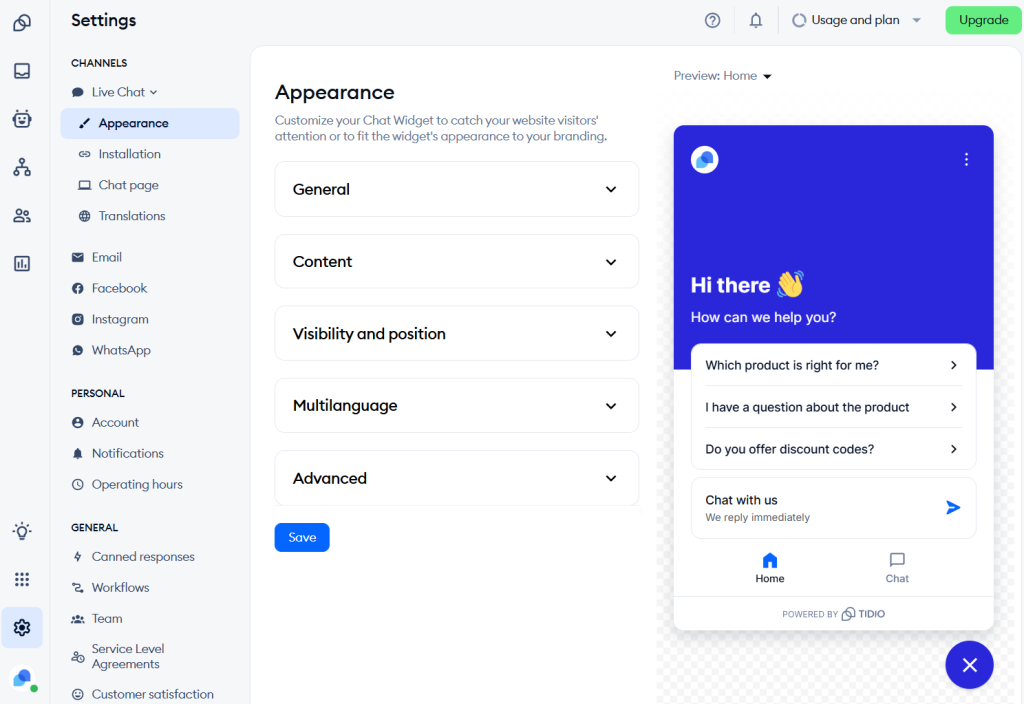
The free plan gave us a genuine way to test the platform, including a live chat widget and a starter allotment of AI conversations, before we spent a dollar. As our conversation volume grew, we had to watch the usage-based AI billing closely, since it’s metered separately from the base plan.
For a small store that mostly needs quick answers to shipping and return questions, Tidio hit the right balance of cost and capability.
Pros:
- Lyro AI agent resolves routine queries using existing FAQ content
- No-code chatbot setup goes live within hours
- Genuinely usable free plan with a starter AI conversation allotment
- Live chat widget is simple to customize and embed
Cons:
- AI conversations are billed separately and scale with usage
- Jump between mid-tier and top-tier plans is steep
Pricing:
Starts at $29/month (a free plan is available).
How Does Tidio Compare To Intercom?
Intercom’s Fin bills per resolution; Tidio’s Lyro AI meters conversations separately too, so the two tools actually share a billing philosophy. The difference is scale and price point, Tidio’s free plan and $29 starting price make it approachable for a small ecommerce team in a way Intercom generally isn’t.
14. Drift – Best for Conversational Marketing & Sales
Drift showed up on my radar for a client whose sales team, not their support team, wanted the chat widget. It’s built around conversational landing pages that qualify visitors and book meetings, more marketing tool than help desk.
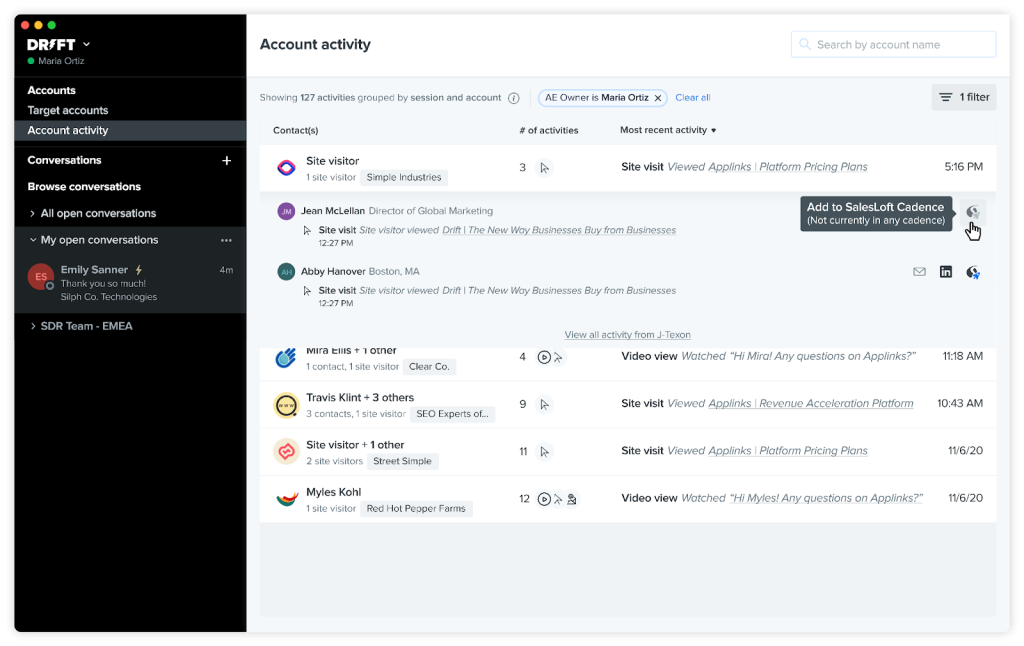
The meeting scheduler let visitors book time directly through a chat conversation, and visitor intelligence gave the sales team real insight into who was on the site and what they cared about. AI chatbots handled first-touch qualification before handing off to a rep.
If customer support is your primary goal, Drift isn’t the right fit. It’s built for pipeline generation, and the price tag reflects that positioning.
Pros:
- Conversational landing pages designed to convert visitors into leads
- Meeting scheduler lets visitors book calls directly through chat
- Visitor intelligence surfaces buyer behavior for sales teams
- AI chatbots handle first-touch lead qualification
Cons:
- Limited customer support ticketing functionality
- Built for sales and marketing use cases, not general support
Pricing:
Starts at $2,500/month.
15. Respond.io – Best for High-Volume B2C Customer Conversations
Respond.io is a customer conversation platform for mid-market B2C businesses managing 500+ customer conversations a month, where customers often chat before buying or booking.
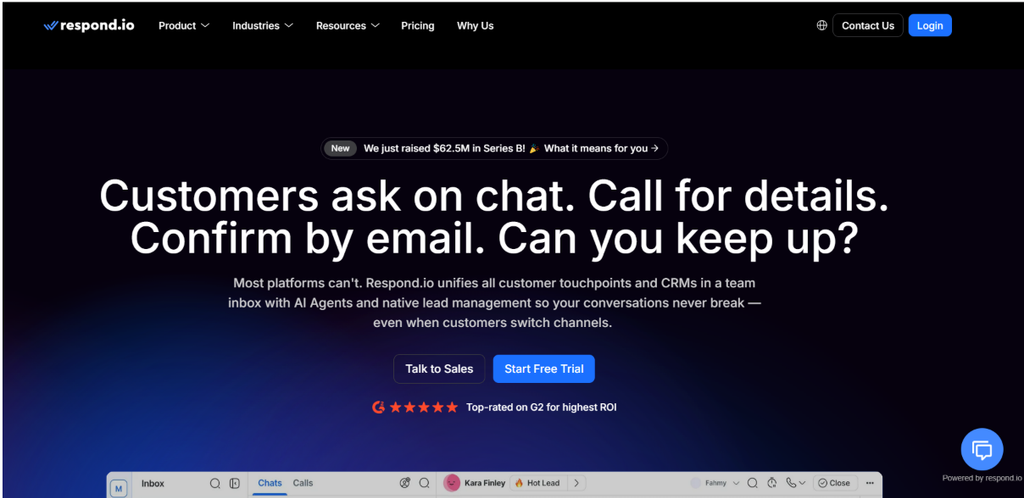
Its AI Agents answer questions, qualify leads, and route conversations using your own business materials, and teams can use the visual workflow builder to automate assignment and follow-ups. Conversations from WhatsApp, Instagram, Messenger, TikTok, email, and voice land in one workspace.
The trade-off is setup and cost structure. Configuring AI Agents and workflows takes more effort than switching on a chat widget, though onboarding, the built-in Copilot, and 24/7 support help teams get started.
For a team whose customers message on chat apps and whose conversations lead to sales or bookings, Respond.io fits better than a ticket-first help desk. If your support is mostly email tickets with SLAs, a dedicated help desk is the better match.
Pros:
- AI Agents qualify leads, answer questions, and route conversations using your own business materials
- One workspace for WhatsApp, Instagram, Messenger, TikTok, email, and voice conversations
- Customer lifecycle tracking shows where prospects drop off so teams can follow up
- Native HubSpot and Salesforce integrations keep conversations connected to the CRM
Cons:
- AI Agents and workflows require the Growth plan, starting at $199/month billed monthly
- AI and workflow configuration takes more setup than a simple chat widget
Pricing:
Starts at $99/month
How Does Respond.io Compare To Intercom?
Intercom’s Fin bills per resolution, while Respond.io uses monthly active contact tiers with included AI credits and separate WhatsApp fees. The bigger difference is focus: Intercom centers on customer support, while Respond.io connects conversations across messaging apps, calls, and email to lead qualification, sales, and retention. That makes it worth considering for B2C businesses whose customers chat before buying or booking.
How Does Drift Compare To Intercom?
Intercom is built to handle support conversations; Drift is built to convert website visitors into sales meetings, so this is more of a different-lane comparison than a head-to-head. If your chat widget needs to qualify leads and book calls rather than resolve tickets, Drift does that job, at a price point that puts it in an entirely different budget bracket than Intercom.
Evaluation Criteria
I didn’t rank these Intercom alternatives on gut feel. I used six factors to keep the comparison fair and grounded in what actually matters when you’re picking customer support software:
- User Reviews & Ratings: I weighted direct feedback from G2 and Capterra heavily, since it reflects real day-to-day experience rather than a vendor’s marketing page.
- Essential Features & Functionality: I looked past feature-list length and tested whether the core ticketing, chat, or automation actually solved the problem it claimed to.
- Ease of Use: I paid attention to how long it took to get a team productive, since a powerful tool nobody adopts isn’t a win.
- Customer Support: I factored in how responsive and helpful each vendor’s own support team was, since that’s exactly the experience you’re trying to replicate for your customers.
- Value for Money: I compared the total cost (seats, AI add-ons, and usage fees) against what each plan actually delivers, not just the advertised starting price.
- Personal Experience & Expert Opinion: Where I had hands-on time with a tool, I leaned on that. Where I didn’t, I cross-checked against consistent patterns in expert reviews and user feedback.
My Top 3 Picks for the Best Intercom Alternative
If you only read one section of this guide, read this one. Here are the three Intercom alternatives I’d point a team toward first, depending on budget and use case.
1. ProProfs Help Desk
ProProfs Help Desk is my top recommendation for most teams leaving Intercom. It pairs AI-powered ticketing with live chat and a knowledge base in one affordable plan, and its forever-free tier means you can test it with zero budget risk before scaling up. For a team tired of unpredictable, usage-based billing, the flat, transparent pricing alone is worth the switch.
2. Freshdesk
Freshdesk is my pick for teams that want a familiar, mature help desk without Zendesk-level cost. It gets you multichannel ticketing, automation, and self-service community forums up and running in a day, with a free plan that covers small teams comfortably.
3. Gorgias
Gorgias is the clear choice if you run a Shopify or ecommerce store. Being able to issue refunds, edit orders, and recommend products without leaving a support ticket saves real time during high-traffic sales periods, and its ticket-based pricing rewards lean teams that don’t want to pay per seat.
FREE. All Features. FOREVER!
Try our Forever FREE account with all premium features!
Pick a Tool That Keeps Your Support Costs (and Your Sanity) In Check
Switching help desks always feels bigger than it is. In reality, most teams aren’t leaving Intercom because it’s a bad tool. They’re leaving because they want to stop guessing what next month’s invoice will look like. That’s a fair thing to want, and it’s worth taking your time over.
Before you commit to anything, get clear on three things: which channels you actually use, roughly how many tickets you handle a month, and what you’re comfortable spending, all in, not just the sticker price. Once you know that, two or three tools from this list should stand out on their own, and a short pilot with real tickets will tell you more than any feature comparison ever could.
If you’re still weighing your options, it doesn’t hurt to start with something that won’t cost you anything to try. ProProfs Help Desk has a forever-free plan for a single agent, so you can get a real feel for AI-assisted replies and a shared inbox before you decide if it’s worth paying for anything at all.
Frequently Asked Questions
What is the best free Intercom alternative?
ProProfs Help Desk offers the most complete free plan, combining ticketing, a shared inbox, and basic reporting for a single agent at no cost.
Why is Intercom so expensive?
Intercom stacks per-seat pricing with a separate $0.99-per-resolution fee for its Fin AI agent, plus usage charges for channels like SMS and WhatsApp, so the bill grows as your support volume grows.
Which Intercom alternative is best for small businesses?
ProProfs Help Desk and Freshdesk both offer free plans and low starting prices, making them the easiest entry points for small support teams.
Can I migrate my chat history when I switch from Intercom?
Most alternatives, including ProProfs Help Desk and Zendesk, support CSV or API-based data import. Read this help desk migration guide first, since the depth of historical data you can bring over varies by plan.
Does ProProfs Help Desk integrate with live chat like Intercom does?
Yes. ProProfs Help Desk connects natively with ProProfs Chat as part of its omnichannel support, so live chat conversations that go unresolved convert automatically into support tickets with full context attached.
Which Intercom alternative has the strongest AI features?
ProProfs Help Desk, Zendesk, and Tidio each offer AI-assisted response suggestions or chatbot resolution, though only ProProfs Help Desk includes this without a separate per-resolution fee.
FREE. All Features. FOREVER!
Try our Forever FREE account with all premium features!

 We'd love your feedback!
What did you like & how can we make it even better?
 Thanks for your feedback!
 Ask Your Question
Have a question? Get expert help to make your decision easier.