


Last quarter, I sat in on a support review where the team insisted they were “on top of everything.” Then we opened their shared inbox. Hundreds of unread emails, flagged messages no one owned, and follow-ups buried three threads deep.
That is the moment most founders realize they don’t have a workload problem, they have a system problem. If you’re trying to figure out how to create a ticketing system, it’s usually because email, chat, and internal requests have started to feel unmanageable.A structured ticketing system brings order, accountability, and measurable performance into your workflow. In this guide, I’ll show you how to create a help desk ticketing system that scales with your team instead of slowing it down.
What you’ll learn in this blog:
- A ticketing system centralizes support requests from email, chat, and forms
- It assigns clear ownership to every issue
- Automation and AI reduce repetitive manual work
- SLAs and dashboards improve response time and accountability
- Reporting turns support into a measurable performance function
What Is a Ticketing System?
A ticketing system is a centralized platform that captures, organizes, and tracks support requests from channels like email, chat, or web portals. Each request receives a unique ticket ID, making it easy for teams to prioritize, assign, and resolve issues efficiently while maintaining full visibility into status and history.
The best ticketing systems make this transition seamless by replacing scattered emails and spreadsheets with a structured, trackable workflow. It also helps teams deliver faster, more consistent support as request volumes grow..
Here’s what makes a ticketing system powerful in practice:
- It automatically routes tickets based on keywords or context to the right team members.
- Teams can collaborate in real time without duplicating efforts or missing updates.
- Built-in reporting helps measure response times and identify recurring problems.
- Integration with tools like Slack or Jira keeps conversations and tasks connected.
- Self-service options allow users to resolve simple issues on their own.
Want to see a ticketing system in action? Watch this short YouTube video:
How to Create a Ticketing System in Simple Steps
Setting up a ticketing system does not have to be complicated. In fact, if you follow a structured flow, you can go from a messy inbox to a fully organized support workflow in just a few steps.
To make this easy to understand, I’ll use ProProfs Help Desk as an example to demonstrate exactly how to create a ticketing system from scratch.
Step 1: Set Up Your Ticket Intake Channels
Start by deciding how users will submit requests. For instance, ProProfs Help Desk lets you connect via:
- Email inboxes
- Customer portals
- Web forms
- Live chat
Once connected, every incoming request automatically converts into a ticket with a unique ID.
This ensures you centralize all requests from day one and stop losing messages across channels.
Step 2: Configure Automatic Ticket Creation and Categorization
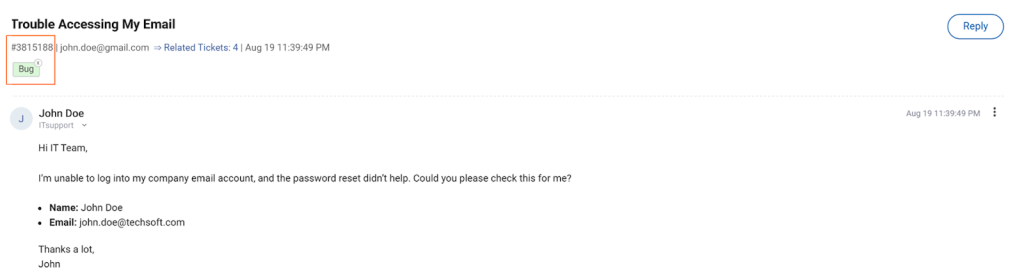
When a request comes in, the system should automatically:
- Generate a unique ticket number
- Capture user details
- Categorize the issue (bug, access issue, billing, etc.)
In ProProfs Help Desk, you can set up categories and custom fields to organize tickets by department, issue type, or priority.
This is where your structure begins.
Step 3: Set Up Smart Ticket Assignment Rules
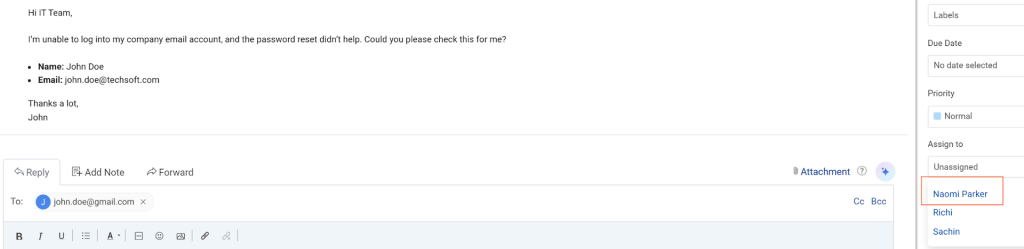
Next, define how tickets get assigned.
You can configure:
- Agent availability
- Round robin distribution
- Manual queue picking
This prevents duplicate replies and ensures every ticket has clear ownership from the start.
Step 4: Enable AI-Powered Assistance for Faster Resolution
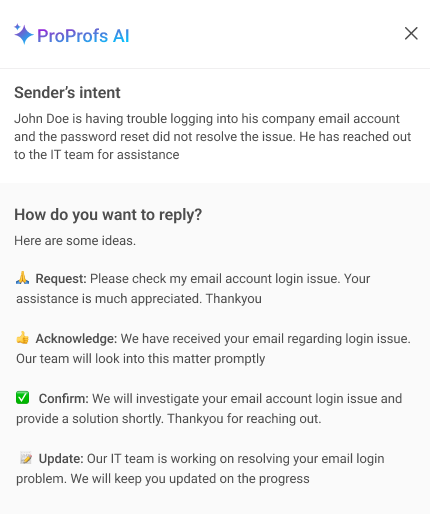
Now activate AI features to reduce manual effort.
With AI assistance, agents can:
- Summarize long ticket threads instantly
- Choose from AI-generated response suggestions
- Prompt AI to tweak or refine a response
This speeds up resolution and helps small teams handle higher volumes without burnout.
Step 5: Manage Communication and Ticket Status
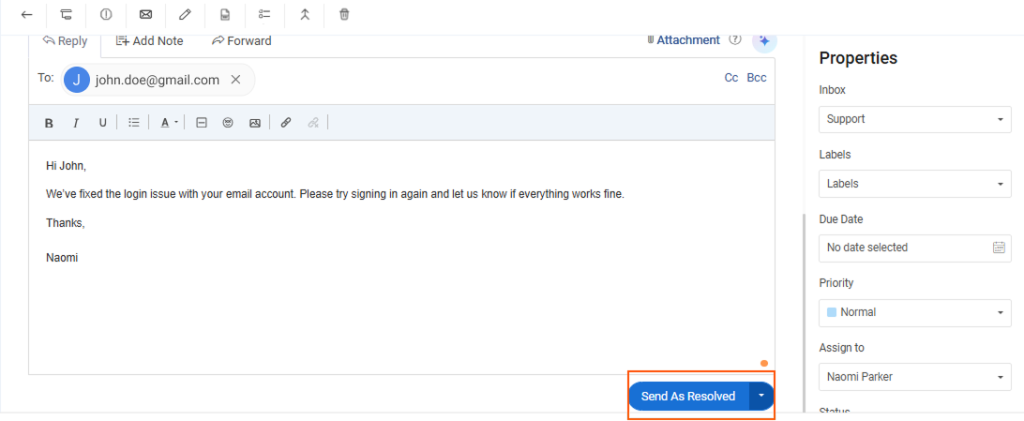
As agents work on tickets, they can:
- Update statuses (Open, Pending, Resolved)
- Request more information
- Send real-time updates to users
Everything stays documented inside the ticket thread, so no context is lost.
Step 6: Close Tickets and Collect Feedback
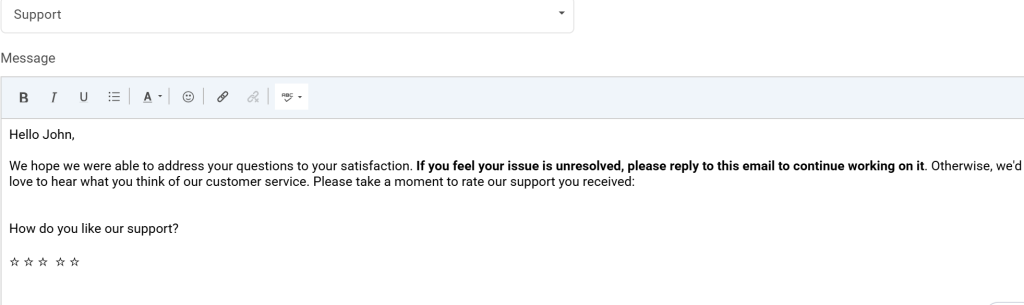
Once resolved, the ticket is marked closed, and the user receives a notification.
You can automatically send a satisfaction survey to:
- Measure service quality
- Track agent performance
- Identify improvement areas
This closes the loop and turns support into a measurable operation.
And voilà, you have successfully created a ticketing system that is organized, scalable, and ready to support your team as you grow.
Ticketing System vs Shared Inbox: What’s the Difference?
At first glance, a shared inbox can feel like a simple way to manage team email. Messages come in, you assign them, and you use folders, labels, and flags to keep things moving.
As support volume grows, though, many teams start wanting more structure. That’s where a ticketing system comes in. It turns incoming requests into trackable tickets, assigns clear ownership, and provides visibility into progress and performance.
Here’s how they truly compare:
| Shared Inbox | Ticketing System |
|---|---|
| Emails are organized using folders, labels, and flags | Every request becomes a structured ticket with a unique ID |
| Assignments are typically handled manually | Each ticket has a clear owner, status, and workflow |
| Agents coordinate replies using internal notes or team habits | Collision detection helps prevent multiple agents replying at once |
| Priority is usually set by the team as they triage | Tickets can be auto-prioritized using rules and urgency |
| Reporting varies by inbox tool and setup | Dashboards track response time, resolution time, and SLAs |
| Patterns are spotted through manual review | Tags and categories make it easier to find trends and recurring issues |
Why Should You Implement a Ticketing System for Support?
If your team is juggling emails, calls, chats, and internal messages, things can fall apart quickly. A ticketing system brings structure to that chaos. It gives you visibility, accountability, and a clear process for handling every request. Here’s why implementing one is a smart move for growing teams.
1. Centralize All Requests in One Place
A ticketing system pulls in requests from email, chat, forms, and other channels into a single dashboard. This prevents missed messages and eliminates the need to search across multiple tools. Everyone works from the same system, which creates clarity and reduces confusion.
2. Improve Response Time and Service Quality
With clear ownership and prioritization, tickets move faster. Agents know exactly what to handle and in what order. This reduces delays, improves turnaround time, and ensures customers or employees do not need to follow up repeatedly for updates.
3. Increase Accountability Across Teams
Every ticket has a visible owner, status, and timeline. You always know who is responsible and how long a request has been open. This transparency improves accountability without constant supervision and keeps the team aligned.
4. Track Performance With Real Metrics
A ticketing system gives you access to measurable data like response time, resolution time, ticket volume, and workload trends. These insights help you make better staffing decisions and continuously improve your support process.
5. Identify and Fix Recurring Issues
Instead of solving the same problems repeatedly, you can spot patterns in ticket categories and trends. This allows you to address root causes, build helpful documentation, and reduce future ticket volume over time.
FREE. All Features. FOREVER!
Try our Forever FREE account with all premium features!
What Features Should a Ticketing System Include?
Before setting up your workflows, you need to know what actually makes a ticketing system effective. The right features do more than log requests. They help you respond faster, automate routine tasks, prioritize urgent issues, and track performance clearly.
Here are the core features that make a real difference.
1. AI Support That Reduces Manual Work
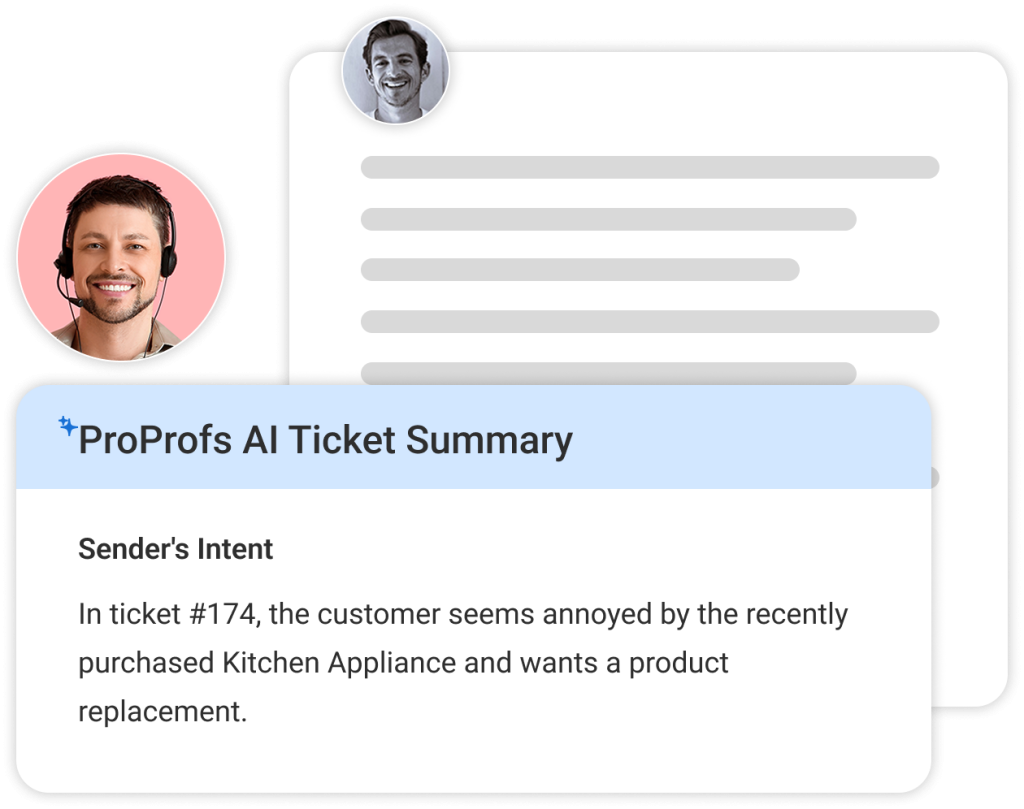
Modern ticketing systems use AI features to handle repetitive support tasks, so your team can focus on complex issues that require real attention. The AI analyzes the full conversation, detects intent and sentiment, and suggests ready-to-use replies that agents can quickly refine. It also condenses long email threads into clear summaries, saving time and reducing confusion. In addition, AI chatbots answer common questions instantly, reducing ticket volume and improving response time.
How It Helps:
- Suggests quick, accurate responses for common issues
- Summarizes long ticket threads for faster understanding
- Automates repetitive support tasks
- Reduces agent workload during high ticket volume
- Improves response speed without adding headcount
2. Omnichannel Request Capture
Customers and employees reach out through multiple channels, not just email. Omnichannel ticketing ensures every request from email, live chat, web forms, and even social platforms is captured in one unified system. This prevents missed messages and keeps conversations organized across touchpoints. It also gives users the flexibility to contact support in the way that feels most convenient for them.
How It Helps:
- Centralizes support requests from all channels
- Prevents missed messages and duplicate follow-ups
- Keeps conversations organized in one place
- Improves customer experience with flexible communication
- Helps teams manage support at scale
3. Ticket Prioritization and Smart Assignment
Not all tickets are equally urgent, and prioritization ensures critical issues get handled first. Smart assignment features automatically route tickets based on keywords, context, department, or workload. Some teams use round robin distribution, while others prefer queue-based picking. This structure reduces delays, prevents bottlenecks, and ensures the right agent works on the right issue quickly.
How It Helps:
- Ensures urgent tickets are addressed first
- Routes requests to the correct team automatically
- Balances workloads across agents
- Prevents tickets from sitting unassigned
- Reduces turnaround time for resolutions
4. Knowledge Base Integration for Self-Service
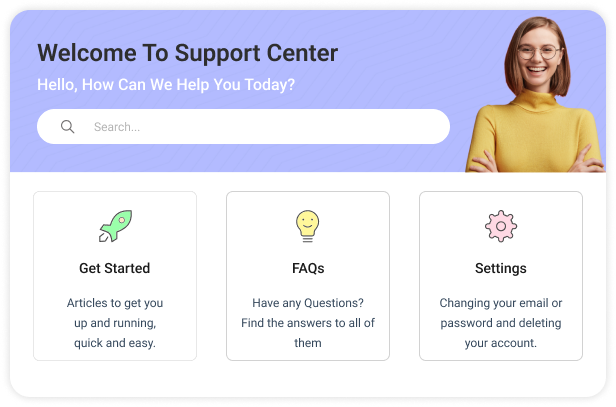
A knowledge base integrated into your ticketing system empowers users to find answers on their own. Instead of raising tickets for every common question, customers and employees can access help articles, FAQs, and troubleshooting guides. Plus, agents can also link relevant articles directly in replies, ensuring consistent communication. Over time, self-service reduces ticket volume and improves support efficiency.
How It Helps:
- Reduces repetitive tickets with self-service options
- Helps users solve issues without waiting for agents
- Ensures consistent responses across the team
- Speeds up resolutions with quick article sharing
- Builds a long-term support resource library
5. Reports and Analytics That Prove Impact
Reporting and analytics features help you measure and improve support performance. A ticketing system should provide dashboards for open, pending, overdue, and resolved tickets, along with metrics like first response time and resolution time. These insights help leaders track workload trends, identify recurring issues, and justify process improvements. Reporting turns support into a measurable, accountable operation.
How It Helps:
- Tracks response time and resolution performance
- Provides visibility into ticket workload and status
- Helps forecast staffing and resource needs
- Identifies recurring issues and service gaps
- Supports data-driven improvements and accountability
Common Ticketing System Implementation Mistakes and How to Fix Them
Creating a ticketing system is a smart move, but the setup matters just as much as the tool. Many teams rush into configuration and end up with a system that feels just as messy as their inbox. That’s why understanding how to implement a ticketing system the right way is key to avoiding early mistakes. Here are the most common pitfalls and how to fix them.
Mistake 1: Forcing Users Into a Portal Too Early
Many teams launch a ticketing system and immediately require users to log into a portal for every request. The problem is that most employees and customers are used to emailing support, so a sudden switch creates friction. Adoption drops, and people return to old habits. Start with email-to-ticket workflows first, then introduce the portal gradually once users understand the benefits and feel comfortable.
How to fix it:
- Begin with email-based ticket submission
- Introduce portals as an optional next step
- Keep the request process simple
- Provide quick onboarding for users
Mistake 2: Not Setting Clear Ownership Rules
A ticketing system breaks down when no one knows who is responsible for handling each request. Tickets stay unassigned, multiple agents respond to the same issue, and urgent problems get overlooked. Clear ownership is essential for accountability and speed. Define ticket categories, assign owners, and ensure every ticket has a visible agent responsible from the moment it enters the queue.
How to fix it:
- Assign owners for each ticket type
- Enable auto-assignment or routing rules
- Make ownership visible across the team
- Review workloads to avoid bottlenecks
Mistake 3: Ignoring SLAs and Escalations
Without SLAs, teams have no clear targets for response or resolution time. That is when urgent tickets get buried, follow-ups pile up, and customers feel ignored. Escalations are equally important because they prevent tickets from staying open indefinitely. Set realistic SLAs, create priority levels, and automate alerts or reassignment when tickets approach deadlines or exceed limits.
How to fix it:
- Define first response and resolution SLAs
- Set priority levels for urgent issues
- Automate escalation alerts for overdue tickets
- Align SLAs with business hours
Mistake 4: Overcomplicating Forms and Fields
It is tempting to collect every detail upfront, but long ticket forms frustrate users and slow submissions. Too many required fields lead to incomplete requests, delays, and unnecessary back-and-forth. Keep forms simple, ask only essential questions, and use conditional fields for specific ticket types. A smoother submission experience helps agents triage faster and resolve issues more efficiently.
How to fix it:
- Ask only essential information upfront
- Use conditional fields for complex requests
- Keep categories easy to understand
- Refine forms based on ticket trends
Mistake 5: Skipping Reporting Setup Until Later
Many teams focus on ticket handling first and forget about reporting until leadership asks for metrics. By then, important performance data may not be tracked properly. Reporting should be part of the initial setup so you can measure response time, resolution time, ticket volume, and workload trends. Configure dashboards early and schedule regular reports to keep service quality visible.
How to fix it:
- Define KPIs early in the setup
- Build dashboards for open and overdue tickets
- Schedule weekly or monthly reports
- Track trends by category and agent
Mistake 6: Treating Tickets as One-Off Tasks
If your team only focuses on closing tickets, recurring issues will keep coming back. A ticketing system should help you identify patterns, not just resolve symptoms. Without tagging and incident tracking, root cause work never happens. Group related tickets, review recurring problems regularly, and turn repeated questions into knowledge base articles to reduce future volume.
How to fix it:
- Tag recurring issues consistently
- Link related tickets to spot patterns
- Review common problems monthly
- Convert repeat issues into KB articles
Achieve Faster Support With a Ticketing System That Scales
When you successfully implement a customer support ticket system, it brings structure, speed, and clarity to support operations. When requests are centralized, assigned properly, and tracked with real metrics, your team stops reacting and starts delivering consistent service.
My biggest tip is to start simple, automate gradually, and keep the experience easy for both users and agents. Over time, adding AI, workflows, and self-service will help you scale without chaos.
If you are ready to set up a modern support process, ProProfs Help Desk can help you manage conversations and tickets smoothly while keeping customer experience front and center. Try it today and turn support into a real growth engine.
Frequently Asked Questions

How do I turn a shared inbox (Outlook/Microsoft 365) into a ticketing system?
You can connect your Outlook inbox to a ticketing tool so emails stop getting lost in threads. Every new message becomes a trackable ticket with an owner and status. It feels like email for your customers, but behind the scenes, your team stays organized and accountable.
How do I convert customer emails into tickets automatically and send an instant acknowledgement with a ticket number?
Once email-to-ticket is enabled, incoming messages are instantly logged as tickets. You can also send an automatic confirmation reply with a ticket number right away. That way, customers know their request was received and they’re not left wondering if anyone saw it.
How do I reduce duplicate tickets and prevent multiple agents from replying to the same request?
This is a common inbox problem. A ticketing system helps by keeping one conversation in one ticket, showing who’s working on it, and allowing duplicates to be merged. It saves your team from stepping on each other’s toes and keeps the customer experience clean.
How do I categorize and tag tickets with custom fields (location, department, ticket type) for better reporting?
You can add simple custom fields like department, location, or request type when tickets are created. This makes it much easier to sort issues, route them faster, and later pull reports that actually tell you what’s happening across teams.
How do I set up auto-routing so tickets get assigned based on keywords, context, or department?
Auto-routing rules let you automatically send tickets to the right person or team. For example, billing questions can go to finance, while IT requests go to tech support. This reduces manual sorting and helps customers get answers faster.
How do I set different business hours and SLAs for teams in different time zones?
If you have teams in multiple regions, you can set separate business hours and SLA rules for each one. This keeps response time tracking fair and realistic, so your UK team isn’t measured by Australia’s clock, and vice versa.
How do I let users update tickets by replying to email instead of forcing them to log into a portal?
Most ticketing systems automatically update the same ticket thread when replying to an email. So users can just hit “reply” like they normally would, while your team still gets all updates neatly tracked inside the ticket.
How do I track ticket turnaround time, ticket age, and the full ticket lifecycle in one dashboard?
Dashboards show you what’s open, what’s overdue, and how long tickets have been sitting. You can easily track response time, resolution time, and ticket aging, which helps you spot delays early and improve support performance over time.
How do I identify recurring issues from tickets and use that for incident and problem management?
Once tickets are categorized and tagged, you can quickly see patterns like repeated password reset requests or recurring product issues. This helps you fix root causes, build better documentation, and prevent the same problems from coming back every week.
FREE. All Features. FOREVER!
Try our Forever FREE account with all premium features!

 We'd love your feedback!
What did you like & how can we make it even better?
 Thanks for your feedback!
 Ask Your Question
Have a question? Get expert help to make your decision easier.