

Freshdesk is a solid help desk. It’s also the tool most support teams eventually outgrow, not because it stops working, but because the features you actually need (AI replies, deeper reporting, more channels) tend to sit one or two tiers above where you started. That’s usually the moment someone opens a new tab and types “Freshdesk alternatives.”
This guide is a side-by-side look at 11 real Freshdesk competitors, what each one actually costs, who it fits best, and where it falls short, so you can pick one based on your team’s actual workflow instead of a features page.
Why do Teams Search for Freshdesk Alternatives?
Teams look for Freshdesk competitors mainly because of unpredictable costs as they scale, AI features that sit behind paid add-ons, and a ticketing system that starts to feel more complex than a growing team actually needs.
Here’s what shows up again and again in reviews and support forums:
- Pricing jumps fast between tiers. Entry plans look cheap, but automation, multiple SLAs, and round-robin routing often require the Pro tier, and AI assistance is usually billed separately on top of that. Freshdesk still holds a solid aggregate score, close to 4.4 out of 5 across thousands of reviews, according to a study by G2 in 2026, but a chunk of that feedback specifically calls out limited features and missing AI on the lower tiers.
- AI is no longer optional, and that raises the stakes on pricing. A study by Gartner in 2026 found that 91% of customer service and support leaders feel pressure from executive leadership to implement AI. That pressure is exactly why so many teams are comparing help desk software with AI built into the core plan rather than sold as an add-on.
- The free plan shrank. Freshdesk’s free tier is now a time-limited program capped at a couple of agents, not the open-ended small-team plan it used to be.
- Feature fragmentation. Chat, ticketing, and voice sometimes live in separate products, so agents end up switching tabs mid-conversation.
- Support teams outgrow the “one tool for everyone” model. A five-person team and a 50-agent operation need very different things, and a lot of teams realize their current plan was built for someone else’s use case.
Think Your Current Help Desk Is Enough? Take Another Look
Top 11 Freshdesk Alternatives for Customer Support in 2026
We tested each tool against real support scenarios (not just pricing pages) and scored them on ease of use, AI depth, channel coverage, integrations, and true cost at scale. Here’s the shortlist before the full breakdown.
| Tool | Best For | Pricing | User Rating (G2) |
| ProProfs Help Desk | Easiest AI Help Desk for Shared Inboxes, Ticket Workflow Automation, and Scaling Support Teams | A free plan is available for growing teams. Paid plan starts at $19.99/month. | 4.7/5 |
| Zendesk | Enterprise-scale omnichannel support | From $19/agent/month | 4.3/5 |
| Zoho Desk | Budget teams that still want AI | Free plan; from $7/agent/month | 4.4/5 |
| Help Scout | Simple, email-first support | From $25/user/month | 4.4/5 |
| Intercom | In-app messaging and product-led support | From $29/seat/month | 4.5/5 |
| HubSpot Service Hub | Teams already using HubSpot CRM | Free plan; from $20/seat/month | 4.4/5 |
| Front | Collaborative shared inboxes | From $19/seat/month | 4.5/5 |
| Gorgias | Shopify and ecommerce support | From $10/month | 4.6/5 |
| LiveAgent | All-in-one channels with a built-in call center | From $9/agent/month | 4.5/5 |
| HappyFox | Customizable workflows and SLAs | From $29/agent/month | 4.5/5 |
| Jira Service Management | IT and internal service desks | Free plan; from $20/agent/month | 4.3/5 |
1. ProProfs Help Desk – Easiest AI Help Desk for Shared Inboxes, Ticket Workflow Automation, and Scaling Support Teams
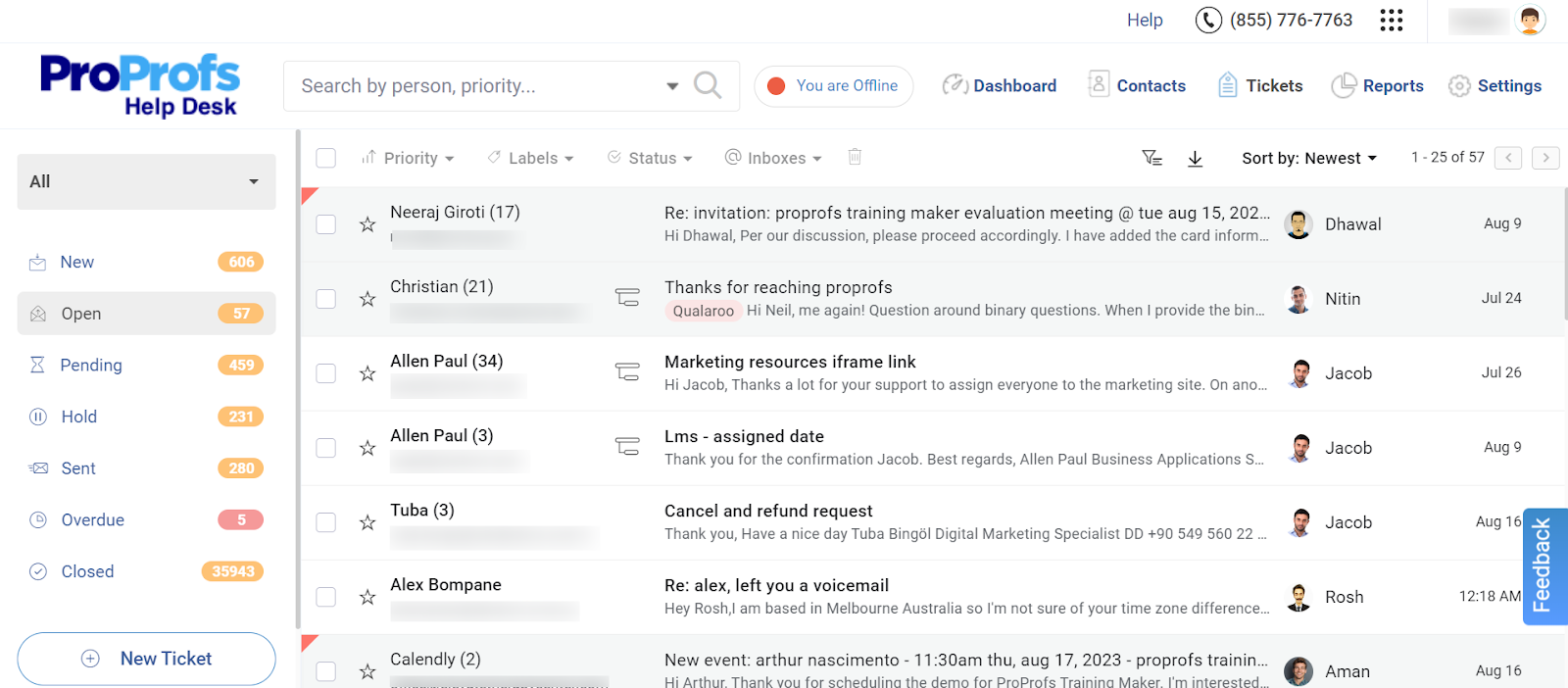
I use ProProfs Help Desk every day, and the thing that keeps me from looking elsewhere is simple: I don’t pay extra to get AI-assisted replies. Every ticket that lands in our shared inbox, whether it comes in through support@, billing@, or help@, shows up in one clean dashboard that feels a lot like Gmail, so new hires barely need training.
What actually changed my day-to-day work is the AI Agent. It reads each incoming message, works out the customer’s intent and mood, and drafts a reply I can send as-is or tweak in a few seconds. I also lean on the child ticket feature more than I expected to. When a request needs input from a second team, I can loop them in without losing the original conversation thread, which used to mean copy-pasting into a separate email chain.
Setting up automation took less time than I budgeted for. Round-robin assignment and canned responses were live within an afternoon, and the reporting dashboard makes it obvious exactly where tickets are getting stuck before they turn into a backlog.
Pros:
- AI Agent reads customer intent and mood before an agent even opens the ticket
- Shared inbox consolidates multiple support email addresses into a single dashboard
- Child ticket feature enables cross-team collaboration without splitting the conversation
- Round-robin assignment and canned responses cut down manual ticket sorting
- Free-forever plan includes core ticketing features for single-agent teams
Cons:
- No downloadable or on-premise version
- Dark mode isn’t available yet
Pricing:
A free plan is available for growing teams. Paid plan starts at $19.99 /month.
How ProProfs Help Desk Compares to Freshdesk?
The biggest difference comes down to how AI is priced. Freshdesk typically bills AI-assisted replies as a separate add-on once you’re past the free tier, while ProProfs Help Desk builds AI-powered ticket resolution into the paid plan itself, so a growing team doesn’t need to budget for a second line item just to get help writing replies.
2. Zendesk – Best for Enterprise-Scale Omnichannel Support
I moved a 40-agent support team onto Zendesk after we hit a wall with SLA management on a smaller platform, and the depth was immediately obvious. The omnichannel agent workspace pulled email, chat, voice, and social into one screen, so agents stopped losing time switching between tabs mid-conversation.
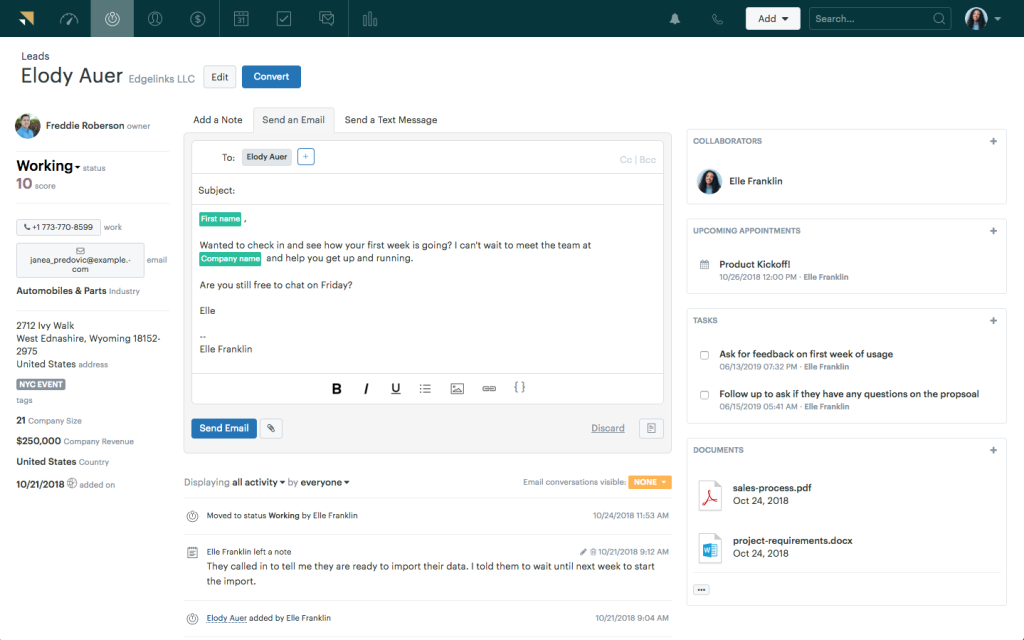
The AI features impressed me more than I expected. Zendesk’s AI is trained on billions of past support interactions, and the copilot suggestions genuinely saved agents time on repetitive tickets. Reporting was another win. I built custom dashboards for QA and agent performance without needing a developer involved.
The tradeoff showed up on the invoice. Once we added AI and multi-brand support, our per-agent cost climbed well past the entry price, and smaller teams on our staff felt the platform was more than they needed for their queues.
Pros:
- Omnichannel workspace unifies email, chat, voice, and social in one view
- AI is trained on a large base of real customer interactions
- Marketplace offers over a thousand third-party integrations
- Advanced reporting supports fully custom dashboards
Cons:
- Per-agent cost rises quickly once AI and Suite features are added
- Smaller teams may find the feature set more than they need
Pricing:
Starts at $19/agent/month (Suite plans with full AI and automation start higher).
How Zendesk Compares to Freshdesk?
Zendesk generally wins on depth, its AI, reporting, and integrations marketplace go further than Freshdesk’s, but that depth comes with a steeper price curve once you move past the entry tier. Freshdesk stays cheaper for teams that just need core ticketing without heavy customization. A full breakdown of where each tool pulls ahead is in this Zendesk vs Freshdesk comparison.
3. Zoho Desk – Best for Budget Teams That Still Want AI
I switched a small support team to Zoho Desk mainly to escape per-agent AI surcharges, and it delivered on that front. Zia, Zoho’s AI assistant, ships inside the paid tiers instead of sitting behind a separate add-on, which meant I didn’t have to justify another line item to finance.
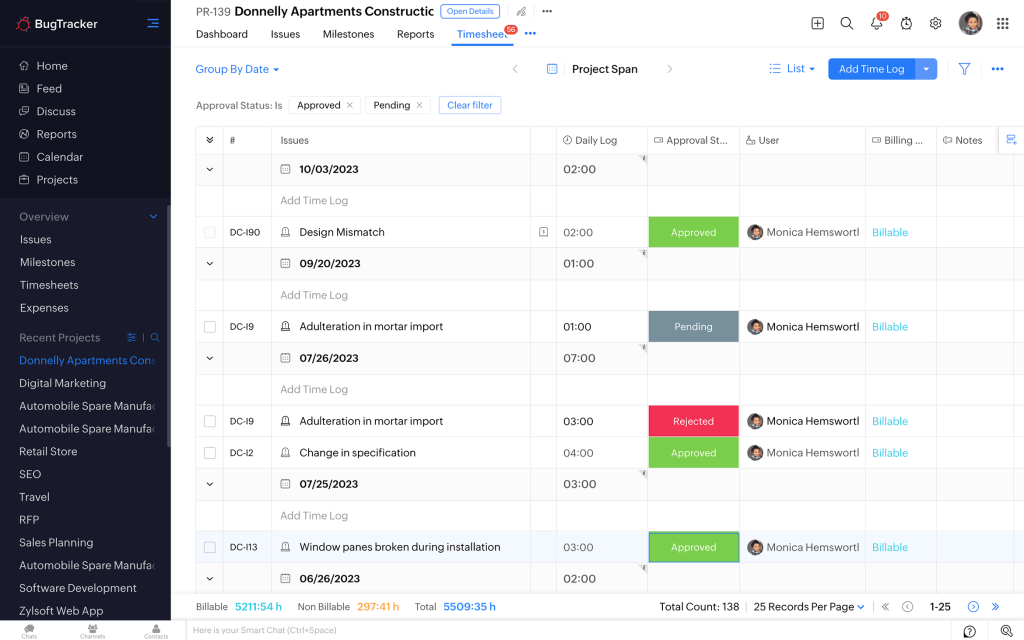
The free plan was genuinely usable, not a stripped-down trial. I ran real ticketing, a knowledge base, and basic reporting on it for three agents before I needed to upgrade. Blueprint, Zoho’s workflow builder, let me map out a multi-step approval process for refund requests without writing any code.
Where I hit friction was live chat and deeper automation. Those features sat behind the Professional tier, and the jump from Standard felt more abrupt than I expected going in.
Pros:
- Zia AI ships inside paid tiers instead of as a separate charge
- Blueprint workflow builder handles multi-step approval processes
- Two-way sync with Zoho CRM keeps contact records aligned
- One of the lowest per-agent entry prices in the category
Cons:
- Live chat and deeper automation require the Professional plan
- Interface can feel cluttered compared to more focused help desks
Pricing:
Starts at $7/agent/month (a free plan is available for up to 3 agents).
How Zoho Desk Compares to Freshdesk?
Zoho Desk generally undercuts Freshdesk on price while still including AI in its paid tiers instead of charging separately for it. Freshdesk pulls ahead on standalone AI maturity and third-party integrations, so the right pick often comes down to whether you’re already using other Zoho products.
4. Help Scout – Best for Simple, Email-First Support
Our team moved off a shared Gmail inbox and onto Help Scout, and the transition took an afternoon, not a week. Conversations looked and felt like regular email, so nobody needed a training session to get productive.
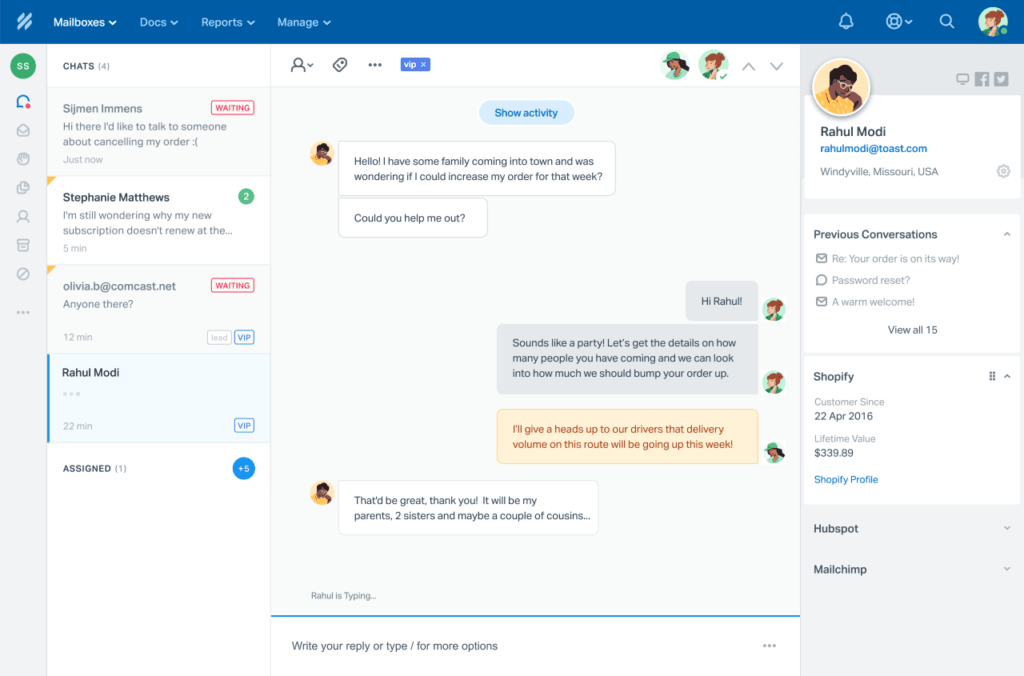
The Beacon widget became our go-to for the website. Customers got live chat and knowledge base articles in one place without us building a separate support portal. I also liked that saved replies and internal notes kept our whole team’s collaboration inside the ticket instead of a separate Slack thread.
The limits showed up as we grew past a handful of agents. Reporting felt lighter than what a dedicated ticketing platform offers, and AI Answers is billed per resolution on top of the seat price, so a busy month meant a bigger bill.
Pros:
- Shared inbox feels like a personal email client with no learning curve
- Beacon widget combines live chat and knowledge base access in one place
- Saved replies and internal notes keep collaboration inside the ticket
- Clean, uncluttered interface that new agents adopt quickly
Cons:
- AI Answers is billed per resolution on top of the seat price
- Reporting is thinner than dedicated ticketing platforms
Pricing:
Starts at $25/user/month (a limited free plan is available).
How Help Scout Compares to Freshdesk?
Help Scout leans into a simpler, email-first experience, while Freshdesk offers more channels and deeper automation out of the box. Teams that want conversations to feel less like formal tickets tend to prefer Help Scout, while teams juggling multiple channels tend to stick with Freshdesk.
5. Intercom – Best for In-App Messaging and Product-Led Support
I brought Intercom in for a product-led SaaS team that needed support baked directly into the app experience, not just a separate help desk tab. The Fin AI agent handled a genuinely high share of routine questions on its own, which freed up our human agents for the technical, high-stakes tickets.
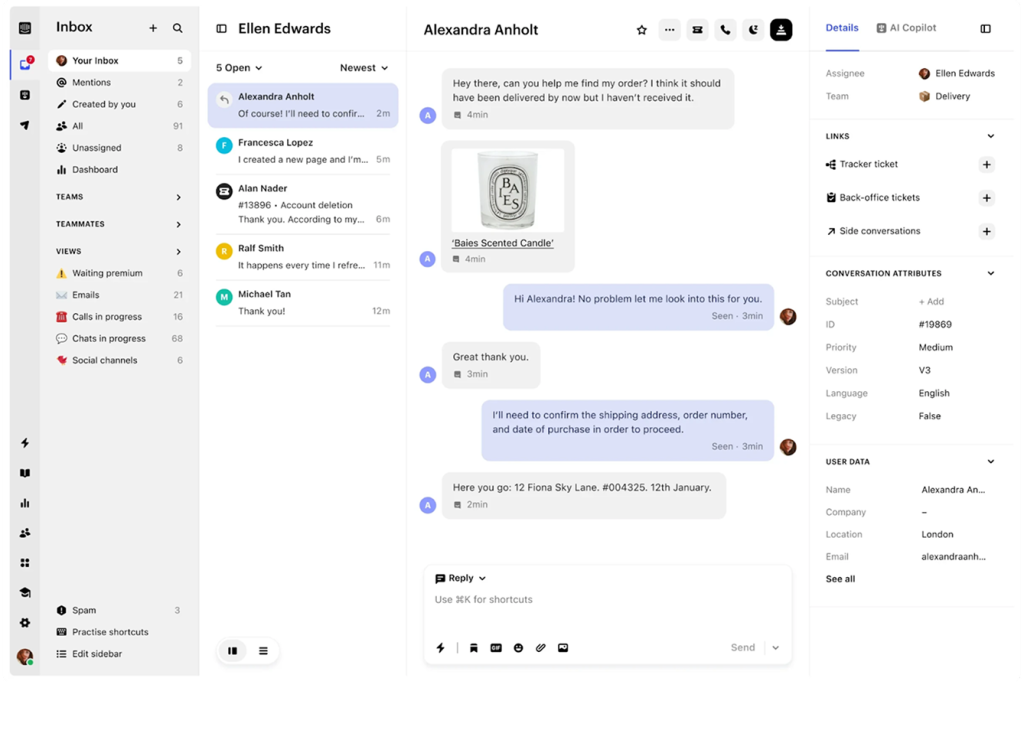
In-app messaging was the real differentiator. We used it to walk new users through onboarding steps and nudge them toward features they hadn’t discovered yet, tied directly to product usage data. When customers did need a human, the AI Copilot gave agents real-time suggestions that cut average handle time noticeably.
The cost caught up with us at scale. Fin is billed per resolution on top of seat fees, so a spike in ticket volume meant a spike in our bill too, and the learning curve for admins configuring workflows was steeper than I expected.
Pros:
- Fin AI agent resolves a high share of routine questions autonomously
- In-app messaging ties support directly to product usage and onboarding
- AI Copilot gives agents real-time suggestions during live conversations
- Unified view of customer conversations across every channel
Cons:
- Fin AI resolutions are billed separately on top of seat costs
- Initial configuration has a steeper learning curve
Pricing:
Starts at $29/seat/month (AI resolutions billed separately based on usage)
How Intercom Compares to Freshdesk?
Intercom’s Fin AI agent generally resolves more complex, product-specific questions than Freshdesk’s AI, but it’s billed per resolution, which makes costs harder to predict during busy periods. Freshdesk sticks closer to traditional ticketing and is usually the more budget-predictable choice for teams that don’t need in-app messaging.
6. HubSpot Service Hub – Best for Teams Already Using HubSpot CRM
I onboarded Service Hub for a team that already ran HubSpot for sales and marketing, and the biggest win was immediate: every support ticket sat on the same customer record as their deal history and email opens. Agents stopped asking “wait, are they even a paying customer?” mid-conversation.
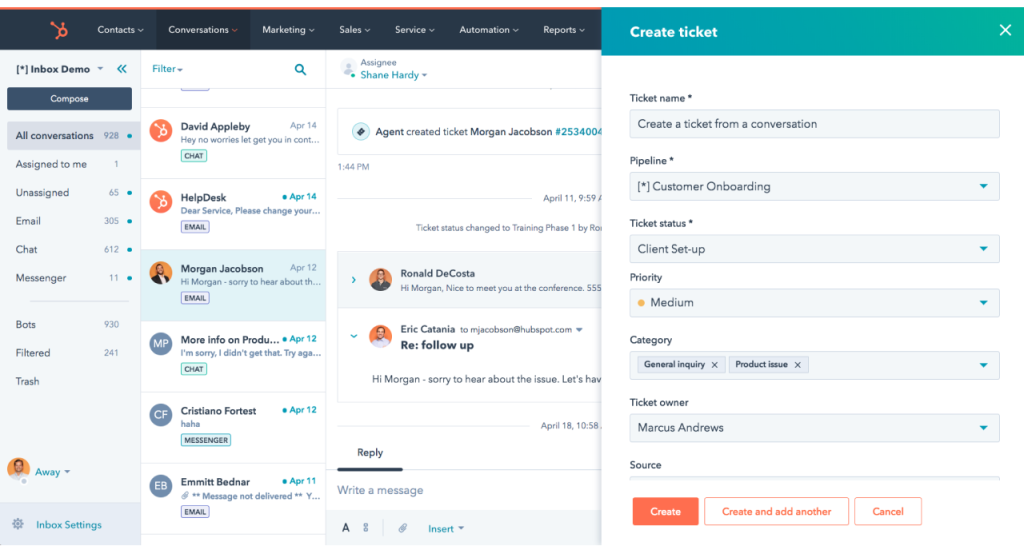
The free tier let us start without a budget conversation, which mattered for a lean team. Canned responses and email scheduling saved real time on repetitive replies, and the customer portal gave our users a self-service option we didn’t have to build from scratch.
The catch was scope creep. Once we wanted to remove HubSpot branding or unlock deeper automation, the cost jumped, and onboarding fees on higher tiers were steeper than I’d budgeted for going in.
Pros:
- Support tickets sit on the same record as sales and marketing activity
- Customer portal offers self-service without custom development
- Breeze AI assists with drafting and conversation summaries
- Reporting ties support data to the broader customer lifecycle
Cons:
- Removing branding and deeper automation requires higher tiers
- Onboarding fees apply on Professional and Enterprise plans
Pricing:
Starts at $20/seat/month (a free plan is available for up to 2 users).
How HubSpot Service Hub Compares to Freshdesk?
HubSpot Service Hub’s real advantage over Freshdesk is context, tickets sit next to the full sales and marketing history, which Freshdesk simply doesn’t offer without a separate CRM integration. Freshdesk still runs leaner and cheaper if you don’t need that CRM backbone.
7. Front – Best for Collaborative Shared Inboxes
I set Front up for an operations team that lived and died by shared addresses like support@ and billing@, and it turned those inboxes into an actual team workflow instead of a free-for-all. Assigning, commenting on, and drafting replies together on the same message meant nobody stepped on anyone else’s reply mid-conversation.
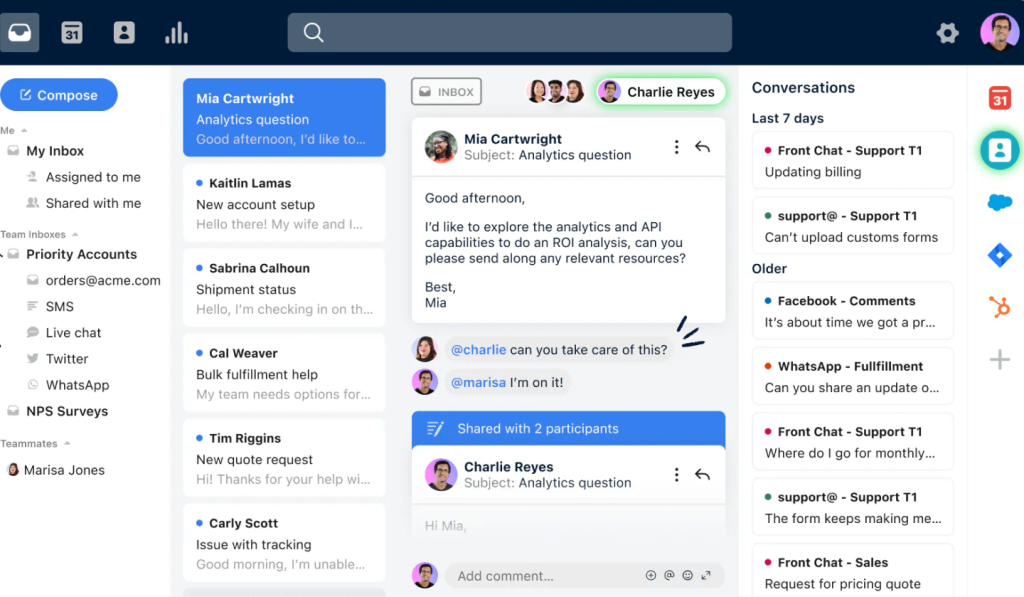
Workflow rules handled the repetitive tagging and routing we used to do by hand, and the analytics gave us a clear read on response times across the whole team. Customers never noticed a difference either, since replies still arrived looking like a normal email.
AI ended up being the sticking point. Autopilot and Copilot both sat behind separate add-on pricing, which echoed the exact Freshdesk problem we were trying to get away from.
Pros:
- Collaborative inbox lets multiple agents work the same shared address
- Workflow rules automate routing and tagging without custom code
- Analytics track response times and workload across the team
- Integrates with major CRMs to pull customer data into the inbox
Cons:
- AI features (Autopilot, Copilot) are priced as separate add-ons
- Lighter on dedicated account context than a purpose-built support platform
Pricing:
Starts at $19/seat/month.
How Front Compares to Freshdesk?
Front turns shared email addresses into a genuine team workflow in a way Freshdesk’s more rigid ticket queue doesn’t quite match, but Front sells its AI features as separate add-ons too, so the pricing pain point that pushes people off Freshdesk doesn’t fully go away here either.
8. Gorgias – Best for Shopify and Ecommerce Support
I deployed Gorgias for a Shopify store that was drowning in “where is my order” tickets, and it was built for exactly that problem. Order details, refund status, and customer history showed up right inside the ticket, so agents never had to alt-tab into Shopify to check anything.
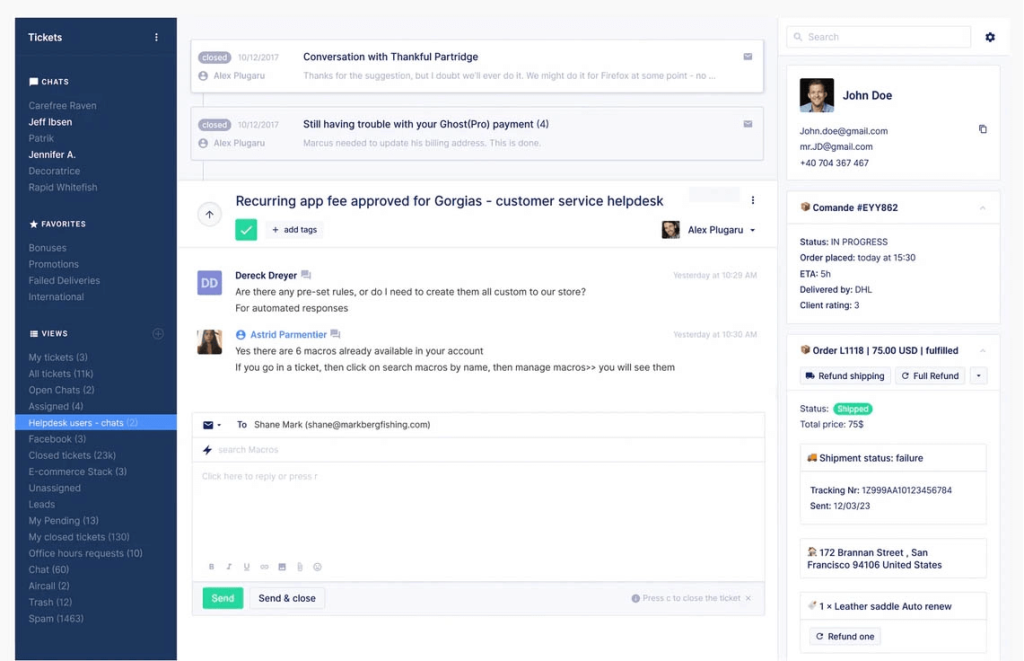
One-click actions were the real time-saver. Agents could issue a refund or check inventory without leaving the conversation. Automation templates handled the repetitive retail questions on their own, and the social media integration turned Instagram comments into trackable tickets, which we hadn’t been managing well before.
Outside of ecommerce, though, I wouldn’t recommend it. The pricing scales with ticket volume, so a busy sale season meant a bigger bill, and none of the order-aware automation is useful if you’re not selling products online.
Pros:
- Order and refund details appear directly inside the ticket
- One-click actions handle refunds and inventory checks without leaving the conversation
- Automation templates resolve common “where is my order” questions
- Social media comments and mentions convert into trackable tickets
Cons:
- Pricing scales with ticket volume, which stings during sale seasons
- Offers little value outside ecommerce use cases
Pricing:
Starts at $10/month (scales with ticket volume).
How Gorgias Compares to Freshdesk?
Gorgias puts order and refund data directly inside the ticket in a way Freshdesk only offers through a bolt-on integration, which makes Gorgias the stronger fit for Shopify-driven stores specifically. If your support isn’t built around online orders, that same order-aware automation, including help desk support for Shopify stores, stops being the deciding factor and general-purpose help desks tend to fit better.
9. LiveAgent – Best for All-in-One Channels With a Built-In Call Center
I picked LiveAgent for a team that needed phone support alongside email and chat, without stitching together three separate vendors. The built-in call center handled IVR and routing natively, which saved us from paying for a separate phone system on top of the help desk.
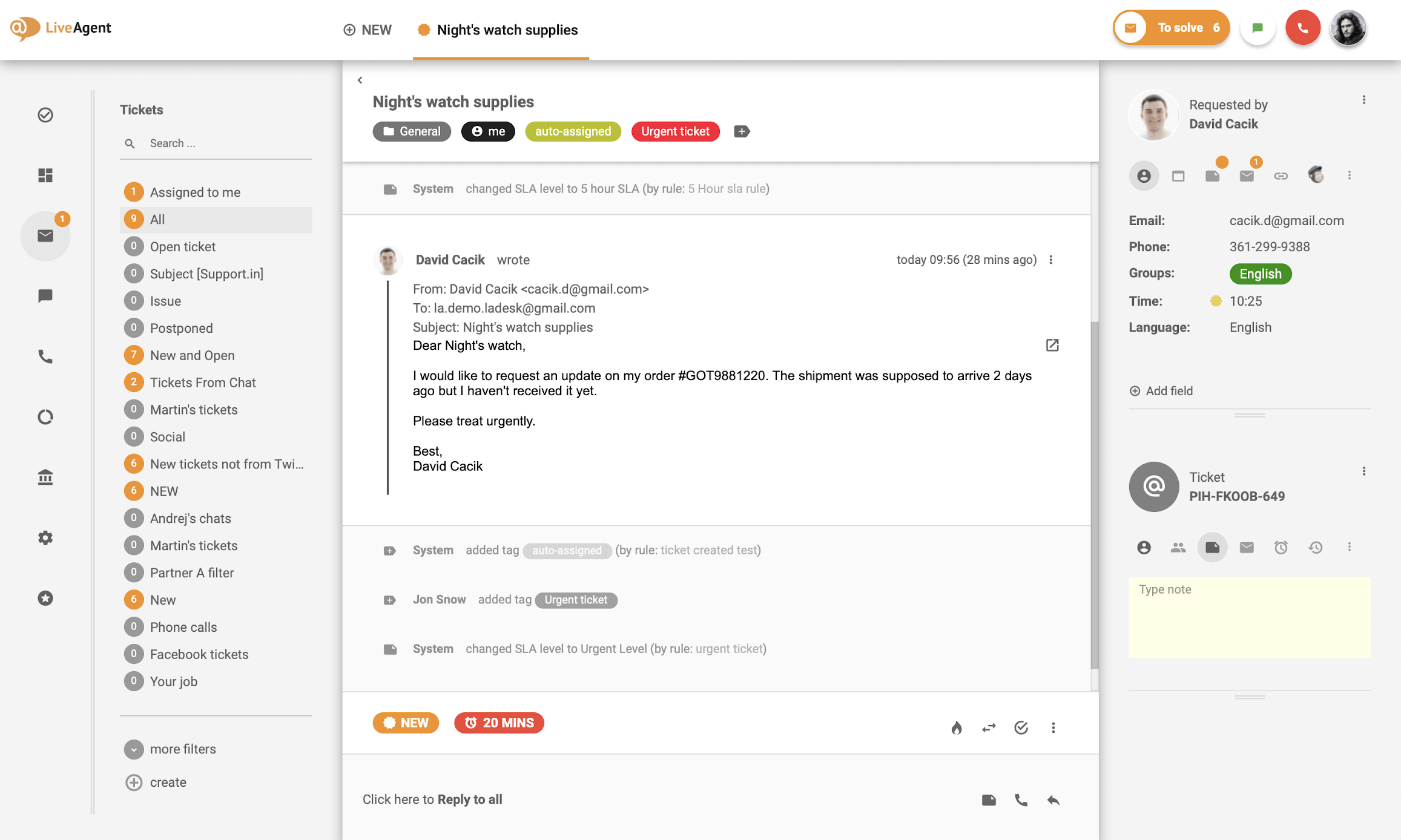
Channel coverage was the standout. Email, live chat, social, and voice all lived in one universal inbox, and collision detection stopped two agents from replying to the same ticket at once. Gamification features, leaderboards and badges, actually helped keep a distributed team motivated during slower shifts.
The interface felt a step behind more modern tools, and configuring the call center properly (routing rules, IVR menus, recordings) took more setup time upfront than a pure email-based help desk would have.
Pros:
- Built-in call center removes the need for a separate phone support tool
- Universal inbox covers email, chat, social, and voice in one place
- Collision detection prevents duplicate replies on the same ticket
- Gamification features help keep distributed teams engaged
Cons:
- Call center setup takes real configuration time upfront
- Deeper automation and AI features require higher tiers
Pricing:
Starts at $9/agent/month.
How LiveAgent Compares to Freshdesk?
LiveAgent generally costs less than Freshdesk and bundles a call center that Freshdesk charges for separately through Freshcaller. Freshdesk pulls ahead on interface polish and AI maturity, so the choice often comes down to whether built-in phone support outweighs a more modern feel.
10. HappyFox – Best for Customizable Workflows and SLAs
I brought HappyFox in for a team that needed tight control over SLAs and ticket categorization, and the customization depth held up. Custom fields, smart rules, and bulk editing let us shape the workflow around our exact process instead of adapting to the tool’s defaults.
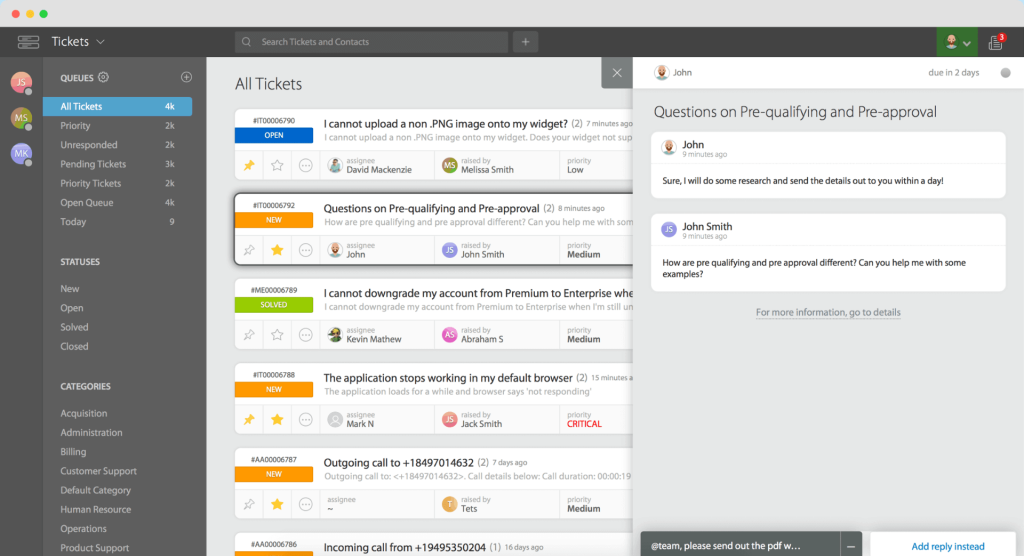
Multi-channel support covered email, chat, and self-service tickets in one system, and the self-service portal (help articles, FAQs, community forums) cut down our incoming ticket volume noticeably within the first month. Reporting dashboards were customizable enough that different managers could build their own views.
The entry price ran higher than I expected for what we got, and AI features sat behind an add-on rather than the core plan, similar to the Freshdesk problem we were trying to solve in the first place.
Pros:
- Custom fields and smart rules support tightly structured workflows
- Bulk editing updates multiple tickets at once
- Self-service portal with help articles and community forums reduces ticket volume
- Multi-channel support unifies email, chat, and self-service in one system
Cons:
- Higher entry price than several comparable tools
- Smaller integration library than larger competitors
Pricing:
Starts at $29/agent/month.
How HappyFox Compares to Freshdesk?
HappyFox generally offers tighter workflow customization and SLA controls than Freshdesk, but it charges more at the entry level and still treats AI as a separate add-on, so the exact pricing complaint that sends people looking for Freshdesk alternatives shows up here too.
11. Jira Service Management – Best for IT and Internal Service Desks
I set up Jira Service Management for an internal IT team already living inside the Atlassian ecosystem, and the fit was obvious from day one. Tickets linked directly to Jira development issues, so engineers working on a bug could see the related support request without switching tools.
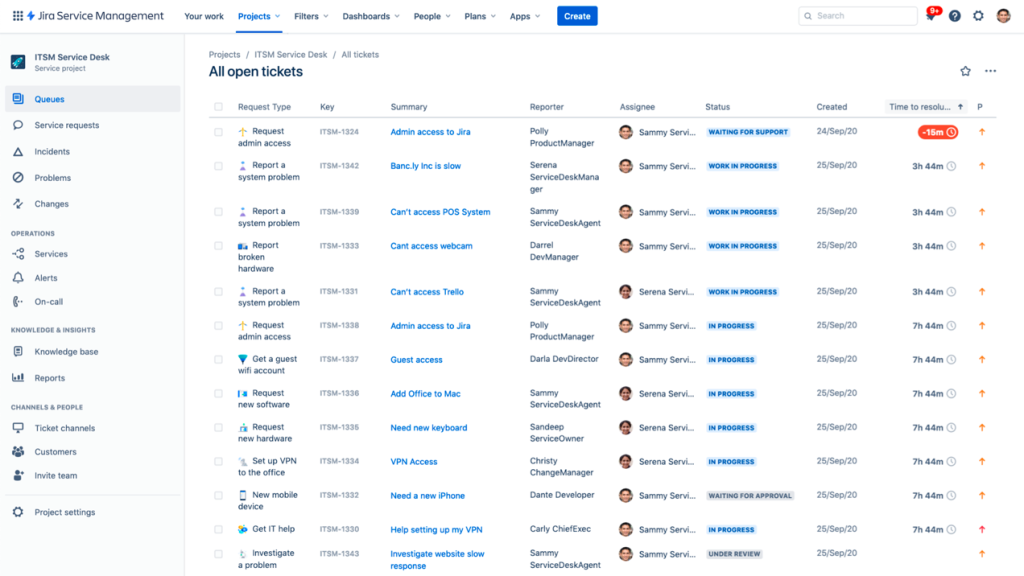
Asset and configuration management stood out for tracking company hardware and software licenses. Incident, change, and request workflows followed proper ITSM structure, and the self-service portal cut down repetitive “how do I reset my password” tickets almost immediately.
Non-technical, customer-facing teams struggled with it, though. Configuring workflows, SLAs, and queues properly needed real Jira admin experience, and agents unfamiliar with Atlassian tools needed more ramp-up time than a lighter help desk would require.
Pros:
- Tickets link directly to Jira development and engineering workflows
- Strong asset and configuration management for IT infrastructure
- ITSM-aligned workflows for incident, change, and request management
- Self-service portal reduces repetitive internal IT tickets
Cons:
- Steeper learning curve for non-technical, customer-facing agents
- Overbuilt for simple, external customer support use cases
Pricing:
Starts at $20/agent/month (a free plan is available for up to 3 agents).
How Jira Service Management Compares to Freshdesk?
Jira Service Management generally wins for IT-centric teams that need asset tracking and ITSM-aligned workflows, something Freshdesk doesn’t build for natively. Freshdesk stays the friendlier, faster option for straightforward, external customer support without the Atlassian learning curve. If IT ticketing specifically is your focus, this list of IT ticketing system options covers more ground.
How did I Evaluate These Freshdesk Alternatives?
I put every tool on this list through the same evaluation process so the ranking reflects real usability, not just which vendor has the flashiest pricing page. Here are the six factors I weighed for each Freshdesk alternative:
- User Reviews and Ratings: I looked at direct feedback from real users on G2 and Capterra to understand overall satisfaction and the problems people actually run into.
- Essential Features and Functionality: I explored each tool’s core ticketing, automation, and AI capabilities in depth to judge how useful they are in practice, not just on paper.
- Ease of Use: I paid attention to how quickly a new agent could get value from each platform, since a clean interface saves real onboarding time.
- Customer Support: I checked how each vendor’s own support team performed, from setup through resolving day-to-day operational issues.
- Value for Money: I compared what each tool delivers against its price at real team sizes, not just the cheapest entry-level tier, so you know if you’re actually getting your money’s worth.
- Personal Experience: I drew on my own hands-on time running real tickets through each platform, alongside what industry reviewers consistently flag as strengths and weaknesses.
My Top 3 Picks for the Best Freshdesk Alternative
If you only read one section of this guide, read this one. These three tools cover the most common reasons teams go looking for a Freshdesk alternative in the first place.
1. ProProfs Help Desk
ProProfs Help Desk is the top pick for teams that want AI-powered ticket resolution without paying extra for every capability. The AI Agent reads customer intent and mood, drafts a personalized reply, and the shared inbox setup takes minutes, not days. Start on the free plan and upgrade only once your team actually needs more seats.
2. Zoho Desk
Zoho Desk is the pick for teams that want the lowest possible entry price and are willing to grow into higher tiers for deeper AI and multi-channel features. Its free plan and bundled AI make it a genuinely budget-friendly starting point, especially if you’re already using other Zoho products.
3. Zendesk
Zendesk rounds out the top three for teams that have outgrown a smaller help desk and need enterprise-level depth: advanced reporting, a massive integrations marketplace, and AI trained on billions of past interactions. It costs more, but it’s built to handle serious scale without buckling.
FREE. All Features. FOREVER!
Try our Forever FREE account with all premium features!
Freshdesk vs Alternatives: What Actually Changes?
The core difference between Freshdesk and most alternatives on this list comes down to how AI is priced and how much a team pays as it grows. Freshdesk generally bills AI as a separate add-on on top of per-agent fees, while tools like ProProfs Help Desk and Zoho Desk build AI assistance into the core plan.
| Factor | Freshdesk | Typical Alternative |
| AI pricing | Often a separate paid add-on | Frequently included in core or lower tiers |
| Free plan | Time-limited, capped at a couple of agents | Several tools (ProProfs, Zoho, HubSpot) offer real, no-expiry free plans |
| Channel depth | Omnichannel often needs a pricier tier | Varies by tool, some bundle channels from the start |
| Best fit | Teams needing broad, established feature coverage | Teams wanting a specific strength (AI, budget, ecommerce, IT) without extra cost |
See What Happens When AI, Automation, and Tickets Work Together
How to Choose the Right Freshdesk Alternative?
Start with your actual bottleneck, not a full feature checklist. Here’s a simple way to narrow it down:
- Count your team size and ticket volume. A 3-agent team and a 50-agent team need very different tools, and paying for enterprise depth you won’t use wastes money every month.
- Decide if AI needs to be included, not metered. If AI-assisted replies are the whole reason you’re switching, rule out tools that charge per AI session or resolution.
- Map your must-have channels. If 90% of your support happens over email, a heavier omnichannel platform may be overkill. If you handle Shopify orders, ecommerce-specific tools like Gorgias will save you time.
- Check if you’re already invested in another ecosystem. Already on HubSpot or Zoho? Their native help desks reduce the number of tools your team has to juggle.
- Test with real tickets before committing. Most tools on this list offer a free trial or free plan. Run your actual support workflow through it, and read through a help desk migration checklist before you move anything permanently.
Choose a Help Desk That Grows With Your Team, not Against Your Budget
Switching help desks isn’t really about chasing the shiniest feature list. It’s about finding a tool that fits how your team actually works today, and doesn’t punish you financially the moment you add a fifth agent or turn on AI-assisted replies. Every tool on this list solves a real, specific problem, whether that’s budget, ecommerce, IT, or enterprise scale, so the “best” one is simply the one that matches the bottleneck you’re actually running into.
Once you’ve narrowed it down to two or three options, the smartest next step is to stop reading comparisons and start testing. Run your own tickets through the free plan or trial, watch how your team reacts in the first week, and pay attention to how much of the AI and automation you actually use versus what just looks good in a demo.
If you’re still on the fence, it’s worth trying a couple of these on your real workflow before committing to anything long-term. Free plans exist for exactly this reason, and tools like ProProfs Help Desk let you test a shared inbox with AI-assisted replies at no cost, so you can see how it handles your actual tickets before you decide to switch for good.
Frequently Asked Questions
What is the best Freshdesk alternative in 2026?
It depends on your priority. ProProfs Help Desk is the strongest pick for AI-assisted replies without an add-on fee, Zendesk leads for enterprise depth, and Zoho Desk wins on budget with AI still included.
What are some free tools similar to Freshdesk?
ProProfs Help Desk, Zoho Desk, HubSpot Service Hub, and Jira Service Management all offer genuine free plans, not just short trials. Each has agent or feature caps, so check the limits before committing to one long-term.
What are some sites similar to Freshdesk for customer support?
ProProfs Help Desk, Zendesk, Zoho Desk, Help Scout, Intercom, and HubSpot Service Hub are the closest functional matches, covering ticketing, live chat, and automation the way Freshdesk does.
Why do teams look for Freshdesk competitors?
The most common reasons are rising per-agent costs at scale, AI features locked behind paid add-ons, and a feature set that feels bigger than what a smaller support team actually needs day to day.
Is there a free Freshdesk alternative for small businesses?
Yes. ProProfs Help Desk offers a free-forever plan for single-agent teams, and Zoho Desk's free plan covers up to 3 agents with real ticketing features, not a stripped-down trial.
Which Freshdesk alternative is best for ecommerce?
Gorgias is purpose-built for Shopify, BigCommerce, and Magento stores, with order details and one-click refund actions built directly into the ticket view.
Can I migrate my Freshdesk data to a new help desk?
Yes. Most alternatives, including ProProfs Help Desk, Zendesk, and Zoho Desk, support importing tickets and contact records through CSV or API, so you keep your support history during the switch.
Does Freshdesk include AI in its free plan?
No. Freshdesk's Free and Growth plans don't include AI-assisted replies. AI capability is typically available only on Pro plans and above, usually as a separate paid add-on.
FREE. All Features. FOREVER!
Try our Forever FREE account with all premium features!

 We'd love your feedback!
What did you like & how can we make it even better?
 Thanks for your feedback!
 Ask Your Question
Have a question? Get expert help to make your decision easier.