
They say the best things in life are free. But when it comes to the best customer service software, that rarely feels true. Most tools come with hefty price tags, making it tough for teams to deliver great support without stretching their budgets.
The good news? You don’t always have to pay a premium. There are some powerful yet free customer service software options available on the market that can get your team up and running for zero dollars.
Whether you’re a small business looking for an affordable solution or a large team looking to take advantage of a free trial offer, there’s something here for everyone. Let’s dive in!
What Is Free Customer Service Software?
Free customer service software refers to support tools that help businesses manage customer queries at no cost. These tools allow support teams to organize conversations, respond faster, and deliver consistent support without investing in expensive platforms.
These software solutions often include features like ticketing systems, live chat, email management, knowledge bases, and dedicated help desk tools that streamline communication between businesses and their customers.
Please Note: Free customer service software can take two forms: those that offer a free plan with limited features or user capacity and those that provide a free trial for a limited period.
The former allows businesses to use essential functionalities indefinitely, making it ideal for small teams or startups. The latter allows businesses to test the full suite of features before deciding whether to invest in a paid plan.
List of 12 Best Free Customer Service Software
In this section, I will share each tool’s comprehensive features, pros and cons, and pricing details to help you make a fair decision.
1. ProProfs Help Desk – Easiest AI Help Desk for Shared Inboxes, Ticket Workflow Automation, and Scaling Support Teams
A forever-free plan with premium features. With its built-in ticketing software, every customer query — whether it arrives via email, chat, or web form — is automatically converted into a trackable ticket for your team.
With a small team and a tight budget, I opted for ProProfs Help Desk’s forever-free plan. To my surprise, the free plan offered all premium features (although limited to a single user).
We are currently using the paid plan, which is quite budget-friendly, too.
Now, coming to features, the tool enables me to interact with customers on multiple channels like email, live chat, web forms, and more. What’s impressive is that automation capabilities like canned responses, automated ticket assignments, chatbots, etc., help us cater to more customers faster and avoid agent burnout.
Thanks to AI help desk features, I can view the summary of every message and understand the customer’s intent instantly. Its AI even offers intelligent response suggestions that help us save a lot of time.
I suggest you build out ProProfs Knowledge Base so customers can find answers at their own pace, cutting your ticket volume, and pair it with ProProfs Chat so anyone who’d rather ask a real-time question doesn’t have to file a ticket for something small.
Pros:
- Simple UI – as easy as using Gmail
- Smart reports and analytics let you monitor ticket response time, resolution time, overdue tickets, and more
- ProProfs Chat, Knowledge Base & CSAT for a complete solution
- Onboarding support and a dedicated account manager are offered to all customers
Cons:
- Lacks an on-premise version
- The free plan is limited to a single user only
Pricing:
A free plan is available for growing teams (includes all premium features). Paid plans start at $19.99/user/month
2. ProProfs Chat – Best for 24/7 Delightful Customer Support with AI Chatbots
A forever-free plan with all premium features
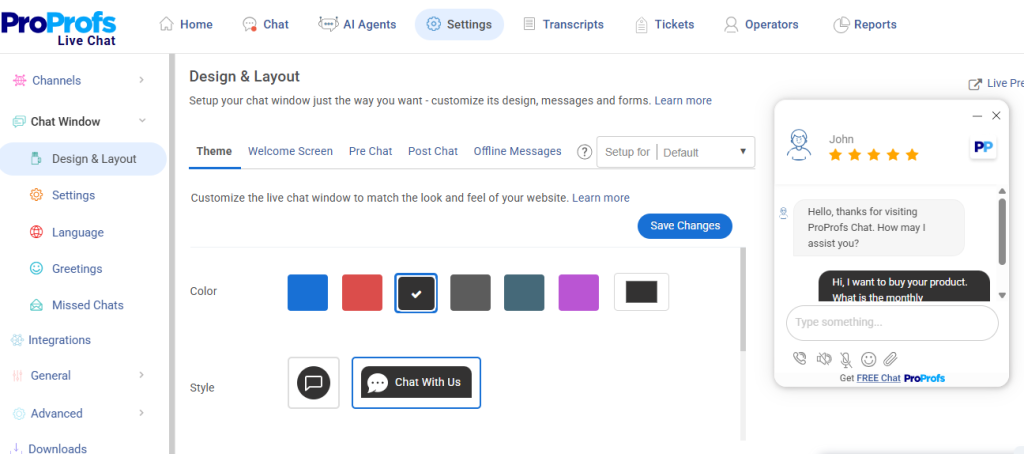
ProProfs Chat helps you deliver instant, accurate, and round-the-clock customer support without the complexity or high monthly burn that most tools come with. What makes it even better is the forever-free plan with all premium features, no credit card, no trial period, no feature gating.
Its AI-powered chatbot automates repetitive questions, delivers round-the-clock assistance, and maintains fast, consistent communication even during peak hours. I can also train the AI bot using website or help center content, so the bot gives precise, contextual answers rather than generic ones.
Features like real-time visitor tracking, smart routing, canned responses, and chat transcripts keep every conversation organized and agents in full control. It strikes a great balance between AI automation and human-first communication.
Pros:
- Proactive chat invitations to boost interaction and conversion.
- Train AI chatbots using your website or help center data for highly accurate responses
- Real-time visitor tracking for timely engagement
- Offer 360-degree support with the Customer Delight Suite (Live Chat + Help Desk + Knowledge Base + Survey + Qualaroo)
Cons:
- Cloud-only – no offline access
- No dark theme
Pricing: A free plan is available for growing teams. Paid plan starts at $19.99/user/month.
3. Hiver – Best Gmail-Based Help Desk Solution
7-Day Free Trial
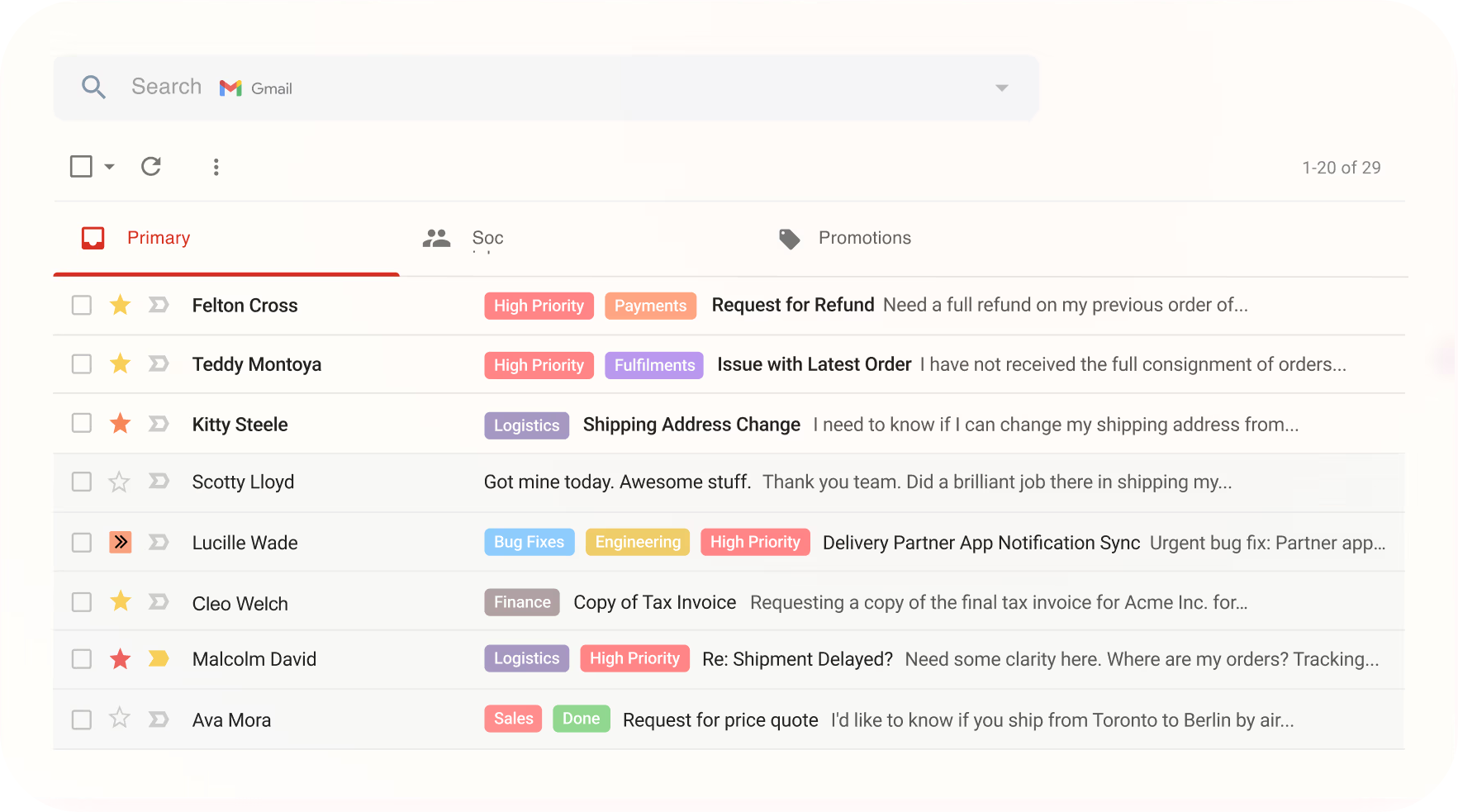
Hiver has been an essential addition to my team’s customer service tool stack.
Since it integrates seamlessly with Gmail, it felt like a natural extension of our workflow. The shared inbox feature allows us to manage and assign emails without ever leaving Gmail, which has significantly streamlined our processes.
One of the standout features is its email tags, which help us easily categorize and prioritize customer queries. The collision alerts are also incredibly helpful, as they prevent multiple team members from responding to the same email, reducing duplication of effort.
On the downside, Hiver is solely designed for Gmail users. If you are using a separate email client, Hiver does not offer anything.
Pros:
- Seamless integration with Gmail
- Email tags can be used for easy categorization and prioritization
- Email notes enable internal team discussions
- Collision alerts to prevent duplicate responses
Cons:
- Limited functionality outside of Gmail
- Reporting features could be more robust
Pricing:
Starts at $19/user/month.
4. Hubspot Service Hub – Best for Existing HubSpot Suite Users
Free plan available.
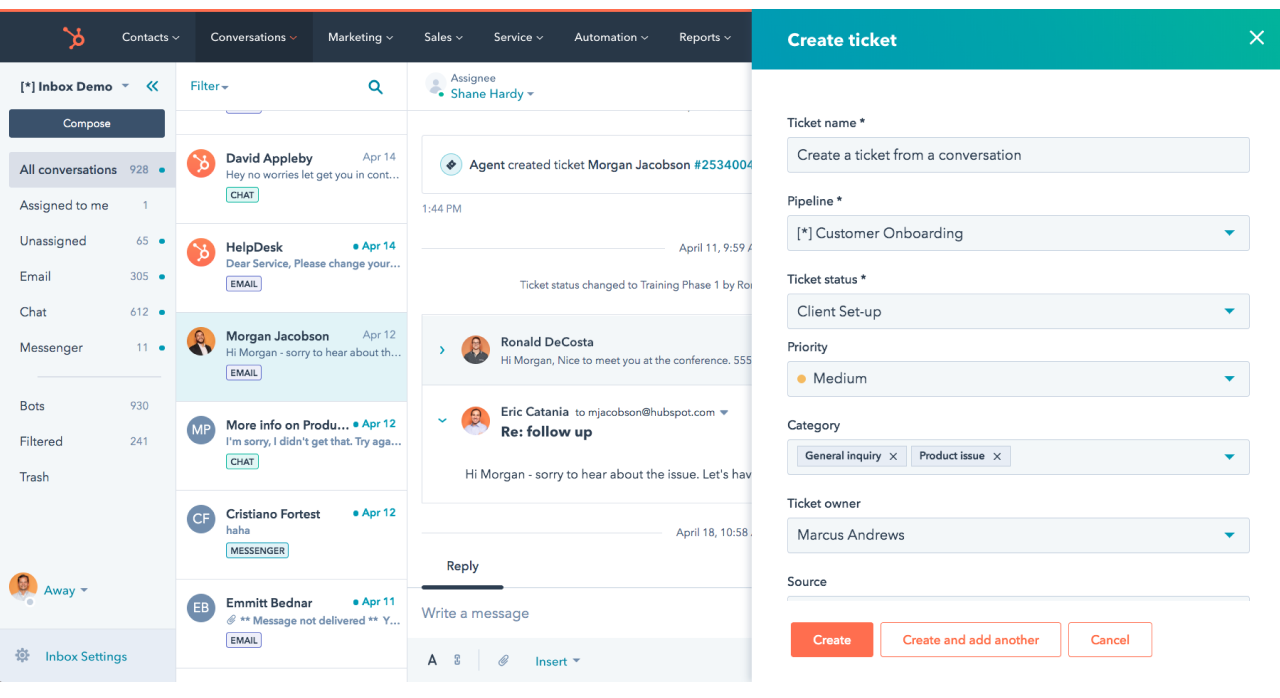
Using HubSpot Service Hub was a fantastic experience for my team, especially since we were already using other HubSpot products. The integration across the HubSpot ecosystem was flawless, allowing us to have a unified view of our customers and their interactions.
The ticketing system is intuitive and easy to use. I particularly liked the knowledge base feature, which can be used to create a self-service portal for customers, reducing the number of repetitive queries.
I’m sure customer feedback tools like CSAT surveys will prove invaluable in gathering insights and improving your service.
Pros:
- Seamless integration with other HubSpot products
- Intuitive ticketing system that captures tickets from multiple channels
- Comprehensive knowledge base to encourage self-service
- CSAT and NPS surveys to monitor customer loyalty and satisfaction levels
Cons:
- Can be expensive for smaller teams
- Some advanced features have a steep learning curve
Pricing:
Starts at $90/user/month.
5. Zendesk – Best for Large Businesses & Enterprises
14-Day Free Trial
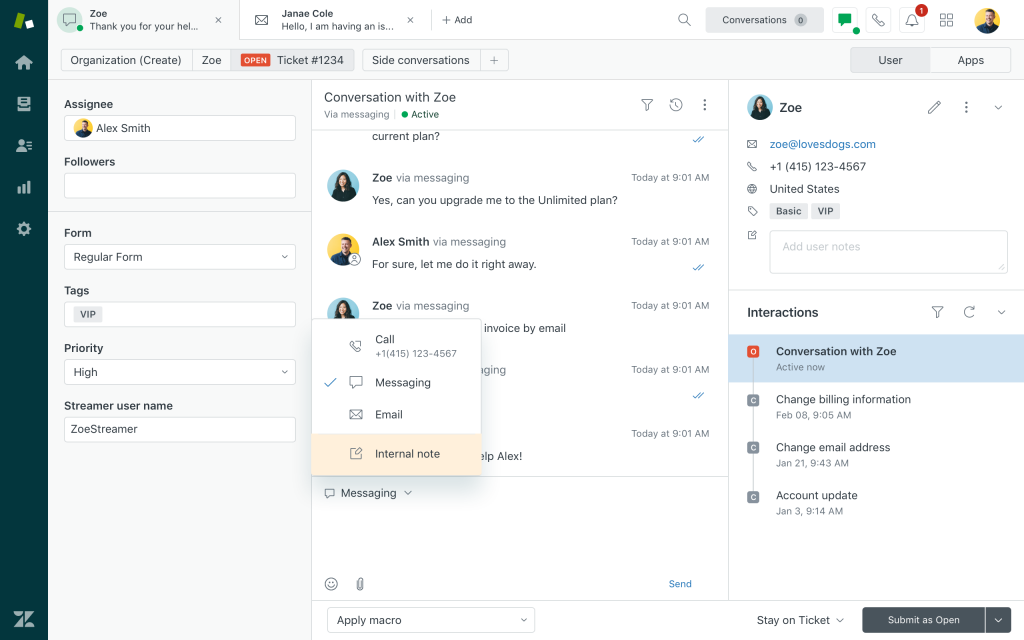
Zendesk’s robust suite of tools perfectly meets the needs of large enterprises with large support teams and growing customer bases.
The omnichannel support ensures you can handle customer interactions across various platforms—email, phone, chat, and social media—all from a single interface.
The ticketing system is incredibly powerful, allowing you to categorize and prioritize tickets efficiently. The automation features, such as triggers and macros, can significantly reduce the manual effort involved in ticket management.
Additionally, the vast integration options allow users to connect Zendesk with other tools more efficiently.
Pros:
- Omnichannel support for seamless customer interactions
- Automation rules can be configured for effective ticket management
- Community forums can be built to allow customers to interact with each other
- Extensive integration options help you connect Zendesk with existing tools
Cons:
- Some advanced features can be overwhelming for small teams
- Higher cost compared to other solutions
Pricing:
Starts at $55/user/month.
6. Freshdesk – Best for Multichannel Communication
Free plan available.
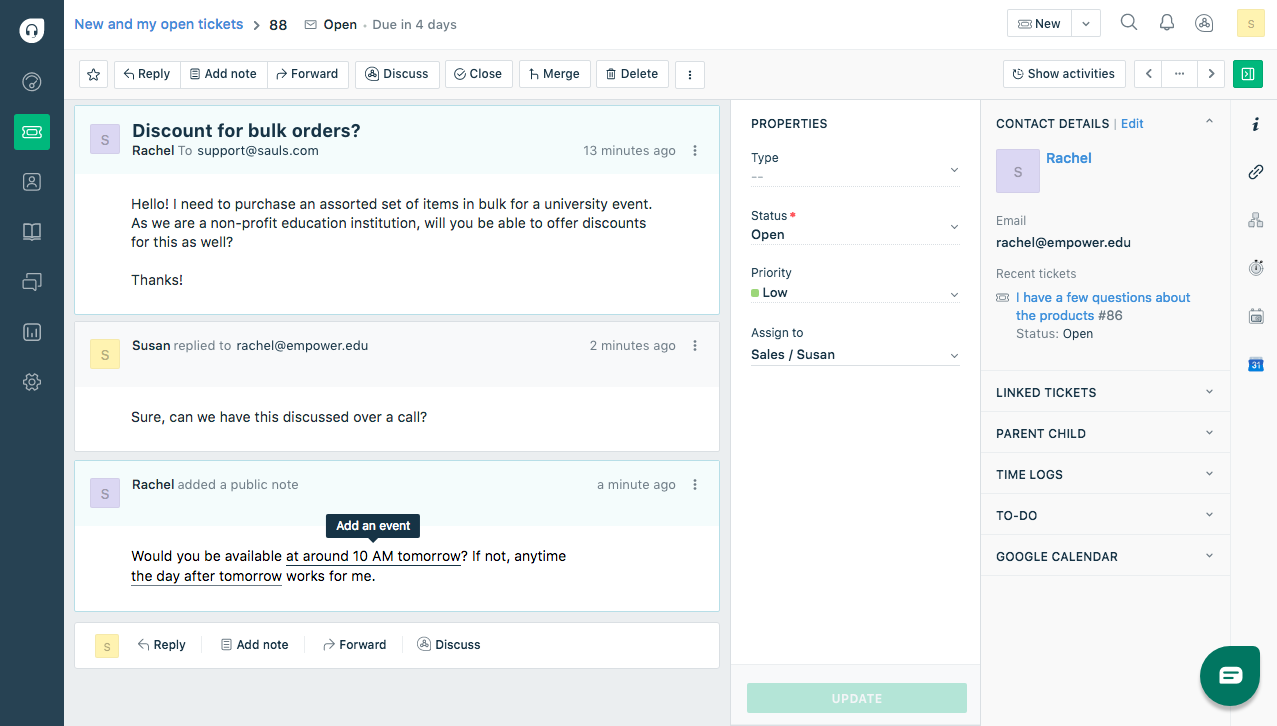
I’ve used Freshdesk’s free plan and can confidently say that it’s a well-balanced customer service tool.
Thanks to its unified platform, managing customer interactions through email, chat, phone, and social media was much easier.
The intuitive ticketing system ensured no customer query fell through the cracks. One of my favorite features is the Freshdesk Arcade, which gamified customer support, making it more engaging and fun for our team.
Also, the canned responses feature helped my agents save time by allowing us to respond quickly to common queries.
Pros:
- Unified platform for multichannel communication
- Freshdesk Arcade for gamified customer support
- Canned responses help you share quick replies to customer complaints
- Seamless integration with Freshcaller for phone support
Cons:
- Customization options can be limited
- Occasional lag in the user interface
Pricing:
Starts at $15/user/month.
7. Spiceworks – Best Open-Source Ticketing System for Small Teams
Free pricing with limitations.
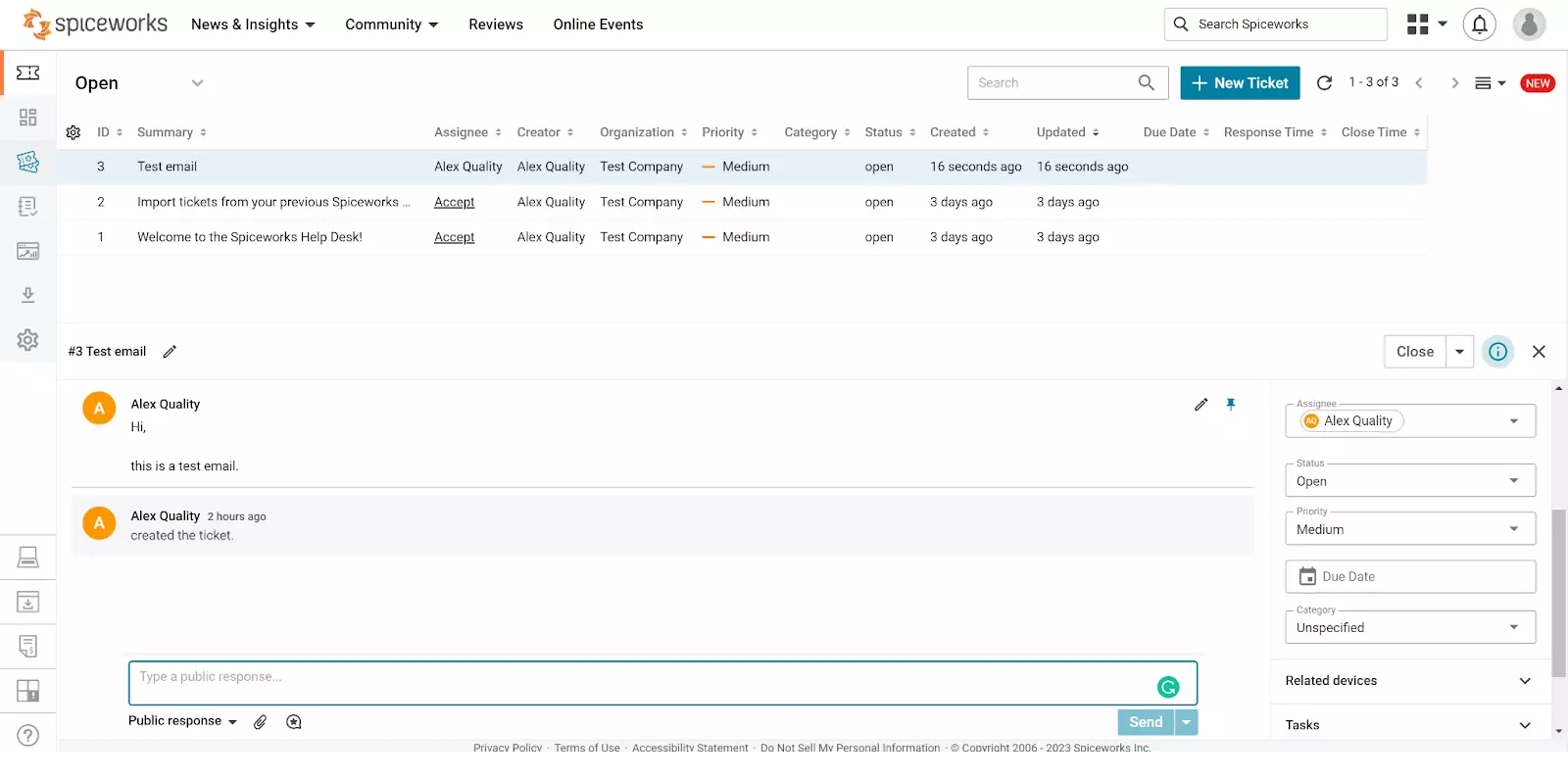
Spiceworks is a fantastic, cost-effective solution for small customer service teams.
As an open-source ticketing system, it offers a great deal of flexibility and customization. The ticketing system is straightforward, making it easy to manage and resolve customer issues.
One of the standout features is the network management capabilities, which allow users to monitor the complete IT infrastructure alongside handling support tickets.
Spiceworks also offers an inventory management feature, which helps us keep track of our hardware and software assets. The user community is also a significant asset, providing a wealth of shared knowledge and resources.
Pros:
- Cost-effective and flexible open-source solution
- Straightforward ticketing system that enables ticket creation from multiple channels
- Inventory management for tracking IT assets and resources
- Active online community of users for support and guidance
Cons:
- Interface can feel outdated
- Since it’s an open-source solution, there are challenges with support and data security
Pricing:
Free for all users.
8. Shared Inbox by Canary – Best for Teams Wanting AI + Email in One Place
7-Day Free Trial
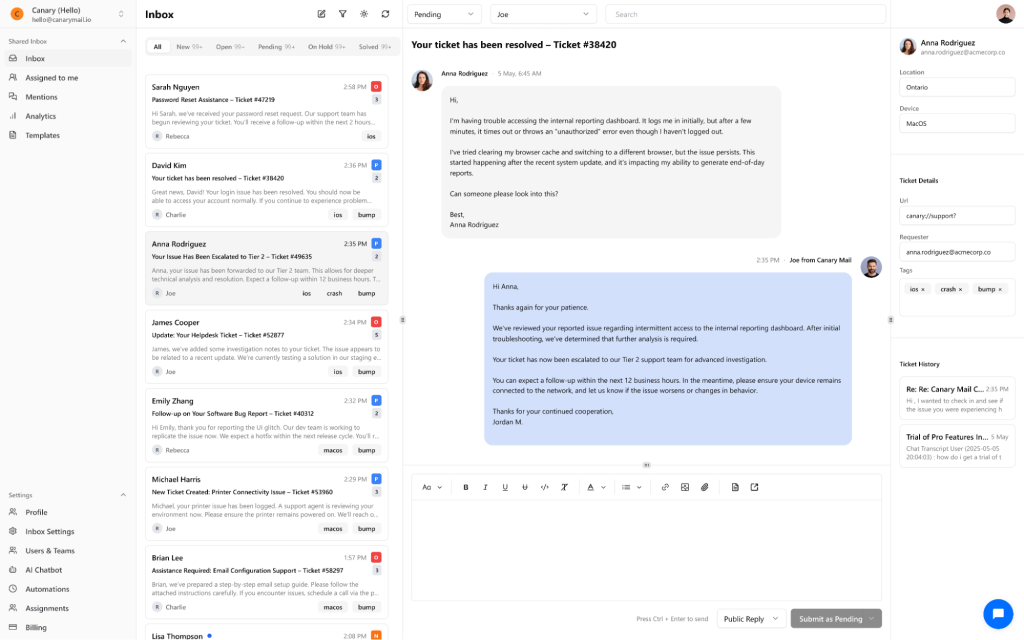
Shared Inbox by Canary has been a game-changer for teams that rely heavily on email but don’t want the hassle of switching between multiple tools. Since it’s built right into Canary Mail, it feels less like “another app” and more like an upgraded inbox.
The standout feature is AI-powered smart ticketing. It automatically assigns tickets to the right team member, ensures no customer service emails get lost, and even suggests replies to speed up response times. Unlike some shared inbox tools, Canary also helps founders and small teams scale without immediately hiring more support staff.
What I found particularly useful is the clear ownership system, which prevents confusion over who’s handling what. The built-in analytics offer a snapshot of top issues and agent performance, which can be especially valuable for growing SaaS startups or consultancies juggling multiple clients.
Pros:
- AI-powered auto-assignment and smart replies
- Clear ownership to avoid lost or duplicate responses
- Shared inbox and ticketing built into the email client itself
- Lightweight analytics to track issues and team performance
Cons:
- Focused mainly on email (limited omnichannel support)
- Fewer integrations compared to enterprise-level tools
Pricing:
Starts at $10/user/month.
9. Zoho Desk – Best for Contextual Support
15-Day Free Trial
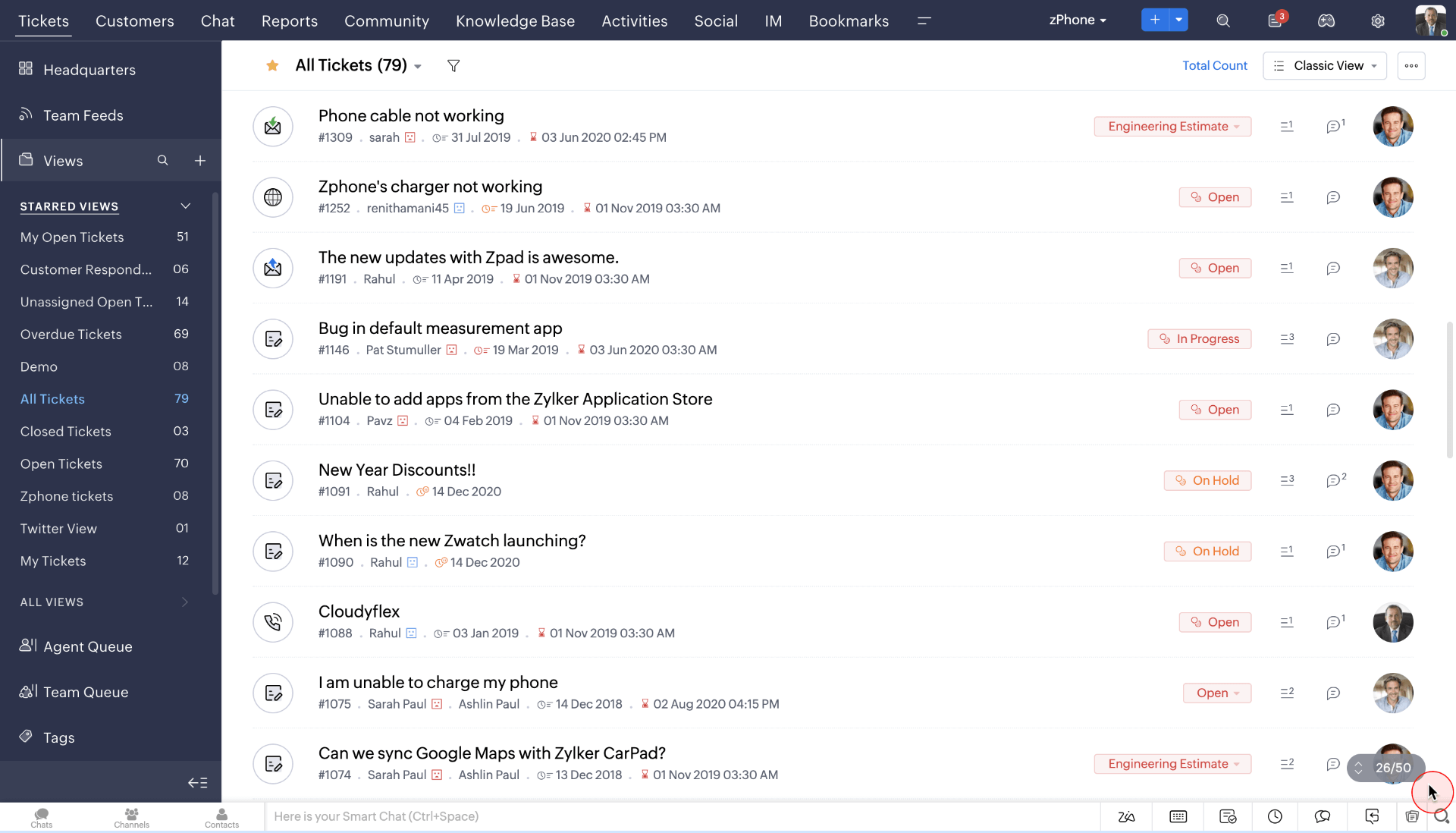
Zoho Desk was a valuable addition to our team, especially focusing on contextual support.
The platform offered a complete view of customer interactions, helping us deliver more personalized and effective support. Overall, the integration with other Zoho products, such as Zoho CRM, ensured a seamless flow of information across our business.
I like Zoho Desk’s highly customizable ticketing system, which made it easier for us to tailor it to our specific needs. Also, the AI assistant, Zia, is a fantastic feature that helped us automate routine tasks and provide instant responses to common queries.
On the downside, the Enterprise Plan only offers the live chat feature. This means you will have to pay a hefty price to connect with customers via chat.
Pros:
- Contextual support for personalized customer interactions
- AI assistant Zia for automation and instant responses
- Seamless integration with Zoho CRM
- Multichannel support for efficient query handling
Cons:
- Zoho Desk can be complex to set up initially
- The live chat feature is only available in the Enterprise Plan
Pricing:
Starts at $14/user/month.
10. LiveAgent – Best for Chat-Based Support
14-Day Free Trial
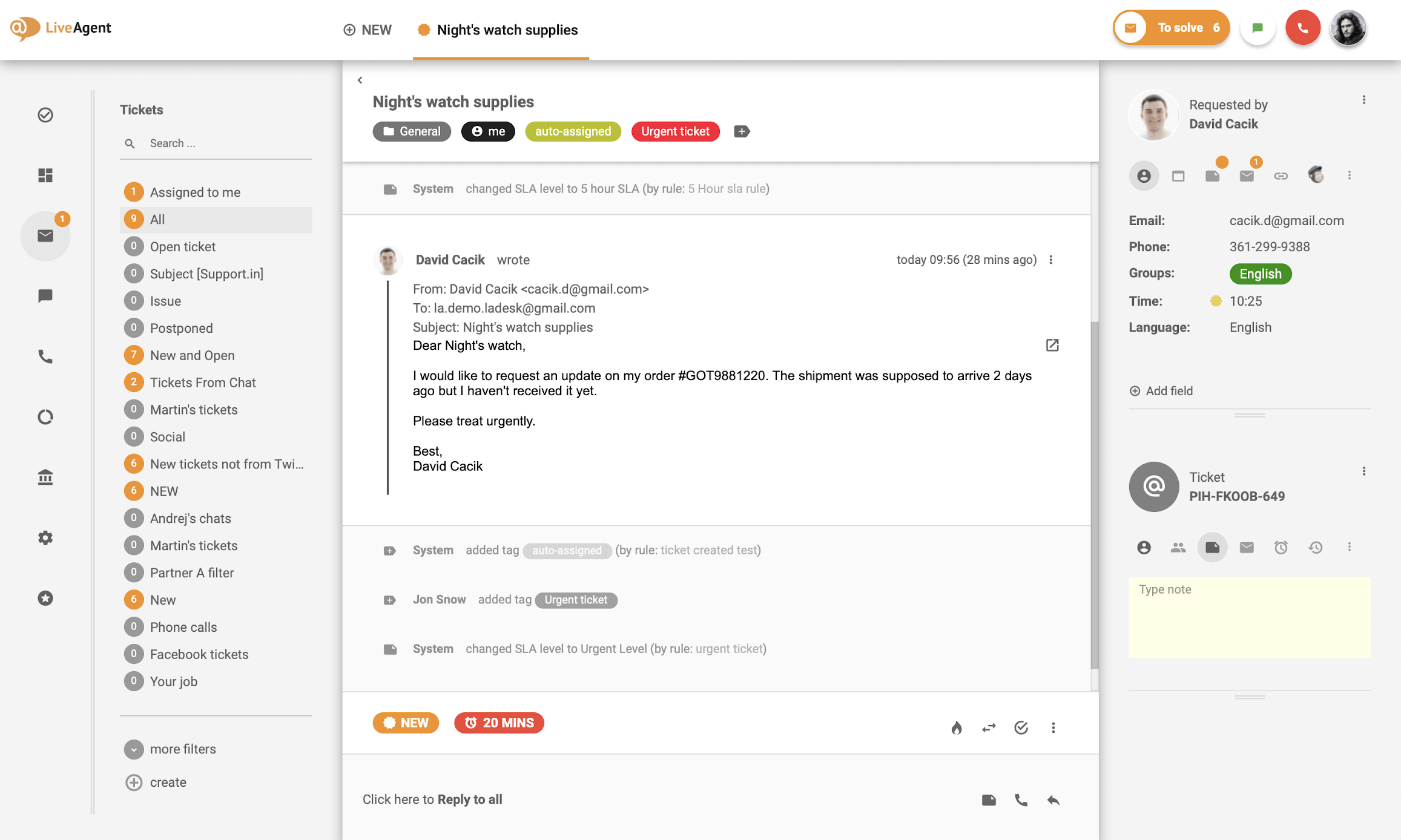
If your support team is heavily dependent on the live chat channel, LiveAgent can be a good option.
The platform offers a comprehensive chat solution to engage with website visitors in real time, leading to higher satisfaction rates. The ticketing system is robust and integrates well with the live chat, ensuring that all interactions are logged and managed efficiently.
One of my favorite features is the built-in call center, which can handle voice support seamlessly. The social media integration is also a big plus, as it helps manage queries from platforms like Facebook and Twitter directly within LiveAgent.
Pros:
- Comprehensive live chat solution for real-time engagement
- Channel Reports provides detailed insights into every active support channel
- Social media integration for managing queries from various social media platforms
- Gamification to enhance team engagement
Cons:
- Customer support isn’t reliable at times
- The user interface can feel cluttered to some users
Pricing:
Starts at $9/user/month.
11. SolarWinds Service Desk – Best for Asset Management
30-Day Free Trial
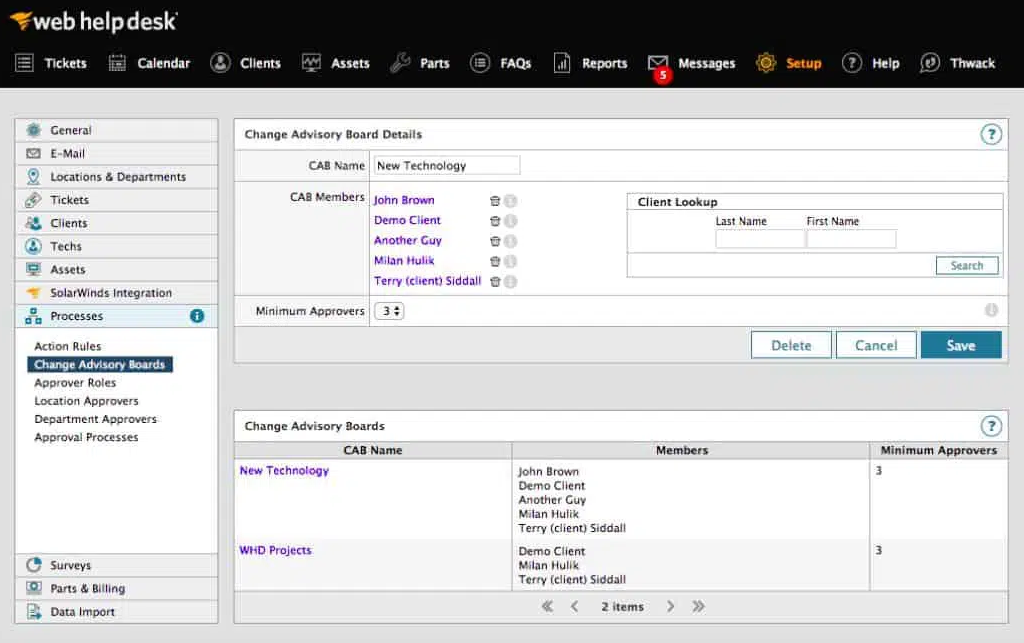
SolarWinds Service Desk has been a fantastic tool for managing our IT assets alongside our customer support operations. The platform’s top-notch asset management capabilities provide a detailed overview of our hardware and software inventory.
The ticketing system is user-friendly and integrates well with the asset management feature, ensuring we can quickly link support tickets to specific assets. The automation features have been a great help in streamlining our workflows and reducing manual effort.
I also appreciate the comprehensive reporting and analytics, which provide valuable insights into our service performance. Additionally, the change management feature helps us track and manage changes to our IT infrastructure effectively.
Pros:
- Asset management to track all IT assets in one place
- Automation features for ticket classification and routing,
- Ticket escalations ensure faster issue resolution
- SLA reports to track and prevent SLA breaches
Cons:
- Can be complex to configure initially
- Integration options are quite limited
Pricing:
Starts at $39/user/month.
12. Intercom – Best for Streamlining Support Workflows
14-Day Free Trial
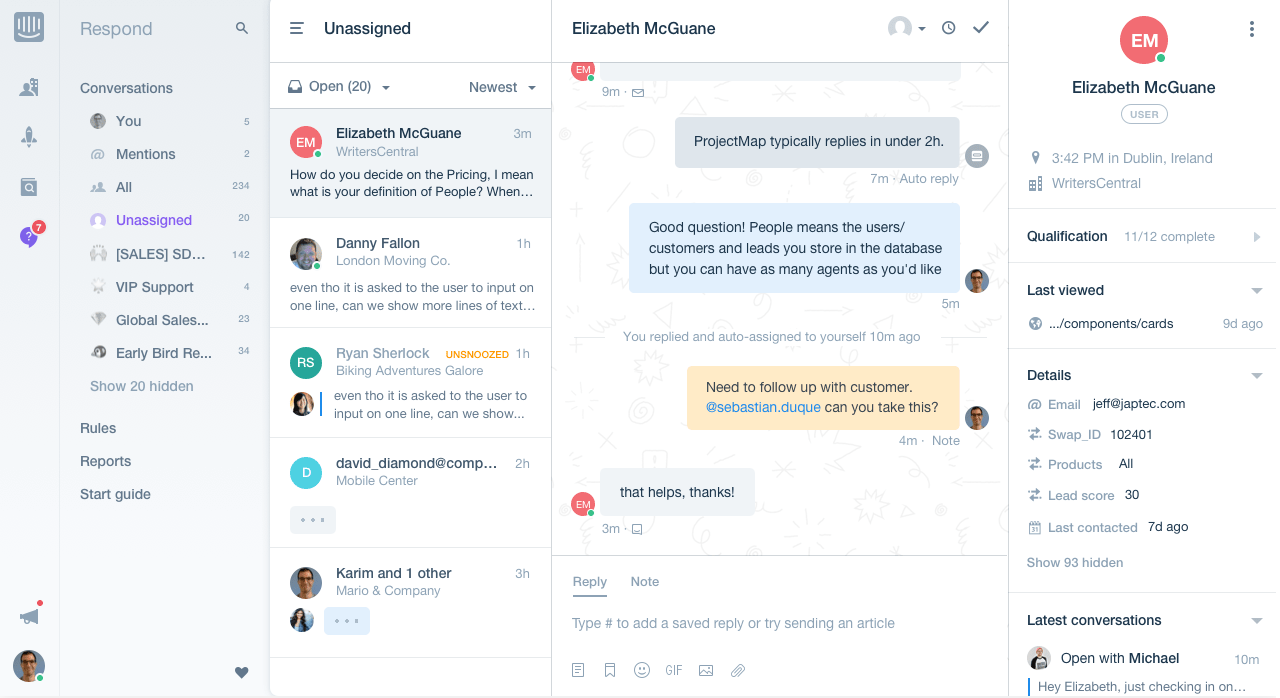
Intercom transformed the way we handled customer support by streamlining our workflows. The platform’s messaging-first approach allowed us to engage with customers more effectively and resolve issues faster.
The inbox feature was highly efficient and enabled us to manage all customer interactions from a single place. I also like the automation capabilities, such as bots and automated messages, which helped us reduce our response times significantly.
Also, seamless integration with our CRM ensured that we have all the context we need for every conversation. Even though Intercom offers a 14-day free trial, the paid plans can be expensive for small businesses.
Pros:
- Messaging-first approach for effective customer engagement
- Efficient inbox for centralizing all customer interactions
- Automation capabilities, including bots and automated messages
- Seamless integration with CRM for contextual support
Cons:
- Can be expensive for smaller teams
- Some advanced features have a learning curve
Pricing:
Starts at $39/user/month.
Evaluation Criteria
The evaluation of products or tools chosen for this article follows an unbiased, systematic approach that ensures a fair, insightful, and well-rounded review. This method employs six key factors:
- User Reviews / Ratings: Direct experiences from users, including ratings and feedback from reputable sites, provide a ground-level perspective. This feedback is critical in understanding overall satisfaction and potential problems.
- Essential Features & Functionality: The value of a product is ascertained by its core features and overall functionality. Through an in-depth exploration of these aspects, the practical usefulness and effectiveness of the tools are carefully evaluated.
- Ease of Use: The user-friendliness of a product or service is assessed, focusing on the design, interface, and navigation. This ensures a positive experience for users of all levels of expertise.
- Customer Support: The quality of customer support is examined, taking into account its efficiency and how well it supports users in different phases – setting up, addressing concerns, and resolving operational issues.
- Value for Money: Value for money is evaluated by comparing the quality, performance, and features. The goal is to help the reader understand whether they would be getting their money’s worth.
- Personal Experience / Experts’ Opinions: This part of the evaluation criteria draws insightful observations from the personal experience of the writer and the opinions of industry experts.
Which Is the Best Free Customer Service Software?
Still undecided? Here are my top 3 recommendations to help you find the best option right away:
1. ProProfs Help Desk
If you’re looking to experience AI-powered help desk features without any cost, ProProfs Help Desk is a great choice. You can automate ticket management, support customers across various channels like email and live chat, and enhance your service with detailed reports and surveys.
2. Spiceworks
For those seeking a tool that remains free and accessible to unlimited users, Spiceworks is an excellent option. It’s an open-source ticketing system supported by a robust community of IT professionals. However, one downside is the presence of advertisements in certain sections of the interface.
3. Zoho Desk
Although Zoho Desk doesn’t provide a forever free plan, you can take advantage of a 15-day free trial. This tool provides your support agents with all the necessary context, such as recent conversations and purchase history, to deliver personalized assistance at scale.
FREE. All Features. FOREVER!
Try our Forever FREE account with all premium features!
When to Upgrade From Free to a Paid Plan
Free customer service software is a great starting point—but there comes a time when it can start holding your team back instead of helping it grow. As your support volume increases and your team expands, you may notice limitations in features, scalability, or performance that slow things down.
So how do you know it’s time to upgrade? Here are some clear signs:
1. Your ticket volume is growing fast
You’re handling more queries than your free plan can comfortably manage. As a result, response times increase, tickets pile up, and it becomes harder to maintain a consistent support experience.
2. You need advanced automation
If your team is still manually assigning tickets, sending repetitive replies, or following up on the same issues, it’s a sign you need automation. Paid plans typically offer workflows, triggers, and AI features that can save hours of manual effort.
3. Your team is expanding
As you add more agents, free plans can become restrictive with user limits and limited collaboration features. This can lead to confusion, duplicate responses, and inefficient teamwork.
4. You need better reporting & insights
Basic analytics can only take you so far. If you want to track metrics like first response time, resolution time, SLA compliance, or agent performance, you’ll need more advanced reporting capabilities.
5. You want multi-channel support
Customers no longer rely on just email. If you’re starting to receive queries via chat, phone, or social media, a paid plan can help you unify all channels into one dashboard for a seamless support experience.
6. Customer expectations are rising
As your business grows, customers expect faster responses, personalized interactions, and even 24/7 support. Free tools may lack the features needed to meet these expectations at scale.
Upgrading to a paid plan isn’t just about unlocking features; it’s about equipping your team to deliver faster, smarter, and more scalable customer support.
Start Small, Scale Smart With Free Customer Service Software
Choosing the right customer service system is crucial for delivering excellent support and building strong customer relationships. Free customer service software offers a cost-effective way to access essential features that streamline operations and enhance customer satisfaction.
By exploring the tools mentioned in this blog, you can find the perfect fit for your team without compromising quality or functionality.
In the end, I recommend you choose ProProfs Help Desk for its forever-free plan, powerful AI capabilities, and reliable support. Remember, the right software can significantly improve how efficiently and effectively you manage customer interactions, ultimately leading to happier customers and a more successful business.
Frequently Asked Questions

What features should I expect from a free plan?
Core features like a ticketing system, email integration, basic live chat, and a simple knowledge base are standard on most free plans. Anything more advanced, like AI automation workflows, custom analytics, or third-party integrations, typically requires a paid upgrade.
What is the best free customer service software for small businesses?
ProProfs Help Desk, Zoho Desk, and Spiceworks are the most consistently recommended options for small teams, each offering a free forever tier with solid ticketing and email support. The right pick depends on whether your team is email-first, CRM-heavy, or needs multichannel coverage from day one.
What's the difference between a "free forever" plan and a free trial?
A free forever plan gives you permanent access to a limited feature set with no expiration date, while a free trial unlocks the full product for a short window, usually 7 to 30 days. Knowing which type you're signing up for matters, especially when planning for team onboarding.
What are the main limitations of free customer service software?
The most common restrictions are low agent seat caps (often just 2–3 users), reduced reporting depth, limited automation rules, and channel restrictions that keep you on email or basic chat only. Branding watermarks on chat widgets are another common trade-off on free tiers.
When should I upgrade from a free to a paid plan?
If your team is regularly hitting agent caps, missing SLA management, or struggling to keep up with ticket volume on basic automation, that's your signal. Growing businesses typically outgrow free plans within 6–12 months as customer volume scales.
Can free customer service software handle multiple channels like email, chat, and social media?
Most free plans cover one or two channels, usually email and basic live chat, with social media, voice, and SMS reserved for paid tiers. A handful of tools like ProProfs Help Desk offer slightly broader channel access on their free plans, but true omnichannel support almost always requires upgrading.
FREE. All Features. FOREVER!
Try our Forever FREE account with all premium features!

 We'd love your feedback!
What did you like & how can we make it even better?
 Thanks for your feedback!
 Ask Your Question
Have a question? Get expert help to make your decision easier.