

Churn is sneaky. It doesn’t announce itself. It shows up weeks later in a renewal email you didn’t expect. I’ve seen teams do everything right on paper and still lose customers because no one had a clear view of what was actually happening. That’s why customer success software exists.
When you’re growing fast, customer relationships get messy. Tickets pile up. Requests live in inboxes. Usage signals are missed. Risks go unnoticed and opportunities slip by.
The right customer success setup changes that. It helps teams see problems early, guide customers intentionally, and turn usage into outcomes. Not by adding more work, but by focusing attention where it matters most.
In this blog, I will break down 11 best customer success software to boost your ROI in 2026, expand accounts, and scale without chaos. These are tools built for operators who want control, clarity, and results.
Why Customer Success Software Is Essential
Customer success starts to break down when information is scattered across emails, spreadsheets, and chat tools. Important requests get missed, follow-ups are delayed, and teams lose visibility into what customers actually need. These gaps often lead to disengagement and, eventually, churn.
Customer success software solves this by centralizing all customer interactions in one place. Tickets, conversations, and requests are easy to track, assign, and manage, giving teams a clear view of customer status at every stage.
It brings structure and accountability. Built-in reporting tracks response times, resolution delays, and workloads, helping teams catch issues early and maintain consistent service. Knowledge bases and canned responses reduce repetitive work and speed up resolutions.
Most importantly, customer success platforms directly impact revenue. By enabling proactive engagement, faster responses, and consistent follow-through, businesses can retain customers, reduce churn, and scale growth more predictably.
Top 11 Customer Success Software to Reduce Churn and Increase ROI
I didn’t put this list together by just comparing features. I reviewed real user feedback and how these tools align with everyday customer success work. From there, I narrowed it down to 11 customer success tools that are practical, flexible, and easy to use.
Before getting into the details, here’s a quick look at the tools leading the space right now. This snapshot helps with an at-a-glance customer success software comparison across pricing, use cases, and ratings.
| Customer Success Software | Best For | Pricing | User Rating |
| ProProfs Help Desk | Easiest AI Help Desk for Shared Inboxes, Ticket Workflow Automation, and Scaling Support Teams | Free plan available; Paid plans start at $19.99/user/month | 4.9 (Capterra) |
| ProProfs Chat | 24/7 Delightful Customer Support with AI Chatbots | A free plan is available for growing teams. Paid plan starts at $19.99/user/month. | 4.8/5 (Capterra) |
| Zendesk | Customer Self-Service | Starts at $19/user/month | 4.3 (G2) |
| HubSpot Service Hub | Universal Inbox | Starts at $20/month | 4.4 (G2) |
| Medallia | Simplifying Workflows | Custom pricing | 4.5 (G2) |
| Help Scout | Help Center Experience | Starts at $20/user/month | 4.6 (Capterra) |
| ChurnZero | Real-Time Customer Insights | Custom pricing | 4.7 (G2) |
| InMoment | Cloud-Based Experience Management | Custom pricing | 4.4 (Capterra) |
| Planhat | Customization & Flexible CS Workflows | Custom pricing | 4.5 (G2) |
| Zoho Desk | Personalized Customer Service | Starts at $14/user/month | 4.4 (G2) |
| Gainsight | Tracking Performance Metrics | Custom pricing | 4.4 (Capterra) |
1. ProProfs Help Desk – Easiest AI Help Desk for Shared Inboxes, Ticket Workflow Automation, and Scaling Support Teams
Using ProProfs Help Desk day to day has changed how my team handles customer conversations. I’ve learned that AI is only useful when it improves accuracy, not just speed, and this tool gets that right. When I open a ticket, the AI summarizes long messages instantly and suggests responses that feel relevant and well-worded.
What I like most is how easy it is to stay organized. I manage requests coming in from email, live chat, social channels, web forms, and SMS without switching tools. Internal notes make it easy to collaborate, and every conversation feels easy to track from start to finish.
Beyond tickets, it supports the bigger customer success picture. AI-based prioritization flags the accounts that can’t wait, so at-risk customers don’t get buried under routine requests. The built-in knowledge base reduces repeat questions, while automated surveys and AI-driven reports help me spot recurring issues and track team performance. It feels balanced, smart automation where it helps, and a human touch where it matters. Besides third-party platforms, it tightly integrates with sibling tools – ProProfs Knowledge Base and ProProfs Chat – helping you provide 360° customer support.
Pros:
- Omnichannel support across email, live chat, social, web forms, and SMS
- AI help desk resolves routine tickets automatically and flags at-risk accounts through smart prioritization
- AI summaries and reply suggestions that save time and keep responses consistent
- Shared inbox to manage all customer emails in one place
- Built-in knowledge base to reduce repeat questions
- 360-degree support through the Customer Delight Suite, which involves ticketing, live chat, AI chatbots, and surveys
Cons:
- Cloud-only – no offline access
- No dark theme
User Rating: 4.9 (Capterra)
Pricing: A free plan is available for growing teams. Paid plan starts at $19.99/user/month
2. ProProfs Chat – Best for 24/7 Delightful Customer Support with AI Chatbots
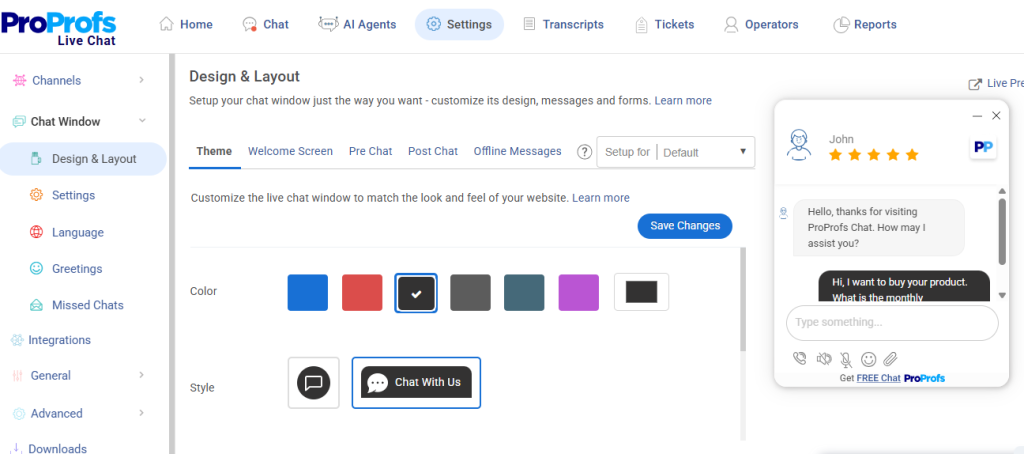
ProProfs Chat helps customer success teams deliver instant, accurate, and proactive support at every stage of the customer journey, from onboarding to retention. The AI-powered chatbot handles repetitive queries around the clock, so your team stays focused on high-value conversations that actually move the needle on satisfaction and loyalty.
I can train the bot using website URLs or help center articles, which means customers get precise, contextual answers the moment they need them, not hours later via email.
And when a conversation needs escalation, native help desk integration auto-converts it into a support ticket with the full chat transcript attached, so no context is ever lost between handoffs.
Features like real-time visitor tracking, smart routing, and proactive chat invitations let success teams engage customers at the right moment, before a small frustration turns into churn.
Pros:
- Proactive chat invitations to boost interaction and conversion.
- Train AI chatbots using your website or help center data for highly accurate responses
- Real-time visitor tracking for timely engagement
- Offer 360-degree support with the Customer Delight Suite (Live Chat + Help Desk + Knowledge Base + Survey + Qualaroo)
Cons:
- Cloud-only – no offline access
- No dark theme
User Rating: 4.8/5 (Capterra)
Pricing: A free plan is available for growing teams. Paid plan starts at $19.99/user/month.
3. Zendesk – Best for Customer Self-Service
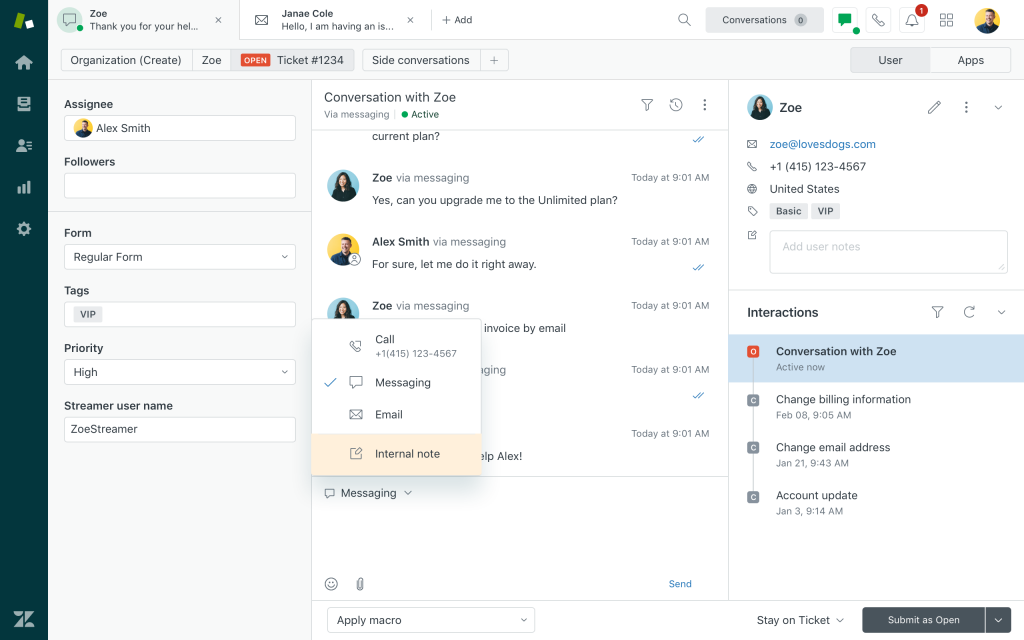
Zendesk works well for teams that want customers to help themselves before reaching out to support. I’ve seen it used effectively when the goal is to reduce ticket volume while still keeping customers informed and supported. The self-service experience feels intentional rather than an afterthought.
Zendesk works well as customer success software because it keeps support conversations and customer context together. Tickets, help articles, and customer history are easy to access in one place, so teams can understand issues faster. It’s especially useful for handling high volumes of repeat questions.
Zendesk also fits teams that expect to scale support operations over time. While it can feel heavy for smaller setups, it gives growing teams the structure needed to manage knowledge, workflows, and customer interactions without losing consistency.
Pros:
- Robust help center for customer self-service and FAQs
- AI-powered bots to deflect common questions before tickets are raised
- Strong ticketing workflows with automation and routing
- Wide range of integrations with CRM, chat, and product tools
Cons:
- Pricing increases quickly as teams and features grow
- Setup and configuration can feel time-consuming
User Rating: 4.3 (G2)
Pricing: Starts at $19/user/month.
4. HubSpot Service Hub – Best for Universal Inbox
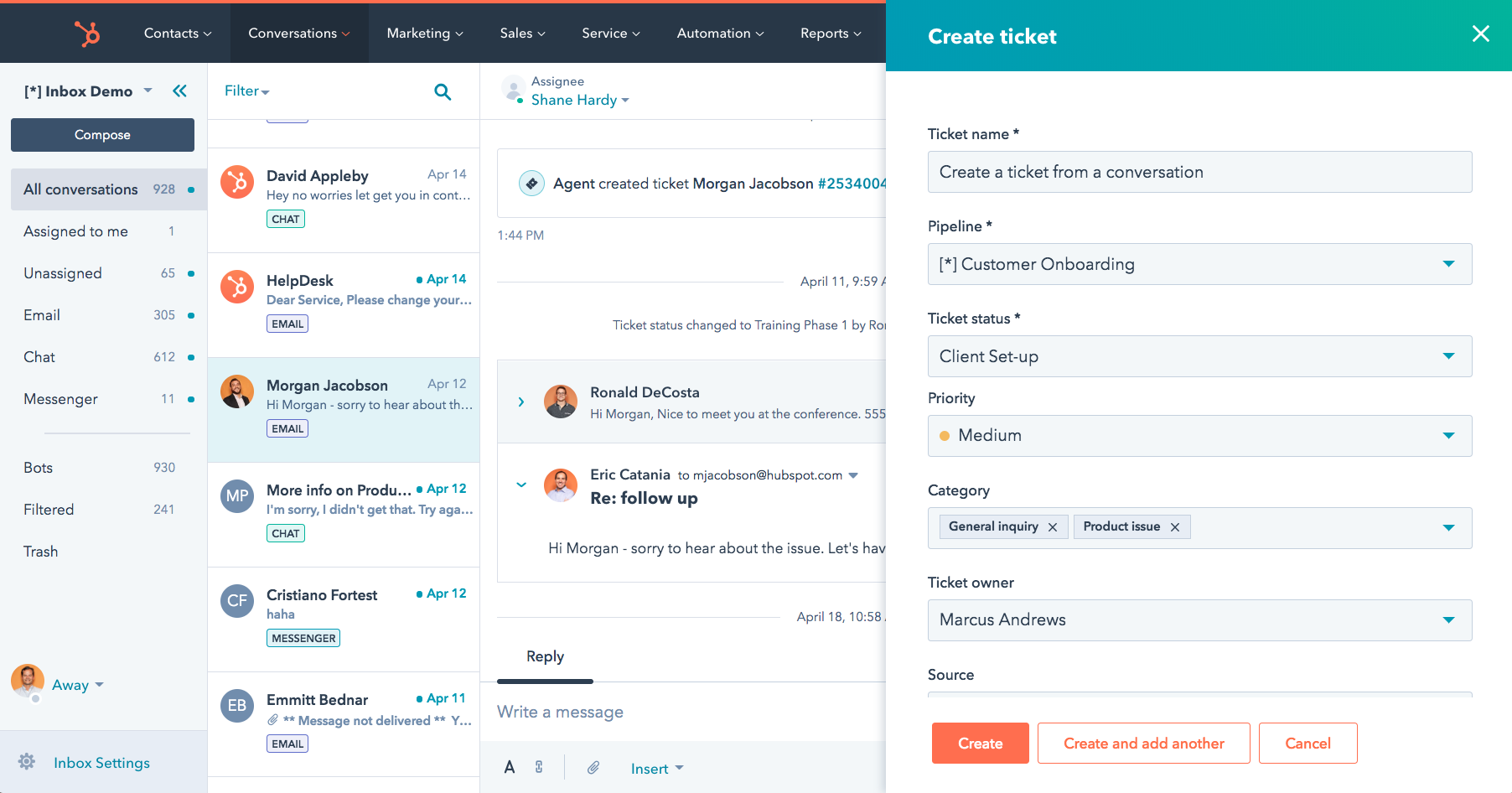
I’ve seen HubSpot Service Hub work especially well for teams that want all customer conversations in one place. Emails, live chat, forms, and social messages come together inside a single universal inbox, which makes it much easier to keep track of ongoing conversations without jumping between tools.
As a customer success software, it fits nicely for teams already using HubSpot CRM. Customer context, like contact details, deal history, and past interactions, is available right inside the ticket view. That context helps teams respond faster and avoid repetitive back-and-forth.
What I like most is how it supports growing teams. You can start simple with ticketing and inbox management, then gradually layer in automation, reporting, and self-service as volumes increase. It feels practical for teams that want structure without heavy setup.
Pros:
- Unified inbox for email, chat, forms, and social channels
- Built-in ticketing with clear ownership and status tracking
- Strong CRM integration for full customer context
- Knowledge base tools for customer self-service
Cons:
- Some advanced workflows require higher-tier plans
- Customization options can feel limited compared to dedicated helpdesk tools
User Rating: 4.4 (G2)
Pricing: Starts at $20/month.
5. Medallia: Best for Simplifying Workflows
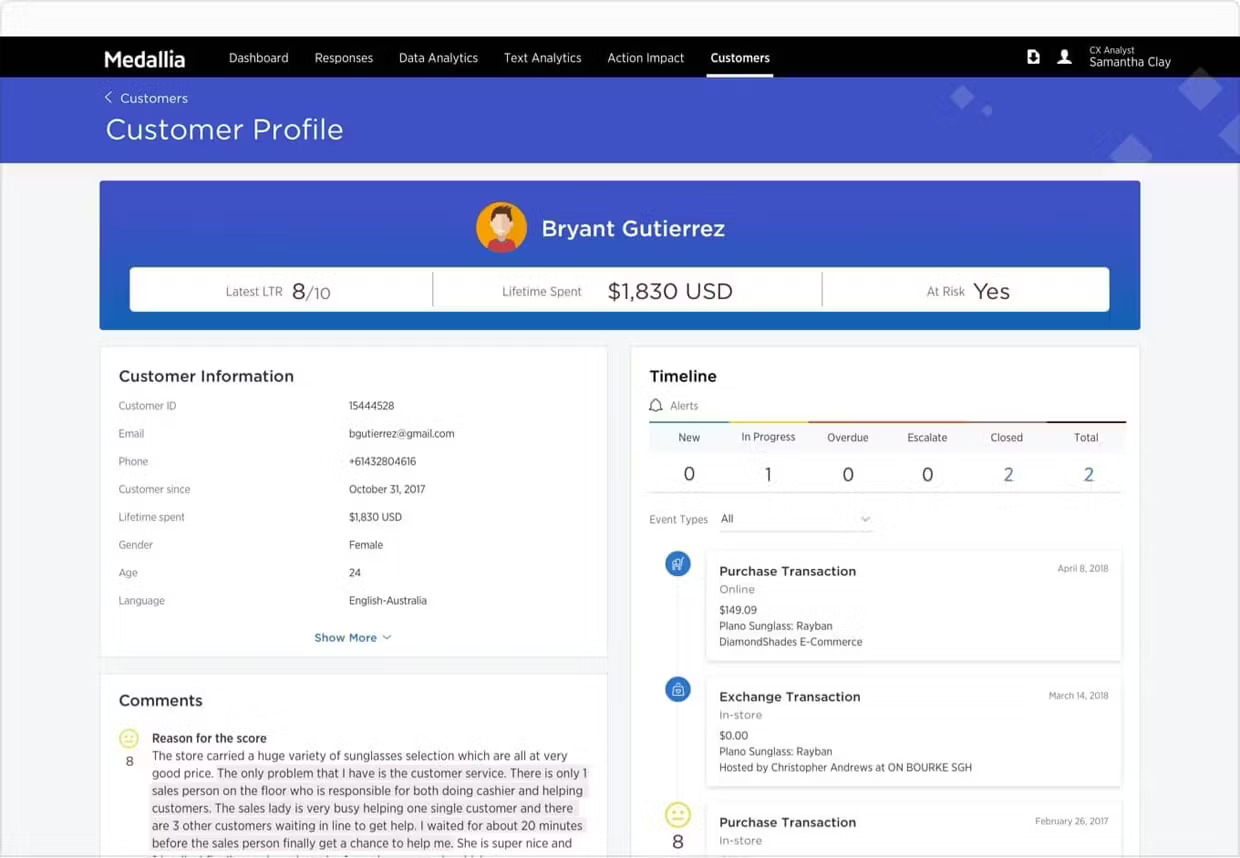
Medallia is a powerful experience management platform that helps teams collect, analyze, and act on customer feedback across channels in real time. I like how it brings all customer signals — from surveys, digital interactions, social posts, and more — into one place, so you can clearly see where experience gaps are cropping up and what to do about them.
What really clicked for me is how Medallia turns feedback into action. The platform uses machine learning and AI to highlight patterns and customer sentiment, helping teams prioritize work without getting buried in raw data. That kind of workflow simplification makes it easy to focus on improvements that actually matter.
Medallia’s flexible reporting and deep insights make it useful not just for customer success teams, but for cross-functional groups as well. Whether you’re trying to reduce churn, optimize onboarding, or understand customer emotion, it provides a way to tie experience data back to business outcomes.
Pros:
- AI-powered analytics and sentiment detection to help prioritize actions
- Customizable reporting that links customer experience to business metrics
- Real-time alerts and insights that support proactive engagement
- Integrations with CRM, ERP, and other operational systems for smoother workflows
Cons:
- Implementation and onboarding may take time due to the depth of features
- Some users note a learning curve for advanced analytics and report setup
User Rating: 4.5 (G2)
Pricing: Custom Pricing.
6. Help Scout – Best for Help Center
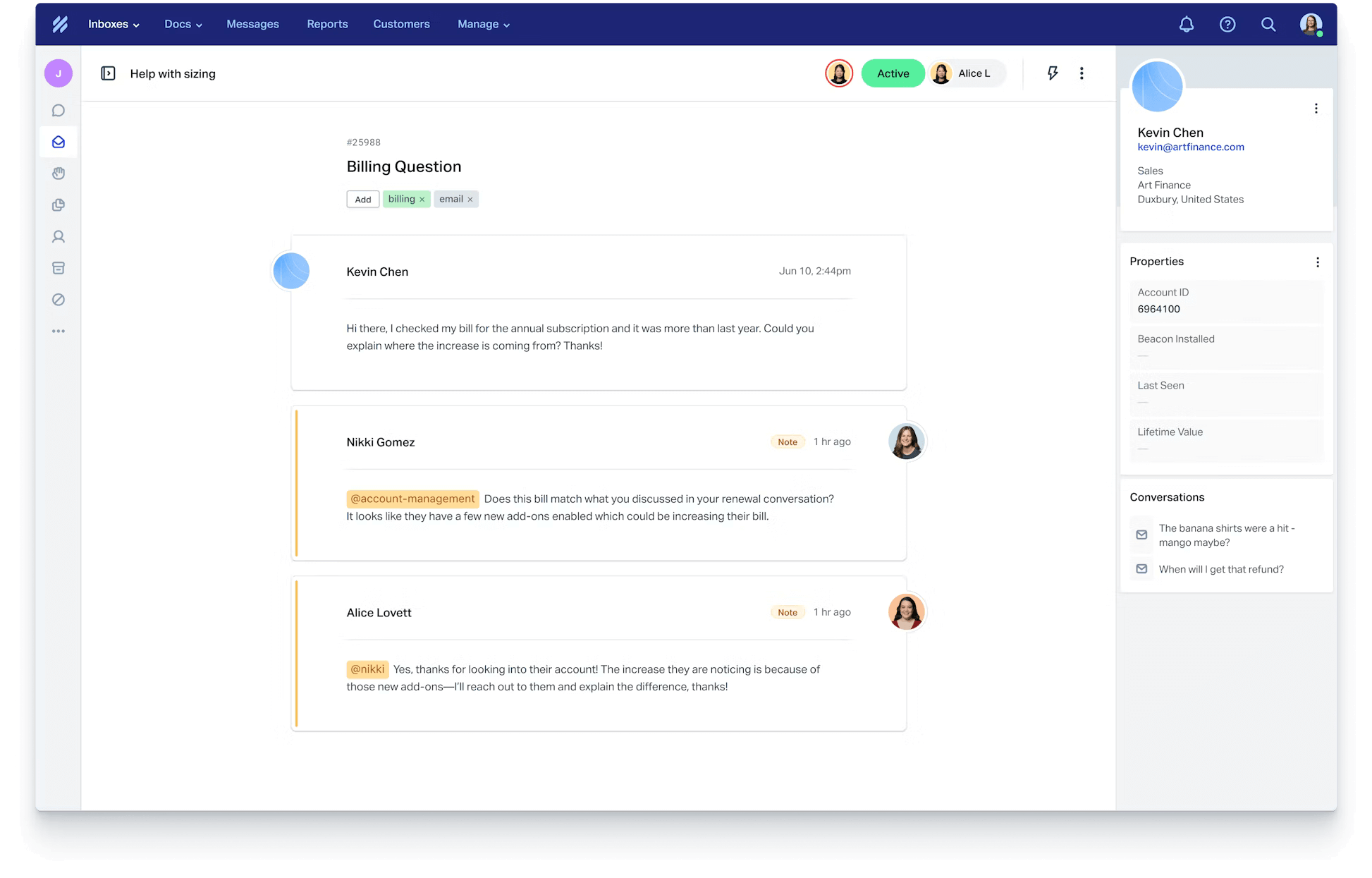
I’ve found Help Scout to be a solid option for teams that see their help center as a core part of customer success, not just a support add-on. The platform puts a lot of emphasis on helping customers find answers on their own, which reduces incoming tickets and keeps interactions more meaningful.
Using Help Scout feels less like managing tickets and more like managing conversations. It keeps customer context visible, makes collaboration easy, and avoids the clutter that comes with heavier systems. That balance works well for teams that want structure without losing the human side of support.
Where Help Scout really delivers is in how smoothly the help center connects with everyday support. Creating and maintaining articles is simple, and customers can move between self-service and direct support without friction. For teams focused on clarity, consistency, and a strong help center experience, it fits naturally into customer success workflows.
Pros:
- Shared inbox that keeps customer conversations organized and visible
- Customer profiles with full conversation history and activity
- Collision detection to prevent duplicate replies from team members
- Reporting on response times and team performance
Cons:
- Automation options are limited compared to more complex platforms
- Reporting depth may feel basic for data-heavy teams
User Rating: 4.6 (Capterra)
Pricing: Starts at $20/user/month.
7. ChurnZero – Best for Real-Time Insights
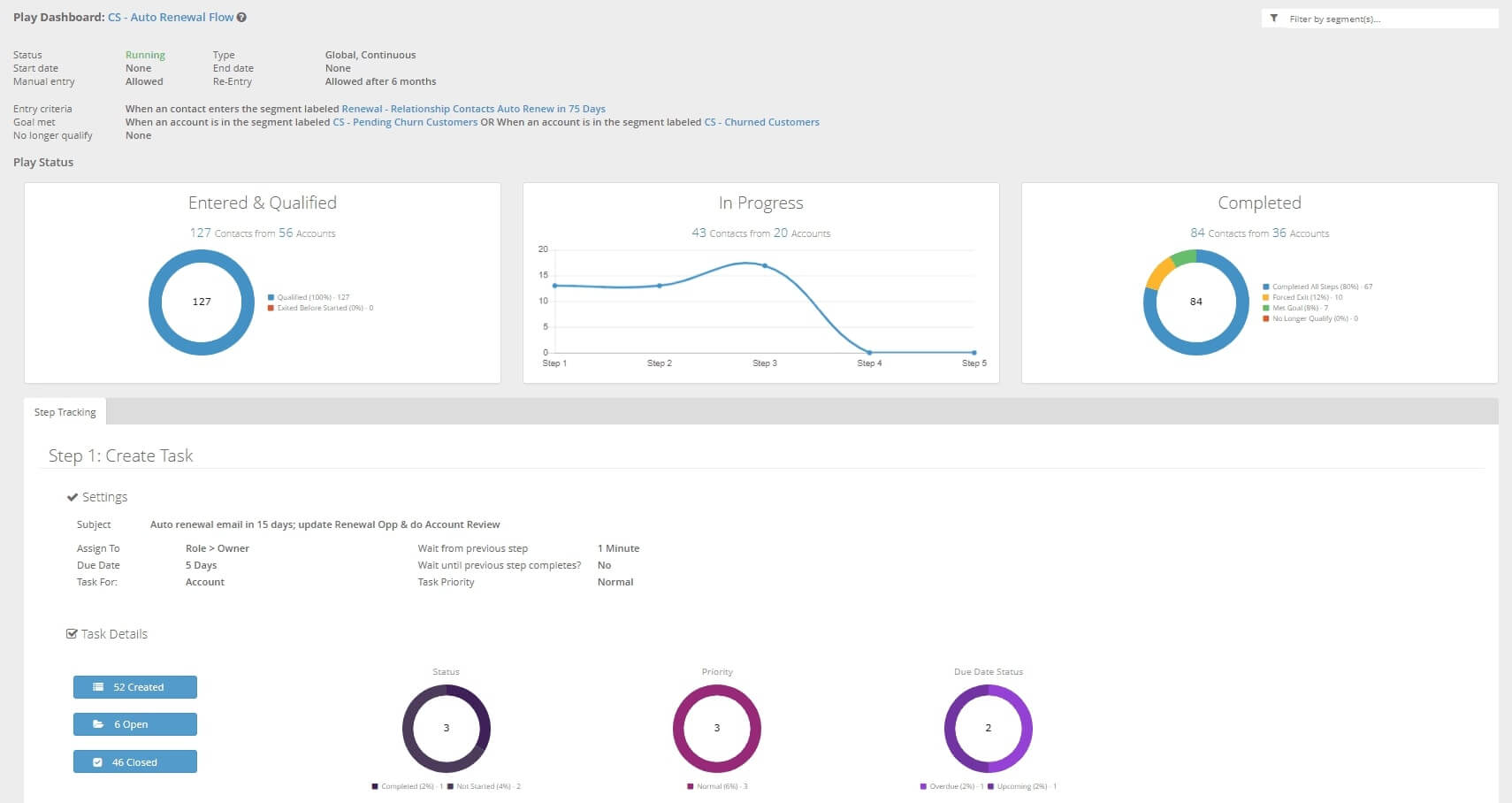
I started using ChurnZero when our team needed clearer visibility into customer activity as it happened. What immediately helped was how it brings product usage, CRM data, and engagement signals together in real time. Those live insights make it easier to spot churn risks early and prioritize the right accounts without relying on gut instinct.
I also like how ChurnZero supports proactive customer management. Its health scores and alerts help teams stay aligned on account status, while automation and playbooks reduce manual follow-ups. This keeps customer success focused on action rather than constant monitoring.
On the engagement side, ChurnZero gives teams tools to guide customers throughout their journey. From in-app messages to shared success plans, it helps keep conversations relevant and goals clear. Overall, it’s built for teams that want real-time visibility and better control over customer outcomes.
Pros:
- Real-time customer health tracking and insights to inform proactive actions.
- Purpose-built AI agents that help automate tasks and surface risks.
- Flexible playbooks and automation to streamline lifecycle management.
- In-app communications and guided walkthroughs to boost adoption.
- Ability to build and share detailed success plans to align goals.
Cons:
- There can be a noticeable learning curve for teams new to customer success software.
- Some users find the interface and navigation complex at first.
User Rating: 4.7(G2)
Pricing: Custom pricing.
8. InMoment: Best for Cloud-Based Services
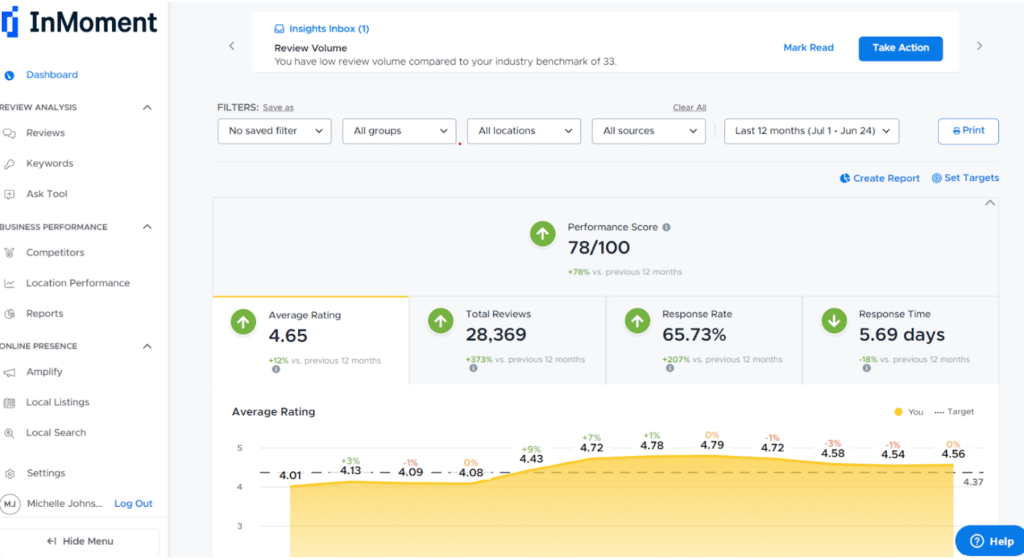
When I view InMoment through a customer success lens, it appears to be built for teams that want decisions grounded in customer experience data. Since it’s fully cloud-based, there’s no heavy setup or maintenance involved, which makes it easier to roll out and manage as teams grow or work across locations.
What draws me to InMoment is how it continuously captures customer feedback from multiple sources and turns it into usable insights. Instead of relying on isolated surveys or manual analysis, the platform uses AI to surface patterns in sentiment and behavior. That makes it easier to understand what’s really driving customer satisfaction or frustration.
From a customer success standpoint, InMoment supports more proactive engagement. By highlighting experience gaps and early risk signals, it helps teams step in before issues escalate. If customer feedback plays a central role in how you manage retention and loyalty, InMoment fits naturally into that workflow.
Pros:
- AI-powered sentiment analysis to identify trends and risks
- Multichannel feedback collection across surveys, reviews, and conversations
- Real-time alerts and case management for faster follow-ups
- Custom dashboards to monitor experience and success metrics
Cons:
- Initial setup and configuration can take time
- Pricing may be less suitable for budget-conscious organizations
User Rating: 4.4 (Capterra)
Pricing: Custom pricing.
9. Planhat – Best for Customization
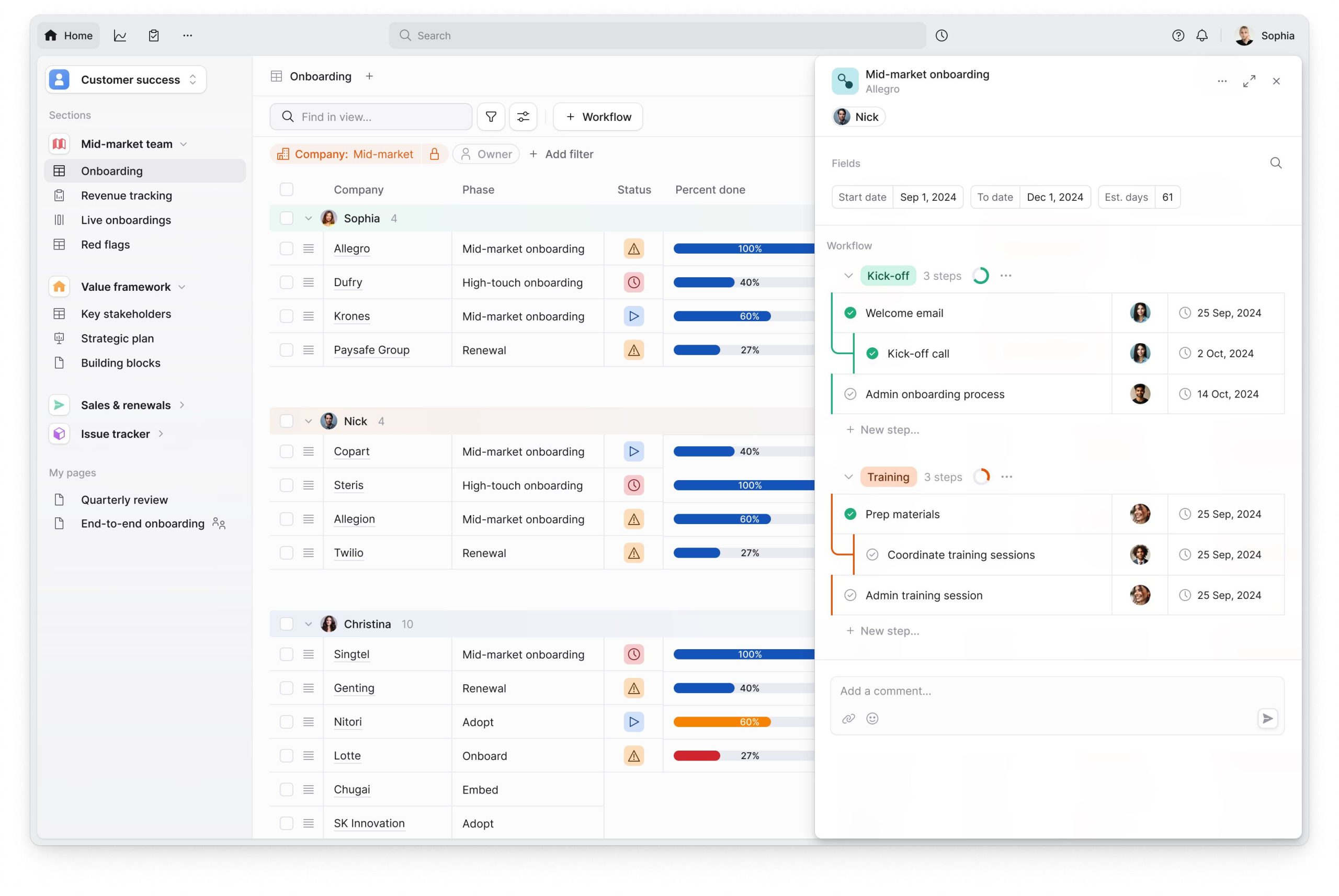
If customization is high on your priority list, Planhat is worth a close look. From my experience, it’s built for teams that don’t want to force their customer success process into rigid templates. Instead, it gives you the freedom to design workflows, data structures, and views that reflect how your business actually operates.
What really works well in Planhat is the level of control it gives over customer data and success metrics. You can tailor health scores, dashboards, and customer views based on the signals that matter most to your team. That flexibility makes it easier to align customer success efforts with renewals, expansion, and long-term adoption.
That said, Planhat isn’t a plug-and-play tool. There’s an upfront investment in setup and configuration, especially if you plan to use its customization fully. Once it’s dialed in, though, it becomes a reliable system for managing complex customer journeys without feeling limiting.
Pros:
- Flexible health scoring based on business-specific signals
- Strong lifecycle management for onboarding and renewals
- Custom dashboards for tracking success metrics
- Integrates smoothly with CRM and support tools
Cons:
- Learning curve for new users
- Best suited for teams with dedicated CS ownership
User Rating: 4.5 (G2)
Pricing: Custom pricing.
10. Zoho Desk – Best for Personalized Service
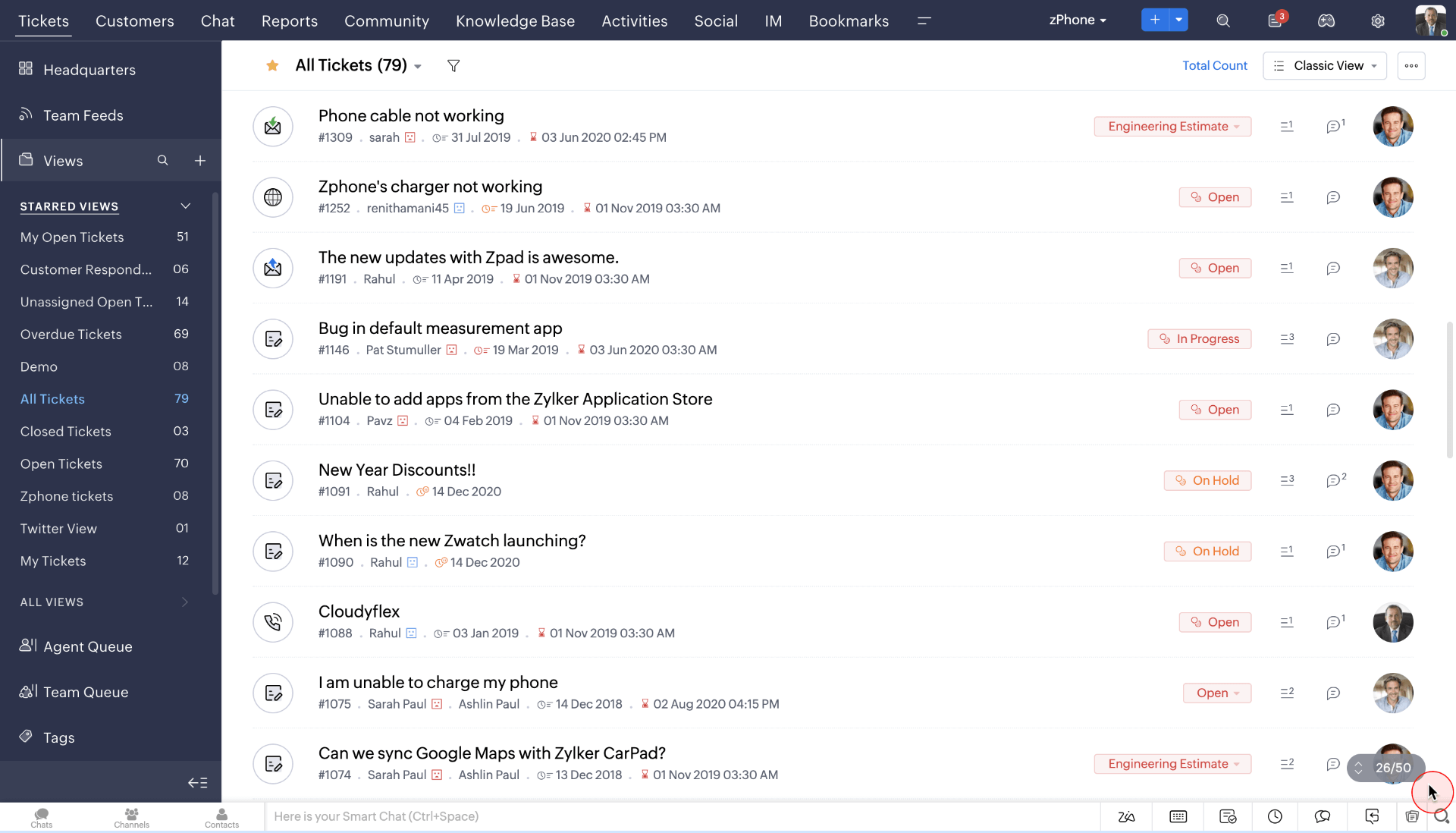
I’ve used Zoho Desk in situations where delivering personalized support actually mattered, not just closing tickets fast. What I like is how it helps teams tailor conversations based on customer context instead of treating every request the same. It feels built for teams that want relationships, not just resolutions.
On a daily basis, Zoho Desk makes it easier to respond with context. I can see past interactions, preferences, and ongoing issues without jumping between tools. That saves time and helps agents respond in a way that feels informed and relevant, especially as ticket volume grows.
What also works well is how Zoho Desk fits into a broader customer success setup. Its integrations reduce tool switching and keep customer data connected. For teams focused on delivering thoughtful, personalized service at scale, Zoho Desk fits naturally into the workflow.
Pros:
- Intelligent ticket management with customer context and history
- Multi-channel support across email, chat, and social platforms
- SLA tracking and workflow automation to maintain service quality
- Analytics that help monitor performance and customer trends
- Strong integrations with Zoho CRM and other business tools
Cons:
- Some customization options feel buried in settings
- Mobile experience is more limited than the desktop version
User Rating: 4.4 (G2)
Pricing: Starts at $14/user/month.
11. Gainsight – Best for Tracking Performance Metrics
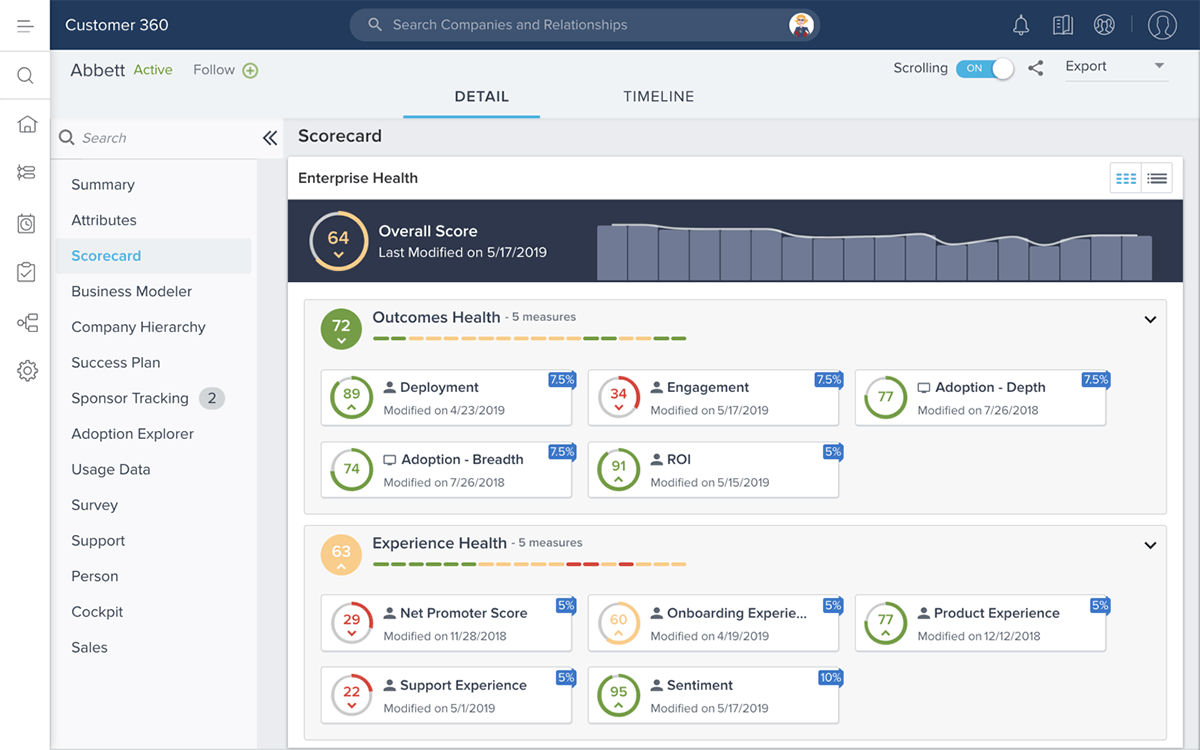
When performance tracking is the priority, Gainsight is usually the first tool that comes to mind. It pulls customer data from across your stack and turns it into clear health scores, usage trends, and risk signals. This makes it easier to understand how customers are actually performing, not just how often they log in.
I like how Gainsight helps teams move from reactive check-ins to proactive planning. Automated playbooks and segmented views let you act based on real customer behavior, while custom dashboards keep key metrics front and center for leadership and CS teams alike.
That said, Gainsight does come with a learning curve and some complexity. Its depth and customization are a benefit, but they can feel overwhelming for smaller teams or organizations without dedicated admins. Still, if tracking performance metrics and turning data into action is a priority, it’s one of the most capable platforms worth considering.
Pros:
- Advanced performance tracking and analytics for customer health and engagement
- Automated workflows and playbooks to trigger proactive actions
- Centralized customer data and insights for better reporting
- Customizable dashboards to focus on key KPIs
Cons:
- Can be overwhelming for smaller teams or simple use cases
- Some configurations require significant admin effort
User Rating: 4.4 (Capterra)
Pricing: Custom pricing
Customer Success Software: My Top 3 Picks
If we had to narrow it down, these three solutions stand out among the top customer success platforms for usability and impact. Let’s take a closer look.
1. ProProfs Help Desk
ProProfs Help Desk helps teams manage customer conversations more efficiently by combining AI-assisted ticket summaries with organized workflows. It supports multiple channels in one place, makes collaboration easier, and reduces repeat questions through a built-in knowledge base, while reports and surveys help track service quality and performance.
2. Help Scout
Help Scout works well for teams that treat the help center as a key part of customer success. It encourages self-service to reduce ticket volume while keeping conversations personal. Customer context stays visible, collaboration remains simple, and the help center connects smoothly with everyday support workflows.
3. Zendesk
Zendesk suits teams that prioritize customer self-service to reduce ticket volume without sacrificing support quality. It keeps tickets, help articles, and customer history in one place, making issue resolution faster. While heavier for small teams, it provides the structure needed to scale support operations consistently.
The Customer Success Software Checklist You Can’t Afford to Skip
When you’re comparing customer success tools, it’s easy to get distracted by feature overload. Use this checklist to focus on the capabilities that actually improve customer experience and team efficiency.
| Selection Criteria | Why It Matters | What to Check |
|---|---|---|
| Centralized customer requests | Prevents missed follow-ups and scattered conversations | Email-to-ticket, manual ticket creation, unified inbox |
| AI-powered assistance | Helps teams respond faster and prioritize better | Ticket summarization, reply suggestions, AI chatbots, etc |
| Clear ownership and tracking | Keeps tickets from falling through the cracks | Easy assignment, reassignment, and visible ticket status |
| Actionable reporting | Improves accountability and decision-making | Response time, resolution time, workload reports |
| Ease of use | Drives adoption across the team | Clean UI, minimal training required |
| Self-service support | Reduces repetitive tickets and speeds up resolution | Knowledge base, canned responses |
| Integration flexibility | Fits into existing workflows | Email, CRM, chat, and project tool integrations |
| Scalability | Supports growth without rework | Flexible pricing, user and volume scaling |
FREE. All Features. FOREVER!
Try our Forever FREE account with all premium features!
Retain & Support Customers Better With the Right Customer Success Software
Customer success software has become a core part of how modern teams protect revenue and drive long-term growth. The right tool helps you stay close to customers, spot risks early, and turn everyday interactions into measurable ROI.
As you shortlist options, focus on how well a tool supports real customer success workflows. Clear visibility, reliable reporting, and practical automation matter most. Comparing best customer success tools can help teams identify solutions that balance usability, scalability, and everyday efficiency.
If you’re looking for a simple, reliable way to centralize support, track customer interactions, and improve response efficiency, ProProfs Help Desk is worth exploring. It brings structure, visibility, and ease of use together, without adding unnecessary complexity.
FREE. All Features. FOREVER!
Try our Forever FREE account with all premium features!

 We'd love your feedback!
What did you like & how can we make it even better?
 Thanks for your feedback!
 Ask Your Question
Have a question? Get expert help to make your decision easier.