

Over the years, I’ve noticed that while email is fine for starting a conversation, it’s bad at showing progress. That’s why my support team ended up answering the same question again and again: “Where does my request stand?” Client portal software fixes that gap.
It gives customers a secure login where they can see all current and past tickets in one place. They can raise a new ticket, attach files, and follow the ticket as it moves toward resolution.
That visibility reduces follow-ups because customers can check the status themselves. It also adds a security layer, so ticket access isn’t floating around in email threads.
In this blog, I’ll break down what client portal software is and share 10 tools you can shortlist based on your needs.
What Is Client Portal Software and How Does It Work?
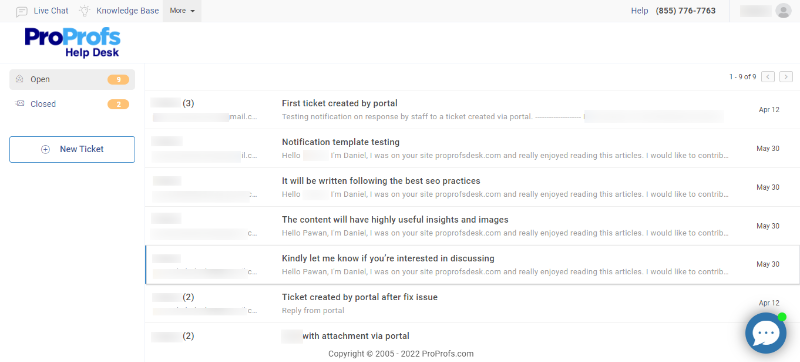
Client portal software, also known as customer service portal software, is a secure support portal where customers can log in to submit requests, upload attachments, and track progress without relying on back-and-forth updates. It keeps the experience organized for customers and predictable for your team.
At its core, it does two jobs well: visibility and control. Customers can view current and past tickets from a single dashboard, while your team controls access, routes new requests to the right inbox, and decides how customers are notified as work moves forward.
Behind the scenes, the workflow is a simple loop:
- Structured Intake: Requests come in through forms that capture the right details upfront.
- Ticket Workflow: Tickets are routed, assigned, tagged, prioritized, and moved through statuses, often with automation.
- Customer Updates: Customers see replies, status changes, and requests for more information, while internal coordination stays private.
- Continuous Improvement: Reporting surfaces repeat issues, workflow bottlenecks, and content gaps so the portal improves over time.
The 10 Best Client Portal Software Tools to Consider This Year
I’ve used several of these tools firsthand and pressure-tested the rest through conversations with support leads and operators. The list below reflects what teams actually pick when they need a customer-facing portal plus dependable ticket handling.
| Tool name | Best for | Pricing |
|---|---|---|
| ProProfs Help Desk | Help desk and support ticketing for customer delight | A free plan is available. Paid plan starts at $19.99/user/month |
| Zendesk Support Suite | Large businesses and enterprises | Starts at $19/agent/month |
| Freshdesk | Multichannel communications | Starts at $15/month |
| Zoho Desk | Context-driven support | Starts at $20/user/month |
| HappyFox | Insightful reports and analytics | Starts at $21/agent/month |
| Intercom | Streamlining support workflows | Starts at $29/seat/month |
| Hiver | Gmail-based help desk solution | Starts at $25/user/month |
| Crisp | Social media customer support | Free plan available; paid plans start at $45/month |
| ServiceNow | IT service management | Custom pricing |
| ManageEngine ServiceDesk Plus | Incident tracking and asset management | Custom pricing |
1. ProProfs Help Desk – Best for AI-Assisted Help Desk for Customer Delight
When I first started using client portal software seriously, my goal was simple: stop wasting time on follow-ups. ProProfs Help Desk helped because customers could log in to the portal, create new tickets, attach files, and check progress on existing tickets without emailing “any update?” every other day.
On my side, I could pull conversations from email, live chat, the service portal, and web forms into one place. Assigning roles and permissions kept ownership clear, and SSO made portal access easier for customers who hate creating new logins.
What impressed me most was the AI help desk functionalities. It summarized long ticket threads, helped me draft replies faster, and made it easier to understand intent when messages were vague. Add reporting plus CSAT and NPS surveys, and I could actually see whether the portal experience was improving over time.
Pros:
- AI summarizes long tickets and speeds up first replies
- Portal enables customers to raise and track tickets in one place
- Omnichannel intake keeps requests unified across channels
- Roles and permissions keep internal access organized
- CSAT and NPS surveys help track experience trends
Cons:
- No downloadable or on-premise deployment option
- No dark mode option yet
Pricing: A free plan is available. Paid plan starts at $19.99/user/month.
User Rating: 4.9 (Capterra)
2. Zendesk Support Suite – Best for Large Businesses & Enterprises
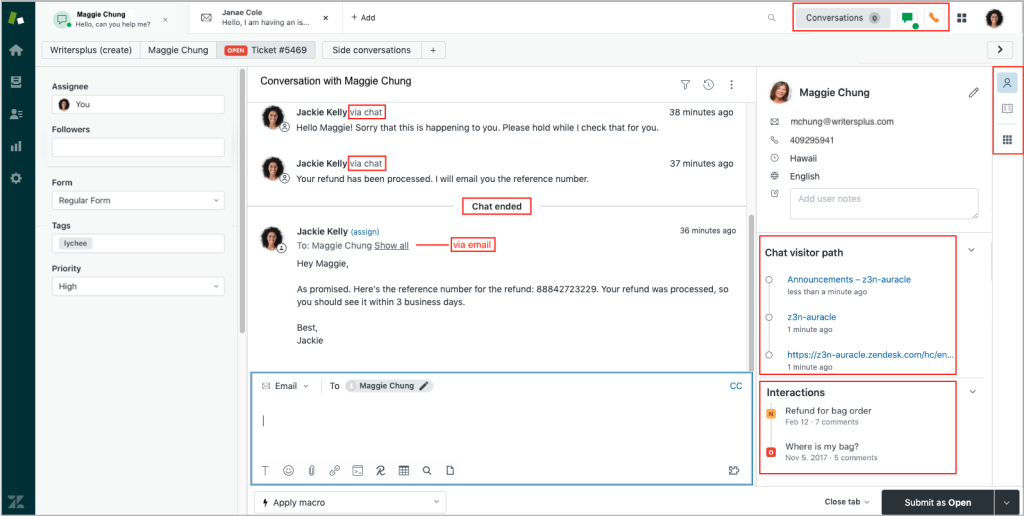
Image source: Zendesk
I’ve used Zendesk in environments where support wasn’t a “single inbox” problem. It was a scale problem. As client portal software, it can handle high ticket volume while keeping the customer experience organized with request forms, status tracking, and a help center that reduces repeat questions.
What stood out during daily use is how Zendesk supports operational rigor. You can set SLAs, build routing rules, and lock down roles so ownership stays clear across multiple teams. It also works well when you need separate experiences for different products, regions, or customer tiers, which is common in larger organizations.
Zendesk is most useful when you already have complexity, and you want a system that can enforce consistency without relying on manual coordination.
Pros:
- Scales well for high ticket volume and larger support teams
- Strong routing rules and SLAs keep ownership and timelines clear
- Help center supports self-service at scale
- Role-based controls fit complex org structures
- Works well for multi-brand and multi-region setups
Cons:
- Portal branding can feel limited without theme customization
- The setup can get sprawling if you don’t standardize workflows early
Pricing: Starts at $19/agent/month
User Rating: 4.4 (Capterra)
3. Freshdesk – Best for Multichannel Communications
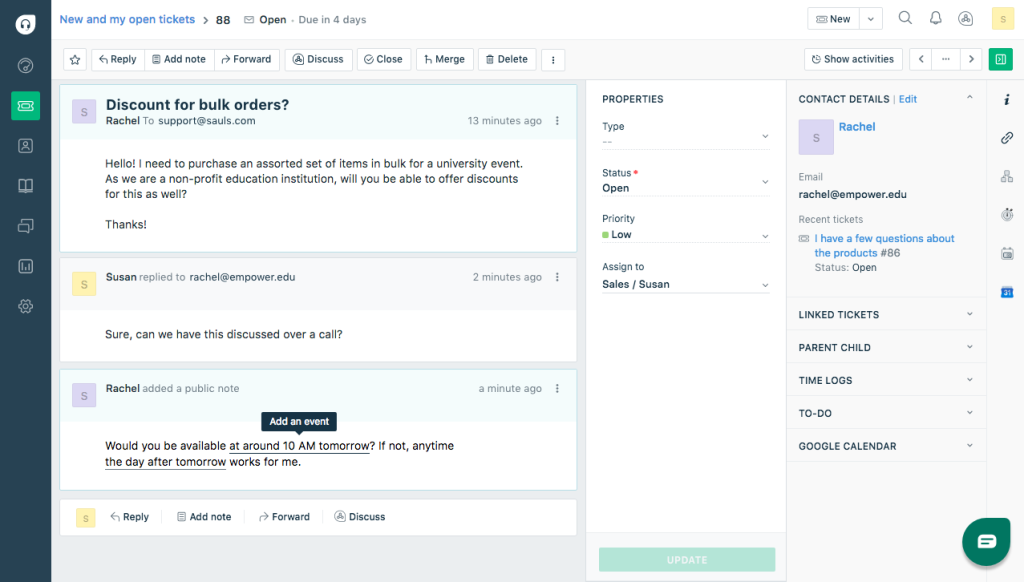
Image source: Freshdesk
Some tools feel built around one channel and patched for the rest. Freshdesk felt different when I used it. As client portal software, it gave customers a simple place to submit requests, attach files, and track updates, while the team handled conversations coming from multiple channels without losing context.
What I appreciated in day-to-day use is how it keeps customer communication from getting scattered. Email, chat, phone, and social messages can flow into one workspace, which makes handoffs cleaner and prevents duplicate replies.
Pairing the customer-facing experience with a knowledge base also helped reduce repeat tickets, especially for common “how do I” questions. Freshdesk is a practical pick when your support happens everywhere, and you still want customers to see one consistent thread.
Pros:
- Unifies messages across channels so context doesn’t get lost
- Customers can submit and track requests in one place
- Automation helps route and prioritize tickets consistently
- Knowledge base supports self-service before ticket creation
- Reporting improves visibility into workload and response times
Cons:
- Ticket forms can feel limiting if you need complex field logic
- Permission controls can be restrictive for layered account structures
Pricing: Starts at $15/month
User Rating: 4.5 (Capterra)
4. Zoho Desk – Best for Context-Driven Support
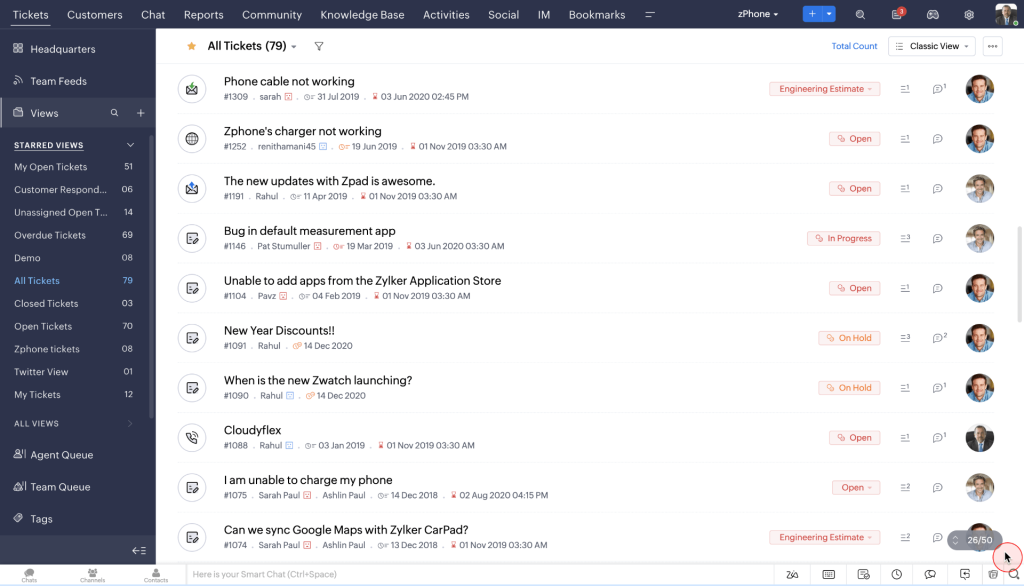
Image source: Zoho
When the real issue is “we replied, but we missed the context,” Zoho Desk is worth a look. I’ve used it in setups where past conversations mattered as much as the current request, and it handled that continuity well.
For teams shopping for client portal software, the customer-facing experience is straightforward: customers can log in, submit tickets, add attachments, and check progress without chasing updates.
What I noticed behind the scenes is that Zoho Desk helps agents respond with better awareness. Conversation history stays organized, and you can set rules that route tickets based on priority or category, so ownership doesn’t get murky.
It’s especially convenient if your company already uses other Zoho tools, because the workflow feels more connected instead of pieced together.
Pros:
- Keeps ticket history organized for better continuity and replies
- Customers can submit and track requests without repeated follow-ups
- Rules help route and prioritize tickets consistently
- Status and ownership stay clear across the team
- Works smoothly for teams already using the Zoho ecosystem
Cons:
- Portal customization is limited for heavily branded experiences
- Advanced workflows can take time to configure cleanly
Pricing: Starts at $20/user/month
User Rating: 4.5 (Capterra)
5. HappyFox – Best for Insightful Reports & Analytics
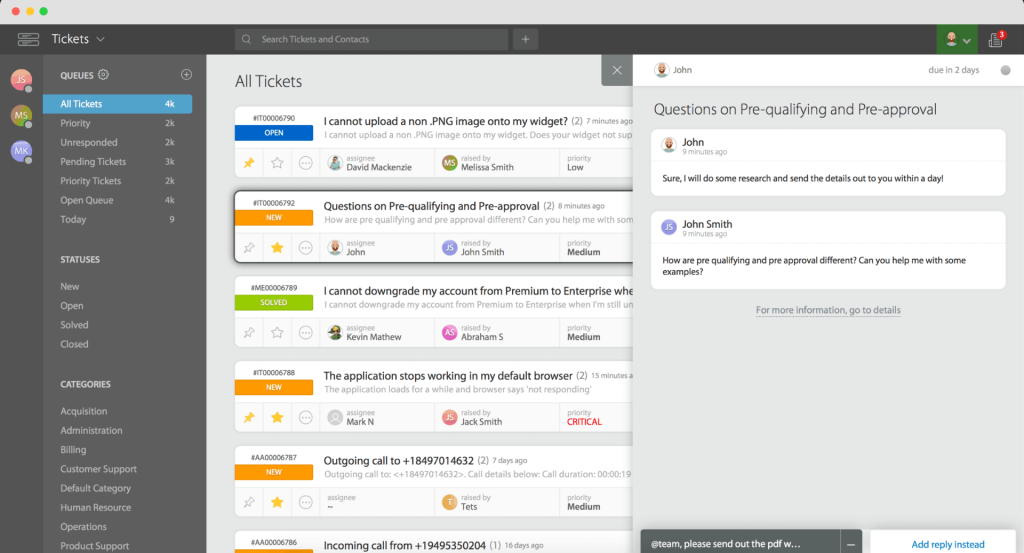
Image source: HappyFox
If you’re the kind of team that runs support by numbers, HappyFox makes that easy. When I used it, the reporting was the first thing I kept coming back to because it gave a clear view of ticket trends, response performance, and where work was getting stuck.
In a setup where you’re comparing client portal software options, that visibility can be the difference between guessing and actually improving.
On the customer side, it offers a secure place for people to submit tickets and track progress without pinging your team for updates. Internally, it’s built for structure. You can categorize requests, standardize workflows, and create rules that keep tickets moving to the right queue. For teams that want analytics to drive decisions, HappyFox fits well.
Pros:
- Reporting makes it easier to spot bottlenecks and workload patterns
- Customers can submit and track tickets without chasing updates
- Workflow rules help maintain consistent routing and ownership
- Categories and templates keep responses and handling standardized
- Good visibility into team performance and ticket status
Cons:
- Customizing workflows can feel rigid for nuanced support processes
- Knowledge base and portal styling options are fairly limited
Pricing: Starts at $21/agent/month
User Rating: 4.6 (Capterra)
6. Intercom – Best for Streamlining Support Workflows
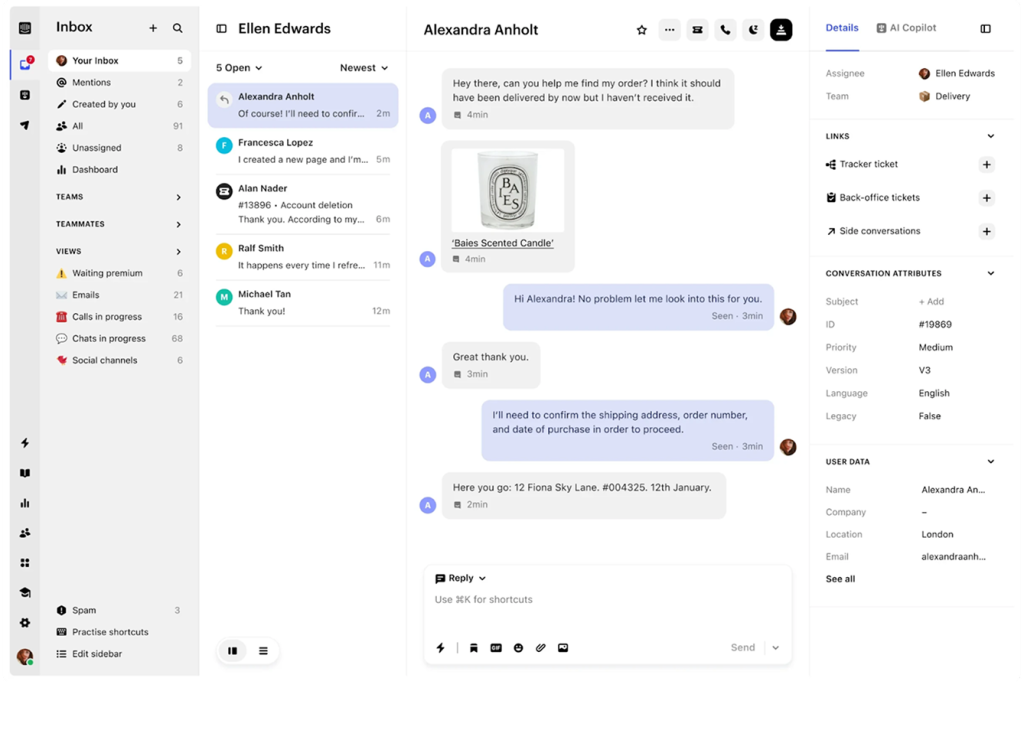
Image source: Intercom
Intercom is what I reach for when the goal is speed without sounding robotic. In my experience, it’s less about “handling tickets” and more about keeping conversations moving across chat and messaging while agents stay focused.
If you’re evaluating client portal software but your customers prefer real-time communication, Intercom can reduce friction by keeping support inside the channels people actually use.
What stood out when I used it is how it helps teams stay consistent. You can route conversations automatically, surface relevant context, and reduce repetitive typing with AI-assisted tools.
It’s especially useful when you want to tighten handoffs between teams or keep support aligned with product and success workflows. The tradeoff is that it feels conversation-first, so you’ll want to be intentional about how you structure ticket-like requests.
Pros:
- Streamlines workflows with automation and smart routing
- AI assistance reduces repetitive typing and speeds up responses
- Keeps context visible so handoffs feel smoother
- Works well for chat-first support and faster conversations
- Helps teams maintain consistency across high message volume
Cons:
- Help content and portal-style self-service can feel secondary
- Configuration choices can get complex as workflows expand
Pricing: Starts at $29/seat/month
User Rating: 4.5 (Capterra)
7. Hiver – Best Gmail-Based Help Desk Solution
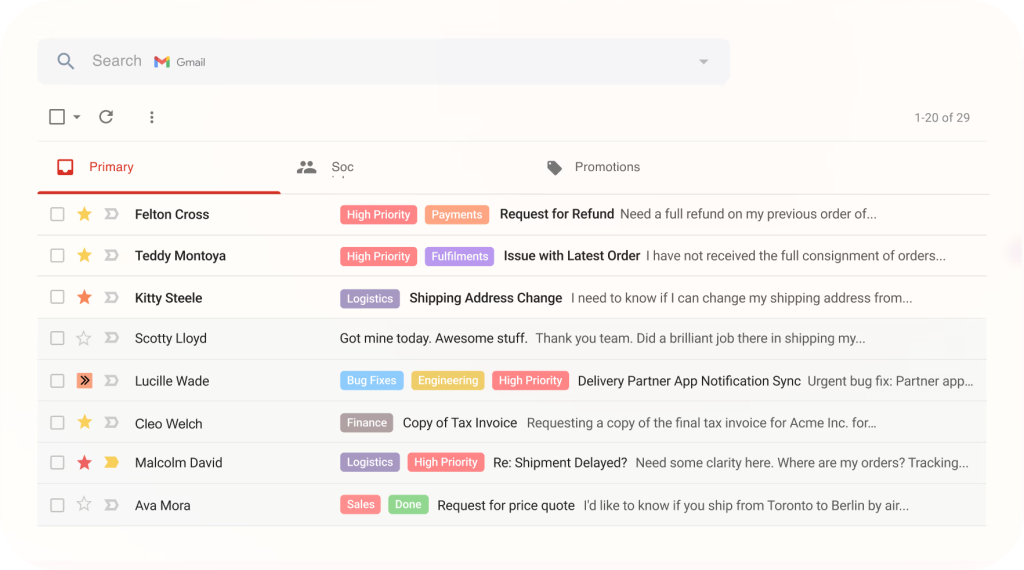
Image source: Hiver
I’ve seen a lot of teams search for “a portal,” when what they really need is ownership inside Gmail. That’s where Hiver clicked for me. It turns a shared inbox into a structured workflow, so emails stop floating around without a clear next step.
In that sense, it can behave like client portal software for teams that want tracking and accountability but aren’t ready to move customers into a full login experience.
In daily use, the biggest win was visibility. I could assign conversations, track status, add internal notes, and avoid the classic “two people replied” problem. It’s best for teams that still want email as the primary channel, but need a system that prevents requests from getting missed and makes follow-ups easier to manage.
Pros:
- Keeps ticket ownership and status visible directly inside Gmail
- Reduces duplicate replies with shared context and assignments
- Internal notes help teams collaborate without forwarding threads
- Works well for email-first support teams with minimal process change
- Helps prevent requests from slipping through the cracks
Cons:
- Not ideal if you need a full customer login and ticket tracking portal
- Limited flexibility for complex workflows beyond email-based support
Pricing: Starts at $25/user/month
User Rating: 4.7 (Capterra)
8. c– Best for Social Media Customer Support
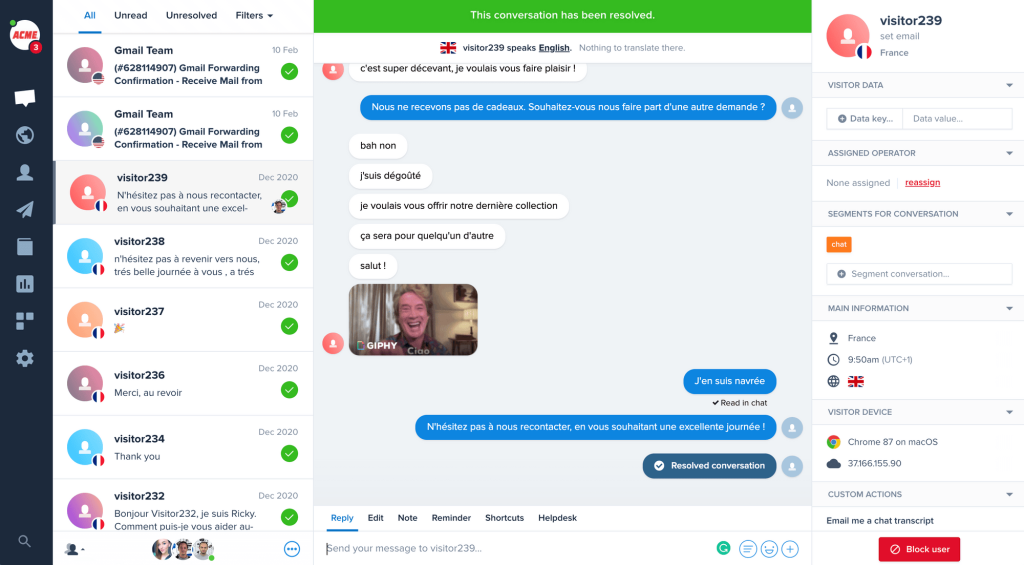
Image source: Crisp
Crisp feels built for teams that don’t want customer conversations scattered across Instagram DMs, Messenger, chat widgets, and email. When I used it, the main value was consolidation. You can pull messages into one inbox and respond faster without hopping between tabs.
If you’re weighing client portal software but your customers mostly reach out through social channels, Crisp can be a more natural way to reduce chaos. It also supports self-service and automation so your team isn’t answering the same basic questions all day.
I found it especially useful for support teams that sit close to marketing or community, because it keeps the tone conversational while still adding structure, tagging, and internal notes. The key is to treat it as a conversation hub first, and a ticketing-style system second.
Pros:
- Centralizes social and chat conversations into one workspace
- Helps teams respond faster without jumping across platforms
- Tagging and notes keep context clear for internal collaboration
- Automation reduces repeat replies for common questions
- Works well for support teams close to marketing and community
Cons:
- Reporting depth can feel limited for heavy SLA-driven teams
- Ticket-style workflows may feel lighter than traditional help desks
Pricing: Free plan available. Paid plans start at $45/month.
User Rating: 4.6 (Capterra)
9. ServiceNow – Best for IT Service Management
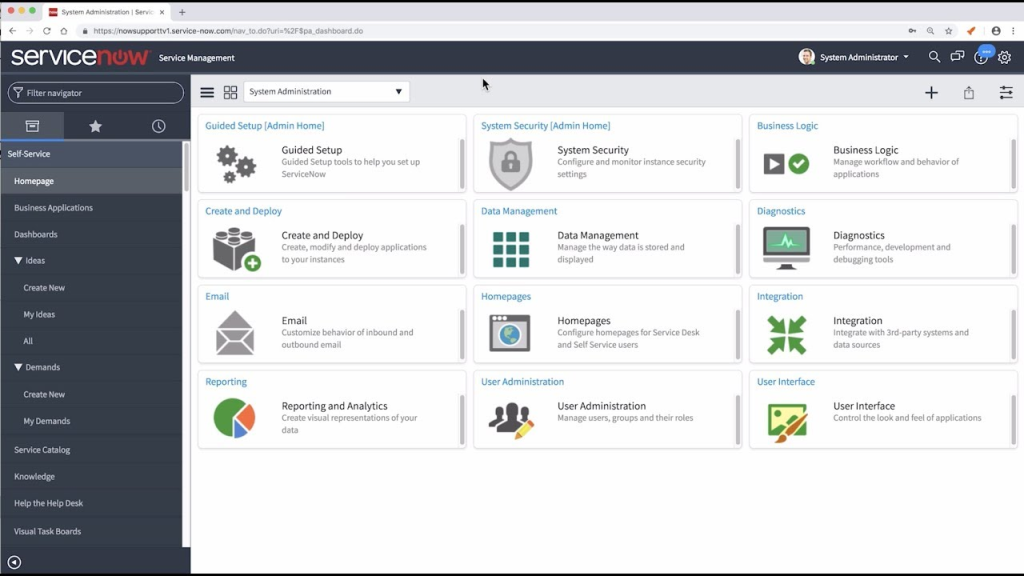
Image source: ServiceNow
ServiceNow is what I associate with “serious IT ops.” When I’ve worked with it, the platform felt less like a simple support inbox and more like an operating system for service delivery.
If your evaluation of client portal software sits inside a broader ITSM requirement, ServiceNow makes sense because it connects incidents, changes, approvals, and knowledge into one controlled process.
What stood out in use is the depth of workflow design. You can standardize how issues get logged, escalated, and resolved, and the system is built to handle complex dependencies across teams.
For customers or internal users, the experience is structured and consistent, which helps when the volume is high and the stakes are higher. It’s best when governance and process matter as much as response speed.
Pros:
- Strong ITSM workflows for incidents, changes, and approvals
- Keeps service processes consistent across multiple IT teams
- Built for high volume and complex operational environments
- Reporting supports visibility into service performance and trends
- Knowledge management fits well into structured IT support
Cons:
- Setup and customization can become heavy without clear governance
- Customer-facing experience can feel rigid for simple support use cases
Pricing: Custom pricing
User Rating: 4.5 (Capterra)
10. ManageEngine ServiceDesk Plus – Best for Incident Tracking & Asset Management
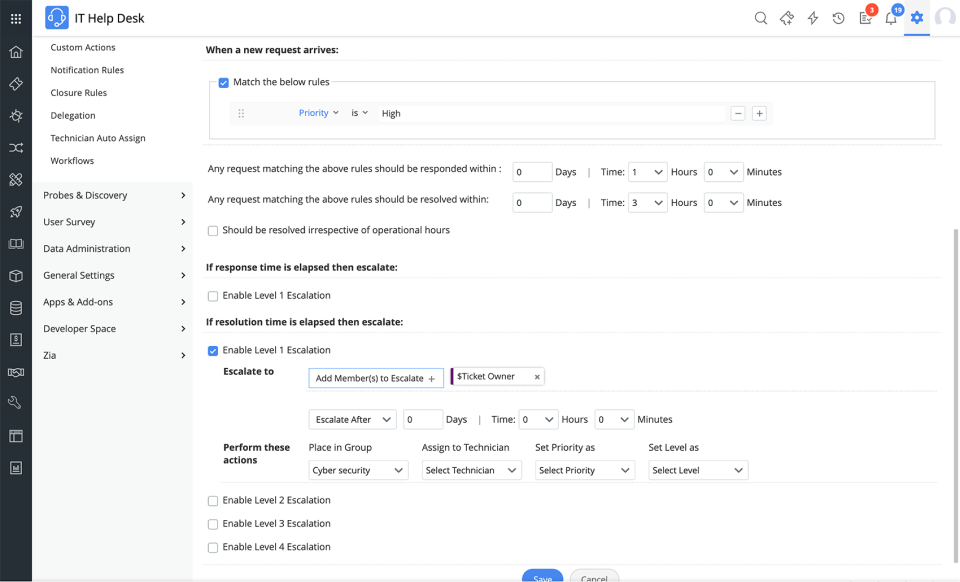
Image source: ManageEngine
ManageEngine is the tool I think of when support and inventory need to live in the same conversation. When I used it, incident tracking felt tightly connected to assets, which helped in situations where the “problem” wasn’t just a ticket, but a specific device, user, or configuration.
If you’re comparing client portal software in an IT-heavy environment, that link between requests and assets can reduce back-and-forth and speed up diagnosis.
The workflow side is also structured enough to keep ownership clear. You can categorize incidents, route them based on rules, and build a consistent process for resolution. It’s especially useful when you need a practical service desk that supports IT operations without forcing you into an enterprise-only setup.
The portal experience supports ticket submission and tracking, but the real strength is the operational backbone behind it.
Pros:
- Connects incidents to assets for faster troubleshooting
- Structured categorization improves routing and ownership clarity
- Useful for IT teams managing both users and hardware inventory
- Reporting supports visibility into incident trends and workload
- Standard workflows help maintain consistent resolution processes
Cons:
- Portal experience can feel utilitarian compared to modern support tools
- Custom reports and fields can take effort to tune properly
Pricing: Custom pricing
User Rating: 4.4 (Capterra)
How to Choose the Best Client Portal Software
I’ve seen teams buy client portal software that looks polished in a demo, then quietly struggle with adoption in week two. The smartest way to choose is to evaluate it the way your customers and agents will use it: under pressure, mid-conversation, with incomplete context and real deadlines.
1. Ease of Use
Test the tool with the actual people who will live in it, not just leadership. If it needs heavy training, adoption slows down and your customer support portal becomes another place people avoid checking.
2. Core Features
Start with the basics, then move outward. Your shortlist should cover ticket management, multichannel intake, automation, AI support (like suggested replies or ticket summaries), and a knowledge base for self-service. If those are weak, the rest won’t matter.
3. Smooth Integrations
Make sure it connects cleanly with your CRM, live chat, and billing or order systems. Integrations that “kind of work” create delays, duplicate effort, and messy handoffs inside your client portal software.
4. Scalability
Choose a system that can grow without a rebuild. You should be able to add more agents, handle higher ticket volume, and expand channels without reworking the entire customer support portal setup.
5. Data Privacy and Security
Treat this as nonnegotiable. Verify encryption, access controls, and the compliance standards your business needs (GDPR, HIPAA, or CCPA). A customer support portal often contains sensitive requests and files, so safeguards must be built-in, not bolted on.
6. Reputation and Reviews
Don’t rely on the sales pitch. Cross-check user feedback on trusted review sites to spot recurring issues around reliability, support quality, and real-world usability. If the same complaint shows up repeatedly, assume you’ll face it too.
Quick Questions to Ask Before You Shortlist
- Can customers submit requests and track progress easily inside the customer support portal?
- Can agents keep ownership clear without manual policing?
- Does it still work smoothly when customers reply by email instead of logging in?
- Do reporting and dashboards help you reduce follow-ups and spot bottlenecks fast?
My Top 3 Picks for Client Portal Software
Out of the client portal software tools I’ve covered, these 3 are the ones I’d keep at the top of my shortlist. Let’s take a quick look.
1. ProProfs Help Desk
ProProfs Help Desk combines ticketing and a customer support portal in one system, so customers can submit requests, attach files, and track progress securely. AI helps summarize long threads, draft replies, and clarify customer intent. Roles, permissions, and SSO support controlled access, while CSAT/NPS and reports help monitor experience and performance.
2. Zendesk Support Suite
Zendesk Support Suite is designed for larger teams that need standardization across people, processes, and support tiers. It supports SLAs, advanced routing, and role-based controls to keep ownership and timelines clear. Its customer support portal and help center work well when support volume is high and workflows must stay consistent across teams or brands.
3. Freshdesk
Freshdesk is a practical option for teams handling support across multiple channels while keeping the customer experience unified. It brings email, chat, phone, and social messages into one workspace and pairs it with a customer support portal for ticket submission and tracking. Automation, reporting, and a knowledge base help reduce repetitive tickets and improve response consistency.
FREE. All Features. FOREVER!
Try our Forever FREE account with all premium features!
Benefits of Client Portal Software
Secure client portal software makes support feel less chaotic. It gives customers a clear place to ask for help, and it gives your team a cleaner way to handle requests without extra back-and-forth.
1. Fewer “Any Update?” Messages: Customers can check the latest status and past replies on their own, so your team spends less time answering progress questions.
2. Requests Come In With Better Details: A good support form collects the basics up front, so agents do not have to chase missing info before they can start.
3. Less Time Wasted Searching: Files, notes, and past conversations stay tied to the request, so people are not digging through old threads to find context.
4. Cleaner Team Handoffs: When a request needs another person or team, it stays in one place. That makes handoffs smoother and reduces dropped details.
5. More Control Over Who Sees What: Customers only see their own requests. Your team controls access and keeps private notes private.
6. Support Gets Better Over Time: It becomes easier to spot what keeps coming up, where requests slow down, and what should be explained in a help article.
Empower Customers With Clear, Trackable Support
Client portal software works best when customers can submit requests, share files, and track progress without chasing your team. That small shift reduces noise, keeps conversations organized, and makes support feel predictable for everyone involved, even during busy weeks.
Choose a tool that matches real behavior, not demo behavior. Customers will still reply by email, and teams still need clear ownership and steady routing. The right setup keeps threads connected, updates consistent, and tickets moving without constant manual pushing.
If you want a clean place to start, ProProfs Help Desk is worth a look. It pairs a customer support portal with ticketing, plus AI that summarizes long threads and helps draft replies faster. Try it for a week, measure follow-ups, then scale what works.
Frequently Asked Questions

Does client portal software replace email support?
Client portal solutions complement email, not replace it. Strong tools convert emails into trackable tickets, allow agents to reply by email, and still give customers a login-based view of status and history.
What are the most important features in client portal software?
Look for ticket status visibility, email-to-ticket, email replies, file attachments, request history, roles and permissions, basic automation (routing, SLAs, notifications), reporting, and key integrations like CRM and collaboration tools.
Why do teams struggle to adopt client portal software after buying it?
Adoption struggles when the portal adds friction. Common issues include clunky customer login, confusing forms, inconsistent routing, unclear ownership, and agents falling back to email because the system feels like extra work.
FREE. All Features. FOREVER!
Try our Forever FREE account with all premium features!

 We'd love your feedback!
What did you like & how can we make it even better?
 Thanks for your feedback!
 Ask Your Question
Have a question? Get expert help to make your decision easier.