
I’ve seen many growing teams hit the same moment: Help Scout feels simple and friendly, until ticket volume climbs and the gaps start costing you time. If you’re searching for Help Scout alternatives, you’re probably in that spot right now.
Here’s what most Help Scout users report: Tickets get missed or duplicated, it is not always clear who owns what, and the rules you want for routing or follow-ups feel limited.
If you want an alternative that keeps ownership clear, speeds up replies with AI, and helps your team stay organized as volume grows, I have multiple great options in store for you. In this guide, I’ll break down the top Help Scout competitors and show how each one compares to Help Scout, so you can narrow your options and choose with confidence.
Why Look Beyond Help Scout
Help Scout can be a great fit for small, email-first teams. However, as ticket volume grows and support gets more complex, many teams start running into a few common limits.
1. Pricing Can Feel Less Predictable as You Scale
If contact volume spikes during launches or busy seasons, costs can get harder to forecast. Some teams also worry about spam inflating contact counts.
2. Email-First Support May Not Cover Every Channel
If customers reach you on WhatsApp, voice, or social channels, you may need a more unified setup so agents are not jumping between tools.
3. Automation, Routing, and SLAs Can Feel Too Lightweight
As queues grow, teams often need smarter assignment (round robin or skill-based), clearer ownership, escalations, and SLA tracking to keep response times consistent.
4. Reporting May Not Offer Enough Operational Visibility
Support leads need to see what is piling up, what is slowing down, and where bottlenecks are forming. Limited reporting can make it harder to manage performance.
5. AI and Self-Service May Not Reduce Workload Enough
Many teams want practical AI, like ticket summaries, reply drafts, and auto-tagging, plus stronger self-service to deflect repeat questions and reduce ticket volume.
List of 10 Best Help Scout Alternatives
Although apps like Help Scout provide a strong array of features for customer support, looking into alternative solutions can help you find a platform that perfectly fits your unique needs and budget.
Here’s a look at 10 noteworthy tools I’ve used, each boasting unique advantages worth considering.
| Help Scout alternatives | Best for | Pricing |
|---|---|---|
| ProProfs Help Desk | Easiest AI Help Desk for Shared Inboxes, Ticket Workflow Automation, and Scaling Support Teams | A free plan is available. Paid plan starts at $19.99/user/month |
| HubSpot Service Hub | HubSpot CRM users | Starts at $15/month (a free plan is available with limited features). |
| Freshdesk | Multichannel communications | Starts at $15/user/month. |
| Groove | Reports and analytics | Starts at $12/month (a free plan is also available). |
| SupportBee | Robust ticket categorization | Starts at $20/month. |
| JitBit Helpdesk | Mobile-based customer support | Starts at $24/month. |
| Kustomer | CRM capabilities | Starts at $89/month. |
| Zendesk | Enterprise scaling | Starts at $19/month. |
| Front | High collaboration teams | Starts at $25/seat/month. |
| Hiver | Gmail-based teams | Starts at $25/user/month (a free plan is available with limited features). |
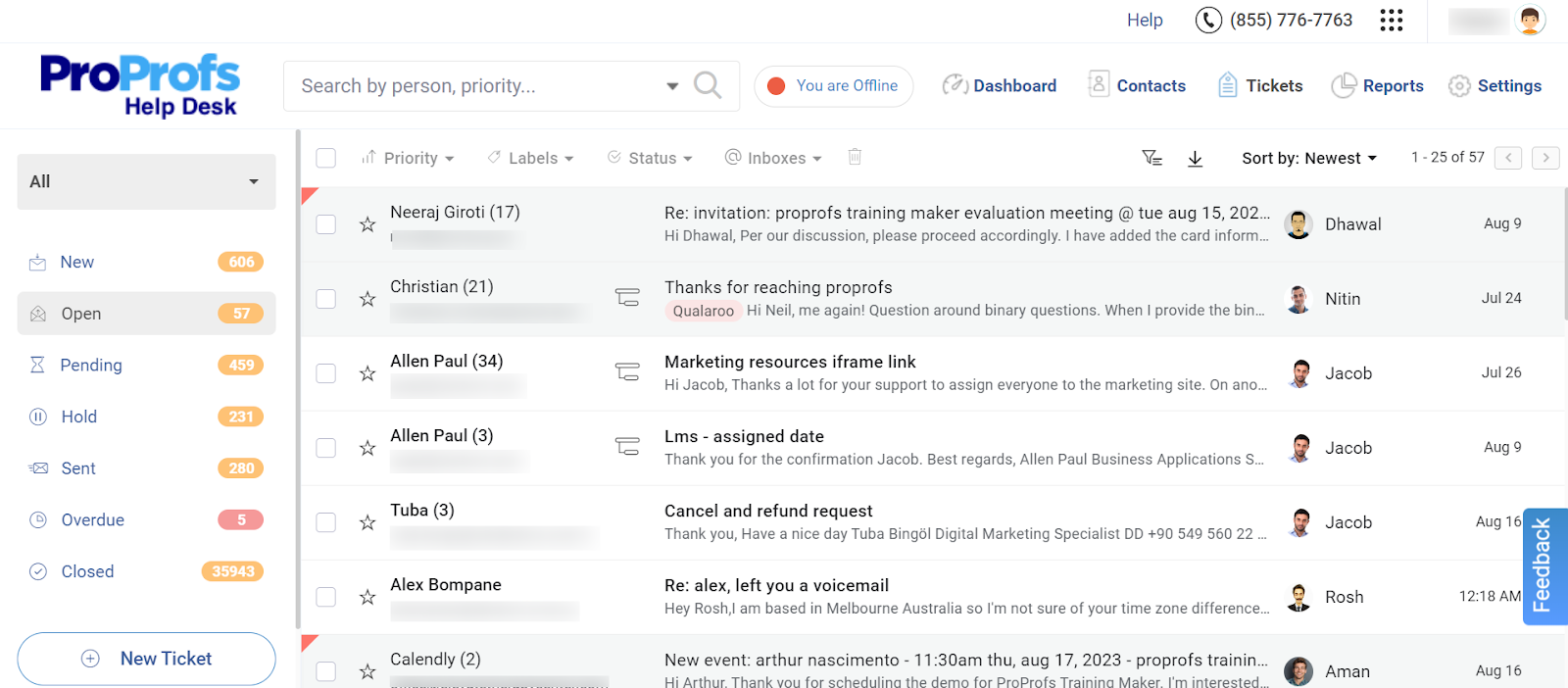
1. ProProfs Help Desk – Easiest AI Help Desk for Shared Inboxes, Ticket Workflow Automation, and Scaling Support Teams
I’ve been using ProProfs Help Desk for more than three years now, and it has significantly streamlined our customer support operations. The centralized dashboard allows me to efficiently track and manage all incoming support requests, ensuring that no customer inquiry is overlooked. Its canned response feature is amazing and has dramatically improved response times.
The best thing is that it seamlessly integrates with ProProfs Knowledge Base, allowing my customers to find answers instantly and reducing our ticket volume significantly, while ProProfs Chat gives them a way to get a real-time reply for anything that isn’t covered in an article. Plus, its AI and automation features, like AI ticket summaries, response suggestions, and ticket escalations, are great for speeding up issue resolution and improving customer satisfaction.
Also, its robust reporting and analytics tools provide valuable insights into agent performance, ticket volume, and customer satisfaction levels, allowing me to identify areas for improvement and make data-driven decisions.
Pros:
- Simple UI that doesn’t require any extensive training
- Canned responses to provide faster, more accurate answers to customers
- Automatic ticket assignment to optimize the workload distribution
- Get ProProfs Help Desk, Live Chat, Survey Maker, and Qualaroo with the Customer Delight Suite
Cons:
- Dark user interface option is not available
- No downloadable or on-premise version
How ProProfs Help Desk Compares to Help Scout
ProProfs Help Desk is more workflow-driven than Help Scout, with a stronger built-in structure for handling tickets at speed. It suits teams that want practical AI-assisted responses, clearer ticket routing controls, and reporting that supports weekly process improvements. Help Scout stays better if you prefer a lighter, inbox-style approach.
User Rating: 4.9 (Capterra)
Pricing: A free plan is available for growing teams. Paid plan starts at $19.99/user/month.
2. HubSpot Service Hub – Best for HubSpot CRM Users
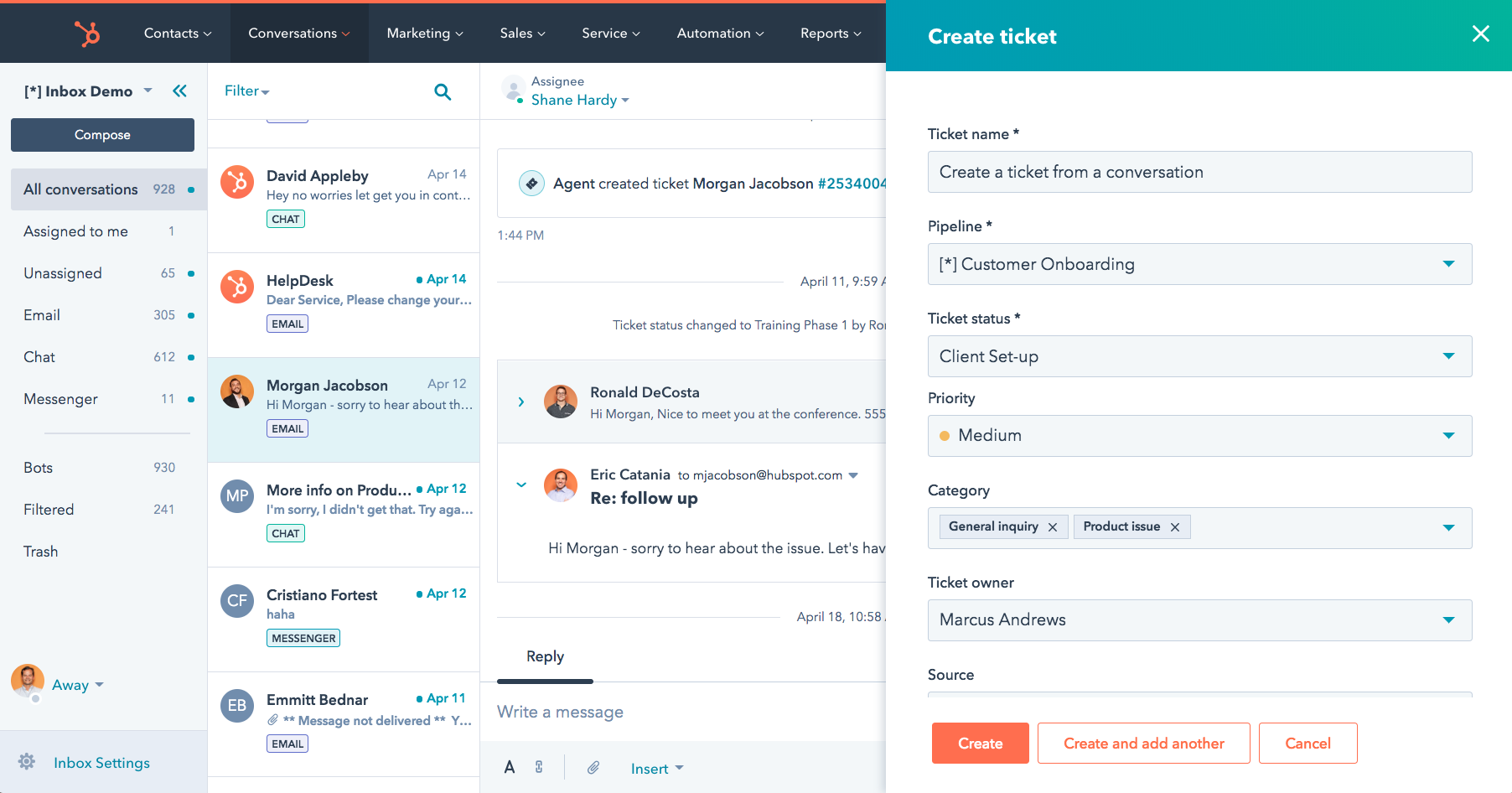
Image source: Hubspot Service Hub
HubSpot Service Hub is a comprehensive customer service platform that allows you to track and monitor crucial support performance metrics, like response times and resolution rates, to gain valuable insights into your team’s effectiveness. It is equipped with AI-powered features, such as chatbots and ticket summarization, automating routine tasks and freeing up your agents to focus on complex issues.
The built-in knowledge base allows you to create and organize helpful articles, enabling customers to find answers quickly and reducing the need for direct support. Plus, it seamlessly integrates with HubSpot’s Smart CRM, providing you with a 360-degree view of your customers, including their support interactions, purchase history, communication preferences, and more.
I would like to recommend this Help Scout alternative to organizations looking to optimize their support operations and create a seamless experience for both their agents and customers.
Pros:
- Seamless integration with tools like Jira and Slack
- Feedback surveys to proactively track and address customer concerns
- Performance metrics and reporting to track the team’s performance
- Built-in knowledge base to create, organize, and share articles, FAQs,etc
Cons:
- The starter plan comes with limited features.
- Functionalities are limited for businesses not utilizing the HubSpot CRM platform.
How HubSpot Service Hub Compares to Help Scout
HubSpot Service Hub makes more sense than Help Scout when support needs to sit inside the CRM context. It ties tickets to the full customer record, which helps with onboarding, renewals, and account-level work. Help Scout is easier if you want support to stay separate from CRM workflows.
User Rating: 4.4 (Capterra)
Pricing: Starts at $15/month (a free plan is available with limited features)
3. Freshdesk – Best for Multichannel Communications
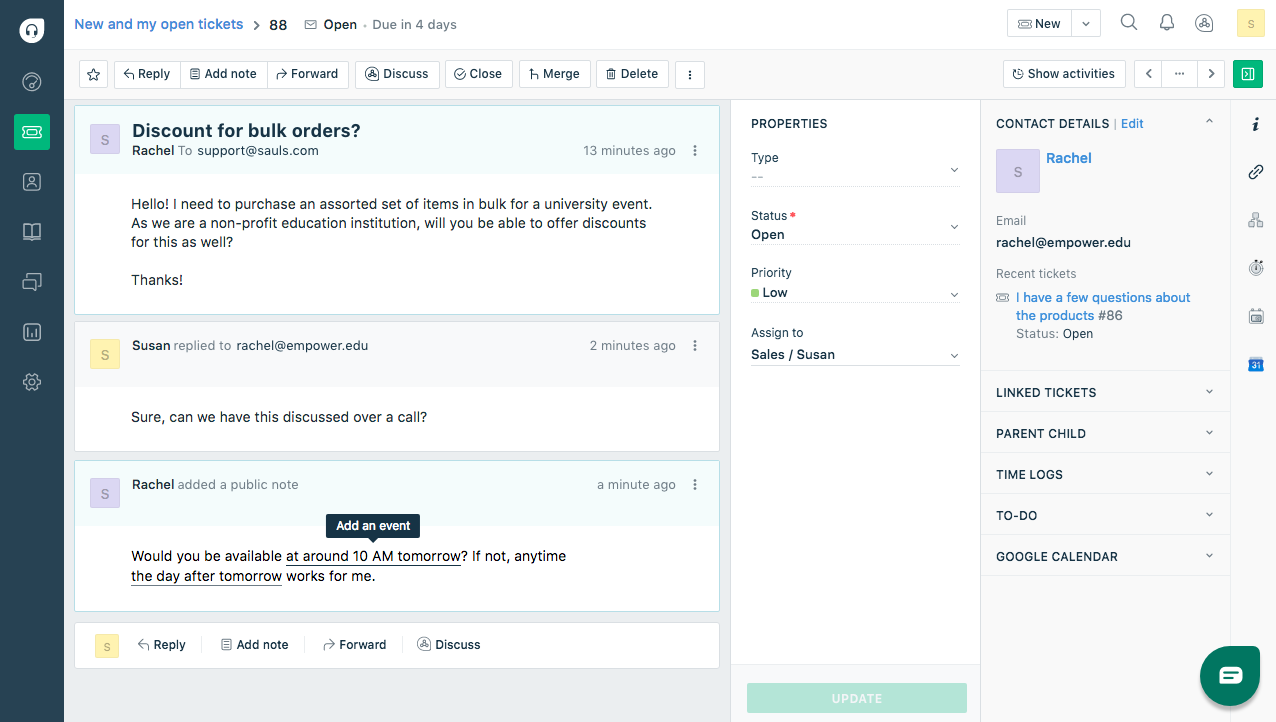
Image source: Freshdesk
Freshdesk is a customer service software that simplifies customer support, making it easier to deliver exceptional service. With Freshdesk, you can track and manage all your incoming support tickets from various channels – email, social media, phone – in one convenient inbox. This eliminates the need to juggle multiple platforms, saving you time and effort.
Freshdesk also offers a host of features to boost agent productivity. Canned responses help you provide quick, consistent answers to common questions, while the ability to split complex tickets into smaller tasks ensures efficient resolution. Plus, you can engage with customers in real-time using live chat, providing immediate support and improving satisfaction.
It also offers intelligent ticket assignment automatically to route tickets to the right agents, ensuring optimal workload distribution and faster response times. Freshdesk, in my opinion, is an all-in-one solution for delivering excellent customer service and nurturing strong customer relationships.
Pros:
- Intelligent ticket assignment to streamline ticket management
- Live chat to offer immediate support and improve satisfaction
- Parent-child ticketing to efficiently manage complex cases
- Custom SSL certificates to protect the support domain or vanity URL
Cons:
- Limited customization options
- AI features may require additional payments
How Freshdesk Compares to Help Scout
Freshdesk is typically a better fit than Help Scout when you need broader channel coverage and more options for routing and automation. It works well for teams scaling volume across multiple touchpoints. Help Scout can still win if most of your support is email-first and you value simplicity.
User Rating: 4.5 (Capterra)
Pricing: Starts at $15/user/month.
4. Groove – Best for Reports & Analytics
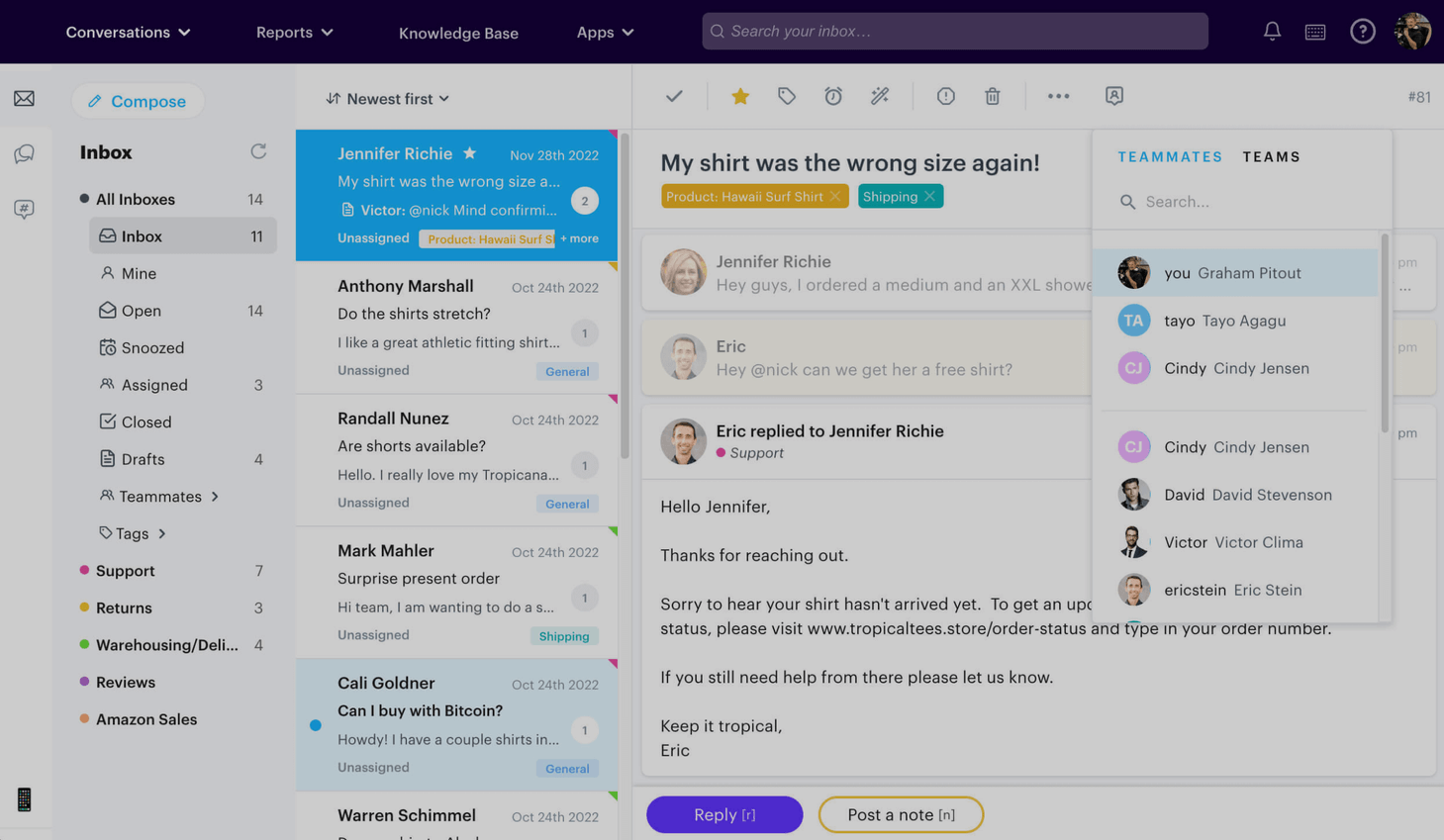
Image source: Groove
Groove made it easy for our team to stay organized and respond to customers quickly. This Help Scout alternative offers a centralized platform for customer support teams, featuring an intuitive shared inbox that facilitates seamless collaboration and prioritization of customer inquiries.
Groove excels in delivering powerful reports and analytics, providing insightful data to drive informed decision-making. Its real-time support is further enhanced by the live chat feature, fostering personalized customer interactions.
Plus, Groove’s native integrations with popular productivity tools consolidate workflows, promoting efficiency and eliminating the need to switch between applications. For those looking to boost their customer support, I suggest giving Groove a try.
Pros:
- Private internal notes to promote collaboration between team members
- Performance metrics to gain valuable insights into your team’s performance
- Round Robin assignment for the seamless distribution of tickets
- intuitive interface to ensure efficient management of tickets
Cons:
- AI features are limited to higher plans
- There’s no option to filter tickets by date
How Groove Compares to Help Scout
Groove feels closest to Help Scout in daily use, but leans more into team visibility and performance tracking. It is a solid pick if you want a lightweight shared inbox with stronger reporting discipline. Help Scout may feel better for relationship-heavy, conversation-led support.
User Rating: 4.5 (Capterra)
Pricing: Starts at $12/month (a free plan is also available).
5. SupportBee – Best for Robust Ticket Categorization
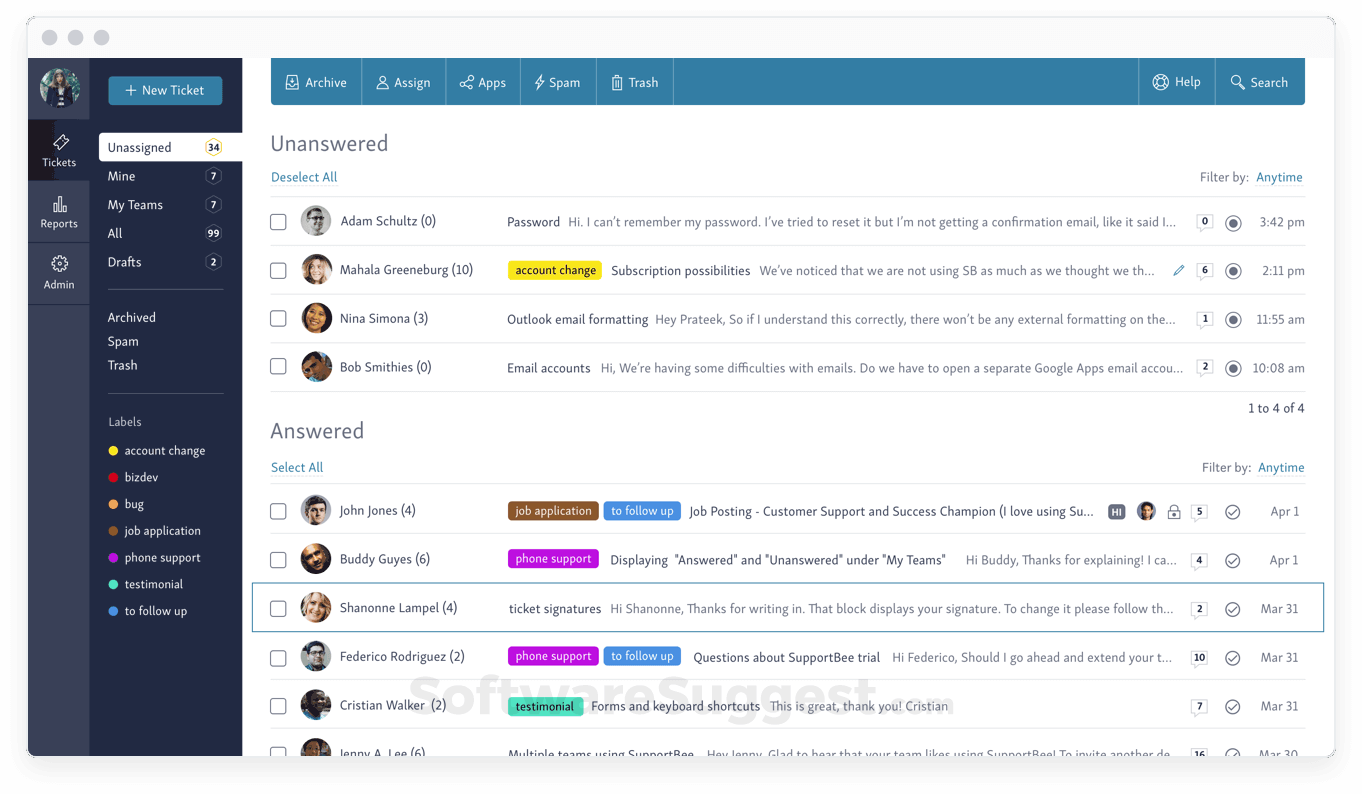
Image source: SoftwareSuggest
SupportBee offers a comprehensive solution for teams looking to streamline their email-based customer support. Its robust ticketing system brings order to the chaos, helping you organize, prioritize, and collaborate on customer inquiries effectively.
SupportBee eliminates the hassle of dealing with endless email threads, providing a centralized platform where your team can collaborate and respond to customers efficiently. Plus, the integrated knowledge base empowers customers to find answers on their own, reducing support ticket volume.
And since it’s designed for the modern workplace, you can access it from your desktop, mobile device, or even your existing email client, giving your team the flexibility to work how they want. If you’re looking for a simple yet powerful tool to improve your email support, SupportBee is worth checking out.
Pros:
- Seamless integration with popular software applications
- Simple and easy to use
- Centralized platform for collaborating and responding to customers efficiently
- Categorization functionality to keep track of ticket status
Cons:
- Customization options are limited
- The reporting functionality lacks the depth
How SupportBee Compares to Help Scout
SupportBee is more stripped down than Help Scout and works best when you want structured email support without paying for extras you will not use. It prioritizes organization and categorization over bells and whistles. Help Scout is often the better choice if polish matters more.
User Rating: 4.4 (Capterra)
Pricing: Starts at $20/month.
6. JitBit Helpdesk – Best for Mobile-Based Customer Support
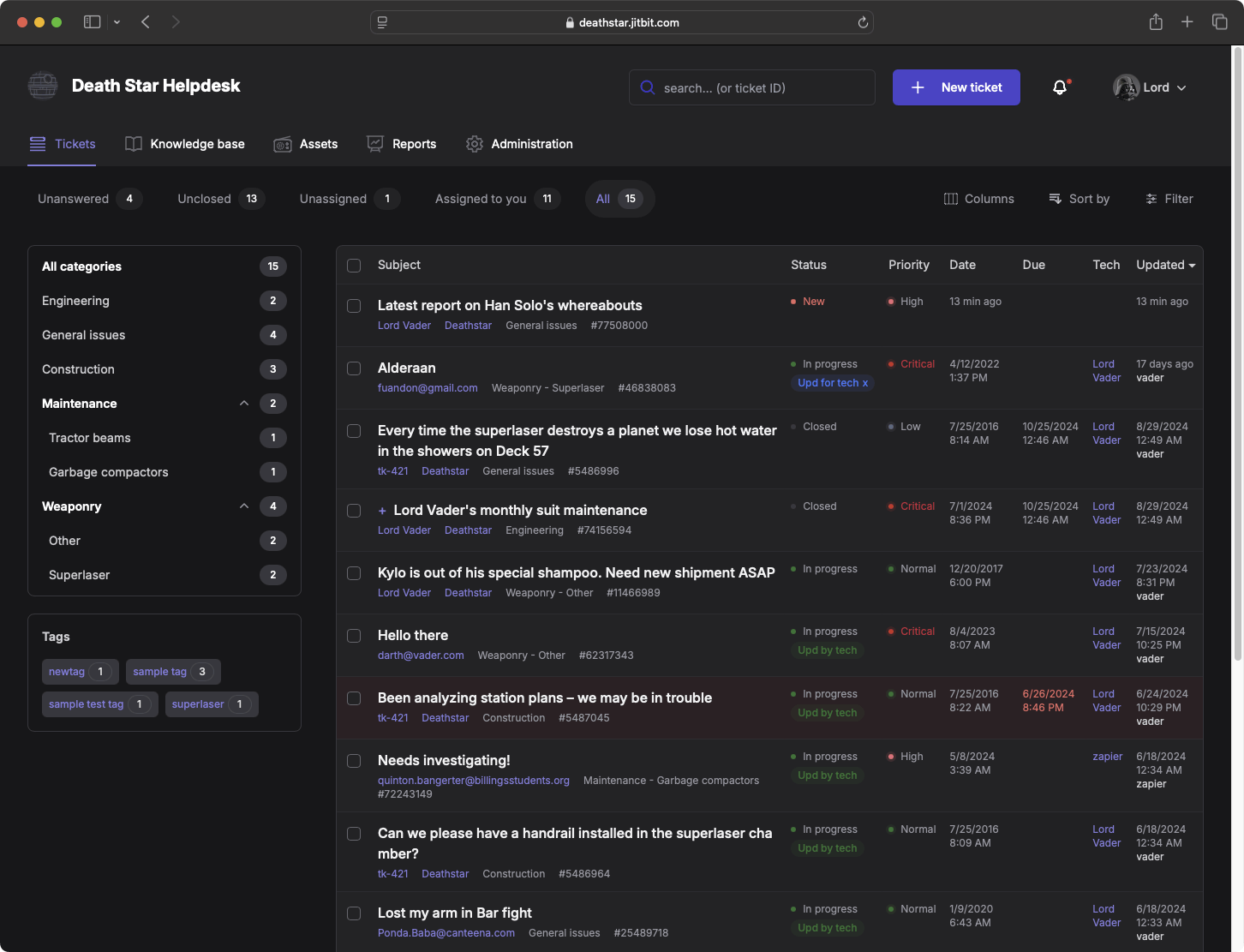
Image source: Jitbit
Jitbit Help Desk is another robust alternative to Help Scout that offers a streamlined and efficient ticketing system designed to simplify customer support operations. Available in both SaaS and on-premises versions, Jitbit seamlessly integrates with existing tools like email, Active Directory, and Google Drive, ensuring a cohesive workflow.
The tool also includes features such as live chat, integrations, and chatbot functionality. Plus, it leverages AI capabilities to generate automated responses based on knowledge base articles, freeing up agents to focus on complex issues.
Also, it automates routine tasks through powerful triggers that handle replies, assignments, and due dates, enhancing overall efficiency. I’m particularly impressed with its free mobile apps for iOS and Android that allow your team to view, reply, and manage tickets on the go, even with slower connections.
Pros:
- Free iOS and Android apps for on-the-go support
- LLM technology for automated, knowledge-based replies
- Knowledge base integration for self-service and agent assistance
- Live chat for real-time support and quick answers
Cons:
- Limited integration options
- The desktop interface isn’t as user-friendly as the mobile version
How JitBit Helpdesk Compares to Help Scout
JitBit is a stronger alternative than Help Scout for internal service desks and IT-style requests, especially if you want an on-premise option. It is built around structured request management rather than customer conversations. Help Scout fits better for customer-facing support that stays simple.
User Rating: 4.5 (Capterra)
Pricing: Starts at $24/month.
7. Kustomer – Best for CRM Capabilities
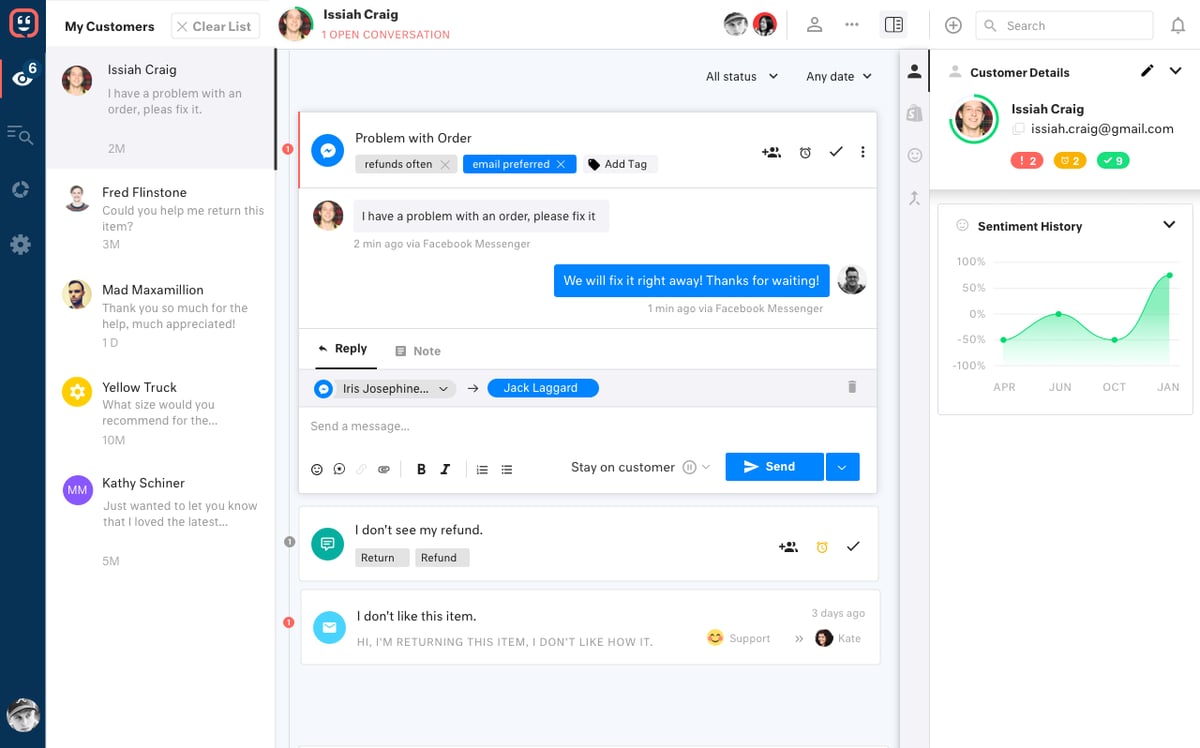
Image source: G2.com
Kustomer offers exceptional CRM capabilities, allowing businesses to effortlessly manage customer interactions and maintain detailed profiles. It lets you create a helpful, searchable help center right on your app or website so your customers can find answers on their own. This means less work for your team!
You can also build smart chatbots to handle common questions and free up your agents for more complex issues. The best part is you don’t need to be a tech expert to make these bots – it’s all done with a simple drag-and-drop tool.
Plus, this Help Scout alternative handles all your support channels in one place—email, chat, social media, even voice. This means a smoother experience for your customers and less confusion for your team. My experience with Kustomer has been fantastic! It’s simplified our support process and made both our team and customers happier. It’s a true win-win!
Pros:
- Voice features such as call recording and IVR to handle complex queries
- Custom push notifications to keep customers aware of delays and updates
- AI chatbots to deliver quick and accurate answers
- High scalability to support varying business needs
Cons:
- Obtaining timely support can be challenging at times
- Smaller teams might find it less useful
How Kustomer Compares to Help Scout
Kustomer goes beyond Help Scout by treating support like a CRM with deeper profiles and richer context across channels. It is a fit for larger teams with complex journeys. Help Scout is easier for small teams that want a clean, straightforward inbox without CRM-level depth.
User Rating: 4.6 (Capterra)
Pricing: Starts at $89/month.
8. Zendesk – Best for Enterprise Scaling
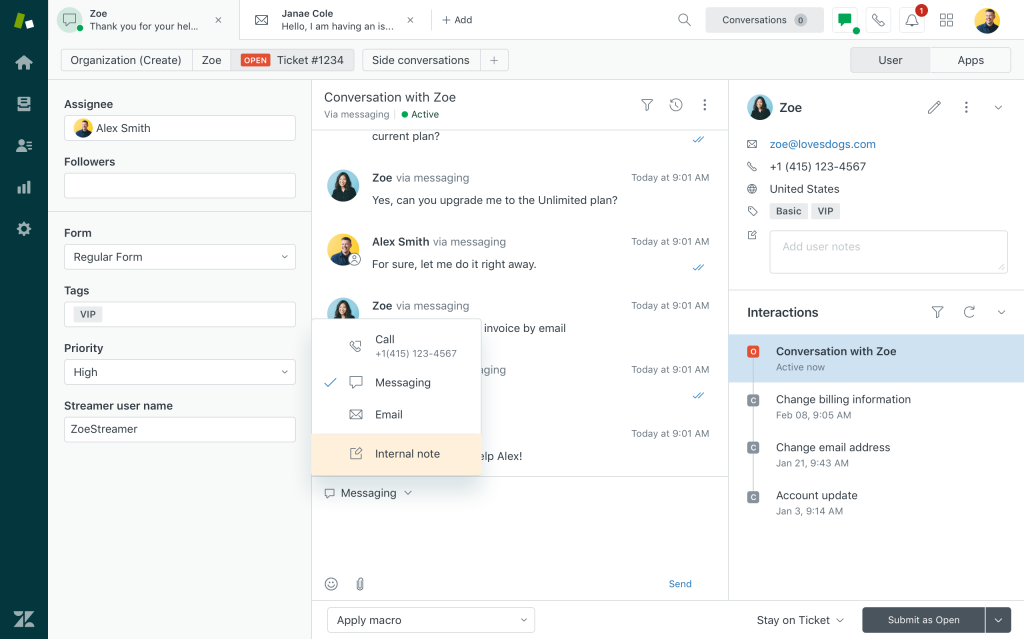
Image source: Zendesk
Zendesk is what I look at when support stops being “just answering emails” and starts running like an operation. It is built for higher ticket volume, multiple channels, and stricter response expectations. I like how it gives you control over routing, escalations, and SLAs, so tickets do not sit idle or bounce around without an owner.
What stands out is the visibility. With deeper reporting and flexible automation, it becomes easier to spot bottlenecks early, standardize workflows, and keep quality consistent as the team grows. If you are scaling quickly or supporting customers across several channels, Zendesk is a strong contender.
It also has a large marketplace of integrations, which helps when you need to connect support with CRM, billing, or product tools. For smaller teams, it can feel like more setup, but on a larger scale, it pays off.
Pros:
- Omnichannel support to manage conversations in one place
- Advanced automation for routing and escalations
- Powerful reporting to track trends and performance
- Large integration ecosystem for growing teams
Cons:
- Can feel complex for small, email-only teams
- Costs can rise as you add channels and advanced features
How Zendesk Compares to Help Scout
Zendesk is the step up from Help Scout when you need enterprise-grade workflows, tighter SLA governance, broader channel coverage, and deeper reporting. It is built for scale and consistency. Help Scout is usually better if you want to stay lean and low on configuration.
User Rating: 4.4 (Capterra)
Pricing: Starts at $19/month
9. Front – Best for High Collaboration Teams
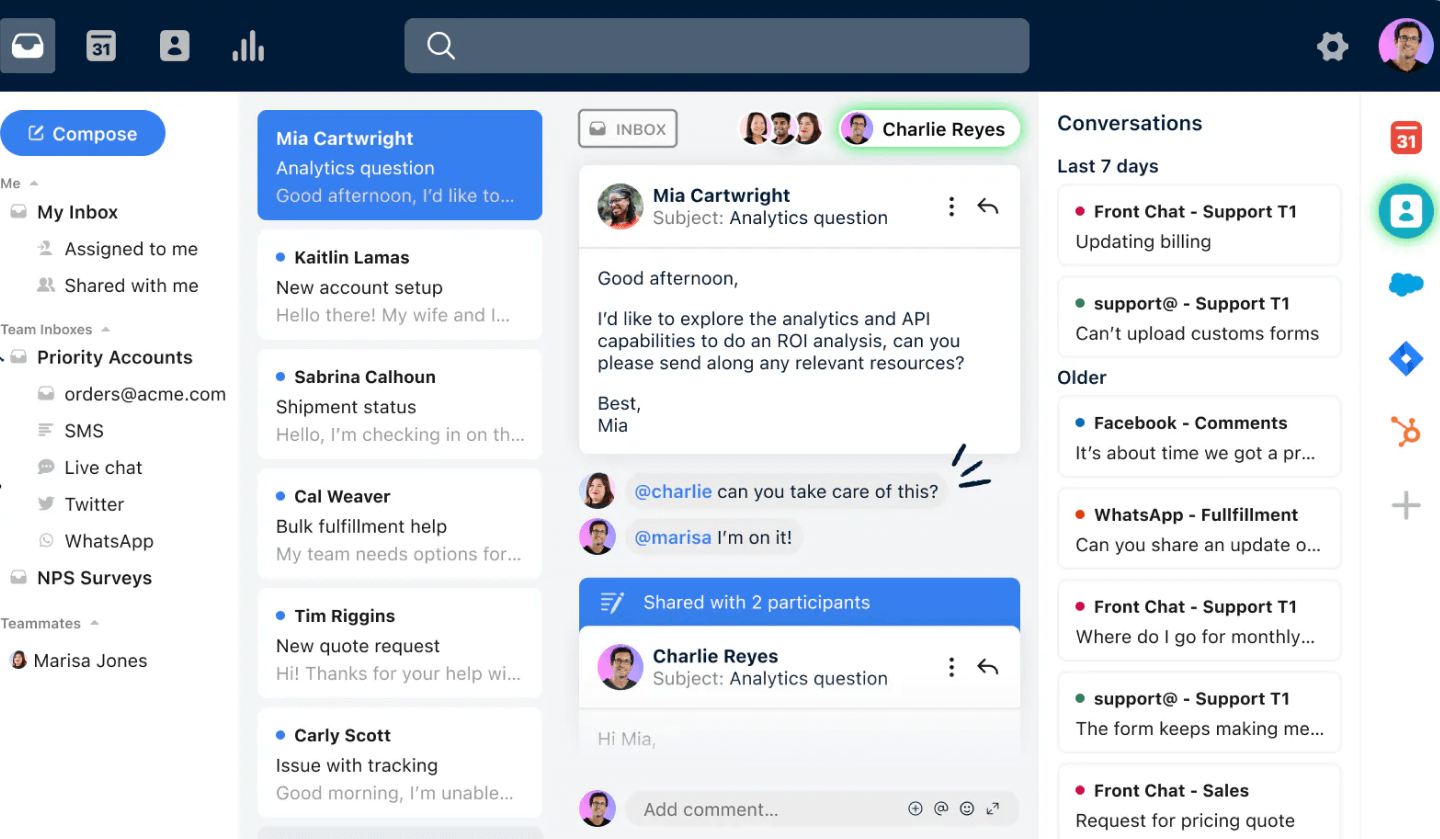
Image source: Front
Front is the tool I recommend when the biggest problem is collaboration, not ticketing. It keeps the shared inbox feel, but adds better ways for teams to work together when multiple people touch the same customer thread. Ownership stays clear, internal context stays inside the conversation, and you waste less time chasing updates across Slack.
It is especially useful for high-touch teams handling email plus messaging, where approvals and handoffs are common. I also like how it supports shared drafts and internal comments, so responses feel consistent even when several teammates contribute.
If your current setup creates duplicate replies or missed follow-ups, Front can tighten the workflow without feeling heavy. It has rules and automation to route messages, and reporting to keep an eye on response times and workload. For many teams, that mix of speed and coordination is the real upgrade.
Pros:
- Shared inbox built for team collaboration
- Internal notes and shared context to reduce back-and-forth
- Rules and automation to keep triage consistent
- Analytics to monitor workload and response performance
Cons:
- Pricing can get expensive for larger teams
- Some features depend on higher plans
How Front Compares to Help Scout
Front competes differently from Help Scout by focusing on collaboration inside customer conversations, especially when multiple teammates contribute, review, or approve replies. It is closer to a shared communications hub than a classic help desk. Help Scout fits better if you want ticket queues and support ops.
User Rating: 4.5 (Capterra)
Pricing: Starts at $25/seat/month
10. Hiver – Best for Gmail-Based Teams
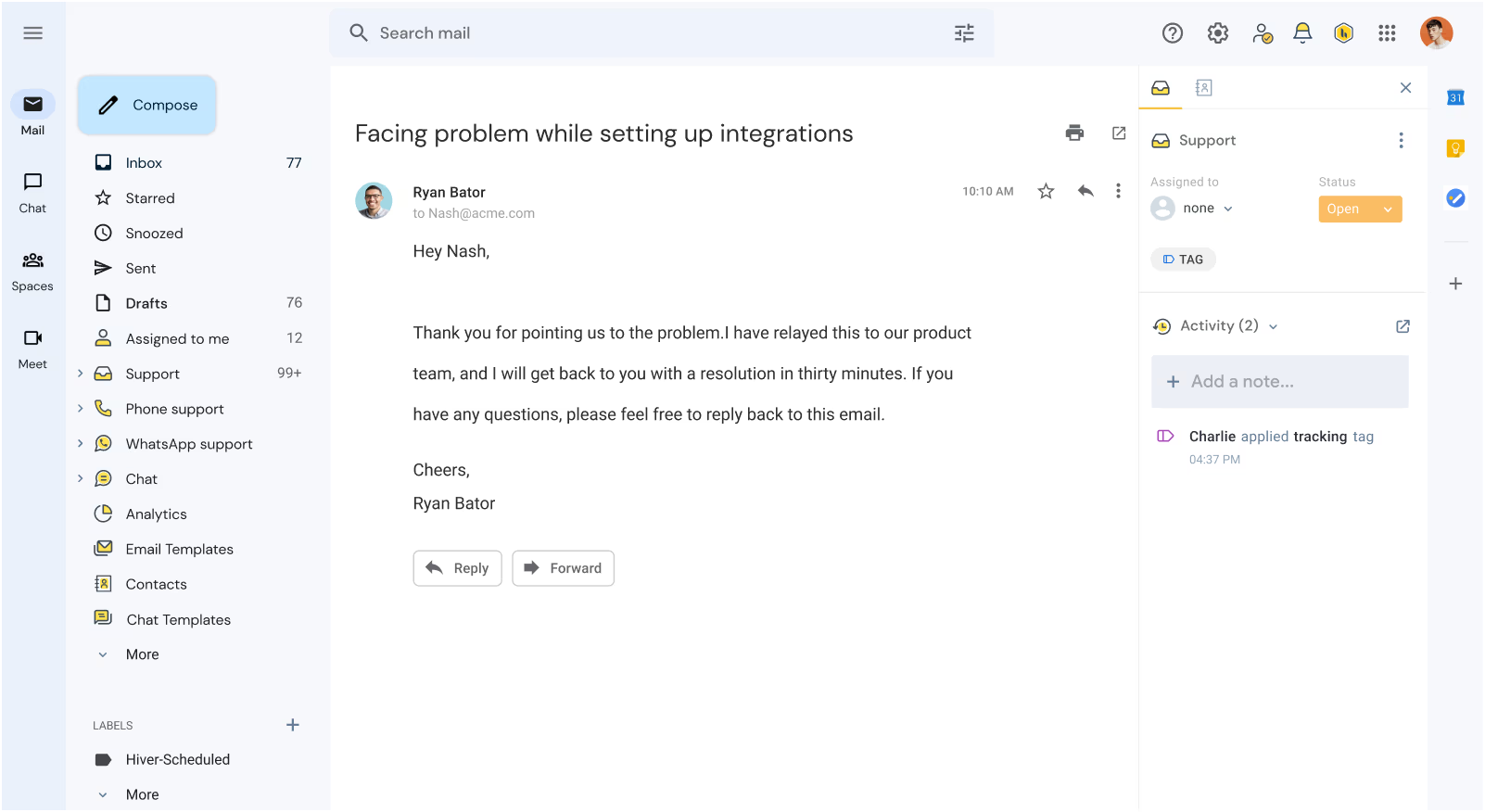
Image source: Hiver
If your team lives inside Gmail and you want structure without switching platforms, Hiver is a strong Help Scout alternative. It turns shared email into a workflow with assignments, tags, and collision alerts, so customers do not get duplicate replies and nothing slips through.
I like it for lean teams that want quick adoption and minimal training. It also works well for internal requests like IT or HR, where email threads get messy fast. You can set simple rules for routing and status tracking, which helps keep ownership clear.
If your goal is to stay in Google Workspace but run support more cleanly, Hiver is worth considering. It is not trying to be an enterprise suite, but it covers the essentials for day-to-day support. You also get basic analytics to see what is pending and how the team is performing.
Pros:
- Works inside Gmail for faster adoption
- Assignments and collision alerts to prevent duplicate replies
- Simple automation and routing for day-to-day workflows
- Good fit for internal requests as well as customer support
Cons:
- Best fit for Google Workspace teams
- Not as deep as enterprise tools for complex omnichannel setups
How Hiver Compares to Help Scout
Hiver is a practical alternative to Help Scout if your team lives in Gmail and you want accountability without switching tools. It adds assignment and tracking directly in the inbox. Help Scout is stronger if you prefer a dedicated help desk workspace separate from your personal email.
User Rating: 4.7 (Capterra)
Pricing: Starts at $25/user/month (a free plan is available with limited features)
How to Choose a Help Scout Alternative
If you’re switching from Help Scout, don’t start by comparing feature lists. Start with why you want to switch, then choose the tool that fixes those gaps without adding complexity or unexpected costs.
1. Start With Your Switching Trigger
Most teams leave Help Scout for a few specific reasons. Identify your top two and evaluate tools through that lens. Common triggers include pricing unpredictability, limited omnichannel support, basic automation and reporting, or tickets slipping through due to unclear ownership.
2. Look for Pricing You Can Predict
Before you fall in love with a tool, verify how it scales. Check whether pricing is per agent or usage-based, and whether essentials like reporting, automation, and knowledge base are locked behind higher tiers. The best fit is the one that won’t create budget surprises during growth or seasonal spikes.
3. Match Channels to How Customers Reach You
Help Scout works well for email-first support, but many teams need more. Make sure the alternative supports the channels you rely on today, and the ones you’ll likely add next, like WhatsApp, voice, or social messaging. The key is whether everything shows up in a single, unified view, so agents don’t have to jump between tools.
4. Test Ticket Ownership, Routing, and SLAs
This is where a “nice inbox” turns into a real help desk. Look for clear ownership, smart assignment (round robin or skill-based), and the ability to manage deadlines through SLAs and escalations. If your current pain is missed tickets, this is a deal-breaker.
5. Confirm Reporting Depth Before You Commit
A clean UI is great, but you also need visibility. Make sure you can track first response time, resolution time, backlog trends, and team performance. If reporting feels shallow, support leads end up guessing instead of improving.
6. Choose Practical AI That Reduces Workload
If AI matters, focus on outcomes, not buzz. The most useful AI features are ticket summaries, reply drafts based on past tickets or knowledge base content, and auto-tagging and categorization. Anything beyond that is optional unless you’re handling very high volume.
7. Prioritize Self-Service to Reduce Tickets
Most teams don’t want a tool that helps them answer more tickets. They want fewer tickets. Check whether the alternative offers a solid knowledge base and help center experience (built in or through a smooth integration) so customers can solve common issues without contacting support.
8. Validate Vendor Support and Migration Help
Switching tools usually involves setup questions, workflow tweaks, and data migration. Look for responsive vendor support, strong onboarding resources, and easy import for conversations, users, and ticket history.
Help Scout Alternatives: My Top 3 Picks
If scanning a full list feels like too much, these three picks narrow the decision fast.
1. ProProfs Help Desk
ProProfs Help Desk fits teams that need clearer ownership, faster replies, and fewer repetitive tickets without adding heavy admin work. AI-powered ticket summaries and response suggestions reduce handling time, while automation and assignments keep tickets from slipping. A built-in knowledge base also deflects common questions, helping the queue stay manageable.
2. Freshdesk
Freshdesk works well when support stops being email-only, and customers start reaching out across multiple channels. It brings email, chat, phone, and social into a single workflow, then supports it with routing and automation that keep volume organized. This helps teams avoid tool-hopping and maintain one consistent operational view.
3. Zendesk
Zendesk suits support operations that need tighter process control as complexity grows. SLAs, escalations, automation, and deeper reporting make it easier to enforce response standards and spot bottlenecks early. For teams scaling quickly or managing strict service expectations, Zendesk handles structure and consistency more reliably.
FREE. All Features. FOREVER!
Try our Forever FREE account with all premium features!
Move Beyond Help Scout as Your Support Needs Grow
When Help Scout starts feeling less like a simple shared inbox and more like something you have to manage around, it is usually because volume has changed the workflow. Tickets sit without a clear owner, two people reply to the same thread, and repeated questions keep filling the queue. Reporting can also feel a bit too light when you are trying to spot what is causing the backlog.
That is when it helps to evaluate a help desk built for clearer routing, stronger accountability, and better visibility, without making the team learn a complicated system.
If you want my pick, I lean toward ProProfs Help Desk for teams that want structure without friction, with smart ticket assignment, canned responses, and automation that keeps queues moving.
Frequently Asked Questions

Why do teams look for Help Scout alternatives?
Most teams start looking when support outgrows an inbox workflow. Common triggers include costs that feel harder to forecast as contact volume rises, limited coverage for channels like WhatsApp or voice, lighter automation and SLAs, and reporting that does not clearly show what is slowing the team down. Internal requests are another driver.
What’s a reasonable price to pay for a Help Scout alternative?
There is no single “right” price. The best target is a plan that stays predictable as you scale without forcing upgrades for basics. Compare whether pricing is per agent or usage-based, then confirm what is included early, like automation, reporting depth, a knowledge base, and the integrations you rely on.
Do Help Scout competitors offer setup help and ongoing support?
Yes, most well-known alternatives offer onboarding resources plus email and chat support, and many add phone support or assisted migration on higher plans. What matters most is responsiveness during rollout, since switching tools usually involves imports, workflow tuning, and agent training.
FREE. All Features. FOREVER!
Try our Forever FREE account with all premium features!

 We'd love your feedback!
What did you like & how can we make it even better?
 Thanks for your feedback!
 Ask Your Question
Have a question? Get expert help to make your decision easier.