

Whenever I hear the term “cloud-based,” three things come to mind – 24/7 access, streamlined operations, and greater flexibility.
As more and more customer service teams embrace innovation, the demand for cloud-based ticketing systems is at an all-time high. If you, too, are looking to shift your help desk from the confines of office walls to the cloud, I have some great options for you!
Allow me to share the seven best cloud help desk systems selling like hotcakes in the market.
What Is a Cloud Help Desk?
A cloud-based ticketing system is support software hosted entirely online, so your team logs in from a browser instead of installing anything on a local server. Tickets, customer data, and reports live on the vendor’s infrastructure, and updates roll out automatically without your IT team lifting a finger.
The shift toward this model is well underway. A study by Gartner in 2022 found that 51% of enterprise IT spending on application software, infrastructure, and business process services would shift to the cloud by 2025, up from 41% just three years earlier. Support ticketing has followed that same curve, and a cloud based service desk is now the default starting point for most teams, not the exception.
10 Cloud-Based Help Desk Software to Consider This Year
As a support manager, I have experimented with both on-premise solutions and cloud-based systems. But I would always choose the latter for its flexible pricing, automated data backups, and security.
All the tools mentioned in this list have been a part of my team’s “toolkit” at some point in the last few years. A few tools were also recommended by peers when they learned I was writing this blog. Let’s quickly explore each tool and its pricing.
| Tool | Best For | Pricing | G2 Rating |
| ProProfs Help Desk | Easiest AI Help Desk for Shared Inboxes, Ticket Workflow Automation, and Scaling Support Teams | A free plan is available for growing teams. Paid plan starts at $19.99/month. | 4.7 |
| Zendesk | Self-service and enterprise-scale cloud support | Starts at $19/agent/month | 4.3 |
| Freshdesk | Omnichannel cloud ticketing | Starts at $15/agent/month | 4.4 |
| Freshservice | Cloud IT service desk and ITSM | Starts at $19/agent/month | 4.6 |
| Zoho Desk | Multichannel support inside the Zoho ecosystem | Starts at $14/user/month | 4.4 |
| Help Scout | Simple, clean shared inbox | Free plan for up to 5 users; paid plans start at $25/user/month | 4.4 |
| Hiver | Gmail-based cloud ticketing | Free plan available; paid plans start at $25/user/month | 4.6 |
| LiveAgent | Social media and live chat ticketing | Starts at $15/agent/month | 4.5 |
| HappyFox Help Desk | Reporting and analytics | Starts at $24/agent/month | 4.5 |
| Jira Service Management | Cloud ITSM for dev and IT teams | Free plan for up to 3 agents; paid plans start at $20/agent/month | 4.3 |
1. ProProfs Help Desk – Easiest AI Help Desk for Shared Inboxes, Ticket Workflow Automation, and Scaling Support Teams
ProProfs Help Desk is a best-in-class cloud help desk software that my team can access 24/7, whether in the office, at home, or in the field.
After investing in this tool, we have been able to reduce support costs, human errors, and agents’ workload. Thanks to its rich automation capabilities!
Beyond the usual ticket assignments, notifications, and survey sharing, AI now handles a fair number of straightforward tickets from start to finish, so my agents open their queue to a shorter, more relevant list each morning. I would suggest you even build a custom chatbot for your website via ProProfs Chat to assist visitors and customers with common questions related to product availability, refunds, pricing, etc., while ProProfs Knowledge Base takes care of the FAQs and how-to content customers can browse on their own time.
Also, my agents can see who is working on which ticket with the Collision Detection feature. This ensures there is no duplicity of work and everyone can work in sync. When a ticket does land with an agent, a summary and a suggested reply are usually already sitting there, saving the back-and-forth of reading through a long thread first.
If you are a support manager, you will love how easy it is to filter help desk reports to monitor agent performance for any given day, week, or month. All the data you need is right at your fingertips!
Pros:
- Online knowledge base to empower customers and reduce your ticket volume
- CSAT surveys to measure the service quality and identify improvement opportunities
- AI-drafted replies and ticket summaries cut down on manual reading and writing
- Live chat to assist customers in an instant
- A simple, email-like interface will help your team get started in a matter of minutes
- Dedicated mobile app to offer support on the move
Cons:
- No downloadable or on-premise deployment option
- Dark mode isn’t available yet
Pricing:
A free plan is available for growing teams. Paid plan starts at $19.99 /month.
Here’s what that looks like for a real business.
USA saddle retailer HorseSaddleShop.com needed a way to answer detailed, time-sensitive questions from customers who could not always call in, especially buyers overseas. Bringing live chat into their cloud support setup gave the team a channel that worked around the clock, and automatic translation meant international customers got answers in their own language without anyone on the team learning a new one. Not every chat ended in a sale, but the team found it consistently opened the door to future orders, proof that a reliable cloud channel earns its cost even when it is not closing a deal on the spot.
2. Zendesk – Best for Self-Service
I’ve had the opportunity to use Zendesk, and it’s truly a standout when it comes to empowering customers with self-service features. The help center and community forum functionalities were a game-changer for my business and customers alike.
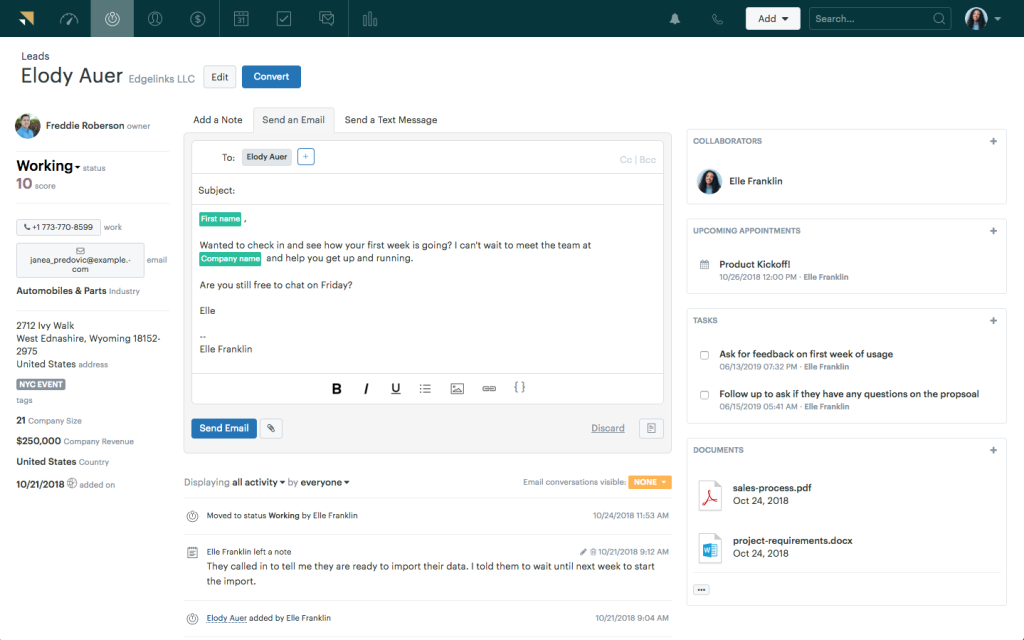
Zendesk’s help center is a powerful tool for creating a self-service knowledge base. It allowed us to craft a repository of articles, FAQs, and guides, making it easy for customers to find answers to their questions without contacting support.
The community forum, on the other hand, fostered a sense of community among our customers. They could engage with one another, share insights, and seek advice. This not only reduced our support team’s workload but also created a vibrant user community.
Overall, I think it’s a valuable asset for any business committed to exceptional customer support. However, Zendesk’s pricing might be a concern, especially if you are on a tight budget.
Pros:
- Zendesk seamlessly integrates with Slack to ensure your agents can receive timely notifications
- AI-powered recommendations help customers quickly find the help they need
- Automated ticket assignments to ensure better work accountability
- Schedule reports to keep key stakeholders in the loop
Cons:
- Highly expensive plans make Zendesk an unfit option for small businesses
- The tool comes with a steep learning curve
Pricing:
Starts at $55/user/month
3. Freshdesk – Best for Reporting & Analytics
Freshdesk has been a pivotal tool in my customer support endeavors, thanks to its remarkable omnichannel capabilities.
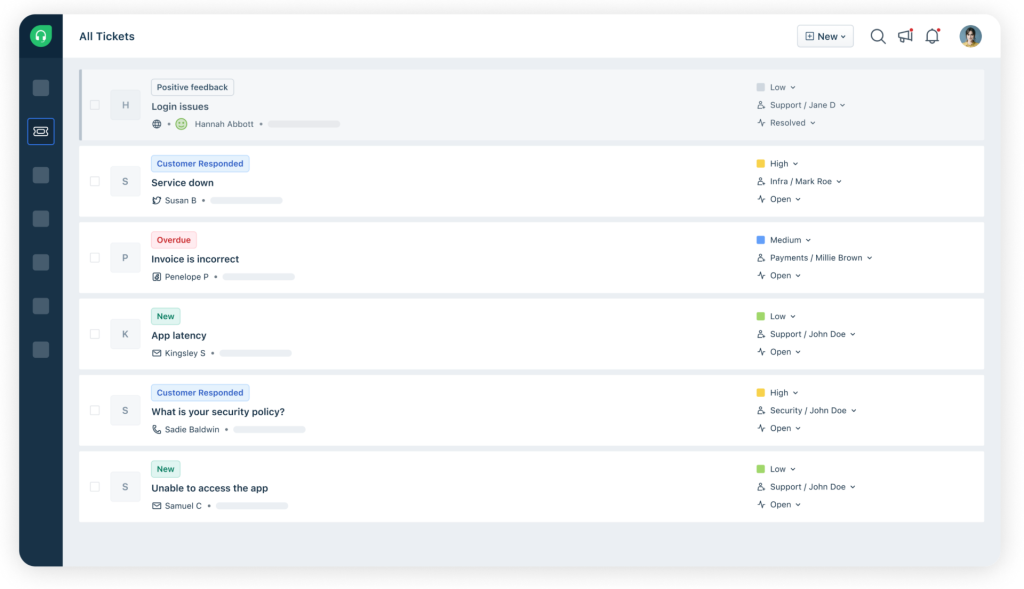
It seamlessly integrated various communication channels, allowing us to manage customer inquiries from email, live chat, phone, social media, and more, all within a single platform.
One of its standout features is the unified inbox, which consolidates messages from all channels into one place. This not only streamlines our response process but also ensures that no customer query falls through the cracks.
What I found particularly valuable is the ability to automate and route tickets intelligently, ensuring they reach the right team members for prompt resolution. This level of automation has significantly boosted our efficiency.
Freshdesk’s robust reporting and analytics provide valuable insights into our support team’s performance, helping us continuously improve our service quality. In summary, Freshdesk’s omnichannel capabilities make it an invaluable asset for businesses aiming to deliver exceptional and efficient customer support across various platforms.
Pros:
- Canned responses to provide consistent replies to common queries and requests
- WhatsApp integration lets you track complaints shared via WhatsApp
- Auto-assign tickets based on agent skills and availability
- Ticket ownership can be shared by multiple agents for collaborative issue resolution
Cons:
- A wide range of features can be overwhelming for some users
- The Growth plan does not offer some must-have features like custom roles, skills-based routing, etc.
Pricing:
Starts at $15/user/month.
4. Freshservice – Best For Cloud IT Service Desk and ITSM
Freshservice came into the picture when we needed a cloud system built specifically for IT requests, not general customer support. Incident management, asset tracking, and change requests all lived in the same place instead of being bolted onto a support-first tool.
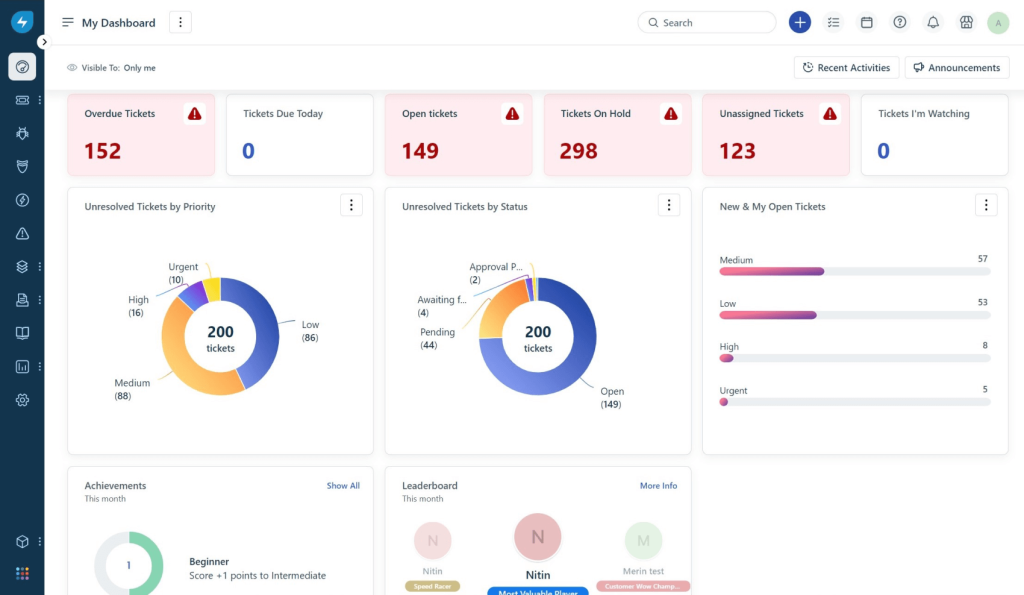
What impressed me most was how quickly it got up and running. The interface felt modern without a heavy setup process, and automation for ticket routing and prioritization meant IT requests did not sit in a general queue waiting to be triaged manually.
It leans clearly toward IT service management rather than customer-facing support, so teams handling both may end up running two tools side by side.
Pros:
- Purpose-built for IT service management, not just customer support
- Fast, modern setup with a shallow learning curve
- Strong automation for ticket routing and prioritization
- Asset and incident management built into the same platform
Cons:
- Geared toward IT and internal service desks, less suited to customer support alone
- Deeper ITSM features sit behind higher tiers
Pricing:
Starts at $19/agent/month.
5. Zoho Desk – Best for Multichannel Support
Zoho Desk has been a cornerstone of my customer support strategy, thanks to its impressive multi-channel capabilities. This tool offers a comprehensive solution for handling customer inquiries across various communication channels seamlessly. Whether it’s email, live chat, phone, or social media, Zoho Desk brings them all together in one unified platform.
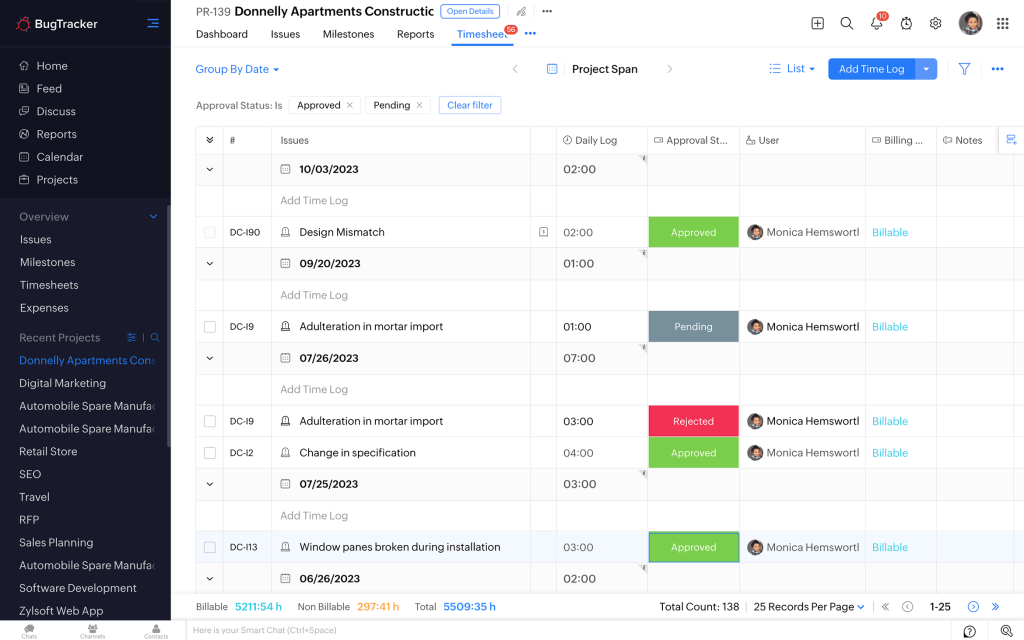
What’s truly remarkable is its ability to automate and streamline responses across these channels. It assigns and routes tickets intelligently, ensuring that inquiries are directed to the right team members for prompt resolution. This level of automation has been a game-changer for my team’s efficiency.
Zoho Desk also offers real-time engagement, allowing us to interact with customers on their preferred channels without switching interfaces. The analytics and reporting features provide insights into our team’s performance, helping us continuously improve our support quality.
In essence, Zoho Desk’s multi-channel capabilities make it an invaluable tool for businesses seeking a seamless, efficient, and customer-centric support system.
Pros:
- Web forms to gather relevant information about tickets
- Auto-tag tickets using an AI-powered assistant called Zia
- Zoho Desk seamlessly integrates with Zoho CRM, giving agents a better view of every customer
- Ready-to-use templates for ticket forms, email responses, and notifications
Cons:
- The live chat feature is only offered in the Enterprise plan
- Zoho Desk’s mobile app lags at times
Pricing:
Starts at $14/user/month.
6. Help Scout – Best for Knowledge Base
Having used Help Scout in the past, I must emphasize its impressive knowledge base feature.
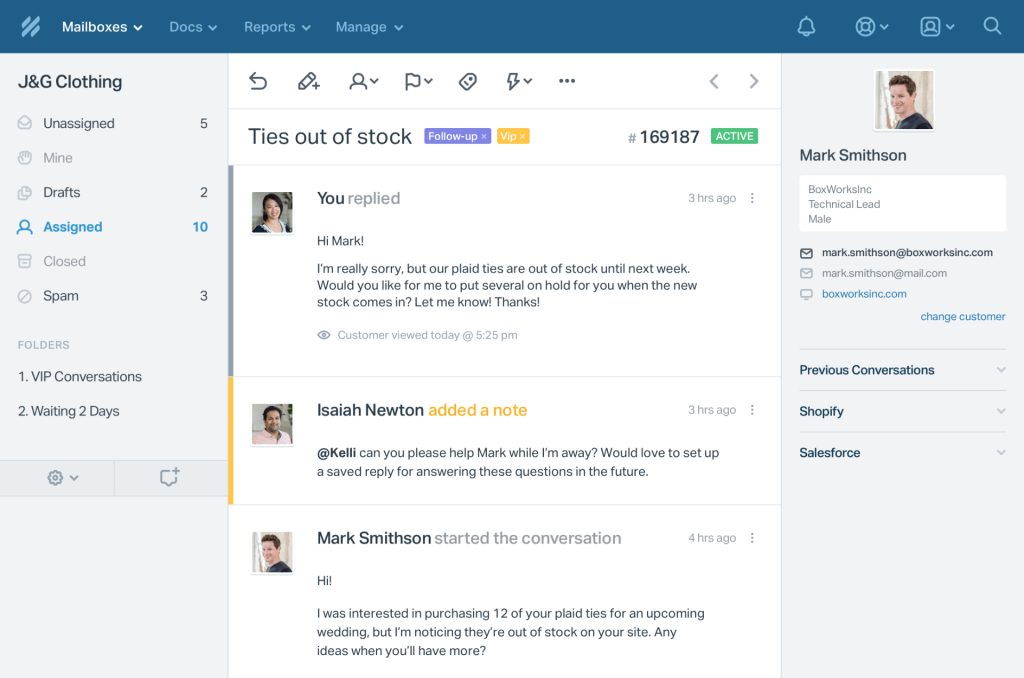
Help Scout is not just a reliable customer support platform; it’s also a robust tool for creating and managing a comprehensive knowledge base. With it, I could easily build a self-service resource library filled with articles, FAQs, and guides to assist both customers and my support team.
What I found particularly beneficial was the intuitive editor, which allowed me to craft and format articles seamlessly. Help Scout’s knowledge base is highly customizable, enabling me to match it to my brand’s aesthetics.
I think it’s not just about creating content; it’s also about tracking its performance. With analytics, I could gain insights into which articles were most helpful and make data-driven improvements.
Pros:
- Channel-specific reports to monitor tickets generated via different communication channels
- Live chat to instantly connect with prospective and existing customers
- Agents can receive browser notifications on Chrome, Safari, or Firefox
- Custom fields to store additional information for each conversation
Cons:
- Social media channels are not available in the Standard plan
- More in-depth metrics and statistics should be offered
Pricing:
Starts at $20/user/month
7. Hiver – Best for Gmail-Based Help Desk
I’ve had the pleasure of using Hiver – a simple online ticketing system for email collaboration and management. Hiver seamlessly integrated with Gmail, transforming our inbox into a shared workspace.
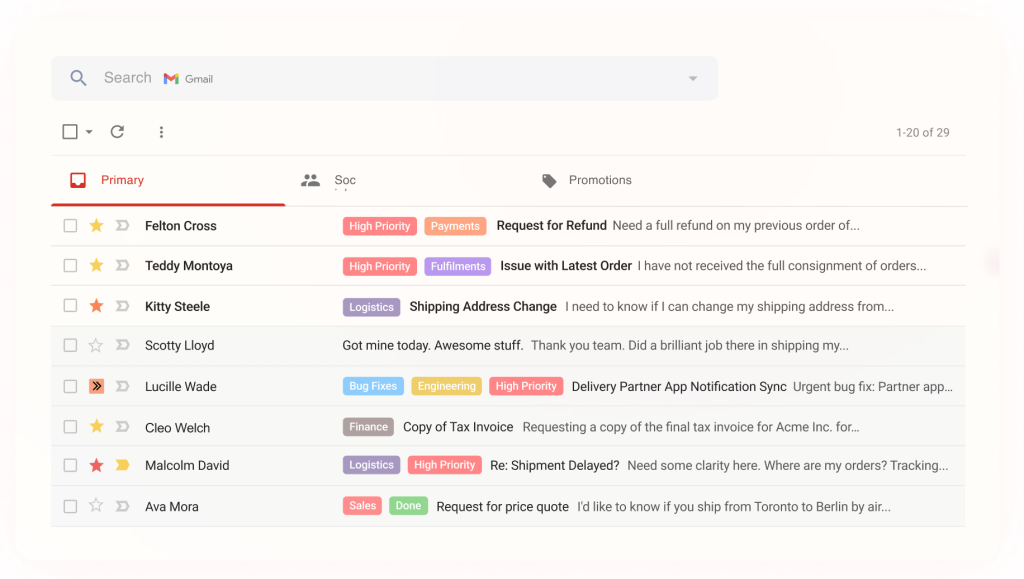
What set it apart was the ability to assign emails as tasks, which was incredibly useful for team collaboration. It was like having a shared to-do list right within our inbox.
One of Hiver’s standout features is the shared inbox function, enabling multiple team members to access and work on the same emails. This ensures that nothing slips through the cracks and everyone stays on the same page. Hiver also offers robust email analytics, providing valuable insights into team performance and response times.
On the downside, I recommended Hiver to a friend, and they immediately told me it won’t work for them as they do not use Gmail. So if you, too, use a separate email client, Hiver may not be the best option for you.
Pros:
- Shared drafts to collaborate with team members on email responses
- Android and iOS mobile apps to empower field service agents
- Customer satisfaction (CSAT) surveys to capture service feedback
- Hiver seamlessly integrates with Aircall, Asana, Salesforce, and other tools
Cons:
- The tool is designed solely for Gmail users; if you use a different email client, Hiver may not have anything to offer
- The round-robin ticket assignment feature is only offered in the most expensive plan
Pricing:
Starts at $15/user/month
8. LiveAgent – Best for Social Media Support
LiveAgent, an all-in-one help desk and live chat software, made managing customer inquiries and tickets a breeze. Its intuitive interface allowed me to respond promptly and effectively to customer needs.
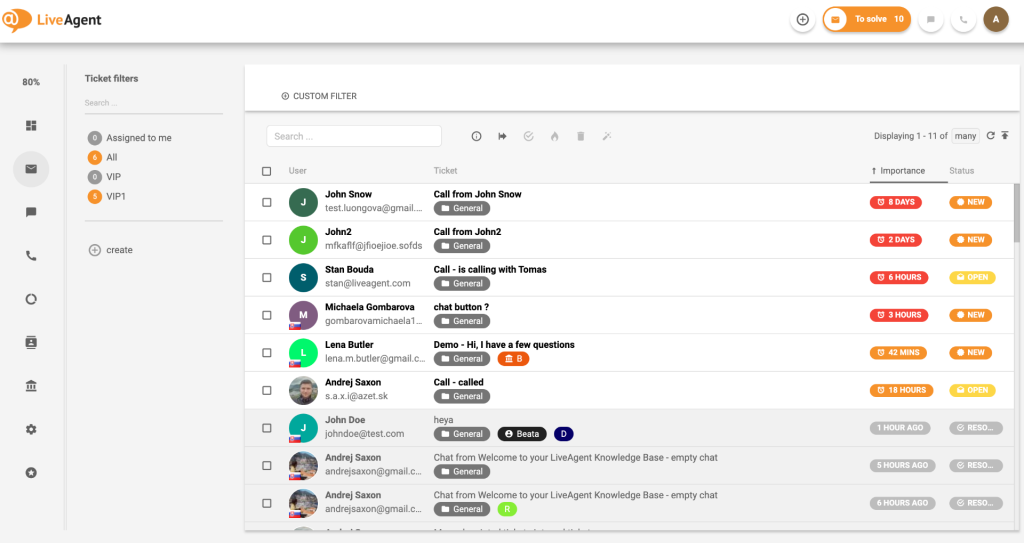
One of the standout features of LiveAgent was its seamless integration with social media platforms. It enabled us to monitor and respond to customer queries and comments on Facebook, Twitter, and Instagram from a single dashboard. This made it exceptionally easy to stay on top of our social media interactions and maintain a positive brand image.
Having said that, I wasn’t much impressed with its text translation features. Most of the time, it delivered inaccurate results, leading to confusion and incorrect responses to our customers.
Pros:
- Drag-and-drop functionality to attach images to support tickets
- Email notifications to keep customers and agents informed on the ticket progress
- The Merge Tickets feature helps you link similar tickets together for faster issue resolution
- Ready-to-use chat invitations to invite website visitors to chat
Cons:
- The Small Business plan is limited to just three email inboxes
- The text translation feature doesn’t display accurate results at times
Pricing:
Starts at $9/user/month.
9. HappyFox Help Desk – Best For Reporting and Analytics
HappyFox became the tool I trusted when a client wanted to run support by the numbers. Its reporting was the first screen I opened every Monday, since it made ticket trends and bottlenecks obvious without building a custom dashboard.
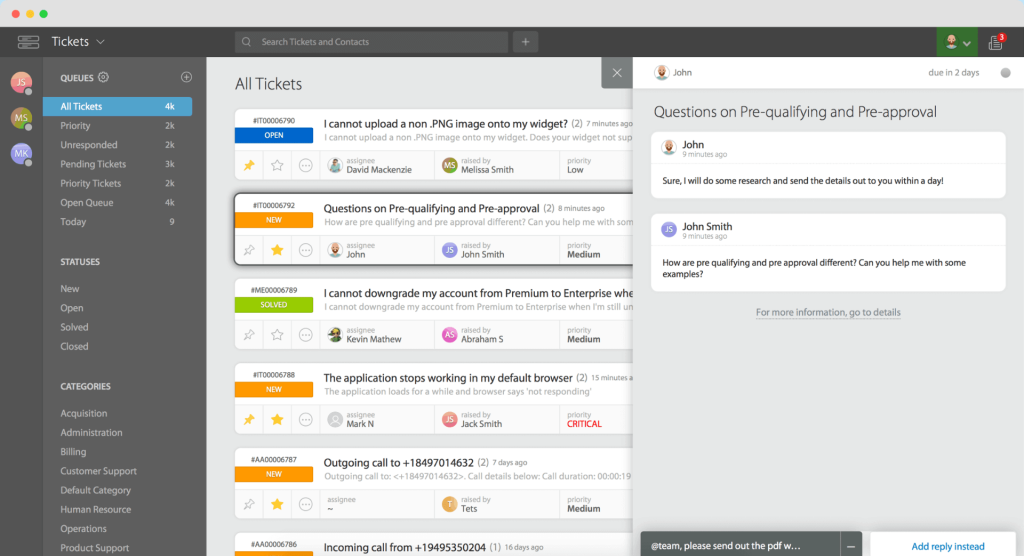
On the customer side, requests came in and got tracked without constant status-check emails. Internally, categorization and workflow rules kept tickets moving to the right queue instead of piling up in one inbox.
Customization can feel rigid for teams with unusual workflows, and the knowledge base styling options are on the lighter side.
Pros:
- Strong reporting surfaces bottlenecks and workload patterns clearly
- Workflow rules maintain consistent ticket routing
- Categories and templates standardize responses across the team
- Good visibility into individual and team performance
Cons:
- Workflow customization can feel rigid for nuanced processes
- Knowledge base and portal styling options are limited
Pricing:
Starts at $24/agent/month.
10. Jira Service Management – Best For Cloud ITSM for Dev and IT Teams
Jira Service Management was the fit when a client’s IT team needed a cloud ticketing system that spoke the same language as their developers. Linking a support ticket directly to a bug in Jira Software meant nothing got lost in translation between support and engineering.
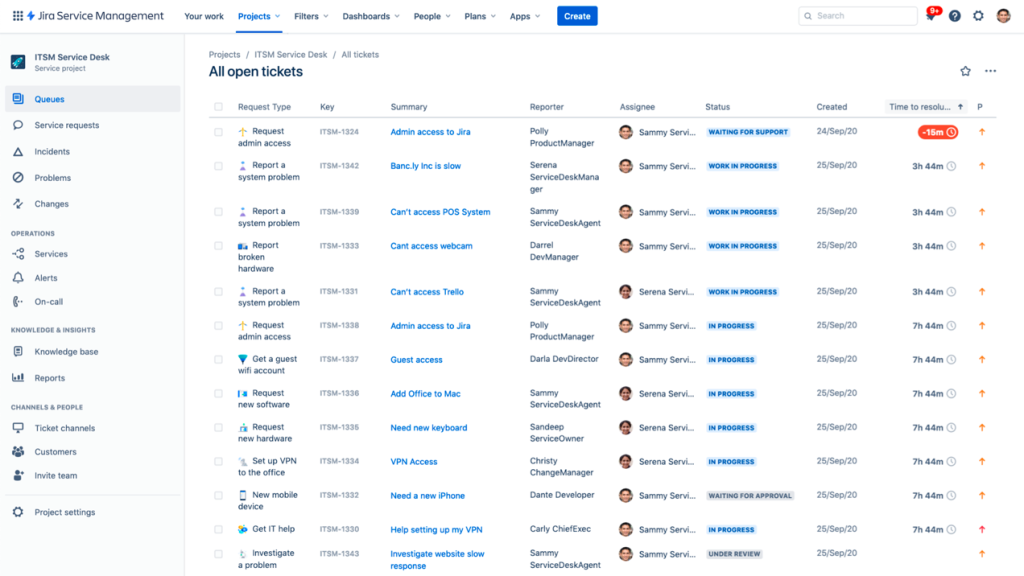
The structure it brings to IT operations is real. Automation rules saved meaningful time on repetitive triage, and the tight integration with Confluence meant agents could link a ticket straight to a knowledge base article without leaving the queue.
New users should expect a real onboarding curve. It is a powerful tool, but it is not the simplest one on this list to pick up cold.
Pros:
- Deep integration with Jira Software and Confluence for dev-aligned teams
- Strong automation for ticket assignment and prioritization
- Clear visibility into ongoing issues across the Atlassian ecosystem
- Scales from small pilots to enterprise-wide service management
Cons:
- Can feel overwhelming for teams new to Atlassian products
- Advanced ITSM features sit behind the Premium tier
Pricing:
Free plan for up to 3 agents. Paid plans start at $20/agent/month.
Evaluation Criteria
I did not rank these tools by gut feeling. I leaned on six factors to keep the comparison fair and grounded in how cloud ticketing systems actually get used day to day:
- User Reviews and Ratings. I weighed current G2 ratings and review volume for each tool, since a strong star rating means little without a meaningful number of reviews behind it.
- Essential Features and Functionality. I looked at whether each tool delivers real ticket routing, automation, and reporting in the cloud, not just a rebranded on-premise product with a login page.
- Ease of Use. I paid close attention to how quickly a new agent could get productive, since a powerful tool nobody wants to open does not help your queue.
- Customer Support. I considered how responsive each vendor is when something breaks, since downtime on a cloud tool you do not control is still downtime your customers feel.
- Value for Money. I compared what each plan actually includes against its price, and how that price holds up as you add more agents, not just the number on the pricing page.
- Personal Experience and Expert Opinions. Where I have run a tool with my own team, I shared that directly. Where I have not, I leaned on verified reviews to round out the picture.
My Top 3 Picks for the Best Cloud-Based Ticketing System
Time to face the real question, “Which is the best cloud-based ticketing system out there?” Well, there is no single tool tailored for your team. The “best” tool would depend on your unique requirements, customer base, communication channels, and many other factors.
Let me try to ease your decision-making process. Here are my top 3 picks:
1. ProProfs Help Desk
If you are searching for a complete customer service suite, look no further than ProProfs Help Desk. I’m sure you will love its simplistic design and features, such as canned responses, automated ticket assignments, knowledge base, labels, private notes, and more. You can use this tool to automate repetitive tasks and save valuable hours every week.
2. Zendesk
If price isn’t a big hurdle for your business, Zendesk can be a good option, too. Even though the tool is a little expensive, it will help you encourage self-service through a help center and community forums. I’m positive you will love its AI-powered bot, too!
3. LiveAgent
If your brand has a great presence on the leading social media platforms, you can opt for LiveAgent. Whether customers share their complaints via Facebook, Twitter, or Instagram, LiveAgent will help you tackle them all in one place.
FREE. All Features. FOREVER!
Try our Forever FREE account with all premium features!
How to Choose the Right Tool
Skip the spec sheet for a minute and think about how your team will actually use a cloud ticketing system day to day. A few things matter more than the rest:
- Uptime and reliability. Check the vendor’s published uptime history before you commit. A cloud tool that goes down as often as your old server defeats the point of switching.
- Automation depth. Look for ticket routing and workflow automation that actually reduces manual work, not just a rules builder that takes longer to configure than it saves.
- Scalability. Confirm the pricing model holds up once you go from 3 agents to 15. Some tools that look affordable at a small scale get expensive fast.
- Security and compliance. Data encryption, role-based access, and clear compliance certifications matter more once support data includes anything sensitive.
One thing worth checking before you commit: some vendors advertise a low entry price but gate core automation or reporting features behind a much pricier tier. A quick look at a best help desk software for small businesses comparison can save you from signing up for a plan that looks cheap and turns out incomplete.
Cloud vs On-Premise Ticketing
The decision behind “cloud-based” is really a decision against something else, running your own server. It helps to see the tradeoff laid out directly.
| Cloud-Based Ticketing | On-Premise Ticketing | |
| Hosting | Vendor-managed servers | Your own hardware and IT team |
| Setup time | Minutes to hours | Days to weeks |
| Maintenance | Handled by the vendor | Your team patches and updates it |
| Access | Any device, anywhere | Typically limited to your network |
| Upfront cost | Low, subscription-based | High, hardware plus licensing |
| Best for | Distributed teams, fast setup, predictable costs | Teams with strict in-house data residency requirements |
Most teams migrating off an aging on-premise system find the switch pays for itself within a few months, mainly in the IT hours no longer spent on patching and backups. If you are actively planning that move, it’s worth reading through this guide on help desk migration before you pick a target platform.
Simplify Support With the Cloud
A cloud-based ticketing system will not fix a disorganized support process on its own, but it removes the excuse that infrastructure is holding your team back. Once patching, backups, and server uptime are someone else’s job, your team gets to spend that time on the tickets themselves.
Start with what is actually broken today. If outages are the pain point, prioritize uptime history. If a distributed team cannot reach the queue reliably, prioritize any-device access. The goal is not to chase every feature on this list, it is to fix the one thing currently slowing your team down.
If you are ready to move off an aging on-premise setup or outgrow a tool that is not built for the cloud, it is worth spending fifteen minutes with a free plan before you commit to anything. ProProfs Help Desk is free to start, which makes it a low-risk way to see how a cloud ticketing system feels with your own team’s actual ticket volume.
FREE. All Features. FOREVER!
Try our Forever FREE account with all premium features!

 We'd love your feedback!
What did you like & how can we make it even better?
 Thanks for your feedback!
 Ask Your Question
Have a question? Get expert help to make your decision easier.