

A policyholder who reports a claim is rarely calm. They may be in a hospital waiting room, a flooded kitchen, or a tow-truck yard, and they want one thing: someone who knows where their claim stands. The right help desk for insurance gives the next agent the history to help.
According to a study by J.D. Power in 2026, satisfaction scored 804 out of 1,000 among auto claimants who completely agreed their insurer delivered a seamless experience across channels, versus 390 among those who disagreed. The study surveyed 8,261 customers; insurers delivered that seamless experience 54% of the time.
Scattered mailboxes, phone notes, and web forms are how that experience breaks. This guide compares 10 help desk software options for insurance carriers, agencies, and brokerages.
What Is Help Desk Software for Insurance?
Help desk software for insurance organizes policyholder questions, claim updates, billing requests, and complaints into tickets with an owner, status, and conversation history. It helps carriers, agencies, and brokerages coordinate replies without relying on one person’s inbox. This help desk software guide explains the underlying ticketing process.
A few insurance terms appear throughout this comparison. A carrier issues policies. Agencies and brokerages help customers arrange or service coverage. FNOL, or first notice of loss, is the initial report of a loss. A COI is a certificate summarizing insurance information. An agency management system, or AMS, stores client and policy records.
Some teams call their support platform a service desk, so this comparison also covers service desk software for insurance. Its job is communication and follow-up. The policy, claim file, and financial records remain in the appropriate insurance system. That distinction matters when evaluating financial services support software.
10 Best Help Desk Software for Insurance
A claim-status question and a coverage dispute need different handling. The tools below offer different ways to route requests, preserve conversation history, and coordinate follow-up.
Here’s where each fits an insurance team’s workflow.
| Tool | Best For | Pricing |
| ProProfs Help Desk | Easiest AI help desk for shared inboxes, ticket workflow automation, and scaling support teams | Free plan available. Paid plan starts at $19.99/month |
| Zendesk | Carriers and larger agencies needing omnichannel routing | Starts at $55/agent/month |
| Salesforce Service Cloud | Carriers and brokerages evaluating Salesforce’s insurance capabilities | Starts at $25/user/month, billed annually |
| Pega Customer Service for Insurance | Large carriers with complex servicing processes | Custom |
| BoldDesk | Teams comparing unlimited-agent plans and HIPAA support | Starts at $99/month |
| Zoho Desk | Agencies already using Zoho CRM | Starts at $7/user/month |
| Freshdesk | Small agencies needing ticket automation and self-service | Starts at $19/agent/month |
| HubSpot Service Hub | Agencies already using HubSpot CRM | Starts at $20/seat/month |
| Intercom, With Fin AI Agent | Insurers prioritizing messaging and AI assistance | Starts at $29/seat/month |
| Help Scout | Small agency teams moving beyond a shared mailbox | Starts at $25/user/month |
Now, here is how each one actually holds up:
1. ProProfs Help Desk: Easiest AI Help Desk for Shared Inboxes, Ticket Workflow Automation, and Scaling Support Teams
Insurance support arrives from every direction: a certificate request via email, a claim status question via chat, a billing complaint via a web form. I see ProProfs Help Desk as a practical way to organize those conversations. Its shared inboxes separate claims, billing, and complaints, while automation assigns requests, sets priorities, and sends deadline reminders.
Claims conversations are emotional, so tone matters. Its AI assistance summarizes threads, suggests replies, adjusts tone, and identifies urgent requests. An AI agent can handle routine questions from approved support content, with a human route for unresolved cases. Sentiment detection in Business Complete Elite helps supervisors identify conversations that need attention.
ProProfs Knowledge Base provides policyholders with answers to common claim-processing questions. Connected ProProfs Live Chat handles quick questions in real time.
CSAT surveys and agent reports show response times, resolution times, and recurring issues. Roles and IP restrictions control access; eligible plans add company sign-on and sensitive-data redaction. Salesforce, Microsoft Dynamics, Slack, and Jira connections extend the workflow, with API access and plan requirements checked against the intended setup.
Pros:
- AI summaries, reply suggestions, and sentiment analysis help agents understand requests and respond appropriately.
- Shared inboxes organize claims, billing, and complaint conversations within one dashboard.
- Auto-routing, triggers, canned responses, SLA alerts, and notifications reduce repetitive ticket-handling work.
- Connected Knowledge Base and Live Chat support self-service answers and real-time assistance.
- CSAT surveys, agent reports, and team analytics track response times, resolution times, and feedback.
- Documented CRM, Slack, Jira, and Shopify connections extend workflows; API access depends on the setup.
Cons:
- No on-premises deployment option.
- Sentiment detection and advanced security controls require an eligible higher plan.
Pricing:
A free plan is available for growing teams. Paid plan starts at $19.99/month.
Here’s how Acer described their experience with ProProfs Help Desk:
Acer used ProProfs Help Desk custom fields to capture service costs when staff closed cases, helping its team analyze repairs, replacements, and spare parts through reports. Its published story also describes approximately 2,600 operators and multilingual support. The relevant lesson for insurance teams is collecting useful reporting details during everyday ticket work, rather than reconstructing them afterward. This is a transferable support example, not an insurance-specific outcome.
2. Zendesk: Best for Carriers and Larger Agencies That Need Omnichannel Routing
I compared Zendesk’s Suite plans for insurance teams handling messaging, voice, and email. Support Team covered email ticketing, while Suite plans added broader channel coverage. Higher editions included skills-based routing, custom roles, and a sandbox for testing changes.
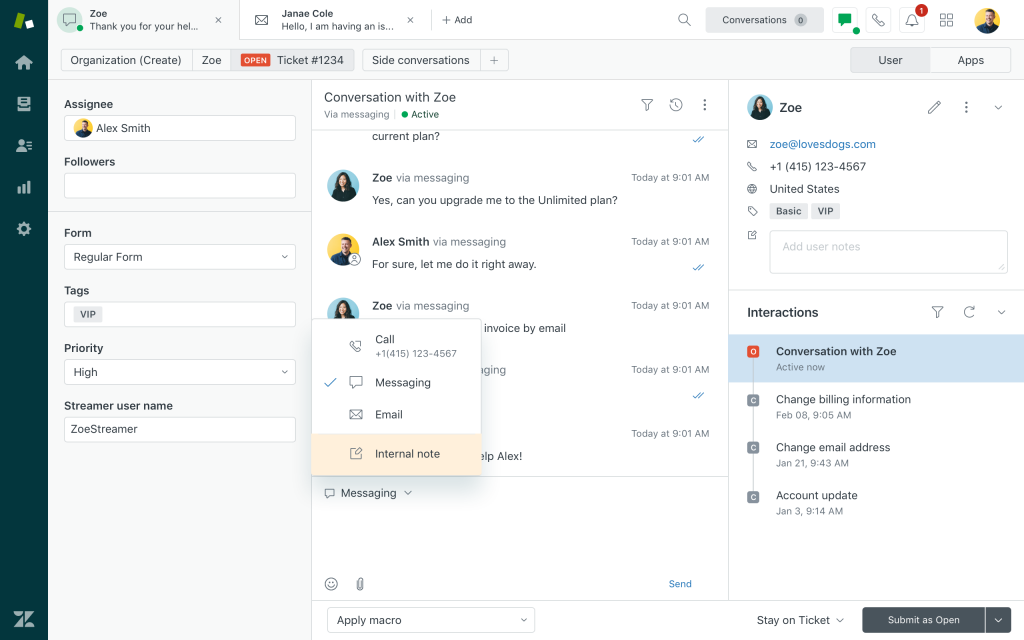
For an insurer, the useful distinction was whether billing questions and claim-status requests were routed to the appropriate team. A consistent support-channel approach also needed to preserve the conversation when a policyholder moved from messaging to a phone call.
During a trial, follow one claim question across channels and departments. Check what the next agent sees, who owns the reply, and whether the promised update remains visible. That makes the routing workflow more meaningful than the channel count alone.
Pros:
- Suite plans combine messaging, voice, and ticketing for support across channels.
- Skills-based routing on higher plans matches requests with appropriately skilled agents.
- Advanced editions add custom roles and a sandbox for testing changes.
- AI assistance and automation options support agents and routine customer requests.
Cons:
- Advanced routing, roles, and testing controls require the appropriate higher edition.
- Additional AI usage and optional products can increase the subscription cost.
Pricing:
Starts at $55/agent/month. A free trial is available.
3. Salesforce Service Cloud: Best for Carriers and Brokerages Evaluating Salesforce’s Insurance Capabilities
Salesforce was relevant in my comparison when service cases needed policy and customer context. Service Cloud handled support cases, while Financial Services Cloud added industry-specific data and workflows. That offered a broader foundation for personalized customer service.
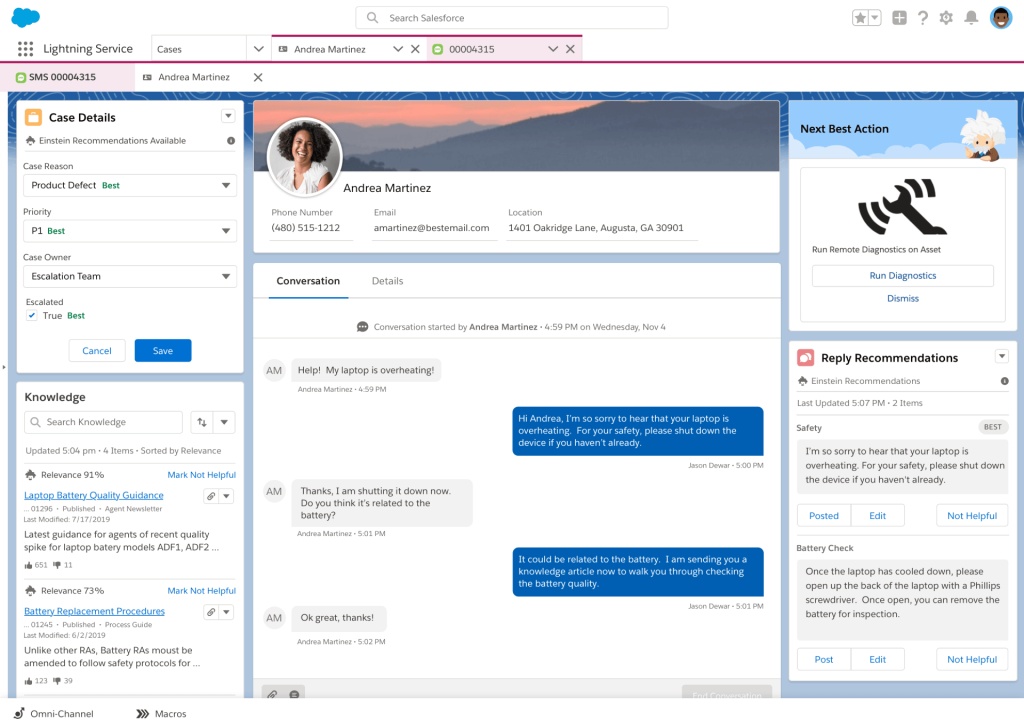
I separated the $25 Starter Suite from the Financial Services Cloud Service editions discussed here. Core started at $325/user/month, billed annually. Advanced included Insurance Brokerages, while Max included Digital Insurance capabilities. Detailed policy and claims requirements still needed a scoped configuration.
For a trial, follow a policyholder inquiry from the service case to the relevant policy or claim record. Check what the agent can access and update. Reliable ticket-handling practices should preserve ownership without creating conflicting records.
Pros:
- Financial Services Cloud connects industry-specific information and workflows with service cases.
- Advanced includes Insurance Brokerage capabilities for relevant servicing requirements.
- Higher packages extend automation, security, and industry-specific functionality.
- Customer and account context supports coordination between service and relationship teams.
Cons:
- Financial Services Cloud pricing is substantially higher than the separate Starter Suite.
- Policy administration, claims capabilities, and implementation require careful package and usage scoping.
Pricing:
Starts at $25/user/month. A 30-day trial is available.
4. Pega Customer Service for Insurance: Best for Large Carriers With Complex Servicing Processes
I focused on Pega for insurance servicing, which involved multiple systems and approval steps. Its insurance offering connected customer-service interactions with case management, routing, knowledge, and service targets. The appeal was coordinating work beyond a shared inbox.
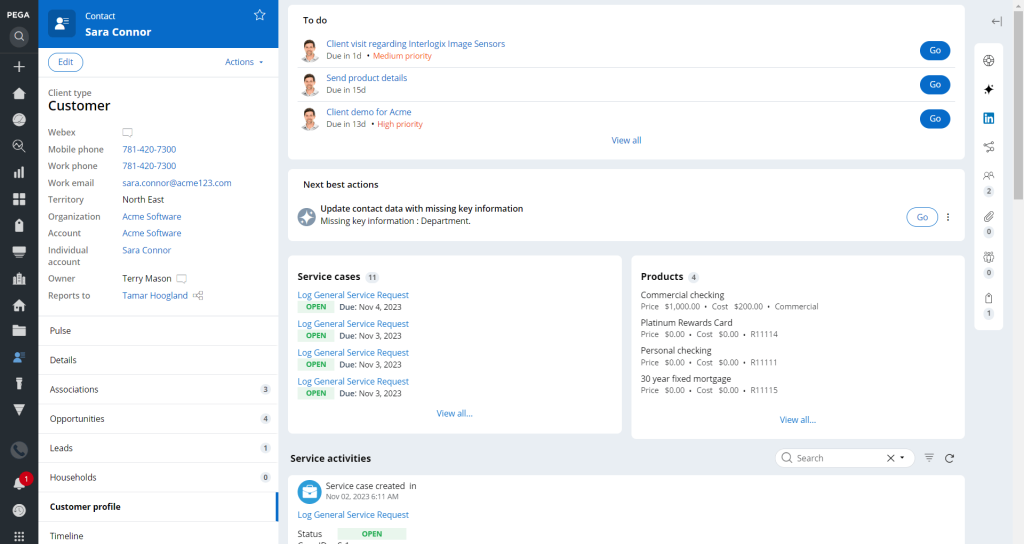
Pega’s wider insurance products also covered areas such as underwriting and claims. I treated those as separate scope decisions, rather than assuming the customer-service package included every insurance process. The implementation needed to identify which existing systems supplied policy and claim information.
A useful evaluation should trace one service request through the teams and systems it touches. Check approvals, missing information, and who updates the policyholder. A clear setup plan and ongoing help desk management responsibilities belong in that comparison.
Pros:
- Insurance-focused case management supports structured policyholder servicing processes.
- Routing and service targets help coordinate requests across teams.
- Connected knowledge supports consistent answers during customer interactions.
- Integration options connect servicing workflows with existing insurance systems.
Cons:
- Pricing requires a scoped quote rather than a public starting rate.
- Complex workflows and integrations can require substantial configuration and implementation work.
Pricing:
Custom Pricing.
5. BoldDesk: Best for Teams Comparing Unlimited-Agent Plans and HIPAA Support
I compared BoldDesk’s insurance workflows alongside its security documentation. Its insurance material described claim intake, document requests, canned responses, and routing. Those features addressed the everyday communication around a claim rather than replacing the claims system.
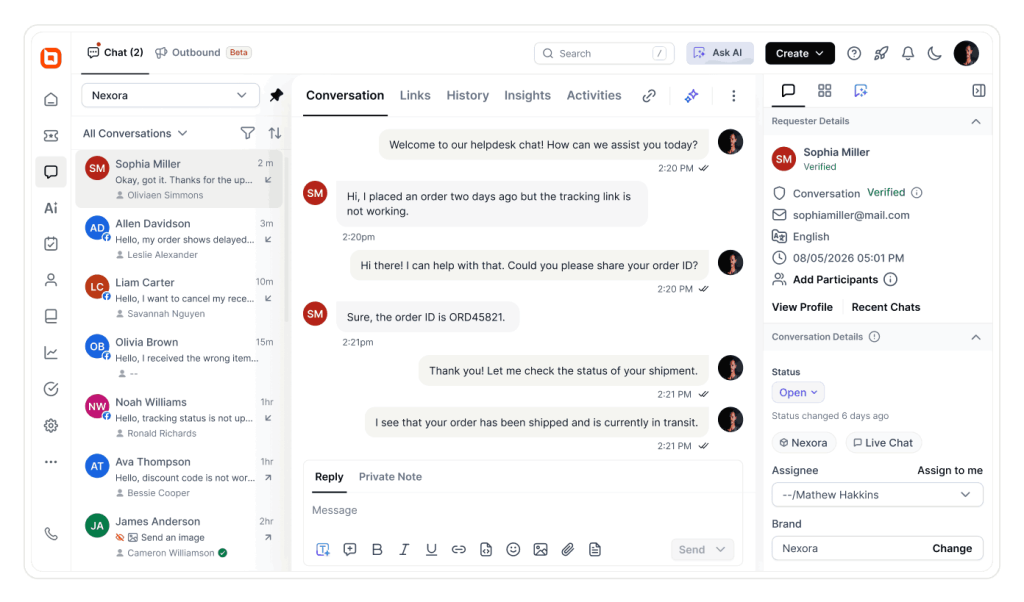
The pricing distinction mattered. AI plans included unlimited human agents and an AI credit allowance, but the $99 entry plan did not include all the capabilities described. Enterprise AI listed HIPAA support; the intended use of health data also required the appropriate agreement and configuration.
During a trial, test claim intake, document requests, and overdue reminders. Check that response-time targets use the correct working schedule. Include the required plan and expected AI usage in the support-cost comparison.
Pros:
- Insurance workflows support claim intake, document requests, and policyholder communication.
- Eligible plans include assignment rules, SLA policies, and escalations.
- Published security information includes a SOC 2 Type 2 report and HIPAA support.
- AI plans include unlimited human agents under the published fair-use policy.
Cons:
- HIPAA support requires the appropriate Enterprise offering and agreement.
- AI work consumes credits, with additional credits charged separately.
Pricing:
Starts at $99/month, billed annually. A 15-day trial is available.
6. Zoho Desk: Best for Agencies Already Using Zoho CRM
Zoho Desk’s value in my comparison was the combination of customer context and departmental ticket handling. Its insurance material described roles, field-level permissions, and audit logs. Those controls needed to be matched to the intended edition.
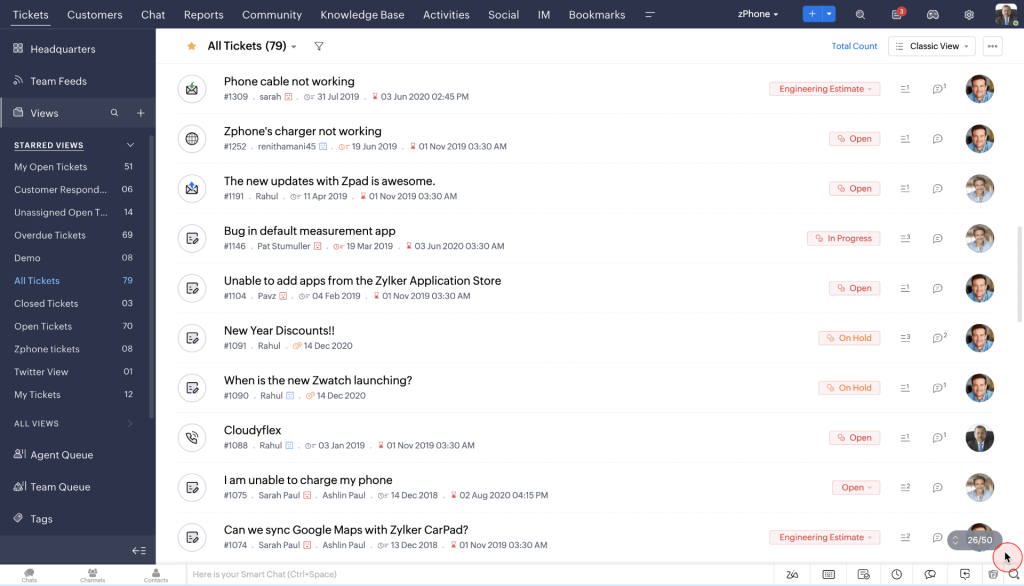
Blueprints supported step-by-step processes, while the customer portal enabled policyholders to check ticket status. Zoho CRM connections added customer and deal information. For health-data use, I checked Zoho’s BAA process and configuration guidance rather than relying on a general compliance label.
Test a complaint requiring input from a producer and a service representative. Confirm what each person can see and change, and whether the history remains available. Useful support reporting should reveal delays without exposing information to unrelated staff.
Pros:
- CRM connections provide customer and deal context alongside support tickets.
- Eligible editions offer roles, field-level permissions, and audit logs.
- Blueprints and workflows support consistent handling and escalation steps.
- A free edition supports up to three users for basic ticket handling.
Cons:
- Departmental workflows and advanced controls require the appropriate higher edition.
- Telephony and external AI services can introduce additional usage charges.
Pricing:
Starts at $7/user/month. A 15-day trial is available.
7. Freshdesk: Best for Small Agencies That Need Ticket Automation and Self-Service
Freshdesk gave me a straightforward starting point for everyday agency support. Growth combined ticketing, a shared support inbox, a customer portal, a knowledge base, and reporting.
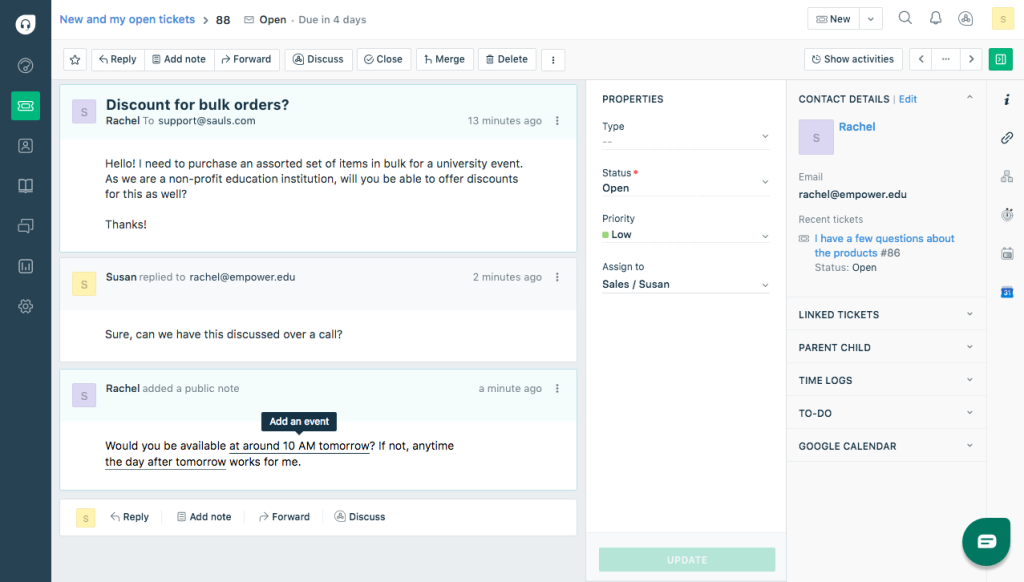
I compared that entry plan with Pro’s routing and reporting and Enterprise’s audit logs and sandbox. Those differences mattered when an agency needed stronger controls over complaint handling. Freddy AI Copilot was separately priced on eligible plans.
Test a billing question, a missing document, and an urgent claim-status request. Check how automation handles each and how unresolved questions reach a person. Then use customer service analytics to identify repeated contacts and slow handoffs.
Pros:
- Growth combines ticketing, a shared inbox, a customer portal, and knowledge content.
- The published plans include an initial allowance of 500 Freddy AI Agent sessions.
- Pro adds intelligent routing, multiple SLA policies, and custom reporting.
- Enterprise adds audit logs and a sandbox for governance and testing.
Cons:
- Audit logs and sandbox access require Enterprise.
- Copilot, additional AI sessions, and some connectors cost extra.
Pricing:
Starts at $19/agent/month for Growth. A trial is available.
8. HubSpot Service Hub: Best for Agencies Already Using HubSpot CRM
HubSpot Service Hub made sense in my comparison when the agency already used HubSpot for sales and renewals. Tickets shared customer context with other CRM activity. Free tools included basic ticketing, a shared inbox, and live chat; paid editions expanded the available capabilities.
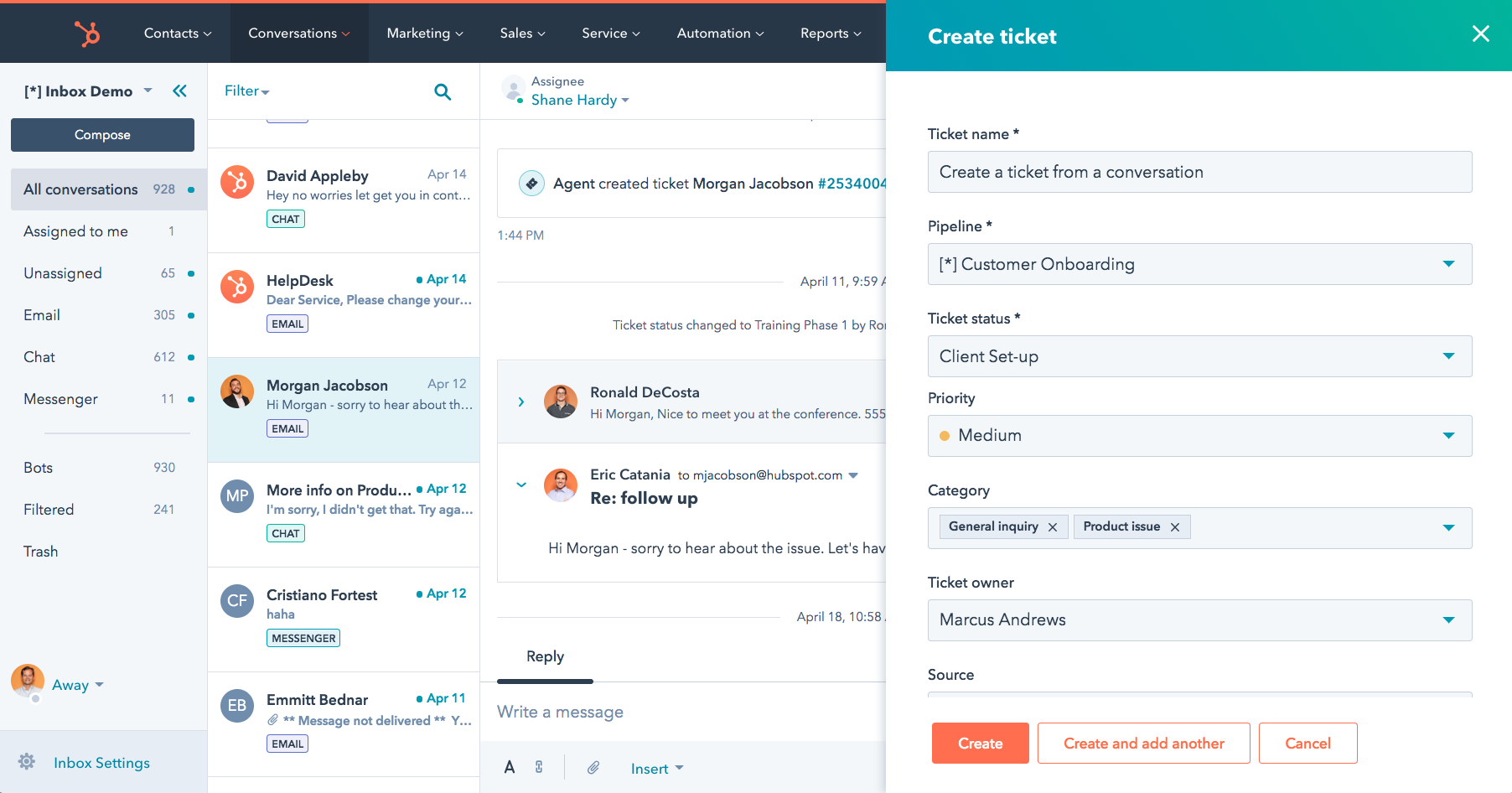
Professional added a broader help desk and customer-success setup. I compared its automation and reporting with the agency’s actual needs, rather than assuming every service feature was part of Starter. Policy and claim records still needed a verified connection to the insurance system.
A useful trial should follow a customer from a sales conversation into a service request. Check who owns the reply and whether support automation preserves the next action. Clear team collaboration matters when sales and service share the relationship.
Pros:
- Tickets share CRM context with customer and sales activity.
- Free tools include basic ticketing, a shared inbox, and live chat.
- Paid editions expand automation, reporting, and service-management capabilities.
- Existing HubSpot users can coordinate customer activity within a familiar platform.
Cons:
- Professional and Enterprise plans have higher seat costs and require onboarding fees.
- Policy and claim information requires an appropriate insurance-system integration.
Pricing:
Starts at $20/seat/month. A 14-day trial is available.
9. Intercom: Best for Insurers Prioritizing Messaging and AI Assistance
I compared Intercom as a messaging-led customer-service platform with Fin AI Agent. The company adopted the Fin name, while Intercom remained the help desk product. For insurance teams, the useful comparison was its inbox, ticketing, help content, and AI support.
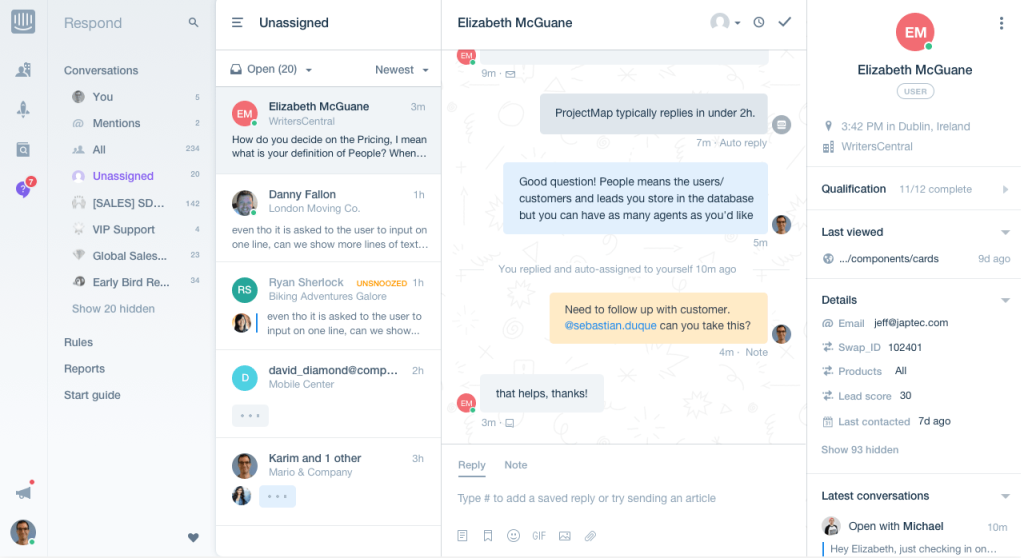
Essential provided the starting seat subscription, while Expert listed SSO, HIPAA support, and SLAs. Fin usage was billed separately at $0.99 per outcome. Its published definition included certain workflow completions and handoffs, so an outcome was not limited to a confirmed resolution.
Start a trial with routine filing questions and requests that need human review. Check the approved support knowledge, escalation route, and information retained when a person takes over. Coverage decisions should remain within the insurer’s approved review process.
Pros:
- Essential combines a shared inbox, ticketing, and a public help center.
- Fin AI Agent supports automated assistance alongside the customer-service platform.
- Expert lists SLAs, SSO, and HIPAA support.
- Messaging and human handoffs support conversations that continue over time.
Cons:
- Fin outcomes and channel usage can add costs beyond seat subscriptions.
- Advanced security and HIPAA support require the appropriate plan and agreement.
Pricing:
Starts at $29/seat/month. A trial is available.
10. Help Scout: Best for Small Agency Teams Moving Beyond a Shared Mailbox
Help Scout offered a focused comparison for small agencies managing email conversations, live chat, and help articles. I looked at how its shared inbox could replace a mailbox-based support setup without losing responsibility for individual requests.
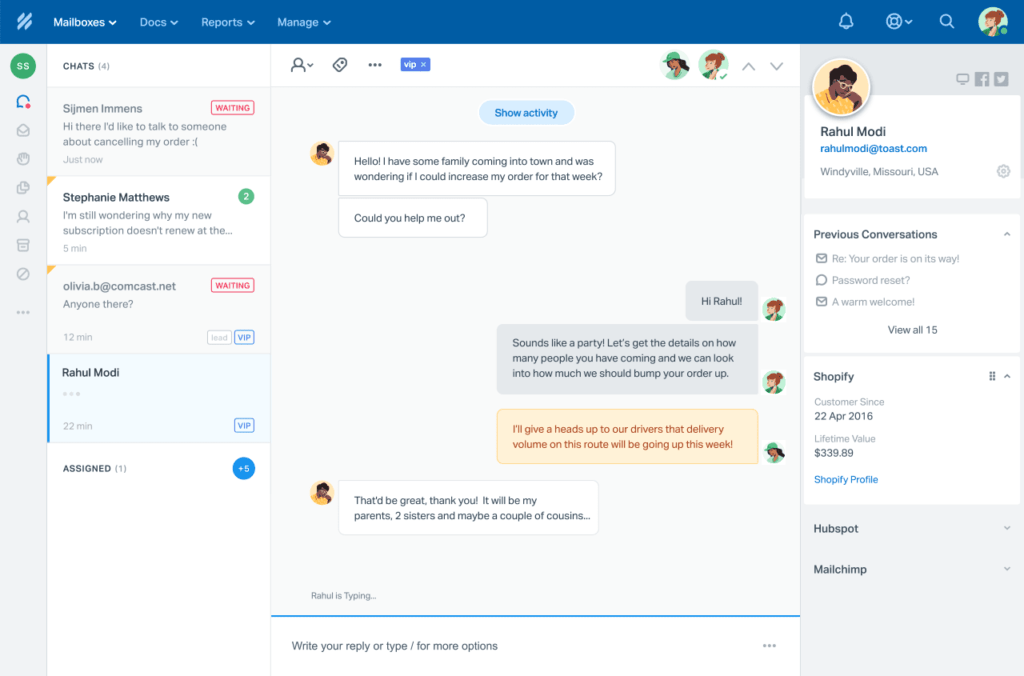
Standard covered core support features, while Plus added advanced workflows and CRM integrations. Pro included broader security and service controls. Its current pricing page presented the AI agent add-on as Envoy, with separate per-resolution billing.
For an agency, the useful trial was an unfinished policy question handed to another representative. Check whether the next person can find the history and promised action. Pair that with customer satisfaction feedback to assess the interaction, not just ticket closure.
Pros:
- A free plan provides a starting point for a small support team.
- Paid plans combine shared inboxes, live chat, and help content.
- Plus adds advanced workflows and Salesforce, Jira, and HubSpot integrations.
- Pro includes HIPAA support, SSO, and broader service controls.
Cons:
- Pro has a ten-user minimum; confirm other security add-on options directly.
- Envoy’s per-resolution charges add to the user subscription.
Pricing:
Starts at $25/user/month, billed annually. A free trial is available.
My Evaluation Criteria
I compared published pricing, product documentation, insurance requirements, and user feedback against the work insurance support teams need to manage.
- User Reviews and Ratings: I considered recurring feedback on G2 and Capterra, including setup, usability, support, and pricing. Official documentation informed plan details.
- Essential Features and Functionality: I compared ticket ownership, complaint tracking, response targets, self-service, AI assistance, and reporting against insurance service requests.
- Ease of Use: I considered how staff would find, assign, and hand over requests. These became practical implementation checks for a trial.
- Customer Support: I reviewed published support routes and onboarding resources, including help with setup, integrations, and operational problems.
- Value for Money: I compared agents, seats, AI usage, required editions, integrations, and onboarding. The relevant cost was the configuration the team needed.
- Industry Analysis and Expert Commentary: I used insurance research, regulatory text, and expert commentary to assess vendor claims against policyholder communication, complaint handling, data protection, and relevant service measures.
My Top 3 Picks for the Best Help Desk for Insurance
These three options address different priorities: everyday support coordination, insurance-specific CRM workflows, and support plans with documented compliance options.
1. ProProfs Help Desk
My pick when scattered inboxes make it difficult to track claim questions and complaints. Shared inboxes, AI assistance, and automation help teams assign responsibility and manage replies. It fits agencies and carriers focused on improving customer service coordination, with insurance system connections and health data requirements checked separately.
2. Salesforce Service Cloud
The right call when service cases need to sit alongside insurance-specific customer, policy, and claim information. Financial Services Cloud provides the relevant industry foundation, with features varying by edition. Compare the required package and implementation against the workflows your carrier or brokerage needs.
3. BoldDesk
Worth shortlisting when the team wants to compare unlimited-agent AI plans with documented security and HIPAA options. The required Enterprise offering and BAA belong in that evaluation, alongside expected AI usage. Include the reporting your managers need when testing the complete package.
FREE. All Features. FOREVER!
Try our Forever FREE account with all premium features!
How Can a Help Desk for Insurance Track Claim & Complaint Deadlines?
Insurance support runs on clocks that other industries do not have. A missed response can become a compliance issue and a service problem. California provides a useful example, but its rules should not become a default for every state.
Example:
- Claimant communications: Qualifying claim-related messages require a complete response immediately, and no later than 15 calendar days after receipt, subject to the rule’s exceptions.
- New claim notices: Insurers generally must acknowledge the notice, provide necessary forms and assistance, and begin any necessary investigation immediately, within the stated 15-calendar-day limit.
- Regulator inquiries: Claim-related Department of Insurance inquiries require a complete written response immediately, and no later than 21 calendar days after receipt.
These are communication and initial-action requirements, not a promise that every claim must be settled within those periods.
Configure the applicable rules with compliance before setting reminders. Record when the notice arrived, what action is due, and whether the clock uses calendar or business days. A dedicated complaint-management workflow helps formal complaints reach an accountable person.
Use ticket management to distinguish claims, complaints, billing questions, and certificate requests. Preserve responses, transfers, and promised updates. A reminder supports the process; it does not establish compliance by itself.
Track Every Complaint Against Its Response Deadline
How Can a Help Desk for Insurance Limit Coverage Replies & Health Data Access?
Not every message about a policy should be sent without review. State licensing requirements and the organization’s procedures determine who may explain or change coverage. Configure permissions and review steps around those requirements.
Look for four controls:
- Role-Based Permissions: Limit who can view, reply to, and close sensitive requests.
- Internal Review: Let an authorized colleague check a draft before it reaches the policyholder. Team collaboration tools can support that discussion.
- Approved Templates: Use reviewed wording for recurring questions and keep it current.
- Human Review of AI: Treat suggested coverage explanations as drafts requiring the appropriate approval.
Data protection needs a separate check. The NAIC’s Insurance Data Security Model Law provides a framework for security programs, incident investigation, and notification of certain cybersecurity events. According to a brief by the NAIC in 2026, the model law had been implemented in 28 jurisdictions. States may adopt different provisions, so check the requirements that apply to your organization.
For health data use, determine whether your organization is a HIPAA-covered entity or business associate. Where a vendor will handle protected health information on your behalf, confirm the applicable BAA, permitted features, and configuration. A SOC 2 report, encryption, or redaction feature does not replace that agreement.
ProProfs publishes security and trust information. Review it alongside your access requirements and confirm any proposed use of protected health information directly before storing that information.
Improve Policyholder Support With the Right Help Desk for Insurance
A policyholder remembers two things about a claim: whether someone kept them informed and whether anyone made them repeat themselves. The right help desk for insurance supports both by preserving conversation history, tracking response deadlines, and making responsibility visible.
If you need policy administration or claims management, compare the appropriate insurance applications and integrations. If your biggest gaps are scattered inboxes, missed follow-ups, and complaints that no one owns, ProProfs Help Desk offers shared inboxes, AI assistance, automation, and connected self-service tools to streamline your communication workflow.
Test representative claim and complaint scenarios using sample records. Check the handoff, permissions, promised updates, and reminders against your approved procedures. Choose the setup that helps staff act without making the policyholder explain everything again.
Keep Policyholders Informed Through Every Handoff
Frequently Asked Questions
Does an Insurance Help Desk Need to Be HIPAA Compliant?
HIPAA requirements depend on whether your organization is a covered entity or business associate and whether the system handles protected health information. Where applicable, confirm the vendor’s BAA, supported features, and configuration. Other insurance teams still need appropriate privacy and security controls.
What Is the Best Help Desk for a Small Insurance Agency?
Start with the work the team needs to organize: policy questions, billing requests, complaints, and follow-ups. ProProfs Help Desk, Help Scout, and Freshdesk offer relevant support workflows.
Can AI Safely Answer Policyholder Questions?
AI can assist with approved process questions, such as filing steps or office hours. Coverage explanations, sensitive decisions, and unresolved cases need an appropriate human route. An AI help desk management process should define the source material, review rules, and escalation point.
What Should an Insurance Ticket Include?
Include the request type, customer identity, contact channel, owner, status, and next action. Add a claim or policy number when relevant and available. Record the applicable response deadline and its starting event. Collect only the sensitive information needed to handle the request.
How Can Insurance Agencies Track Renewal Requests?
Assign each renewal question an owner, a due date, and a next action. ProProfs Help Desk can organize the related conversations and follow-ups in tickets. Keep official policy dates and renewal decisions in the agency management system, and verify any connections before relying on automatic updates.
How Should Teams Follow Up on Missing Claim Documents?
Record which documents are missing, who requested them, and when the next follow-up is due. Use an approved secure route for sensitive files. Reminders should reflect the actual status of the document so customers do not receive another request after submitting their information.
Can Policyholders Check Request Status Without Calling?
Yes, if the platform includes a customer portal on the selected plan. Policyholders may be able to view replies and ticket progress there. Distinguish support-ticket status from claim status: showing an adjuster’s decision or payment update requires an appropriate connection to the claims system.
FREE. All Features. FOREVER!
Try our Forever FREE account with all premium features!

 We'd love your feedback!
What did you like & how can we make it even better?
 Thanks for your feedback!
 Ask Your Question
Have a question? Get expert help to make your decision easier.