
If you’re still managing customer support using traditional methods, you’re probably dealing with slow response times, overwhelming ticket volumes, and frustrated customers.
As a support manager, I can tell you this: helpdesk automation is one of the most reliable ways to bring order back to support.
Helpdesk automation can drastically improve support operations by automating repetitive tasks, routing tickets efficiently, and providing instant responses.
In this guide, I’ll walk you through everything you need to know about automating your help desk, why it’s so important, and how it can transform your team’s productivity. Let’s get started!
What Is Help Desk Automation?
Help desk automation refers to the use of software and AI-driven workflows to streamline customer support processes, reducing manual effort and improving efficiency. Instead of agents handling repetitive tasks—like ticket assignments, status updates, or basic troubleshooting—automated systems take care of them, ensuring faster resolutions and better customer experiences.
Here’s how AI enhances help desk automation:
- Smart Ticket Routing: AI assigns tickets based on priority, issue type, and agent availability.
- Customer Intent Analysis: Detects customer needs for accurate and relevant responses.
- Automated Response Suggestions: AI recommends replies to speed up agent responses.
- AI Chatbots: Handles FAQs and common queries instantly, reducing agent workload.
- Real-Time Analytics: Tracks patterns to improve service quality and efficiency.
If you’re exploring service desk automation, the idea is similar. The biggest difference is that service desks often handle internal IT requests, approvals, SLAs, and asset-related workflows. The automation goal stays the same: faster resolution, less manual work, and better visibility.
Top 10 Automated Help Desk Software to Improve Response Time & Productivity
Over the past seven years, I’ve tested quite a few help desk automation tools. Now, let me share my top ten picks—along with their standout features, drawbacks, and pricing—so you can find the right fit for your needs.
Before we proceed further, let’s take a quick look at the 10 top automated helpdesk tools.
| Tool | Best for | Pricing |
|---|---|---|
| ProProfs Help Desk | Easiest AI Help Desk for Shared Inboxes, Ticket Workflow Automation, and Scaling Support Teams | Free for a single user. Plans start at $19.99/user/month for 2 or more users. |
| Zoho Desk | Omnichannel Help Desk Support | Starts at $14/user/month |
| Zendesk | AI-Powered Customer Support | Starts at $55/user/month |
| Freshdesk | AI-Driven Ticket Management | Starts at $55/user/month |
| HelpDesk | Streamlining Email-Based Support | Starts at $29/user/month |
| HappyFox | Help Desk Reporting | Starts at $24/user/month |
| Spiceworks | Open-Source Ticketing System for Small IT Teams | Free |
| Salesforce Service Cloud | AI-Powered Service | Starts at $25/user/month |
| ServiceNow | IT Service Automation | Custom pricing |
| SysAid | IT Service Management | Custom pricing |
1. ProProfs Helpdesk – Easiest AI Help Desk for Shared Inboxes, Ticket Workflow Automation, and Scaling Support Teams
I’ve been using ProProfs Help Desk for a while now, and I have to say, it’s made customer support a whole lot easier. The AI features really stand out, especially the ticket summarization feature, which instantly helps me understand exactly what the customer is looking for.
The response suggestions are another favorite of mine, they speed up replies and make my team look super efficient. Plus, automated ticket routing ensures that each query lands in the right hands, while ProProfs Chat’s chatbots are great for handling basic requests even when my team’s off the clock.
One feature I can’t live without is the shared inbox. It keeps all communication in one place, making it so much easier for my team to collaborate. On top of that, ProProfs Knowledge Base cuts down on incoming volume by letting customers find their own answers, and the reporting features give me solid insights into our performance, with integrations to other tools that feel genuinely seamless.
Pros:
- Shared inbox for centralized management of all support emails
- Reporting tools to get In-depth insights into ticket data, team performance, and trends
- Syncs effortlessly with your CRM, email, and chat tools for a seamless experience
- Canned responses for quick replies and reduced agent effort
Cons:
- There is no dark mode for the interface
- No downloadable or on-premise version
Pricing:
A free plan is available for growing teams. Paid plans start at $19.99/user/month
Let’s look at how Steve Organek at Shaver Shebang used the ProProfs Help Desk to deliver faster and better support.
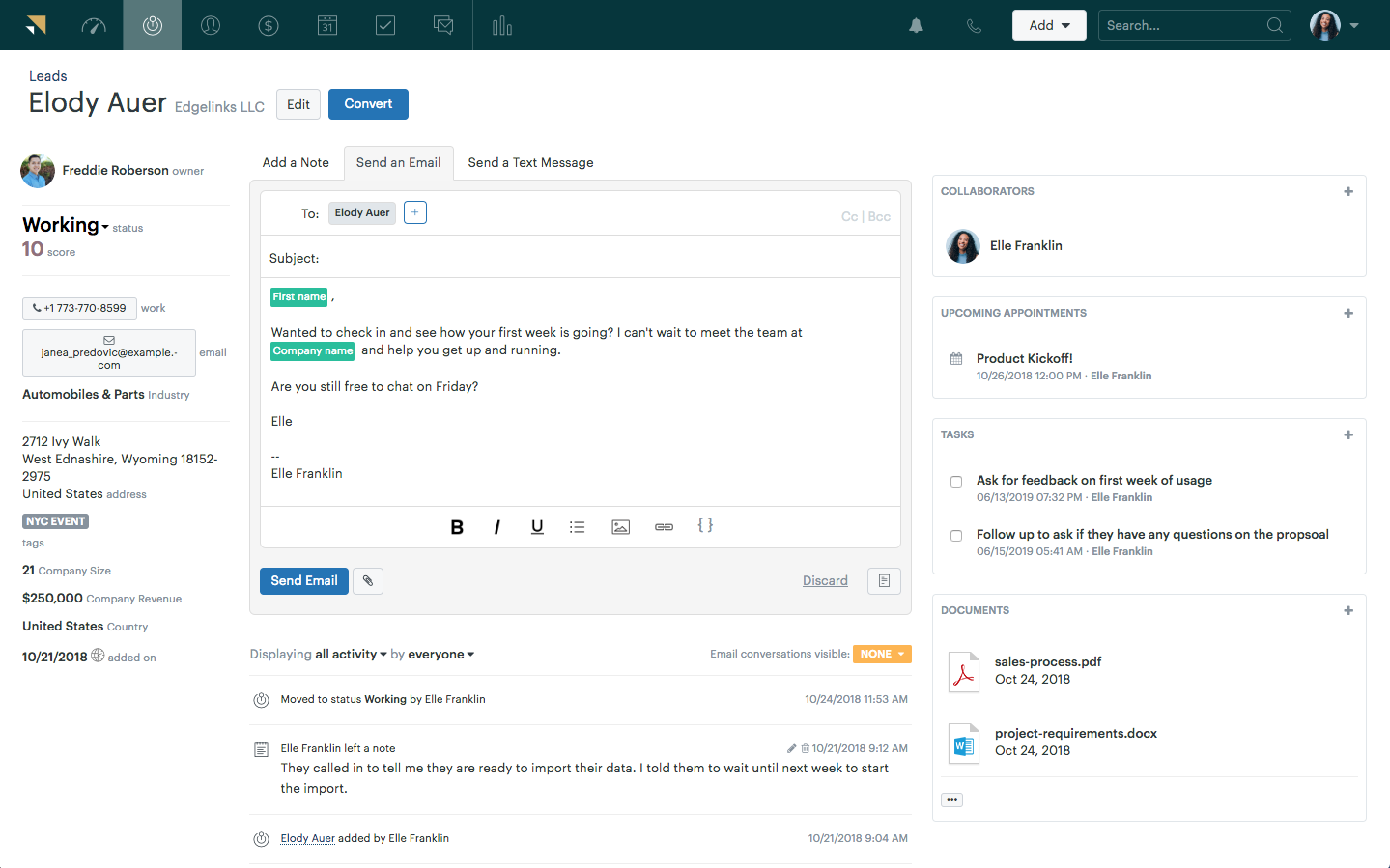
2. Zoho Desk – Best for Omnichannel Help Desk Support
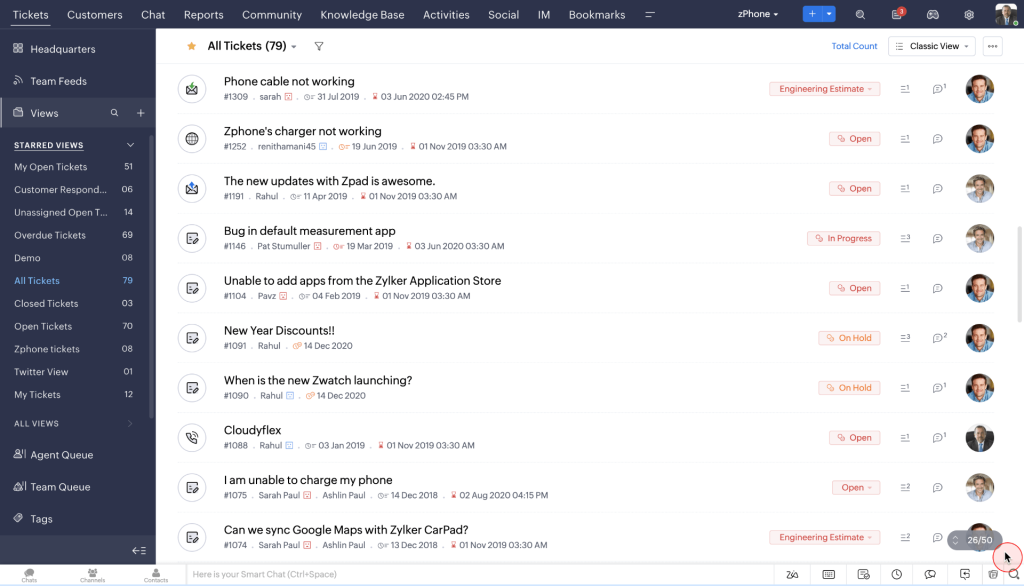
Image source: Zoho
I’ve used Zoho Desk for managing customer support, and it’s been a great tool, especially for omnichannel support. One of its most useful features is the AI assistant, Zia, which helps automate ticket categorization, suggest responses, and even predict customer sentiment.
The integration with email, chat, and social media makes it easy to manage all inquiries in one place.
If you’re looking for a simple yet powerful automated helpdesk tool that works across different channels, Zoho Desk is definitely worth considering.
Pros:
- Zia AI assistant to automate ticket categorization and provides AI-based suggestions for responses
- Customizable workflows to tailor workflows to meet your team’s specific needs and processes
- Multi-brand support to manage support for multiple brands within one platform
- Time-based SLA management to tracks service level agreements and ensures timely responses
Cons:
- Some users feel customization options could be deeper in certain features
- Setting up for large teams with multiple departments can be a bit complicated
Pricing:
Starts at $14/user/month.
3. Zendesk – Best for AI-Powered Customer Support
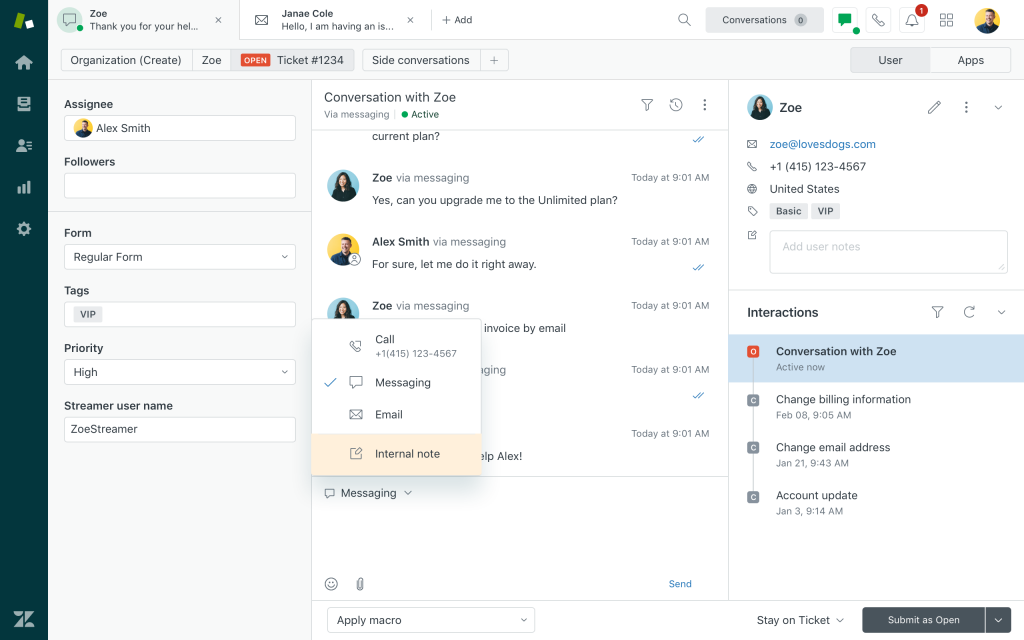
Image source: Zendesk
I’ve used Zendesk for managing customer support, and it’s truly a comprehensive tool. I’ve found its AI features, like the Answer Bot, incredibly helpful for automating responses and resolving simple tickets quickly.
The ability to manage email, chat, social media, and voice support in one platform makes Zendesk perfect for teams aiming to provide consistent, high-quality service.
With its powerful reporting tools and easy integrations, it’s an all-in-one solution that keeps customer service efficient and organized.
Pros:
- Multilingual support to handle support tickets in multiple languages with ease
- Comprehensive analytics to track team performance and customer satisfaction
- Ticket automation to automatically categorize and route tickets to the right agent
- Easy integrations with other tools and apps to enhance functionality
Cons:
- Many advanced features are locked behind higher-tier plans
- There are occasional reports of slow response times from Zendesk’s support team
Pricing:
Starts at $55/user/month.
4. Freshdesk – Best for AI-Driven Ticket Management
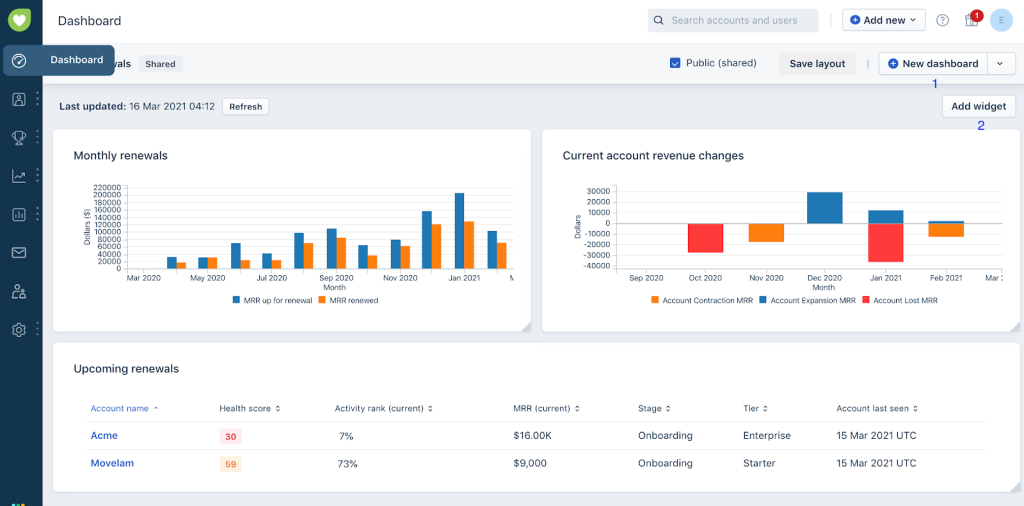
Image source: Freshdesk
I’ve used Freshdesk, and one thing I love is how much time it saves. The Freddy AI bot takes care of ticket sorting, prioritizing, and even suggesting replies, so I don’t have to do everything manually. Whether it’s emails, chats, or social media messages, everything flows into one place, making it easy to manage.
I also found the automation rules super useful for cutting out repetitive tasks. Instead of constantly reassigning tickets or answering the same questions, I could focus on the bigger issues that actually needed my attention.
Another thing that stood out to me was how easy it was to track performance without digging through complex reports. Freshdesk’s dashboards give a clear view of response times, backlog, and agent workload, so I always knew where things were slipping and where we were doing well.
Pros:
- Multichannel Support to keep emails, chat, social media, and calls in one organized space
- AI-Powered ticket routing to send tickets to the right agents without manual sorting
- SLA Tracking to help keep response times in check
- Mobile App to Lets you handle tickets on the go without being stuck at your desk
Cons:
- Performance slows down when dealing with a large ticket volume.
- Custom reports could be more detailed and user-friendly.
Pricing:
Starts at $55/user/month.
5. HelpDesk – Best for Streamlining Email-Based Support
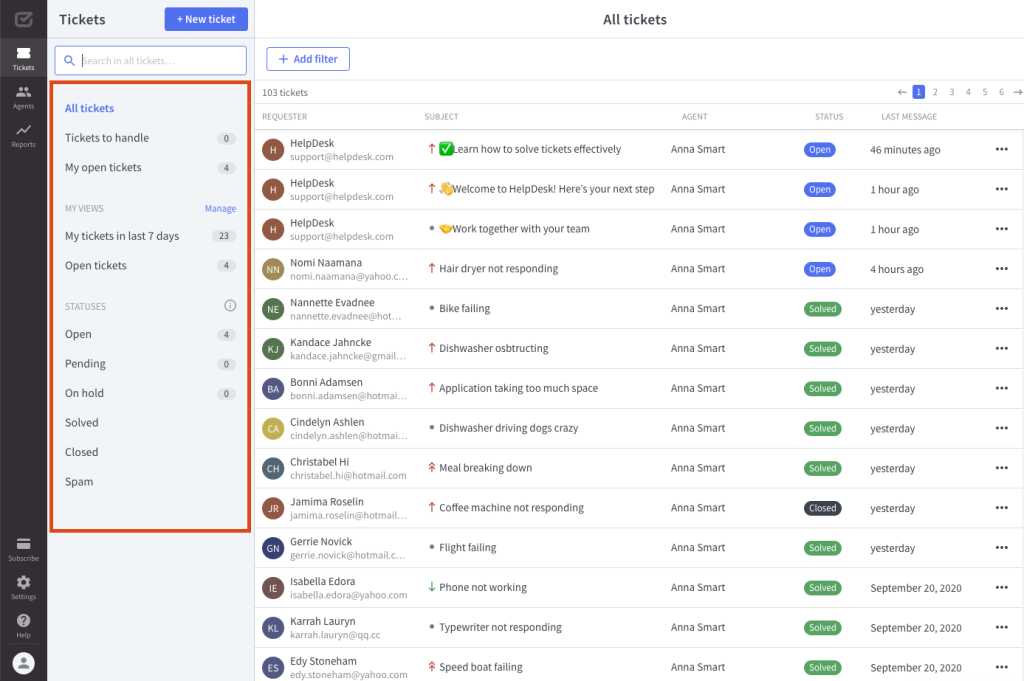
Image source: Helpdesk
HelpDesk is a simple yet effective automated helpdesk software that makes ticket management a breeze. I’ve used it, and what stood out was its AI-powered automated responses that help cut down response times.
The smart ticket assignment ensures that queries land with the right agents, making customer support more efficient.
It also comes with collision detection, canned responses, and analytics to improve team productivity. For businesses handling a high volume of email-based support, HelpDesk provides an organized and automated way to manage customer interactions without unnecessary complexity.
Pros:
- Collision detection to prevent multiple agents from working on the same ticket
- Canned responses to save time for common issues
- Ticket tagging & categorization to organize tickets efficiently for better tracking
- Customizable workflows to automate repetitive tasks to boost efficiency
Cons:
- Some users find the automation rules restrictive
- Missing a dedicated mobile app for on-the-go ticket management
Pricing:
Starts at $29/month.
6. HappyFox – Best for Help Desk Reporting
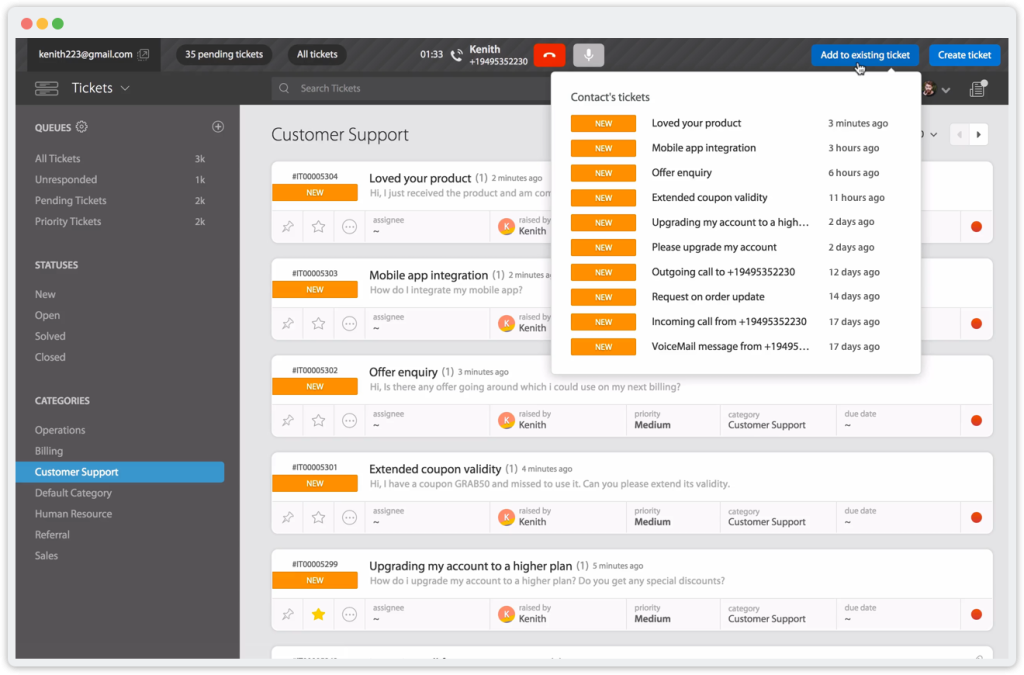
Image source: HappyFox
If you’re looking for an automated help desk software that takes reporting to the next level, HappyFox is definitely worth checking out. I’ve personally used it, and what I love most is its ability to deliver detailed, real-time reports.
The AI-powered ticket tracking is a game changer—it automatically monitors ticket progress and helps you keep an eye on agent performance.
Custom reports are super easy to generate, so I can quickly access key insights like SLA compliance, team performance, and customer satisfaction. If data-driven decision-making is a priority for your team, HappyFox offers everything you need to keep things running smoothly and improve overall support efficiency.
Pros:
- Customizable reports to track exactly what matters to your team.
- Real-time analytics to Stay up-to-date with live performance metrics and customer feedback.
- Team performance tracking to monitor how your agents are doing and identify areas for growth.
- Customer satisfaction surveys to collect feedback and easily measure customer happiness.
Cons:
- It might be out of budget for smaller businesses or teams
- Connecting to certain third-party apps can be tricky
Pricing:
Starts at $24/agent/month.
7. Spiceworks – Best for Open-Source Ticketing System for Small IT Teams
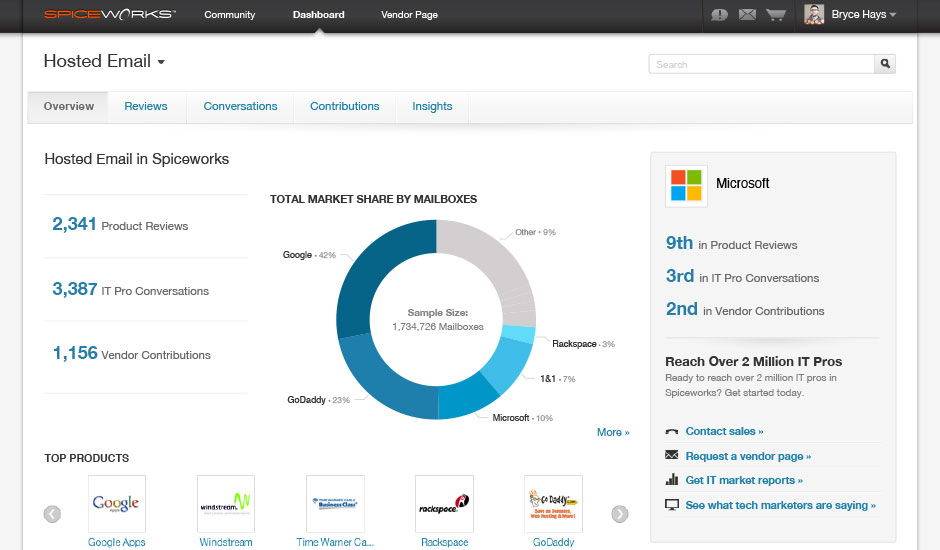
Image source: CompareCamp
Spiceworks is a great choice for small IT teams that need a free, open-source ticketing system without compromising on essential features. I’ve used it for managing IT support requests, and its AI-powered ticket prioritization is a huge time-saver.
It automatically sorts and assigns tickets based on urgency, so my team doesn’t have to manually sift through every request.
Since it’s open-source, there’s plenty of flexibility to tweak it to fit specific IT workflows. If you’re looking for a budget-friendly, community-supported helpdesk solution, Spiceworks is a solid pick for small IT teams.
Pros:
- Real-time reporting to track IT support trends and ticket resolution times instantly
- Multi-channel support to manage IT requests from email, chat, and web portals in one place
- Collaboration tools to enable IT teams to work together on complex issues efficiently
- Asset management to keep track of IT hardware and software within the same platform
Cons:
- Some automation and advanced reporting require additional setup
- Lacks some desktop functionality for managing tickets on the go
Pricing:
Spiceworks is free for all users.
8. Salesforce Service Cloud – Best for AI-Powered Service
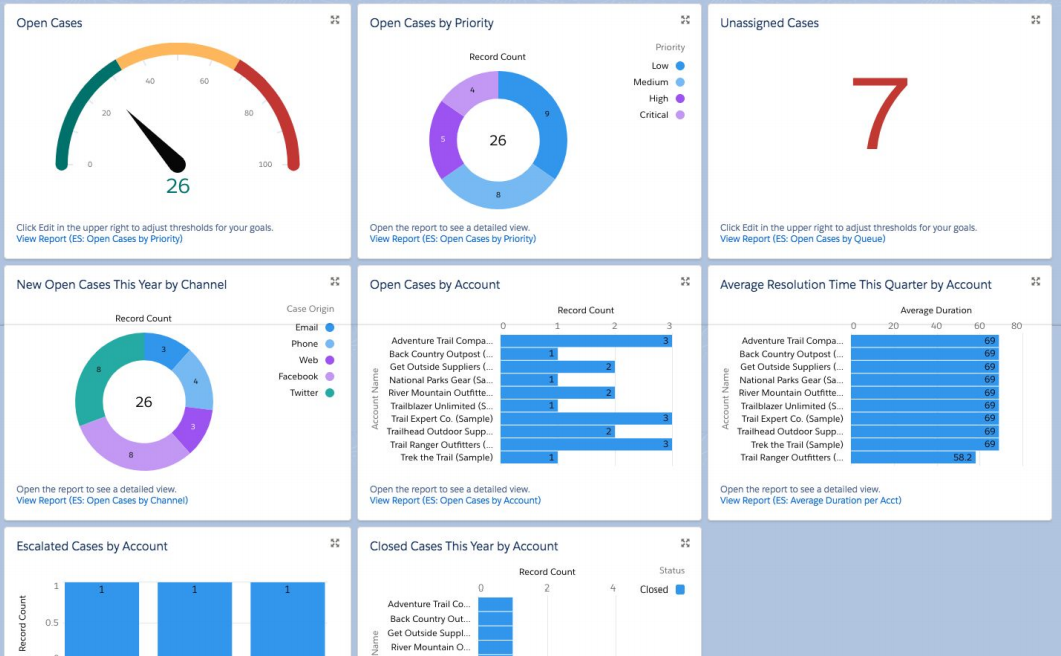
Image source: Salesforce Ben
I’ve used Salesforce Service Cloud for a while, and honestly, it’s a game-changer when it comes to AI-powered service. The AI features, especially Salesforce Einstein, have made my life so much easier. It helps predict customer needs and automates a lot of repetitive tasks like ticket routing and prioritizing, which saves a ton of time.
What really impressed me was how seamlessly it integrates with everything else in the Salesforce ecosystem. If you’re looking to level up your customer service with some serious AI power, I’d highly recommend giving this tool a try.
Pros:
- Salesforce Einstein AI to predict customer needs and automate tasks
- Automated case escalation to automatically escalate unresolved issues based on rules
- Intelligent agent assist to provide real-time suggestions to improve agent responses
- AI-Powered case classification to automatically categorize customer issues for faster resolution.
Cons:
- It can get pricey, especially for smaller teams or startups.
- The mobile app is decent, but you’ll miss a few desktop features.
Pricing:
Starts at $25/user/month.
9. ServiceNow – Best for IT Service Automation
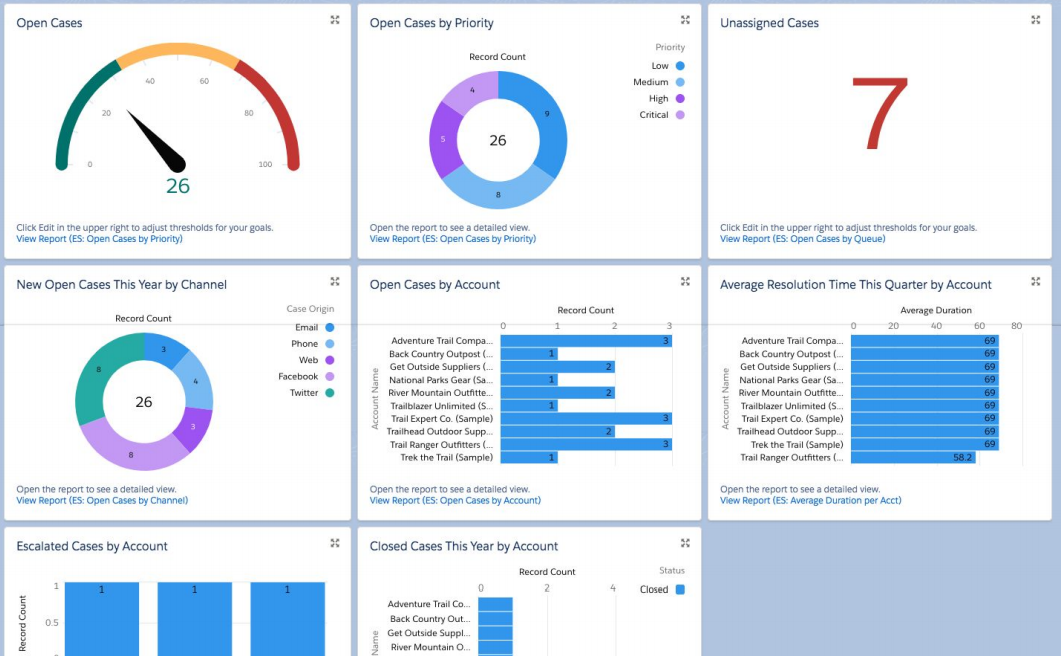
Image source: ServiceNow
I’ve used ServiceNow, and it’s an excellent automated helpdesk software, especially for IT service management. What I love is its AI capabilities, like Virtual Agent, which automates responses to common issues, allowing agents to focus on more complex tasks. The predictive analytics also help prioritize issues, ensuring that critical problems are handled first.
The platform integrates smoothly with other IT systems, making it easy to keep track of everything in one place. If you need an all-in-one solution to automate IT support, ServiceNow delivers a solid, scalable service.
Pros:
- Virtual Agent AI to Automate responses to common queries, reducing agent workload
- Unified Service Management to centralize all IT service management tasks in one platform
- Automated Incident Management to automatically route incidents to the appropriate team for faster resolution
- IT Asset Management to track and manage IT assets within the system, ensuring proper allocation
Cons:
- It can take time and expertise to fully set up and customize
- New users might find the platform overwhelming initially
Pricing:
Custom pricing.
10. SysAid – Best for IT Service Management
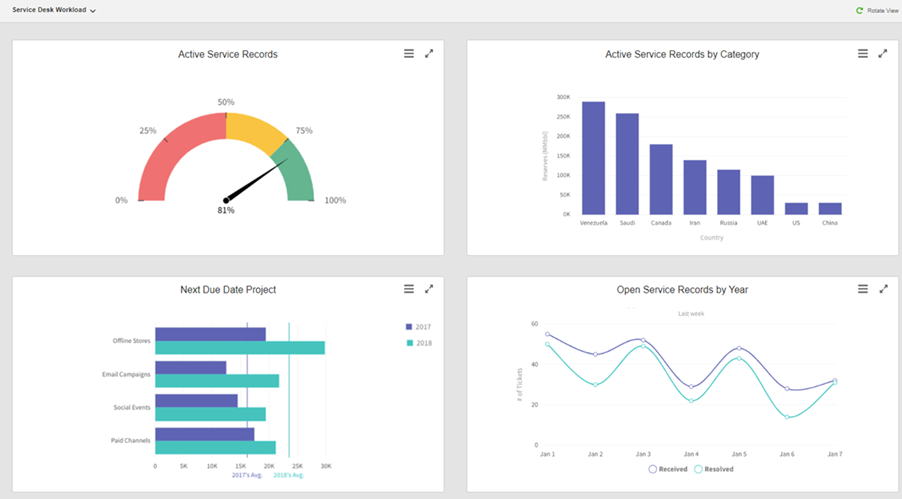
Image source: SysAid Documentation
SysAid is a powerful automated helpdesk software that offers a wide array of features, making it ideal for IT service management. I’ve used it, and its ability to automate tasks and streamline workflows is impressive.
One of the standout features is its AI-driven ticket routing system, which ensures that issues are quickly directed to the right team.
SysAid also offers asset management and custom reporting to help teams stay on top of their service processes. It’s an all-around tool designed to improve efficiency in managing IT operations.
Pros:
- AI-Powered ticket routing to automatically assigns tickets to the right agent
- Asset management to track and manage all your IT assets from one place
- Customizable dashboards to view relevant metrics and KPIs
- Knowledge base integration to reduce the load on support teams
Cons:
- Customizing certain features may require technical expertise.
- The mobile app doesn’t offer the full range of features available on desktop.
Pricing:
Custom pricing.
My Top 3 Picks for the Best Automated Help Desk Tools
Need quick recommendations? I’ve got three for you!
1. ProProfs Help Desk
ProProfs Help Desk simplifies customer support with AI features like customer intent analysis, response suggestions, automated ticket routing, and chatbots. Its detailed reporting and seamless tool integrations make managing support efficient and improve overall team performance.
2. HappyFox
HappyFox offers AI-powered ticket tracking and detailed real-time reports, making it ideal for data-driven decision-making. Its custom report generation provides insights into SLA compliance, team performance, and customer satisfaction, helping improve support efficiency and streamline operations.
3. ServiceNow
ServiceNow is a robust automated helpdesk software, ideal for IT service management. Its AI features, like Virtual Agent, automate common responses, while predictive analytics prioritize issues. Seamless integration with IT systems makes it an excellent, scalable solution for IT support automation.
The Top Reasons Businesses Are Switching to Help Desk Automation
Customer support today isn’t just about answering tickets. It’s about speed, efficiency, and customer satisfaction. Helpdesk automation helps businesses streamline operations while ensuring customers get faster resolutions.
Here’s why companies are making the switch:
1. Faster Response and Resolution Times
Customers expect quick answers, and automation makes that possible. Automated ticket routing assigns issues to the right agents based on priority, category, or past interactions, reducing wait times. AI chatbots can instantly answer common queries, while automated workflows trigger follow-ups, ensuring no ticket gets lost in the queue.
Automated systems can also escalate urgent tickets instantly, making sure high-priority cases are handled without delay. Businesses can set up auto-responses to acknowledge customer concerns immediately, giving them reassurance while the issue is being resolved.
2. Reduced Manual Work for Support Teams
Repetitive tasks like sorting tickets, sending follow-up emails, or updating ticket statuses eat up valuable time. Automation eliminates these by setting up rules to handle them automatically. This frees up support agents to focus on solving complex issues, improving overall efficiency.
By removing repetitive administrative tasks, agents can dedicate more time to personalized support, enhancing customer relationships.
With automation handling the background work, businesses can operate with leaner support teams without compromising service quality.
3. 24/7 Support Without Extra Costs
Customers don’t operate on a 9-to-5 schedule, and hiring round-the-clock support staff can be expensive. Helpdesk automation, through knowledge base and other self-service portals, ensures customers can get answers anytime. Automated ticket responses acknowledge issues immediately, setting expectations even outside business hours.
AI chatbots can handle FAQs, troubleshooting, and ticket creation, allowing businesses to maintain high service levels without additional staffing costs.
4. Improved Customer Satisfaction and Experience
Long wait times and delayed responses frustrate customers. Automation helps businesses provide faster updates, proactive email notifications, and instant self-help options, leading to a smoother experience.
AI-driven solutions help customers fix common issues without waiting for an agent, reducing dependency on human support. Plus, automated CSAT surveys play a key role in measuring customer satisfaction, offering valuable feedback on how well the support team is performing.
5. Better Data and Performance Insights
Understanding customer pain points and agent performance is crucial for continuous improvement. AI-powered help desk systems provide analytics on rated tickets, resolution times, and response time.
Businesses can use this data to optimize their support strategies, identify recurring issues, and improve service quality.
FREE. All Features. FOREVER!
Try our Forever FREE account with all premium features!
What Are the Must-Have Features of an Automated Help Desk System?
An automated desk system goes beyond basic ticket management—it streamlines workflows, improves response times, and enhances overall support efficiency. The right set of features reduces agent workload while ensuring faster resolutions. Here are the top five must-have features of an automated help desk system:
1. Canned Responses for Faster Agent Replies
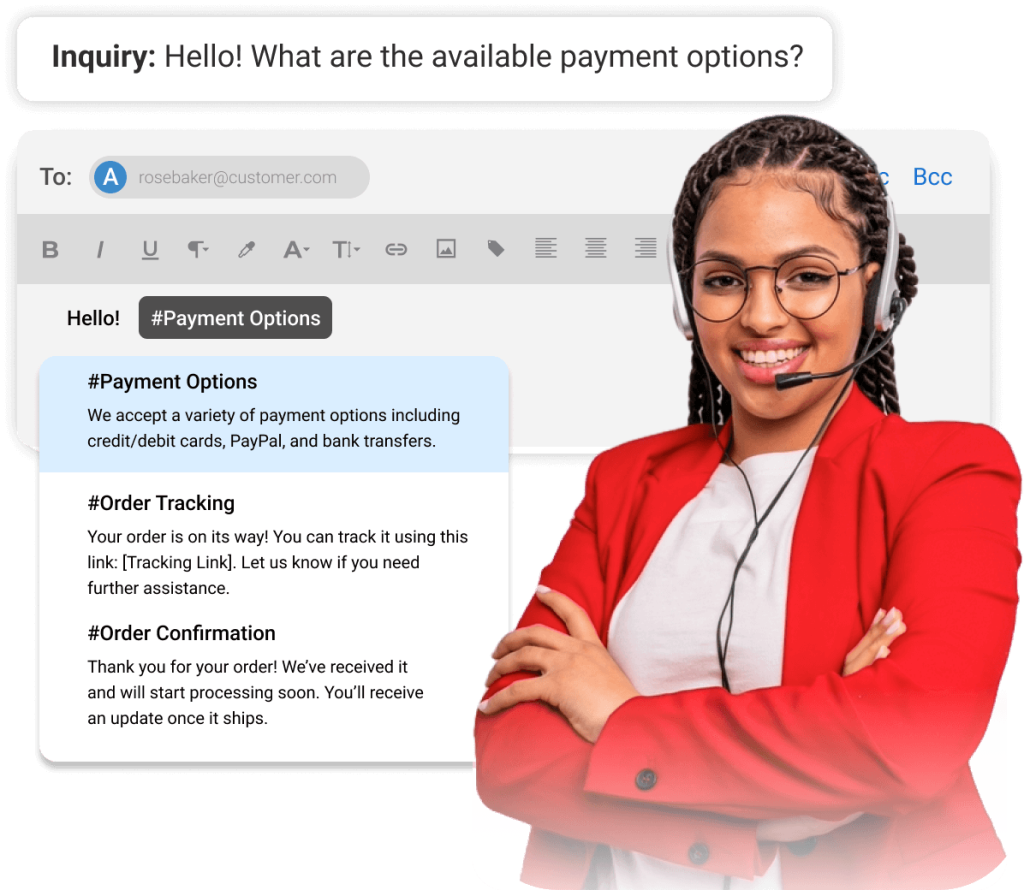
Support teams often handle repetitive questions, such as password resets, troubleshooting steps, or billing inquiries. Canned responses allow agents to send pre-written, standardized answers to these common queries in just a few clicks.
Instead of typing the same response multiple times, agents can pull from a library of templated replies, significantly reducing response time and improving consistency.
These responses can also be personalized with customer-specific details, ensuring a balance between efficiency and a human touch. Over time, businesses can refine canned responses based on customer feedback to improve clarity and effectiveness.
2. Knowledge Base Integration for Self-Service
A well-integrated knowledge base empowers customers to find answers on their own without needing to contact support. Automated help desks can suggest relevant articles or FAQs based on the customer’s query, reducing ticket volume and agent workload.
A self-service portal also allows users to track ticket status and updates in real time, eliminating unnecessary follow-ups. By automating self-help options, businesses not only improve efficiency but also enhance customer satisfaction by providing instant solutions to common problems.
3. Multi-Channel Support Automation
Customers reach out for support through various channels, including email, live chat, social media, and web forms. An automated help desk centralizes all inquiries in one dashboard, ensuring that no request is missed. With automation, businesses can set up workflows to trigger responses across different channels, ensuring a seamless support experience.
Whether a customer contacts support via chat or email, automation ensures they receive the same level of service across all platforms, improving customer satisfaction and brand consistency.
4. AI Chatbots for Instant Support
AI chatbots have become an essential part of modern help desk automation. AI chatbots for the helpdesk provide real-time assistance by handling common queries, booking appointments, and even collecting necessary details before escalating a ticket to a human agent.
You can also train chatbots using knowledge base or website data to deliver accurate and personalized responses.
This significantly reduces the workload on support agents while ensuring that customers receive immediate assistance. Businesses can also customize chatbots to offer personalized responses, enhancing the overall customer experience.
5. Ticket Summarization & Response Suggestions
Ticket Summarization and Response Suggestions is a feature designed to streamline customer support workflows. It automatically analyzes incoming support tickets, summarizing the key details and suggesting appropriate responses based on the issue at hand. This helps support teams respond faster and more accurately, saving time and improving efficiency.
By offering smart response suggestions, it reduces the manual effort needed to draft replies and ensures consistent, quality support across all customer interactions, leading to a better customer experience.
6. Security, Permissions, and Compliance Controls
This is often overlooked, but it matters a lot, especially if your tickets include customer data, internal IT requests, or account details. When evaluating automated help desk or automated service desk tools, I look for:
- Role-based access, so agents only see what they should
- Audit logs, so you can track who did what and when
- Encryption (in transit, and ideally at rest)
- SSO support for safer logins
- Compliance readiness if your industry needs it (GDPR expectations, SOC 2-aligned practices, etc.)
A Simple 5-Step Help Desk Automation Checklist
If you want to start without overthinking it, this quick checklist helps.
Step 1: Identify Your Top Repeat Tickets
Pick the top 10 to 20 categories that consume most of your time (billing, login issues, password resets, order status, how-to questions).
Step 2: Set up Routing Rules
Route tickets by priority, category, customer type, region, or agent skill set.
Step 3: Build Canned Responses & Knowledge Base Articles
Create quick replies for common questions and link them to help articles.
Step 4: Add Chatbot Coverage for FAQs
Start small with simple FAQs, then expand based on what customers ask most.
Step 5: Measure & Refine Weekly
Track time to first response, resolution time, reopen rate, CSAT, and backlog trends. Then refine workflows.
How to Calculate If Automation Is Worth It
You do not need a complicated model to estimate ROI. A simple breakdown is usually enough to see the impact.
1. Estimate Time Saved per Ticket
Even saving 1 to 2 minutes on tasks like routing, tagging, or replying adds up quickly at scale.
2. Multiply by Your Monthly Ticket Volume
Example: 2 minutes saved × 2,000 tickets = 4,000 minutes saved per month.
3. Convert Saved Minutes Into Hours
4,000 minutes equals roughly 66.7 hours saved every month, which is close to a full workweek.
4. Multiply by Your Loaded Hourly Cost
Use the fully loaded cost, including salary, benefits, and overhead.
Example: 66.7 hours × $25/hour = about $1,667 saved per month.
5. Compare Savings to the Tool Cost
If monthly savings exceed the tool’s price, automation is already paying for itself. This does not include added benefits like faster responses, higher CSAT, and lower agent burnout.
Common Challenges: Remote Teams and Integration Issues
Automation delivers the best results when you plan for real-world operational challenges upfront.
1. Remote Team Coordination Challenges
For distributed teams, common issues include duplicate replies, unclear ticket ownership, and tickets getting stuck between shifts. These problems usually show up when handoffs are unclear or visibility is limited.
What helps is a combination of smart automation and simple process rules. Collision detection prevents multiple agents from replying to the same ticket. Clear routing rules ensure tickets go to the right owner immediately. Consistent tagging makes tickets easy to track across shifts. A simple handoff checklist helps teams close the loop during shift changes and prevents tickets from slipping through the cracks.
2. Integration Challenges
Integrations can unlock a lot of value, but only if they are set up thoughtfully. Start with must-have integrations first, usually CRM and email. These provide the most immediate context for agents without overwhelming the system.
Before rolling anything out widely, test integrations in a limited setup. Decide early what data should sync and what should not to avoid clutter or security issues. If approvals are required, bring IT or security teams in early so integrations do not become a last-minute blocker.
FREE. All Features. FOREVER!
Try our Forever FREE account with all premium features!
How to Automate Support with ProProfs Help Desk
I’ve used ProProfs Help Desk to automate support tasks, and let me tell you—it makes life so much easier. No more manually sorting tickets or crafting the same responses over and over. If you’re looking to streamline your help desk, here are five ways to automate ProProfs Help Desk:
1. Automated Ticket Routing
ProProfs Help Desk uses Round-Robin ticket assignments to distribute tickets evenly among agents. This means tickets are assigned one by one in a rotating order, so no one gets overloaded. For example, if three agents are online, the first ticket goes to Agent 1, the second to Agent 2, and so on.
Once everyone gets a turn, the cycle starts again. This makes things fair and fast, ensuring every agent stays active and no ticket gets missed. It also helps reduce response time since no ticket sits waiting in a queue for too long. As a result, customers get quicker replies, and agents work more efficiently.
2. AI-Generated Responses for Common Questions
ProProfs Help Desk uses Round-Robin ticket assignments to distribute tickets evenly among agents. This means tickets are assigned one by one in a rotating order, so no one gets overloaded. For example, if three agents are online, the first ticket goes to Agent 1, the second to Agent 2, and so on.
Once everyone gets a turn, the cycle starts again. This makes things fair and fast, ensuring every agent stays active and no ticket gets missed. It also helps reduce response time since no ticket sits waiting in a queue for too long. As a result, customers get quicker replies, and agents work more efficiently.
2. AI-Generated Responses for Common Questions
AI chatbots are crucial when it comes to providing quick support, especially outside business hours. With ProProfs Help Desk, you can set up AI-driven chatbots that engage with customers in real-time.
These bots can answer frequently asked questions, guide users to the right help articles, and even collect necessary details before handing the conversation over to a live agent.
This means customers don’t have to wait in a queue for simple inquiries, and agents can focus on resolving more complex issues. It’s a win-win for both sides.
4. Automated Ticket Escalations
Sometimes tickets require urgent attention, but if they get stuck in a backlog, it can frustrate customers. ProProfs Help Desk prevents this by automatically escalating unresolved tickets. If a ticket remains unanswered beyond a set time limit, the system flags it and forwards it to a higher-level agent or manager.
This ensures that high-priority issues aren’t left waiting too long and that customers receive timely responses. This kind of automation helps businesses maintain high service standards and improve customer satisfaction.
5. Automated Reports & Performance Insights
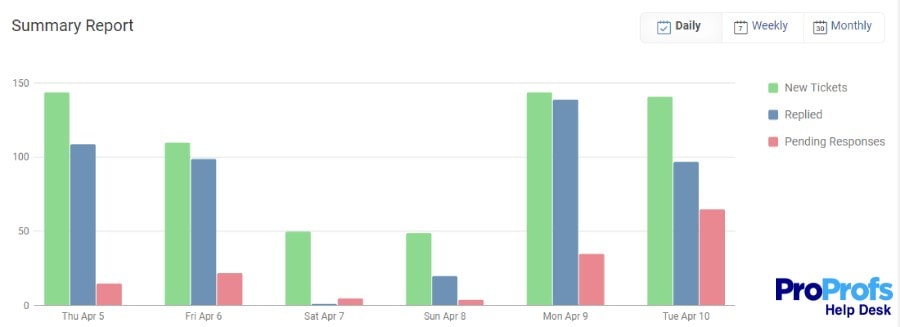
Tracking help desk performance manually can be overwhelming, but ProProfs Help Desk makes it easy with automated reports and analytics. The system continuously monitors key metrics like rated tickets, average resolution time, and customer satisfaction ratings.
These reports are generated automatically, so managers can quickly identify trends, spot inefficiencies, and make data-driven decisions without having to dig through raw data. Plus, with the report scheduling feature, you get regular performance updates sent straight to your inbox.
How Will AI Shape the Future of Help Desks?
AI is already making waves in various industries, and help desks are no exception. As technology evolves, AI will continue to play a pivotal role in transforming how customer support operates. Here’s how AI will shape the future of help desks:
1. Enhanced Customer Support with AI Chatbots
AI-powered chatbots are already handling customer queries in real-time, providing instant responses to frequently asked questions. These chatbots will become even more sophisticated, using natural language processing (NLP) to understand complex issues and offer personalized solutions.
This means customers can get the help they need at any time of day, without waiting for a human agent, which significantly improves response times and customer satisfaction.
2. Smarter Ticket Routing and Prioritization
AI will further enhance ticket routing by automatically analyzing and categorizing incoming tickets based on their content, urgency, and complexity. This allows help desks to route tickets to the appropriate agent with the right skill set more efficiently.
AI can also prioritize high-priority issues, ensuring that urgent problems get immediate attention, reducing resolution times, and increasing overall productivity.
3. Automating Repetitive Tasks
Help desk agents spend a significant amount of time handling repetitive tasks, such as ticket assignment, follow-ups, and data entry. AI will automate these mundane activities, allowing agents to focus on more complex and valuable customer interactions.
Automation will also reduce human error and ensure that the processes are consistently executed, increasing efficiency and reliability across the board.
4. Data-Driven Insights for Better Decision-Making
AI will provide valuable analytics by tracking and analyzing customer interactions, identifying patterns, and generating insights about common issues, customer satisfaction, and agent performance.
With this data, businesses can make informed decisions about improving customer service, optimizing workflows, and identifying opportunities for training or product improvements. AI-powered analytics will help businesses stay ahead of customer expectations and improve their support strategies over time.
5. Proactive Customer Support
AI’s ability to analyze customer data and predict issues will take customer support to the next level. Rather than simply reacting to problems, AI can proactively identify potential issues before they escalate.
For instance, if the system detects a problem that could affect multiple customers, it could automatically send out notifications or solutions to prevent a surge in support tickets. This proactive approach can lead to better customer experiences and fewer support requests overall.
Boost Efficiency with Help Desk Automation: Here’s How to Start
Helpdesk automation works best when you treat it like a process upgrade, not a one-time setup. I’d start by automating the repetitive work first, like routing, tagging, status updates, and first replies, then add a small self-service layer with a knowledge base for your most common issues.
From there, I’d use AI only where it clearly saves time without affecting quality, like response suggestions and ticket summaries, and keep tracking a few core metrics such as first response time, resolution time, reopen rate, CSAT, and backlog trends so you can refine workflows weekly. When choosing an automated help desk, I’d prioritize something your agents can adopt quickly, that supports multi-channel support, and gives you enough reporting to see what’s improving.
If you want a practical starting point, ProProfs Help Desk fits nicely here because you can set up routing, use response suggestions, and add chatbot support without making the whole process feel heavy or disruptive.
Frequently Asked Questions

Which areas of a Help Desk can be automated?
Areas like ticket creation, routing, follow-ups, canned responses, knowledge base suggestions, and reporting can all be automated to improve efficiency and response times.
Can you use help desk automation tools for a service desk?
Yes, many help desk automation tools can be used for a service desk, as both aim to streamline workflows. However, service desk tools typically focus more on IT service management and incident handling.
What is the impact of service desk automation?
Service desk automation speeds up issue resolution, reduces manual tasks, improves consistency, and enables proactive support, all while cutting operational costs.
What is the impact of service desk automation?
Service desk automation speeds up issue resolution, reduces manual tasks, improves consistency, and enables proactive support, all while cutting operational costs.
FREE. All Features. FOREVER!
Try our Forever FREE account with all premium features!

 We'd love your feedback!
What did you like & how can we make it even better?
 Thanks for your feedback!
 Ask Your Question
Have a question? Get expert help to make your decision easier.