
Customer service and lead generation share more than most teams admit. The visitor asking about pricing in chat and the customer asking about a refund by email both want a fast, clear answer. According to a study by Zendesk in 2026, 85% of CX leaders said customers would leave brands that could not resolve issues on first contact. A prospect who waits too long for an answer disappears just as quietly.
A lead generation and customer support platform keeps both jobs in view. Some combine contacts, chats, and tickets; others connect separate tools. This guide compares 12 options to show which lead-generation and customer-service tools belong together.
I compared published pricing, product documentation, and review sources, focusing on capture, ownership, follow-up, and the cost of connecting them.
What Is a Lead Generation and Customer Support Platform?
A lead generation and customer support platform is software that captures prospects and answers customers from the same set of forms, chats, and contact records. A lead is a person who has shown interest in buying, such as a visitor who fills in a form or asks about pricing in chat. A support request is a customer or prospect asking for help.
Some platforms combine both functions in a single product, while others integrate a CRM, a live chat tool, and a help desk.
A few terms appear throughout this guide. A CRM, or customer relationship management system, tracks contacts, deals, and follow-ups. A pre-chat form asks a visitor for details before a conversation starts. A qualified lead is a lead that fits your buyer profile and is likely to buy.
A handoff is the moment when one team or an AI agent passes a conversation to another. For background, see how ProProfs describes its customer communication management platform, and this explainer on the help desk ticketing system.
12 Best Lead Generation and Customer Support Platforms
A few of these focus on capturing new leads, while others are stronger at supporting customers after the first conversation. The useful difference is how well they connect those jobs, so your team knows what was discussed, who owns the request, and what happens next.
Here’s a quick look at the 12 platforms before the full breakdown:
| Tool | Best For | Pricing |
| ProProfs Help Desk | Easiest AI Help Desk for Shared Inboxes, Ticket Workflow Automation, and Scaling Support Teams | Free plan available. Paid plan starts at $19.99/month |
| HubSpot | Leads, deals, and tickets around a CRM record | Starts at $7/seat/month |
| Zoho CRM Plus | Sales, chat, and support in a connected suite | Starts at $20/user/month |
| Freshworks | Freshdesk Omni alongside a separate sales CRM | Starts at $29/agent/month |
| Salesforce | Small teams combining sales and service | Starts at $25/user/month |
| Zendesk | Support-first teams connecting a separate sales CRM | Starts at $55/agent/month |
| Fin AI Agent + Intercom | AI-led sales conversations and support | Starts at $19/seat/month |
| Tidio | Smaller teams using chat and lead-capture flows | Starts at $24.17/month |
| LiveChat / Text | Website sales conversations with connected support | Starts at $19/user/month |
| Crisp | Workspace pricing for chat, CRM, and ticketing | Starts at $295/workspace/month |
| respond.io | Automated WhatsApp and social messaging workflows | Starts at $159/month |
| Brevo | Marketing-led capture and follow-up | Starts at $9/month |
Now, here is how each one actually holds up:
1. ProProfs Help Desk: Easiest AI Help Desk for Shared Inboxes, Ticket Workflow Automation, and Scaling Support Teams
ProProfs Help Desk stands out to me when a buying question needs input from more than one person. A prospect asking about implementation may need answers from sales and technical support. Customizable forms collect the request up front, while assignments and custom fields help staff record product interest and next steps.
I particularly value child tickets for splitting that work between departments without losing the original inquiry. Internal notes preserve the discussion, and collision alerts help prevent two people from sending conflicting replies. AI summaries and response suggestions help the next owner continue a longer conversation.
Connected ProProfs Knowledge Base provides self-service answers to product and setup questions. ProProfs Live Chat handles website conversations and allows staff to create tickets when an inquiry requires further attention.
For managers, reports and customer satisfaction surveys help review response quality and unresolved work. Those measures support the customer experience; sales conversion still needs appropriate CRM tracking.
Pros:
- Ticket forms collect contact details, inquiry types, and relevant requirements before follow-up.
- Custom fields help staff record product interest and the information needed by the next owner.
- Child tickets divide technical, billing, and sales-related work while keeping it connected.
- Shared inboxes, assignments, priorities, and internal notes give sales and support requests accountable owners.
- AI summaries and suggested responses help staff continue conversations without rereading every message.
- CSAT surveys and reports reveal unanswered questions, slow responses, and recurring service gaps.
Cons:
- No downloadable or on-premises version
- Dark user interface option not available
Pricing:
A free plan is available for growing teams. Paid plan starts at $19.99/month.
Here’s how Steve Organek, founder of Shaver Shebang, described his experience with ProProfs Help Desk –
Steve Organek, founder of Shaver Shebang, adopted ProProfs Help Desk to organize customer inquiries and respond while away from his desk. Centralized conversations, saved replies, and mobile access helped him manage support more efficiently.
For teams that combine lead generation and customer support, the relevant lesson is to keep inquiries manageable after the first contact. The story demonstrates support improvements rather than measured lead growth.
2. HubSpot: Best for Leads, Deals, and Tickets Around One CRM Record
I shortlisted HubSpot for teams that wanted sales and service to work from the same CRM. Its free tools covered contact management, forms, live chat, and basic ticketing.
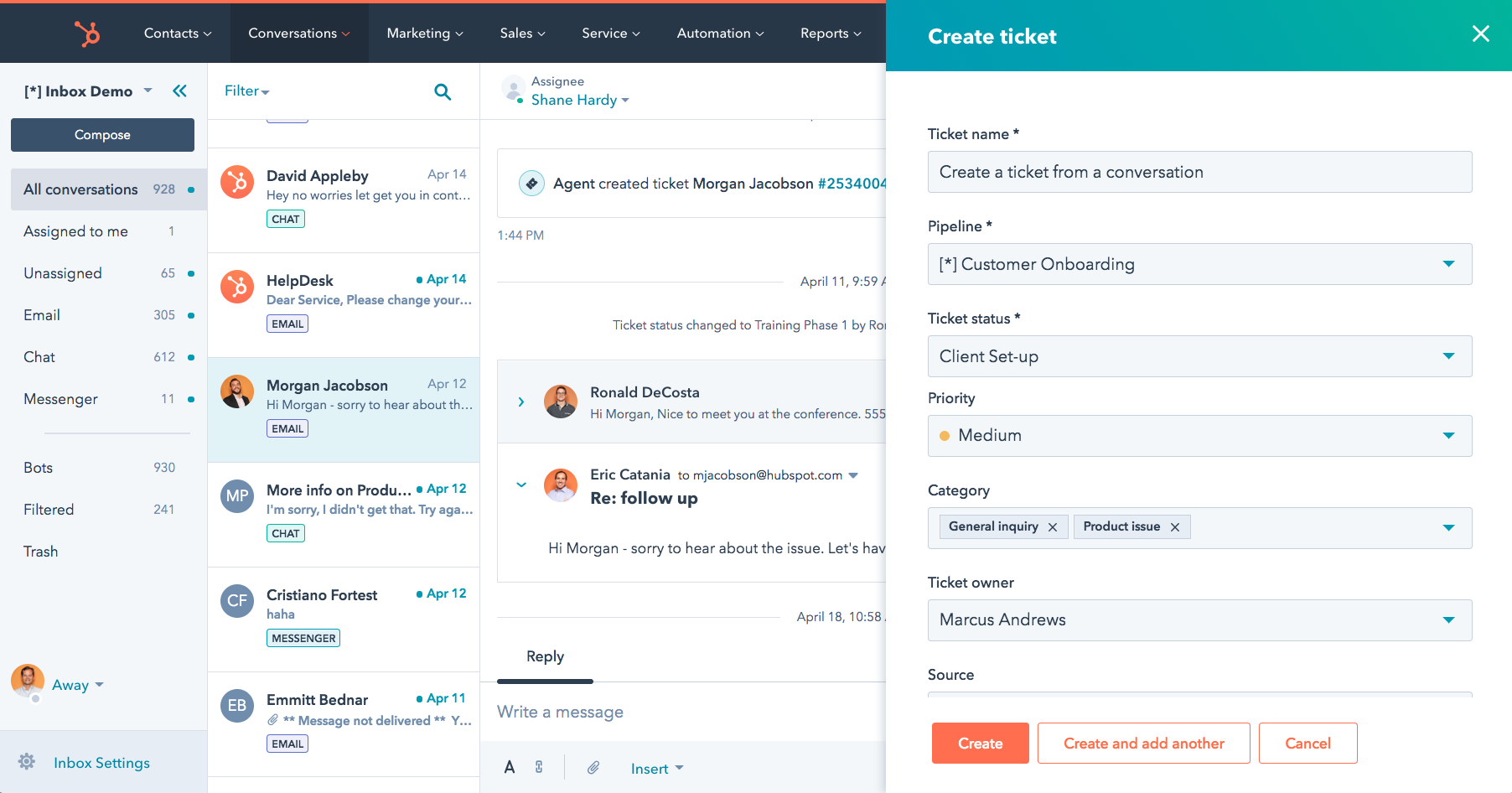
The Starter Customer Platform combined entry-level marketing, sales, service, content, and data tools. That made it a useful comparison when disconnected records were the main problem.
I also considered its deal-tracking and meeting tools relevant when an inquiry required a sales conversation. The practical check was whether staff could find the original question and continue it without asking the person to start again.
Pros:
- Free CRM, forms, chat, and basic ticketing.
- Contact records connected sales and service activity.
- Starter bundled marketing, sales, service, content, and data tools.
- Higher tiers offered broader automation and reporting.
Cons:
- Advanced workflows required higher tiers.
- Starter promotional pricing was limited to eligible new customers.
Pricing:
Starts at $7/seat/month.
3. Zoho CRM Plus: Best for Connecting Sales, Live Chat, and Support
I included Zoho CRM Plus for teams that wanted CRM, help desk, live chat, and reporting within one product family. It was a closer comparison for this workflow than standalone Zoho CRM.
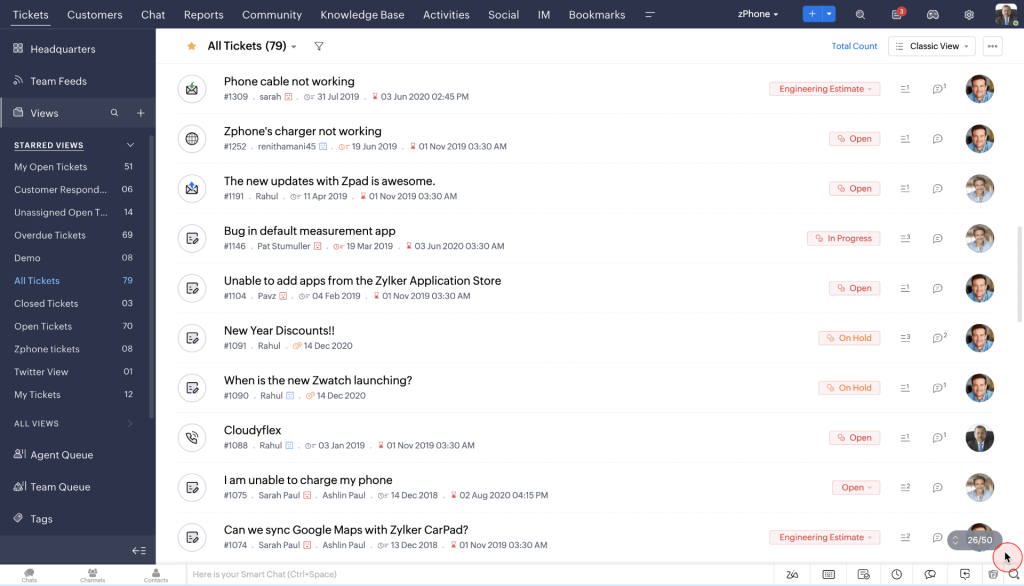
SalesIQ supplied visitor and chat information, while Desk managed support requests. The useful handoff preserved the original question and gave the next person responsibility for replying.
I also considered the suite’s analytics useful for reviewing activity across teams. The key setup check was whether the right contact, conversation, and owner appeared in the relevant application.
Pros:
- Combined sales, help desk, live chat, and analytics.
- SalesIQ connected website conversations with follow-up.
- Desk organized ticket ownership and customer inquiries.
- Analytics helped teams review activity across applications.
Cons:
- Staff needed to understand the roles of several connected applications.
- Cross-product workflows required setup and suitable permissions.
Pricing:
Starts at $20/user/month, billed annually. 30-day free trial available.
4. Freshworks: Best for Buying Sales and Support Tools From One Vendor
I considered Freshworks when a team wanted Freshsales CRM alongside Freshdesk Omni. Freshsales handled leads and deals; Omni brought customer conversations into support queues.
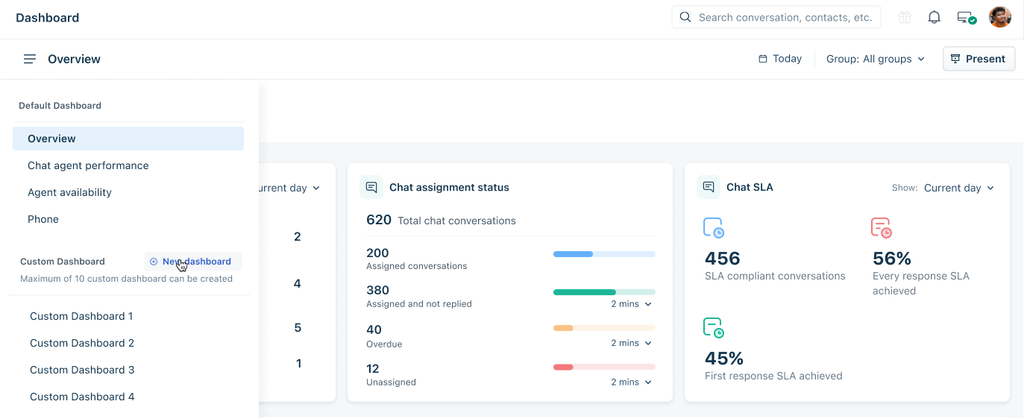
The useful comparison was the connection between them. The next owner needed the contact details, original question, and relevant conversation history, not just an alert that someone had written in.
I focused on what the recipient could actually see: the customer details, the original question, and relevant history. A notification alone would not provide enough information for a useful follow-up.
Pros:
- Freshsales organized lead, contact, and deal records.
- Freshdesk Omni brought support conversations into managed queues.
- Connected CRM details helped agents understand incoming inquiries.
- Documented integrations supported creating sales contacts from support questions.
Cons:
- Sales and support used separate subscriptions.
- Voice and additional AI use may incur extra charges.
Pricing:
Starts at $29/agent/month, billed annually. 14-day free trial available.
5. Salesforce: Best for Small Teams Combining Lead and Case Management
I shortlisted Salesforce Starter Suite for teams that wanted sales and service in one package. Lead and opportunity tracking sat alongside case management and marketing tools.
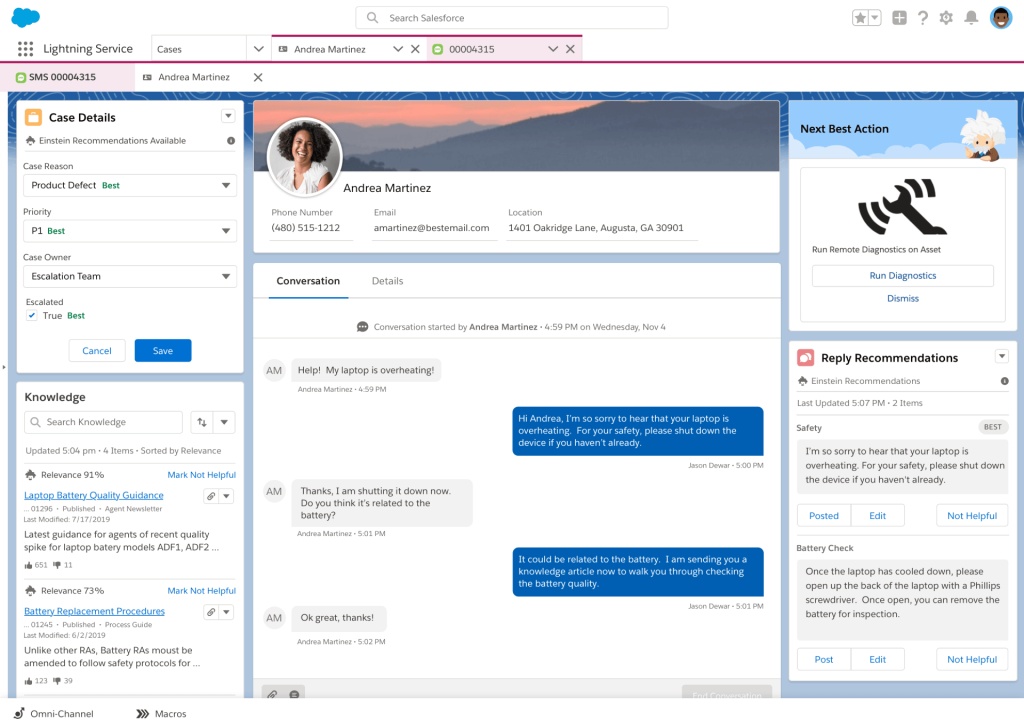
That structure was relevant when the same person appeared first as a prospect and later as a customer needing help. Staff could organize the sales relationship while keeping service requests tied to customer information.
I also looked at the distinction between a case and an opportunity. A complaint needed resolution even when the customer also expressed interest in another product. Separate records and ownership helped prevent a sales conversation from replacing unfinished support work.
Pros:
- Lead records organized incoming sales interest.
- Opportunity tracking supported structured sales follow-up.
- Case management gave service requests their own workflow.
- Marketing tools supported communication around customer records.
Cons:
- Teams needed consistent rules for contacts, opportunities, and cases.
- A shared platform still required clearly assigned sales and service responsibilities.
Pricing:
Starts at $25/user/month. 30-day free trial available.
6. Zendesk: Best for Support-First Teams Connecting a Sales CRM
I included Zendesk for teams whose main challenge was support coordination. Its ticketing, messaging, voice, and customer history tools addressed the work of receiving, assigning, and resolving inquiries.
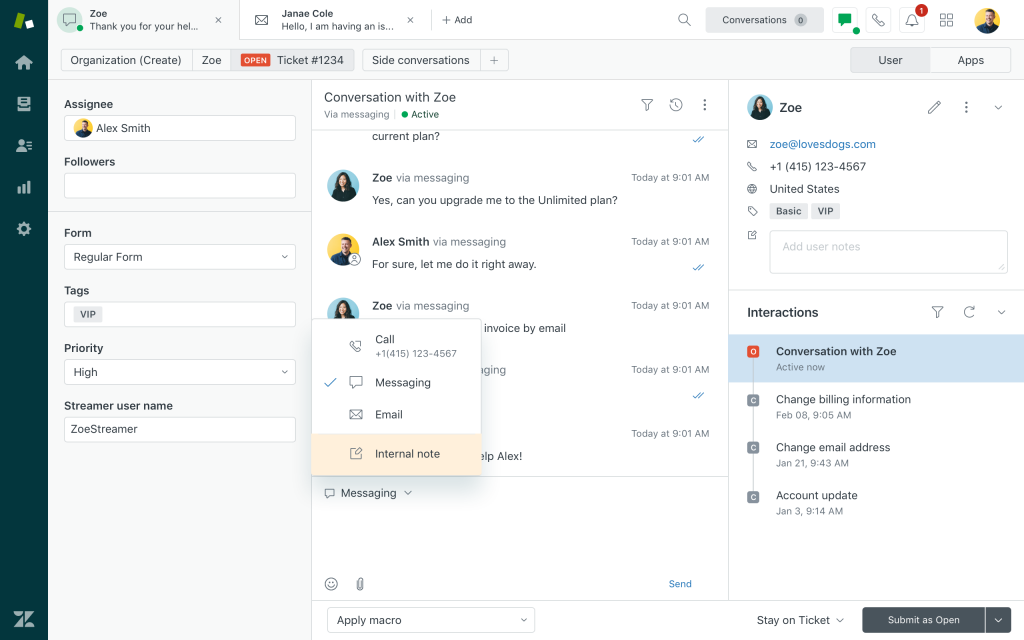
For lead generation, I treated the sales CRM connection as a separate decision. A useful connection passed the buying question, relevant history, and responsibility to the right sales owner.
Zendesk’s announcement of the retirement of Sell in August 2027 also mattered. Existing users needed a transition plan before building a new sales workflow around it. I considered Zendesk primarily as the support side of a connected setup.
Pros:
- Ticket routing helped direct incoming requests.
- Customer history gave agents context before replying.
- Messaging, live chat, and voice supported multiple contact routes.
- Knowledge articles and saved responses supported consistent answers.
Cons:
- Sales pipeline management required a separate CRM strategy.
- Existing Zendesk Sell users needed to plan for its retirement.
Pricing:
Starts at $55/agent/month, billed annually. 14-day free trial available.
7. Intercom: Best for AI-Led Sales Conversations and Support
I shortlisted Intercom for teams that wanted AI to answer routine questions and recognize buying interest. Its helpdesk provided an inbox, ticketing, customer conversations, and help center tools.
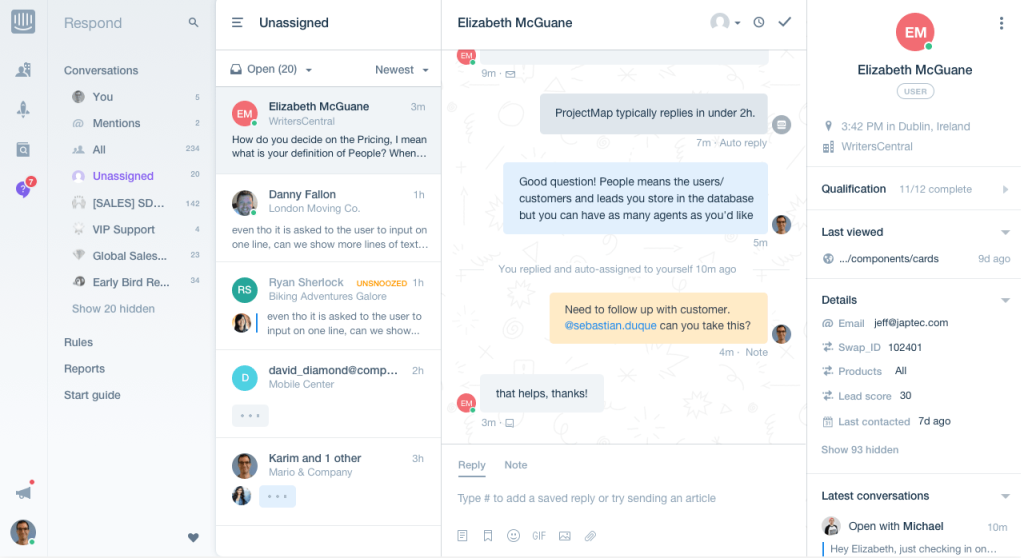
Fin for Sales added a more specific lead workflow. Its documented setup supported qualification questions, routing outcomes, CRM connections, and meeting booking through configured scheduling integrations.
What interested me was the handoff after qualification. Sales needed the person’s requirements and conversation history, while support needed a route for unresolved questions. I would test both paths, including what happened when the AI could not qualify the prospect or answer confidently.
Pros:
- Fin supported conversational lead qualification.
- Configured outcomes directed prospects toward relevant next steps.
- Scheduling integrations supported meeting booking.
- Shared inbox and ticketing tools supported human follow-up.
Cons:
- Qualification depended on the criteria and instructions supplied.
- Calendar and CRM handoffs required configured integrations.
Pricing:
Starts at $19/seat/month, billed annually. 14-day free trial available.
8. Tidio: Best for Smaller Teams Using Chat and Lead-Capture Flows
I included Tidio for teams that wanted website chat, ticketing, and automated conversations close to the point of purchase. Its visitor information and commerce features made it particularly relevant to online sellers.
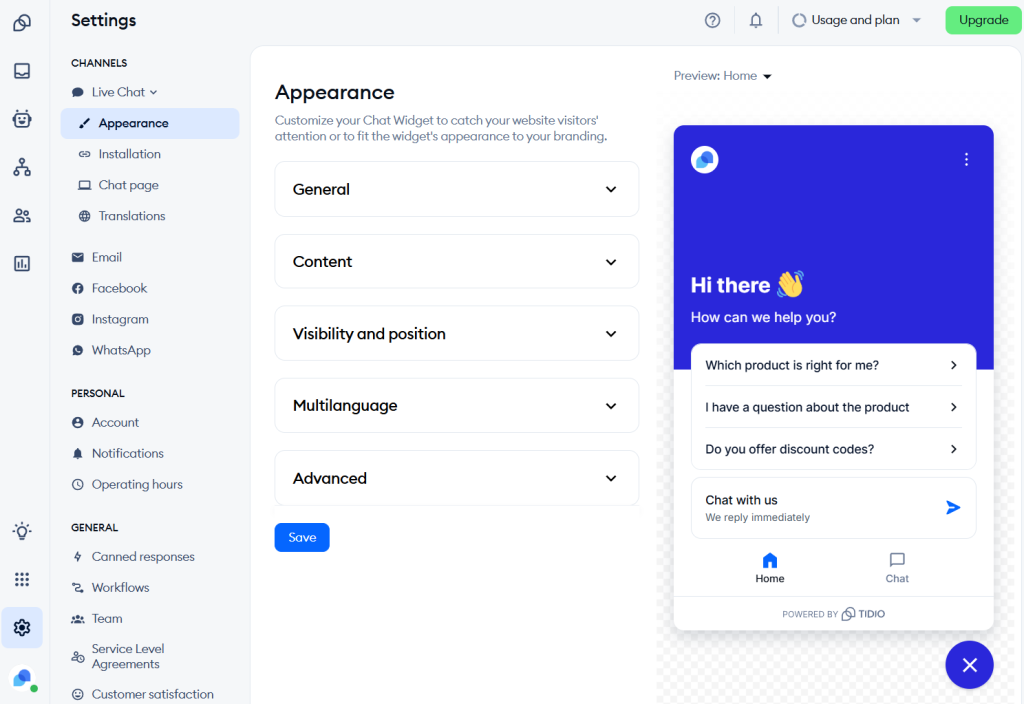
Lyro answered routine questions from the information supplied and handed conversations to staff when needed. Flows supported rule-based engagement, such as starting a conversation when a visitor showed relevant website behavior.
I saw the strongest fit where a product question could become either a purchase discussion or a support request. The important test was whether the person reached a helpful answer and an available employee when automation stopped.
Pros:
- Live chat captured questions while visitors were on the website.
- Lyro supported routine answers and human handover.
- Flows used website behavior to start relevant conversations.
- Ticketing helped staff continue inquiries that needed more work.
Cons:
- AI answer quality depended on the knowledge and instructions provided.
- Automated conversations still needed a dependable route to staff.
Pricing:
Starts at $24.17/month, billed annually. 7-day free trial available.
9. LiveChat / Text: Best for Website Sales Conversations With Connected Support
I shortlisted LiveChat’s current Text offering for teams that sold through website conversations. It combined live chat, a shared inbox, ticketing, and AI assistance.
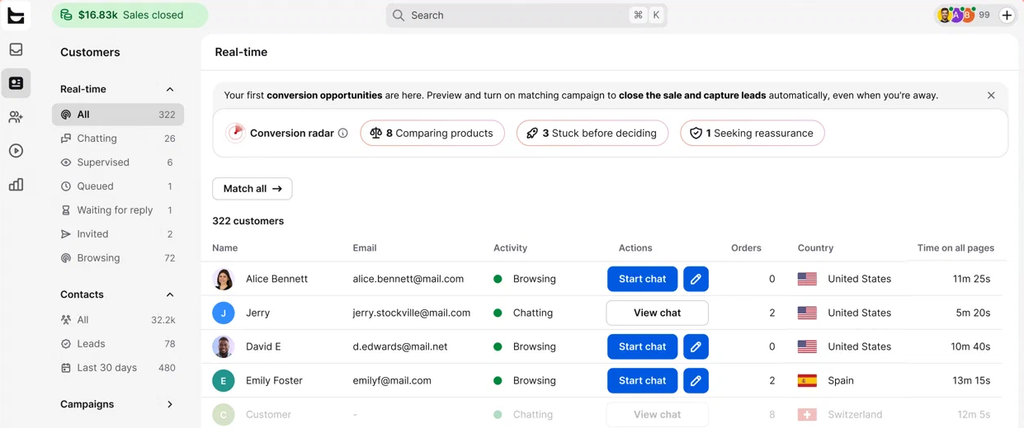
Proactive campaigns and visitor information helped staff engage with visitors as they considered a purchase. The shared inbox then gave the conversation somewhere to continue when the answer required more than a quick chat.
I also considered its commerce and CRM connections relevant to sales follow-up. The useful check was whether agents could identify the visitor’s question and pass it to the right person without losing the context that started the conversation.
Pros:
- Proactive campaigns supported website engagement.
- Visitor tracking supplied context for conversations.
- A shared inbox and ticketing organized continued follow-up.
- AI reply suggestions helped staff prepare responses.
Cons:
- Website engagement did not replace a complete sales pipeline.
- CRM follow-up depended on the selected integration and field mapping.
Pricing:
Starts at $19/user/month, billed annually. 14-day free trial available.
10. Crisp: Best for Teams That Prefer Workspace Pricing
I included Crisp for teams that wanted customer conversations and contact information in one workspace. Its shared inbox brought messages together so staff could continue an inquiry without searching several tools.
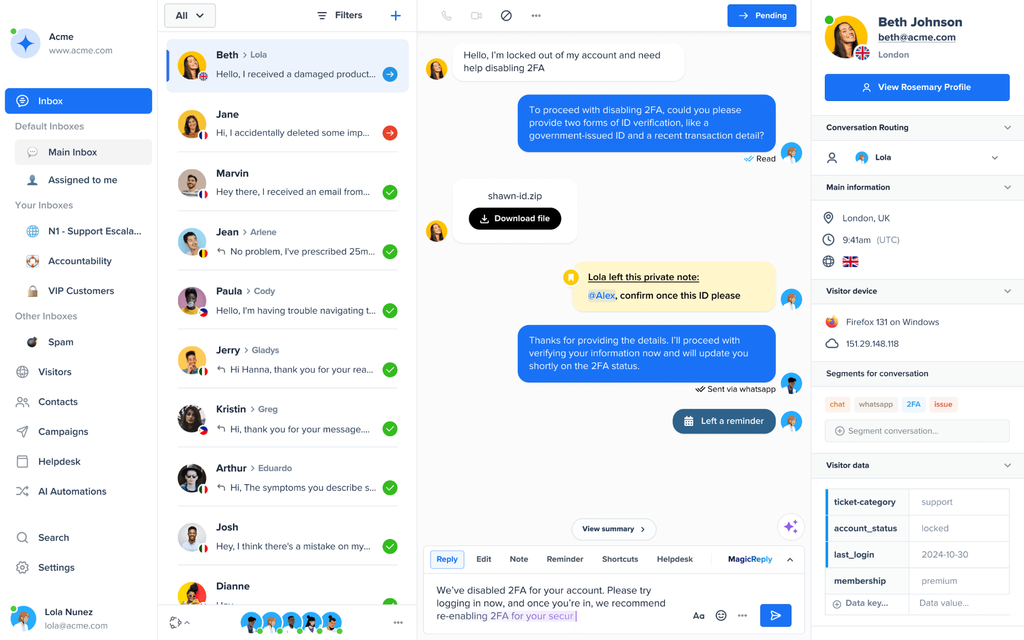
Customer profiles and conversation history helped explain who was asking and what had already happened. Knowledge content supported routine answers, while ticket management gave longer-running requests a more structured route.
For lead generation, I focused on the move from an initial chat to a useful follow-up. Capturing a contact was only the beginning; the receiving employee still needed the question, the customer’s interest, and responsibility for the next reply.
Pros:
- A shared inbox centralized customer conversations.
- Customer profiles preserved relevant contact information.
- Knowledge content supported self-service answers.
- Ticket management organized inquiries requiring continued work.
Cons:
- Contact profiles alone did not establish sales qualification.
- External sales workflows required suitable CRM connections.
Pricing:
Starts at $295/workspace/month. 14-day free trial available.
11. respond.io: Best for WhatsApp and Social Messaging Workflows
I shortlisted respond.io for businesses that won customers through WhatsApp and other social messaging channels. Its inbox organized contacts and conversations from those channels.
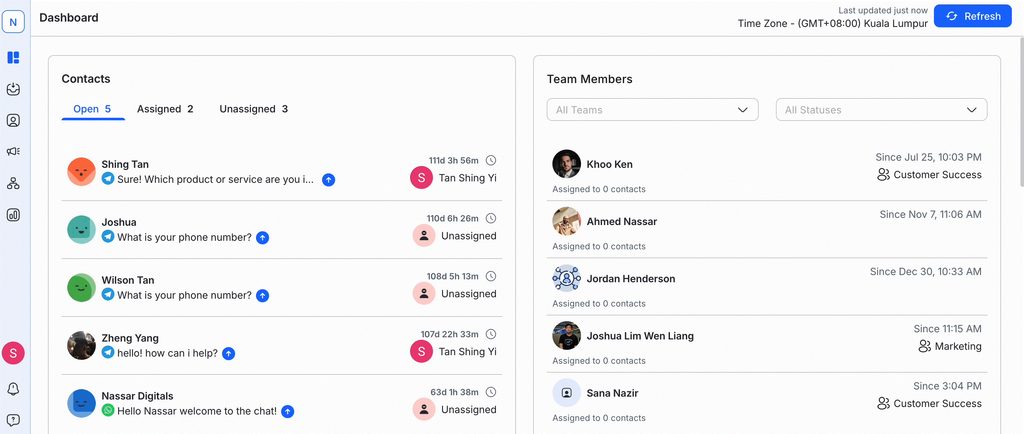
AI agents and workflows supported qualification, routing, and continued engagement. That was relevant when a campaign response required a few questions to be answered before reaching the right sales or service employee.
I also considered contact lifecycle tracking useful for separating new inquiries from ongoing conversations. The practical check was what happened when a person changed channels: whether staff recognized the contact, retained the earlier discussion, and could continue without treating every message as a new lead.
Pros:
- A shared inbox brought messaging conversations together.
- Workflows supported qualification and routing.
- AI agents handled configured conversational tasks.
- Contact lifecycle information helped organize follow-up.
Cons:
- Messaging records did not replace a complete sales CRM.
- Recognizing the same person across channels required careful contact matching.
Pricing:
Starts at $159/month, billed annually. 7-day free trial available.
12. Brevo: Best for Marketing-Led Capture and Follow-Up
I included Brevo for teams whose lead-generation work centered on forms, email, and contact management. It offered a different starting point from a support-first help desk.
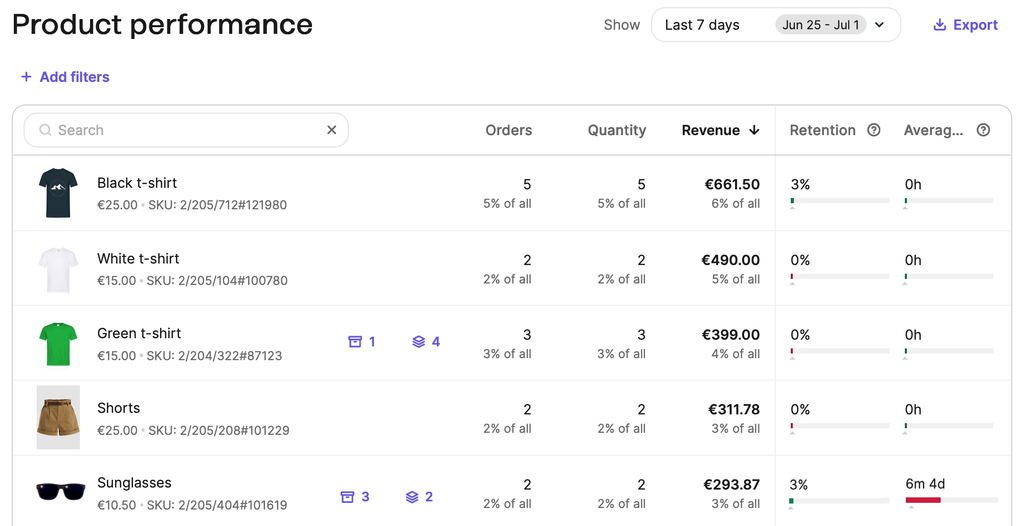
Contact segmentation and marketing automation helped organize communication after someone expressed interest. Campaign reporting then helped staff review engagement and decide which messages deserved further attention.
I treated support coordination as a separate check. A marketing contact record could help explain the relationship, but an unresolved customer request still needed an owner, a response, and a visible status. Brevo was most relevant when capture and ongoing communication were the main jobs to be connected.
Pros:
- Forms supported contact capture.
- Segmentation organized contacts around relevant criteria.
- Marketing automation supported continued communication.
- Campaign reporting helped teams review engagement.
Cons:
- Marketing workflows did not replace detailed ticket management.
- Sales interest and unresolved support work needed separate tracking.
Pricing:
Starts at $9/month.
My Evaluation Criteria
I compared published product information, pricing, and review sources against the work sales and support teams need to share.
- User Reviews and Ratings: I considered recurring feedback on G2 and Capterra, including setup, usability, support, and pricing. Official documentation informed plan details.
- Essential Features and Functionality: I compared lead capture, qualification, ticket ownership, self-service, AI assistance, and reporting. I checked what happened when a buying question needed support or a service conversation needed sales follow-up.
- Ease of Use: I considered how staff would find, assign, and hand over requests while preserving useful history. These became practical checks for a trial, not claims of hands-on product testing.
- Customer Support: I reviewed published support routes and onboarding resources, including help with setup, integrations, migration, and operational problems.
- Value for Money: I compared seats, contacts, AI usage, channels, required editions, integrations, and onboarding. The relevant cost was the complete setup needed for both lead generation and support.
- Industry Analysis and Expert Commentary: I used sales and customer service research, privacy guidance, and expert commentary to assess vendors’ claims about response speed, qualification, shared records, and follow-up.
My Top 3 Picks for Lead Generation and Customer Support Platforms
These three cover different starting points: support coordination, a shared CRM, and chat-led customer conversations.
1. ProProfs Help Desk
My first pick when support ownership comes first, with lead capture added through related tools. Its AI help desk features assist agents, while the required CRM and lead-capture connections should be checked against the package. For a support-focused bundle, compare the Customer Delight Suite; broader growth work calls for a different mix.
2. HubSpot
My shortlist choice when leads, deals, and support activity need a CRM-centered structure. The free tools offer a useful starting point. Compare the paid workflow, seats, and contact requirements before committing to a broader bundle.
3. Crisp
A useful comparison when workspace pricing suits the team better than per-agent billing. Plus combines ticketing, customer data, and a knowledge base into a single package. Check its included seats and AI credits against the conversations your team expects to handle.
FREE. All Features. FOREVER!
Try our Forever FREE account with all premium features!
Improve Follow-Up With a Lead Generation and Customer Support Platform
Choose one conversation your team most often loses: a pricing question, an upgrade request, or a customer issue passed between departments. Follow it from arrival to a named owner and an agreed next step. The right lead generation and customer support platform should make ownership easier to see.
ProProfs Help Desk is my first pick when that work starts with support coordination. Shared inboxes, automation, AI assistance, and connected self-service help teams manage requests. Add the lead-capture and CRM tools your workflow needs, then test the connection before expanding it.
Start with one channel. Check the reply, the handoff, the follow-up, and the complete cost. A better setup helps both teams act without asking the customer to start again.
Track Every Request From First Reply to Follow-Up
Frequently Asked Questions
Can I Add Lead Capture Without Replacing My Help Desk?
Yes. You can connect forms, live chat, or a CRM to the existing help desk. For example, ProProfs Help Desk can support the service workflow while related products handle lead capture. Check the contact matching, field transfers, owner notifications, and total cost before adding tools.
How Can I Prevent Duplicate Contacts?
Choose a matching rule, such as a verified email address or customer ID, and test returning visitors. Check whether the integration updates an existing record or creates another. Shared email addresses and changed contact details need a review process rather than an automatic merge.
What Should I Budget Beyond the Starting Price?
Include the required seats, CRM and support subscriptions, messaging fees, AI usage, integrations, and setup. A free plan may be enough to test capture but exclude the handoff you need. Compare the named package and expected usage rather than the vendor’s lowest advertised price.
What Should an AI Agent Pass to a Person?
It should pass the question, relevant conversation history, collected details, and actions already taken. Avoid exposing restricted notes or unnecessary personal information. Test the handoff during setup; thisAI help desk guide provides background on organizing AI-assisted support.
Can I Move Existing Leads and Tickets Into a New Platform?
Often, but the available import tools and formats vary. Test a small sample of contacts, long conversations, attachments, private notes, and subscription preferences. Ahelp desk migration should preserve ownership and useful history without importing information the new team should not access.
FREE. All Features. FOREVER!
Try our Forever FREE account with all premium features!

 We'd love your feedback!
What did you like & how can we make it even better?
 Thanks for your feedback!
 Ask Your Question
Have a question? Get expert help to make your decision easier.