

When a line lead cannot log in to a terminal at the start of a shift, nothing gets built until someone fixes it. An IT helpdesk for manufacturing operations exists for moments like that.
According to a study by Siemens in 2024, unplanned downtime costs the world’s 500 biggest companies about $1.4 trillion annually, or 11% of their revenues. An hour at a large automotive plant can cost $2.3 million. These figures cover industrial downtime broadly, not just IT incidents.
Few plants lose that much, but the pattern holds at every size: a stalled screen, a locked account, or a failed switch turns into lost output fast. For this comparison, I focused on how 10 IT helpdesk options handle manufacturing requests, assets, change control, hosting, and shift coverage.
What Is an IT Helpdesk for Manufacturing Operations?
An IT helpdesk for manufacturing operations organizes technology requests from production staff, supervisors, engineers, and office teams. Supported emails, forms, and conversations become tickets with an owner, priority, history, and next action.
That can include a locked account, a failed workstation, a network problem, or an issue accessing a business application. IT help desk software coordinates the response. It does not automatically replace the systems used to maintain machinery or control production.
Operational technology, or OT, includes systems that monitor or control physical processes. Some problems cross IT, OT, engineering, and maintenance. A practical manufacturing support setup records who owns each system and how teams hand over work.
10 Best IT Helpdesk Software for Manufacturing Operations
A few of these focus on everyday IT requests, while others connect support with assets, approvals, and work across multiple plants. The difference matters when a locked terminal or an unfinished handover can hold up the next shift.
Here’s how these IT helpdesk tools for manufacturing operations compare before the full breakdown:
| Tool | Best For | Pricing |
| ProProfs Help Desk | Easiest AI help desk for shared inboxes, ticket workflow automation, and scaling support teams | Free plan available. Paid plan starts at $19.99/month |
| ServiceNow | Coordinating service workflows across large manufacturing organizations | Custom pricing |
| Freshservice | Employee IT requests and onboarding workflows | Starts at $19/agent/month |
| Jira Service Management | Connecting IT support with Atlassian-based engineering teams | Starts at $21.50/agent/month |
| ManageEngine ServiceDesk Plus | Managing IT services alongside asset and change records | Starts at $13/technician/month |
| SolarWinds Service Desk | Connecting service requests with asset information | Starts at $39/technician/month |
| InvGate Service Management | Coordinating requests and approvals across departments | Starts at $124.92/month |
| HaloITSM | Connecting incident, change, and configuration management | Custom pricing |
| Issuetrak | Tracking requests in cloud, on-premises, or air-gapped environments | Starts at $75/agent/month |
| GLPI | Self-hosted ticketing and asset inventory | Starts at $0 for self-hosted software |
Now, here is how each one actually holds up:
1. ProProfs Help Desk: Easiest AI Help Desk for Shared Inboxes, Ticket Workflow Automation, and Scaling Support Teams
ProProfs Help Desk stands out to me for keeping plant IT requests organized across production, engineering, and office teams. A locked terminal and a faulty scanner need different fixes, but neither should disappear at shift change. I particularly value its ticket automation for assigning requests and sending configured alerts.
For shift handovers, I see clear value in AI summaries and response suggestions. Custom fields identify the plant, line, and affected system, while internal notes preserve attempted fixes. Technicians still review the details before taking action.
It also integrates with ProProfs Knowledge Base for searchable troubleshooting guides and site-specific procedures, and with ProProfs Live Chat for real-time employee questions that may need further investigation.
For managers, I prioritize reports that reveal recurring problems and response delays across plants. Supported integrations can connect related systems where configured; MES or ERP information needs a verified connection or staff entry.
Pros:
- AI summaries help incoming technicians understand long conversations before continuing the investigation.
- Child tickets divide related work between teams while keeping it connected to the original request.
- Internal notes preserve attempted fixes, outstanding tasks, and promised updates for the next shift.
- Custom fields capture the plant, production line, affected equipment, and reported operational impact.
- Routing rules and approval workflows direct access requests and equipment inquiries to responsible staff.
- Support reports help managers review recurring issues, response times, and resolution delays.
Cons:
- No downloadable or on-premise version
- Dark user interface option not available
Pricing:
A free plan is available for growing teams. Paid plan starts at $19.99/month.
Here’s how Acer described their experience with ProProfs Help Desk.
Here is how Acer used ProProfs Help Desk to make support costs easier to understand. Its internal teams needed reports covering repairs, replacements, and spare parts. Custom fields let employees enter costs when closing a case, helping its team analyze those service items through reports. Acer also reported using the platform across approximately 2,600 operators, with multilingual support helping its Taiwan-based operation.

2. ServiceNow: Best for Coordinating Service Workflows Across Large Manufacturers
ServiceNow stood out in my research for connecting plant-floor requests with broader enterprise workflows. Its manufacturing announcements described EmployeeWorks access through Teams, Slack, shared workstation browsers, and kiosks.
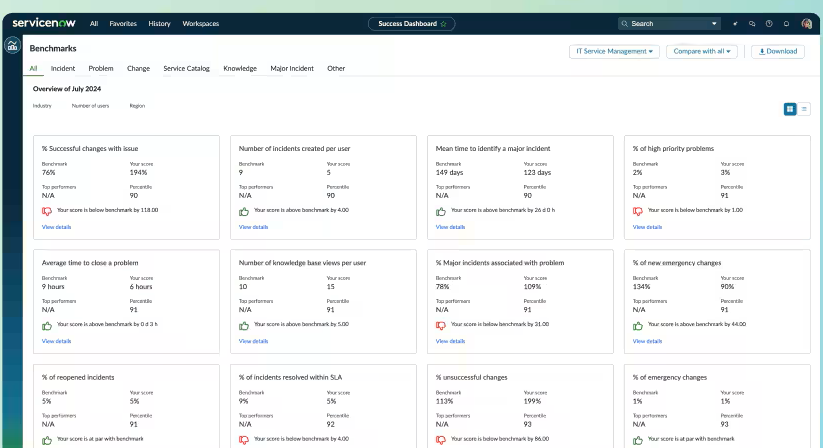
I also considered Industrial Connected Workforce, which focused on guided tasks and preserving frontline knowledge. These were distinct manufacturing offerings to evaluate alongside the organization’s service-management requirements.
For a multi-plant manufacturer, the useful comparison was how a request moved between IT, HR, facilities, and operations. I would validate the exact offering and demonstrate the handoff, rather than assume that every capability belonged to a basic IT service deployment.
Pros:
- EmployeeWorks supports requesting access through familiar workplace channels and shared devices.
- Industrial Connected Workforce supports guided frontline tasks and knowledge capture.
- Routing and approvals coordinate requests across departments.
- Audit records help teams review how work progressed.
Cons:
- Cross-department workflows require clearly defined ownership and implementation planning.
- The breadth of configuration requires ongoing administrative responsibility.
Pricing:
3. Freshservice: Best for Employee IT Requests and Onboarding Workflows
Freshservice made my shortlist for organizing employee incidents, support knowledge, and routine service requests. Its portal gave staff a designated place to request help rather than relying on individual technicians’ inboxes.
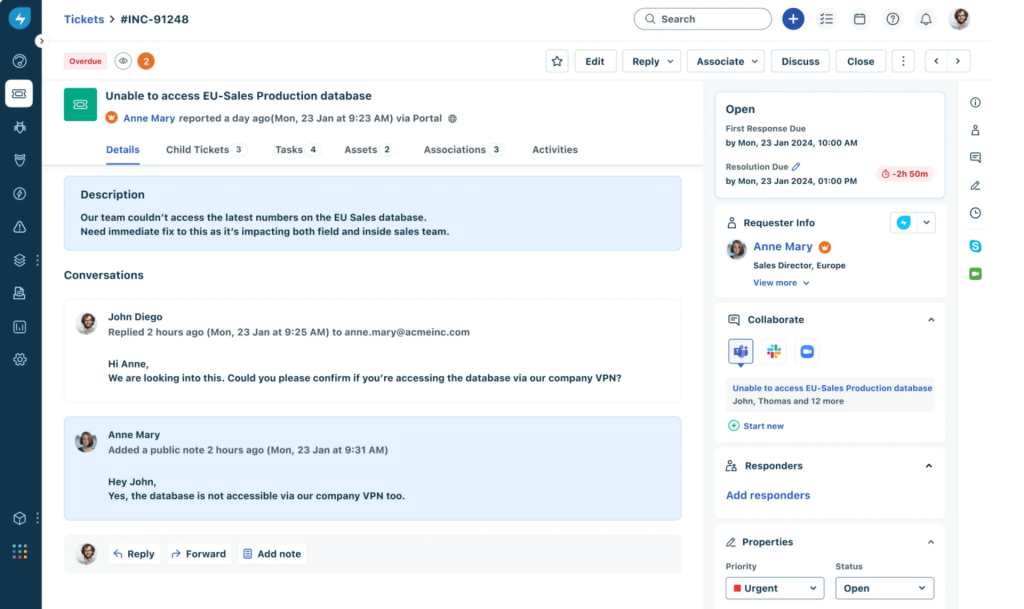
I considered onboarding and offboarding workflows particularly relevant to plants with changing roles and locations. Access, equipment, and follow-up tasks needed a visible owner when an employee moved between teams.
My comparison also separated ticket handling from asset-management requirements. For manufacturing teams, the key test was whether the selected setup linked a request to the correct device and employee record.
Pros:
- Incident management organizes employee technology problems in a shared workspace.
- Knowledge articles provide reusable troubleshooting instructions.
- Employee-service workflows coordinate onboarding and offboarding tasks.
- Portal and task-management features keep requests and related work visible.
Cons:
- Employee and device records need consistent ownership to remain useful.
- Broad workflows require careful configuration of approvals and exceptions.
Pricing:
Starts at $19/agent/month. 14-day free trial available.
4. Jira Service Management: Best for Teams Already Using Atlassian
Jira Service Management fit my comparison, since engineering and IT were already using Atlassian. Request forms, queues, and configurable workflows provided a structured way to handle employee issues.
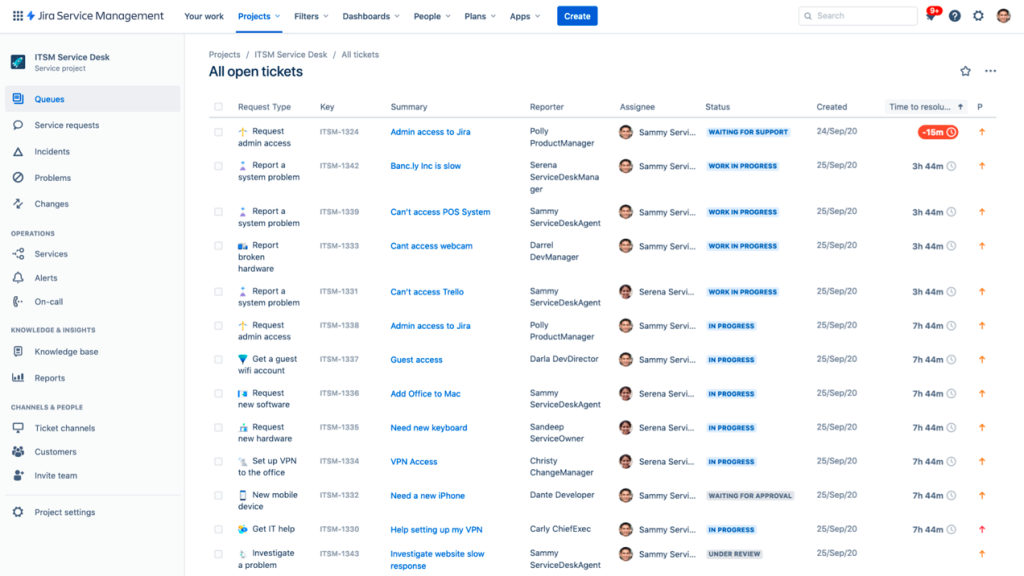
I reviewed approvals and incident-related work for situations involving multiple teams. A failed application, for example, might need IT support and an engineering investigation without losing the original request.
Its hosting direction also mattered. Atlassian ended new Data Center sales to new customers, with the affected products reaching end of life. New buyers needing self-managed deployment should account for that restriction.
Pros:
- Request forms collect structured information before triage.
- Configurable queues separate incidents and service requests.
- Approval workflows record decisions within the request.
- Atlassian connections support coordination with engineering teams.
Cons:
- New customers cannot purchase the affected Data Center subscriptions.
- Workflow and permission setup can become complex across many teams.
Pricing:
Starts at $21.50/agent/month, billed monthly. 14-day free trial available.
5. ManageEngine ServiceDesk Plus: Best for IT Services With Asset and Change Records
ManageEngine ServiceDesk Plus caught my attention for combining service requests with broader IT management capabilities. I considered it for manufacturers needing asset information alongside incident handling.
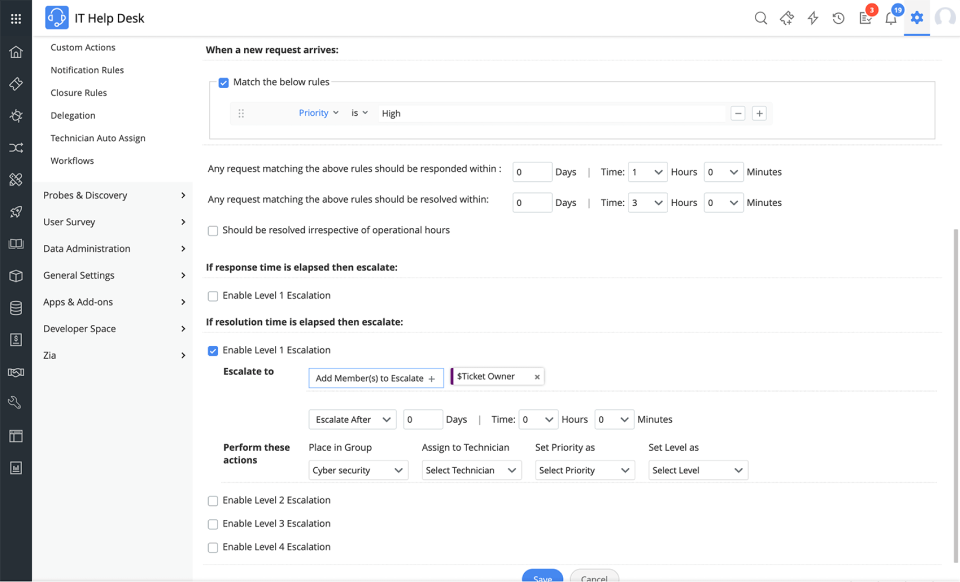
Its manufacturing materials described inventory methods such as network scans, barcode and QR scans, and imports. Change-management capabilities were relevant to planned ERP updates, database work, and server changes.
I treated those capabilities as tools for organizing approved work, not permission to scan or modify production equipment. The useful trial would demonstrate the selected configuration against the plant’s actual systems and change process.
Pros:
- Cloud and on-premises deployment support different operating requirements.
- Asset records provide context for equipment-related requests.
- Change workflows organize planned updates and their approvals.
- Purchase and contract records support equipment lifecycle management.
Cons:
- Inventory and configuration records need regular maintenance.
- Discovery on production-connected networks requires plant-specific approval and testing.
Pricing:
Starts at $13/technician/month, billed annually. 30-day free trial available.
6. SolarWinds Service Desk: Best for Connecting Requests With Asset Information
SolarWinds Service Desk stood out for bringing incidents, a service portal, knowledge, and asset information into a cloud service. I considered that combination useful when technicians needed more context than an email provided.
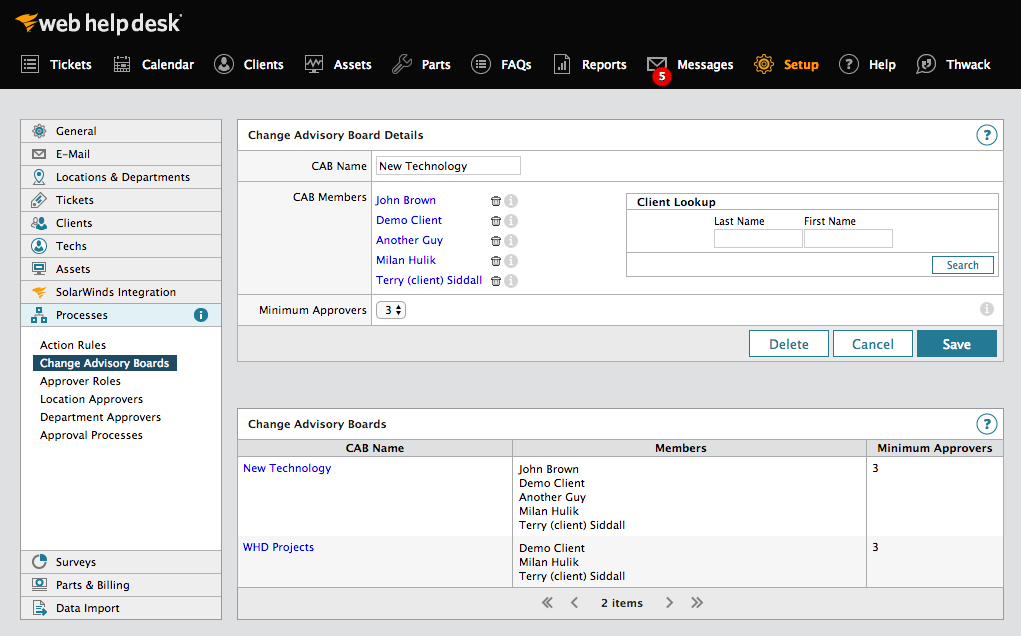
The service catalog offered a structured route for recurring requests. Instead of sending an incomplete message, a supervisor could select the relevant service and supply the information needed to begin.
I also looked at configuration management and dependency mapping. For a manufacturer, these records were useful when they reflected the real environment and helped staff understand which services an affected device supported.
Pros:
- Incident management keeps employee issues in a shared queue.
- A service catalog standardizes recurring requests.
- Asset records provide equipment context during investigation.
- Configuration-management capabilities help teams understand related services.
Cons:
- The cloud application requires suitable connectivity.
- Asset relationships need maintenance to remain reliable during incidents.
Pricing:
Starts at $39/technician/month, billed annually. 30-day free trial available.
7. InvGate Service Management: Best for Coordinating Requests and Approvals
InvGate Service Management entered my shortlist for its visual approach to service workflows. I considered it for requests that needed several decisions before the work could proceed.
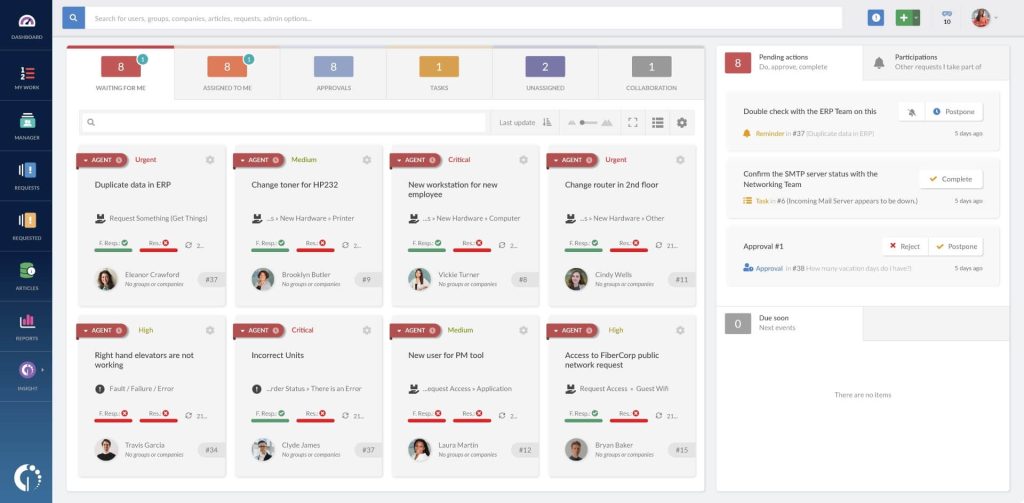
Its workflow builder was relevant to equipment requests, employee access, and departmental approvals. The useful distinction was whether staff could see the current step and the person responsible for moving it forward.
I also examined its connection with InvGate Asset Management. That relationship mattered when technicians needed device context, although service workflows and asset records still required their own setup and maintenance.
Pros:
- A visual workflow builder organizes multi-step service processes.
- Approvals record decisions within the request workflow.
- AI service capabilities support employee assistance.
- Asset-management connections add equipment context to support work.
Cons:
- Asset information depends on a configured, maintained asset-management connection.
- Multi-step workflows need clear exception and escalation routes.
Pricing:
Starts at $124.92/month. 30-day free trial available.
8. HaloITSM: Best for Connected Incident, Change, and Configuration Management
HaloITSM was relevant to my comparison when a manufacturer needed related service records rather than a standalone inbox. I focused on incident, problem, change, and configuration-management capabilities.
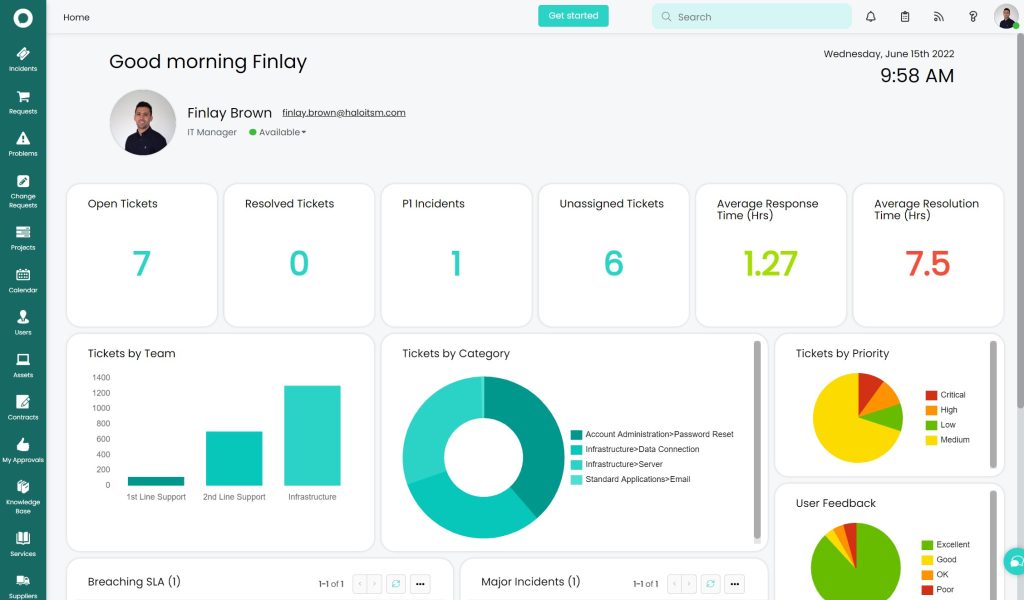
A recurring workstation issue, for example, needed more than another closed ticket. Linking related incidents with an investigation and an approved change could help teams document the underlying work.
I also considered its service portal, knowledge management, and reporting. The practical check was whether operators could submit a simple request while technicians retained the detail needed to investigate it.
Pros:
- Incident and problem management connect recurring issues with investigations.
- Change workflows organize proposed updates and approvals.
- Configuration records provide context about related assets and services.
- Portal and knowledge features support employee self-service.
Cons:
- Broad configuration requires an administrator who understands the service process.
- Asset and dependency records need ongoing upkeep.
Pricing:
Custom pricing. Free trial available.
9. Issuetrak: Best for Cloud, On-Premises, or Air-Gapped Request Tracking
Issuetrak made my shortlist because its documented deployment choices included cloud, on-premises, and air-gapped environments. That was relevant to plants whose network restrictions ruled out a cloud-only application.
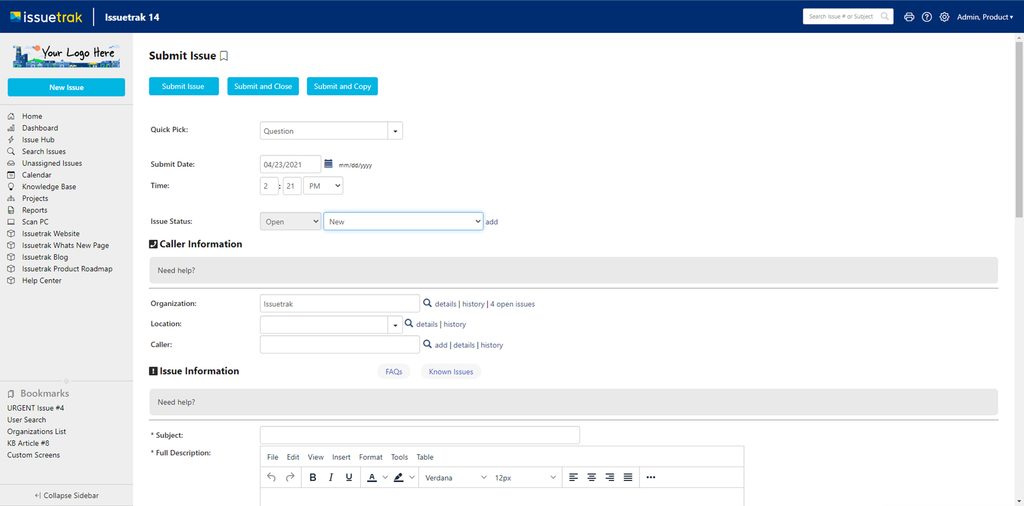
I also considered its service targets, workflow automation, and audit trail. These features supported requests that needed a visible deadline, a responsible team, and a record of what happened.
For an isolated plant, I would demonstrate the complete operating setup. Authentication, email intake, updates, backups, and any connected services needed to work within the approved network design.
Pros:
- Deployment options include cloud, on-premises, and air-gapped operation.
- Multiple service-target policies support different request priorities.
- Workflow automation directs work through defined steps.
- Audit records preserve the history of request handling.
Cons:
- Self-managed deployments require local administration and recovery planning.
- Air-gapped operation requires checking every external dependency.
Pricing:
Starts at $75/agent/month, billed annually. 14-day free trial available.
10. GLPI: Best for Self-Hosted Ticketing and Asset Inventory
GLPI stood out in my research for combining help desk work with asset and configuration records. Its self-hosted approach suited the comparison for manufacturers with the technical capacity to operate their own application.
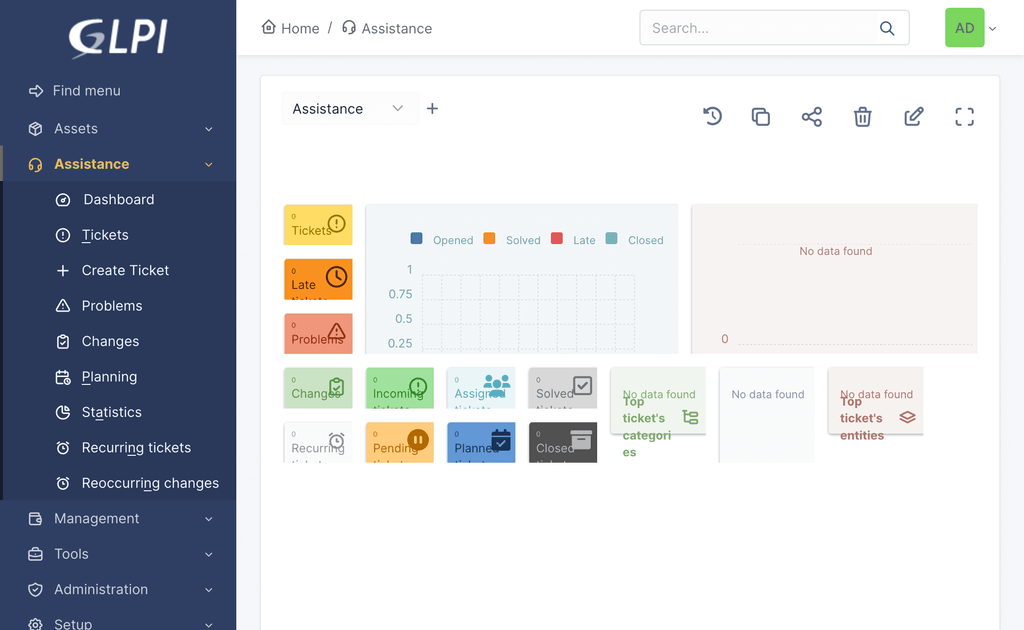
I considered the connection between a ticket and the equipment involved particularly useful. Device history, contracts, and related records could help technicians investigate an issue without rebuilding that context each time.
The operational responsibility was equally important. A self-hosted installation needed someone to maintain the application, database, backups, and extensions. I would also check discovery methods before using them on production-connected networks.
Pros:
- Ticketing and asset inventory support related IT work.
- Configuration records organize equipment and service information.
- Contract records help teams review equipment-related obligations.
- Extensions support additional workflows and connections.
Cons:
- Self-hosting requires application, database, security, and backup maintenance.
- Extensions and discovery methods require compatibility and operational checks.
Pricing:
Free for self-hosted software.
My Evaluation Criteria
I compared published pricing, product documentation, manufacturing research, and review feedback against the work plant IT teams need to manage.
- User Reviews and Ratings: I considered recurring feedback on Capterra and G2 about usability, setup, and support. Official documentation informed product and pricing details.
- Essential Features and Functionality: I compared request ownership, routing, approvals, asset context, change workflows, knowledge, AI assistance, and reporting against manufacturing IT requests.
- Ease of Use: I considered how operators and technicians would submit, find, update, and hand over requests. These became practical checks for a trial.
- Customer Support: I reviewed published support routes and setup resources, including help with configuration, migration, and deployment.
- Value for Money: I compared the required configuration, including agents, asset allowances, hosting, integrations, implementation, and ongoing administration.
- Industry Analysis and Expert Commentary: I used manufacturing workforce research, industrial cybersecurity analysis, and official guidance to assess vendor claims against plant operating needs.
My Top 3 Picks for IT Helpdesk for Manufacturing Operations
These three address different priorities: coordinating daily requests, connecting support with asset and change records, and operating within restricted networks.
1. ProProfs Help Desk
My first pick when the main job is coordinating internal requests across plants and shifts. Custom fields, child tickets, AI summaries, and shared knowledge help staff continue work with the relevant context. I would start with one plant and check assignments, handovers, and reporting against its actual support process.
2. ManageEngine ServiceDesk Plus
My shortlist choice when technicians need asset information and structured change management alongside service requests. It is relevant to teams coordinating equipment records, planned updates, and approvals. Demonstrate the selected configuration with a representative system before expanding it across sites.
3. Issuetrak
Worth evaluating when deployment restrictions are central to the decision. Its documented cloud, on-premises, and air-gapped options give plants different operating routes. Test the intended deployment’s authentication, intake, updates, and recovery process rather than relying on the hosting label alone.
FREE. All Features. FOREVER!
Try our Forever FREE account with all premium features!
Choose an IT Helpdesk for Manufacturing Operations That Fits Your Plants
A plant’s IT helpdesk earns its keep in the first ten minutes of a problem, when someone has to know who owns it and what happens next. The right IT helpdesk for manufacturing operations should make the owner, priority, and next action visible across shifts and sites.
ProProfs Help Desk is my first pick when the immediate need is coordinating requests, approvals, and shared knowledge. Custom fields preserve plant details, while child tickets and AI summaries help teams continue related work. Plants needing asset discovery or isolated deployment should compare those requirements separately.
Start with one plant and one request that regularly gets delayed. Follow it from arrival through investigation, handover, and resolution. Choose the setup your team can operate consistently, with IT, OT, engineering, and maintenance responsibilities agreed before rollout.
Give Every Plant IT Request an Owner
Frequently Asked Questions
What Is the Best IT Helpdesk for Manufacturing Operations?
The best fit depends on the work. ProProfs Help Desk suits shared request handling and knowledge. ManageEngine and SolarWinds offer broader asset-related service capabilities. Issuetrak deserves consideration where deployment restrictions are central. Compare the required configuration using a realistic plant request.
What Should a Helpdesk for Manufacturing Industries Include?
Look for structured intake, routing by site and system, production-impact priorities, approvals, searchable guidance, and clear handovers. Asset records and change management may also matter. A helpdesk for manufacturing industries should support the plant’s ownership and escalation process.
How Much Does an IT Helpdesk for Manufacturing Companies Cost?
Compare the complete configuration, not just the entry price. ManageEngine’s asset and change capabilities require the appropriate edition, whereas SolarWinds requests separate asset pricing confirmation. Issuetrak’s cloud price has a three-agent minimum. Self-hosted software also requires hosting, maintenance, and technical ownership.
Does GLPI’s Cloud Trial Apply to Its Self-Hosted Edition?
No. The self-hosted software and GLPI Network Cloud are different operating options. The published 45-day trial applies to Public Cloud, which starts at €19 per standard-interface user per month, excluding tax. Keep that commercial offer separate from the $0 self-hosted software entry.https://www.glpi-project.org/en/pricing/?utm_source=chatgpt.com
Is IT Support the Same as Plant Maintenance?
No. IT commonly handles accounts, computers, networks, and business applications. Maintenance, engineering, and OT teams may own machinery and control systems. Responsibilities vary by plant. Record the owner of each system and require an accepted handoff when several teams need to help.
Can a Help Desk Run in an Air-Gapped Plant Network?
Some can, but on-premises hosting alone does not establish air-gapped compatibility. Check licensing, authentication, updates, email, backups, and integrations without internet access. Issuetrak documents an air-gapped option. Validate the complete deployment before choosing it for an isolated production environment.
Can AI Answer Plant-Floor IT Questions?
AI can help explain approved troubleshooting steps and summarize previous work. Actually resetting an account or changing a device requires an authorized workflow and suitable system connection. Keep safety-related issues and suspected security incidents under human control. Start with low-risk topics and a documented AI support process.
Is ProProfs Help Desk a Good Fit for Manufacturing IT?
It is worth considering when teams need shared inboxes, custom fields, approvals, mobile ticket access, and connected self-service. Test how it handles plant identifiers and shift handovers. Evaluate asset discovery, production-system connections, and isolated hosting separately rather than assuming those capabilities are included.
Can a Help Desk Connect With MES or ERP Systems?
A manufacturing execution system manages production activity, while an enterprise resource planning system handles business processes such as inventory and finance. Check the exact integration options, supported fields, permissions, and update behavior. API access alone does not guarantee a working connection.
FREE. All Features. FOREVER!
Try our Forever FREE account with all premium features!

 We'd love your feedback!
What did you like & how can we make it even better?
 Thanks for your feedback!
 Ask Your Question
Have a question? Get expert help to make your decision easier.