

Almost every second day, a business owner asks me this: “Can we get started with a solid ticketing system without spending a dime?” The answer, thankfully, is yes, and there are plenty of free ticketing systems available than ever.
But here’s the thing: not all free ticketing systems are created equal. Some offer genuinely useful features on their free plans; others lure you in with a ‘free’ label only to gate everything useful behind a paywall or a well-marketed “free plan.”
In this guide, I’ve done the hard work of filtering out the noise. Every tool on this list has a meaningful free plan, not just a 14-day trial, and I’ve evaluated each one based on real-world usability, feature depth, and how well it holds up as your team grows..
Whether you’re a startup handling your first wave of customer queries, a small IT team keeping operations running, or a growing business trying to get organized before committing to a paid plan, this list of free ticket systems has something for you. Let’s dive in.
What Is a Free Ticketing System?
A free ticketing system is a customer support tool that allows businesses and teams to receive, track, organize, and respond to customer inquiries (also called ‘tickets’) at no cost. These platforms convert incoming support requests from email, chat, social media, or web forms into structured tickets that can be assigned to agents, categorized, prioritized, and tracked through to resolution.
Unlike simple shared email inboxes, ticketing systems bring order to support operations. They prevent tickets from falling through the cracks, provide agents with full conversation history, enable team collaboration, and give managers visibility into how quickly and effectively their team is resolving issues. A good ticket management system is the backbone of any organized support operation.
Please Note: ‘Free’ in this context means the vendor offers a plan, permanently and not as a time-limited trial, that includes core ticketing functionality at no charge. Some free plans have user or ticket volume limits; others are entirely unlimited but supported by ads or open-source community models. Understanding those distinctions is exactly what this guide is here to help with.
10 Best Free Ticketing Systems That Don’t Feel Free
Free tools often come with limitations, but some ticketing systems go above and beyond, offering features that rival paid solutions. From automation and reporting to multi-channel support, these tools deliver real value without the price tag.
In this list, I’ve rounded up the 10 best free ticketing software that don’t feel “free” at all. Here’s a quick summary of the top 10:
| Free Ticketing System | Best For | Free Plan Details |
|---|---|---|
| ProProfs Help Desk | Easiest AI Help Desk for Shared Inboxes, Ticket Workflow Automation, and Scaling Support Teams | Free plan available with all core features; Paid plans start at $19.99/user/month |
| Hiver | Gmail-based support | Free plan for up to 3 users with shared inbox, tags, and basic assignment features |
| Zoho Desk | Contextual and personalized support | Free plan for up to 3 agents with multi-channel support and basic features |
| FreeScout | Open-source ticket system | Completely free and self-hosted; optional paid modules available |
| Raiseaticket | Small businesses with basic ticketing needs | 100% free with unlimited agents and tickets; no paid plans listed |
| HubSpot Service Hub | HubSpot ecosystem users | Free plan includes ticketing, shared inbox, live chat, bot, and knowledge base |
| Spiceworks Cloud Help Desk | Small IT teams | Completely free with no limits; supported by in-app ads |
| Jira Service Management | IT service management (ITSM) | Free plan for up to 3 agents with SLAs, portal, and basic automation |
| Freshdesk | Multi-channel ticketing | Free plan (Sprout) supports unlimited agents with email and social ticketing |
| osTicket | Teams that prefer self-hosting | Free and open-source (self-hosted); optional cloud version starts at $12/month |
1. ProProfs Help Desk – Easiest AI Help Desk for Shared Inboxes, Ticket Workflow Automation, and Scaling Support Teams
I’ve been closely associated with ProProfs Help Desk, and I can say without hesitation that it stands out as one of the most thoughtfully built ticketing systems available, especially for teams that want to deliver exceptional customer experiences without a steep learning curve.
The platform’s free plan is the best in the business, as there is no cap on features. It’s ideal for growing teams that need all premium help desk features at zero cost.
The AI-powered help desk features are where ProProfs Help Desk truly shines. The platform uses AI to help my agents craft better replies, summarize long ticket threads, and even suggest responses based on past interactions. This dramatically cuts down our average handle time and keeps my team consistent in tone and quality.
Beyond the ticketing itself, ProProfs Knowledge Base lets my small team deflect up to 80% of support tickets by empowering customers to resolve their own queries using FAQs, troubleshooting guides, and user manuals, while ProProfs Chat gives anyone who’d rather not wait for a ticket response a way to get help in real time.
Pros:
- Shared inbox consolidates emails and support queries from multiple channels into one collaborative workspace so nothing falls through the cracks.
- Canned responses save time by allowing agents to reply instantly
- Ticket prioritization, labels, filters, and custom statuses keep your inbox organized
- Offer 360-degree support using the Customer Delight Suite, which includes Help Desk + Chat + Knowledge Base + Survey
Cons:
- The free plan limits the number of users, which can become a bottleneck for growing teams
- Cloud-only access; no on-premise version
Pricing: A free plan is available for growing teams. Paid plans start at $19.99/user/month (billed annually).
2. Hiver – Best for Gmail-Based Support
If your team lives inside Gmail and you’re looking for a help desk that doesn’t disrupt that workflow, Hiver is an incredibly natural fit. It layers ticketing and collaboration features directly on top of Google Workspace, meaning your agents never have to leave their inbox to manage customer support.
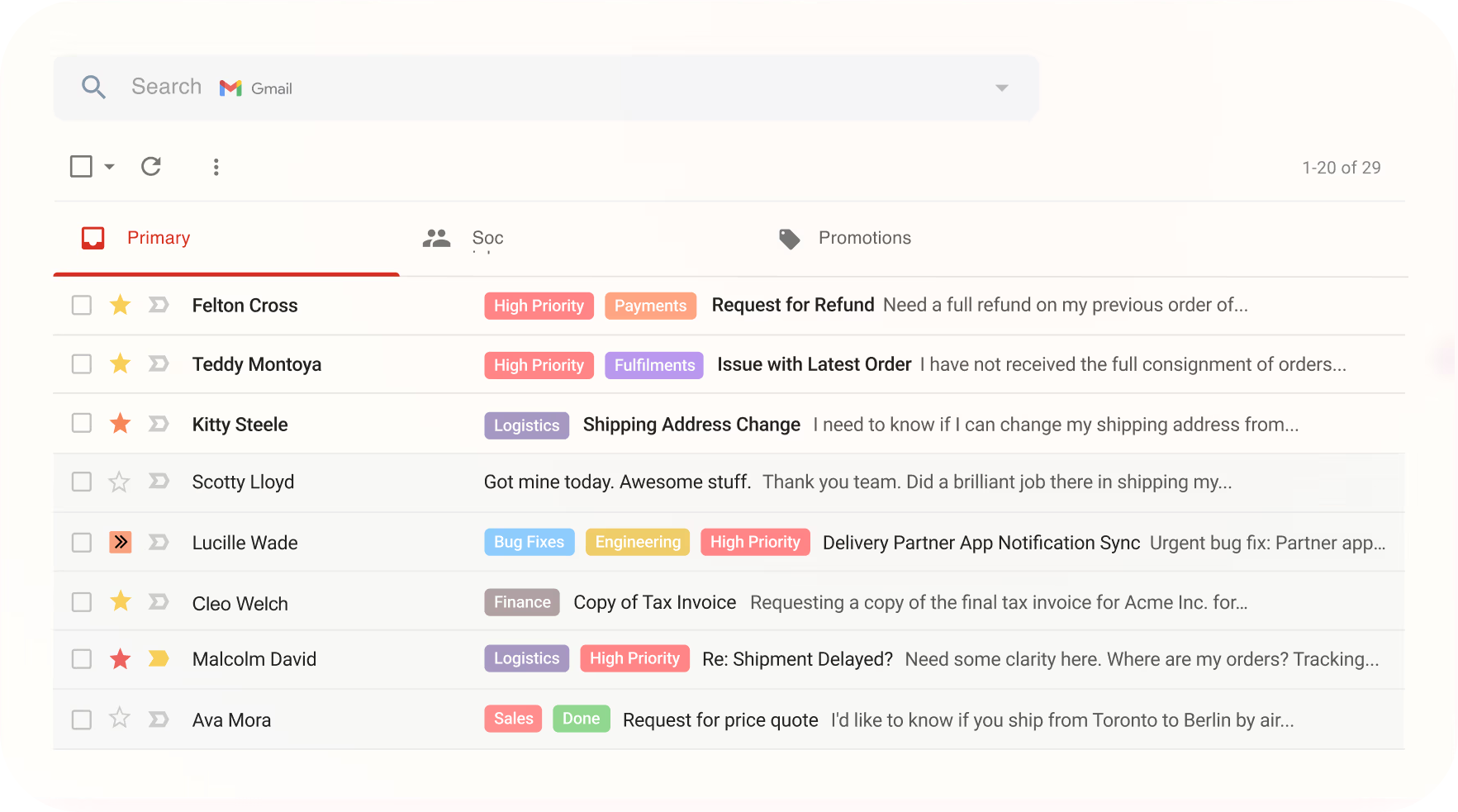
I’ve seen teams adopt Hiver in a matter of hours because there’s virtually no interface to relearn; it just feels like a smarter, more organized Gmail. The free plan includes shared inboxes, email tags, basic assignment rules, and collision detection. These core features are more than enough for small teams handling moderate support volumes.
However, Hiver’s Gmail-centric design is also its biggest limitation. If your support operation spans beyond email, think live chat, social media, or phone, Hiver starts to feel restrictive. It’s a fantastic starting point, but teams with multi-channel aspirations will outgrow it relatively quickly.
Pros:
- Gmail integration works natively inside Google Workspace
- Collision detection prevents duplicate replies by alerting agents when someone else is already responding to the same ticket
- Internal notes enable private team collaboration
- Email tags and assignment help organize tickets and route them to the right agents
Cons:
- Only supports email-based ticketing and lacks native live chat, social, or phone channel support.
- The free plan is limited to 3 users with no automation or analytics included.
Pricing: Free plan available for up to 3 users. Paid plans start at $19/user/month.
3. Zoho Desk – Best for Contextual and Personalized Support
Zoho Desk has always impressed me with its philosophy of context-first support, the idea that agents should always know who the customer is, what they’ve purchased, and what they’ve previously reached out about before they even begin typing a response.
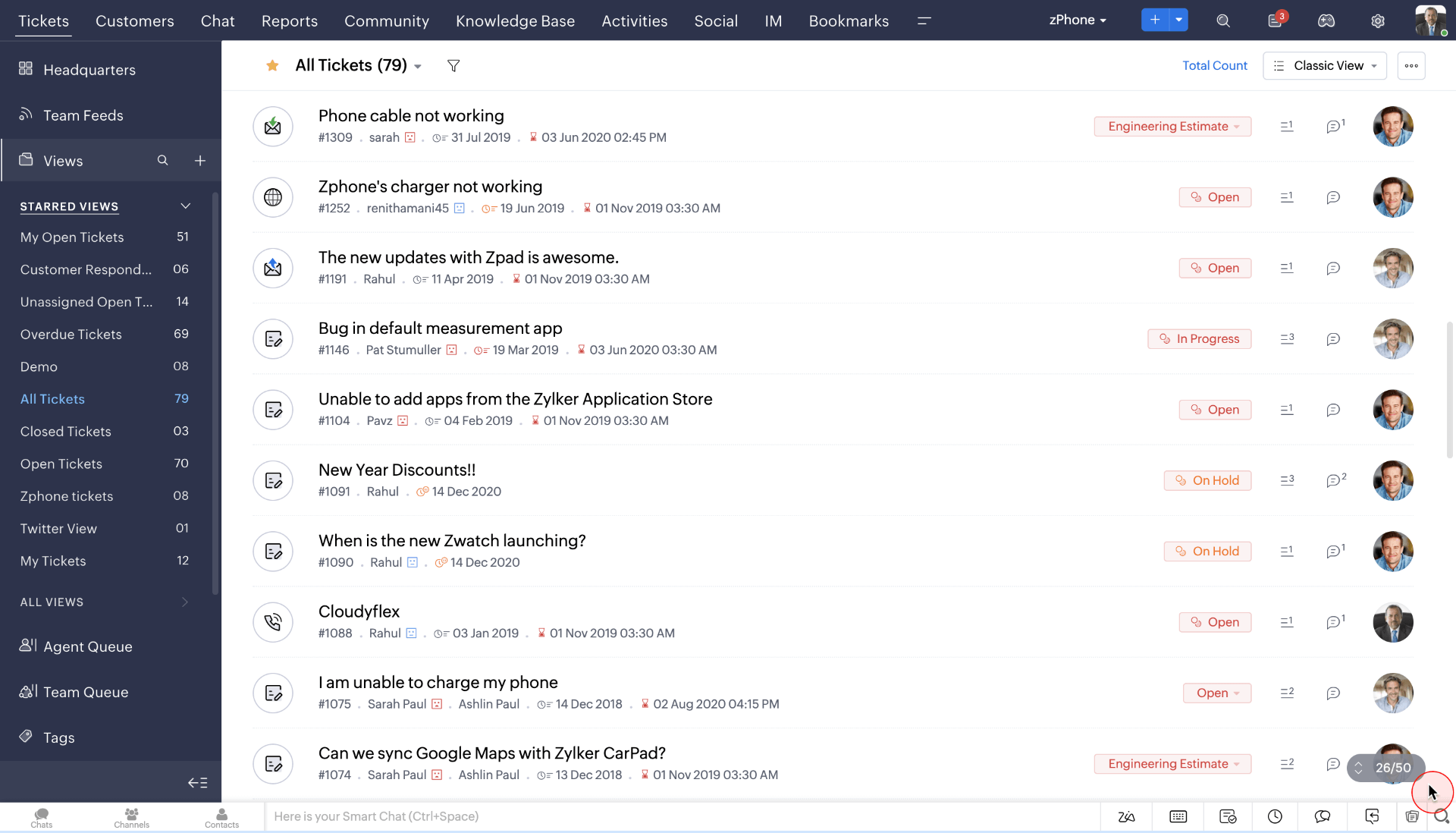
One of the standout aspects of Zoho Desk is its tight integration with the broader Zoho ecosystem. If you’re already using Zoho CRM, Zoho Books, or other Zoho products, the experience becomes even richer; customer data flows seamlessly across platforms, giving your agents a 360-degree view of every interaction.
The trade-off is complexity. Zoho Desk has a lot going on, and while power users will appreciate the depth, smaller teams can feel overwhelmed by the sheer number of settings, modules, and customization options.
Pros:
- Multi-channel ticketing handles email, social media, and community forums, even on the free plan
- Zoho ecosystem integration works seamlessly with Zoho CRM and other Zoho apps
- Self-service portal allows customers to find answers independently
- AI-powered sentiment analysis through Zia
Cons:
- The interface can feel overwhelming for teams that just need simple ticketing without heavy configuration
- The free plan is capped at 3 agents and lacks advanced automation and reporting
Pricing: Free plan available for up to 3 agents. Paid plans start at $14/agent/month.
4. FreeScout – Best for Open-Source Ticket System
FreeScout is the go-to recommendation I make for technically inclined teams that want full ownership of their helpdesk infrastructure. As an open-source, self-hosted platform built on PHP and Laravel, it gives you complete control over your data, your customizations, and your server environment.
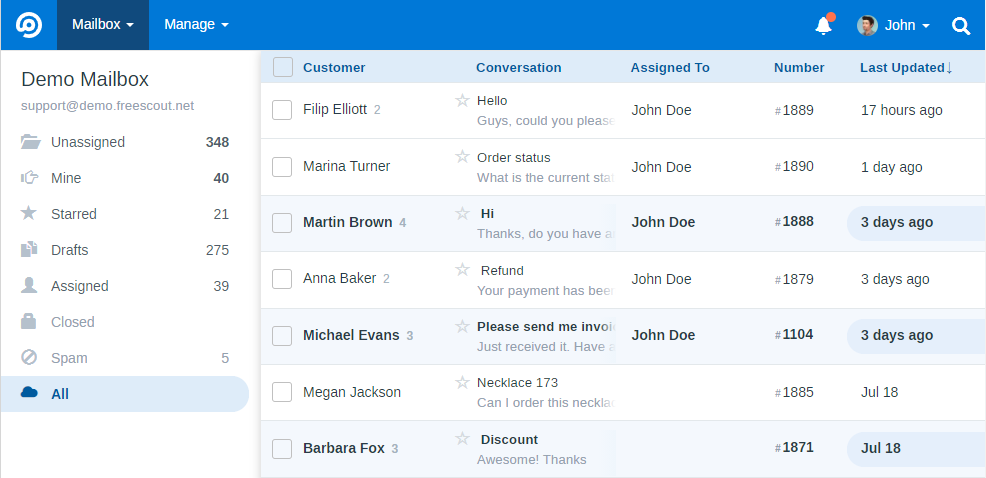
The feature set is surprisingly robust for a free open-source tool. FreeScout supports multiple mailboxes, team assignments, saved replies, email templates, and a clean HelpScout-like interface that agents genuinely enjoy using. I’ve recommended it to bootstrapped startups and developer-heavy teams who want HelpScout-like UX without HelpScout’s pricing.
The catch, as with most self-hosted tools, is the operational overhead. You’re responsible for installation, maintenance, backups, security patches, and uptime. If your team lacks technical expertise, this can quickly become a burden.
Pros:
- Open-source and free licensing mean no software cost and full access to the source code
- Self-hosted data control keeps your customer data on your own servers
- HelpScout-like UI gives agents a clean, modern interface that feels intuitive.
- Module marketplace lets you extend capabilities with integrations and add-ons
Cons:
- Requires technical expertise to install, configure, and maintain on your own server.
- There is no official support channel; you rely on community forums and documentation for troubleshooting.
Pricing: Free and open-source (self-hosted). Paid modules available in the marketplace.
5. Raiseaticket – Best for Small Businesses with Basic Ticketing Needs
Raiseaticket earns its place on this list by doing one thing exceptionally well: making ticketing dead simple for small businesses. The free plan is genuinely unlimited in terms of agents and tickets, which makes it an attractive option for bootstrapped teams that just need a reliable way to track and respond to customer queries.
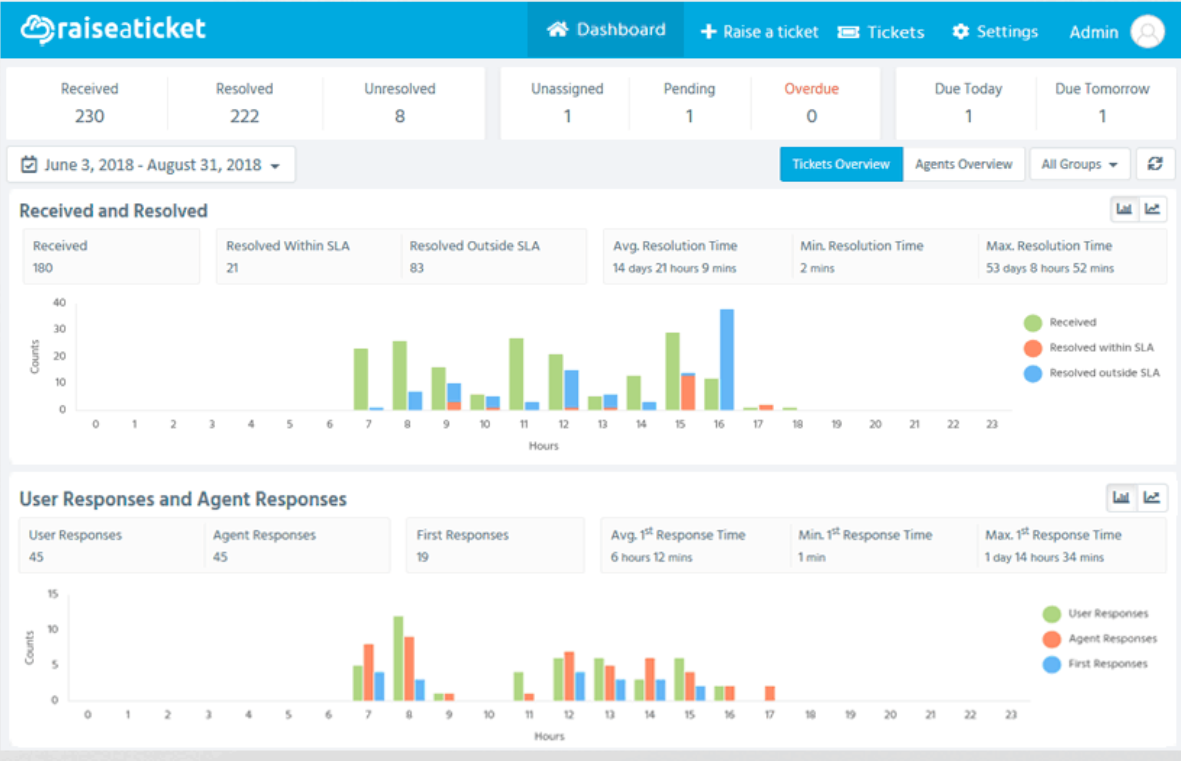
The platform covers all the basics: email-to-ticket conversion, ticket categorization, canned responses, a customer portal, and basic reporting. Setup is minimal, onboarding is straightforward, and the interface is clean enough that non-technical staff can get started without any formal training. For solopreneurs or freelancers handling a modest ticket volume, Raiseaticket is a solid, no-frills choice.
That said, ‘basic’ is both its strength and its ceiling. Raiseaticket doesn’t offer live chat, social media integration, automation workflows, or advanced SLA management. The reporting capabilities are limited, and there’s no AI or smart triage functionality. If your support needs evolve beyond email ticketing, you’ll quickly find yourself constrained. .
Pros:
- Truly unlimited free plan means there are no hidden caps or expiry dates on agents or tickets
- Easy onboarding requires minimal setup time
- Customer portal allows customers to submit and track their own tickets
- Canned responses help agents maintain response consistency and speed
Cons:
- Lacks automation, live chat, and multi-channel capabilities that growing teams typically need.
- Reporting and analytics are minimal, making it hard to track team performance and SLA adherence.
Pricing: 100% free with unlimited agents and tickets. No paid plans are currently listed.
6. HubSpot Service Hub – Best for HubSpot Ecosystem Users
HubSpot Service Hub is the natural choice for any team already embedded in the HubSpot CRM ecosystem. Because the ticketing system lives inside the same platform as your contacts, deals, and marketing automations.
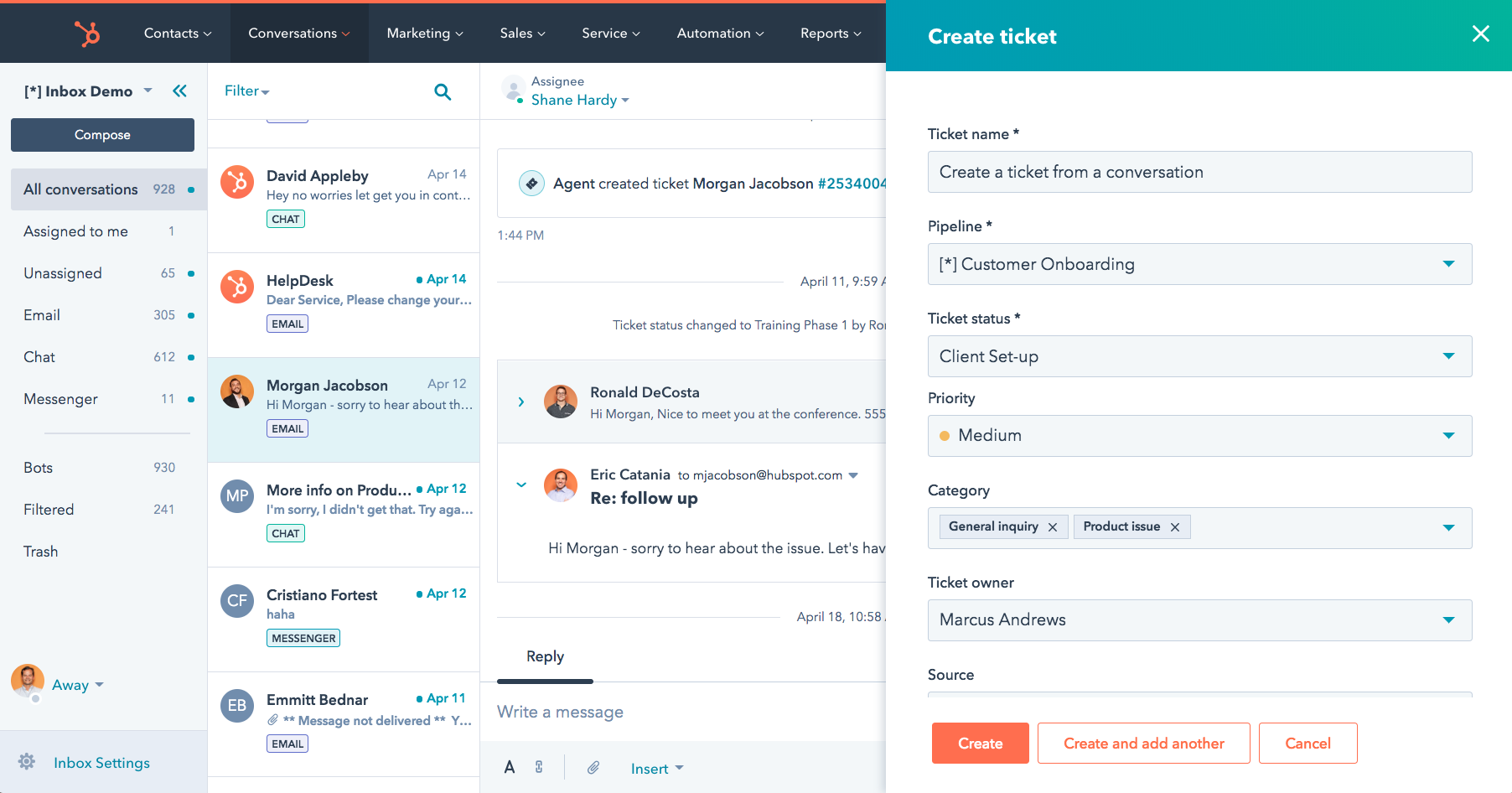
The free plan includes basic ticketing, a shared inbox, live chat, a conversational bot, and a knowledge base, a surprisingly comprehensive bundle. The drag-and-drop pipeline view for tickets is one of my favorite features; it makes it visually easy to see where every open issue stands, which is great for team leads who need at-a-glance status updates.
Teams that aren’t already using HubSpot may also find the platform unnecessarily complex for pure customer support use cases, and the free plan’s branding restrictions can feel limiting from a customer-facing perspective.
Pros:
- CRM-native ticketing ties every support ticket to the customer’s full history
- Shared inbox and live chat allow teams to handle multiple communication channels from one unified interface
- Conversational bot automates first responses and common query deflections
- Knowledge base integrates directly with tickets and contact records
Cons:
- Paid plans scale steeply in price, especially as your contact database grows.
- The platform adds unnecessary complexity for teams not using the broader HubSpot ecosystem.
Pricing: Free plan available. Paid plans start at $20/month (Starter tier).
7. Spiceworks Cloud Help Desk – Best for Small IT Teams
Spiceworks Cloud Help Desk has been a staple of the IT support community for over a decade, and for good reason. It’s completely free with no trial, no freemium tier, and no upsell pressure, and it’s purpose-built for internal IT support teams.
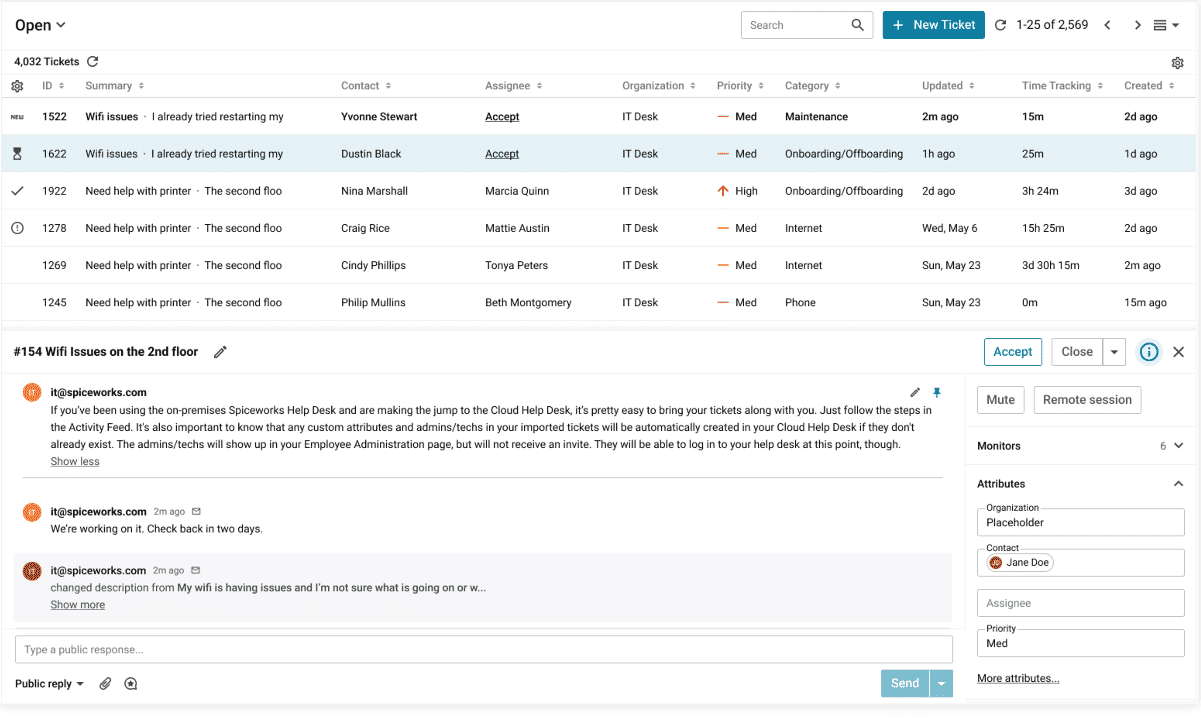
If you’re managing an IT help desk for a school, small office, or SMB, Spiceworks delivers everything you’d need: ticket management, user portal, email notifications, and a network inventory tool that integrates directly with the help desk.
However, there’s a catch. Spiceworks’ free IT ticketing system monetizes through advertising, which means agents will see ads within the interface, a trade-off that some teams find perfectly acceptable and others find distracting or unprofessional. It’s also heavily oriented toward IT use cases; if you’re running a customer-facing support operation, it may not feel like the right fit.
Pros:
- Completely free with no usage limits means there are no paid tiers whatsoever
- IT-specific features include built-in network inventory and IT-centric workflows that general-purpose help desks don’t offer
- Active IT community gives you access to a large network of professionals sharing tips and troubleshooting advice
- Cloud-hosted with no installation, so you can access the help desk from any browser
Cons:
- Displays ads within the interface, which can feel unprofessional in client-facing or executive settings.
- Not designed for customer-facing support and lacks multi-channel or CRM integrations.
Pricing: Completely free. Monetized through in-app advertising.
8. Jira Service Management – Best for IT Service Management
Jira Service Management (formerly Jira Service Desk) is the gold standard for teams that need ITSM capabilities aligned with ITIL practices. If your help desk needs to handle incident management, change requests, and service catalogs, Jira Service Management is in a class of its own.
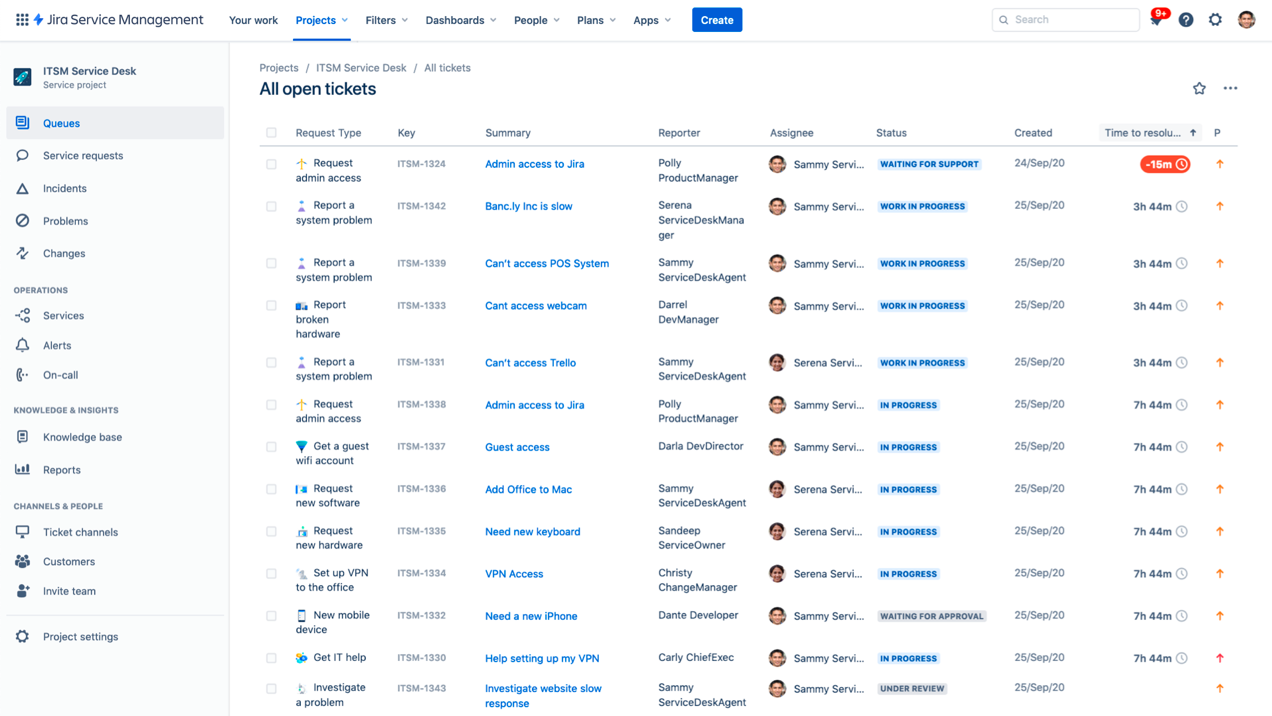
The free plan supports up to three agents and includes a fully functional service desk portal, queues, SLA policies, and basic automation.
The integration with the broader Atlassian ecosystem is where Jira Service Management becomes extremely powerful. When a support ticket needs developer attention, it can be escalated directly to a linked Jira Software project. Same ticket, same context, no duplication of effort.
The flip side is that Jira Service Management carries a significant learning curve. Configuration, including queues, request types, schemas, workflows, and permission settings, is powerful but complex, and new admins often spend considerable time in setup before the system feels right.
Pros:
- ITSM and ITIL alignment provide built-in support for incident, change, and problem management
- Jira Software integration lets you seamlessly escalate tickets to engineering teams
- SLA policies allow you to define and enforce response and resolution time targets for different request types, even on the free plan.
- Self-service portal enables customers and internal users to submit and track requests
Cons:
- The steep learning curve for configuration can make setup time-consuming, especially for non-technical admins.
- The free plan limits to 3 agents, making it unsuitable for any team of meaningful size.
Pricing: Free plan for up to 3 agents. Paid plans start at $17.65/agent/month.
9. Freshdesk – Best for Multi-Channel Ticketing
Freshdesk has been one of my top recommendations for teams that want a polished, multi-channel ticketing experience without an enterprise budget. The free plan, called Sprout, supports unlimited agents with email and social media ticketing, a shared inbox, ticket dispatch, basic automations, a knowledge base, and basic reporting.
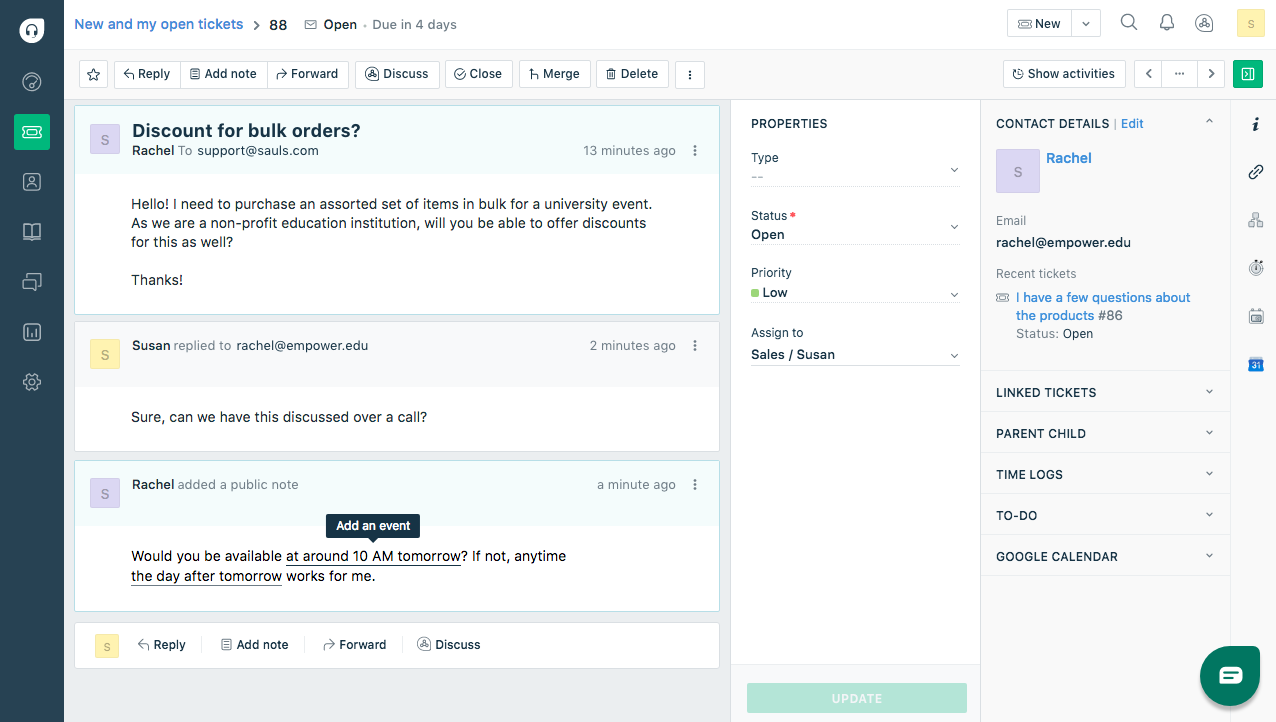
The platform’s multi-channel approach means tickets from email, Facebook, Twitter, and your website contact form all flow into a single unified inbox. Agents don’t need to juggle multiple tabs or tools; everything is in one place. The UI is modern, well-designed, and responsive, which matters a lot when your team is processing hundreds of tickets a day.
Where Freshdesk’s free plan falls short is in depth. The automations on the free tier are basic, the reporting is surface-level, and features like SLA policies, round-robin assignment, CSAT surveys, and time tracking are all reserved for paid plans.
Pros:
- Multi-channel inbox consolidates email, social media, and web form tickets
- Unlimited agents on the free plan is a standout advantage
- Automation rules handle basic ticket dispatch
- App marketplace offers over 1,000 integrations
Cons:
- SLA management, CSAT surveys, and advanced reporting are locked behind paid plans.
- Automations on the free tier are limited and do not support complex multi-step workflows.
Pricing: Free plan available (Sprout) for unlimited agents. Paid plans start at $15/agent/month.
10. osTicket – Best for Teams that Prefer Self-Hosting
osTicket is one of the longest-standing open-source ticketing systems in existence, and it’s stood the test of time for good reason. For teams that want a battle-tested, self-hosted solution with zero licensing cost, osTicket remains one of the most reliable options available.
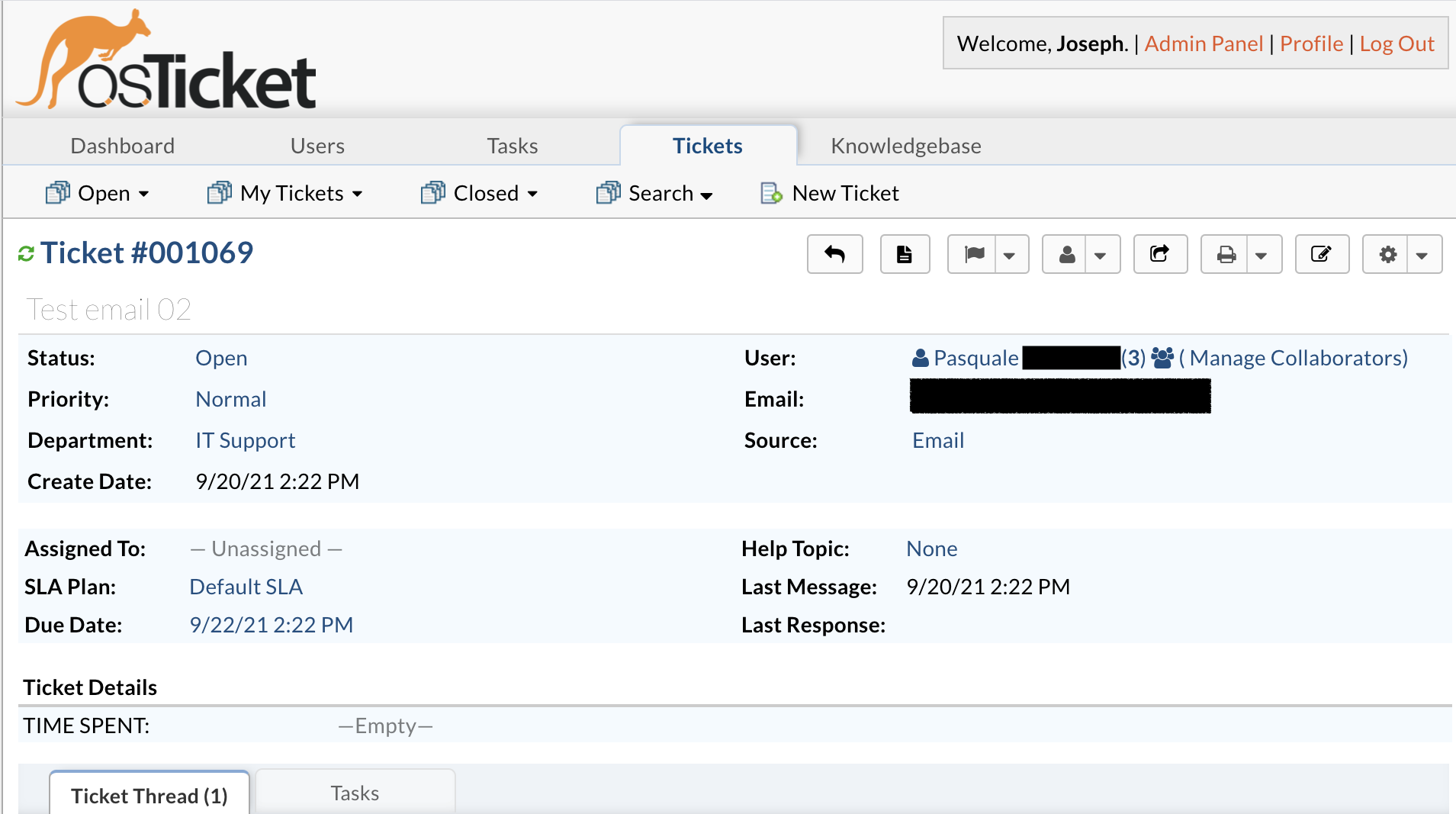
It handles email-to-ticket conversion, ticket threading, agent assignment, priority management, and a customer portal, all the essentials, out of the box. The level of customization available in osTicket is impressive. You can define custom fields, ticket forms, help topics, and SLA plans to match your exact support workflow.
Like all self-hosted tools, osTicket’s greatest strength is also its greatest challenge. Installation requires a web server with PHP and MySQL, and ongoing maintenance, including security updates, backup management, and server uptime, falls entirely on your team.
Pros:
- Open-source and free licensing mean no software cost and full access to the source code
- Custom ticket forms let you define custom fields and help topics
- Department-based routing automatically sends tickets to the correct team
- SLA management lets you create and enforce response and resolution time policies
Cons:
- Requires a web server with PHP and MySQL, making it unsuitable for teams without technical resources.
- The interface feels outdated and has not received a significant modern redesign in a long time.
Pricing: Free and open-source (self-hosted). A cloud-hosted version is available starting at $12/month.
Evaluation Criteria
To evaluate the free ticketing systems featured in this article, I followed a systematic and unbiased approach that ensures a fair, well-rounded review. My assessment is built on six key factors:
User Reviews / Ratings: I analyzed real user feedback and ratings from reputable platforms like G2 and Capterra to understand how these tools perform in day-to-day use. This helped me gauge overall satisfaction and flag recurring pain points that teams commonly experience.
Essential Features & Functionality: I closely examined the core capabilities of each system, including ticket creation from multiple channels, automated routing, thread management, collision detection, and reporting. This allowed me to assess how well each tool handles the actual demands of managing email-based support.
Ease of Use: I evaluated how intuitive each platform is to navigate, from setting up help desk inboxes to managing tickets and resolving queries. I paid special attention to whether support agents, regardless of technical skill, could hit the ground running without a steep learning curve.
Customer Support: I looked at the quality of support each vendor offers its own users, including response times, available channels (live chat, email, documentation), and how effectively they help teams during onboarding and when issues arise.
Value for Money: I compared each tool’s pricing against the features it offers, factoring in plan tiers, user limits, and any hidden costs. The goal was to help you determine whether the investment is justified for your team’s size and needs.
Personal Experience / Experts’ Opinions: My evaluations are further informed by hands-on testing and insights from customer support professionals. These perspectives helped me go beyond feature lists to assess real-world performance and reliability.
My Top 3 Picks for Free Ticket System
If you’re still on the fence after going through all ten options, I get it.
The choices can feel overwhelming when so many tools offer solid free plans. Here are my top three recommendations depending on what matters most to your team.
1. ProProfs Help Desk
This is my top pick for teams that want more than just a basic inbox. The AI-assisted features genuinely reduce the workload for agents, the shared inbox keeps everyone aligned, and the interface is clean enough that onboarding takes almost no time. If you want a free plan that actually feels like a professional support tool, ProProfs Help Desk is where I’d start.
2. Raiseaticket
For very small teams or solo operators who just need a reliable, no-fuss way to track and respond to tickets, Raiseaticket is hard to beat. The fact that it’s completely free with no agent or ticket limits means you can use it as long as you need without ever hitting a wall. It’s simple by design, and for many teams, simple is exactly what’s needed.
3. Freshdesk
Freshdesk earns its spot here because of its breadth on the free plan. Unlimited agents, multi-channel ticketing, and a clean, modern interface make it one of the most versatile free options available. If your team is handling support across email and social, and you want everything in one place, Freshdesk gives you that without asking for a credit card.
FREE. All Features. FOREVER!
Try our Forever FREE account with all premium features!
When to Upgrade From Free to a Paid Plan: 6 Signs
A free help desk ticketing system is a great starting point, but there comes a time when it can start holding your team back instead of helping it grow. As your support volume increases and your team expands, you may notice limitations in features, number of operators, scalability, or performance that slow things down.
So how do you know it’s time to upgrade? Here are some clear signs:
1. Your ticket volume is growing fast
You’re handling more queries than your free plan can comfortably manage. As a result, response times increase, tickets pile up, and it becomes harder to maintain a consistent support experience.
2. You need advanced automation
If your team is still manually assigning tickets, sending repetitive replies, or following up on the same issues, it’s a sign you need automation. Paid plans typically offer workflows, triggers, and AI features that can save hours of manual effort.
3. Your team is expanding
As you add more agents, free plans can become restrictive with user limits and limited collaboration features. This can lead to confusion, duplicate responses, and inefficient teamwork.
4. You need better reporting & insights
Basic analytics can only take you so far. If you want to track metrics like first response time, resolution time, SLA compliance, or agent performance, you’ll need more advanced reporting capabilities.
5. You want multi-channel support
Customers no longer rely on just email. If you’re starting to receive queries via chat, phone, or social media, a paid plan can help you unify all channels into one dashboard for a seamless support experience.
6. Customer expectations are rising
As your business grows, customers expect faster responses, personalized interactions, and even 24/7 support. Free tools may lack the features needed to meet these expectations at scale.
Upgrading to a paid plan isn’t just about unlocking features; it’s about equipping your team to deliver faster, smarter, and more scalable customer support.
Start Small, Scale Fast With Free Ticketing System
Choosing the right ticketing system isn’t just a software decision; it’s a statement about how seriously you take customer experience. Every tool on this list offers real, meaningful free-plan functionality, and the right one for you depends on your team size, technical comfort level, channel requirements, and how deep into the ecosystem you want to go.
That said, I’d encourage you not to just optimize for ‘free’ but to optimize for fit. A tool that scales well, offers a clear upgrade path, and doesn’t require a full migration when your needs evolve is worth slightly more friction today.
If I had to pick just one tool that checks the most boxes, combining ease of use, AI-assisted efficiency, a strong free plan, and a clear path to scale, it’s ProProfs Help Desk. Having worked closely with the platform, I can vouch for both its thoughtful design and its genuine commitment to customer delight. The free plan, inclusive of all core features, is robust enough to get real work done, the AI features are practical rather than just marketing fluff, and the support team genuinely cares about your success.
Frequently Asked Questions

What is the difference between a free and paid ticketing system?
Free plans handle the basics well but typically come with user caps, limited automation, and surface-level reporting. Paid plans unlock features like SLA management, advanced workflows, CSAT surveys, multi-channel support, and priority customer service from the vendor. The jump from free to paid usually makes sense when your team is growing and your support workflows are becoming more complex.
Can a free ticketing system handle email support?
Yes, email-to-ticket conversion is the most universally available feature across all free ticketing plans. When a customer sends an email to your support address, the system automatically creates a ticket, assigns it, and threads all follow-up replies together. This alone is a significant upgrade over managing support from a shared Gmail or Outlook inbox.
What is the best free open-source ticketing system?
osTicket and FreeScout are the two most widely recommended open-source options, both with active communities and solid core feature sets. osTicket has a longer track record and supports custom forms and department-based routing, while FreeScout offers a more modern, Helpscout-like interface. Both require self-hosting, so they're best suited to teams with some technical capability.
When should I switch from a free to a paid ticketing system?
The clearest signals are when manual ticket routing is slowing your team down, when you need SLA tracking to meet customer commitments, or when your support has expanded beyond email to channels like live chat, phone, or social media. If your reporting needs have outgrown basic ticket counts and you need agent performance data or CSAT scores, that's also a strong indicator it's time to upgrade.
FREE. All Features. FOREVER!
Try our Forever FREE account with all premium features!

 We'd love your feedback!
What did you like & how can we make it even better?
 Thanks for your feedback!
 Ask Your Question
Have a question? Get expert help to make your decision easier.